Clearbit Email Finder: Honest 2026 Review & Alternatives
Clearbit became HubSpot Breeze Intelligence in 2024. Here's what the Clearbit email finder actually does in 2026, what it costs, and where it falls short.

Clearbit Email Finder: Honest 2026 Review & Alternatives
If you searched for "Clearbit email finder" expecting a standalone tool, here's the short version: it doesn't really exist as one anymore. Clearbit was acquired by HubSpot in late 2024 and folded into a product called Breeze Intelligence. The data enrichment is still good, but the way you buy it, who it's built for, and what you actually get have all changed. This review walks through what the Clearbit email finder does today, what it costs, and which alternatives make more sense if your job is simply finding accurate B2B email addresses.
TL;DR#
- Clearbit is now HubSpot Breeze Intelligence. The standalone "find an email" workflow is gone; enrichment runs inside HubSpot's CRM and credits model.
- It's an enrichment engine, not a dedicated email finder. Clearbit excels at appending company and person data to records you already have — not at prospecting from scratch.
- Pricing is opaque and HubSpot-gated. You generally need a HubSpot subscription plus credits, which prices out small teams and solo founders.
- Accuracy is solid for firmographics, mixed for email. Clearbit was never an email-verification-first tool, so bounce rates can surprise you.
- For pure email finding, dedicated tools win. Options like Tomba deliver a free tier, transparent pricing, and built-in verification that Clearbit doesn't prioritize.
What is the Clearbit email finder?#
Clearbit is a B2B data enrichment platform, not a search-box email finder. The classic mental model — type a name and a company, get an email back — was never Clearbit's core strength. Its engine was built to take a record you already have (a domain, a website signup, a CRM contact) and enrich it with firmographic and demographic attributes: company size, industry, technologies used, role, seniority, and yes, sometimes a work email.
After the HubSpot acquisition, Clearbit's capabilities were rebranded as Breeze Intelligence. Today the data flows directly into HubSpot's CRM. You enrich contacts and companies, score leads, and reveal anonymous website visitors — all inside the HubSpot ecosystem. That's powerful if you already live in HubSpot. It's awkward if you just want emails.
So when people search for a "clearbit email finder," they're usually after one of three things:
- Reveal — identifying the company behind anonymous website traffic.
- Enrichment — filling in missing fields on existing leads.
- Prospecting — finding net-new contact emails from a name or domain.
Clearbit is strong at #1 and #2. It's the weakest at #3, which is exactly what most people picture when they hear "email finder."

How does Clearbit find and enrich emails?#
Clearbit builds a contact graph from public web data, partner feeds, and its network of free-tool users, then matches your input against it. When you pass a domain or a person, it returns the attributes it has on file. If an email exists in its dataset, you get it; if not, you get firmographics without a deliverable address.
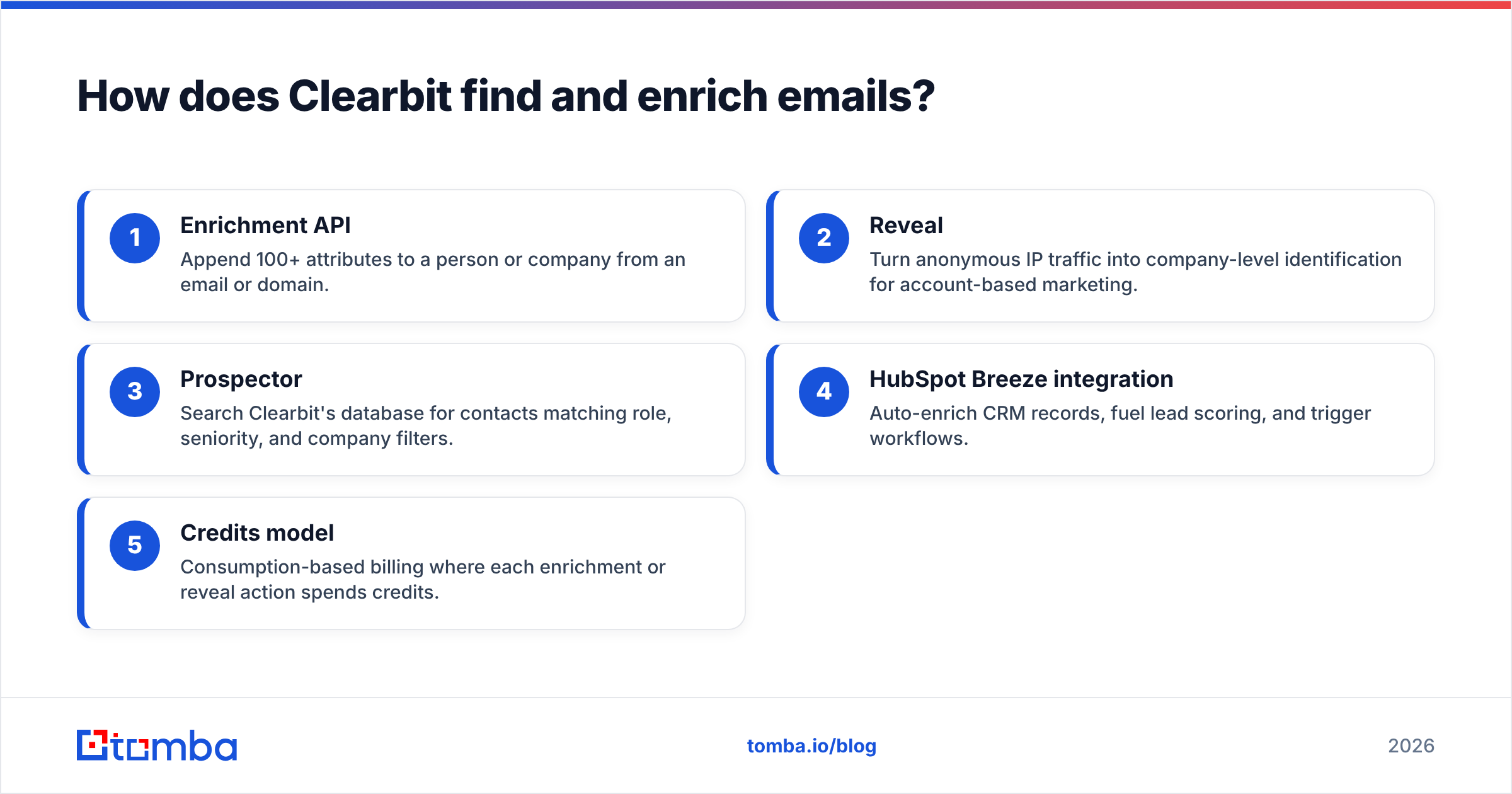
The core pieces of the modern Clearbit/Breeze stack break down like this:
- Enrichment API — Append 100+ attributes to a person or company from an email or domain.
- Reveal — Turn anonymous IP traffic into company-level identification for account-based marketing.
- Prospector — Search Clearbit's database for contacts matching role, seniority, and company filters.
- HubSpot Breeze integration — Auto-enrich CRM records, fuel lead scoring, and trigger workflows.
- Credits model — Consumption-based billing where each enrichment or reveal action spends credits.
The thing to understand is that Clearbit treats email as one attribute among many. A dedicated email finder treats the deliverable address as the entire point — and pairs it with a verification step so you don't burn your sender reputation. That difference shows up the moment you start sending cold outreach at volume. If you want a primer on why verification matters, Tomba's guide to email deliverability is a useful starting point.
How accurate is the Clearbit email finder in 2026?#
Clearbit's firmographic data is among the best in the industry; its email accuracy is good but not verification-grade. Because the platform was architected around company intelligence, its strongest signals are things like industry, employee count, funding, and tech stack. Person-level email coverage is decent for mid-to-large companies but thins out for SMBs, regional businesses, and non-US markets.

The practical issue is that Clearbit doesn't run a real-time SMTP verification pass the way a finder-first tool does. You get an email that was valid when it entered the dataset — but B2B contacts churn 25–30% per year, so stale records slip through. If you push those straight into a cold campaign without re-verifying, your bounce rate climbs, and mailbox providers start routing you to spam. Running results through an email verifier before you send is non-negotiable, regardless of which finder produced the address.
A few accuracy realities worth setting expectations around:
- US enterprise/mid-market: strong coverage, reliable firmographics.
- SMB and solopreneurs: sparse, often company-only with no person email.
- Non-English / emerging markets: noticeably weaker than US data.
- Catch-all domains: Clearbit won't tell you whether a catch-all address is real — you'll need a separate catch-all verifier.
How much does the Clearbit email finder cost?#
There is no simple per-email price — Clearbit/Breeze is sold through HubSpot on a credits model, usually bundled with a HubSpot subscription. This is the single biggest friction point for anyone who just wants emails. You can't grab a $20 plan and start finding contacts; you're entering HubSpot's pricing world, where costs scale with seats, credits, and the Marketing/Sales Hub tier you're on.
That structure makes Clearbit a poor fit for freelancers, bootstrapped founders, agencies, and lean SDR teams who need predictable cost per lead. It makes a lot more sense if you're already a HubSpot customer enriching thousands of inbound records a month.
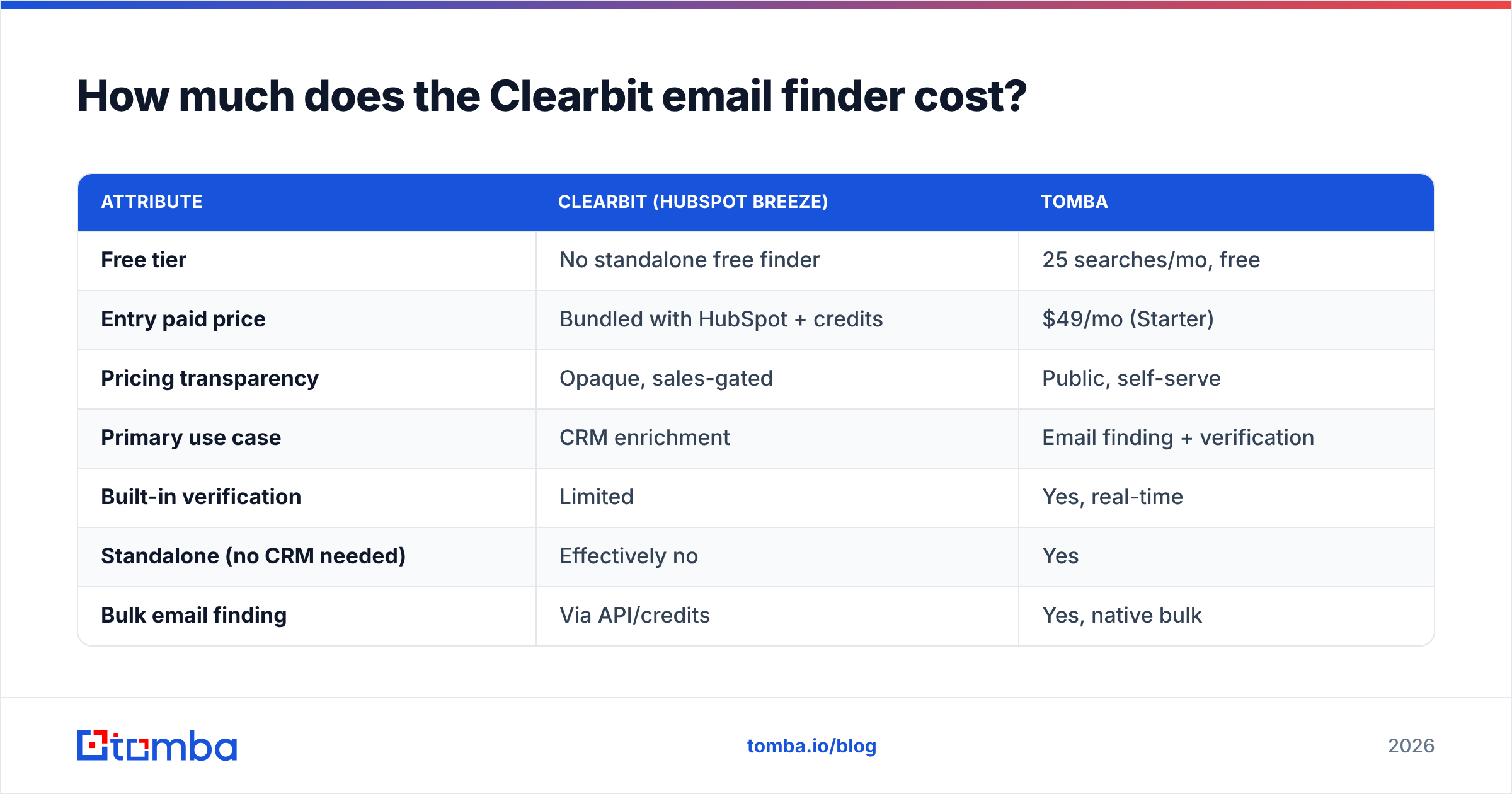
Here's how the model compares to a transparent, finder-first tool:
| Attribute | Clearbit (HubSpot Breeze) | Tomba |
|---|---|---|
| Free tier | No standalone free finder | 25 searches/mo, free |
| Entry paid price | Bundled with HubSpot + credits | $49/mo (Starter) |
| Pricing transparency | Opaque, sales-gated | Public, self-serve |
| Primary use case | CRM enrichment | Email finding + verification |
| Built-in verification | Limited | Yes, real-time |
| Standalone (no CRM needed) | Effectively no | Yes |
| Bulk email finding | Via API/credits | Yes, native bulk |
| Best for | HubSpot-native ABM teams | Prospecting + outreach teams |
You can see full, public Tomba pricing without talking to a sales rep — Free, Starter at $49/mo, Growth at $99/mo, Pro at $249/mo, and custom Enterprise. The contrast is the point: one model is consumption-and-CRM-gated, the other is flat and self-serve.
Who should actually use Clearbit?#
Use Clearbit if you live inside HubSpot and your priority is enrichment, not prospecting. It's an excellent fit for a specific profile and a frustrating one for everyone else.
Clearbit makes sense when:
- You're a HubSpot customer and want enrichment that writes natively to your CRM records.
- Your motion is inbound + ABM — you're enriching form fills and revealing anonymous traffic, not cold-sourcing lists.
- You need deep firmographics for lead scoring and routing more than you need raw emails.
- Budget isn't the constraint and you can absorb credit-based, seat-based pricing.
Clearbit is the wrong tool when:
- You just need emails from names or domains, fast and cheap.
- You're not on HubSpot and don't want to adopt it.
- You run high-volume cold outreach and need verification baked in.
- You're a small team or solo and need a free tier to start.

What are the best Clearbit email finder alternatives?#
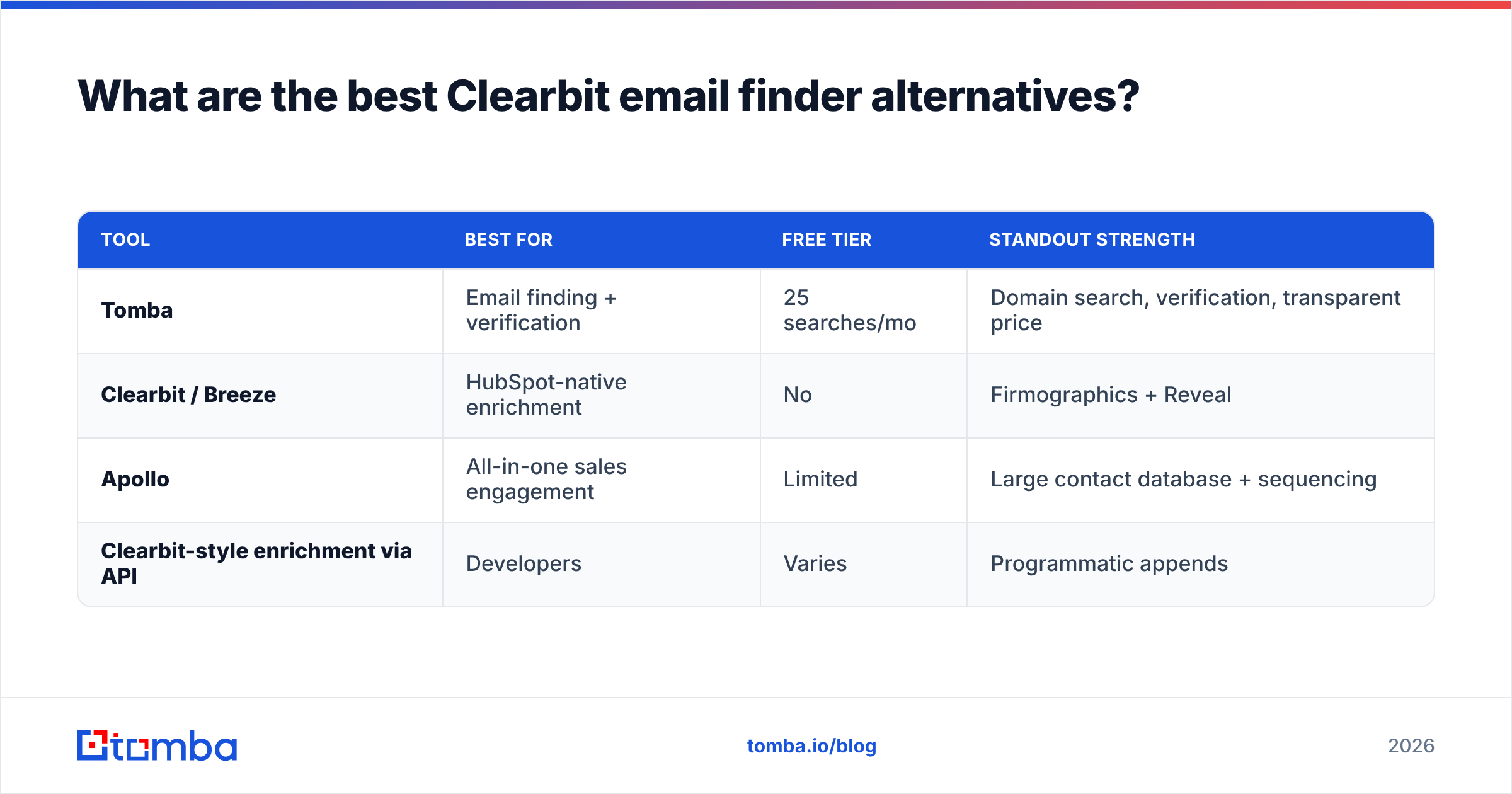
If your real goal is finding and verifying B2B emails, a dedicated finder beats an enrichment platform on cost, speed, and deliverability. The market has several strong options depending on your motion. Here's an honest map.
| Tool | Best for | Free tier | Standout strength |
|---|---|---|---|
| Tomba | Email finding + verification | 25 searches/mo | Domain search, verification, transparent price |
| Clearbit / Breeze | HubSpot-native enrichment | No | Firmographics + Reveal |
| Apollo | All-in-one sales engagement | Limited | Large contact database + sequencing |
| Clearbit-style enrichment via API | Developers | Varies | Programmatic appends |
A few notes on fit:
- Tomba is the closest thing to a drop-in replacement for the "find an email" job. It offers an email finder, domain search to pull every address on a company domain, and real-time verification — all with a public free tier. If you previously used Clearbit just to get emails, this is the cleaner path. Read the full Clearbit alternative breakdown for a feature-by-feature look.
- Apollo competes more on the all-in-one sales-engagement side; it bundles a database with sequencing. If you want sending and finding in one seat, it's worth a look on G2. It's heavier than a pure finder.
- API-first teams who specifically liked Clearbit's programmatic enrichment can replicate much of it with a focused email finder API plus enrichment, often at a fraction of the cost.
The honest takeaway: Clearbit didn't get worse — it got repositioned. It's now an enrichment layer for HubSpot, not a standalone email finder. If that matches your stack, great. If it doesn't, you're paying enterprise CRM overhead for a job a $49/mo finder does better.
How do you migrate off Clearbit for email finding?#
Swapping out the email-finding portion is straightforward because it's a self-contained job. You don't have to rip out your CRM; you just point the "get me a verified email" step at a dedicated tool.
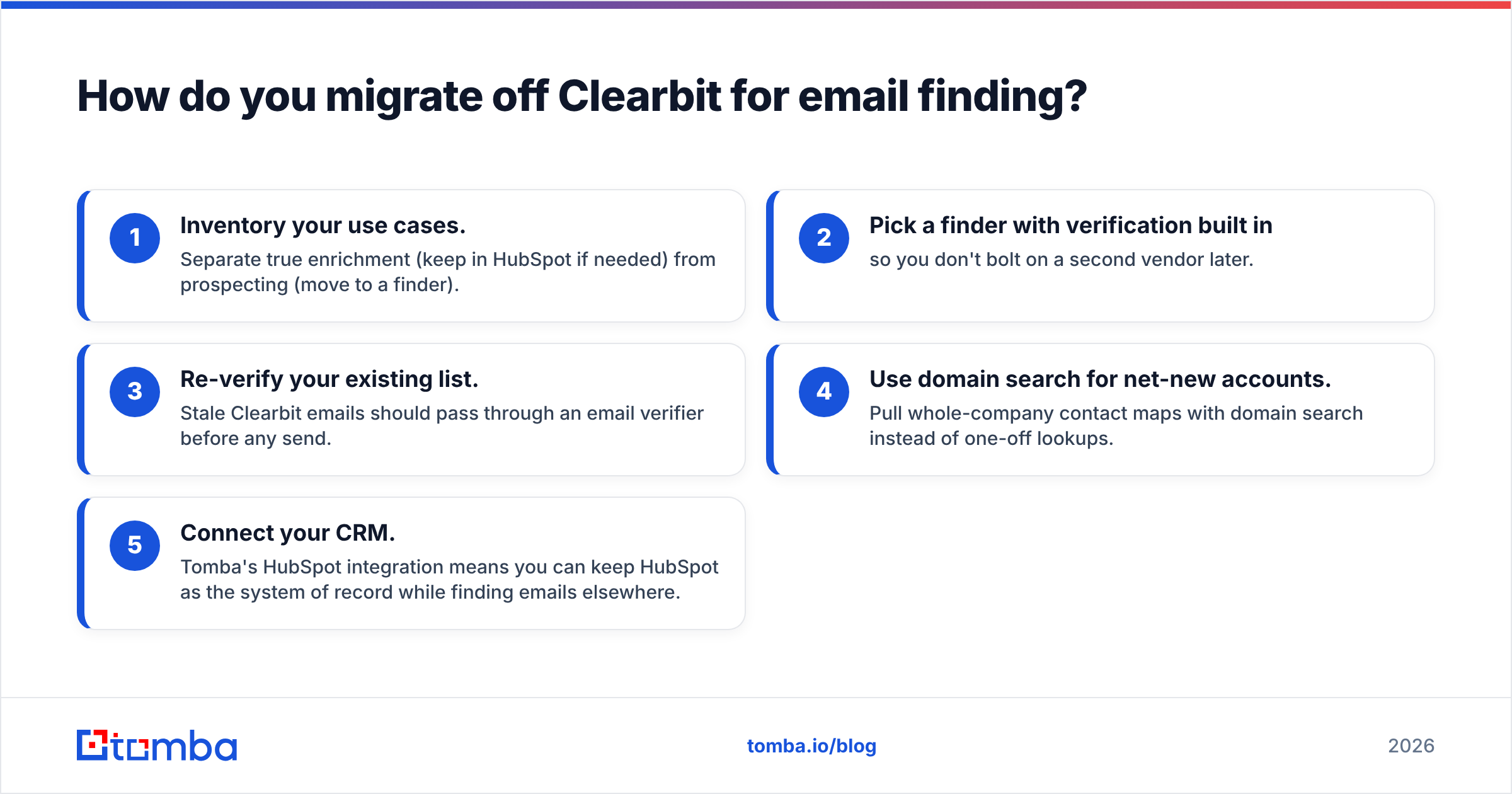
A clean migration looks like this:
- Inventory your use cases. Separate true enrichment (keep in HubSpot if needed) from prospecting (move to a finder).
- Pick a finder with verification built in so you don't bolt on a second vendor later.
- Re-verify your existing list. Stale Clearbit emails should pass through an email verifier before any send.
- Use domain search for net-new accounts. Pull whole-company contact maps with domain search instead of one-off lookups.
- Connect your CRM. Tomba's HubSpot integration means you can keep HubSpot as the system of record while finding emails elsewhere.
This split — CRM for storage, dedicated finder for sourcing — is how most lean GTM teams operate in 2026. It keeps cost per lead predictable and keeps your deliverability under your own control.
Frequently asked questions#
Is the Clearbit email finder free? No. There's no standalone free Clearbit email finder anymore. Clearbit's capabilities run through HubSpot Breeze Intelligence on a credits model, typically alongside a paid HubSpot subscription. If you want a free starting point, dedicated finders like Tomba offer 25 free searches per month.
Did HubSpot kill Clearbit? Not exactly — HubSpot acquired Clearbit and rebranded its technology as Breeze Intelligence. The data and enrichment live on, but the standalone product experience and pricing were absorbed into HubSpot.
Is Clearbit accurate for emails? Its firmographic data is excellent. Email accuracy is good for US mid-market and enterprise contacts but weaker for SMBs and non-US markets, and it lacks finder-grade real-time verification. Always re-verify before sending.
What's the best Clearbit alternative for just finding emails? For pure email finding with verification and transparent pricing, Tomba is the most direct swap. Apollo is a heavier all-in-one option if you also want sequencing.
The bottom line#
Clearbit is a strong enrichment engine that now lives inside HubSpot — and a mismatched choice if all you need is to find and verify B2B emails. The credits model, the CRM dependency, and the missing free tier all push the cost and complexity in the wrong direction for prospecting teams.
If your actual job is turning a name or domain into a verified, deliverable email, skip the enterprise overhead. Tomba's email finder gives you accurate addresses, built-in verification, domain search, and a genuinely free tier to start — no sales call, no HubSpot subscription, no surprise bounce rates. Start with 25 free searches this month and see how it stacks up against what Clearbit used to do.
// get started
Find, verify and enrich your first contacts today
Start on the free plan with 25 searches a month, then scale when your team is ready.
Free plan · No credit card required · GDPR & CCPA
// about the author