Clearout vs ContactOut 2026: Which Email Finder Wins?
Clearout vs ContactOut compared on accuracy, pricing, data coverage, and use cases for 2026 — plus where a third option beats both on cost-per-valid-email.
Clearout vs ContactOut: Which Email Finder Should You Pay For in 2026?
Picking between Clearout and ContactOut is really a fork in the road: one is a verification-first engine, the other is a LinkedIn-first contact scraper. They overlap enough to land on the same shortlist, but they solve different problems — and paying for the wrong one means either clean data you can't source or sourced data you can't trust.
TL;DR — Clearout vs ContactOut in 30 seconds#
- Clearout is strongest at email verification and bulk list cleaning, with a real-time API and cheap per-credit pricing. Its finder is solid but secondary to its verifier.
- ContactOut is built around LinkedIn: a Chrome extension that pulls personal and work emails plus phone numbers off profiles. Great for recruiters, pricier per contact.
- Accuracy is close on work emails; ContactOut wins on personal emails, Clearout wins on bounce-rate guarantees and verification depth.
- Pricing model differs sharply: Clearout sells credits you can stretch, ContactOut sells seats and monthly contact caps.
- If you want both finding and verification in one billing line, a consolidated platform like Tomba often beats running two subscriptions — more on that below.

What is Clearout and who is it for?#
Clearout is an email verification and finding platform aimed at marketers, SDR teams, and anyone shipping cold email at volume. Its core promise is bounce prevention: feed it a list, and it flags invalids, catch-alls, role accounts, disposables, and gibberish before you send.
The finder side works the classic way — give it a name and a company domain and it returns the most probable address, scored by confidence. But Clearout's center of gravity is the verifier. If your problem is "I already have 40,000 emails and half might be dead," Clearout is purpose-built for that. Its real-time API plugs into signup forms to block junk at the point of entry, and bulk uploads handle CSVs in the hundreds of thousands.
Where Clearout is weaker: it isn't a prospecting database. It won't show you who to email at a company the way a LinkedIn-native tool does. You bring the names; Clearout confirms the addresses. For deeper list hygiene workflows, pairing any finder with a dedicated email verifier is the pattern Clearout leans into.
What is ContactOut and who is it for?#
ContactOut is a LinkedIn-first contact finder built for recruiters and sales reps who live inside profiles. Install the Chrome extension, open a LinkedIn profile, and ContactOut surfaces the person's work email, personal (often Gmail) email, and frequently a phone number. It also offers a search portal and an Aom-style data export for bulk work.
Its standout is personal email coverage. Recruiters love ContactOut because candidates ignore work addresses but answer personal ones. That dual-email angle is genuinely hard to replicate with a domain-pattern finder, since personal Gmails follow no corporate pattern.
Where ContactOut is weaker: verification is thinner than a dedicated verifier, and pricing climbs fast once you need volume or multiple seats. It's also tightly coupled to LinkedIn — outside that workflow, its value drops. If your motion is account-based and you're enriching company domains rather than individual profiles, a domain search tool fits better than a per-profile scraper.
Clearout vs ContactOut: the core comparison table#
Here's the side-by-side that matters when the trial ends and the invoice starts.
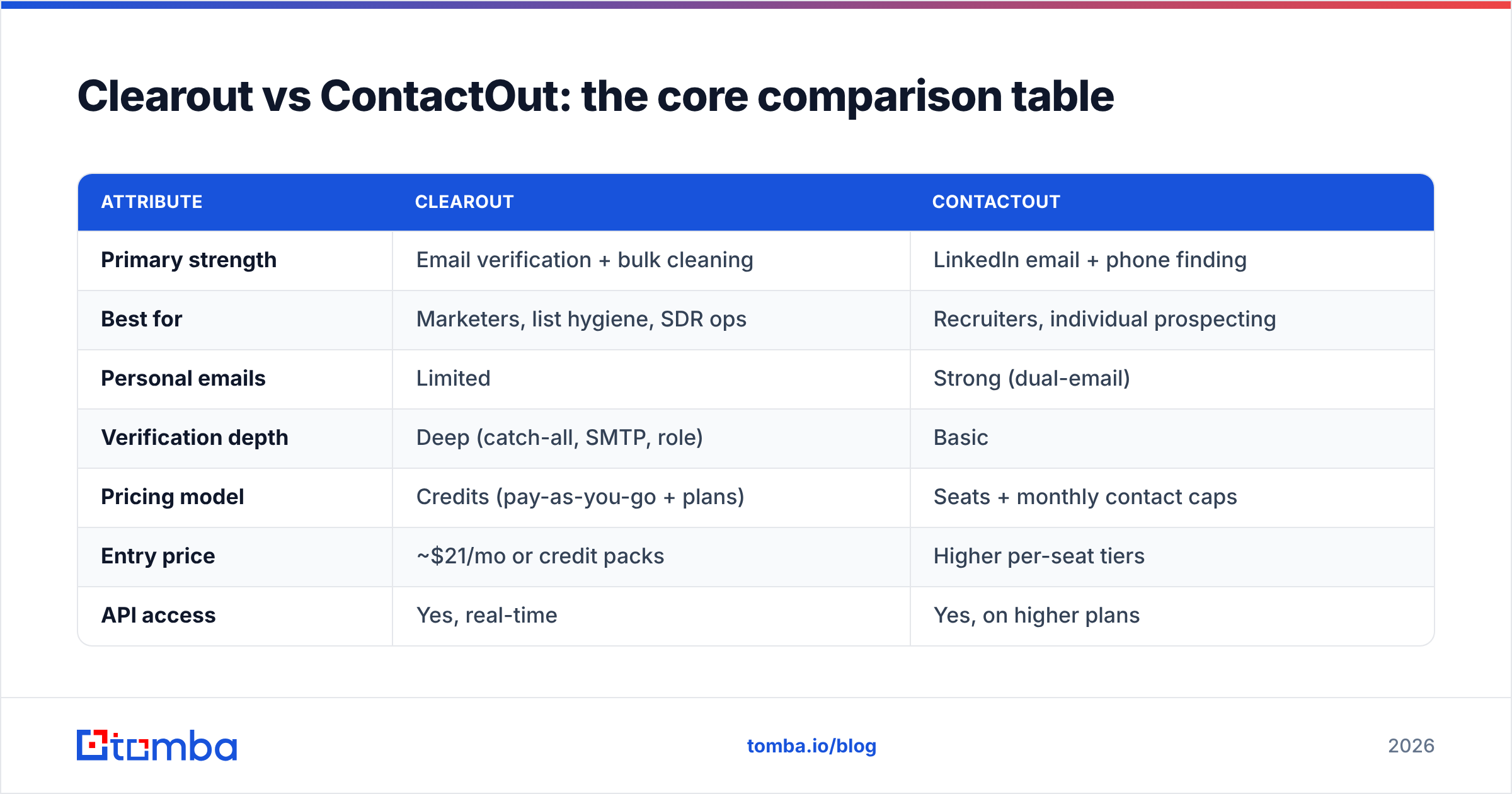
| Attribute | Clearout | ContactOut |
|---|---|---|
| Primary strength | Email verification + bulk cleaning | LinkedIn email + phone finding |
| Best for | Marketers, list hygiene, SDR ops | Recruiters, individual prospecting |
| Personal emails | Limited | Strong (dual-email) |
| Verification depth | Deep (catch-all, SMTP, role) | Basic |
| Pricing model | Credits (pay-as-you-go + plans) | Seats + monthly contact caps |
| Entry price | ~$21/mo or credit packs | Higher per-seat tiers |
| API access | Yes, real-time | Yes, on higher plans |
| Free tier | 100 free credits | Limited free lookups/mo |
| Bulk workflow | Strong (CSV up to 100k+) | Available, export-based |
| Chrome extension | Basic | Core product |
The pattern is clear: Clearout is a data-quality tool that finds as a bonus; ContactOut is a data-sourcing tool that verifies as a bonus. Neither is a clean all-rounder, which is why teams frequently end up paying for two products.
Is Clearout or ContactOut more accurate?#
Accuracy depends entirely on the email type you're chasing.
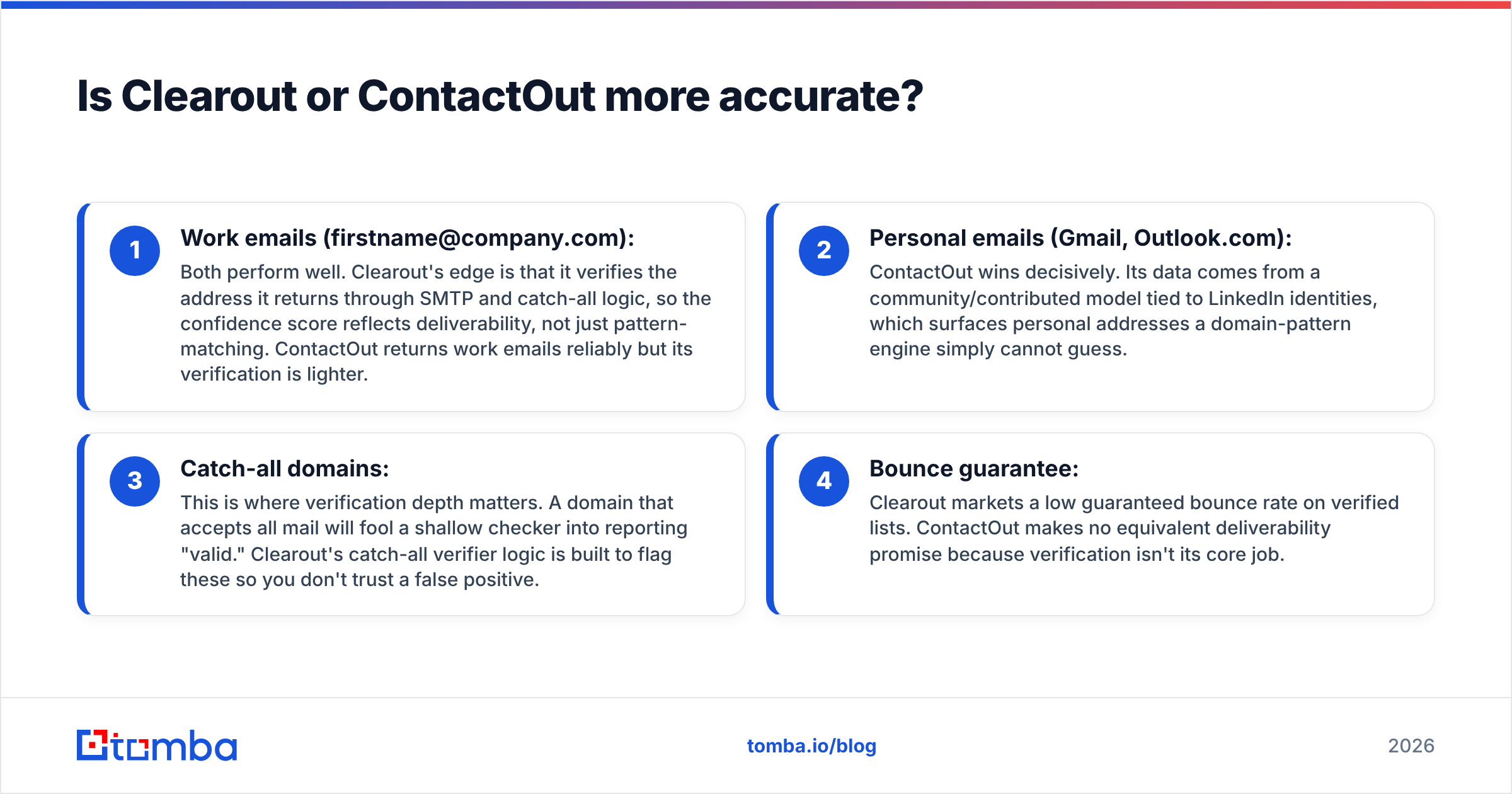
- Work emails (firstname@company.com): Both perform well. Clearout's edge is that it verifies the address it returns through SMTP and catch-all logic, so the confidence score reflects deliverability, not just pattern-matching. ContactOut returns work emails reliably but its verification is lighter.
- Personal emails (Gmail, Outlook.com): ContactOut wins decisively. Its data comes from a community/contributed model tied to LinkedIn identities, which surfaces personal addresses a domain-pattern engine simply cannot guess.
- Catch-all domains: This is where verification depth matters. A domain that accepts all mail will fool a shallow checker into reporting "valid." Clearout's catch-all verifier logic is built to flag these so you don't trust a false positive.
- Bounce guarantee: Clearout markets a low guaranteed bounce rate on verified lists. ContactOut makes no equivalent deliverability promise because verification isn't its core job.
The honest takeaway: if you measure accuracy as "the address exists and the inbox is real," Clearout's verification gives you more confidence. If you measure it as "I got an address for a person who isn't in any corporate directory," ContactOut reaches contacts Clearout can't.

For an independent read on either vendor's reliability claims, cross-check user reviews on G2 before you commit — self-reported accuracy numbers and third-party scores often diverge.
How do Clearout and ContactOut pricing compare?#
The pricing philosophies are almost opposites, and that's the deciding factor for most buyers.
Clearout sells credits. You can buy pay-as-you-go packs that never expire or subscribe for a monthly allotment. One verification or one find consumes credits, so a hygiene-heavy team can spend efficiently — you're paying for work done, not for seats parked.
ContactOut sells seats plus monthly contact caps. Each user gets a quota of reveals, and exceeding it means upgrading. For a two-person recruiting team this is fine; for a ten-rep SDR floor it adds up fast, because everyone needs a seat and the per-contact cost is higher than a credit-based finder.
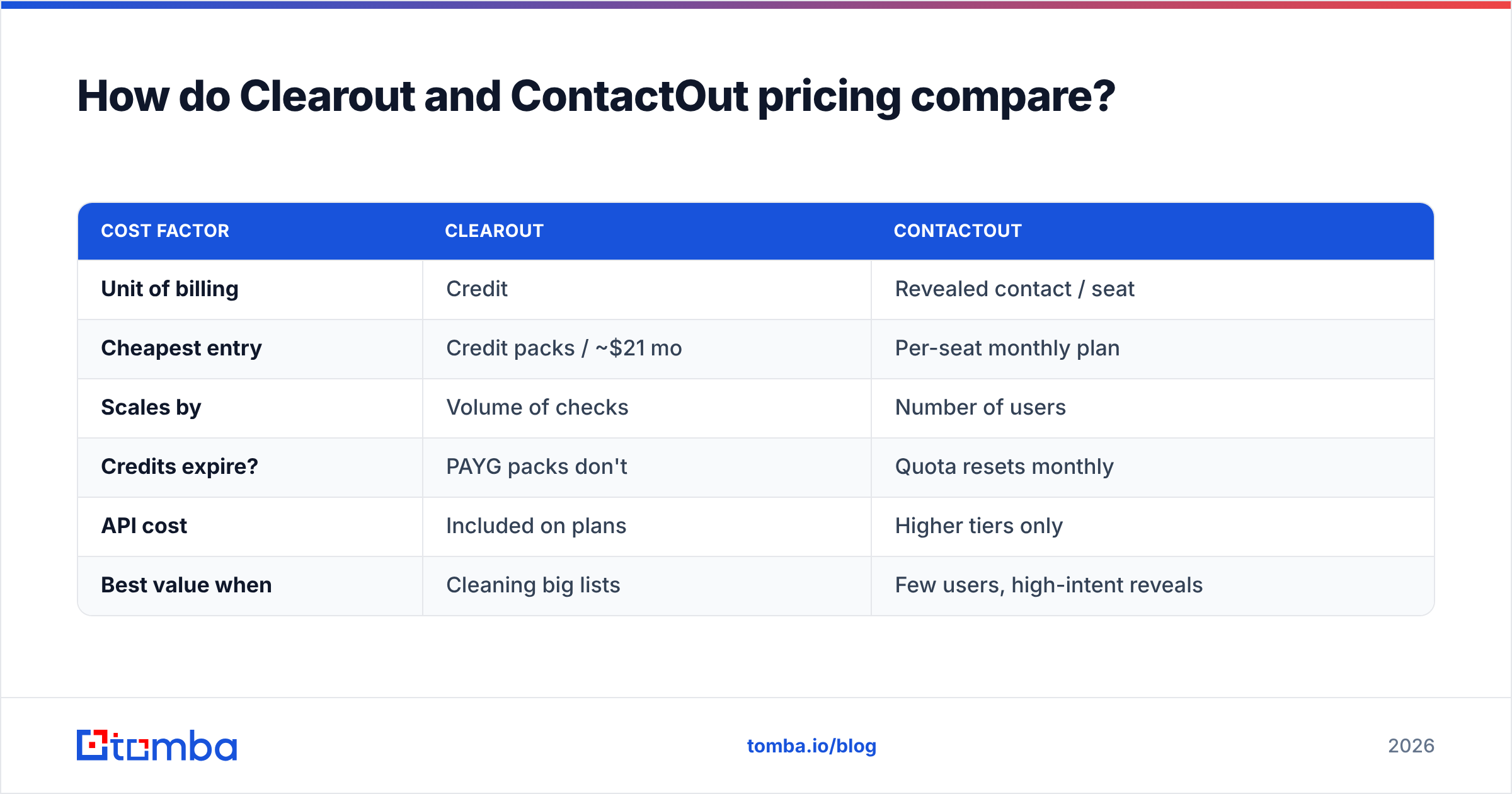
| Cost factor | Clearout | ContactOut |
|---|---|---|
| Unit of billing | Credit | Revealed contact / seat |
| Cheapest entry | Credit packs / ~$21 mo | Per-seat monthly plan |
| Scales by | Volume of checks | Number of users |
| Credits expire? | PAYG packs don't | Quota resets monthly |
| API cost | Included on plans | Higher tiers only |
| Best value when | Cleaning big lists | Few users, high-intent reveals |
A practical rule: high-volume, few-users → Clearout's credit model wins. Per-rep prospecting with personal-email needs → ContactOut's seat model is justifiable. Mixed needs are exactly where a single-vendor platform with transparent Tomba pricing gets attractive, because you're not paying twice for find-then-verify.
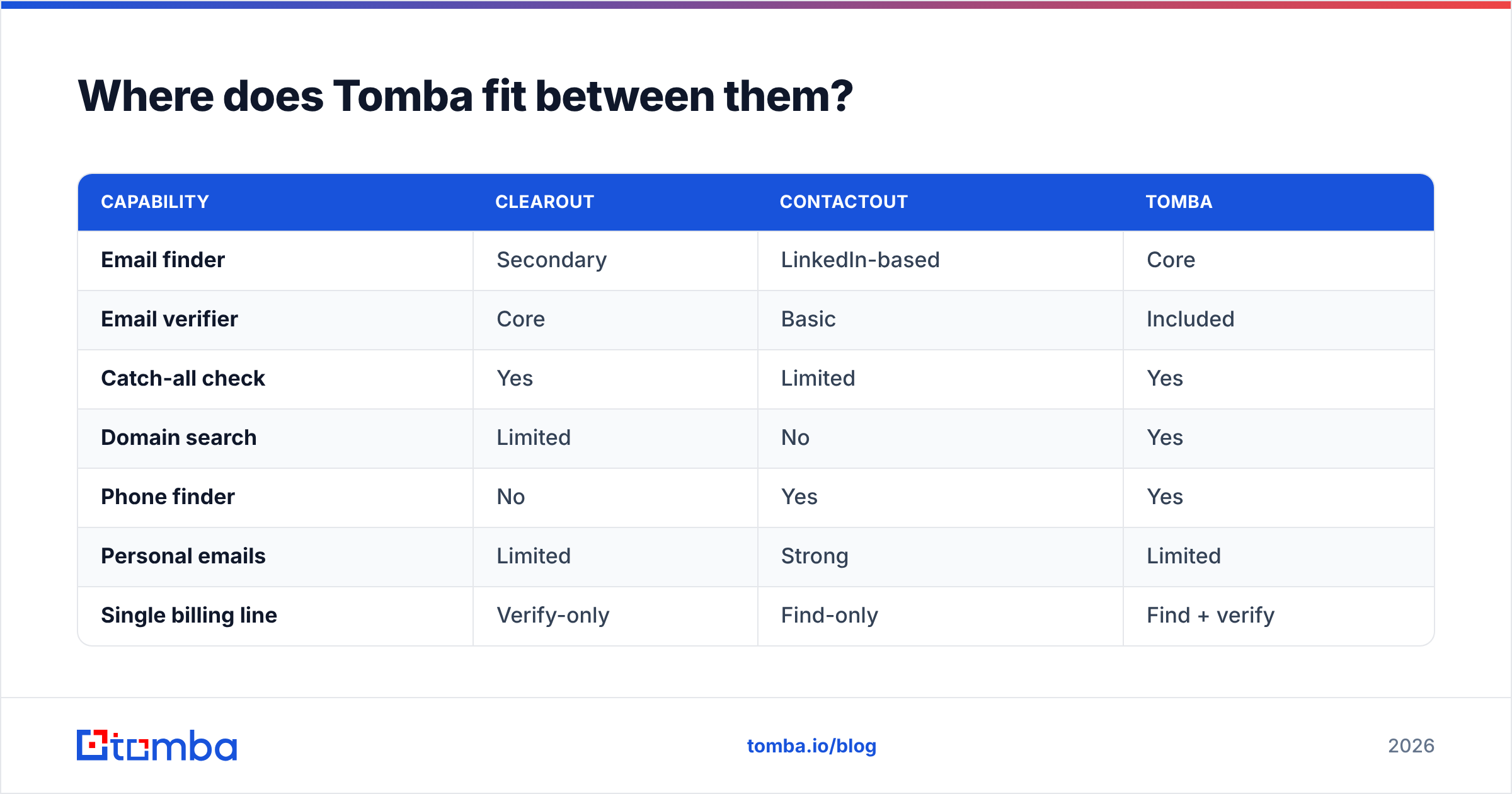
Where does Tomba fit between them?#
Tomba is worth a neutral mention here because it collapses the two jobs Clearout and ContactOut split. It's an email-finder platform that ships verification, domain search, catch-all checks, phone finding, and enrichment under one account and one credit pool.
That matters for the most common real-world workflow: find an address, then verify it before you send. With Clearout you get world-class verification but a secondary finder. With ContactOut you get strong sourcing but light verification. With a consolidated tool you do both in one pass — the bulk email finder finds and verifies the same list without a CSV hand-off between two vendors.

Tomba's plans are straightforward: a Free tier with 25 searches/month, Starter at $49/mo, Growth at $99/mo, Pro at $249/mo, and custom Enterprise. The point isn't that it's cheapest on every single metric — it's that one subscription covers the find-and-verify loop that otherwise needs both Clearout and something like ContactOut.
| Capability | Clearout | ContactOut | Tomba |
|---|---|---|---|
| Email finder | Secondary | LinkedIn-based | Core |
| Email verifier | Core | Basic | Included |
| Catch-all check | Yes | Limited | Yes |
| Domain search | Limited | No | Yes |
| Phone finder | No | Yes | Yes |
| Personal emails | Limited | Strong | Limited |
| Single billing line | Verify-only | Find-only | Find + verify |
| Free tier | 100 credits | Limited | 25 searches/mo |
If your bottleneck is LinkedIn personal emails for recruiting, ContactOut still has a real edge. For everything else — outbound at scale, list hygiene, account-based sourcing — a unified finder removes a vendor from your stack.
Which should you choose: a decision framework#
Run your use case through these four questions.
- Are you mostly cleaning existing lists? Choose Clearout. Its verification depth and credit pricing are built for exactly this, and the email verification workflow is its home turf.
- Are you a recruiter living on LinkedIn who needs personal emails and phones? Choose ContactOut. Nothing in this comparison matches its dual-email coverage for individual profiles.
- Do you need to both find and verify, at SDR-team scale, on one bill? A consolidated platform beats running two subscriptions — fewer seats, one credit pool, no CSV hand-offs.
- Is account-based prospecting (by company domain) your motion? A domain search approach fits better than a per-profile reveal tool, since you're enriching companies, not individuals.
Don't over-index on a single accuracy stat from a vendor's own landing page. Pull a real sample of 200 contacts from your actual target market, run it through each tool's trial, and measure bounce rate and reveal rate yourself. The tool that wins on your data is the one to buy — methodology you can read more about via HubSpot's deliverability guidance.

Frequently asked questions#
Is ContactOut better than Clearout for cold email? For deliverability, Clearout is the safer pick because verification is its core function and it markets a low guaranteed bounce rate. ContactOut is better for sourcing the contacts in the first place, especially personal emails, but you'll want to verify its output before a cold campaign.
Does Clearout find personal email addresses? Only in a limited way. Clearout is strongest on work emails verified through SMTP and catch-all logic. For personal Gmail-style addresses tied to LinkedIn identities, ContactOut has materially better coverage.
Can I use Clearout and ContactOut together? Yes, and many teams do — ContactOut to source, Clearout to verify. The downside is two subscriptions, two seat models, and a manual hand-off. That stacked cost is the main argument for a single platform that does both.
Which has a better free tier? Clearout offers around 100 free verification credits; ContactOut gives a small number of free monthly lookups. Tomba's free tier provides 25 searches per month. All three are trial-grade — enough to test accuracy on a sample, not to run a campaign.
Do these tools offer an API? Clearout offers a real-time verification API on its plans. ContactOut exposes an API on higher tiers. If API access on lower tiers matters to you, check the included Tomba API as well, since gated API access is a common hidden cost.
The bottom line#
Clearout and ContactOut aren't really competitors so much as two halves of one workflow: ContactOut finds the harder contacts, Clearout makes sure the addresses are real. Choose Clearout if data quality and bulk verification are the job. Choose ContactOut if LinkedIn personal emails for recruiting are the job. And if you're tired of paying two vendors to find-then-verify, consolidate.
Start with the Tomba Email Finder — find professional email addresses by domain, name, or company, verify them in the same pass, and keep your sourcing and hygiene on one bill. The free tier gives you 25 searches a month to benchmark it against both Clearout and ContactOut on your own list before you spend a dollar.
// get started
Find, verify and enrich your first contacts today
Start on the free plan with 25 searches a month, then scale when your team is ready.
Free plan · No credit card required · GDPR & CCPA
// about the author