Clearout vs Salesbot (2026): Data Quality vs Automation
Clearout cleans and finds B2B email data; Salesbot automates conversations. Here's how the two actually compare on accuracy, automation, pricing, and fit — plus where a dedicated email finder beats both.
Clearout vs Salesbot: Which One Actually Moves Pipeline in 2026?
You typed "Clearout vs Salesbot" into a search bar because you have a budget line and one decision to make. The honest answer up front: these two tools barely compete. Clearout is a data layer — it finds and verifies email addresses so your list is clean before you send. Salesbot is an engagement layer — it automates conversations, qualifies leads, and routes replies after contact is made. Picking between them is like choosing between a water filter and a faucet. You usually need both, and the order matters.
This guide breaks down what each one does, where they overlap, what they cost, and — because clean data is the part most teams get wrong — where a focused email finder like Tomba beats either tool at the job that actually determines whether your outreach lands.
TL;DR#
- Clearout = email verification + email finder. Its core value is reducing bounce rates and feeding clean data into your CRM. It is a data-quality tool, not an outreach engine.
- Salesbot = conversational automation (chatbot / CRM bot, in the Kommo and HubSpot sense). It engages leads, qualifies them with scripted flows, and hands off to reps. It does not source or verify B2B emails.
- They solve different problems. Compare them on the job you need done: enrich-and-clean (Clearout) vs automate-and-respond (Salesbot).
- Pricing models differ. Clearout sells verification/finder credits; Salesbot-style tools sell per-seat or per-conversation automation, usually bundled into a CRM.
- If accuracy is your bottleneck, neither is purpose-built for high-precision email discovery at scale — a dedicated email finder closes that gap.
What Is Clearout?#
Clearout is a B2B email verification and email-finder platform. Marketers and SDR teams use it for two things: cleaning an existing list so it doesn't bounce, and finding new professional email addresses from names and domains. It checks syntax, MX records, SMTP responses, catch-all status, and known spam traps, then returns a deliverability verdict per address.
Think of Clearout as the airport security line for your email list. Every contact walks through the scanner; the obviously risky ones get pulled before they ever reach the gate (your send). The payoff is a lower bounce rate, which protects your sender reputation and keeps you out of spam folders.
Where Clearout is strong:
- Bulk verification of large, messy lists imported from events, scrapes, or old CRMs.
- Catch-all handling, a notoriously hard category where most verifiers just shrug. (If you live in catch-all hell, a dedicated catch-all verifier is worth comparing too.)
- API access for teams that want verification baked into a signup form or data pipeline.
Where it's weaker: Clearout is a utility, not a workflow. It tells you whether an address is valid — it doesn't write the email, send the sequence, or manage the reply. You bolt it onto the front of your stack.

What Is Salesbot?#
"Salesbot" refers to conversational sales automation — most commonly the Salesbot feature inside CRMs like Kommo (formerly amoCRM), and similar bot builders such as HubSpot's chatflows. A Salesbot is a no-code automation that greets website visitors, qualifies them with branching questions, books meetings, sends follow-ups, and escalates to a human when the script runs out.
If Clearout is airport security, Salesbot is the gate agent and the announcements system combined — it talks to people, sorts them into the right line, and keeps the queue moving without a human standing there for every interaction.
Where Salesbot-style tools shine:
- 24/7 first response to inbound leads, which directly lifts conversion because speed-to-lead matters.
- Pipeline automation — moving deals between stages, assigning owners, triggering tasks.
- Scripted qualification so reps only spend time on leads that clear a bar.
Where it's weaker for the "vs Clearout" question: a Salesbot has nothing to do with sourcing or validating contact data. It assumes the contact already exists and is already engaging. Feed it a bad list and it has nobody to talk to.

Clearout vs Salesbot: The Core Difference#
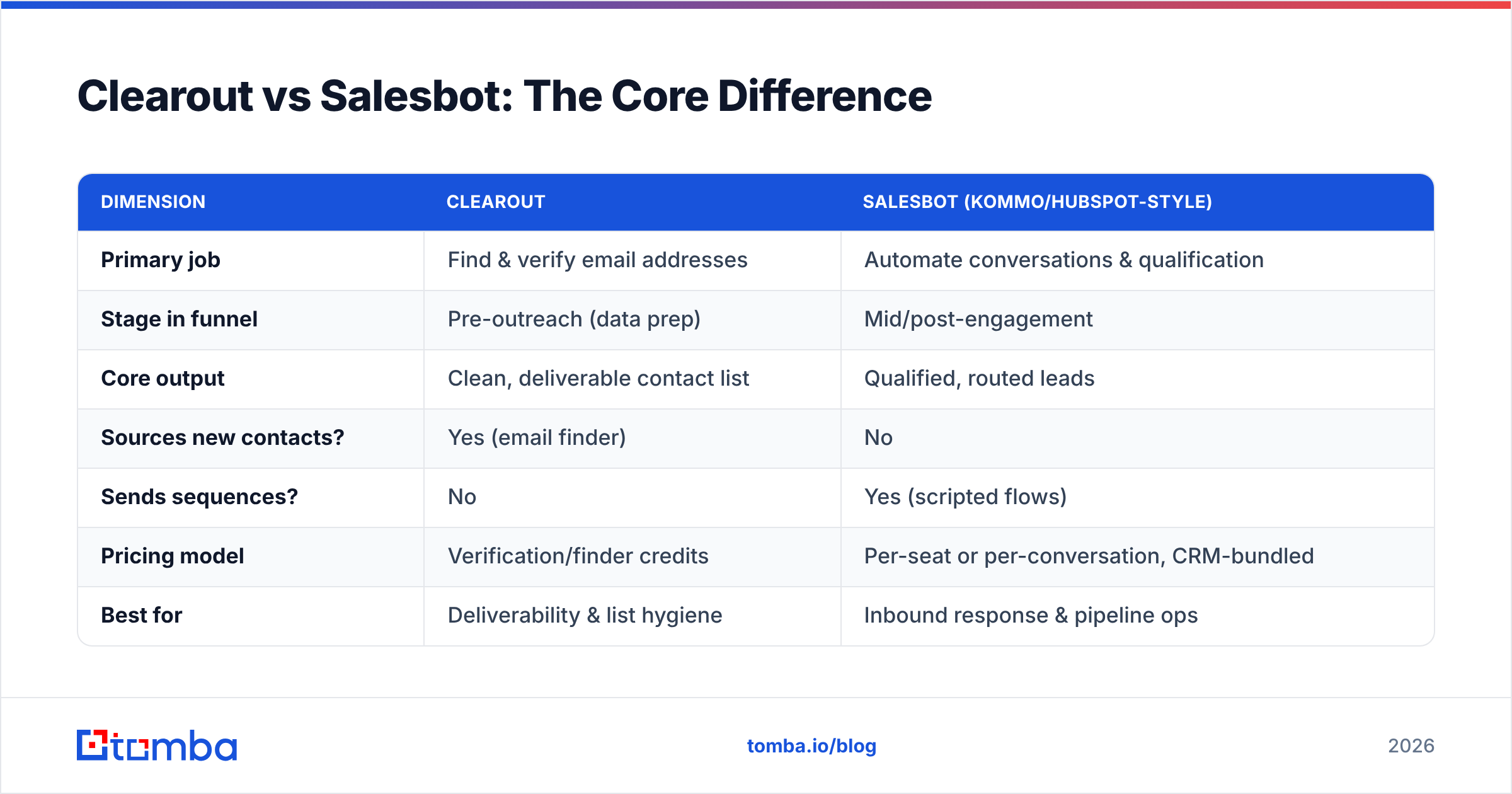
Here's the cleanest way to hold it in your head: Clearout works before contact. Salesbot works during and after contact. One improves who you reach; the other improves how you handle them once they respond.
| Dimension | Clearout | Salesbot (Kommo/HubSpot-style) |
|---|---|---|
| Primary job | Find & verify email addresses | Automate conversations & qualification |
| Stage in funnel | Pre-outreach (data prep) | Mid/post-engagement |
| Core output | Clean, deliverable contact list | Qualified, routed leads |
| Sources new contacts? | Yes (email finder) | No |
| Sends sequences? | No | Yes (scripted flows) |
| Pricing model | Verification/finder credits | Per-seat or per-conversation, CRM-bundled |
| Best for | Deliverability & list hygiene | Inbound response & pipeline ops |
| Replaces a human for | Manual list cleaning | First-touch chat & follow-up |
If your bounce rate is high and reps complain that emails go nowhere, your problem is upstream — that's a Clearout (or email-finder) problem. If leads come in but nobody responds for six hours and they go cold, that's a Salesbot problem. Diagnose the bottleneck before you buy.
How Do They Compare on Pricing?#
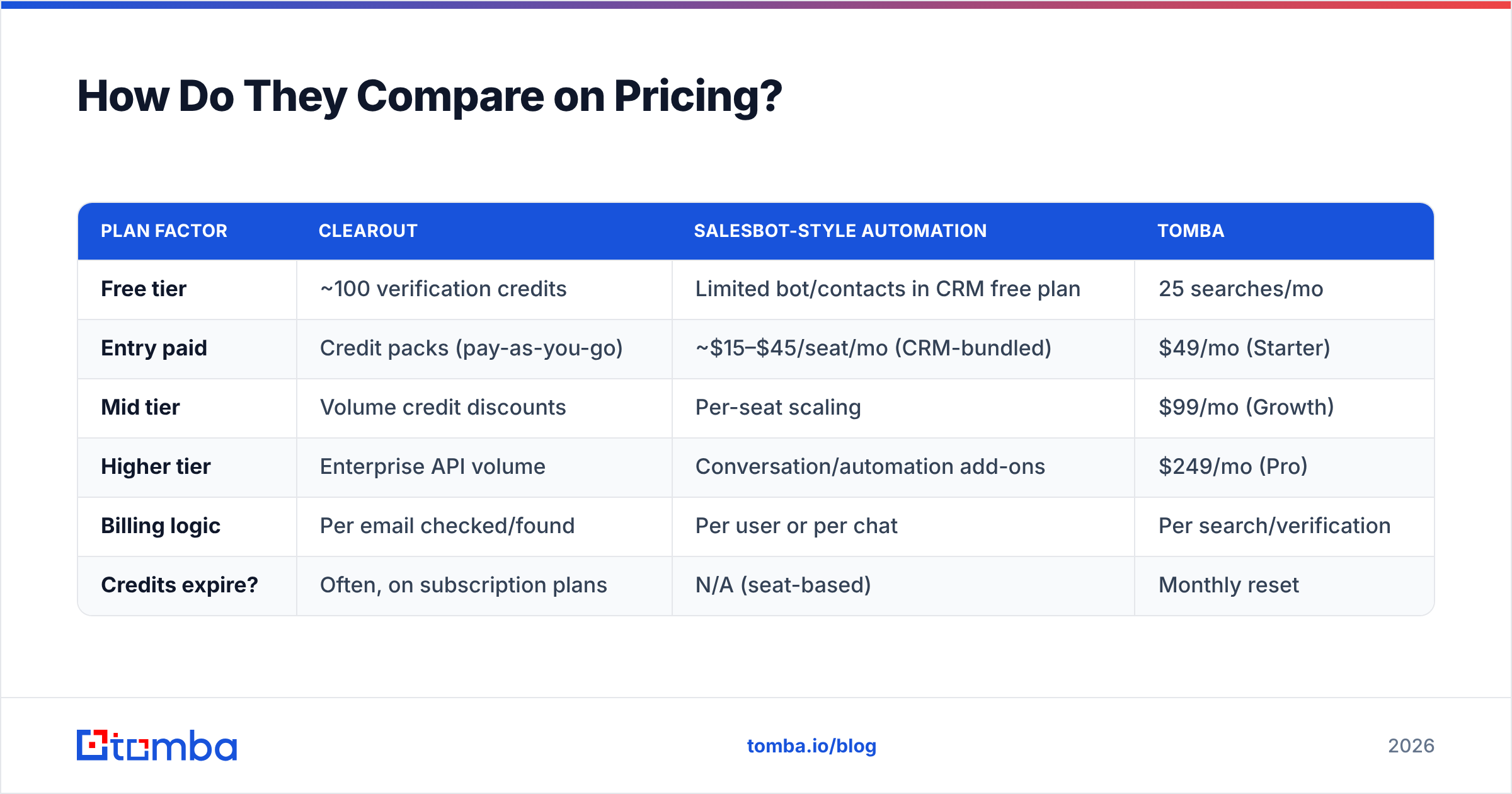
Pricing is where the "vs" framing breaks down, because the two charge for completely different units.
| Plan factor | Clearout | Salesbot-style automation | Tomba |
|---|---|---|---|
| Free tier | ~100 verification credits | Limited bot/contacts in CRM free plan | 25 searches/mo |
| Entry paid | Credit packs (pay-as-you-go) | ~$15–$45/seat/mo (CRM-bundled) | $49/mo (Starter) |
| Mid tier | Volume credit discounts | Per-seat scaling | $99/mo (Growth) |
| Higher tier | Enterprise API volume | Conversation/automation add-ons | $249/mo (Pro) |
| Billing logic | Per email checked/found | Per user or per chat | Per search/verification |
| Credits expire? | Often, on subscription plans | N/A (seat-based) | Monthly reset |
Clearout's pay-as-you-go credit model is genuinely useful if your verification needs are spiky — clean a big list once a quarter, don't pay monthly. Salesbot pricing is almost always tied to the CRM it lives in, so the real cost is the platform, not the bot. And for transparent, search-based pricing on the data side, Tomba pricing starts at $49/mo for the Starter plan with a free tier to test accuracy first. Always check current numbers on each vendor's own page before you commit — plans change.
Which One Should You Choose?#
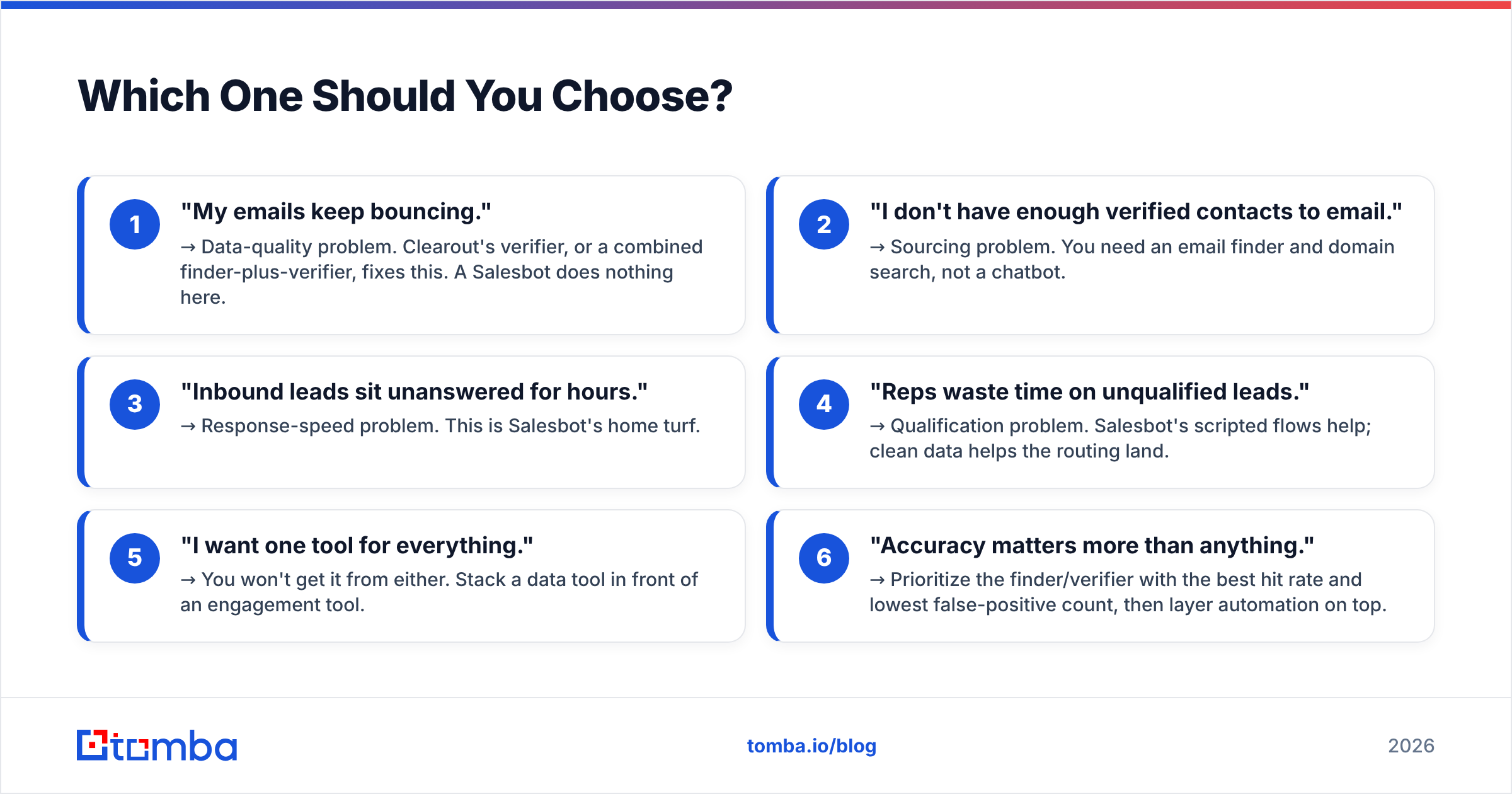
Use the job-to-be-done test. You're not buying a brand; you're hiring a tool for a specific outcome.
- "My emails keep bouncing." → Data-quality problem. Clearout's verifier, or a combined finder-plus-verifier, fixes this. A Salesbot does nothing here.
- "I don't have enough verified contacts to email." → Sourcing problem. You need an email finder and domain search, not a chatbot.
- "Inbound leads sit unanswered for hours." → Response-speed problem. This is Salesbot's home turf.
- "Reps waste time on unqualified leads." → Qualification problem. Salesbot's scripted flows help; clean data helps the routing land.
- "I want one tool for everything." → You won't get it from either. Stack a data tool in front of an engagement tool.
- "Accuracy matters more than anything." → Prioritize the finder/verifier with the best hit rate and lowest false-positive count, then layer automation on top.
Most teams that frame this as "Clearout vs Salesbot" actually need a clean data front end (find + verify) feeding a automation back end (engage + route). The mistake is buying the back end first and starving it of good contacts.
Where Does Tomba Fit In?#
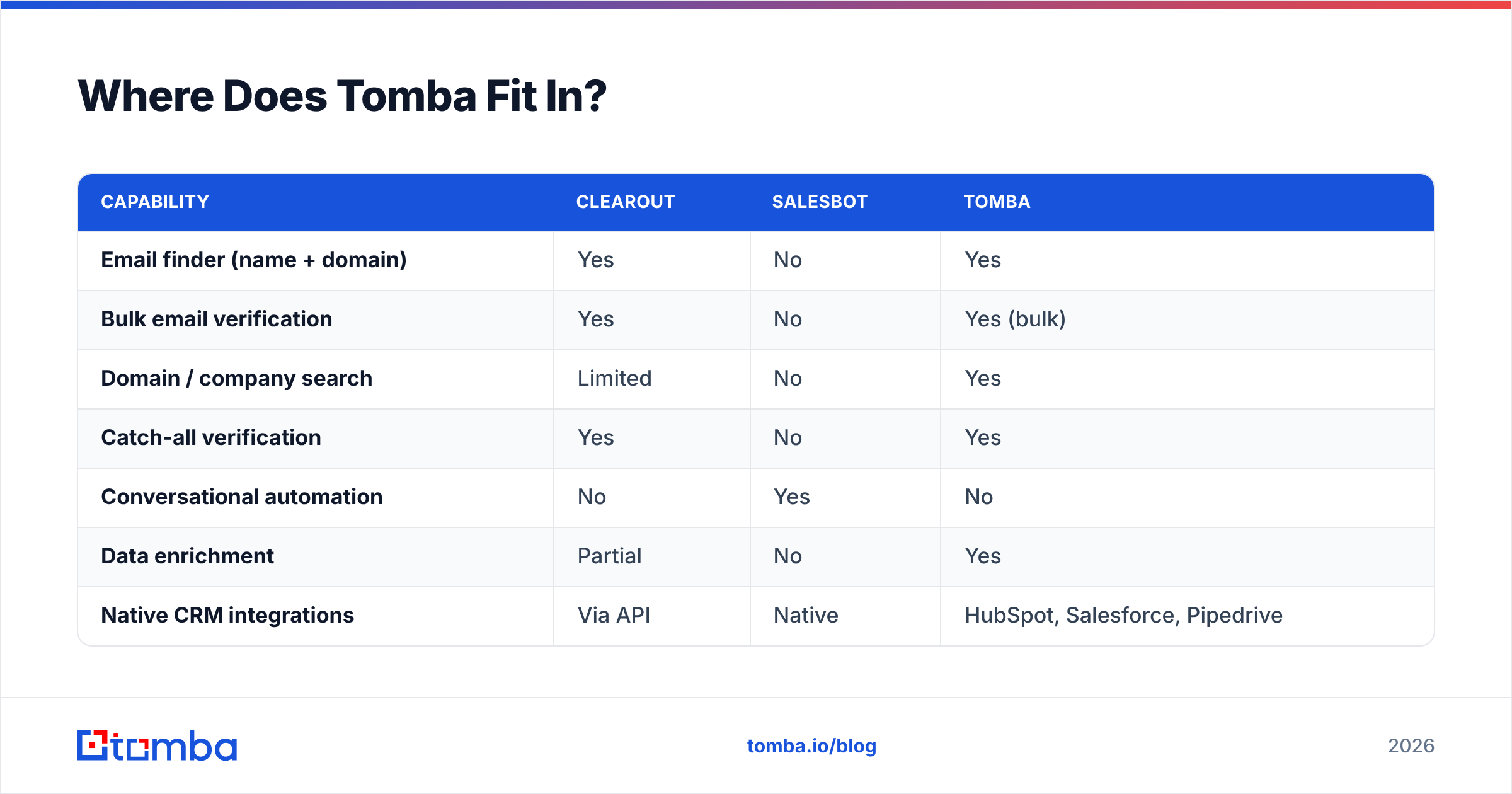
Tomba focuses on the part both tools depend on but neither fully owns: getting accurate, verified B2B email addresses in the first place. If Salesbot needs someone to talk to and Clearout needs a list to scrub, Tomba is upstream of both — it finds the addresses and verifies them in the same workflow.
| Capability | Clearout | Salesbot | Tomba |
|---|---|---|---|
| Email finder (name + domain) | Yes | No | Yes |
| Bulk email verification | Yes | No | Yes (bulk) |
| Domain / company search | Limited | No | Yes |
| Catch-all verification | Yes | No | Yes |
| Conversational automation | No | Yes | No |
| Data enrichment | Partial | No | Yes |
| Native CRM integrations | Via API | Native | HubSpot, Salesforce, Pipedrive |
| Free tier to test accuracy | Yes | Limited | 25 searches/mo |
Tomba isn't a chatbot and doesn't pretend to be — if your gap is response automation, a Salesbot is the right buy. But if your real constraint is the quality and quantity of contacts entering your pipeline, that's exactly what Tomba's email verifier and finder are built for. The platform's accuracy comes from how it sources and cross-checks data; you can read about Tomba's data sources to see how the verdicts are produced rather than guessed.

What Do Real Buyers Say?#
Don't take a vendor's word — including this one. Check independent review sites before you buy. On platforms like G2, Clearout consistently scores well for verification accuracy and bulk handling, with the common complaint being credit consumption on catch-all checks. Salesbot-style tools score well for ease of automation and speed-to-lead, with the common gripe being that bots feel robotic when scripts are shallow.
The pattern across reviews is consistent with the framing here: people praise Clearout for data, praise Salesbot for workflow, and rarely compare the two head-to-head because they rarely overlap in practice. For the official feature lists, see Clearout's own site and your CRM vendor's automation docs, then validate the claims against third-party reviews.
Frequently Asked Questions#
Is Clearout the same as Salesbot? No. Clearout is an email verification and finder tool that prepares clean contact data. Salesbot is conversational automation that engages and qualifies leads after they're in your funnel. They operate at different stages.
Can I use Clearout and Salesbot together? Yes, and many teams should. Use Clearout (or an email finder) to build and clean the list, then let a Salesbot handle inbound responses and routing. They complement each other rather than compete.
Which is cheaper, Clearout or Salesbot? It depends on volume, not sticker price. Clearout charges per email found or verified; Salesbot pricing is usually per seat inside a CRM. Heavy data needs favor credit models; heavy engagement needs favor seat plans.
Does Salesbot find email addresses? No. A Salesbot automates conversations with contacts you already have. To source new verified emails, you need an email finder like Tomba or Clearout.
What if accuracy is my top priority? Lead with the data tool. Test free tiers on the same sample list, compare hit rate and false positives, then add automation. Tomba's free 25 searches/month let you benchmark accuracy before paying.
The Bottom Line#
Stop treating "Clearout vs Salesbot" as an either/or. Clearout cleans and finds the data; Salesbot engages and qualifies the people. The right question is which gap is costing you pipeline right now — bad data, or slow response — and buy for that gap first.
If the answer is data — bounces, thin lists, unverifiable catch-alls — start at the source. Try the Tomba Email Finder to pull accurate, verified B2B email addresses by name, domain, or company, then feed that clean list into whatever automation layer you run. Spin up the free tier, run it against your worst list, and let the bounce rate tell you the truth.
// get started
Find, verify and enrich your first contacts today
Start on the free plan with 25 searches a month, then scale when your team is ready.
Free plan · No credit card required · GDPR & CCPA
// about the author