Clearout vs SalesQL 2026: Email Finder & Verifier Compared
Clearout vs SalesQL in 2026: accuracy, pricing, LinkedIn coverage, and verification tested side by side — plus where each one quietly loses to a stronger third option.
Clearout vs SalesQL: Which Email Tool Should You Actually Use in 2026?
If you are comparing Clearout vs SalesQL, you are really asking two different questions at once: "How do I find the right email?" and "How do I trust that email won't bounce?" These two tools answer those questions from opposite ends. SalesQL is a LinkedIn-first prospecting extension. Clearout is a verification-first platform that also finds emails. Picking the wrong one for your workflow costs you bounce rates, wasted credits, and a sender reputation you can't easily repair.
This guide breaks down accuracy, pricing, data sources, and real-world fit — then shows where a third option quietly beats both.
TL;DR#
- SalesQL wins if your entire workflow lives inside LinkedIn and Sales Navigator — it scrapes profiles and returns personal plus work emails fast.
- Clearout wins if your priority is verification — its bulk verifier and catch-all handling are stronger than SalesQL's.
- Neither is a complete prospecting engine. SalesQL is thin on bulk domain search; Clearout is thin on LinkedIn coverage.
- Pricing favors Clearout for high-volume verification; SalesQL's credit model gets expensive at scale.
- If you want LinkedIn finding, domain search, and verification under one roof, Tomba's email finder covers all three with a 25-search free tier.

What is Clearout and what is SalesQL?#
Think of it like buying tools for a kitchen. SalesQL is a great knife — sharp, specific, perfect for one job (slicing LinkedIn profiles into contact data). Clearout is the dishwasher — it makes sure everything you already have is clean and safe to serve. You can technically force each to do the other's job, but neither is built for it.
Clearout launched as an email verification service and expanded into finding. Its core strength is validating large lists: it runs real-time SMTP checks, syntax validation, MX record lookups, and a notably good catch-all detection layer. Its email finder works by domain and name, similar to a domain search tool, but verification is the headline feature.
SalesQL is a Chrome extension built around LinkedIn. You open a profile or a Sales Navigator search, click the icon, and it returns emails and phone numbers tied to that person. It shines for reps who prospect one profile at a time and want personal emails alongside work addresses.
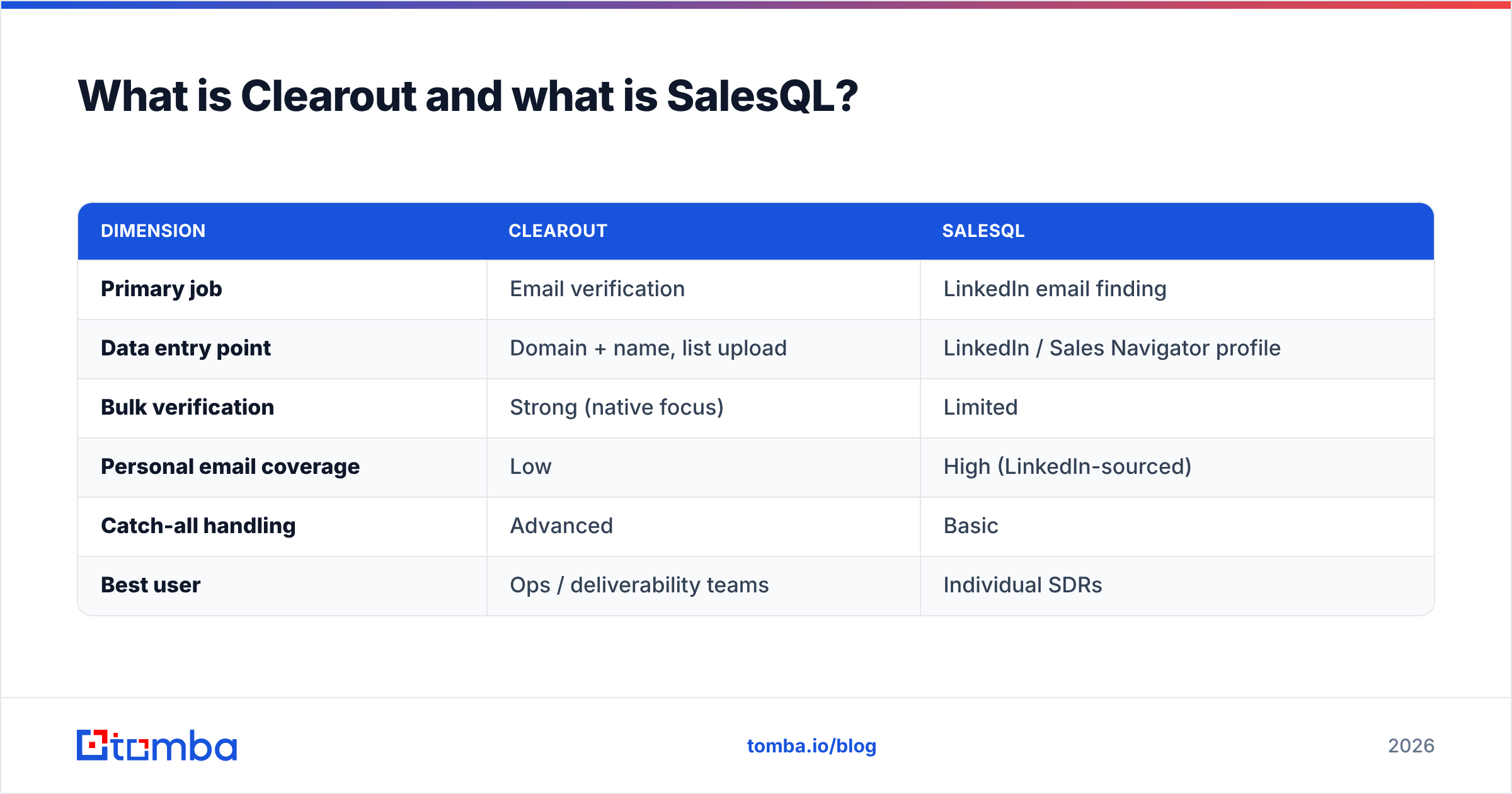
Here is the core distinction in one structured view:
| Dimension | Clearout | SalesQL |
|---|---|---|
| Primary job | Email verification | LinkedIn email finding |
| Data entry point | Domain + name, list upload | LinkedIn / Sales Navigator profile |
| Bulk verification | Strong (native focus) | Limited |
| Personal email coverage | Low | High (LinkedIn-sourced) |
| Catch-all handling | Advanced | Basic |
| Best user | Ops / deliverability teams | Individual SDRs |
Is Clearout or SalesQL more accurate?#
Accuracy depends on which task you measure. For verification, Clearout leads. For pulling a fresh email off a LinkedIn profile, SalesQL leads. They are not really competing on the same metric, which is why head-to-head "winner" claims usually mislead.
Clearout's verification accuracy is its reason to exist. It separates valid, invalid, catch-all, and unknown results with more granularity than SalesQL, and its catch-all logic reduces the "unknown" bucket that kills most cheaper verifiers. If you upload a 50,000-row list, Clearout will give you a defensible deliverability read.
SalesQL's finding accuracy is solid for LinkedIn-sourced data, but it does not deeply re-verify every email it returns. You often get a result marked "valid" that is really "format-plausible." That gap matters: a found email that bounces still damages your sender reputation, and reputation is the hardest thing in cold outreach to rebuild.
The honest takeaway: if you run SalesQL to find and then push everything through a verifier before sending, you get the best of both — but now you are paying for two tools and stitching a workflow.
How do Clearout and SalesQL price compare?#
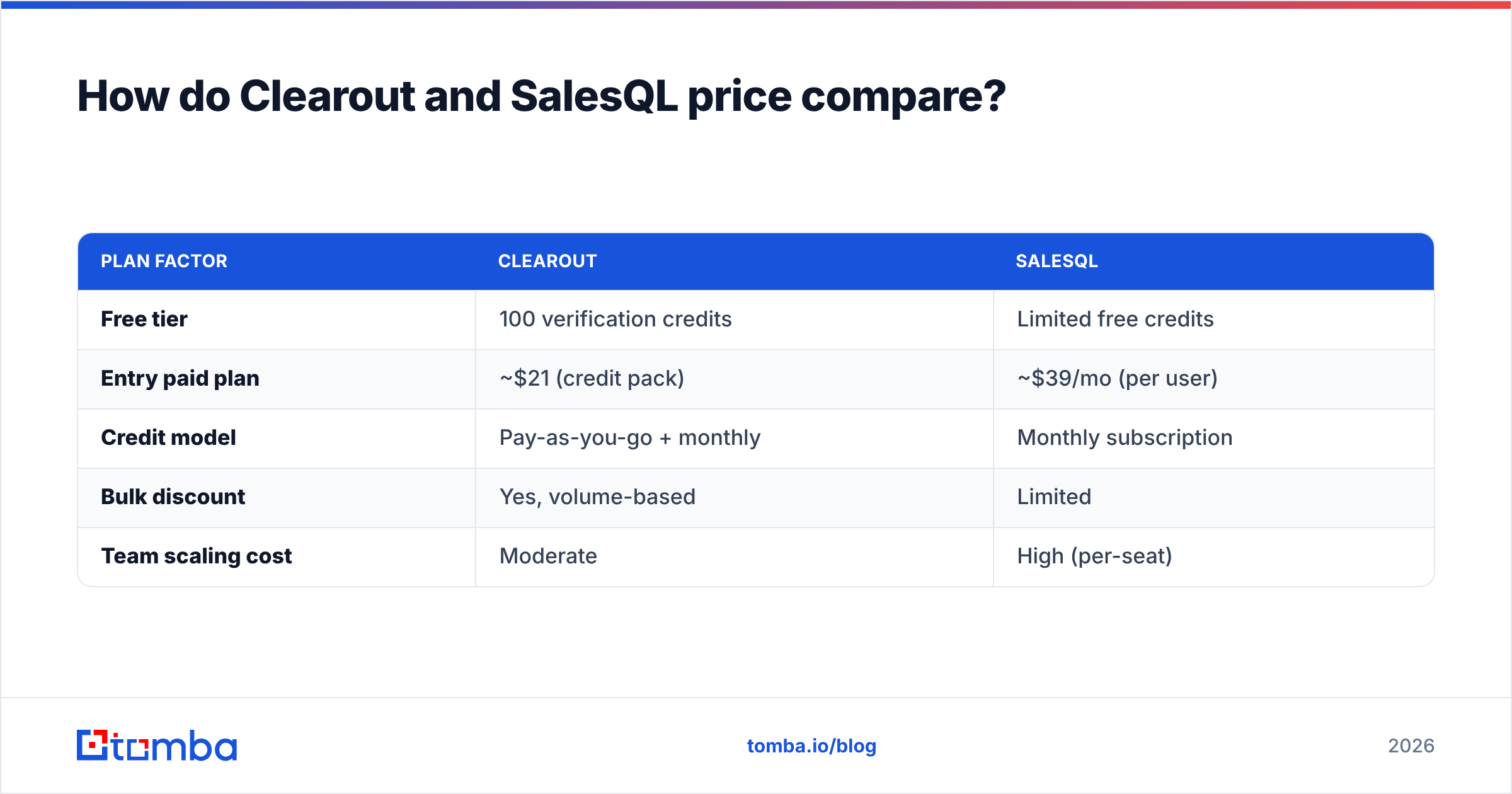
Clearout is cheaper per verification; SalesQL is priced for per-profile finding. Your cost depends entirely on volume and which action dominates your week.
Clearout sells verification credits in tiers and often offers pay-as-you-go packs, which suits teams with spiky list-cleaning needs. Finding credits are separate. SalesQL uses a monthly credit model tied to the number of contacts you reveal, which is predictable for a single rep but climbs quickly across a team where everyone is revealing profiles daily.
| Plan factor | Clearout | SalesQL |
|---|---|---|
| Free tier | 100 verification credits | Limited free credits |
| Entry paid plan | ~$21 (credit pack) | ~$39/mo (per user) |
| Credit model | Pay-as-you-go + monthly | Monthly subscription |
| Bulk discount | Yes, volume-based | Limited |
| Team scaling cost | Moderate | High (per-seat) |
A quick reality check on credits: a "find" credit and a "verify" credit are rarely the same price, and catch-all checks sometimes cost extra. Before committing, model your real monthly volume. For reference on how transparent tiered pricing can look, compare against published Tomba pricing rather than assuming all vendors charge alike. You can also confirm each vendor's current numbers on their own sites — clearout.io and salesql.com — since credit definitions change often.
Which tool has better data coverage?#
SalesQL covers people; Clearout covers validity. Coverage means two different things here, and conflating them is the most common mistake buyers make.
SalesQL's coverage is a function of LinkedIn. If a person has a profile, SalesQL can usually surface something. Its strength is personal email discovery — useful when work emails are locked behind strict catch-all domains. The weakness is that it is blind to anyone not actively on LinkedIn, and it offers little for company-wide list building where you want every address at a domain.
Clearout's "coverage" is about how confidently it can classify any email you feed it, regardless of source. It does not care where the email came from — it cares whether it will land. For domain-level discovery, it is functional but not its specialty.
Neither tool is a true B2B database play. If you need to enrich thousands of accounts from a CRM export, you will feel the ceiling on both. This is where verification-plus-finding-plus-enrichment platforms pull ahead, because data enrichment fills the gaps that a single-angle tool leaves open.
Clearout vs SalesQL: full feature comparison#
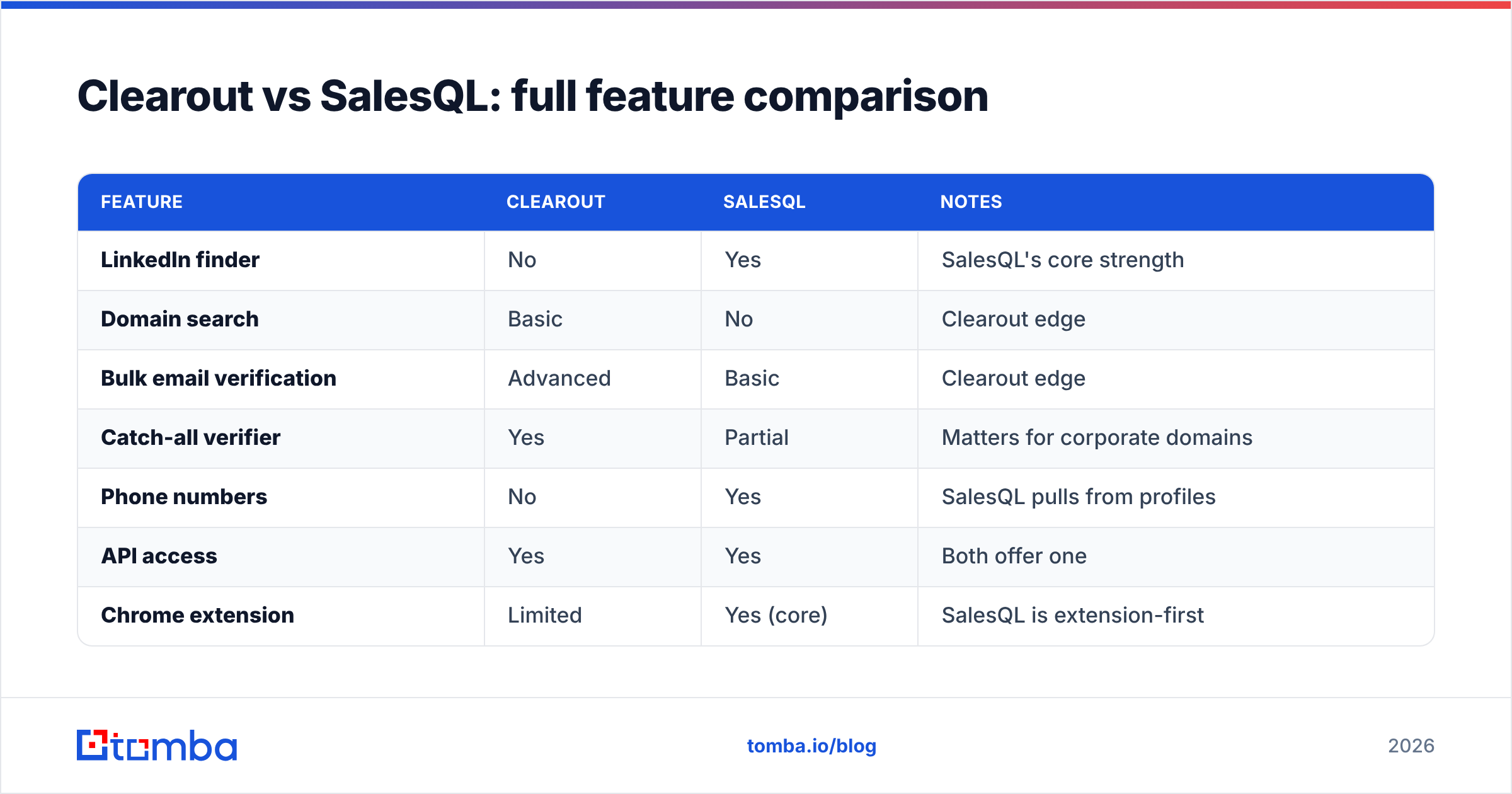
Here is the side-by-side that most buyers actually want, with concrete attributes rather than marketing adjectives:
| Feature | Clearout | SalesQL | Notes |
|---|---|---|---|
| LinkedIn finder | No | Yes | SalesQL's core strength |
| Domain search | Basic | No | Clearout edge |
| Bulk email verification | Advanced | Basic | Clearout edge |
| Catch-all verifier | Yes | Partial | Matters for corporate domains |
| Phone numbers | No | Yes | SalesQL pulls from profiles |
| API access | Yes | Yes | Both offer one |
| Chrome extension | Limited | Yes (core) | SalesQL is extension-first |
| Free tier | 100 credits | Limited | Both let you test |
| Personal emails | No | Yes | LinkedIn-sourced |
| Deliverability scoring | Yes | No | Clearout edge |
The pattern is clear: these tools barely overlap. SalesQL is a finder that does light verification. Clearout is a verifier that does light finding. A serious outbound motion needs both jobs done well, which is exactly the gap the next section addresses.

When should you choose SalesQL?#
Choose SalesQL if you are a solo SDR who lives in LinkedIn. Its workflow is unbeatable for one specific motion: you find a prospect on Sales Navigator, click, and get an email and a phone number in seconds.
It fits when:
- Your prospecting is profile-by-profile, not list-by-list.
- You need personal emails because target companies use strict catch-all domains.
- Phone numbers matter to your cadence and you want them in the same click.
- You are one or two reps, so per-seat pricing stays manageable.
It does not fit when you need to build a list of every contact at 500 companies, or when verification quality is non-negotiable before a send. For those, you will bolt on a verifier anyway.
When should you choose Clearout?#
Choose Clearout if verification is your bottleneck. When you already have lists — from events, partners, scraped sources, or an old CRM — and your bounce rate is creeping up, Clearout is the right surgical tool.
It fits when:
- You upload large lists and need a trustworthy valid/invalid/catch-all split.
- Deliverability is a KPI your team reports on, not an afterthought.
- You buy credits in bursts rather than needing a steady monthly find quota.
- Catch-all domains make up a big slice of your target accounts.
It does not fit as a primary prospecting engine. If you need fresh contacts more than you need clean ones, Clearout solves the wrong half of the problem. Pairing it with a dedicated email verifier workflow is its natural home, not net-new discovery.
Is there a better alternative to both?#
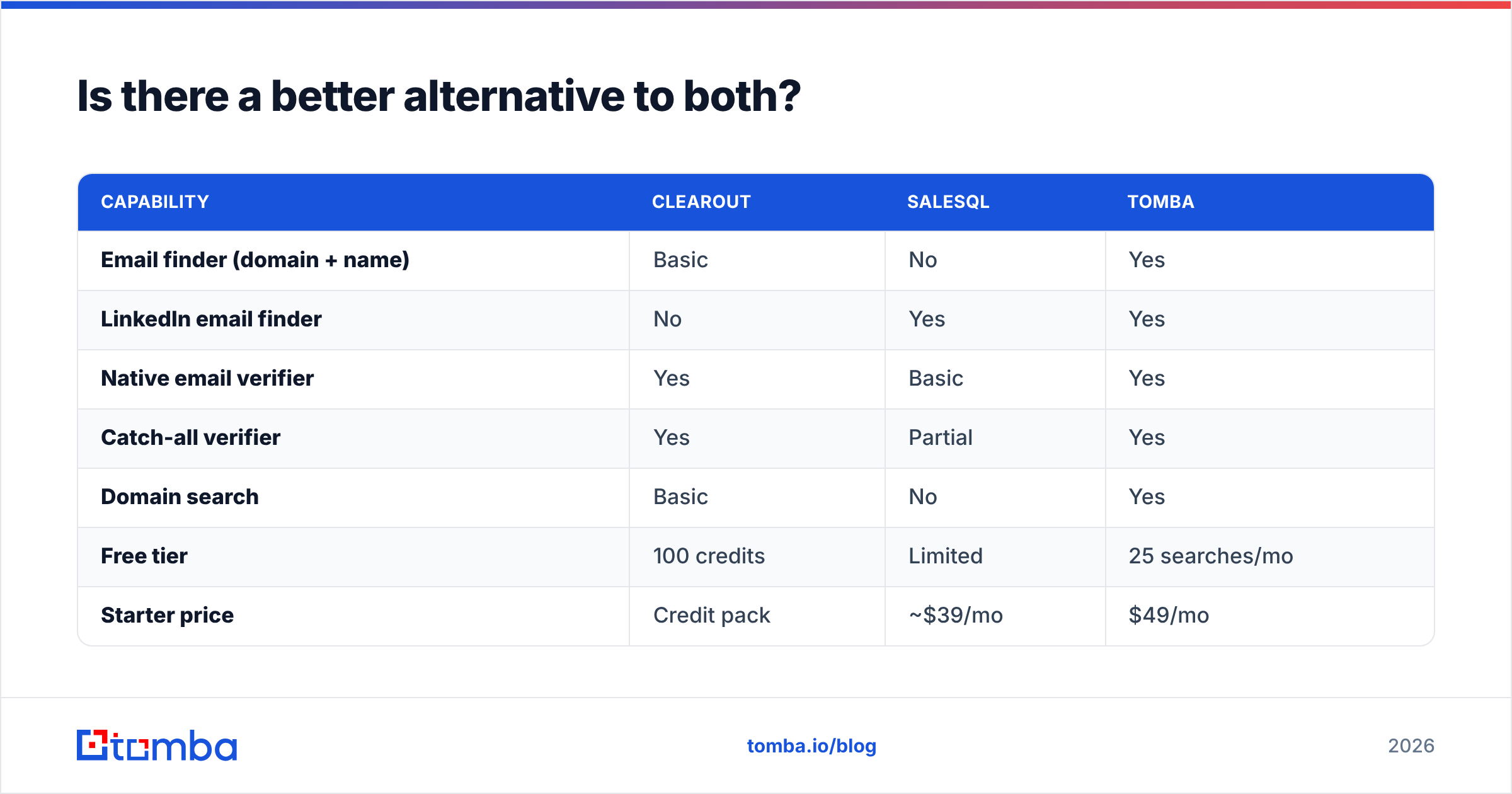
Yes — if your real need is finding and verifying in one place. The recurring theme in any Clearout vs SalesQL comparison is that you end up running two tools to cover one job. That is the gap a unified platform closes.
Tomba was built so you don't have to choose between "find" and "verify." It pairs a name-and-domain email finder with a native verifier, adds domain search for company-wide list building, a LinkedIn finder for the profile-by-profile motion SalesQL owns, and a catch-all verifier for the exact corporate domains that trip up cheaper tools.
| Capability | Clearout | SalesQL | Tomba |
|---|---|---|---|
| Email finder (domain + name) | Basic | No | Yes |
| LinkedIn email finder | No | Yes | Yes |
| Native email verifier | Yes | Basic | Yes |
| Catch-all verifier | Yes | Partial | Yes |
| Domain search | Basic | No | Yes |
| Free tier | 100 credits | Limited | 25 searches/mo |
| Starter price | Credit pack | ~$39/mo | $49/mo |
The point is not that Tomba is cheapest on every line — it is that one workflow replaces the two-tool stitch most teams build around Clearout and SalesQL. If you want to validate that claim, run the same 50 prospects through all three and compare bounce rates after a real send. Cross-checking vendor reviews on G2 before you commit is also worth the ten minutes.
How do I test which tool fits my workflow?#
Run a controlled bake-off before you buy anything. Marketing pages and even this comparison can't substitute for your own data, because accuracy varies wildly by industry and target geography.
A clean test looks like this:
- Pick 50 real target prospects you genuinely want to reach.
- Find their emails in each tool (SalesQL via LinkedIn, Clearout via domain, Tomba via both).
- Verify every result through a single neutral verifier so the scoring is consistent.
- Send a real campaign and record the actual bounce rate after 24 hours.
- Divide cost by valid-deliverable contacts — that per-good-lead number is the only price that matters.
This protocol exposes the difference between a tool that returns a lot of emails and a tool that returns a lot of emails that work. For ongoing list hygiene, a quick free email checker can spot obvious failures before they ever enter your sending tool.
Final verdict: Clearout vs SalesQL#
SalesQL for LinkedIn-native finding, Clearout for serious verification — but most teams need both jobs done together. That is the unavoidable conclusion. SalesQL is the better single-profile prospecting click. Clearout is the better list-cleaning engine. They solve adjacent problems, and buying one usually means eventually buying something to cover the other half.
If you are a solo rep glued to Sales Navigator, SalesQL earns its seat. If you are a deliverability-focused ops team drowning in messy lists, Clearout is a sharp, affordable verifier. And if you would rather not run two subscriptions to cover one outbound motion, start with a unified platform.
Ready to find and verify in one place instead of stitching tools together? Try the Tomba Email Finder free — 25 searches a month, no card required — and see how a combined find-plus-verify workflow changes your bounce rate before you renew anything else.
// get started
Find, verify and enrich your first contacts today
Start on the free plan with 25 searches a month, then scale when your team is ready.
Free plan · No credit card required · GDPR & CCPA
// about the author