Clearout vs Tomba 2026: Email Finder & Verifier Compared
Clearout verifies email lists well, but Tomba both finds and verifies B2B emails. Here's a feature-by-feature, price-by-price breakdown for 2026.
Clearout vs Tomba: Which Email Tool Should You Pick in 2026?
You're choosing between two tools that sound similar on the surface but solve different halves of the same problem. Clearout is a verification specialist. Tomba finds the email first, then verifies it. Picking the wrong one means either a clean list with no new leads, or new leads you can't trust. This breakdown settles it.
TL;DR#
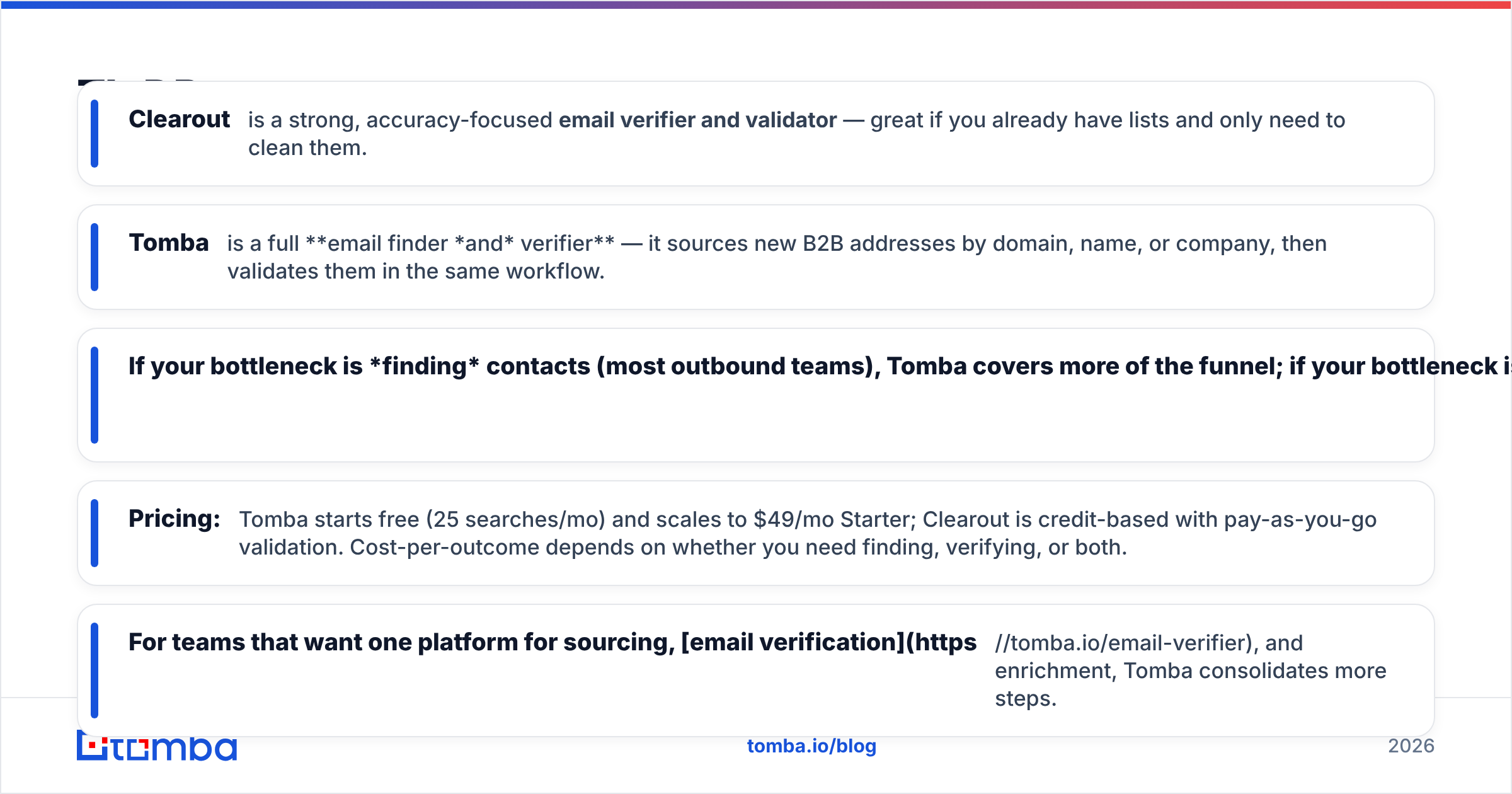
- Clearout is a strong, accuracy-focused email verifier and validator — great if you already have lists and only need to clean them.
- Tomba is a full email finder and verifier — it sources new B2B addresses by domain, name, or company, then validates them in the same workflow.
- If your bottleneck is finding contacts (most outbound teams), Tomba covers more of the funnel; if your bottleneck is cleaning an existing database, Clearout is purpose-built for it.
- Pricing: Tomba starts free (25 searches/mo) and scales to $49/mo Starter; Clearout is credit-based with pay-as-you-go validation. Cost-per-outcome depends on whether you need finding, verifying, or both.
- For teams that want one platform for sourcing, email verification, and enrichment, Tomba consolidates more steps.

What is Clearout?#
Clearout is an email verification and validation platform built to scrub bounce-prone addresses out of your lists before you send. Its core job is checking whether an address is deliverable: syntax checks, MX record lookups, SMTP handshakes, role-account detection, disposable-domain flags, and a confidence score for each contact.
Clearout does ship a lightweight prospecting feature (EmailFinder), but the product's center of gravity is verification. Teams reach for it when they import a list from a webinar, a CRM export, or a scraped source and need to know what's safe to email. It's the kind of tool that lives at the end of a data pipeline, not the start.
Think of Clearout as a water filter. It doesn't produce water — it makes the water you already have safe to drink. That's valuable, but only if you have a source.
What is Tomba?#
Tomba is a B2B email finder and lead-enrichment platform that covers both halves: sourcing the address and confirming it's real. You give it a name and a company domain, or just a domain, and it returns verified professional email addresses with a confidence score and the public sources behind each guess.
Around that core, Tomba bundles a stack most verification-only tools don't: domain search to pull every public email at a company, a catch-all verifier, a phone finder, data enrichment, and a bulk email finder for list-scale work. So instead of stitching together a finder and a separate validator, you run the whole motion in one place.
Back to the analogy: Tomba is the well and the filter. It produces the water and cleans it.
Clearout vs Tomba: the core difference#
Here's the distinction that decides everything else:
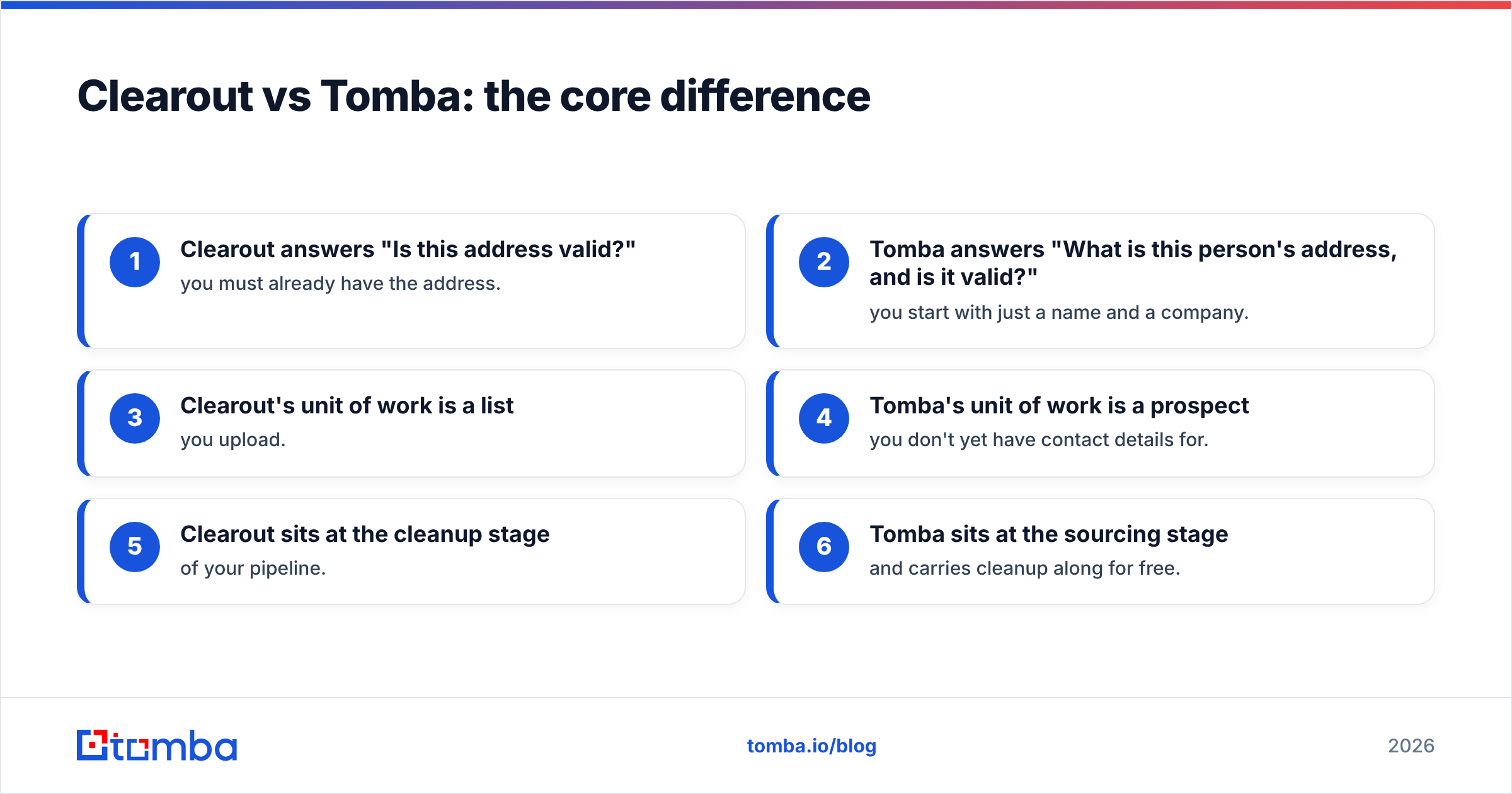
- Clearout answers "Is this address valid?" — you must already have the address.
- Tomba answers "What is this person's address, and is it valid?" — you start with just a name and a company.
- Clearout's unit of work is a list you upload.
- Tomba's unit of work is a prospect you don't yet have contact details for.
- Clearout sits at the cleanup stage of your pipeline.
- Tomba sits at the sourcing stage and carries cleanup along for free.
If you map these against your actual bottleneck, the choice usually makes itself. Outbound and growth teams almost always run short on new verified contacts — that's a finding problem. Email and lifecycle teams sitting on big legacy databases run short on trust — that's a verifying problem.

How do Clearout and Tomba compare feature by feature?#
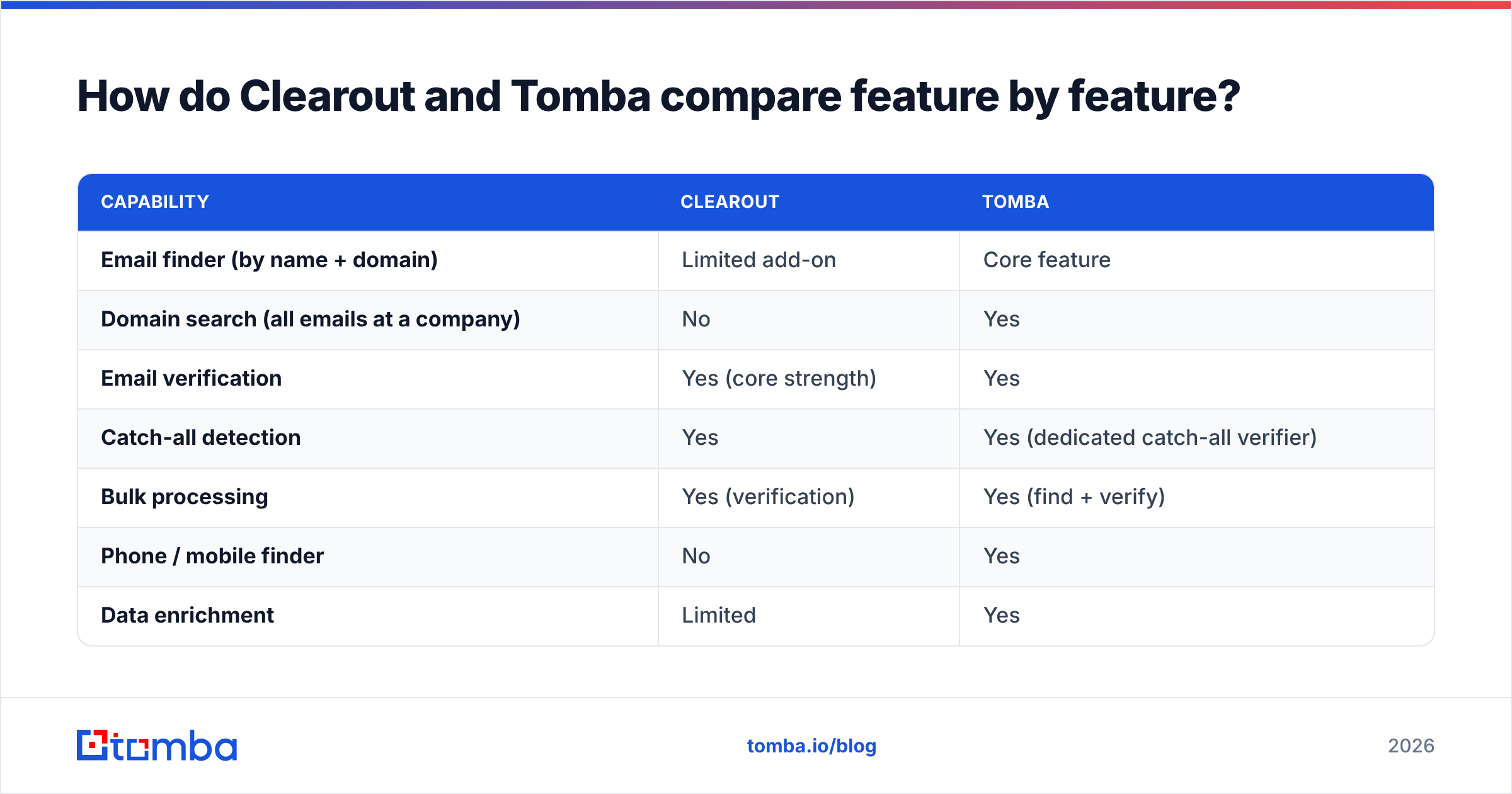
| Capability | Clearout | Tomba |
|---|---|---|
| Email finder (by name + domain) | Limited add-on | Core feature |
| Domain search (all emails at a company) | No | Yes |
| Email verification | Yes (core strength) | Yes |
| Catch-all detection | Yes | Yes (dedicated catch-all verifier) |
| Bulk processing | Yes (verification) | Yes (find + verify) |
| Phone / mobile finder | No | Yes |
| Data enrichment | Limited | Yes |
| Free tier | Pay-as-you-go credits | 25 searches/mo free |
| API access | Yes | Yes |
| Chrome extension | Limited | Yes |
| Best for | Cleaning existing lists | Sourcing + verifying new leads |
The pattern is clear: Clearout is deep on one dimension, Tomba is broad across the funnel. Neither is "better" in a vacuum — they're optimized for different jobs. The question is which job you're actually doing.
Which tool is more accurate?#
Accuracy means two different things here, and conflating them is the most common mistake buyers make.
Verification accuracy — does the tool correctly predict whether an existing address will bounce? Both Clearout and Tomba do real SMTP-level checks, MX validation, and catch-all handling. On clean, non-catch-all domains, mature verifiers cluster within a few percentage points of each other. Clearout's reputation here is solid; this is its specialty.
Finding accuracy — when you ask for an unknown person's email, how often is the returned address correct and deliverable? This is where a finder-first platform pulls ahead, because Tomba both generates candidate patterns from real public sources and runs them through verification before handing them back. A verifier without a finder simply can't compete on this axis — it has nothing to find.
So if you only need to clean lists, judge the tools on verification accuracy, where the gap is narrow. If you need to build lists, finding accuracy matters more, and that's structurally Tomba's lane. Tomba is transparent about where its data comes from, which is worth checking against any vendor's accuracy claims — including independent reviews on G2.

How does pricing compare?#
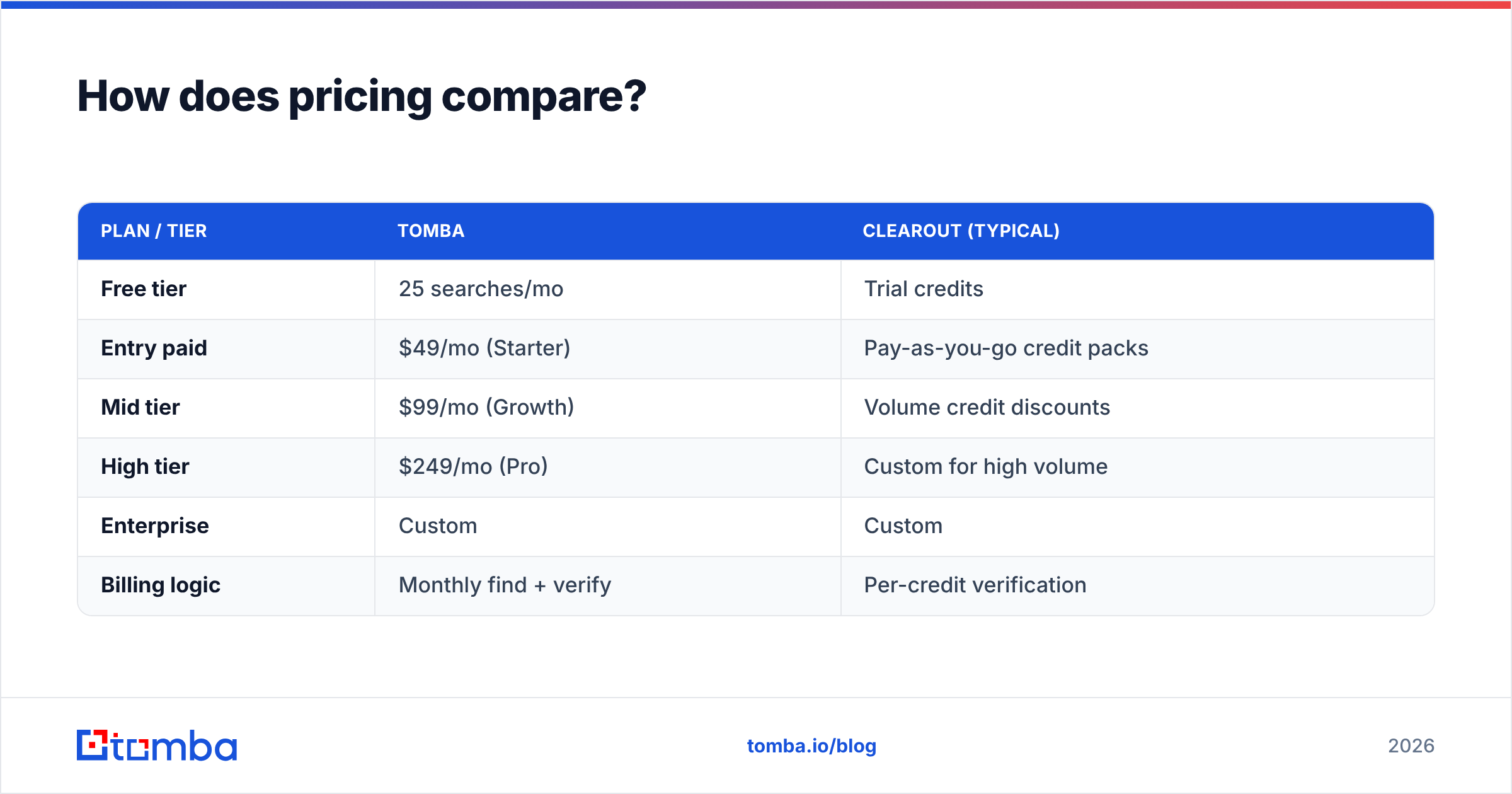
Pricing models differ enough that a flat "X is cheaper" answer would mislead you. Clearout sells verification credits (often pay-as-you-go, so you buy what you scrub). Tomba sells monthly search-and-verify plans with a free entry point.
| Plan / tier | Tomba | Clearout (typical) |
|---|---|---|
| Free tier | 25 searches/mo | Trial credits |
| Entry paid | $49/mo (Starter) | Pay-as-you-go credit packs |
| Mid tier | $99/mo (Growth) | Volume credit discounts |
| High tier | $249/mo (Pro) | Custom for high volume |
| Enterprise | Custom | Custom |
| Billing logic | Monthly find + verify | Per-credit verification |
The right comparison isn't sticker price — it's cost per outcome. If your outcome is "1,000 verified addresses I already had," Clearout's credit model can be efficient. If your outcome is "1,000 new verified prospects I didn't have," you'd have to pair a separate finder with Clearout, and the combined cost usually exceeds running everything through Tomba. Check the live Tomba pricing page before budgeting, since plan limits change.
A practical rule: count how many tools you'd need to buy to complete your workflow. One platform billing is almost always cheaper to operate than two.
When should you choose Clearout?#
Pick Clearout when verification is the entire job:
- You already own large lists from events, signups, partnerships, or a CRM, and you need to scrub them before sending.
- You don't source new contacts often — your inbound or partnerships engine supplies the names.
- You want pay-as-you-go billing for sporadic, bursty cleaning rather than a monthly subscription.
- Deliverability hygiene is your KPI, and you've already solved sourcing elsewhere.
In those cases, a dedicated verifier is a clean fit, and Clearout is a credible one.
When should you choose Tomba?#
Pick Tomba when finding is part of the job — or when you'd rather not run two tools:
- You're doing outbound and constantly need new verified emails by name and company.
- You want domain-level discovery — pull every public address at a target account in one query.
- You need more than email — phone numbers, enrichment, and catch-all verification in the same place.
- You value consolidation — one subscription, one API, one workflow from prospect to verified contact.
- You want a free on-ramp to test before paying — the free tier covers 25 searches a month.
For most sales, growth, and agency teams, the bottleneck is sourcing, which puts Tomba on the right side of the decision. You also get Tomba's email verifier included, so you're not giving up the cleanup capability Clearout specializes in — you're getting both.
Can you use both together?#
Yes, and some teams do — though it's usually redundant. A common setup is: source with Tomba, then run a second-opinion scrub through Clearout before a high-stakes send. There's nothing wrong with that, and double-verification can shave the last fraction off your bounce rate on critical campaigns.
But be honest about the overlap. Tomba already verifies what it finds, so a second verifier is a belt-and-suspenders move, not a necessity. If budget is tight, one platform that does both is the leaner play. Reserve the two-tool stack for cases where deliverability is mission-critical and you want independent confirmation — for example, a large reactivation send to a dormant database, where bounce spikes can dent your sender reputation.
For most outbound motions, picking the tool that matches your primary bottleneck — finding or verifying — is enough. Don't pay for two when one closes the gap.
Clearout vs Tomba: the verdict#
The decision compresses to one question: is your problem finding emails or cleaning them?
- If you have the contacts and need them verified, Clearout is a focused, capable verifier with flexible credit pricing.
- If you need to find verified B2B contacts — by name, by company, or across a whole domain — Tomba covers more of the funnel and folds verification, enrichment, and phone lookup into one workflow.
Most teams reading a "Clearout vs Tomba" comparison are trying to fill a pipeline, not just protect one. That's a sourcing problem, and a finder-first platform wins it. The fact that Tomba also verifies, dedupes, and enriches means you rarely need a second tool — which is the cheapest outcome of all. Independent listings on directories like G2's email-finder category are a good sanity check before you commit, alongside vendor sites like clearout.io.
Start finding and verifying in one place#
Stop paying for two tools to do one job. Tomba's Email Finder sources verified professional emails by name, company, or domain — and verifies them in the same step, so the addresses you export are ones that actually land. Start on the free tier with 25 searches a month, then scale to a $49/mo Starter plan when your pipeline does. Find the contact, confirm the address, and skip the second subscription.
Ready to find emails that actually work?
Join 150,000+ professionals who stopped guessing and started sending. Free credits on signup — no credit card required.
Get the Tomba newsletter
Practical outbound tactics and product updates — once every two weeks.
About the author