Click Rate Calculator: Measure Email CTR the Right Way in 2026
A click rate calculator turns raw sends and clicks into a number you can act on. Here's the formula, the benchmarks, and the mistakes that quietly inflate your CTR.
TL;DR
- A click rate calculator divides unique clicks by emails delivered (not sent) and multiplies by 100 — the formula is simple, but the inputs are where most teams go wrong.
- Click rate and click-to-open rate (CTOR) answer different questions. Reporting one as the other inflates or deflates your numbers by 3-5x.
- Average email click rate sits around 2-3% across industries in 2026; cold outbound clicks behave very differently from newsletter clicks.
- Bad data — invalid addresses, bots, and tracking-pixel noise — silently distorts CTR. Clean lists fix the denominator before you touch the formula.
- Use the manual formula below, or skip the spreadsheet and let a tool compute it per campaign.
If you can't measure a click rate correctly, every downstream decision — subject line, copy, offer, send time — is built on sand. This guide gives you the exact math, the benchmarks to compare against, and the data hygiene that keeps the number honest.
What is a click rate and how do you calculate it?#
Click rate is the percentage of delivered emails that produced at least one link click. That's it. The formula:
Click Rate = (Unique Clicks / Emails Delivered) × 100If you delivered 5,000 emails and 150 unique recipients clicked a link, your click rate is (150 / 5000) × 100 = 3%.
Three inputs decide whether that number means anything:
- Unique clicks — count each recipient once, even if they click five times. Total clicks (raw click events) is a vanity number; unique clicks reflect actual people.
- Emails delivered — this is sends minus bounces. Using sends as the denominator understates your true click rate because bounced emails never had a chance to be clicked.
- The tracking window — a click on day 30 still counts. Decide your reporting window (most teams use 7 or 14 days) and apply it consistently.
A click rate calculator just automates this division so you stop fat-fingering it in a spreadsheet. The value is in feeding it the right numbers.

Wait — ignore that. Here's the meme that actually belongs here:
)
Click rate vs click-to-open rate: which one are you actually measuring?#
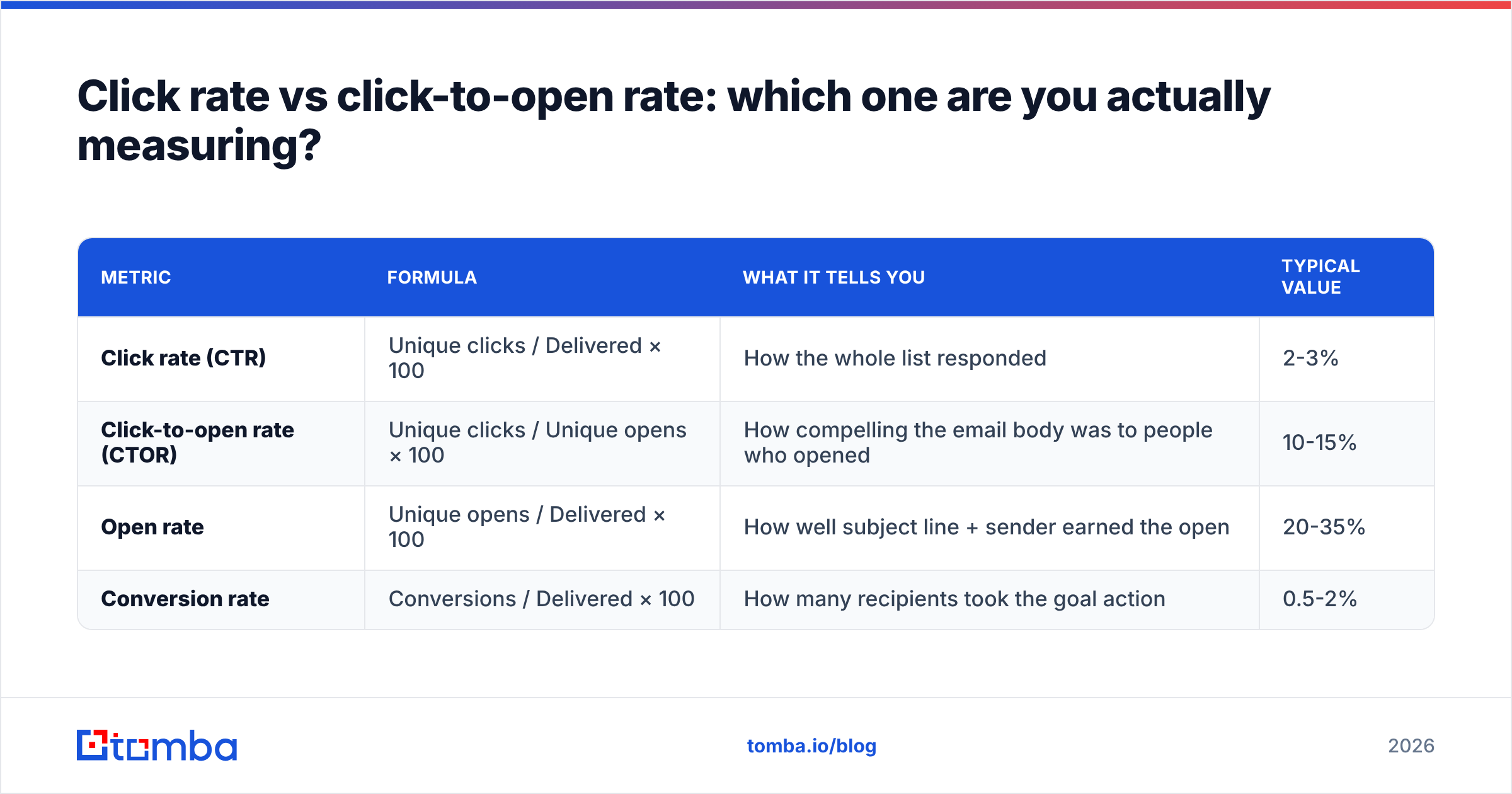
They are not the same metric, and confusing them is the single most common reporting error. Here's the difference in one table.
| Metric | Formula | What it tells you | Typical value |
|---|---|---|---|
| Click rate (CTR) | Unique clicks / Delivered × 100 | How the whole list responded | 2-3% |
| Click-to-open rate (CTOR) | Unique clicks / Unique opens × 100 | How compelling the email body was to people who opened | 10-15% |
| Open rate | Unique opens / Delivered × 100 | How well subject line + sender earned the open | 20-35% |
| Conversion rate | Conversions / Delivered × 100 | How many recipients took the goal action | 0.5-2% |
CTOR isolates the quality of your content because it only looks at people who already opened. Click rate measures the funnel end-to-end — a weak subject line tanks it even if the body is brilliant.
Use both. If your click rate is low but CTOR is healthy, the problem is upstream: deliverability, sender reputation, or subject lines — test those with a subject line tester before you rewrite the body. If CTOR itself is weak, the email content or call-to-action is the bottleneck.
Apple's Mail Privacy Protection and similar features have made open tracking unreliable since 2021, which is why many teams in 2026 lean on click rate as the more trustworthy engagement signal. Opens can be machine-inflated; a click is a deliberate human action.
What is a good email click rate in 2026?#
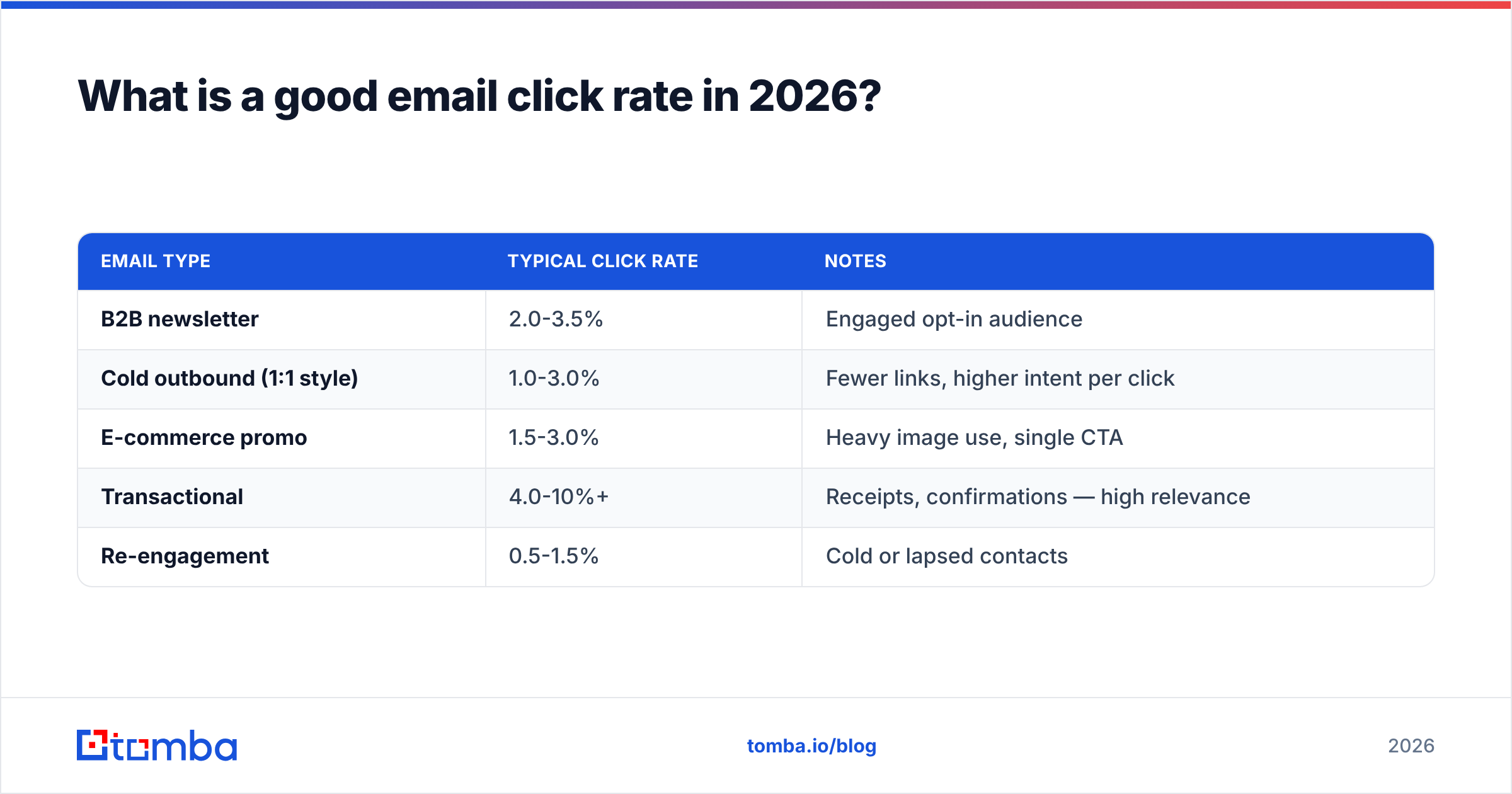
A "good" click rate is 2-5% for broadcast email and 1-3% for cold outbound — but the only benchmark that matters is your own trend line. Industry averages give you a sanity check, not a target.
| Email type | Typical click rate | Notes |
|---|---|---|
| B2B newsletter | 2.0-3.5% | Engaged opt-in audience |
| Cold outbound (1:1 style) | 1.0-3.0% | Fewer links, higher intent per click |
| E-commerce promo | 1.5-3.0% | Heavy image use, single CTA |
| Transactional | 4.0-10%+ | Receipts, confirmations — high relevance |
| Re-engagement | 0.5-1.5% | Cold or lapsed contacts |
Reputable sources like Mailchimp's email benchmarks and HubSpot's marketing statistics publish these by industry; check the vertical that matches yours rather than the blended average, because a 2.1% legal-industry click rate and a 2.1% hobby-newsletter click rate mean very different things.
Two cautions when reading any benchmark:
- Definitions vary. Some vendors report CTR off sends, others off delivered. A 0.5-point gap between two "click rates" can be pure methodology.
- Cold email is its own world. In outbound, a reply often matters more than a click, and overloading a cold email with tracked links can hurt your email deliverability. Measure clicks, but don't optimize a cold sequence into spam to chase them.
How does bad data wreck your click rate calculator?#
Garbage in the denominator quietly distorts every percentage you report. Your formula can be perfect and your number still lies — because the list feeding it is dirty.
Here's how each data problem moves the math:
- Invalid and bouncing addresses inflate your "delivered" count if your platform counts soft bounces as delivered, dragging your click rate down on paper.
- Spam traps and role accounts (info@, sales@) never click but stay in your denominator, suppressing CTR and damaging sender reputation at the same time.
- Bot clicks from corporate security scanners that pre-fetch every link inflate your clicks, faking a CTR spike that maps to zero pipeline.
- Duplicate contacts double-count a single human across two list entries, skewing both unique opens and unique clicks.
- Catch-all domains accept everything at the server, so "delivered" doesn't mean "reached an inbox." Verify these separately.
The fix is upstream of the calculator: build the list from verified, deliverable addresses in the first place. Finding the right contact with an accurate email finder and confirming it lands means your "delivered" number reflects real inboxes — so the click rate you calculate reflects real human behavior. Clean inputs are the difference between a metric you act on and a metric you argue about.
)
How do you calculate click rate manually, step by step?#
Five steps take you from raw campaign exports to a defensible CTR. Do it once by hand so you understand what any automated click rate calculator is doing under the hood.
- Pull your sends. The total number of emails your platform attempted to send for this campaign. Example: 10,000.
- Subtract bounces to get delivered. Sends minus hard and soft bounces. If 400 bounced, delivered = 9,600.
- Count unique clicks. Distinct recipients who clicked at least one tracked link — not total click events. Say 240 people clicked.
- Apply the formula.
(240 / 9,600) × 100 = 2.5%. That's your click rate. - Calculate CTOR alongside it. If 2,400 unique opens were recorded, CTOR =
(240 / 2,400) × 100 = 10%. Now you know the body converted opens to clicks at a healthy clip; the lower 2.5% CTR points you at the open stage.
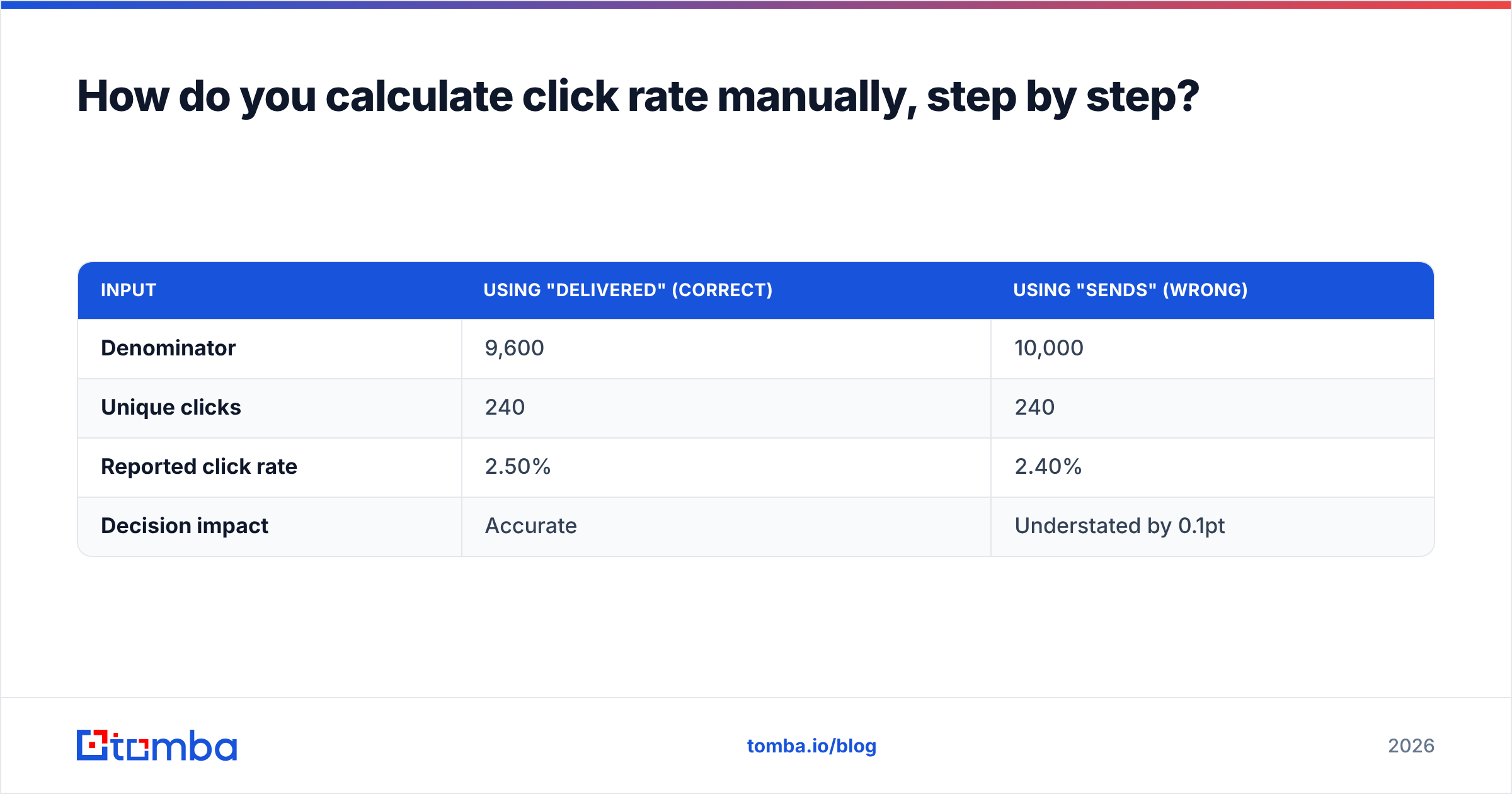
A worked comparison of the same campaign under two denominators:
| Input | Using "delivered" (correct) | Using "sends" (wrong) |
|---|---|---|
| Denominator | 9,600 | 10,000 |
| Unique clicks | 240 | 240 |
| Reported click rate | 2.50% | 2.40% |
| Decision impact | Accurate | Understated by 0.1pt |
That 0.1-point gap looks small on one campaign. Across a quarter of reporting, it's the difference between "we're trending up" and "we're flat" — which is the difference between keeping a budget and losing one.
What should you do once you know your click rate?#
Treat click rate as a diagnostic dial, not a scoreboard. A single number tells you little; the comparison tells you everything.
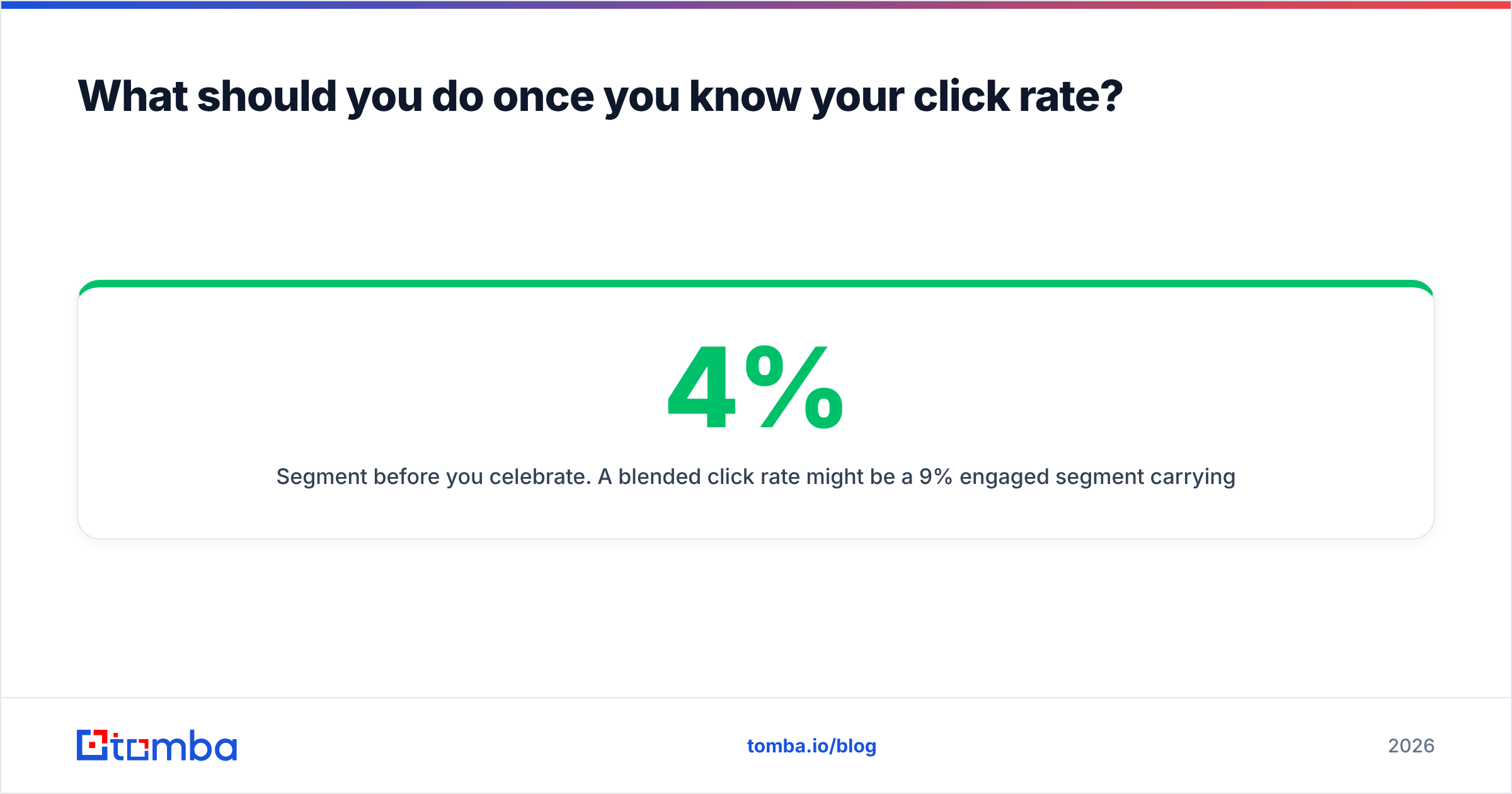
- Segment before you celebrate. A 4% blended click rate might be a 9% engaged segment carrying a 0.5% dead segment. Calculate CTR per segment to find where to prune and where to double down.
- Tie clicks to revenue. A high click rate with no conversions means your landing page or offer breaks the promise the email made. Clicks are a means, not the goal.
- Watch the reply-to-click ratio in outbound. In cold email, clicks can signal interest, but a strong response rate is the metric that pays. Don't trade replies for link clicks.
- A/B test one variable at a time. Subject line, CTA copy, CTA placement, send time. Change one, recompute click rate on each variant, keep the winner. Changing three at once tells you nothing about cause.
The discipline is the same loop every time: measure with clean inputs, compare against your own baseline and a relevant benchmark, change one thing, measure again.
Click rate calculator: frequently asked questions#
Is click rate calculated on sends or delivered emails? Delivered. Using sends includes bounced emails that never reached anyone, which understates your true engagement. Always divide by delivered (sends minus bounces).
What's the difference between click rate and CTOR? Click rate divides clicks by delivered emails; CTOR divides clicks by unique opens. Click rate measures the full funnel; CTOR isolates how compelling your email body was to people who already opened.
Why is my click rate suddenly higher with no extra conversions? Likely bot clicks from corporate security scanners pre-fetching links. Filter machine clicks if your platform supports it, and watch conversions — not raw clicks — as the truth signal.
Should I track clicks in cold email? Yes, but sparingly. Tracked links can hurt deliverability if overused, and in outbound a reply usually matters more than a click. One tracked link per email is a reasonable ceiling.
What's a realistic click rate to aim for? For most B2B email, 2-3% is solid and 5%+ is excellent. Beat your own trailing average before you chase someone else's published benchmark.
Get the inputs right before you run the math#
A click rate calculator is only as honest as the list behind it. The fastest way to a CTR you can defend in a board meeting is a clean, verified contact list — real people at real inboxes, no traps, no duplicates, no catch-all noise inflating your denominator.
That starts at the source. Use the Tomba Email Finder to build prospect lists from verified, deliverable professional addresses, so your "delivered" count reflects genuine inboxes and the click rate you calculate reflects genuine human interest. Check Tomba pricing — there's a free tier with 25 searches a month to test it against your current list before you commit. Fix the data first; the math takes care of itself.
// get started
Find, verify and enrich your first contacts today
Start on the free plan with 25 searches a month, then scale when your team is ready.
Free plan · No credit card required · GDPR & CCPA
// about the author