Click to Call Dialer: The 2026 Guide to Faster Outbound Calls
A click to call dialer turns every phone number into a one-tap call, killing manual dialing and wasted minutes. Here's how to pick, price, and deploy one in 2026.
Click to Call Dialer: The 2026 Guide to Faster Outbound Calls
TL;DR
- A click to call dialer turns any phone number on your screen — in a CRM, a browser tab, or a spreadsheet — into a one-click outbound call, removing manual dialing entirely.
- Reps using click to call typically dial 2–3x more numbers per hour and spend more time talking instead of typing 10 digits.
- The feature spans three tiers: a simple
tel:link, a browser extension that highlights numbers, and a full power/parallel dialer wired into your CRM. - The dialer is only as good as the numbers feeding it. Bad data wastes every click, so pair your dialer with verified B2B phone numbers.
- This guide covers how click to call works, what to look for, a feature-by-feature comparison, pricing, and where the dialer fits in a modern outbound stack.
What is a click to call dialer?#
A click to call dialer is software that places an outbound phone call the instant you click a number, instead of forcing you to read and key in each digit by hand. Think of it like a hyperlink for phone calls: the same way clicking blue text opens a web page, clicking a phone number opens a live call.
That sounds small. It isn't. A sales rep who dials manually loses roughly 10–15 seconds per number to reading, typing, and fixing fat-finger mistakes. Across 100 dials a day, that's 20–25 minutes of pure dialing friction — time that produces zero conversations. Multiply by a team of ten and you're burning entire selling days every week on a task a single click solves.
Click to call also reduces a quieter cost: context switching. When a rep looks away from the prospect's record to punch numbers into a desk phone, they drop the thread. The notes, the LinkedIn tab, the last email — all of it leaves their attention. A click to call dialer keeps the call action inside the same screen as the data, so the rep stays in the conversation, not in the keypad.
)
How does click to call actually work?#
Under the hood, a click to call dialer connects a clickable trigger to a voice channel. There are three common implementations, and they differ a lot in capability.
tel:hyperlinks — The simplest form. A phone number is wrapped in atel:link so clicking it hands the call to your default softphone or mobile app. Zero cost, zero analytics, and it only works where the link exists.- Browser extensions — A Chrome or Edge extension scans every page, detects phone-number patterns, and makes them clickable on the fly. This works on CRMs, web apps, and even random prospect websites. Many pair detection with logging.
- Embedded CRM dialers — A dialer baked directly into HubSpot, Salesforce, Pipedrive, or a sales-engagement tool. Click a contact, the call fires through a VoIP line, and the disposition, recording, and notes log automatically against the record.
- Power and parallel dialers — The top tier. The system auto-advances through a list, dials one number after another (power) or several at once (parallel), and only connects the rep when a human answers. Click to call here is the on-ramp to fully automated calling.
Most teams start at tier 2 or 3 and graduate to power dialing once call volume justifies it. The mechanics matter less than the outcome: fewer seconds between deciding to call and actually talking.
Why does a click to call dialer raise connect rates?#
It raises connect rates indirectly, by raising attempt volume and timing precision. Connect rate per dial doesn't magically improve because you clicked instead of typed — but the number of well-timed attempts does, and that's what drives conversations.
Here's the chain. Reps procrastinate on dialing because each call carries small friction and the fear of rejection. Lower the friction to a single click and the psychological barrier drops, so more dials happen. More dials in the prospect's local business hours means more pickups. According to widely cited outbound benchmarks compiled by tools like HubSpot, it takes multiple touches to reach most B2B buyers, so the team that completes its call list reaches more decision-makers — full stop.
There's a data-quality multiplier too. A dialer that fires instantly is wasted if the number is wrong. Disconnected lines, switchboard numbers, and stale direct dials all eat clicks and crater rep morale. This is exactly why your dialer and your data sourcing have to be treated as one system, not two. Verified, direct-dial mobile numbers — sourced through a phone finder and confirmed with a phone validator — turn each click into a real shot at a conversation instead of a dead tone.
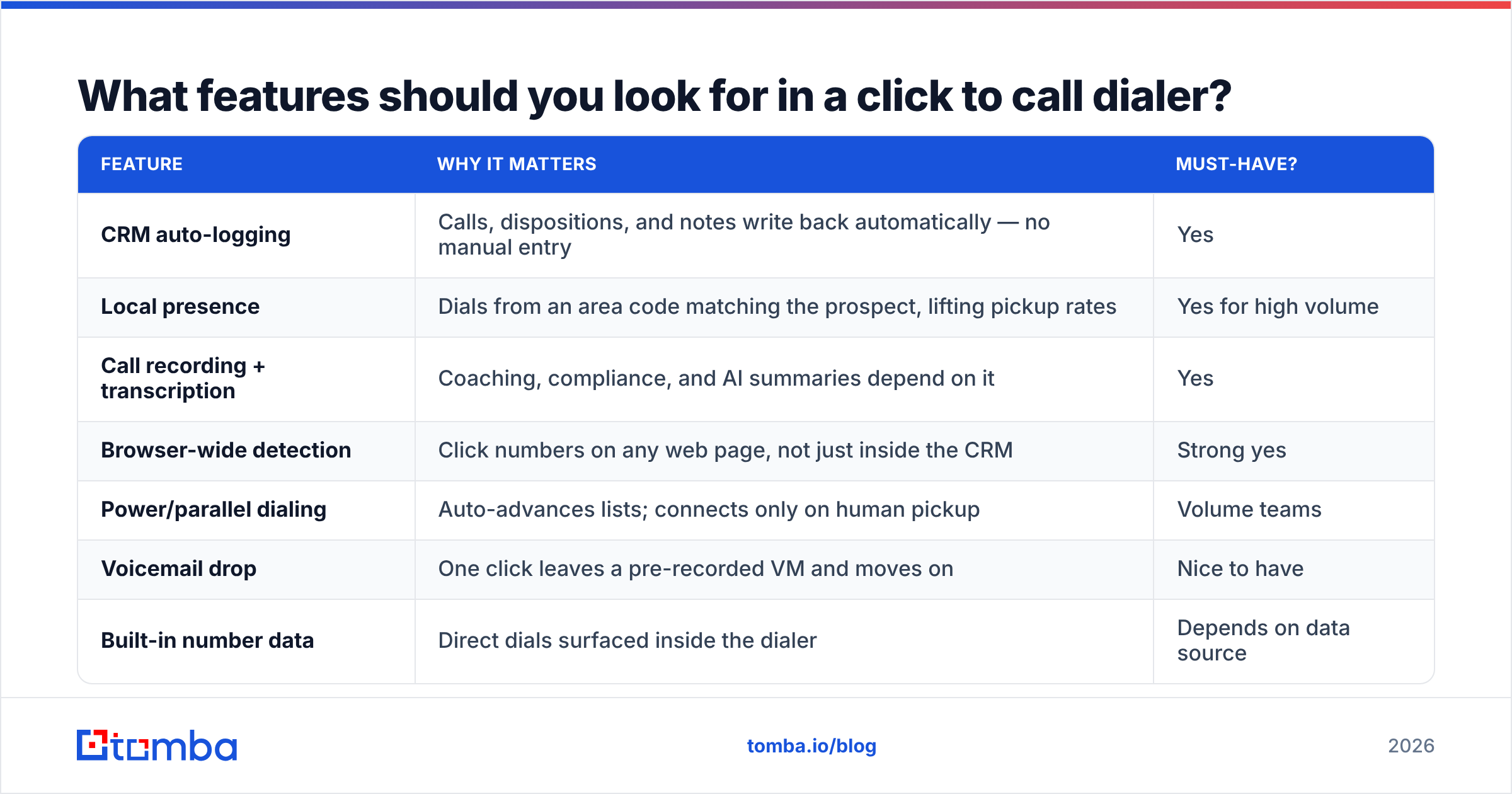
What features should you look for in a click to call dialer?#
Not all dialers earn their seat in your stack. Score candidates against the attributes below before you commit budget.
| Feature | Why it matters | Must-have? |
|---|---|---|
| CRM auto-logging | Calls, dispositions, and notes write back automatically — no manual entry | Yes |
| Local presence | Dials from an area code matching the prospect, lifting pickup rates | Yes for high volume |
| Call recording + transcription | Coaching, compliance, and AI summaries depend on it | Yes |
| Browser-wide detection | Click numbers on any web page, not just inside the CRM | Strong yes |
| Power/parallel dialing | Auto-advances lists; connects only on human pickup | Volume teams |
| Voicemail drop | One click leaves a pre-recorded VM and moves on | Nice to have |
| Built-in number data | Direct dials surfaced inside the dialer | Depends on data source |
| Analytics dashboard | Dials, connects, talk time, conversion per rep | Yes |
The two non-negotiables are CRM auto-logging and call recording. Without logging, reps spend the time they saved on dialing re-keying activity. Without recording, you can't coach or feed AI tooling. Everything else scales with call volume.
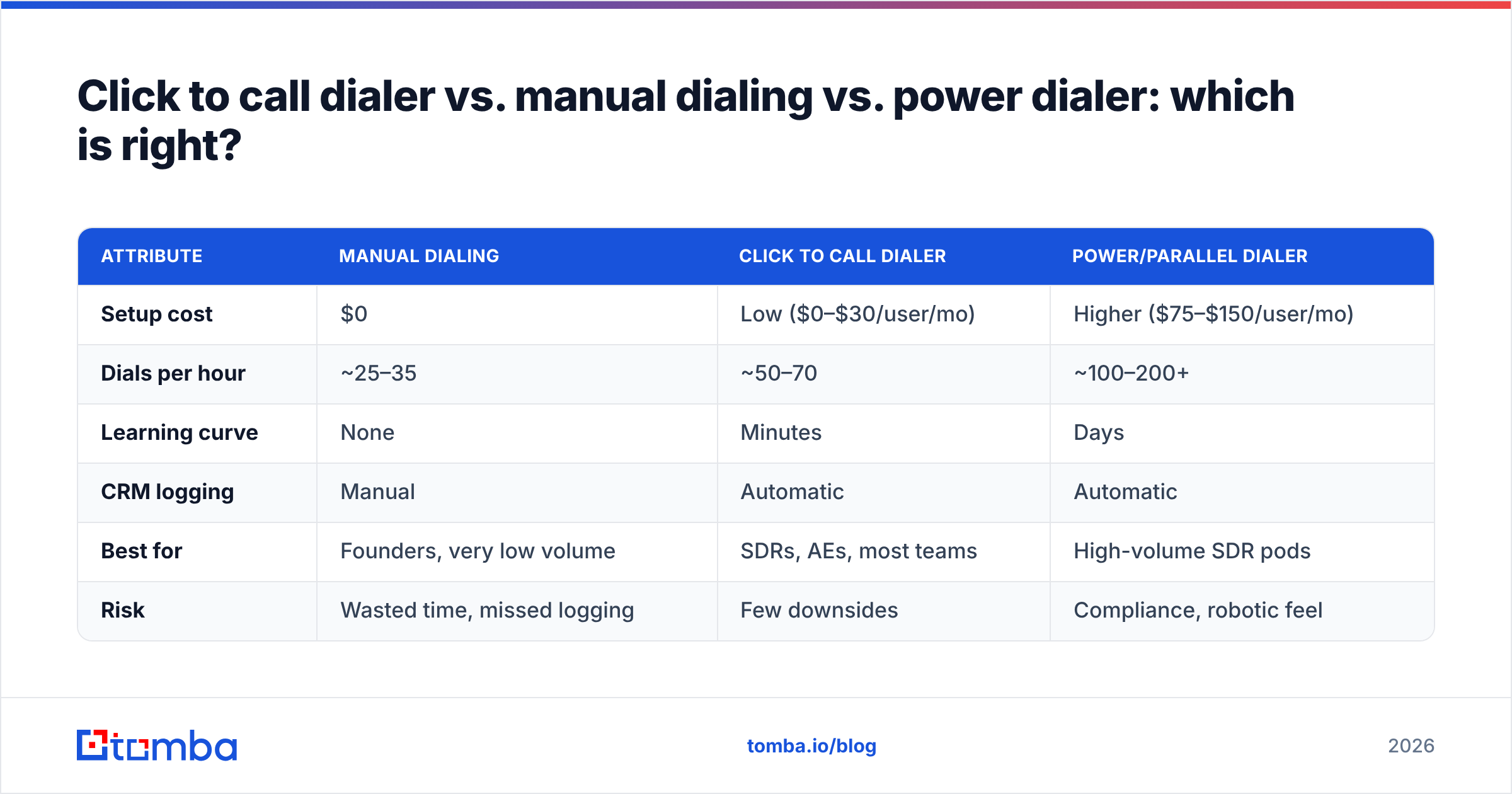
Click to call dialer vs. manual dialing vs. power dialer: which is right?#
Pick by call volume and team maturity. Here's the honest trade-off across the three common setups.
| Attribute | Manual dialing | Click to call dialer | Power/parallel dialer |
|---|---|---|---|
| Setup cost | $0 | Low ($0–$30/user/mo) | Higher ($75–$150/user/mo) |
| Dials per hour | ~25–35 | ~50–70 | ~100–200+ |
| Learning curve | None | Minutes | Days |
| CRM logging | Manual | Automatic | Automatic |
| Best for | Founders, very low volume | SDRs, AEs, most teams | High-volume SDR pods |
| Risk | Wasted time, missed logging | Few downsides | Compliance, robotic feel |
For most B2B sales teams, the click to call dialer is the sweet spot. It captures the bulk of the time savings without the compliance overhead, area-code complexity, or "machine-gun" feel that parallel dialers can introduce when poorly tuned. Move up to power dialing only when a dedicated SDR team is making hundreds of dials a day and the data and scripts are already dialed in.
)
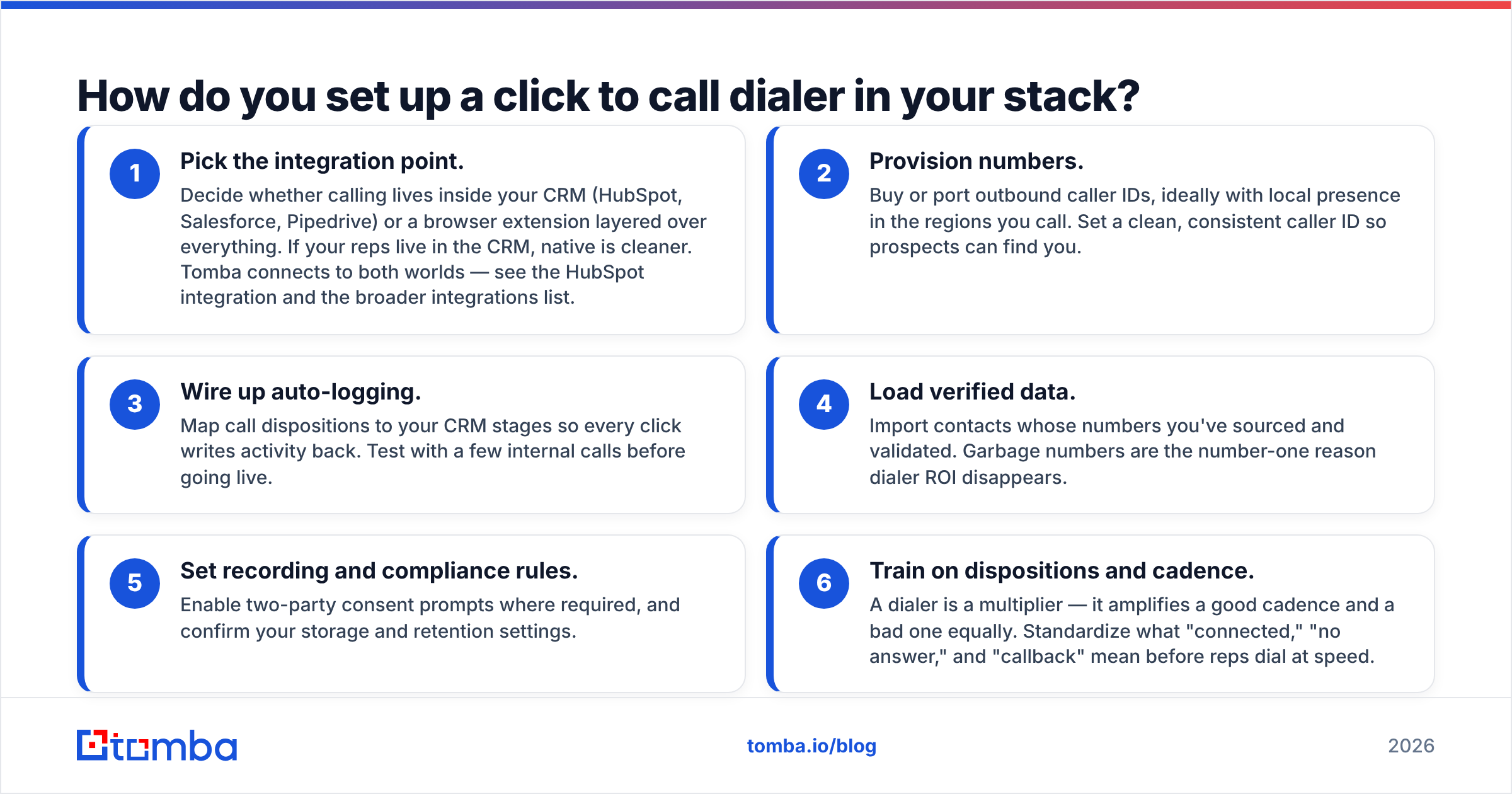
How do you set up a click to call dialer in your stack?#
A working setup takes about an afternoon. Follow this sequence and you avoid the usual rework.
- Pick the integration point. Decide whether calling lives inside your CRM (HubSpot, Salesforce, Pipedrive) or a browser extension layered over everything. If your reps live in the CRM, native is cleaner. Tomba connects to both worlds — see the HubSpot integration and the broader integrations list.
- Provision numbers. Buy or port outbound caller IDs, ideally with local presence in the regions you call. Set a clean, consistent caller ID so prospects can find you.
- Wire up auto-logging. Map call dispositions to your CRM stages so every click writes activity back. Test with a few internal calls before going live.
- Load verified data. Import contacts whose numbers you've sourced and validated. Garbage numbers are the number-one reason dialer ROI disappears.
- Set recording and compliance rules. Enable two-party consent prompts where required, and confirm your storage and retention settings.
- Train on dispositions and cadence. A dialer is a multiplier — it amplifies a good cadence and a bad one equally. Standardize what "connected," "no answer," and "callback" mean before reps dial at speed.
Step 4 is where teams cut corners and pay for it. Sourcing direct dials at scale is its own discipline; the bulk lead generation workflow and a real B2B database keep the dialer fed with numbers that actually ring a human.
Where do the phone numbers come from?#
This is the question that separates dialers that produce pipeline from dialers that produce frustration. A click to call dialer is a delivery mechanism — it does not, on its own, know a single prospect's number. You supply the data.
You have three sourcing paths, and most teams blend them:
- Inside your CRM already. Numbers your reps and marketing captured over time. Highest intent, but coverage is thin and records decay fast — people change roles and phones constantly.
- Manual research. Reps hunt LinkedIn, company sites, and signatures. Accurate when done well, but it doesn't scale past a handful of accounts per day.
- A dedicated data tool. Software that returns direct dials and mobiles from a name, company, or domain, then verifies them before you call. This is how you fill a dialer at speed.
For the third path, a phone finder pulls B2B phone numbers tied to verified business contacts, and data enrichment backfills missing numbers across an existing list. Because many outbound plays start from an email-found contact, teams often run an email finder and a phone lookup from the same record — one workflow, both channels covered. Vendor-neutral review sites like G2 are a good place to sanity-check any data provider's accuracy claims before you buy.
A quick rule: validate before you dial. Run numbers through a phone validator so reps never burn a click — or worse, a connect — on a dead line.
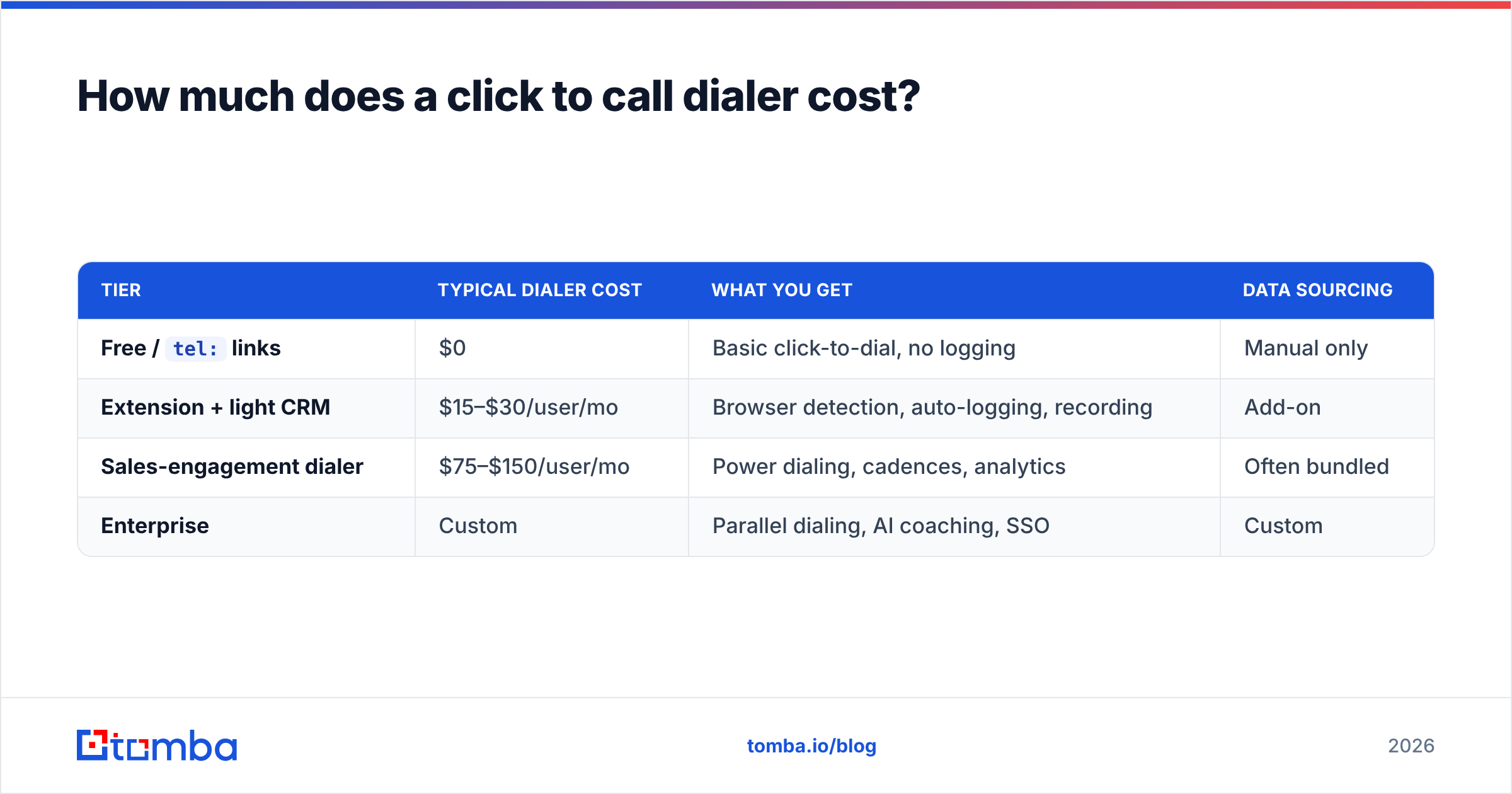
How much does a click to call dialer cost?#
Pricing splits into the dialer software itself and the data that feeds it. Budget for both, because one without the other underperforms.
| Tier | Typical dialer cost | What you get | Data sourcing |
|---|---|---|---|
Free / tel: links |
$0 | Basic click-to-dial, no logging | Manual only |
| Extension + light CRM | $15–$30/user/mo | Browser detection, auto-logging, recording | Add-on |
| Sales-engagement dialer | $75–$150/user/mo | Power dialing, cadences, analytics | Often bundled |
| Enterprise | Custom | Parallel dialing, AI coaching, SSO | Custom |
On the data side, Tomba keeps the numbers affordable so the dialer never runs dry. The Tomba pricing ladder runs from a Free tier (25 searches/month) to Starter at $49/month, Growth at $99/month, Pro at $249/month, and custom Enterprise. That means a two-rep team can validate a click to call workflow end to end — find numbers, verify them, dial — for the price of a single mid-tier seat, then scale data volume only as the calling proves out.
The cheapest mistake is paying for a premium dialer and feeding it free, unverified scraped numbers. You'll pay per seat for reps to dial disconnected lines. Spend the smaller amount on accurate data first; it pays back faster than any dialer feature.
Does a click to call dialer work for inbound and support, not just sales?#
Yes, and it's underrated outside sales. Anywhere a human reads a phone number off a screen and then calls it, click to call removes friction.
- Customer success teams click straight from a renewal or health-score record to call an at-risk account.
- Recruiting teams dial candidates from an ATS without copy-pasting between tabs.
- Support escalations call customers back from the ticket itself, with full context on screen.
- Collections and operations work down lists where every saved second compounds across thousands of contacts.
The common thread is the same as in sales: the call should start where the data lives, and the data should be correct. A reverse lookup via reverse email lookup can even surface a contact's profile and number when all you have is an inbound email address — handy for support and CS teams fielding messages from unknown senders.
What are the common mistakes to avoid?#
Even a great dialer underperforms when these traps go unaddressed:
- Dialing unverified numbers. The single biggest ROI killer. Validate first, always.
- No local presence on high-volume lists. Out-of-area caller IDs get ignored; pickup rates fall.
- Skipping disposition discipline. If reps don't tag outcomes consistently, your analytics and follow-up cadences become noise.
- Treating the dialer as the whole system. It's one layer. Data sourcing, cadence design, and CRM hygiene matter just as much.
- Ignoring compliance. Recording and consent rules vary by region. Configure them before you scale, not after a complaint.
Fix these and the dialer does what it's supposed to: get reps talking to more of the right people, faster.
The bottom line#
A click to call dialer is one of the highest-ROI, lowest-risk upgrades an outbound team can make in 2026. It removes the dumbest tax in sales — manually typing phone numbers — and hands that time back to selling. But the dialer is a multiplier, not a miracle. Point it at bad data and you'll just reach dead lines faster.
Start with the data. Use Tomba's phone finder to source verified, direct-dial B2B numbers, run them through the phone validator so every click connects, and pair them with the Tomba Email Finder to work email and phone from the same record. Spin up the Free tier (25 searches/month) to feed your dialer real numbers today, and scale through Starter at $49/month only once the calls turn into pipeline. Your reps will dial more, talk more, and waste a lot fewer clicks.
// get started
Find, verify and enrich your first contacts today
Start on the free plan with 25 searches a month, then scale when your team is ready.
Free plan · No credit card required · GDPR & CCPA
// about the author