Clickback vs EasyLeadz 2026: Which B2B Lead Tool Wins?
Clickback sends to cold lists; EasyLeadz finds direct dials. They solve different problems. Here's how the two stack up on data, pricing, and fit in 2026 — and where a finder like Tomba beats both.
People type "Clickback vs EasyLeadz" expecting a head-to-head between two versions of the same tool. They aren't. One blasts email to cold purchased lists; the other digs out mobile numbers for sales reps. Picking between them without understanding that gap is how teams waste a quarter's budget on the wrong engine.
TL;DR — Clickback vs EasyLeadz at a glance#
- Clickback is a cold-email marketing platform built to send to purchased or rented B2B lists at scale, with built-in list validation and CAN-SPAM compliance tooling.
- EasyLeadz is a contact-intelligence tool — its "Mr. E" product finds direct-dial mobile numbers and emails from LinkedIn profiles and company domains.
- They overlap only at the edges: both feed your top-of-funnel, but one is a sending engine and the other is a data engine.
- Neither is a precision email finder. If your real need is verified, current work emails by name and domain, a dedicated email finder like Tomba usually beats both on cost-per-valid-contact.
- Best move for most teams in 2026: source contacts with an accurate finder + verifier, then send through a deliverability-first platform — not a cold-list blaster.
What is Clickback and who is it for?#
Clickback is a B2B email lead-generation platform aimed at marketers who want to email cold audiences — people who never opted in. That's the whole pitch: take a purchased or third-party list, run it through Clickback's validation and "ICP" filtering, then send mass campaigns that (in theory) stay compliant with CAN-SPAM and CASL.
The product leans into a use case most senders avoid. Sending to cold, non-opt-in lists is legally permitted in the US under CAN-SPAM if you follow the rules, but it carries real email deliverability risk. Clickback's answer is heavy list hygiene up front and dedicated sending infrastructure so your primary domain doesn't absorb the blowback.
Who actually benefits:
- Volume-first demand-gen teams running broad awareness plays to large purchased lists.
- Agencies managing cold outreach for clients who already accept the compliance trade-offs.
- Marketers in regions/industries where cold B2B email is an established channel and the list is the asset.
If your motion is precise, one-to-one sales outreach, Clickback is overkill and the cold-list philosophy works against you.

What is EasyLeadz and who is it for?#
EasyLeadz is a contact-finding tool. Its flagship "Mr. E by EasyLeadz" Chrome extension sits on top of LinkedIn and company websites and surfaces direct phone numbers and email addresses for the person you're viewing. The headline draw is mobile numbers — direct dials that most email-only databases don't carry.
It's built for the opposite persona from Clickback. EasyLeadz users are SDRs, recruiters, and founders doing targeted, account-by-account prospecting who need a number to call or a personal email to write. There's no mass-sending engine; the output is data you push into your CRM or dialer.
Where it shines: cold calling motions and markets like India and APAC, where EasyLeadz has historically had stronger mobile coverage than US-centric databases. Where it struggles: credit costs add up fast at scale, and email accuracy is inconsistent compared with tools that verify before they hand you the address — which is why pairing any finder with a real email verifier matters.
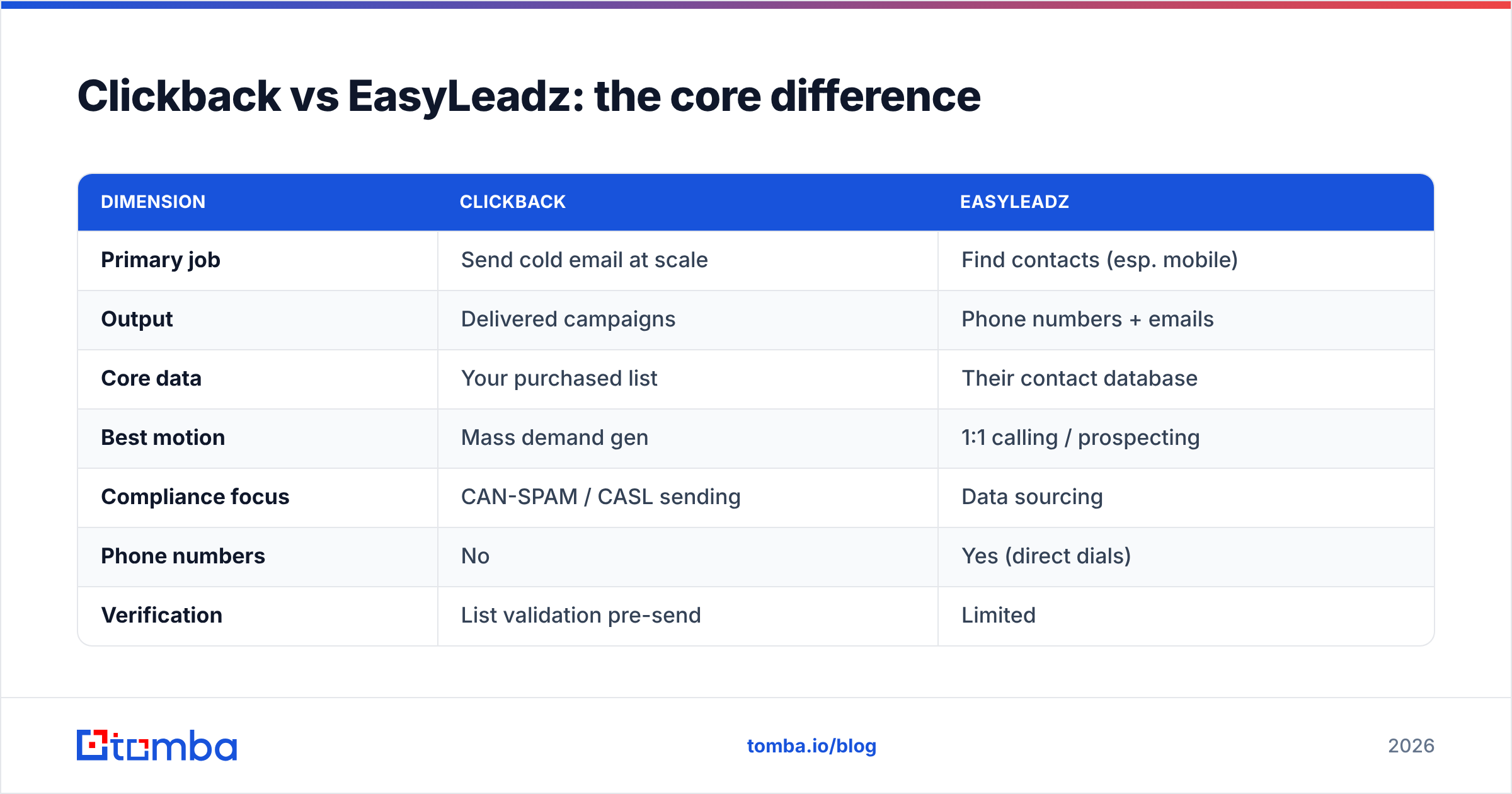
Clickback vs EasyLeadz: the core difference#
Here's the distinction in one table. Read it before you compare prices, because price means nothing if the tool solves a problem you don't have.
| Dimension | Clickback | EasyLeadz |
|---|---|---|
| Primary job | Send cold email at scale | Find contacts (esp. mobile) |
| Output | Delivered campaigns | Phone numbers + emails |
| Core data | Your purchased list | Their contact database |
| Best motion | Mass demand gen | 1:1 calling / prospecting |
| Compliance focus | CAN-SPAM / CASL sending | Data sourcing |
| Phone numbers | No | Yes (direct dials) |
| Verification | List validation pre-send | Limited |
| Strong regions | North America | India / APAC + global |
The takeaway: Clickback is a sending platform, EasyLeadz is a data platform. Comparing them feature-for-feature is like comparing a delivery truck to a warehouse. You may need both — but you choose them for different reasons, and most teams discover they actually need a third thing: accurate, verified contact data that feeds whatever sending tool they already trust.
How do they compare on pricing in 2026?#
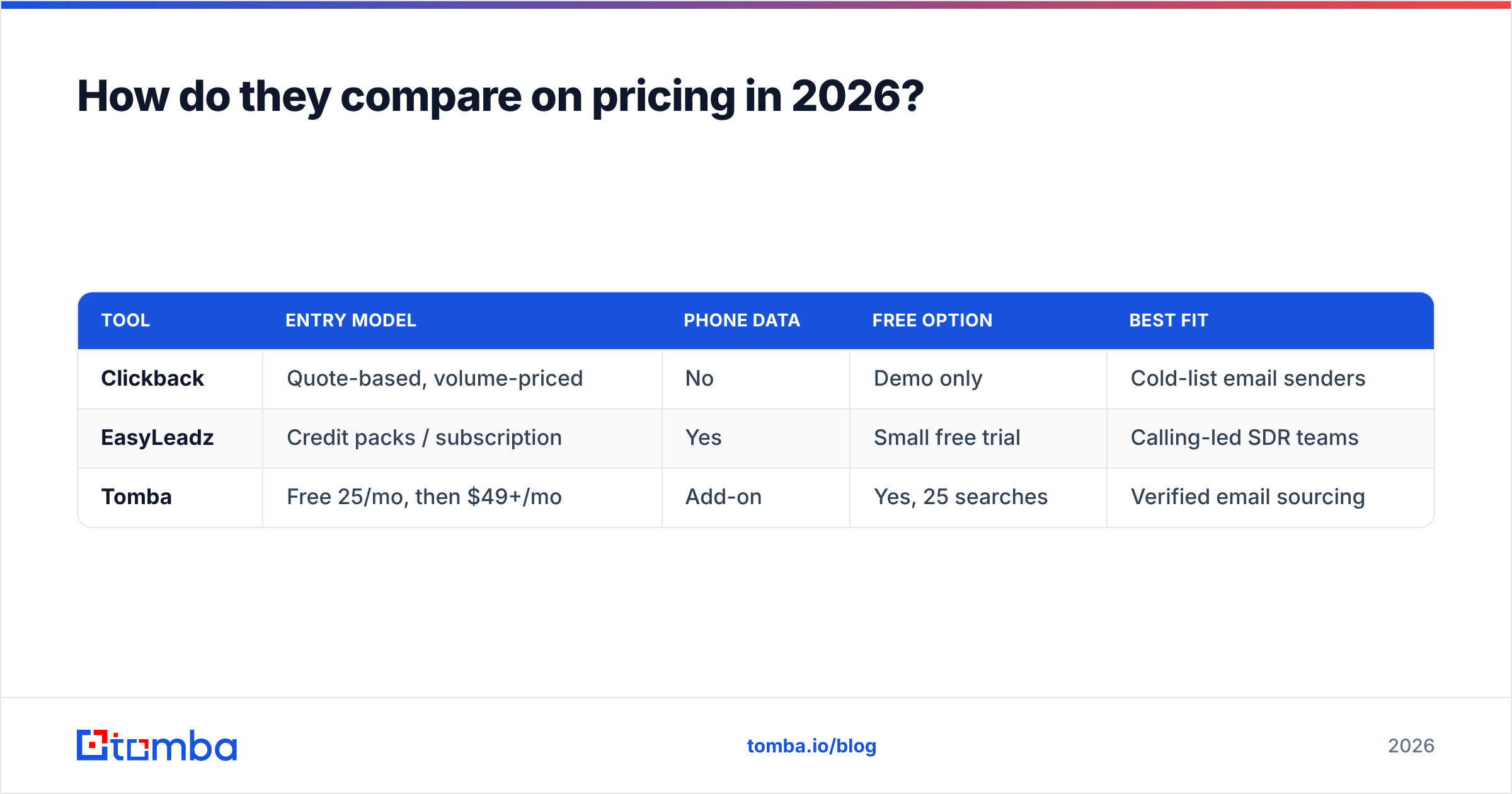
Both vendors keep pricing behind sales conversations more than published tiers, which is itself a signal — neither is built for self-serve, pay-as-you-go buyers. Here's the practical shape of each, with a verified-finder benchmark for context.
| Tool | Entry model | Phone data | Free option | Best fit |
|---|---|---|---|---|
| Clickback | Quote-based, volume-priced | No | Demo only | Cold-list email senders |
| EasyLeadz | Credit packs / subscription | Yes | Small free trial | Calling-led SDR teams |
| Tomba | Free 25/mo, then $49+/mo | Add-on | Yes, 25 searches | Verified email sourcing |
Clickback's cost scales with send volume and the infrastructure it provisions for you — expect a sales-led quote, not a credit card checkout. EasyLeadz sells credits, and the gotcha is that you can burn credits on contacts that turn out stale or unverified. With a transparent finder, you see Tomba pricing up front: a free tier of 25 searches a month, Starter at $49/mo, Growth at $99/mo, and Pro at $249/mo — and every result runs through verification so you're not paying for guesses.
If predictable cost-per-valid-contact is your metric, the credit-roulette model of contact databases tends to lose to flat, verified pricing.
Which has better data accuracy?#
Accuracy depends on what you're measuring, and the two tools fail in different places.
- Clickback doesn't find data — it validates the list you bring. So accuracy is really about how good your purchased list was, plus how aggressively Clickback scrubs it. Garbage in, validated-garbage out.
- EasyLeadz finds data, and its mobile coverage can be genuinely strong, especially outside North America. But email accuracy is its weak spot — addresses are often pattern-guessed rather than verified against a live mail server.
This is the crux of the whole comparison. A direct-dial number EasyLeadz pulls might be excellent, while the email it hands you alongside it bounces. And a Clickback campaign is only as clean as the list you fed it.
The fix is the same in both cases: separate finding from sending, and verify everything in between. Source emails with a tool that confirms deliverability — including the tricky catch-all verifier cases that wreck bounce rates — before a single message goes out. That's where a verification-first finder pulls ahead of both Clickback's list-validation and EasyLeadz's find-and-hope approach.

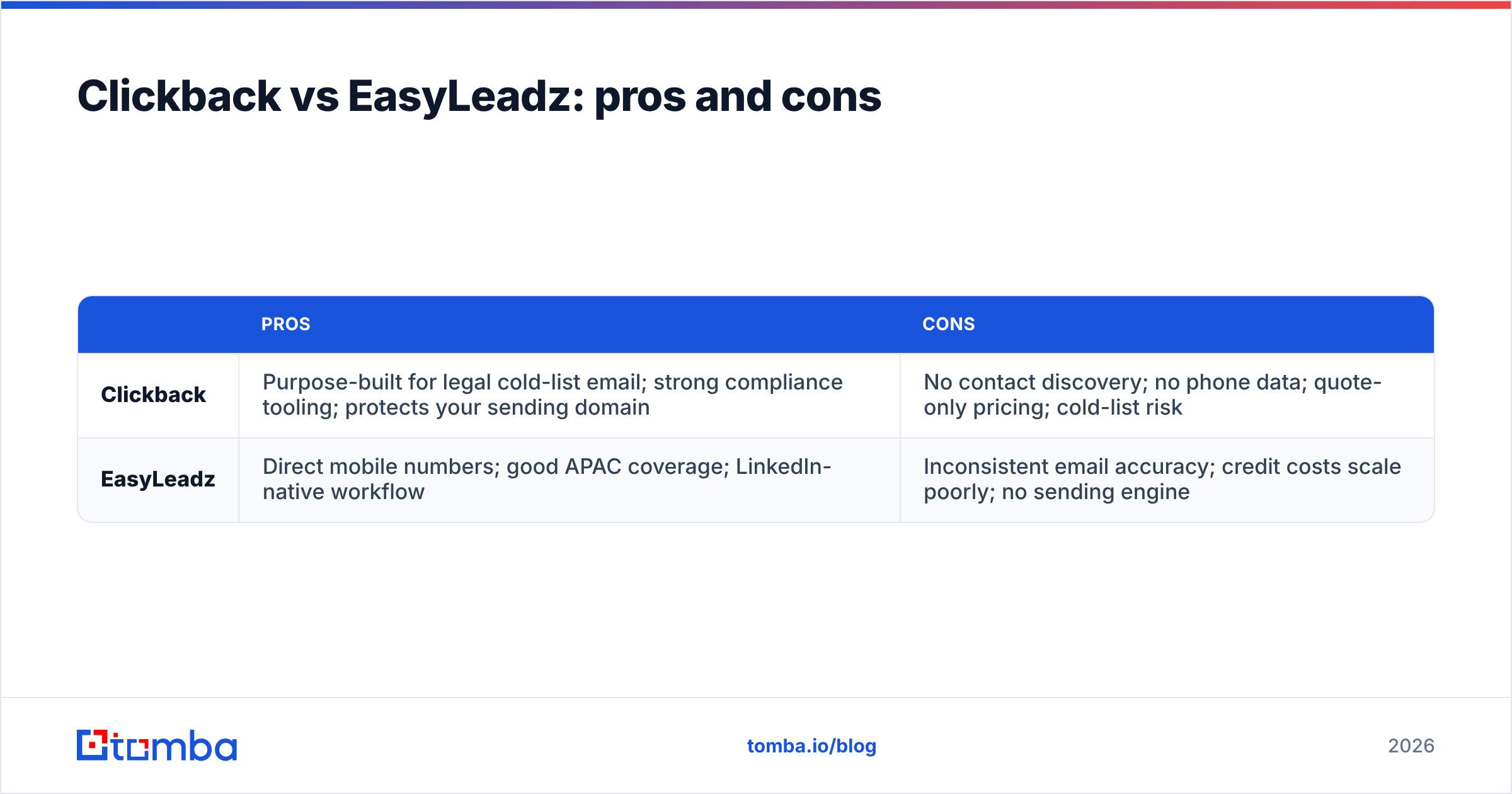
Clickback vs EasyLeadz: pros and cons#
| Pros | Cons | |
|---|---|---|
| Clickback | Purpose-built for legal cold-list email; strong compliance tooling; protects your sending domain | No contact discovery; no phone data; quote-only pricing; cold-list risk |
| EasyLeadz | Direct mobile numbers; good APAC coverage; LinkedIn-native workflow | Inconsistent email accuracy; credit costs scale poorly; no sending engine |
Neither list has a clear knockout. They're strong at their one job and absent everywhere else. That's fine — niche tools should be narrow. The mistake is expecting either to be your full lead-gen stack.
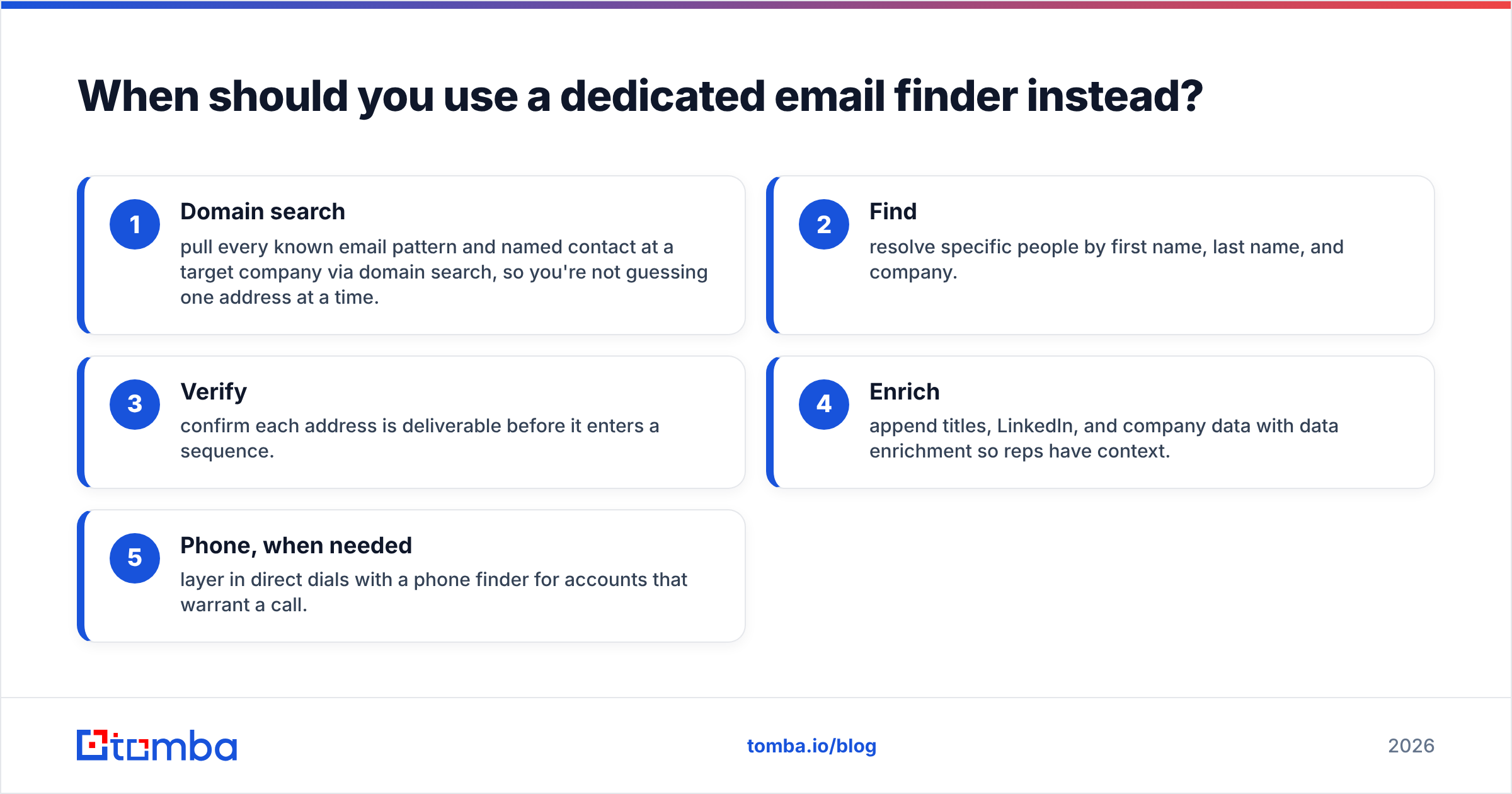
When should you use a dedicated email finder instead?#
Use a dedicated finder whenever the bottleneck is getting accurate, current work emails by name and domain — which, for most B2B sales and marketing teams, is the actual bottleneck. Cold-list sending and mobile dialing are downstream of having good contact data, not substitutes for it.
A focused finder workflow looks like this:
- Domain search — pull every known email pattern and named contact at a target company via domain search, so you're not guessing one address at a time.
- Find — resolve specific people by first name, last name, and company.
- Verify — confirm each address is deliverable before it enters a sequence.
- Enrich — append titles, LinkedIn, and company data with data enrichment so reps have context.
- Phone, when needed — layer in direct dials with a phone finder for accounts that warrant a call.
This is the part Clickback assumes you've already solved (it wants a finished list) and the part EasyLeadz does inconsistently (strong on phones, shaky on email). A finder built around verification closes that gap, and it plugs into whatever you use for sending — Clickback included.
For teams choosing tools this year, the comparison table on G2 across these categories is worth scanning to confirm fit; you can read real-user reviews of EasyLeadz on G2 and check each vendor's own claims at clickback.com and easyleadz.com before committing budget.
Which should you choose: Clickback, EasyLeadz, or something else?#
Decide by motion, not by feature count:
- Choose Clickback if you run high-volume cold-email demand gen to purchased lists and you've accepted the compliance and deliverability trade-offs that come with it. It's the specialist for that exact play.
- Choose EasyLeadz if your team lives in the dialer, sells into APAC, and needs direct mobile numbers more than anything else. Its phone coverage is its moat.
- Choose a dedicated finder + verifier if your real problem is sourcing accurate, deliverable B2B emails at a predictable cost — the situation most teams are actually in. Then send through whatever platform fits your volume.
The honest answer for the majority of "Clickback vs EasyLeadz" searchers is neither, by itself. You need clean, verified contact data first. The sending tool and the dialer are downstream choices that only pay off once the data underneath them is right.
Make your contact data the strong part of the stack#
Clickback and EasyLeadz both assume the hard part is already done. It usually isn't. Before you pay for a cold-list sender or a credit-based phone database, lock down the layer they both depend on: accurate, verified emails you can actually reach.
Start free with the Tomba Email Finder — 25 searches a month at no cost, every result verified before it reaches you, with domain search, enrichment, and phone lookup in the same platform. Source the data right, and Clickback, EasyLeadz, or any tool you bolt on afterward works better for it.
// get started
Find, verify and enrich your first contacts today
Start on the free plan with 25 searches a month, then scale when your team is ready.
Free plan · No credit card required · GDPR & CCPA
// about the author