Clickback vs FinalScout 2026: Which Cold Email Tool Wins?
Clickback sends compliant cold email at scale; FinalScout finds and writes it with AI. Here's an honest 2026 breakdown of pricing, features, and the data layer both depend on.
Clickback vs FinalScout: The 2026 Comparison
Picking between Clickback and FinalScout is confusing because people frame them as rivals when they actually solve different halves of the same problem. One sends cold email at scale; the other finds the addresses and drafts the copy. This guide untangles which is which, where each is strong, and where you still need a third tool to make either one work.
TL;DR#
- Clickback is a B2B cold-email sending platform built around CASL/CAN-SPAM compliance — it's for blasting compliant outreach to cold lists at volume, not for finding contacts.
- FinalScout is an AI email-finding and writing tool, heavily tied to LinkedIn, that extracts verified addresses and drafts personalized messages.
- They overlap less than the "vs" suggests: many teams could run both, with FinalScout (or a better data source) feeding leads into Clickback.
- Pricing favors FinalScout for solo founders; Clickback is an enterprise-leaning spend with managed onboarding.
- Neither tool is a best-in-class data provider — accuracy is the weak point, and that's where a dedicated email finder like Tomba changes the math.
What is Clickback?#
Clickback is an email lead-generation platform aimed at marketers who want to email cold, purchased, or list-based audiences legally. Its flagship product, Clickback MAIL, is engineered to push promotional email to recipients who never opted in, while staying inside Canadian (CASL) and US (CAN-SPAM) rules. That's a narrow, real niche: most mainstream ESPs (Mailchimp, HubSpot) ban cold sending outright and will suspend you for it.
The platform's value is the sending infrastructure — IP warming, suppression handling, bounce processing, and reporting tuned for cold lists. You bring the list. Clickback does not meaningfully find contacts for you; it assumes you already have data or are buying it. If your list quality is poor, Clickback will happily deliver your campaign straight into spam folders, because the tool can't fix bad data it never sourced.
You can read more about how sending reputation works in Tomba's email deliverability glossary entry — it's the single biggest factor Clickback users underestimate.
What is FinalScout?#
FinalScout is the opposite end of the funnel. It's an AI-driven tool that finds professional email addresses — primarily by scraping and matching LinkedIn profiles — and then uses ChatGPT-style generation to write tailored outreach. Its pitch is "find the email and write the email" in one motion, with claimed deliverability validation on the addresses it returns.
Where Clickback assumes you have a list, FinalScout builds the list. It leans hard on LinkedIn workflows: you browse profiles or search results, and FinalScout reveals business emails it can match. That makes it popular with recruiters, founders, and solo SDRs who live inside LinkedIn already and want to skip manual prospecting.
The trade-off is the same one every LinkedIn-tied finder faces: coverage and accuracy swing wildly by region and seniority, and LinkedIn's own anti-scraping changes can disrupt the workflow overnight. If you want a more resilient approach, a domain-first domain search doesn't depend on any single social network staying friendly.

Clickback vs FinalScout: How do they actually compare?#
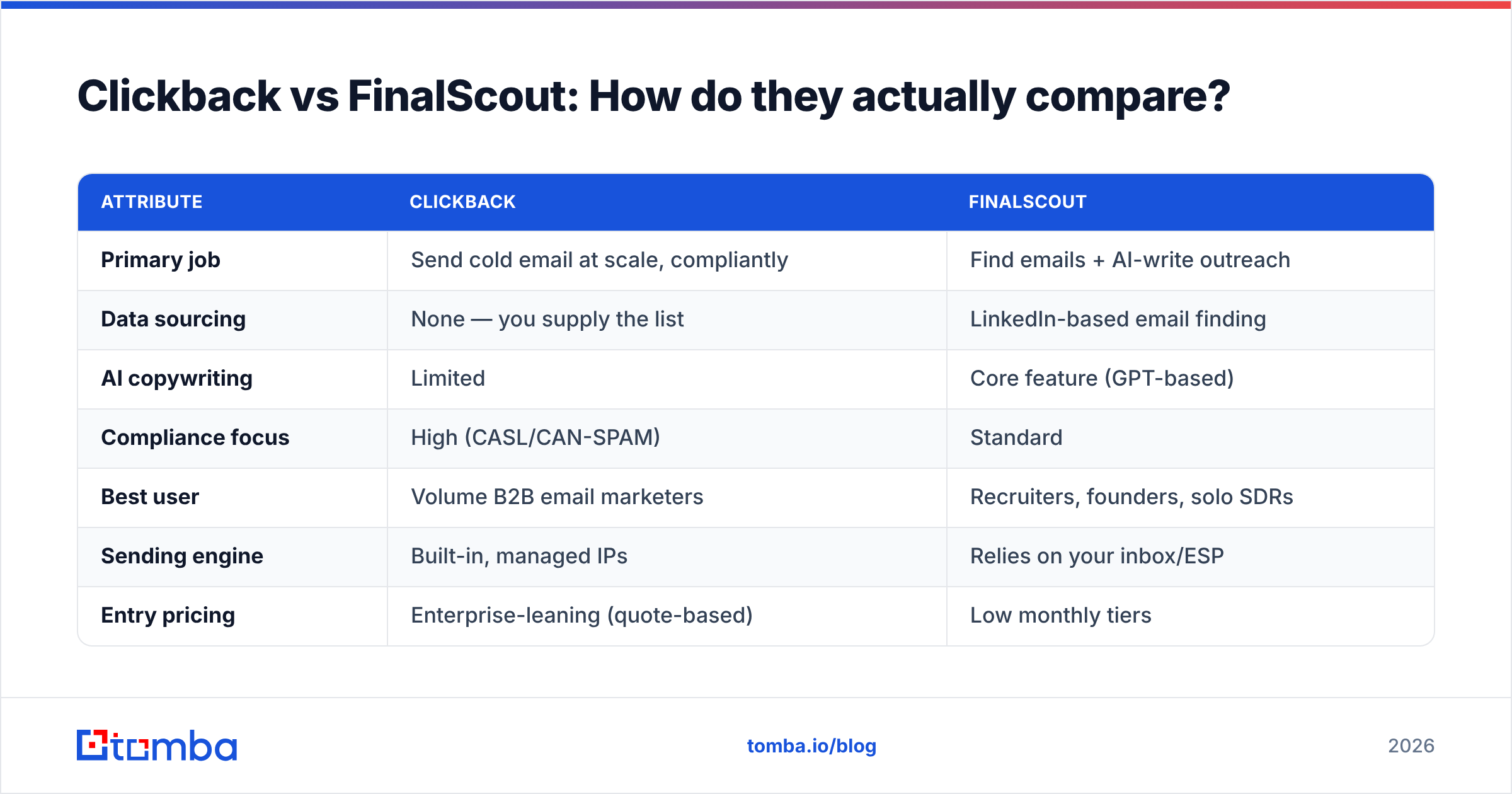
Here's the honest core-concept breakdown. Read the "primary job" row first — it explains every other difference.
| Attribute | Clickback | FinalScout |
|---|---|---|
| Primary job | Send cold email at scale, compliantly | Find emails + AI-write outreach |
| Data sourcing | None — you supply the list | LinkedIn-based email finding |
| AI copywriting | Limited | Core feature (GPT-based) |
| Compliance focus | High (CASL/CAN-SPAM) | Standard |
| Best user | Volume B2B email marketers | Recruiters, founders, solo SDRs |
| Sending engine | Built-in, managed IPs | Relies on your inbox/ESP |
| Entry pricing | Enterprise-leaning (quote-based) | Low monthly tiers |
| Free tier | No | Limited free credits |
| Verification | Basic list hygiene | Claims validated emails |
Notice the rows barely conflict. Clickback's "none" on data sourcing and FinalScout's "relies on your inbox" on sending are the tell: each is missing what the other has. The real decision isn't "which one" — it's "which gap do I have, and what fills the rest of the stack."
Which one fits which workflow?#
To make this concrete, here are the three scenarios that cover most buyers:
- You have a big purchased list and need to send legally. Clickback wins outright. FinalScout has no sending engine that matches Clickback's compliance-grade infrastructure for cold blasts.
- You live in LinkedIn and need contacts plus copy, fast. FinalScout wins. Clickback does nothing for you here — it can't find a single address.
- You're building targeted outbound and care about reply rates. Neither is ideal alone. You want accurate data first, then a sender. This is the most common real situation, and it's where a dedicated finder + verifier beats both.
If you map your week to one of those, the answer falls out immediately. The mistake is buying one tool expecting it to cover all three.
How accurate is the data behind each tool?#
Accuracy is where both tools quietly disappoint, and it's the thing that actually decides whether your campaign makes money. FinalScout's LinkedIn matching produces a lot of addresses, but a meaningful share are catch-all, role-based, or simply wrong — and Clickback can't tell the difference, it just sends to whatever you load.
A bounced send doesn't just waste a credit. It dents your sender reputation, and a damaged domain reputation tanks the deliverability of every future campaign, including the good leads. That's why the data layer matters more than the sending UI. The order of operations that actually works:
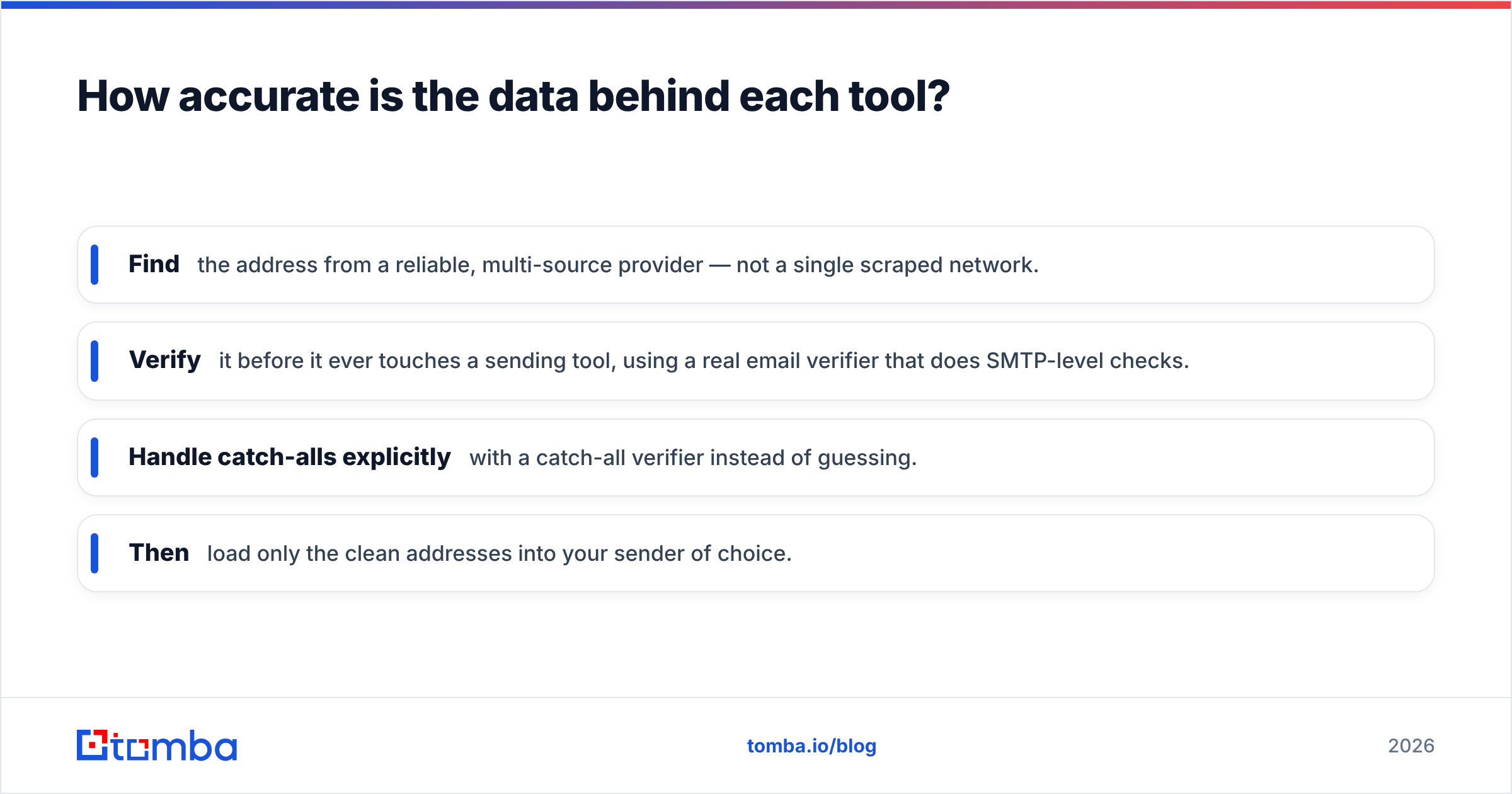
- Find the address from a reliable, multi-source provider — not a single scraped network.
- Verify it before it ever touches a sending tool, using a real email verifier that does SMTP-level checks.
- Handle catch-alls explicitly with a catch-all verifier instead of guessing.
- Then load only the clean addresses into your sender of choice.
FinalScout collapses find-and-write into one step, which is convenient but hides the verification quality. Clickback skips finding entirely. A purpose-built stack keeps each job honest.

What does Clickback vs FinalScout pricing look like?#
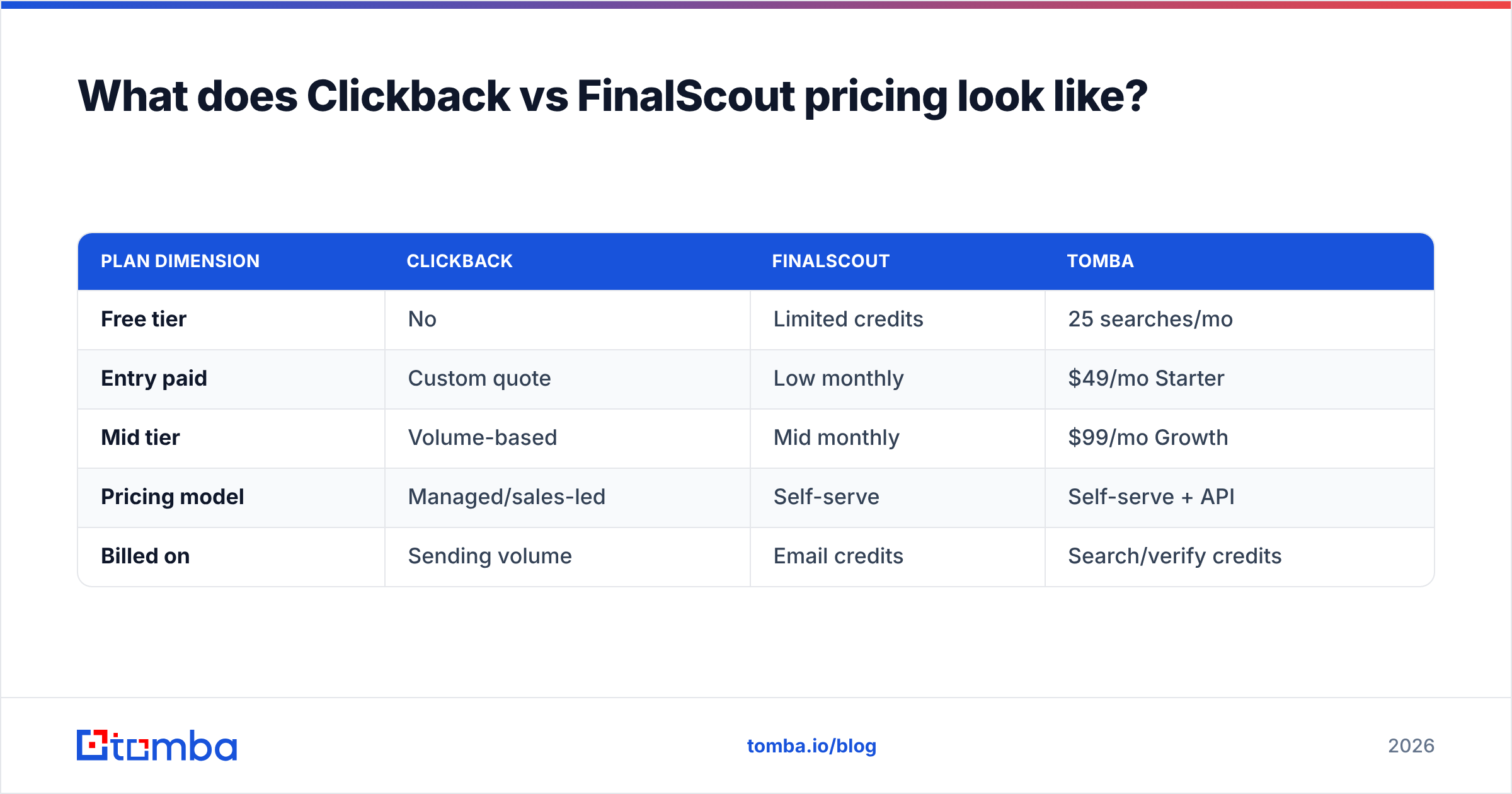
Pricing philosophy splits them as cleanly as features do. FinalScout sells low-cost monthly self-serve tiers with a small free allowance — friendly to individuals testing the waters. Clickback is quote-driven and enterprise-flavored; you typically talk to sales, get managed onboarding, and pay for volume sending capacity rather than per-lead credits.
| Plan dimension | Clickback | FinalScout | Tomba |
|---|---|---|---|
| Free tier | No | Limited credits | 25 searches/mo |
| Entry paid | Custom quote | Low monthly | $49/mo Starter |
| Mid tier | Volume-based | Mid monthly | $99/mo Growth |
| Pricing model | Managed/sales-led | Self-serve | Self-serve + API |
| Billed on | Sending volume | Email credits | Search/verify credits |
That last column is the point. If your real gap is data quality — and for most teams comparing these two, it is — neither Clickback's sending fees nor FinalScout's bundled credits get you the cleanest possible list. Tomba's transparent pricing starts at a Free tier (25 searches/month) and a $49/mo Starter plan, with a real email finder API if you want to automate the whole flow. (Ignore any old "$39" figures floating around — the current Starter price is $49/mo.)
Pros and cons at a glance#
Clickback — pros: purpose-built for compliant cold sending, managed IP warming, strong reporting for list campaigns, genuinely legal CASL-grade infrastructure. Clickback — cons: no contact finding, enterprise pricing, steep for small teams, useless if your list is bad.
FinalScout — pros: fast LinkedIn-native finding, AI copy in the same tool, low entry cost, good for solo operators. FinalScout — cons: accuracy varies, LinkedIn-dependent and fragile to platform changes, no real sending engine, validation quality is opaque.
You can sanity-check both against third-party reviews on G2 before committing — vendor pages always read better than the messy reality.
Do you actually need a third tool?#
Short answer: most likely yes, and it should be the data layer. The pattern that consistently produces replies is accurate finding + strict verification → your sender. Clickback is a fine "sender" if you do compliant volume marketing. FinalScout is a fine "finder" if LinkedIn is your whole universe. But the bottleneck for both is whether the address is real and the person is reachable.
That's where Tomba slots in cleanly rather than competing head-on. Use the bulk email finder to build a list from company domains, run it through verification, then export only the survivors into Clickback for compliant sending — or skip FinalScout's scraping risk entirely and pull contacts via domain search. It's the difference between sending to a list and sending to a list that loads without bouncing. For how the underlying data is assembled, Tomba documents its data sources openly, which neither LinkedIn-scraped nor list-purchased pipelines can fully claim.
For deliverability fundamentals beyond either tool, HubSpot's email marketing guidance is a solid neutral primer on the reputation mechanics both Clickback and FinalScout users keep tripping over.
So, which should you choose?#
- Choose Clickback if you are a B2B marketer sending high-volume cold email to purchased or owned lists and your top fear is legal/compliance risk.
- Choose FinalScout if you are a solo founder, recruiter, or SDR who prospects inside LinkedIn and wants finding plus AI copy in one cheap subscription.
- Choose neither as your data layer. Both lean on contact data they don't specialize in, and that's the variable that decides reply rates.
The framing "Clickback vs FinalScout" is a bit of a false binary. They're a sender and a finder. The thing they have in common is that they're only as good as the accuracy of the addresses involved — and that's a problem you solve upstream, not inside either platform.
Start with clean data#
Before you pay for a sending engine or an AI writer, fix the input. Tomba's Email Finder locates professional addresses by name, company, or domain across multiple data sources, then lets you verify them so only deliverable contacts make it into Clickback, FinalScout, or any other tool in your stack. Start free with 25 searches a month, scale to the $49/mo Starter plan when it's working, and stop letting bad data quietly burn your sender reputation. Find the right people first — the sending part is easy once the list is real.
// get started
Find, verify and enrich your first contacts today
Start on the free plan with 25 searches a month, then scale when your team is ready.
Free plan · No credit card required · GDPR & CCPA
// about the author