Clickback vs FindThatLead 2026: Which B2B Tool Wins?
Clickback vs FindThatLead: one sends compliant B2B email at scale, the other finds and verifies leads. See pricing, accuracy, and the smarter 2026 stack.
Clickback vs FindThatLead: Which B2B Lead Tool Should You Use in 2026?
TL;DR
- They solve different problems. The short version of clickback vs findthatlead: Clickback is a B2B email marketing platform. It sends cold email to purchased or aggregated lists, with compliance guardrails built in. FindThatLead is a prospecting tool. It finds and verifies email addresses by domain, name, or LinkedIn.
- If you need leads, FindThatLead is closer to your job. If you need to email a large cold list legally, Clickback is the closer fit. Most teams actually need both functions — found data and a way to reach it.
- Pricing favors FindThatLead for early-stage teams. Clickback's seat-and-volume model gets expensive fast. FindThatLead starts cheaper, but accuracy and credits become the bottleneck at scale.
- Neither is best-in-class at data accuracy. For verified B2B emails with a real verifier behind them, a dedicated finder like Tomba Email Finder usually beats both on hit rate and bounce control.
- Best 2026 stack: find and verify with a specialist tool. Then send through whatever ESP or sequencer fits your compliance posture.
What Are Clickback and FindThatLead?#
Quick answer: Clickback helps you send cold B2B email at scale. FindThatLead helps you find the addresses in the first place. Treating them as direct rivals is like comparing a delivery truck to a warehouse. They are related, but not the same machine.
Clickback (clickback.com) markets itself as a B2B email lead-generation platform. Its differentiator is sending cold email to lists you bought or compiled. Most mainstream ESPs forbid that outright. Clickback layers on list cleaning, spam-trap filtering, and engagement scoring. That lets you email colder contacts without instantly nuking your domain.
FindThatLead (findthatlead.com) is a prospecting and email-finder tool. You give it a domain, a full name, or a LinkedIn profile. It returns a best-guess business email plus a verification status. It also bundles a "Prospector" search, a Chrome extension, and a lightweight cold-email sender called Scrab.in/Email Sender.
So the honest framing of clickback vs findthatlead isn't "which is better." It's "which job are you hiring the tool for." If you already have a clean list and need compliant volume sending, you lean Clickback. If you have target companies but no contact data, you lean FindThatLead. Many outbound teams discover they need both halves. That is exactly where a dedicated data layer earns its place.

How Do Clickback and FindThatLead Compare Head-to-Head?#
Here's the side-by-side so you can see where the overlap actually is — and where it isn't.
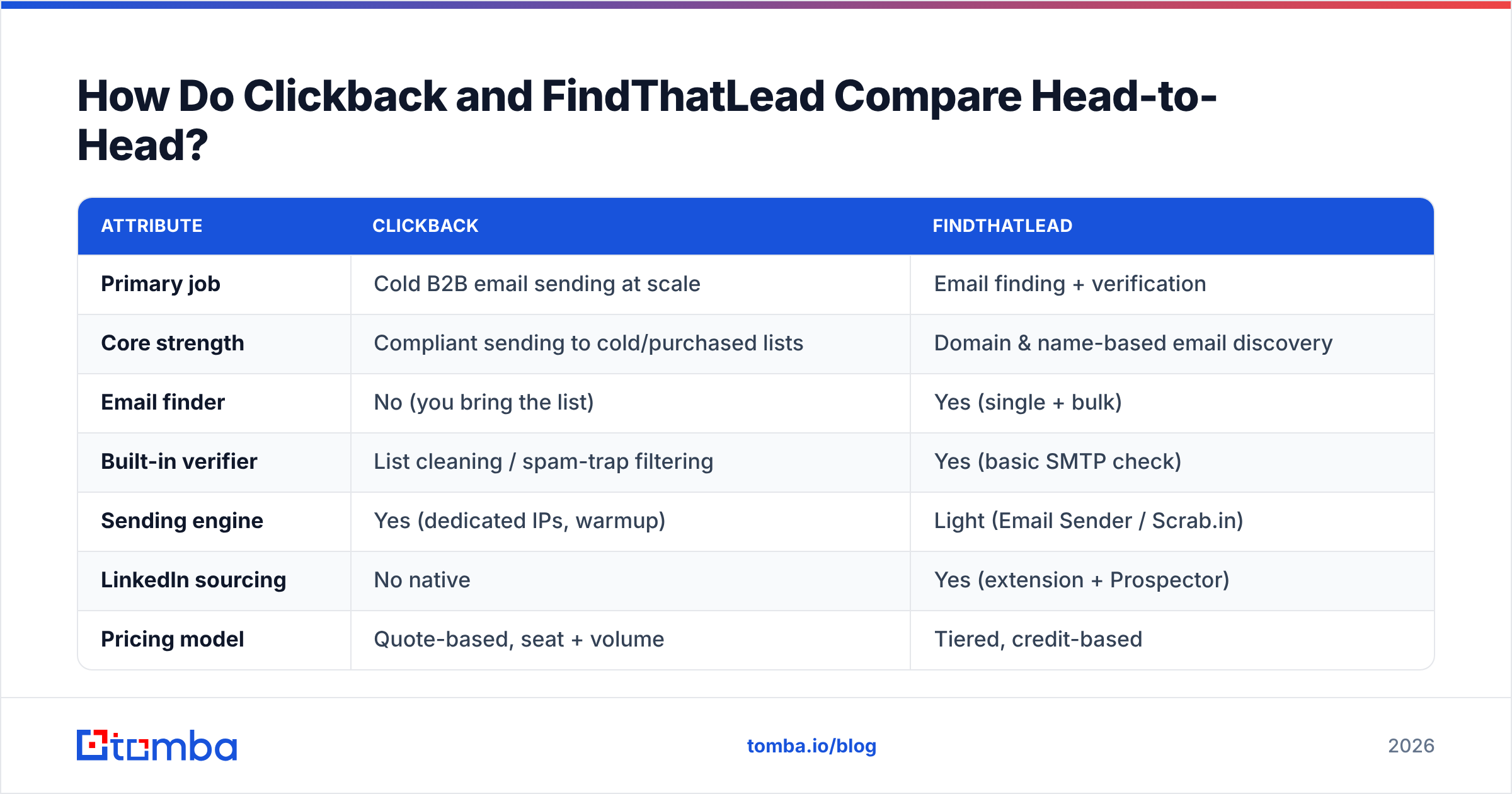
| Attribute | Clickback | FindThatLead |
|---|---|---|
| Primary job | Cold B2B email sending at scale | Email finding + verification |
| Core strength | Compliant sending to cold/purchased lists | Domain & name-based email discovery |
| Email finder | No (you bring the list) | Yes (single + bulk) |
| Built-in verifier | List cleaning / spam-trap filtering | Yes (basic SMTP check) |
| Sending engine | Yes (dedicated IPs, warmup) | Light (Email Sender / Scrab.in) |
| LinkedIn sourcing | No native | Yes (extension + Prospector) |
| Pricing model | Quote-based, seat + volume | Tiered, credit-based |
| Entry price | Higher, sales-led | Lower, self-serve |
| Best for | Mid-market demand gen with bought lists | SMB prospecting & list building |
| Free option | Demo only | Limited free credits |
The takeaway: there's a small overlap, since both touch "email" and "leads." But the center of gravity is different. Clickback is a sending machine that tolerates cold data. FindThatLead is a sourcing machine that does a little sending on the side. Neither one is a complete outbound stack by itself. Neither leads the market on raw data accuracy.
Which One Finds Better Email Addresses?#
FindThatLead wins this by default. Clickback doesn't find emails. It sends to ones you already have. But "better than a tool that doesn't compete" is a low bar, and FindThatLead's accuracy has real ceilings.
FindThatLead generates likely email patterns (think first.last@company.com) and runs a quick SMTP check. That pattern-plus-ping approach works well for clean, mid-size company domains with predictable formats. It struggles in three common situations:
- Catch-all domains — servers that accept every address make SMTP verification ambiguous. You get "valid" results that still bounce. You need a dedicated catch-all verifier to handle these confidently.
- Generic inboxes — it can return
info@orcontact@when no personal address exists. That inflates your "found" rate but tanks reply rate. - Large or non-standard formats — enterprises with mixed or rotating formats break simple pattern guessing.

This is where a specialist data layer matters. Tomba sources from public web indexing plus pattern intelligence. Then it runs every result through an email verifier before it hits your list. You can also start from a company and pull every published address with domain search. That is far more reliable than guessing one address at a time. If you're sending cold, your bounce rate is decided before the send. The quality of the data going in decides it.
Is Clickback Better Than FindThatLead for Cold Email?#
For pure sending compliance and deliverability on cold lists, yes. Clickback is purpose-built for that, and FindThatLead's sender is a side feature. But "better at sending" doesn't mean "better outcome."
Clickback's pitch is legitimate. Most ESPs (Mailchimp, HubSpot's marketing email, and the like) will suspend you for emailing purchased lists. Clickback engineers around this with dedicated infrastructure, spam-trap scrubbing, and engagement-based list pruning. If your motion genuinely depends on emailing cold, compiled B2B lists at volume, that capability is hard to replicate with a generic tool.
The trade-offs:
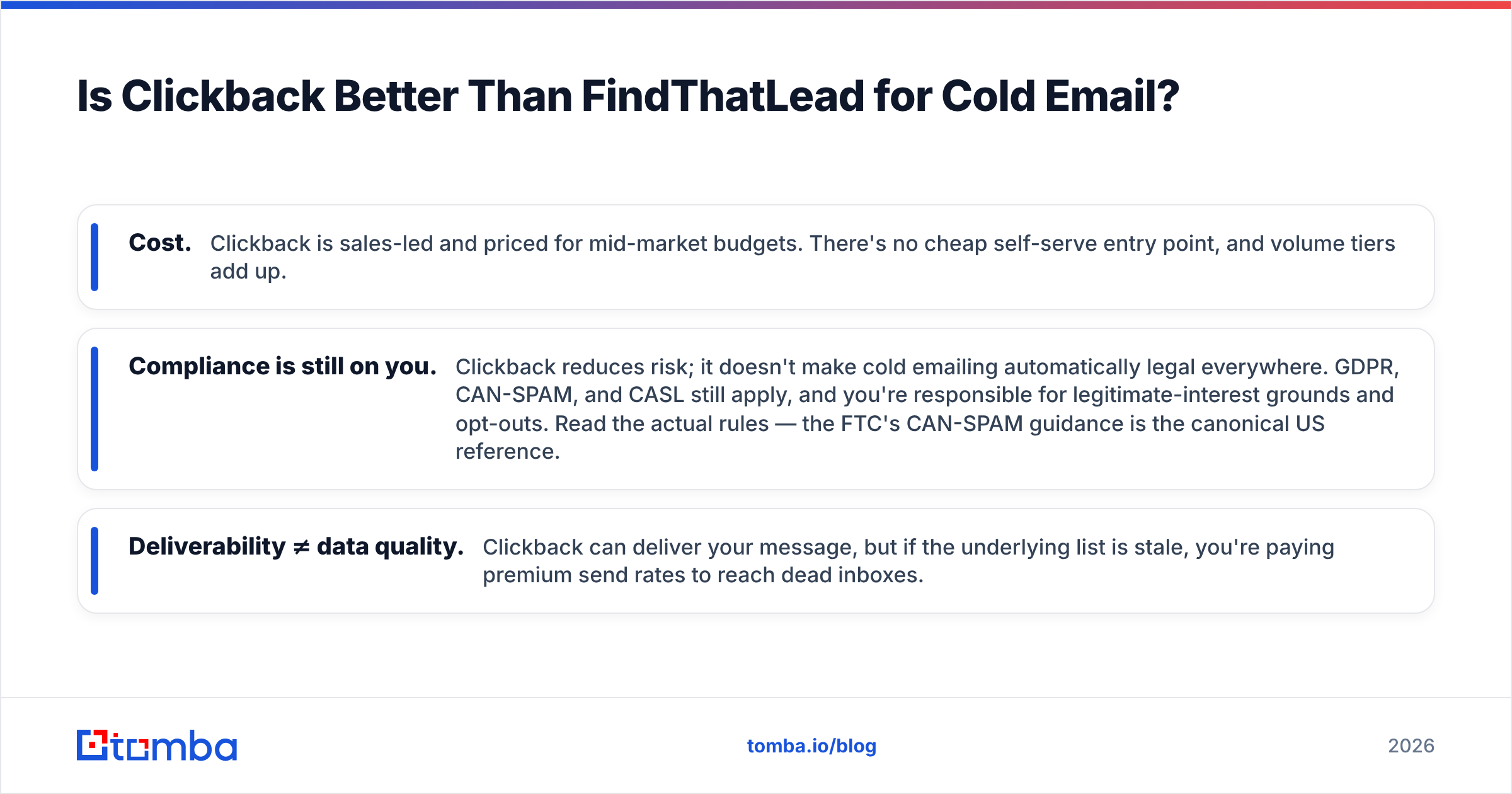
- Cost. Clickback is sales-led and priced for mid-market budgets. There's no cheap self-serve entry point, and volume tiers add up.
- Compliance is still on you. Clickback reduces risk. It doesn't make cold emailing automatically legal everywhere. GDPR, CAN-SPAM, and CASL still apply. You're responsible for legitimate-interest grounds and opt-outs. Read the actual rules — the FTC's CAN-SPAM guidance is the canonical US reference.
- Deliverability ≠ data quality. Clickback can deliver your message. But if the underlying list is stale, you're paying premium send rates to reach dead inboxes.
FindThatLead's sender, by contrast, is fine for small, warm-ish sequences. It isn't built to push large cold volumes through compliant infrastructure. If cold-at-scale is your model, FindThatLead's sending side will disappoint you.
The deeper point: deliverability tooling and data tooling are separate disciplines. Strong email deliverability starts with authentication (SPF, DKIM, DMARC), warmup, and a verified list above all. No sending platform fixes a list full of guessed addresses.
What Does Each Tool Cost in 2026?#
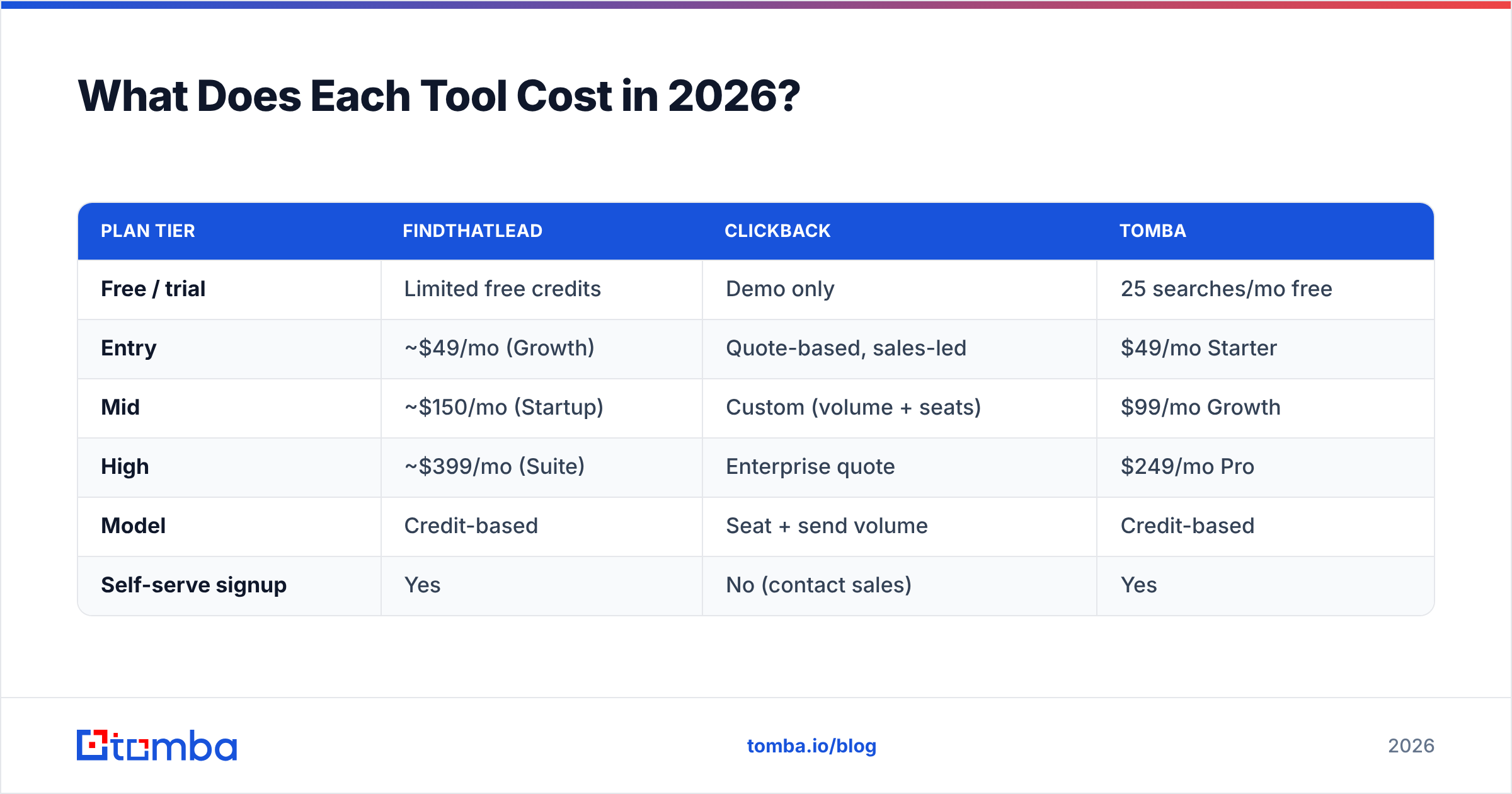
FindThatLead is the cheaper entry. Clickback is the bigger commitment. Here's the rough shape. Always confirm current numbers on each vendor's pricing page, since both adjust tiers.
| Plan tier | FindThatLead | Clickback | Tomba |
|---|---|---|---|
| Free / trial | Limited free credits | Demo only | 25 searches/mo free |
| Entry | ~$49/mo (Growth) | Quote-based, sales-led | $49/mo Starter |
| Mid | ~$150/mo (Startup) | Custom (volume + seats) | $99/mo Growth |
| High | ~$399/mo (Suite) | Enterprise quote | $249/mo Pro |
| Model | Credit-based | Seat + send volume | Credit-based |
| Self-serve signup | Yes | No (contact sales) | Yes |
A few honest notes:
- FindThatLead's credits deplete fast if you're running bulk searches, and unverified results still cost you a credit.
- Clickback's quote model means you won't see real numbers without a sales call. Entry pricing sits well above typical SMB budgets.
- Tomba's transparent tiers sit in the same range as FindThatLead's lower plans, but include verification in the workflow. You can compare full Tomba pricing directly rather than book a demo.
If budget predictability matters — and for most SMB and mid-market teams it does — self-serve, credit-transparent pricing beats quote-gated sales motions.
Who Should Choose Which Tool?#
Match the tool to your actual bottleneck, not the brand name. This is the practical core of clickback vs findthatlead.
- Choose Clickback if: your entire model is sending cold, compiled B2B lists at volume, you have the budget for sales-led pricing, and you specifically need infrastructure that tolerates purchased data. Demand-gen teams at established mid-market firms are the core fit.
- Choose FindThatLead if: you're an SMB or solo founder who needs to build lists from domains and LinkedIn, you want self-serve onboarding, and your send volumes are modest. It's a reasonable starter prospecting tool.
- Choose a dedicated data layer (like Tomba) if: accuracy and bounce control are the thing keeping you up at night. For most cold outbound, they are. Find and verify with a specialist, then send through your ESP, sequencer, or even Clickback.
The pattern most successful teams land on: separate the data layer from the sending layer. Use the best available source for verified contacts. Then route that clean data into whatever sending tool fits your compliance and volume needs. That keeps each layer swappable and your bounce rate low.
How Do These Compare to a Dedicated Email Finder?#
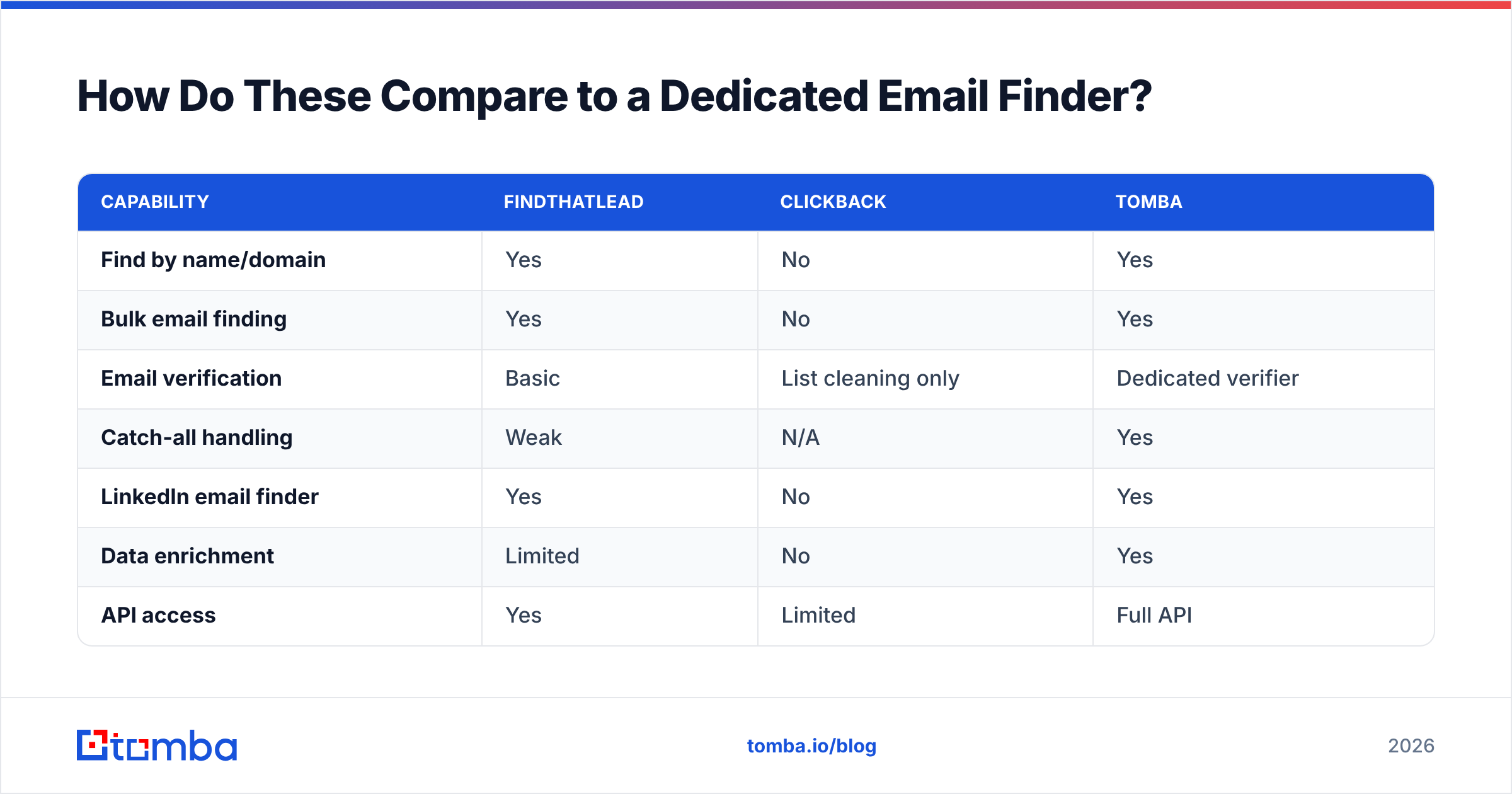
Both Clickback and FindThatLead leave a gap that a focused finder fills. That gap is reliable, verified contact data. A good finder also covers catch-all domains, LinkedIn sourcing, enrichment, and bulk workflows in one place.
Here's where a tool like Tomba slots in next to the two:
| Capability | FindThatLead | Clickback | Tomba |
|---|---|---|---|
| Find by name/domain | Yes | No | Yes |
| Bulk email finding | Yes | No | Yes |
| Email verification | Basic | List cleaning only | Dedicated verifier |
| Catch-all handling | Weak | N/A | Yes |
| LinkedIn email finder | Yes | No | Yes |
| Data enrichment | Limited | No | Yes |
| API access | Yes | Limited | Full API |
| Sending engine | Light | Strong (cold-tolerant) | No (data-focused) |
Notice Tomba doesn't try to be your sender. That's deliberate. The data layer and the sending layer reward different specializations. By staying focused on finding and verifying, a dedicated finder can push hit rates and bounce control further. A tool splitting attention across both jobs can't match that. You then pair it with the sender that fits your compliance posture — Clickback for cold-list volume, a standard ESP for warmer lists, or a sequencer for sales outreach.
For accuracy-sensitive teams, that separation is the whole game. You can read where the underlying data comes from on Tomba's data sources page. Third-party reviews on G2 give an outside read on real-world hit rates versus the alternatives.
What's the Verdict on Clickback vs FindThatLead?#
There's no single winner in clickback vs findthatlead, because they're not really the same product. But for most teams the practical answer is "neither, alone."
If you're forced to pick one: FindThatLead is the better starting point for the larger number of teams. Finding and verifying leads is the more common bottleneck, and its self-serve pricing is accessible. Clickback is the right call only when compliant, high-volume cold sending to compiled lists is the explicit core of your motion and you have the budget for it.
But the smarter move in 2026 is to stop treating one tool as the whole stack. Source verified data from a specialist. Then send through the infrastructure that matches your risk tolerance. Your reply rate is decided by data quality first and sending sophistication second. Get the data right and the rest gets easier.
Start With Clean, Verified Data#
Before you compare senders, fix the input. Most cold-email failures trace back to guessed, unverified addresses, not the sending tool. Start with Tomba Email Finder to pull verified business emails by name, domain, or LinkedIn. Then run them through the built-in verifier, so only deliverable contacts reach your sequence. The free tier gives you 25 searches a month to test hit rate against your own target accounts. Paid plans start at $49/mo with the same verification baked in. Find better data first, then send it through Clickback, FindThatLead, or whatever sender fits. Watch your bounce rate drop.
Ready to find emails that actually work?
Join 150,000+ professionals who stopped guessing and started sending. Free credits on signup — no credit card required.
Get the Tomba newsletter
Practical outbound tactics and product updates — once every two weeks.
About the author