Clickback vs Findymail (2026): Full B2B Lead Tool Comparison
Clickback sends compliant cold email at scale; Findymail finds and verifies the addresses you send to. They solve different problems — here's how they compare in 2026 and where Tomba fits.
You typed "Clickback vs Findymail" into a search bar expecting a head-to-head between two similar tools. Here is the first thing to know: they barely overlap. One sends email. The other finds the addresses you send to. Picking between them as if they were interchangeable is how outbound budgets get wasted.
TL;DR — Clickback vs Findymail at a glance#
- Clickback is a B2B email marketing and outreach platform built to send cold email to opted-in or purchased contact lists at volume, plus website visitor tracking (Clickback WEB).
- Findymail is an email finder and verifier — it sources and validates contact data, then pushes it into your sequencer or CRM. It does not send campaigns.
- They sit at different stages of the same funnel: Findymail (and tools like it) builds the list; Clickback (or any sender) mails it.
- For most teams the real question is not "either/or" but "which finder feeds which sender" — and whether your data is accurate enough to keep your domain out of the spam folder.
- If your bottleneck is verified contact data, a dedicated finder like Tomba Email Finder usually beats bolting list-buying onto a sending tool.
What are Clickback and Findymail?#
Clickback is a sending-and-engagement platform. Its flagship product, Clickback MAIL, is designed for cold B2B email to lists you own or acquire, with compliance guardrails aimed at CAN-SPAM and CASL. Clickback WEB adds anonymous website visitor identification. The pitch is "turn cold contacts into warm leads" — so the product assumes you already have, or will buy, a list.
Findymail is a data tool. You give it a name and company, a LinkedIn URL, or a domain, and it returns a verified business email. It leans hard into verification accuracy and integrates with cold-email senders (Instantly, Smartlead, lemlist) and CRMs. Findymail does not run campaigns; it fills the top of someone else's sequencer.
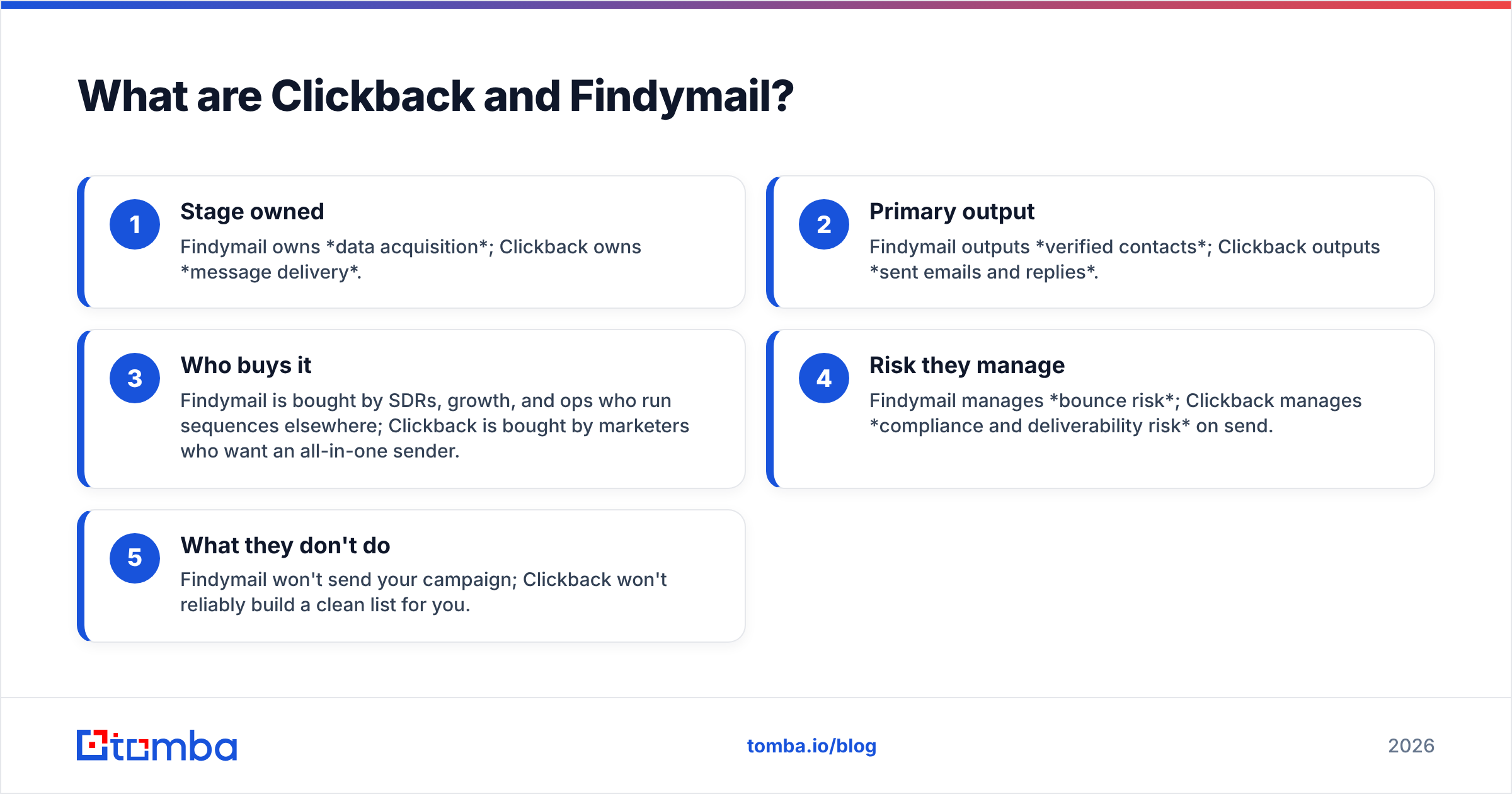
Here is the cleanest way to hold the difference in your head:
- Stage owned — Findymail owns data acquisition; Clickback owns message delivery.
- Primary output — Findymail outputs verified contacts; Clickback outputs sent emails and replies.
- Who buys it — Findymail is bought by SDRs, growth, and ops who run sequences elsewhere; Clickback is bought by marketers who want an all-in-one sender.
- Risk they manage — Findymail manages bounce risk; Clickback manages compliance and deliverability risk on send.
- What they don't do — Findymail won't send your campaign; Clickback won't reliably build a clean list for you.
How do Clickback and Findymail differ in practice?#
Think of it like building a house. Findymail is the supplier delivering inspected lumber; Clickback is the crew nailing it together. You can't frame a wall with a lumber yard, and you can't cut quality boards with a hammer. Confusing the two is the root of most "why is my cold email failing?" threads.
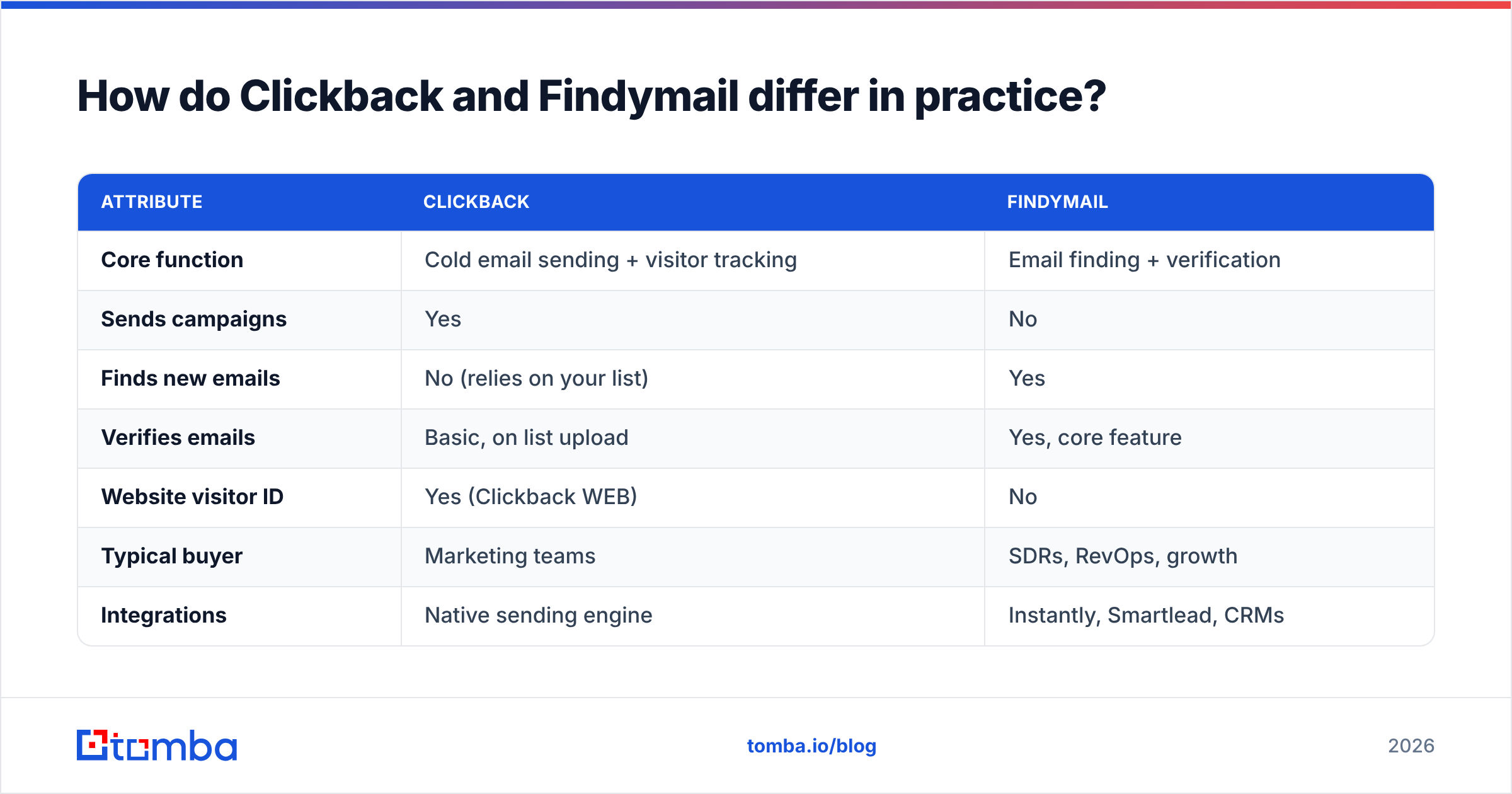
| Attribute | Clickback | Findymail |
|---|---|---|
| Core function | Cold email sending + visitor tracking | Email finding + verification |
| Sends campaigns | Yes | No |
| Finds new emails | No (relies on your list) | Yes |
| Verifies emails | Basic, on list upload | Yes, core feature |
| Website visitor ID | Yes (Clickback WEB) | No |
| Typical buyer | Marketing teams | SDRs, RevOps, growth |
| Integrations | Native sending engine | Instantly, Smartlead, CRMs |
| Best for | Volume outreach to owned lists | Building clean prospect lists |
The table makes the trap obvious. If you buy Clickback expecting it to find prospects, you'll end up sourcing lists elsewhere anyway. If you buy Findymail expecting it to run campaigns, you'll need a sender on top. Neither is a complete outbound stack alone.
Is Clickback better than Findymail for cold email?#
It depends which half of "cold email" you mean. Clickback is genuinely built for the send — list segmentation, throttling, compliance footers, and reporting. Findymail never touches the send; it makes sure the addresses you load are real so your bounce rate stays low and your sender reputation survives.
Bounce rate is the hinge. Mailbox providers read high bounces as a spam signal, and once your domain reputation drops, even your good emails land in spam. That is why data quality decides deliverability more than any sending feature does. A pristine sending tool firing at a stale, unverified list still burns the domain.
So the honest answer: Clickback is better at sending, Findymail is better at the data that makes sending work. Comparing them on "cold email" without splitting those jobs produces a meaningless winner. Many teams that start with a list-buying-plus-sending model migrate to a find-verify-then-send model precisely because the bought lists bounce. If you're evaluating Findymail specifically as a data source, it's worth lining it up against a broader Findymail alternative set before committing.
Where does data accuracy actually matter?#
Everywhere downstream. An email that doesn't exist costs you three times: the wasted credit, the bounce penalty against your domain, and the rep who chases a dead contact. Verification is not a nice-to-have at the top of the funnel — it's the cheapest insurance you can buy for the whole campaign.
This is where the Clickback-vs-Findymail framing breaks down again. Clickback runs basic checks on list upload, but it is not a verification engine. Findymail is. If your purchased Clickback list is full of role accounts, catch-alls, and abandoned mailboxes, the platform will dutifully mail them — and your reputation pays. A dedicated verifier, whether Findymail or Tomba's email verifier, exists to catch those before they ever reach a sequence.
For catch-all domains specifically — the ones that accept every address and tell you nothing — you want a tool that resolves them rather than guesses. That capability separates serious data providers from list resellers, and it's the kind of edge a catch-all verifier is built for.
How do Clickback and Findymail compare on pricing?#
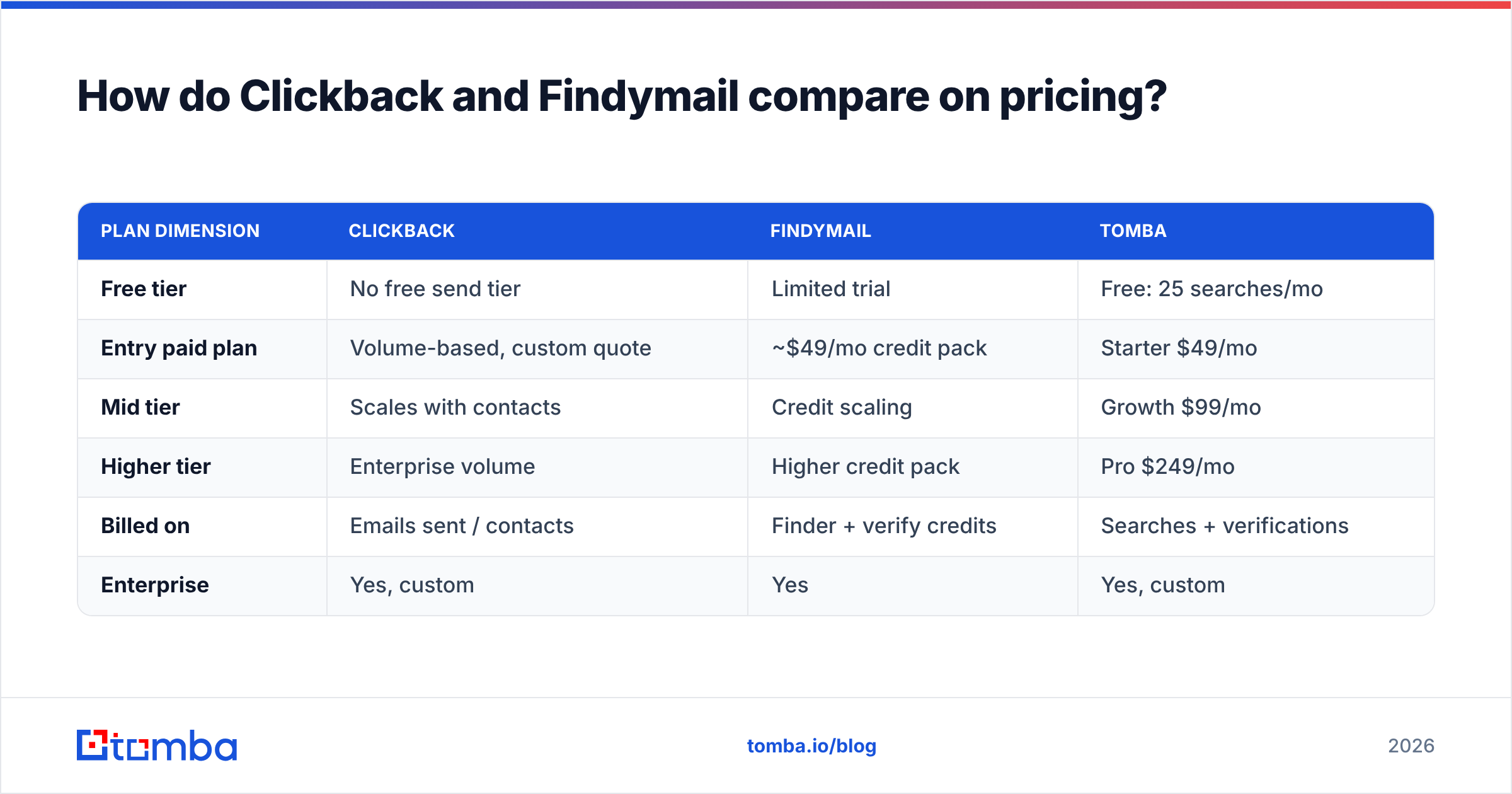
Pricing is hard to compare directly because the tools bill for different things. Clickback prices around sending volume and contacts; Findymail prices around finder/verifier credits. Below is a representative shape for 2026 — always confirm current numbers on each vendor's own page, since both adjust tiers.
| Plan dimension | Clickback | Findymail | Tomba |
|---|---|---|---|
| Free tier | No free send tier | Limited trial | Free: 25 searches/mo |
| Entry paid plan | Volume-based, custom quote | ~$49/mo credit pack | Starter $49/mo |
| Mid tier | Scales with contacts | Credit scaling | Growth $99/mo |
| Higher tier | Enterprise volume | Higher credit pack | Pro $249/mo |
| Billed on | Emails sent / contacts | Finder + verify credits | Searches + verifications |
| Enterprise | Yes, custom | Yes | Yes, custom |
A few takeaways. Clickback's model rewards high send volume but assumes you bring the list, so factor in a separate data spend. Findymail's credit model is predictable for sourcing but adds a sender cost on top. If you'd rather consolidate finding and verifying under one predictable bill, compare both against transparent Tomba pricing before you sign anything. For large one-time pulls, a bulk email finder run is often cheaper per contact than topping up credits piecemeal.
Which tool should you choose?#
Match the tool to the gap in your stack, not to a generic "best" label.
- Choose Clickback if your bottleneck is the send: you already have compliant, owned lists, you mail at high volume, and you want native visitor tracking in the same place. Verify your list with something else first.
- Choose Findymail if your bottleneck is data: you run sequences in Instantly or Smartlead and just need a steady feed of verified emails. Pair it with your existing sender.
- Choose a dedicated finder like Tomba if you want accuracy-first sourcing, domain search, verification, and enrichment under one roof, then plug the clean data into whatever sender you prefer.
Notice that none of these is "Clickback or Findymail." In a working outbound motion you typically need a finder and a sender. The decision is which finder and which sender — and how clean the handoff between them is.
What does a real outbound stack look like?#
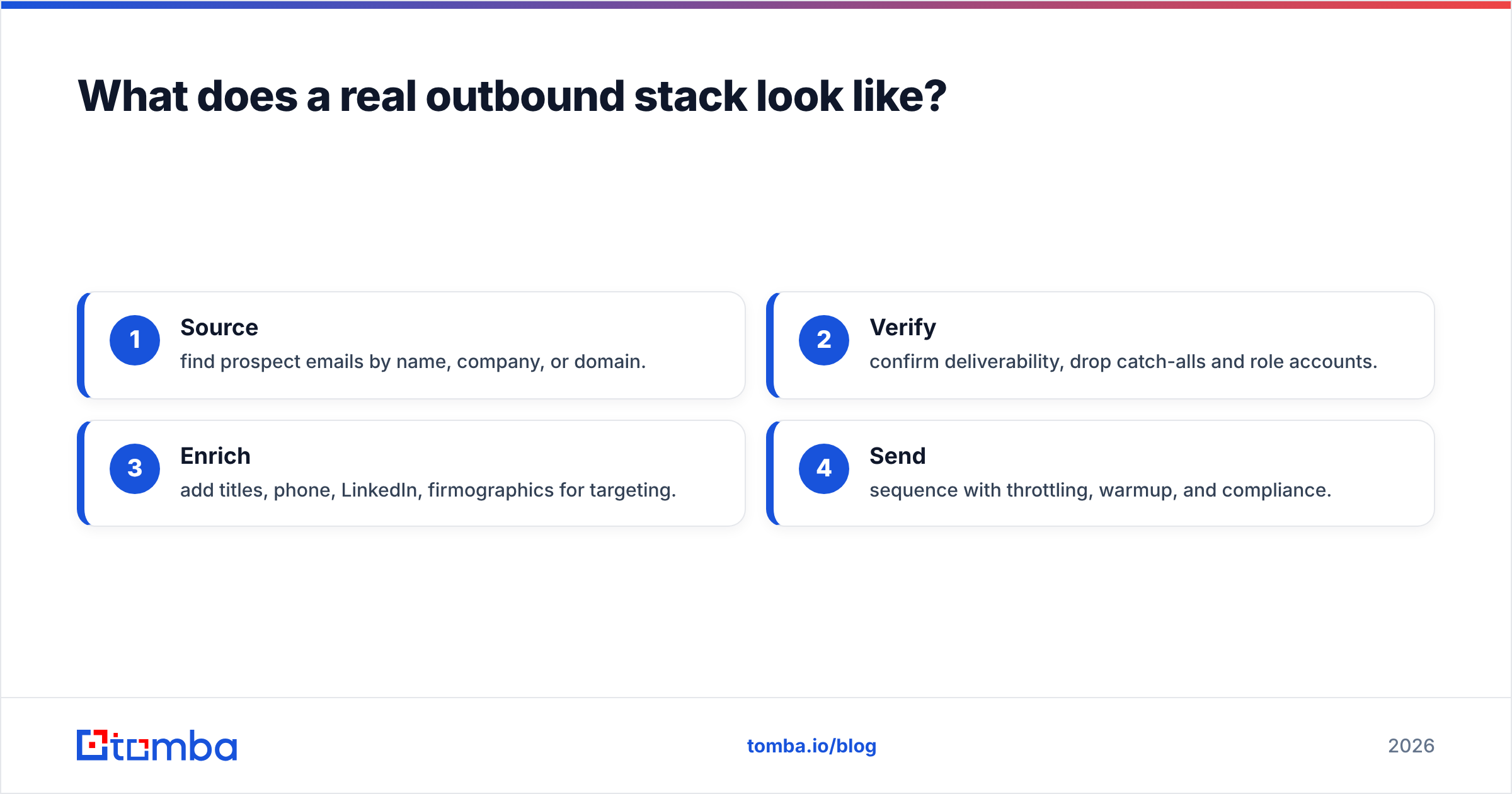
A durable 2026 stack separates four jobs and refuses to let one tool fake another:
- Source — find prospect emails by name, company, or domain.
- Verify — confirm deliverability, drop catch-alls and role accounts.
- Enrich — add titles, phone, LinkedIn, firmographics for targeting.
- Send — sequence with throttling, warmup, and compliance.
Findymail covers steps 1–2. Clickback covers step 4 (plus visitor ID, which sits outside this chain). Step 3 — data enrichment — is where many setups leak, because a verified email with no context produces generic, ignorable copy. A platform that handles 1–3 cleanly hands your sender a list that actually converts.
The practical test when evaluating any of these tools: ask for accuracy and bounce-rate evidence, not adjectives. Independent reviews on G2 and vendor verification documentation tell you more than a landing page. And whatever you pick, validate a sample before you load thousands of contacts — a quick free email checker pass will surface obvious junk in minutes.
Where does Tomba fit between Clickback and Findymail?#
Tomba lives in the same lane as Findymail — finding and verifying — but widens it. Alongside the core email finder, you get domain search, a catch-all verifier, phone finder, reverse lookup, and enrichment, plus integrations and an email finder API so the data flows straight into your sender of choice, Clickback included. If your honest diagnosis is "my sending is fine, my data isn't," that's the gap to close first.
You can read the official positioning for each vendor directly — Clickback for the sending side and Findymail for the finder side — then decide which job you're actually solving.
Ready to fix the data half of your funnel? Start free with Tomba Email Finder — 25 searches a month, no card — find and verify real business emails, then send them through Clickback, Instantly, or whatever sender you already trust. Clean data in, fewer bounces out, a domain reputation that lasts. That's the part no sending tool can do for you.
// get started
Find, verify and enrich your first contacts today
Start on the free plan with 25 searches a month, then scale when your team is ready.
Free plan · No credit card required · GDPR & CCPA
// about the author