Clickback vs GetProspect 2026: Which B2B Tool Wins?
Clickback sends compliant B2B email campaigns; GetProspect finds and verifies the addresses. See where each fits, what they cost, and the smarter stack.
Clickback vs GetProspect: Which B2B Tool Actually Fits Your Outbound Stack in 2026?
You are comparing Clickback and GetProspect because both promise more B2B leads in your pipeline. But they solve different halves of the same problem, and picking the wrong one means you either have a great list with no way to email it, or a great sending engine with nobody to send to.
This breakdown cuts through the marketing pages. You will see what each tool actually does, what it costs, where the accuracy holds up, and why most teams end up needing a dedicated data layer underneath either one.
TL;DR#
- Clickback is B2B email marketing and lead-conversion software built for sending cold-but-compliant campaigns at volume. It is a sender, not a prospecting database.
- GetProspect is primarily an email finder and verifier with a LinkedIn extension and a lightweight CRM. It builds lists; it does not run high-deliverability campaigns.
- They are complements more than rivals — Clickback sends, GetProspect sources. Comparing them head-to-head only makes sense on the narrow overlap of "lead generation."
- Both lock data accuracy and email sending into one bill. A specialized email finder like Tomba Email Finder usually gives cleaner data at a lower cost, and plugs into either tool.
- For most outbound teams in 2026, the winning stack is dedicated finder + verifier + a sending tool — not one all-in-one box.
What Is Clickback and Who Is It For?#
Clickback is a B2B email lead generation platform focused on the send side. Its flagship use case is emailing cold contacts you already have — purchased lists, event scans, dormant CRM records — in a way designed to stay compliant with CAN-SPAM and CASL. The product leans on its own infrastructure to push higher volumes than a normal ESP like Mailchimp would tolerate for cold audiences.
Where it shines: you have a list of thousands of B2B contacts and you need to warm them, route engaged opens to sales, and track who clicked. Clickback positions itself as a bridge between raw lists and your CRM, scrubbing some invalid addresses on the way in and reporting on engagement.
Where it does not help: building the list in the first place. Clickback expects you to bring contacts. It is not a prospecting database, and it is not where you go to find the VP of Marketing at a target account.

If your core problem is "I have leads but my regular email tool flags them as cold and tanks my deliverability," Clickback is built for exactly that pain. Read more about why that matters in our primer on email deliverability.
What Is GetProspect and Who Is It For?#
GetProspect sits on the opposite end of the funnel. It is an email finder and verifier: give it a name and company, or browse LinkedIn with its Chrome extension, and it returns professional email addresses plus enrichment fields like job title, company size, and location. It bundles a basic CRM-style list manager so you can organize what you pull.
Where it shines: turning a list of target people or companies into reachable contacts. The LinkedIn extension is the main draw — sales reps scrape a Sales Navigator search and walk away with a verified-ish contact list. It also offers bulk lookups and an API for programmatic enrichment.
Where it does not help: sending. GetProspect is not a campaign tool. You export to a sequencer, an ESP, or something like Clickback to actually run outreach. Its verification is decent but, like most all-in-one finders, accuracy varies by region and seniority.
So the honest framing is this: GetProspect feeds Clickback. You would not really choose between them — you would choose whether you need each layer, and which vendor gives you the best version of that layer.
Clickback vs GetProspect: Side-by-Side Comparison#
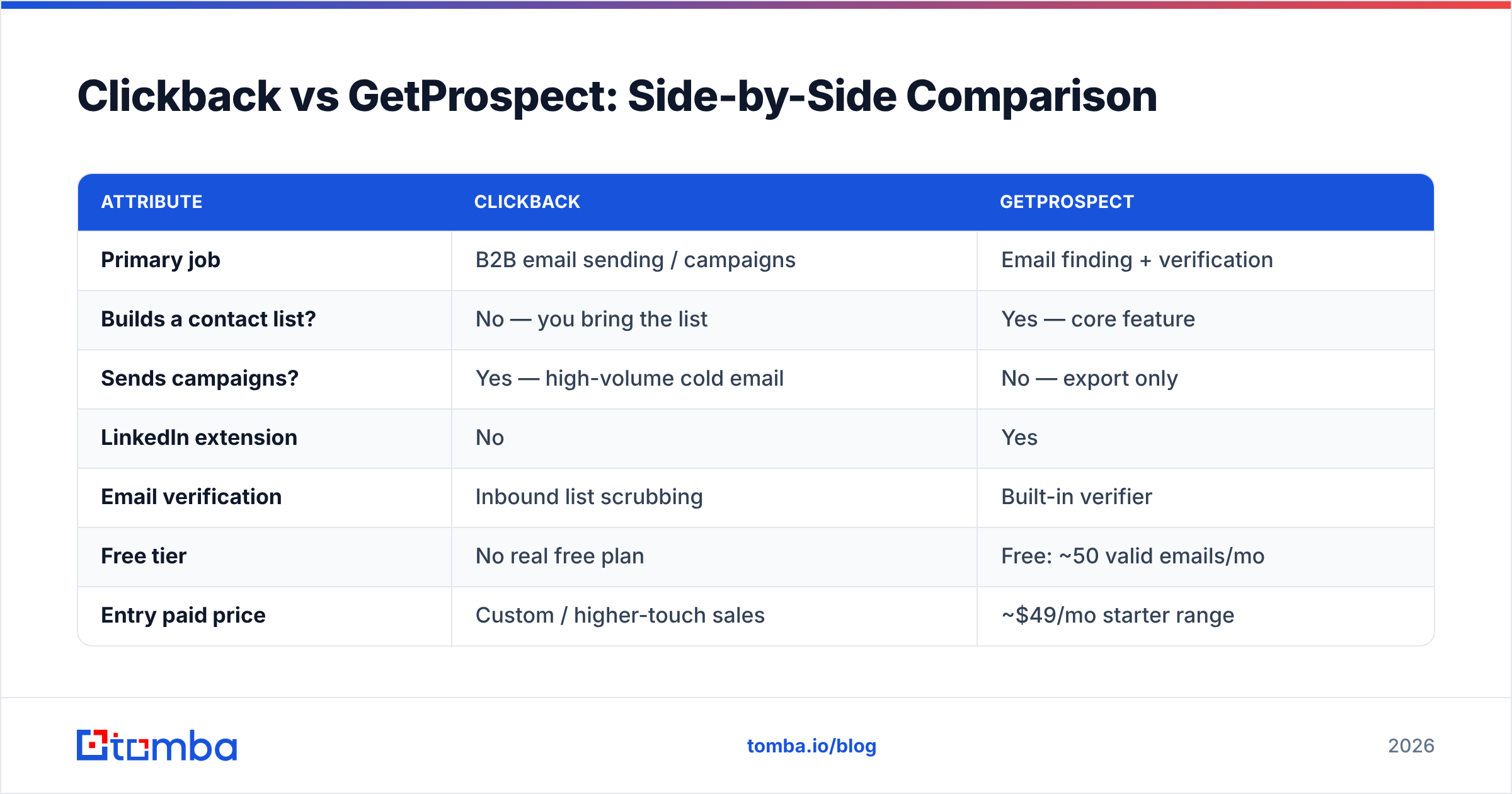
Here is the core comparison on the attributes that actually drive a buying decision. Treat published pricing as directional — both vendors gate exact numbers and run custom enterprise tiers.
| Attribute | Clickback | GetProspect |
|---|---|---|
| Primary job | B2B email sending / campaigns | Email finding + verification |
| Builds a contact list? | No — you bring the list | Yes — core feature |
| Sends campaigns? | Yes — high-volume cold email | No — export only |
| LinkedIn extension | No | Yes |
| Email verification | Inbound list scrubbing | Built-in verifier |
| Free tier | No real free plan | Free: ~50 valid emails/mo |
| Entry paid price | Custom / higher-touch sales | ~$49/mo starter range |
| CRM features | Lead routing to your CRM | Lightweight list/CRM |
| Best for | Sending to owned cold lists | Sourcing new contacts |
| Weak spot | No prospecting data | No sending engine |
The table makes the split obvious. If you only buy one and you already have lists, Clickback. If you only buy one and you need to build lists, GetProspect. But "buy one" is usually the wrong frame, which is the whole point of the next section.
Is It Really Clickback vs GetProspect — Or Do You Need Both?#
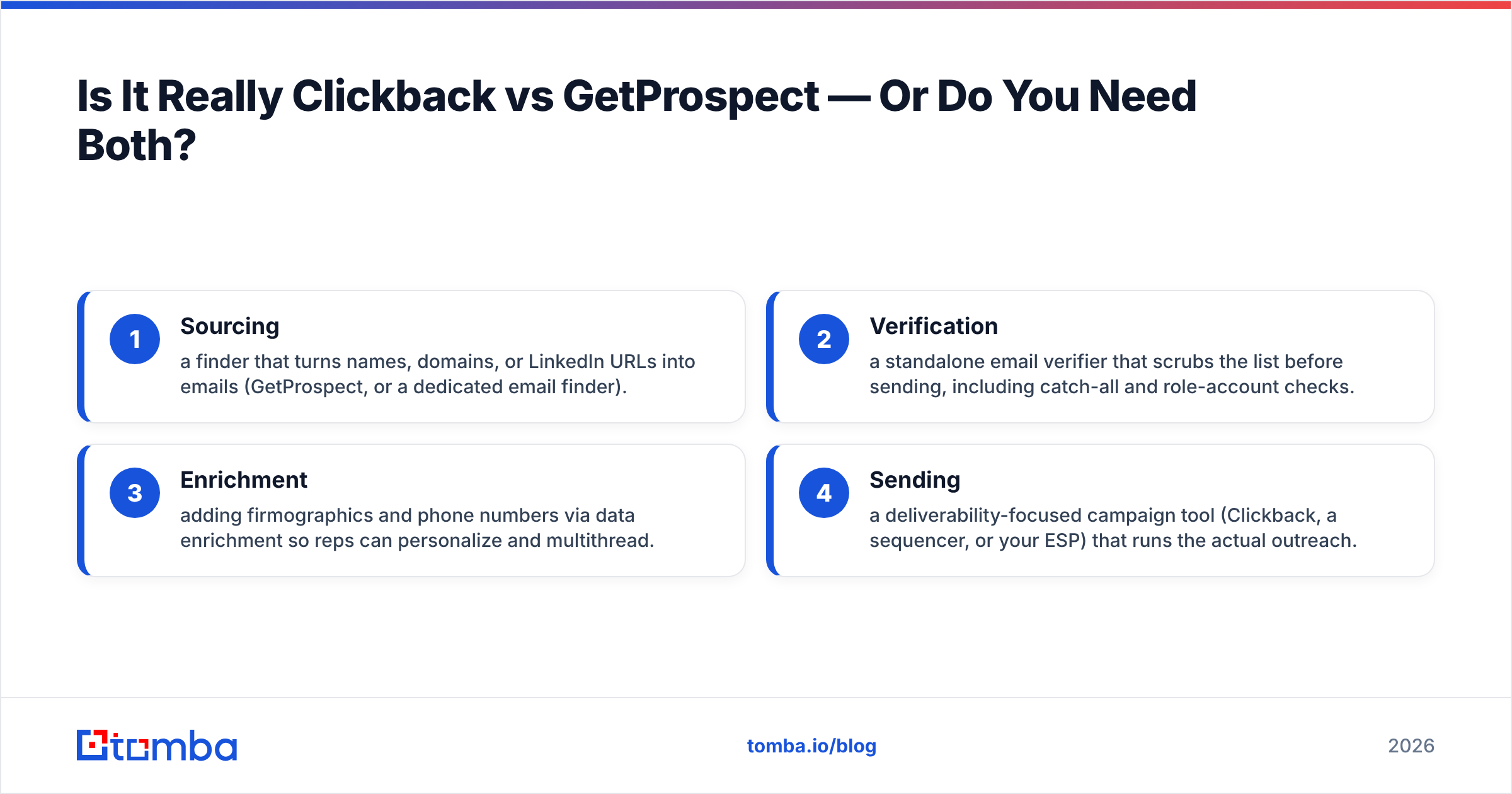
The key conclusion: most teams need both a sourcing layer and a sending layer, so the real decision is which vendor wins each layer — not which single tool wins overall.
Think of outbound like a restaurant. GetProspect is the grocery supplier bringing ingredients (contacts). Clickback is the kitchen that cooks and serves (campaigns). A supplier with no kitchen feeds nobody; a kitchen with no ingredients serves empty plates. You need both stations staffed, and you want the best vendor at each — not a single vendor who is mediocre at both.
This is where the all-in-one promise gets expensive. When one tool bundles finding, verifying, and sending, you pay a premium for convenience and you inherit that vendor's weakest component. GetProspect's verification, for example, is fine for first-pass cleanup but not built to catch catch-all domains the way a dedicated catch-all verifier is. Clickback's inbound scrubbing reduces hard bounces but is not a substitute for verifying a list before it ever touches your sending IP.
The four-part outbound stack most high-performing teams actually run:
- Sourcing — a finder that turns names, domains, or LinkedIn URLs into emails (GetProspect, or a dedicated email finder).
- Verification — a standalone email verifier that scrubs the list before sending, including catch-all and role-account checks.
- Enrichment — adding firmographics and phone numbers via data enrichment so reps can personalize and multithread.
- Sending — a deliverability-focused campaign tool (Clickback, a sequencer, or your ESP) that runs the actual outreach.
Bundling 1–3 into the sending tool feels simpler, but it almost always means worse data quality and a higher per-contact cost.
How Do Clickback and GetProspect Compare on Data Accuracy?#
Accuracy is where these tools quietly diverge, and it is the number that decides your bounce rate and sender reputation.
GetProspect's accuracy is "good enough to start" — it finds and runs a verification pass, but like most consumer-grade finders, hit rates drop on smaller companies, non-US contacts, and senior titles where emails are guarded. Reported valid-email rates from bundled finders tend to look great on big, well-documented domains and slide on the long tail.
Clickback does not source data, so its "accuracy" is really about how well its inbound scrubbing protects deliverability. It catches obvious invalids, but a list that was poorly built upstream still arrives full of risky catch-all and role addresses that erode your domain reputation over time.
The practical takeaway: neither tool removes the need to independently verify your list. A bad address that slips through costs you twice — once in wasted send volume and once in the deliverability damage that follows. That is why teams route every list, regardless of source, through a dedicated verification step. You can sanity-check single addresses with a free email checker and run full lists through bulk verify before any campaign.
For the deliverability stakes here, third-party guides like HubSpot's deliverability resources and review aggregators such as G2 are worth a read before you commit to either vendor's accuracy claims.
How Much Do Clickback and GetProspect Cost?#
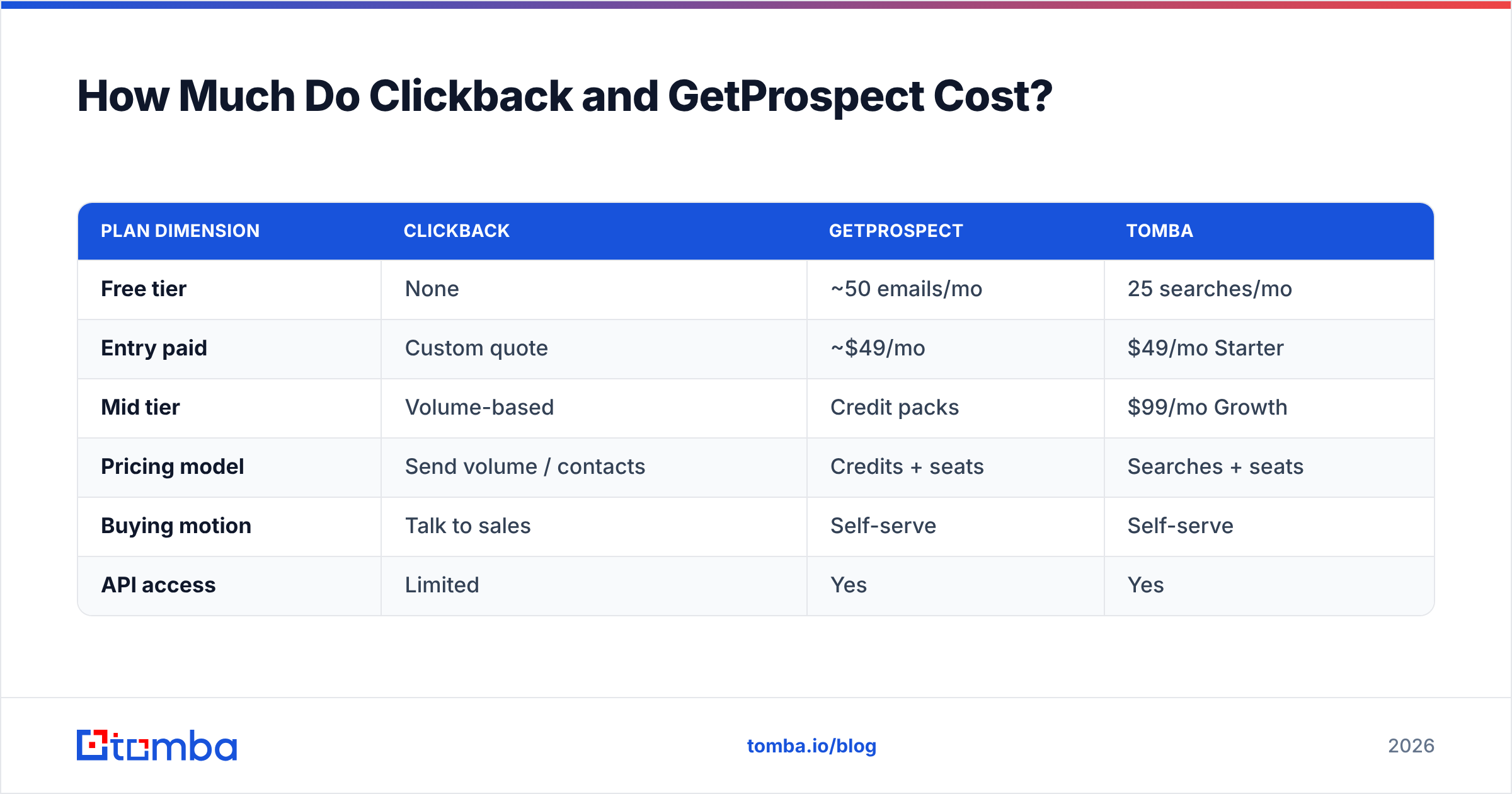
Pricing models differ enough that a flat comparison misleads. GetProspect sells credits and seats with a usable free tier and transparent self-serve plans. Clickback runs a higher-touch, sales-led model priced around send volume and contacts, with no meaningful free plan.
| Plan dimension | Clickback | GetProspect | Tomba |
|---|---|---|---|
| Free tier | None | ~50 emails/mo | 25 searches/mo |
| Entry paid | Custom quote | ~$49/mo | $49/mo Starter |
| Mid tier | Volume-based | Credit packs | $99/mo Growth |
| Pricing model | Send volume / contacts | Credits + seats | Searches + seats |
| Buying motion | Talk to sales | Self-serve | Self-serve |
| API access | Limited | Yes | Yes |
The headline: GetProspect and a focused finder land in the same ~$49/mo neighborhood for entry plans, while Clickback's sales-led pricing usually pushes a bigger minimum commitment. If budget predictability matters, self-serve tools win. Compare full Tomba pricing against GetProspect's published tiers before assuming the bundle is cheaper — when you separate finding from sending, you often pay less for better data on each.
Where Does Tomba Fit Against These Two?#
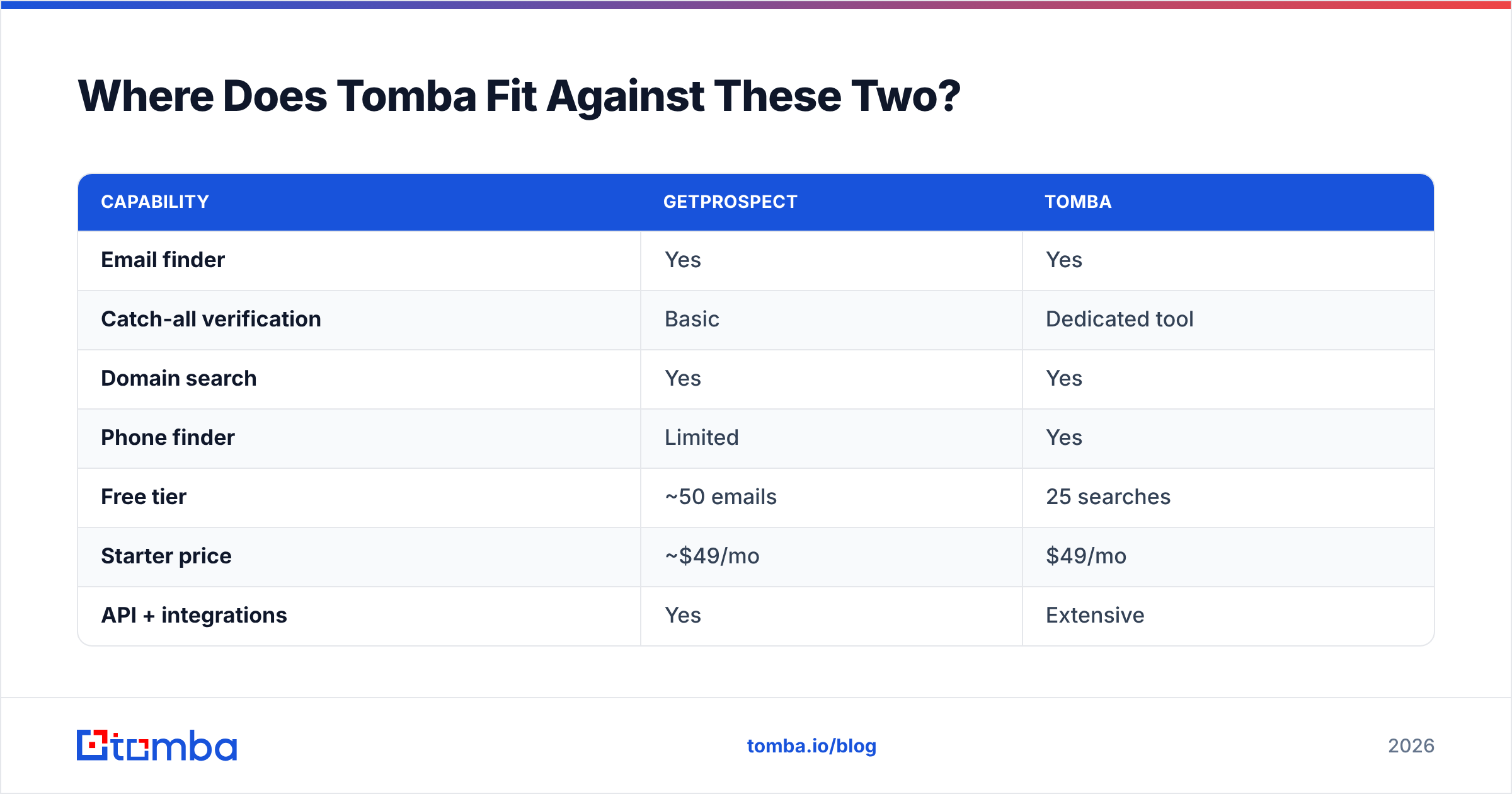
Tomba competes directly with GetProspect's half of this matchup — the finding and verification layer — and it is built to feed any sender, including Clickback.
The difference is focus. Tomba does one category of jobs exceptionally well: turning company domains, names, and LinkedIn profiles into verified contact data. That includes the email finder, domain search for mapping every reachable contact at an account, a LinkedIn finder, a dedicated verifier with catch-all handling, a phone finder for multithreading, and a documented email finder API for automation.
| Capability | GetProspect | Tomba |
|---|---|---|
| Email finder | Yes | Yes |
| Catch-all verification | Basic | Dedicated tool |
| Domain search | Yes | Yes |
| Phone finder | Limited | Yes |
| Free tier | ~50 emails | 25 searches |
| Starter price | ~$49/mo | $49/mo |
| API + integrations | Yes | Extensive |
| Spreadsheet add-ons | Limited | Sheets, Excel, Airtable |
Because Tomba is built to slot into the rest of your stack, it connects to the tools you already run — including a HubSpot integration, Salesforce integration, and Zapier — so verified contacts flow straight into whatever sends them. If you are running Clickback, Tomba is the supplier that keeps its kitchen stocked with clean ingredients.
Which Should You Choose?#
Decide by the gap in your funnel, not by the louder marketing page:
- You have lists but poor deliverability on cold sends? Clickback solves the send-side problem. Pair it with independent verification so you are not feeding it dirty data.
- You need to build targeted contact lists from LinkedIn or domains? That is a finder job. GetProspect works; a focused alternative like Tomba usually returns cleaner data at the same entry price with stronger catch-all handling.
- You are building outbound from scratch? Stand up the full stack — finder, verifier, enrichment, sender — and pick the best vendor per layer instead of one bundle that is average at everything.
- You want predictable, self-serve pricing? GetProspect and Tomba beat Clickback's sales-led model on transparency.
The honest verdict: Clickback and GetProspect are not really competitors — they are two stations in the same pipeline. The mistake is letting either one's bundled data quality become your bottleneck.
Start With Clean Data Underneath Either Tool#
Whatever you send with, your results live and die on the quality of the contacts going in. Bad addresses bounce, burn your sender reputation, and waste every dollar you spend on the sending layer.
Start by stocking your pipeline with verified, accurate contacts. Tomba Email Finder turns domains, names, and LinkedIn profiles into deliverable B2B emails — with a free tier of 25 searches to test it, $49/mo Starter and $99/mo Growth plans, and an API that drops straight into Clickback, GetProspect, or any sequencer you already run. Build the list right, verify it once, and let your sending tool do the part it is actually good at.
Ready to find emails that actually work?
Join 150,000+ professionals who stopped guessing and started sending. Free credits on signup — no credit card required.
Get the Tomba newsletter
Practical outbound tactics and product updates — once every two weeks.
About the author