Clickback vs Lead411 (2026): B2B Lead Data Compared
Clickback sends cold email at scale; Lead411 sells the contact data behind it. Here's how the two actually compare in 2026 — and where a dedicated finder beats both.
Clickback and Lead411 get lumped together in "B2B lead generation" roundups, but they solve different halves of the same problem. One is a sending engine for cold email to purchased lists. The other is a contact database you query to build those lists. Picking between them as if they were interchangeable is how teams end up paying twice and still missing the part that actually drives reply rates: clean, current contact data.
This guide breaks down what each tool really does, where they overlap, what they cost in 2026, and how to decide — including when neither is the right primary spend.
TL;DR#
- Clickback is cold-email-to-cold-lists software (MAP — its email platform — plus WEB for visitor ID). It's built to legally email purchased B2B contact lists at volume.
- Lead411 is a B2B sales-intelligence database: company and contact records, intent data, and trigger events you export or sync to your CRM.
- They're complementary more than competitive — Lead411 supplies data, Clickback sends to it — but both pitch themselves as "lead generation," which causes the confusion.
- Data freshness is the weak link in both: purchased lists decay ~2.5% per month, and stale records crater deliverability no matter which sender you use.
- If your real bottleneck is accurate, verified contact data on demand, a dedicated email finder with built-in verification often beats bolting these two together.
What is Clickback?#
Clickback is a Canadian software company focused on a niche most cold-email vendors avoid: emailing cold, purchased B2B lists rather than opt-in subscribers. Its flagship products are Clickback MAP (an email marketing platform tuned for cold sending) and Clickback WEB (website visitor identification).
The pitch is compliance and deliverability for a use case that gets most senders blacklisted. Clickback runs lists through a cleansing process, manages sending infrastructure, and positions itself as a way to "accelerate" lead generation by turning bought data into pipeline. You bring the list — or buy one — and Clickback handles the sending mechanics.
What Clickback is not: a data provider. It doesn't hand you a searchable database of decision-makers. You still have to source contacts somewhere else, which is exactly where a tool like Lead411 enters the conversation.
What is Lead411?#
Lead411 is a B2B sales-intelligence platform — think searchable database of companies and contacts, enriched with verified emails, direct-dial phone numbers, intent signals, and growth triggers (funding rounds, hiring spikes, leadership changes). You filter by industry, title, location, technology, or trigger, then export the matching contacts or push them into your CRM.
Its differentiators are unlimited-export pricing on some plans and a focus on "growth intent" — flagging accounts showing buying signals so reps prioritize the right ones. Lead411 competes more directly with ZoomInfo, Apollo, and Seamless.AI than with Clickback.
The catch is the same one every static database fights: records age. A title that was current at scrape time is wrong six months later when the person changes jobs. Lead411 re-verifies, but no purchased database is real-time, and you're trusting their refresh cadence over your own.
Clickback vs Lead411: how do they actually differ?#
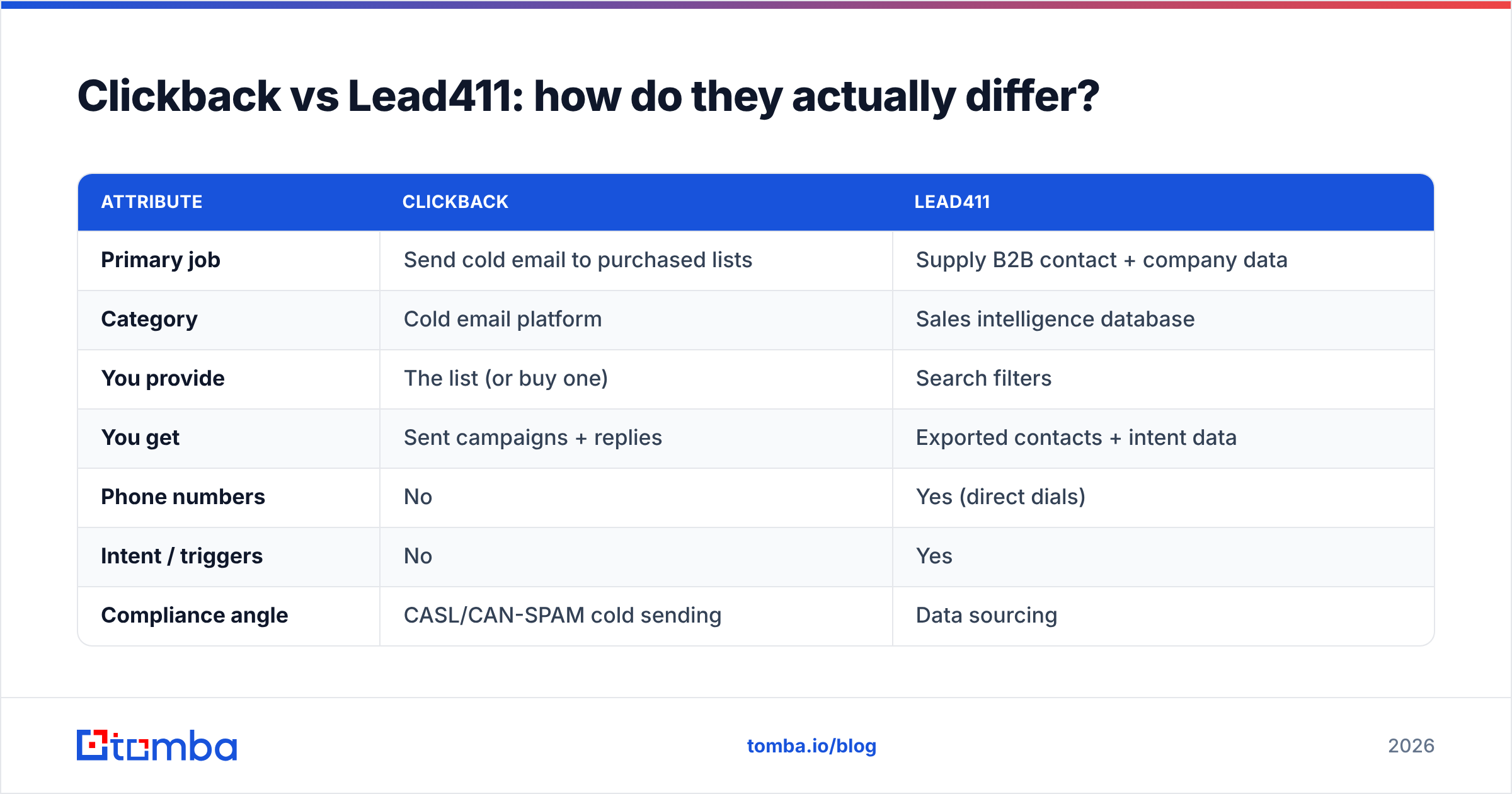
Here's the core distinction in one table.
| Attribute | Clickback | Lead411 |
|---|---|---|
| Primary job | Send cold email to purchased lists | Supply B2B contact + company data |
| Category | Cold email platform | Sales intelligence database |
| You provide | The list (or buy one) | Search filters |
| You get | Sent campaigns + replies | Exported contacts + intent data |
| Phone numbers | No | Yes (direct dials) |
| Intent / triggers | No | Yes |
| Compliance angle | CASL/CAN-SPAM cold sending | Data sourcing |
| Best for | Volume cold outreach | Targeted list building |
The takeaway: these tools sit at different stages of the same funnel. Lead411 is step one (find the people). Clickback is step three (email the people). Step two — verifying that the data is still good before you send — is where both quietly underdeliver, and it's the step that decides whether your campaign lands in the inbox or the spam folder.
Which one is better for lead generation in 2026?#
Neither, by itself — and that's the honest answer most comparison posts won't give you.
If you define lead generation as sending high volume to bought lists, Clickback is the more specialized tool and the safer choice for that exact motion. If you define it as building targeted, intent-aware prospect lists, Lead411 wins because Clickback doesn't supply data at all.
But most teams in 2026 are moving away from the spray-and-pray, buy-a-list model entirely. Deliverability rules have tightened: Google and Yahoo's bulk-sender requirements, stricter spam-trap enforcement, and one-click unsubscribe mandates all punish senders who blast unverified lists. Read the fundamentals on email deliverability and sender reputation before you commit to any high-volume cold strategy — they explain why list quality now matters more than list size.
Consider the decision this way:
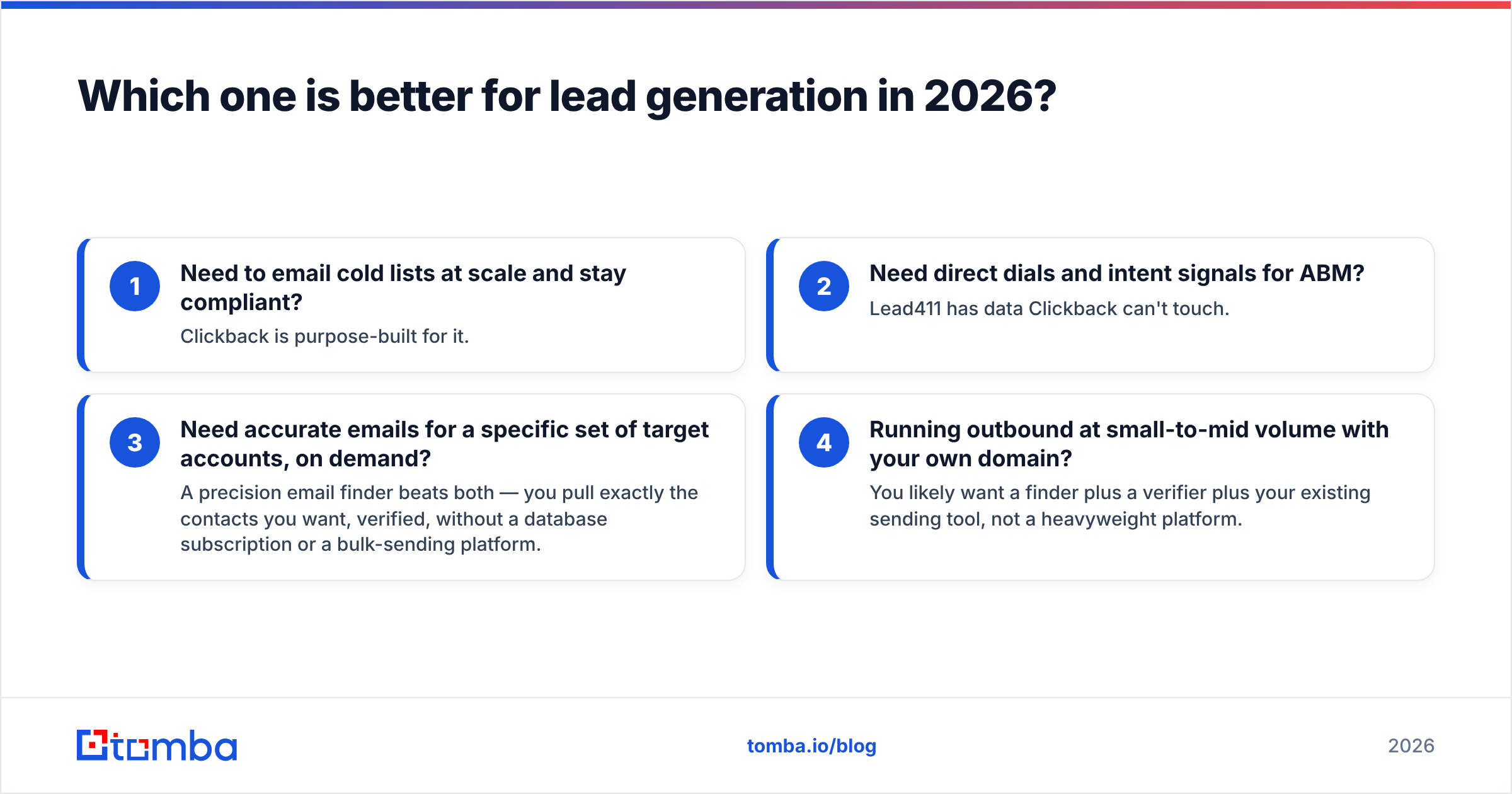
- Need to email cold lists at scale and stay compliant? Clickback is purpose-built for it.
- Need direct dials and intent signals for ABM? Lead411 has data Clickback can't touch.
- Need accurate emails for a specific set of target accounts, on demand? A precision email finder beats both — you pull exactly the contacts you want, verified, without a database subscription or a bulk-sending platform.
- Running outbound at small-to-mid volume with your own domain? You likely want a finder plus a verifier plus your existing sending tool, not a heavyweight platform.
What about data accuracy and deliverability?#
This is the part that decides ROI, and it's where the Clickback-vs-Lead411 framing falls apart.
Clickback's deliverability depends entirely on the quality of the list you feed it. Send to a stale Lead411 export — or worse, a cheap third-party list — and even the best sending infrastructure can't save your reputation. Bounces above ~2-3% start triggering throttling and blocks. Spam-trap hits are worse: a single recycled trap can land your domain on a blocklist.
Lead411's accuracy is solid for a static database but inherits the structural problem of all of them: data is a snapshot. B2B contact data decays at roughly 2-2.5% per month as people change roles, companies rebrand, and domains shift. Over a year that's a quarter of your list gone bad if it isn't re-verified close to send time.
The fix both tools skip is verification at the moment of use. Running every address through an email verifier before a campaign — checking syntax, MX records, SMTP acceptance, and catch-all status — is what keeps bounce rates low and reputation intact. If you rely on a database's last refresh date, you're sending with month-old assumptions.
For catch-all domains (where the server accepts every address, hiding which are real), you need a dedicated catch-all verifier — neither Clickback nor Lead411 solves that cleanly, and catch-alls are a large and growing share of corporate domains.
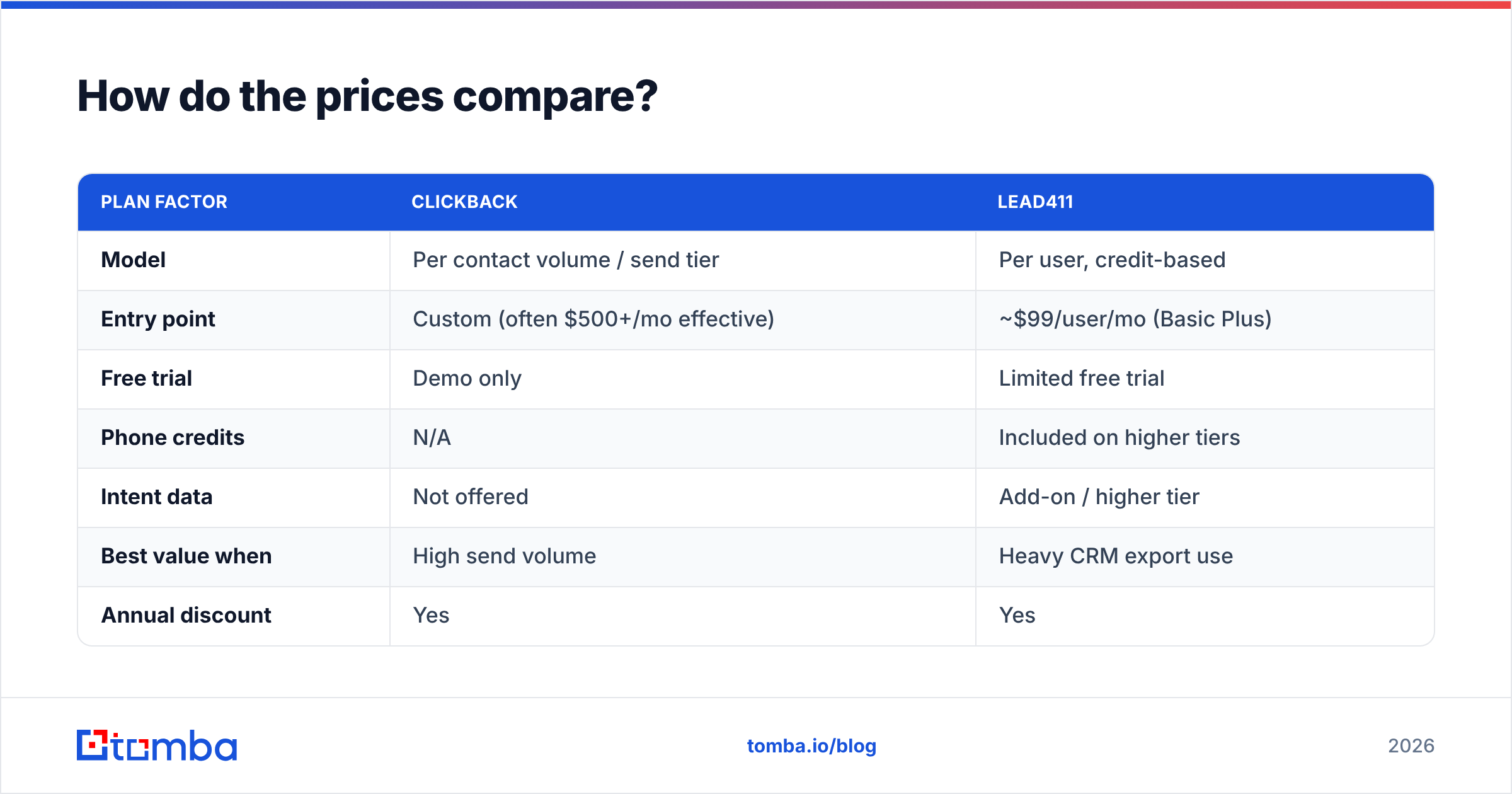
How do the prices compare?#
Pricing for both is quote-heavy, but here's the 2026 shape based on public information and typical deal sizes.
| Plan factor | Clickback | Lead411 |
|---|---|---|
| Model | Per contact volume / send tier | Per user, credit-based |
| Entry point | Custom (often $500+/mo effective) | ~$99/user/mo (Basic Plus) |
| Free trial | Demo only | Limited free trial |
| Phone credits | N/A | Included on higher tiers |
| Intent data | Not offered | Add-on / higher tier |
| Best value when | High send volume | Heavy CRM export use |
| Annual discount | Yes | Yes |
Clickback is generally the larger commitment because it bundles managed sending and list cleansing. Lead411 looks cheaper at the user level, but unlimited-export plans and intent add-ons push real spend up fast for a full team. Neither publishes simple self-serve pricing the way most modern tools do — expect a sales call.
By contrast, a dedicated finder is transparent and pay-for-what-you-use. Tomba pricing runs a free tier (25 searches/mo), Starter at $49/mo, Growth at $99/mo, and Pro at $249/mo — so you can scale credits to actual outreach volume instead of buying a platform-sized contract before you've proven the channel.
Where does a dedicated email finder fit?#
A finder replaces the "buy a list and hope it's clean" step with "find the exact contacts you need, verified, right now."
Instead of subscribing to a database and trusting its refresh cycle, you query by domain, name, or company and get current, verified emails on demand. The practical workflow looks like this:
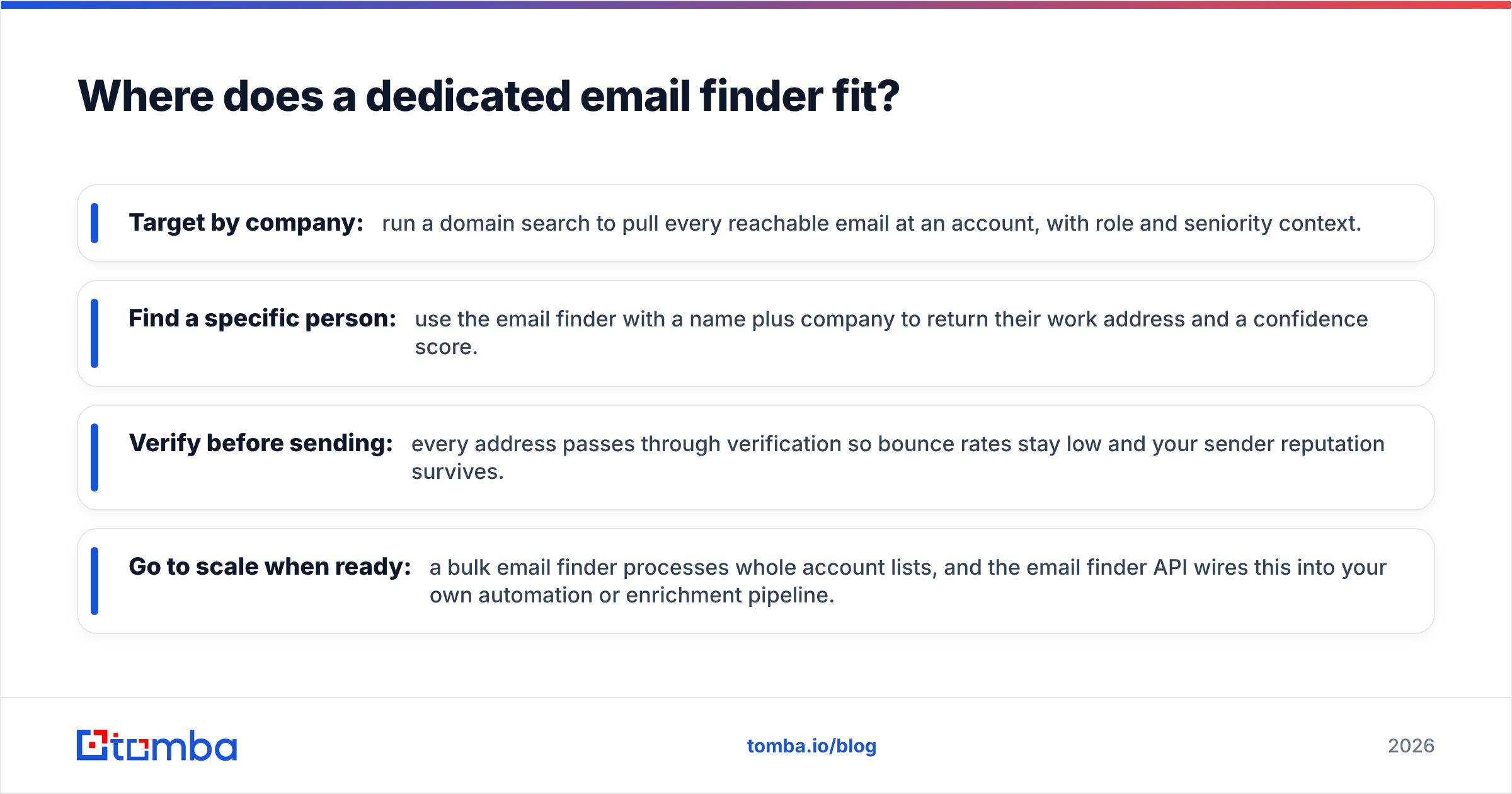
- Target by company: run a domain search to pull every reachable email at an account, with role and seniority context.
- Find a specific person: use the email finder with a name plus company to return their work address and a confidence score.
- Verify before sending: every address passes through verification so bounce rates stay low and your sender reputation survives.
- Go to scale when ready: a bulk email finder processes whole account lists, and the email finder API wires this into your own automation or enrichment pipeline.
This isn't a knock on Lead411's breadth — its intent data and direct dials are genuinely useful for ABM teams. It's a point about fit. If your bottleneck is "I need accurate emails for these 500 accounts this week," a finder solves it faster and cheaper than a database subscription, and far more safely than feeding a bought list into a bulk sender.
You can also push found-and-verified contacts straight into your stack via the HubSpot integration or Salesforce integration, keeping your CRM clean without manual CSV juggling.
What do third-party reviews say?#
Don't take any vendor's word for it — including this one. Cross-check on independent review platforms before you commit budget:
- G2 has category grids and verified-buyer reviews for both Clickback and Lead411, plus deliverability and data-accuracy sentiment.
- Capterra skews toward SMB reviewers and surfaces pricing complaints and support quality.
Read the 3-star reviews, not the 5-star ones — that's where the real limitations (data staleness, contract lock-in, deliverability surprises) show up. Pair that with a small paid pilot before signing any annual deal.
Which should you choose?#
Decide by your dominant motion, not by the marketing:
- You run high-volume cold email to purchased lists and need compliance cover → Clickback is the specialist. Just verify every list before it sends.
- You need intent signals, direct dials, and broad database search for ABM → Lead411 has data Clickback doesn't, and competes well with pricier incumbents.
- Your real problem is accurate, current emails for specific target accounts → a dedicated email finder with built-in verification beats stitching a database to a sender, costs less to start, and protects your domain reputation.
Most growing teams in 2026 land on a hybrid: a finder for precision sourcing and verification, your own warmed domain for sending, and a data provider only if intent and direct dials justify the spend. That sequence keeps deliverability high and cost proportional to results.
Start with clean, verified data#
The fastest way to improve any outbound program — whether you keep Clickback, Lead411, both, or neither — is to stop sending to data you haven't verified. Start free with the Tomba Email Finder: find professional email addresses by domain, name, or company, get a confidence score on every result, and verify before you send. The free tier gives you 25 searches a month to test accuracy against your own target accounts, and paid plans start at $49/mo when you're ready to scale. Build your list on data that's current today — not a snapshot from last quarter.
// get started
Find, verify and enrich your first contacts today
Start on the free plan with 25 searches a month, then scale when your team is ready.
Free plan · No credit card required · GDPR & CCPA
// about the author