Clickback vs LeadIQ 2026: Which B2B Lead Tool Wins?
Clickback blasts purchased lists; LeadIQ captures verified prospects from LinkedIn. We compare pricing, data quality, deliverability, and fit so you pick the right 2026 stack.
Clickback and LeadIQ both promise more B2B leads, but they solve opposite halves of the problem. One mails to lists you already have; the other helps you build a list in the first place. Pick the wrong one and you either burn your domain reputation or pay for data you can't actually send to.
TL;DR — Clickback vs LeadIQ at a glance#
- Clickback is a cold-email sending platform built to mail purchased or third-party lists at scale, with built-in list cleaning and reputation safeguards.
- LeadIQ is a prospecting data tool — capture verified contacts from LinkedIn, enrich them, and push into your CRM and sequencer. It does not send the email.
- They are complements as often as competitors: LeadIQ (or a dedicated email finder) builds the list, your sequencer sends it. Clickback tries to own both, but only for the "blast a bought list" motion.
- Pricing: LeadIQ has a free tier and seat-based plans; Clickback is quote-based and lands in the four-figures-per-month range for serious volume.
- If your real bottleneck is accurate, verified contact data, neither is the cheapest route — a focused email finder like Tomba starts at $49/mo and verifies before you ever hit send.
What is Clickback and who is it for?#
Clickback is a Canadian B2B email marketing platform aimed at companies that want to email cold, third-party, or purchased lists — something most mainstream ESPs (Mailchimp, HubSpot) explicitly forbid. Its pitch is that it makes cold-list emailing safe by scrubbing your list before send and protecting your sending infrastructure.
The core product, Clickback MAIL, runs uploaded lists through validation, removes known complainers and traps, and sends from managed IPs designed to absorb the higher complaint rates that cold lists generate. There's also Clickback WEB, a website-visitor identification add-on.
Clickback fits a specific buyer: a mid-market or enterprise team that has already acquired a large list (from a data vendor, an event, or a partner) and needs to mail it without torching their primary domain. If you don't have a list yet, Clickback doesn't help you find one.

What is LeadIQ and who is it for?#
LeadIQ is a sales-prospecting platform built around a browser extension that pulls contact data — work email, phone, title — straight off LinkedIn and company pages, then pushes it into Salesforce, HubSpot, Outreach, or Salesloft in a couple of clicks.
Where Clickback assumes you have a list, LeadIQ helps SDRs build one person at a time (or in batches) while they research accounts. Its newer features lean into AI: "Scribe" drafts personalized opening lines, and the platform tracks contact "tracking" so you know when a prospect changes jobs.
LeadIQ is for outbound SDR teams that live in LinkedIn Sales Navigator and a sequencer, and want capture-and-sync to be frictionless. It is a data and workflow layer, not a sending engine — you still need Outreach, Salesloft, or your own ESP to actually send.

Clickback vs LeadIQ: how do they actually compare?#
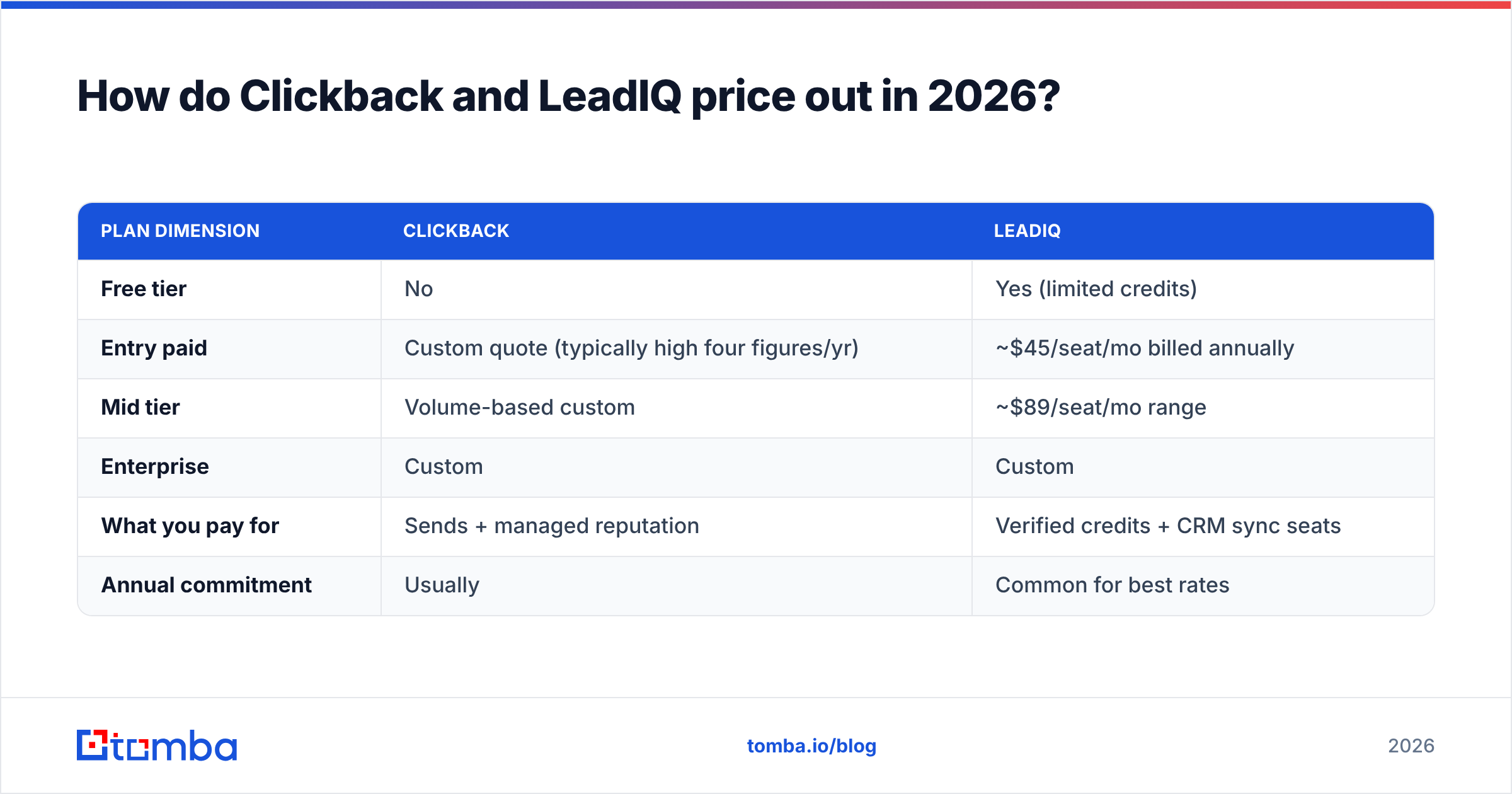
The honest answer: they barely overlap. One is a sender, one is a data source. Here's where each sits.
| Attribute | Clickback | LeadIQ |
|---|---|---|
| Primary job | Send cold email to purchased/third-party lists | Capture & enrich B2B contacts for prospecting |
| Core surface | Web app (upload list, send campaign) | Chrome extension + web app on LinkedIn |
| Provides contact data? | No — you bring the list | Yes — email, phone, title from LinkedIn |
| Sends email? | Yes — managed IPs for cold lists | No — pushes to your sequencer/CRM |
| List hygiene | Built-in cleaning before send | Email verification on captured records |
| Best fit | Bought a big list, need to mail it safely | SDRs building targeted lists from LinkedIn |
| Pricing model | Custom quote (high four-figure annual+) | Free tier + per-seat paid plans |
| Typical buyer | Demand-gen / marketing ops | SDR / sales development teams |
If you're comparing them head-to-head, you're probably asking the wrong question. The better framing is: do I need to build a list or send to one? Most teams that think they need Clickback actually need clean, opt-in-adjacent data first — which is closer to LeadIQ's job, or a dedicated email finder.

Which has better data quality and deliverability?#
Deliverability comes down to where the data started, not how clean the spreadsheet looks. This is the single biggest decision in the Clickback-vs-LeadIQ debate, so it's worth slowing down.
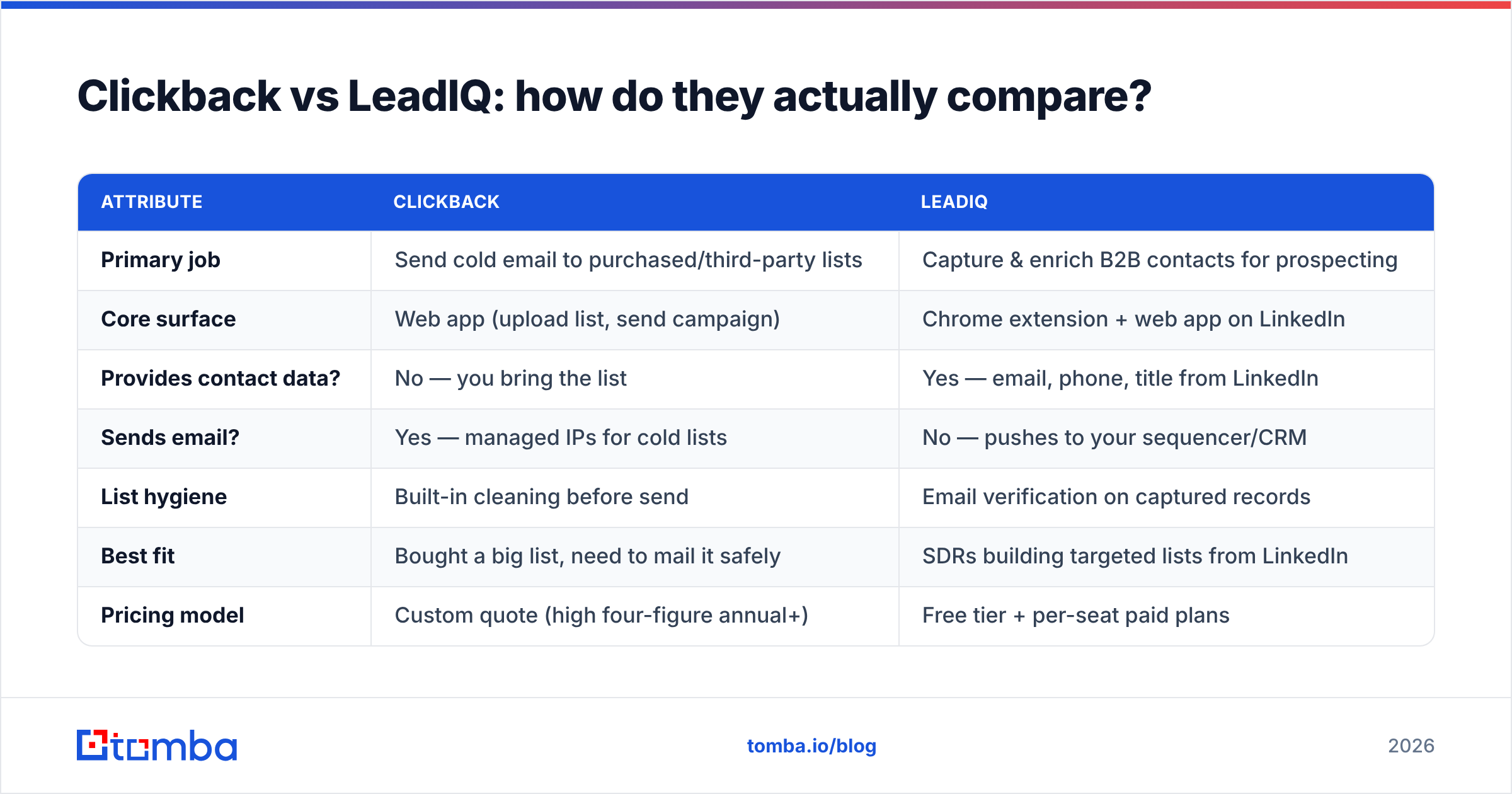
- Purchased lists (Clickback's input) carry structural risk. No matter how good the scrubbing, a bought list contains people who never opted in, plus a higher density of spam traps and stale addresses. Clickback's cleaning reduces the damage, but it can't manufacture consent. Complaint rates on cold third-party lists routinely run far above the 0.1% threshold that mailbox providers tolerate.
- Captured-at-source data (LeadIQ's input) is fresher. Because LeadIQ pulls from live LinkedIn profiles, titles and companies tend to be current, and the email is verified at capture. You're emailing one researched prospect, not the 47th name on a vendor's resold CSV.
- Verification is not optional. Both approaches still need a real-time SMTP check before send. A name that was valid six months ago may now bounce. Run every address through an email verifier and treat catch-all domains separately with a catch-all verifier.
- Your domain reputation is the asset you're protecting. Google's own sender guidelines make it clear: low spam complaints and authenticated sending (SPF, DKIM, DMARC) are what keep you in the inbox. Blasting a cold list — even a cleaned one — works against that.
On raw data quality, LeadIQ's capture-at-source model wins for targeted outbound. On deliverability, neither beats the basics: verified addresses, authenticated domains, and small, relevant sends.
How do Clickback and LeadIQ price out in 2026?#
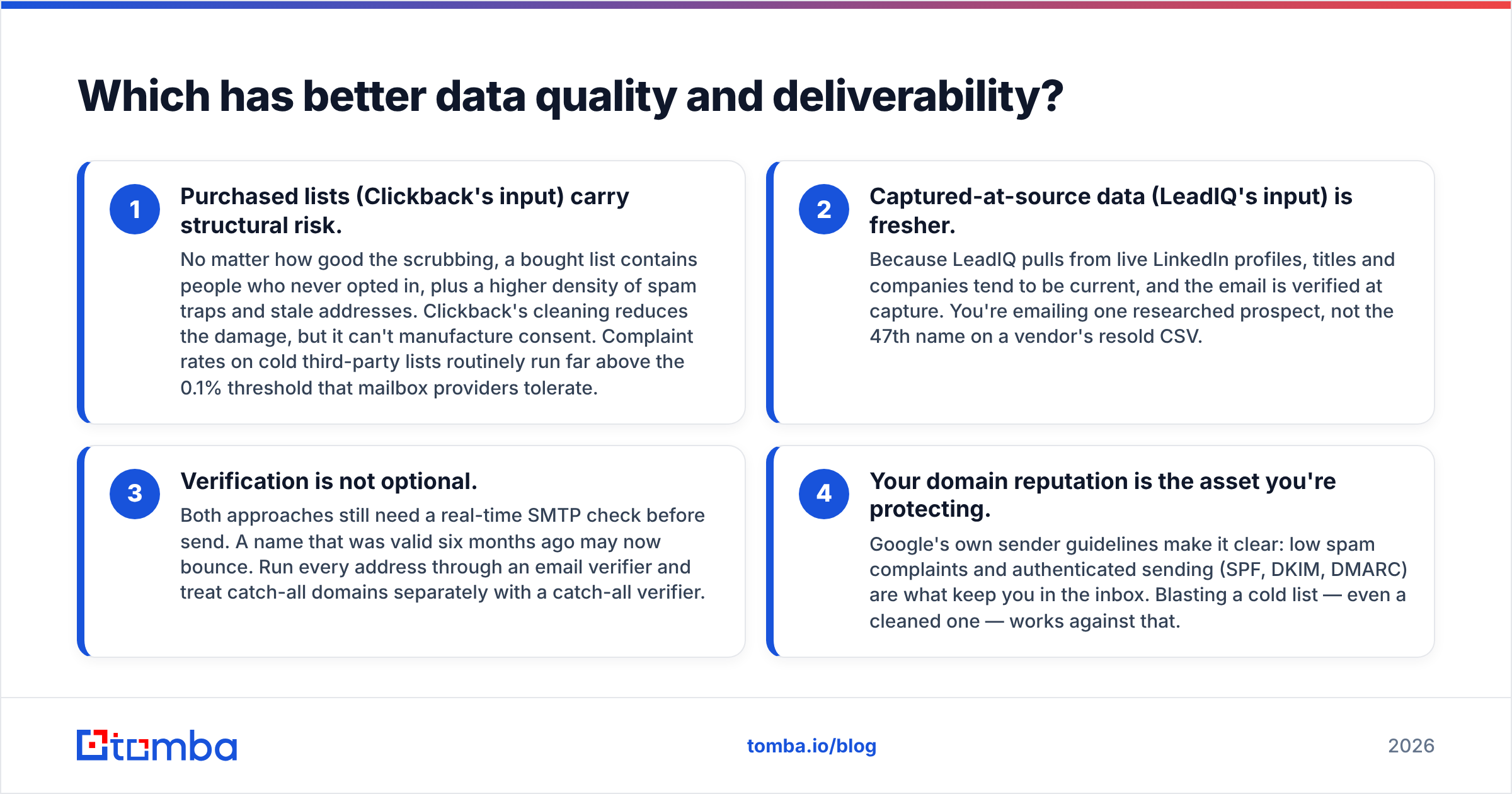
Pricing is where the two diverge again. LeadIQ publishes seat-based tiers and a free plan; Clickback runs on custom quotes scoped to list size and send volume.
| Plan dimension | Clickback | LeadIQ |
|---|---|---|
| Free tier | No | Yes (limited credits) |
| Entry paid | Custom quote (typically high four figures/yr) | ~$45/seat/mo billed annually |
| Mid tier | Volume-based custom | ~$89/seat/mo range |
| Enterprise | Custom | Custom |
| What you pay for | Sends + managed reputation | Verified credits + CRM sync seats |
| Annual commitment | Usually | Common for best rates |
For a small team, Clickback's quote-based, send-volume model is overkill unless you genuinely have a large cold list to mail. LeadIQ's per-seat pricing scales with headcount, which gets expensive once an SDR team grows past a handful of reps and burns through credits.
If the line item you actually care about is cost per verified contact, compare both against transparent Tomba pricing: a Free tier with 25 searches, Starter at $49/mo, Growth at $99/mo, and Pro at $249/mo — no annual lock-in required to start.

Wait — that placeholder belongs below. Here it is in context:
When should you choose Clickback?#
Choose Clickback when all of these are true:
- You already own a large third-party or purchased list and have a legal basis to email it in your market.
- Your ESP has refused to send it (most will), and you need managed IPs that won't take down your primary domain.
- You're a demand-gen or marketing-ops team measuring on volume and pipeline contribution, not 1:1 SDR personalization.
- You've accepted the deliverability and compliance trade-offs of cold-list mailing in your region (CAN-SPAM, CASL, GDPR all apply differently).
Clickback is a legitimate tool for a narrow job. The risk is using it as a shortcut around building a real, targeted list — which usually shows up later as a damaged domain and a shrinking inbox-placement rate.
When should you choose LeadIQ?#
Choose LeadIQ when:
- Your reps prospect inside LinkedIn Sales Navigator daily and you want one-click capture into the CRM.
- You run a structured outbound motion through Outreach or Salesloft and need data to flow there cleanly.
- Personalization matters — you're sending dozens of researched emails, not tens of thousands of generic ones.
- You value job-change tracking and AI-assisted opening lines as part of the workflow.
LeadIQ's weak spots are credit limits, per-seat cost at scale, and coverage gaps outside its strongest regions. Like any single data source, it's worth cross-checking captured emails against a second tool before a campaign — which is exactly where a dedicated finder and verifier earn their keep.
Is there a better-value third option?#
Yes — if your real problem is getting accurate, verified contact data without overpaying, a focused email-finding stack beats both for cost and flexibility.
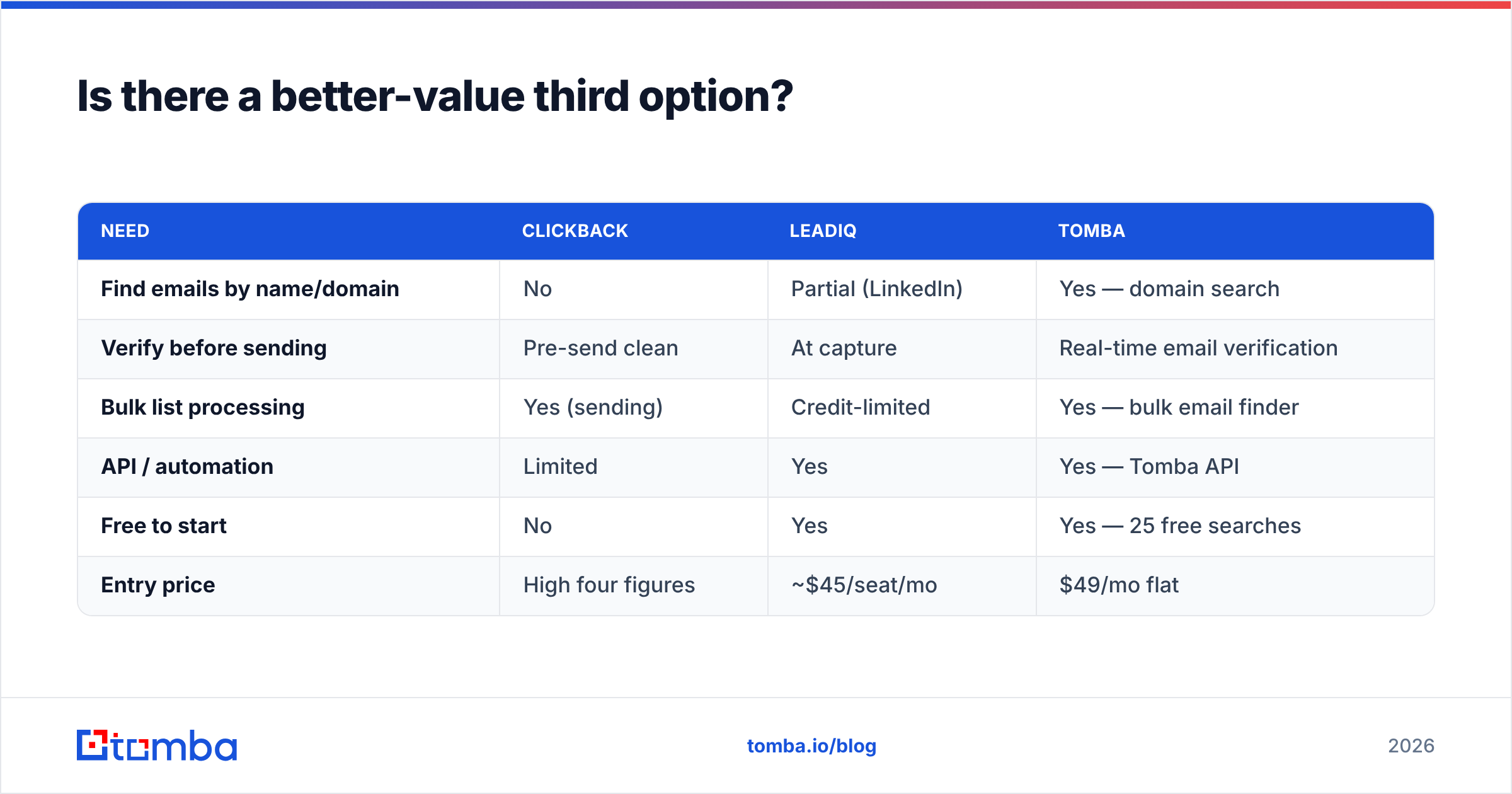
Here's how a Tomba-centered approach stacks up against the two:
| Need | Clickback | LeadIQ | Tomba |
|---|---|---|---|
| Find emails by name/domain | No | Partial (LinkedIn) | Yes — domain search |
| Verify before sending | Pre-send clean | At capture | Real-time email verification |
| Bulk list processing | Yes (sending) | Credit-limited | Yes — bulk email finder |
| API / automation | Limited | Yes | Yes — Tomba API |
| Free to start | No | Yes | Yes — 25 free searches |
| Entry price | High four figures | ~$45/seat/mo | $49/mo flat |
The pattern most efficient teams land on: use a finder to build and verify the list, push it into the CRM, and send through a sequencer you control with a properly warmed domain. You skip the bought-list reputation risk of Clickback and the per-seat credit ceiling of LeadIQ. For reference data on where contact records come from and how they're validated, see Tomba's data sources, and compare independent reviews on G2 before committing.
The verdict: Clickback vs LeadIQ#
They're not really rivals — they're two stages of two different motions. Clickback is for mailing a list you already bought; LeadIQ is for building a targeted list one prospect at a time. Decide by your bottleneck:
- Have a big cold list and need to send it without burning your domain? Clickback, with eyes open on compliance.
- Run an SDR team that lives in LinkedIn and a sequencer? LeadIQ, budgeting for seats and credits.
- Mostly need accurate emails you can trust at a predictable price? Neither — start with a dedicated finder and verifier.
Whichever sending motion you run, the data underneath it is what decides whether you reach the inbox or the spam folder.
Start with verified data, then send#
Before you pay for a sending platform or a per-seat prospecting tool, fix the input. The Tomba Email Finder lets you find professional email addresses by domain, name, or company, verify them in real time, and export clean lists to your CRM or sequencer — starting free with 25 searches and scaling to $49/mo when you're ready. Build the list right first, and Clickback or LeadIQ (or neither) becomes a much smaller decision. See full Tomba pricing and start finding verified contacts today.
Ready to find emails that actually work?
Join 150,000+ professionals who stopped guessing and started sending. Free credits on signup — no credit card required.
Get the Tomba newsletter
Practical outbound tactics and product updates — once every two weeks.
About the author