Clickback vs LeadRocks (2026): Full B2B Lead Comparison
Clickback sends cold email to purchased lists; LeadRocks hands you the contacts. Here is how the two B2B tools actually compare in 2026 — and what they both miss.
Clickback vs LeadRocks: Which B2B Lead Tool Actually Fits Your Outbound in 2026?
People put Clickback and LeadRocks in the same shortlist, then realize halfway through a trial that they solve two different problems. One sends email to lists you already own. The other sells you the list. Pick the wrong one and you either have a sending engine with no contacts, or a pile of contacts with nowhere clean to send them.
This breakdown sorts out what each tool actually does, where the data and deliverability gaps sit, and which one belongs in your stack — plus the layer both of them assume you already have.
TL;DR#
- Clickback is a cold-email sending platform built to email purchased or cold B2B lists from dedicated IPs — it is a deliverability engine, not a data source.
- LeadRocks is a B2B contact database — you search by title, company, and industry, then export emails and phone numbers. It does not send for you.
- They are complements, not true competitors. A realistic stack is "data tool → verification → sending tool," and these two sit on opposite ends.
- Both lean on data you have to trust blindly. Neither gives you per-address SMTP verification or a confidence score before you hit send.
- The missing layer is a dedicated email finder + verifier like the Tomba Email Finder, which checks each address before it ever touches a sending IP.
What Is Clickback and Who Is It For?#
Clickback (specifically Clickback MAIL) is a cold email outreach platform aimed at one job most ESPs refuse to touch: emailing cold, purchased, or list-bought B2B contacts without nuking your domain. Mailchimp, HubSpot, and most mainstream senders ban cold lists outright. Clickback built its whole positioning around being allowed to send to them.
To do that, it runs your campaigns on dedicated sending infrastructure, layers in list cleaning, and tracks opens and clicks so you can route warm contacts into your CRM. Think of it as a courier that will deliver to addresses other couriers refuse — but it expects you to bring the addresses.
Who it fits:
- Volume B2B marketers running cold email to bought lists who keep getting throttled by normal ESPs.
- Teams that already buy data and need a compliant-ish way to actually mail it.
- Top-of-funnel demand gen where opens and clicks feed a nurture sequence, not 1:1 sales reps.
What it is not: a prospecting database. Clickback does not hand you a list of CMOs at fintech companies. You supply the contacts; it sends.
What Is LeadRocks and Who Is It For?#
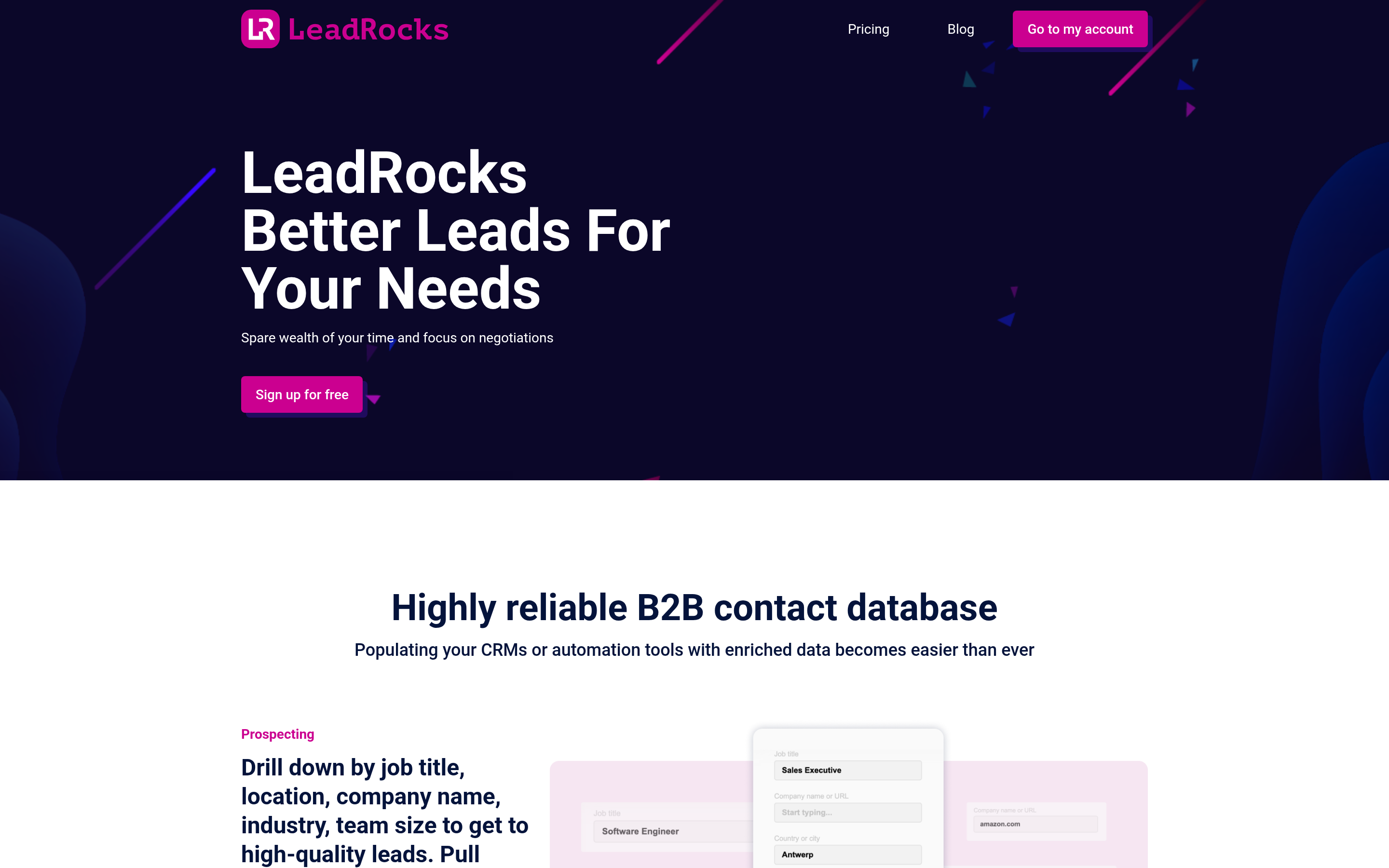
LeadRocks is the opposite half of the equation: a B2B contact database with a reported pool of hundreds of millions of records, searchable by job title, company, location, and industry. You filter, you get back work emails, personal emails, phone numbers, and LinkedIn URLs, and you export to CSV or push to your CRM.
It is closest in spirit to tools like Apollo or RocketReach, but priced for small teams and often sold through lifetime deals. The pitch is simple: stop guessing who to contact and get a list in minutes.
Who it fits:
- Founders and small sales teams who need contacts now and do not want a per-seat enterprise contract.
- LinkedIn-driven prospecting, since LeadRocks leans on profile enrichment.
- Budget buyers who grabbed a lifetime deal and want a standing data source.
What it is not: a sender. LeadRocks will not run your sequences, manage IPs, or protect your deliverability. Export the data and you are on your own for the next step.

Clickback vs LeadRocks: The Core Difference at a Glance#
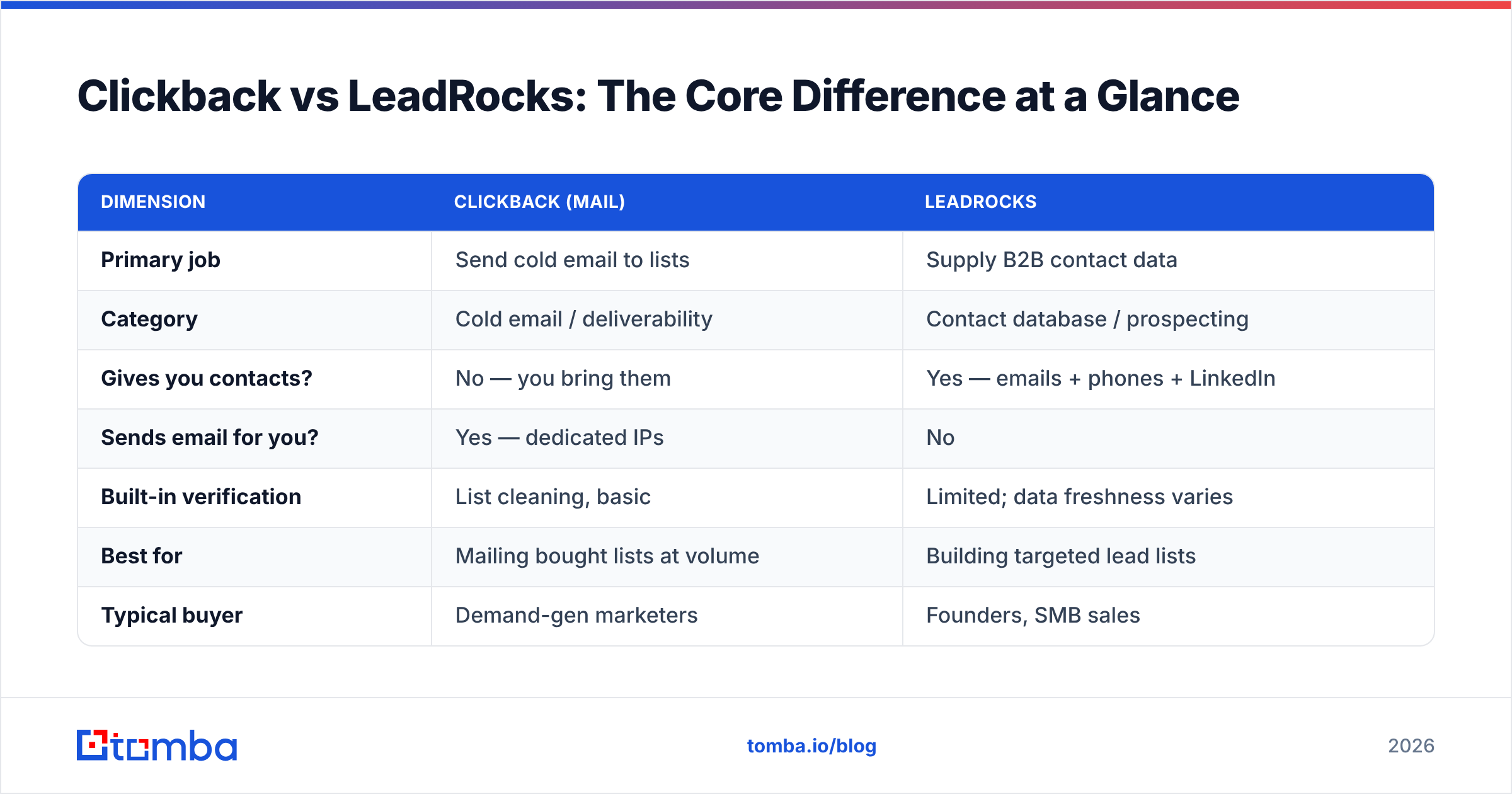
The single most important thing to understand before comparing features: these tools live on opposite ends of the outbound pipeline. One is data acquisition, the other is delivery. Here is the breakdown of where each one actually operates.
| Dimension | Clickback (MAIL) | LeadRocks |
|---|---|---|
| Primary job | Send cold email to lists | Supply B2B contact data |
| Category | Cold email / deliverability | Contact database / prospecting |
| Gives you contacts? | No — you bring them | Yes — emails + phones + LinkedIn |
| Sends email for you? | Yes — dedicated IPs | No |
| Built-in verification | List cleaning, basic | Limited; data freshness varies |
| Best for | Mailing bought lists at volume | Building targeted lead lists |
| Typical buyer | Demand-gen marketers | Founders, SMB sales |
| Pricing model | Volume/contact-based, mid-high | Lifetime deals + subscriptions |
If you only read one row, read "Gives you contacts?" against "Sends email for you?" — they are mirror images. That is why a head-to-head "winner" framing is misleading. The honest question is which problem do you have right now, and often the answer is both.
Which One Has Better Data Accuracy?#
LeadRocks is the only one of the two that is even in the data business, so it wins by default — but "wins" deserves an asterisk. Aggregated B2B databases decay fast. Contacts change jobs, companies rebrand, and a record that was accurate at scrape time can be dead six months later. Independent buyers consistently report that large database tools land somewhere in the 60–85% deliverable range depending on region and seniority, and LeadRocks sits inside that band rather than above it.
Clickback, for its part, includes list-cleaning and validation as part of getting your mail delivered, but it is cleaning your list — it is not generating or scoring net-new contacts. So the accuracy of what you send through Clickback is capped by the quality of whatever data you fed it.
This is the gap both tools share. Neither gives you a real-time, per-address SMTP check with a confidence score before you commit a send. And on cold B2B lists, a chunk of your records will be catch-all domains that accept everything and confirm nothing — exactly the addresses that quietly tank your bounce rate. A dedicated catch-all verifier and a standalone email verifier exist precisely because database exports and list cleaners leave this hole open.
The practical rule: treat any list — from LeadRocks, from Clickback's importer, from anywhere — as unverified until a verification layer says otherwise.
Which One Protects Deliverability Better?#
Clickback wins this one cleanly, because it is the only one that touches deliverability at all. Sending cold email to purchased lists is a fast way to get blacklisted if you do it from your primary domain, and Clickback's dedicated-IP model plus list hygiene is built to absorb that risk. If your problem is "my ESP keeps suspending me for cold sending," Clickback is the tool of the two that addresses it.
But dedicated IPs do not fix bad data. High bounce rates damage sender reputation regardless of which IP they come from, and mailbox providers increasingly judge you on engagement and spam complaints, not just infrastructure. Google and Yahoo's bulk-sender requirements made a sub-0.3% spam complaint rate a hard expectation, and no amount of dedicated IP saves a list that is half stale. You can read the current bar straight from Google's sender guidelines — they are explicit about authentication and complaint thresholds.
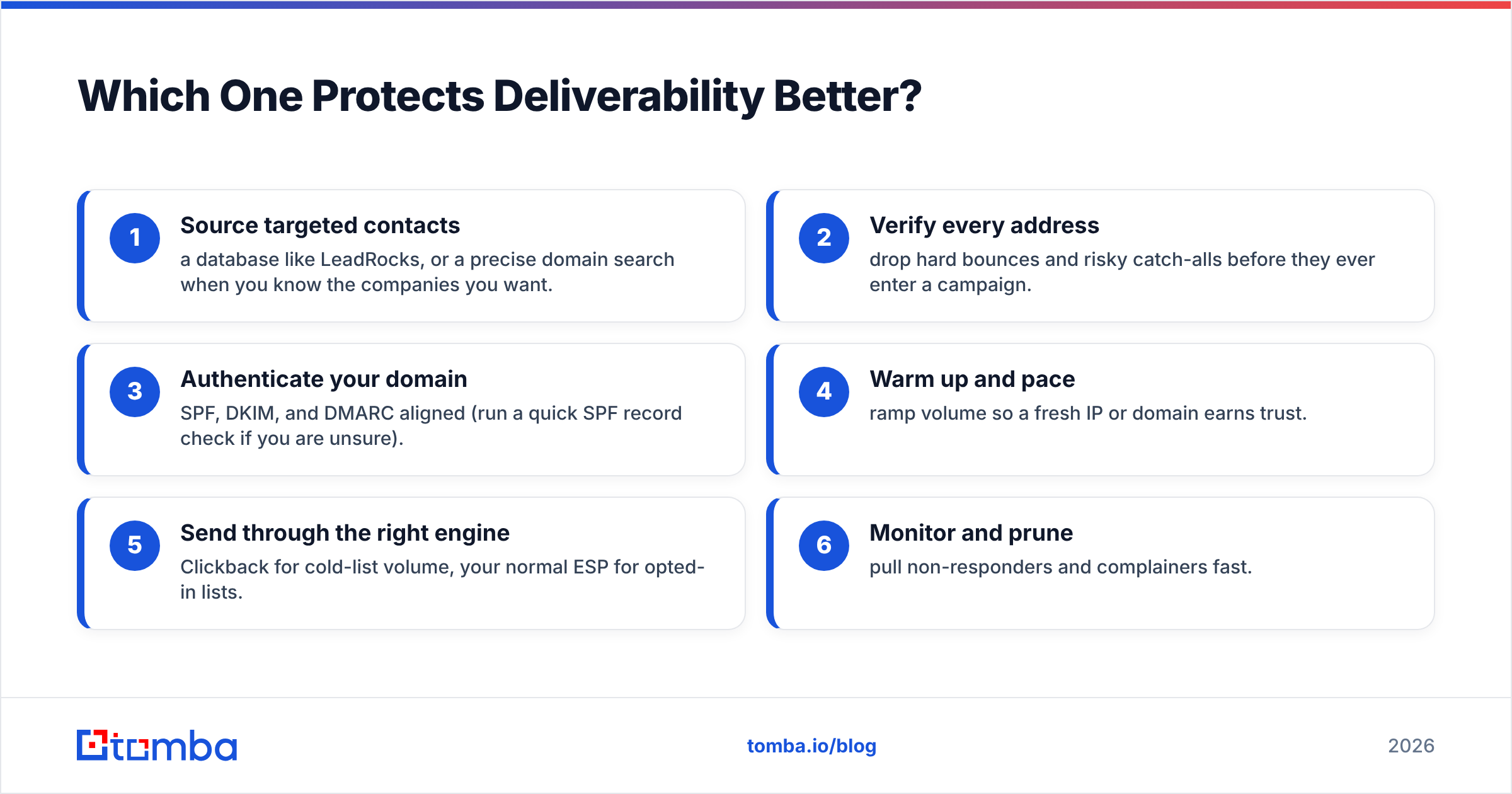
So the deliverability stack that actually holds up looks like this:
- Source targeted contacts — a database like LeadRocks, or a precise domain search when you know the companies you want.
- Verify every address — drop hard bounces and risky catch-alls before they ever enter a campaign.
- Authenticate your domain — SPF, DKIM, and DMARC aligned (run a quick SPF record check if you are unsure).
- Warm up and pace — ramp volume so a fresh IP or domain earns trust.
- Send through the right engine — Clickback for cold-list volume, your normal ESP for opted-in lists.
- Monitor and prune — pull non-responders and complainers fast.
LeadRocks gets you step 1. Clickback handles step 5. Steps 2 through 4 are where most cold programs actually fail, and neither tool fully owns them.
How Do They Compare on Pricing?#
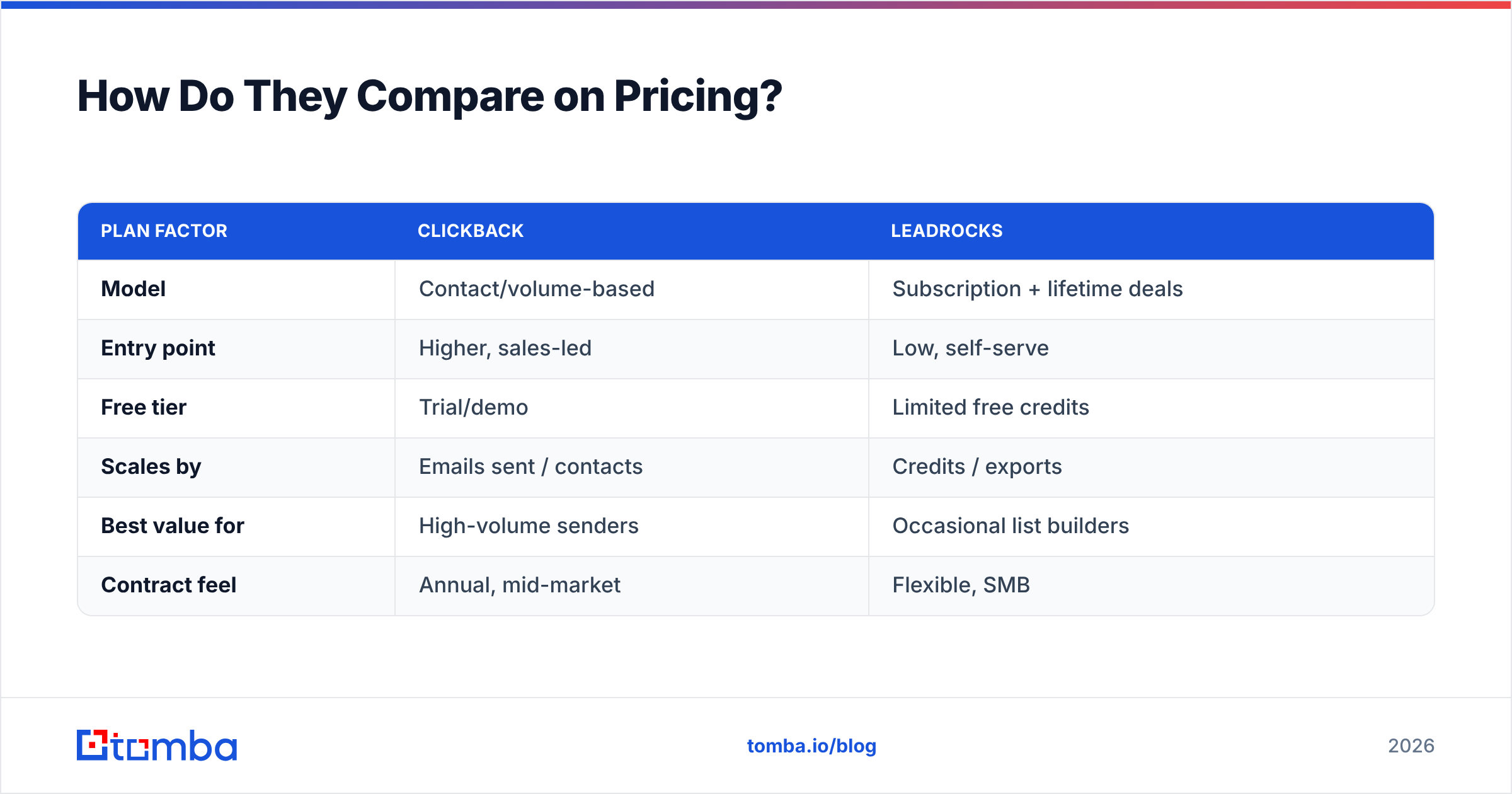
Pricing is structured so differently that a flat number comparison is nearly meaningless, but here is the shape of it.
| Plan factor | Clickback | LeadRocks |
|---|---|---|
| Model | Contact/volume-based | Subscription + lifetime deals |
| Entry point | Higher, sales-led | Low, self-serve |
| Free tier | Trial/demo | Limited free credits |
| Scales by | Emails sent / contacts | Credits / exports |
| Best value for | High-volume senders | Occasional list builders |
| Contract feel | Annual, mid-market | Flexible, SMB |
Clickback is positioned as a mid-market, sales-led purchase — you talk to someone, and the cost reflects sending infrastructure. LeadRocks is a self-serve, often lifetime-deal product, which is why it shows up in so many founder stacks. If budget predictability matters and you only build lists occasionally, LeadRocks' model is friendlier. If you are mailing hundreds of thousands of cold contacts a month, Clickback's volume pricing is the one built for that scale.
Neither is "cheap" relative to a focused finder-and-verifier. For comparison, transparent Tomba pricing starts with a free tier at 25 searches a month, then $49/mo Starter, $99/mo Growth, and $249/mo Pro — credit-based and aimed squarely at the find-and-verify step both of these tools skip or underdeliver.
Clickback vs LeadRocks: Pros and Cons#
Clickback#

Pros
- Purpose-built to send cold email to purchased lists without instant blacklisting.
- Dedicated sending IPs and list hygiene baked in.
- Open/click tracking that feeds CRM nurture.
- Compliance guardrails around cold sending.
Cons
- Supplies zero contacts — you must source data elsewhere.
- Higher, sales-led pricing not built for small teams.
- Deliverability still depends entirely on your list quality.
- Overkill if you send to opted-in lists your normal ESP already accepts.
LeadRocks#
Pros
- Large searchable B2B database with emails, phones, and LinkedIn URLs.
- Affordable, often lifetime-deal pricing.
- Fast list building by title, company, and industry.
- Friendly for founders and SMB sales teams.
Cons
- Data freshness varies; expect to verify before sending.
- No sending engine — you still need a campaign tool.
- Limited per-address verification confidence.
- Coverage is uneven outside core US/EU corporate segments.
So Which Should You Choose?#
Choose based on the hole in your pipeline, not on a scoreboard:
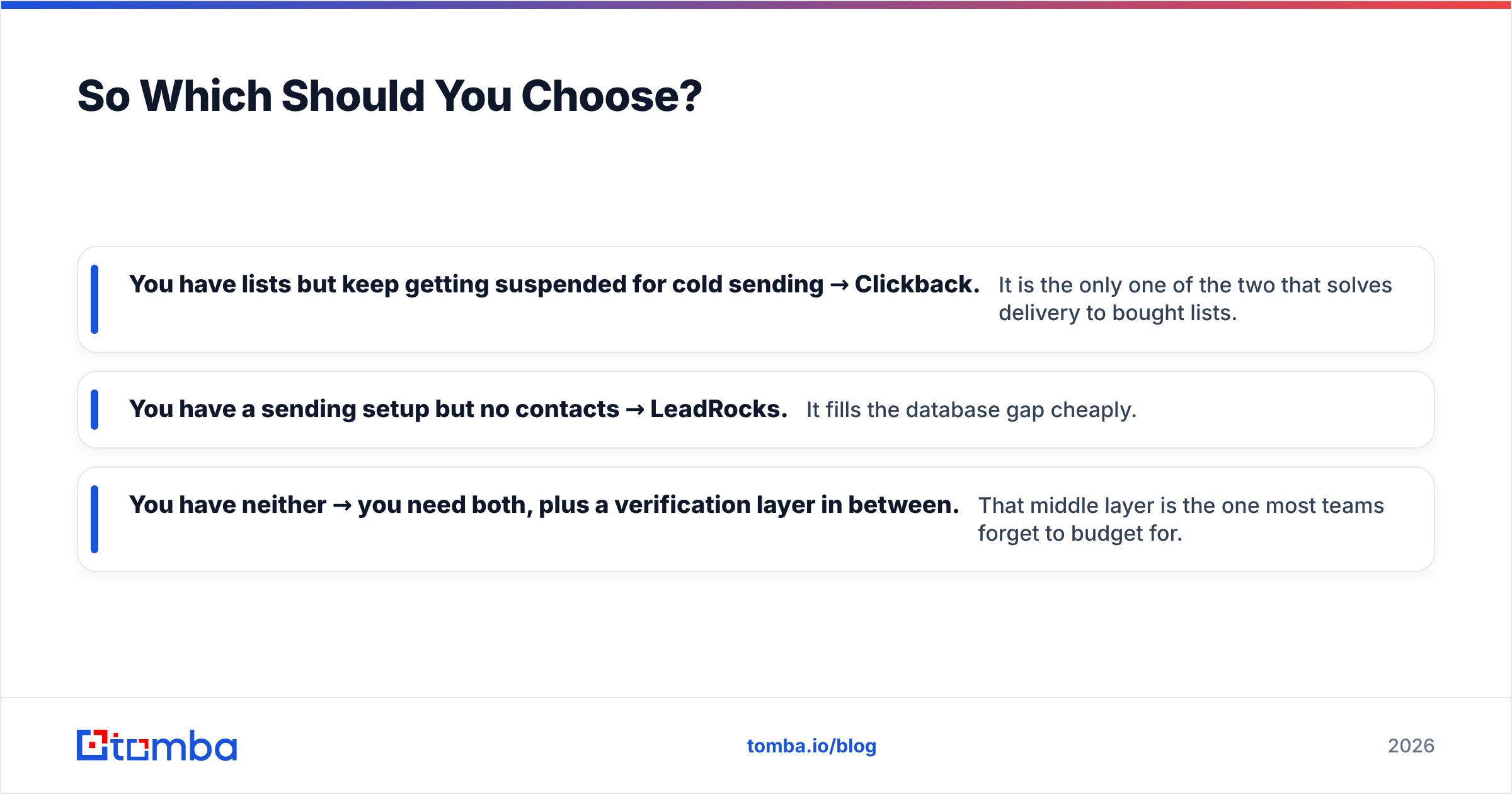
- You have lists but keep getting suspended for cold sending → Clickback. It is the only one of the two that solves delivery to bought lists.
- You have a sending setup but no contacts → LeadRocks. It fills the database gap cheaply.
- You have neither → you need both, plus a verification layer in between. That middle layer is the one most teams forget to budget for.
And here is the uncomfortable part: even with both tools, your results live or die on whether each address is real before you send. A LeadRocks export run straight into Clickback inherits every stale record, every catch-all, every role address that will bounce. The fix is not a third heavyweight platform — it is a precise email finder and verifier that confirms addresses and fills gaps your database missed.
That is where Tomba sits. Instead of buying a static list and hoping, you can run a domain search to pull verified contacts for a target company, enrich what you already have, and verify every address with a confidence score before it ever reaches a sending IP — via the dashboard, the Tomba API, or a bulk email finder for whole lists at once. You can sanity-check the broader market on G2's email-finder category before committing to anything.
The Bottom Line#
Clickback and LeadRocks are not really rivals — they are two ends of the same pipe. LeadRocks gets you contacts; Clickback gets them delivered. Put them together and you have a credible cold-email program, but only if you slot verification in between. Skip that step and you are paying two platforms to amplify bad data.
If you want the find-and-verify layer that makes everything downstream work, start with the Tomba Email Finder — find professional emails by domain, name, or company, verify each one before you send, and stop letting stale records decide your deliverability. The free tier gives you 25 searches a month to test it against your current list before you spend another dollar on sending.
Ready to find emails that actually work?
Join 150,000+ professionals who stopped guessing and started sending. Free credits on signup — no credit card required.
Get the Tomba newsletter
Practical outbound tactics and product updates — once every two weeks.
About the author