Clickback vs Leadsforge: B2B Lead Gen Compared (2026)
Clickback vs Leadsforge in 2026: how each tool builds B2B lists, what they actually cost, where they fall short, and the cleaner data stack that beats both.
Clickback vs Leadsforge: Which B2B Lead Engine Wins in 2026?
Picking between Clickback and Leadsforge is really a choice between two philosophies of lead generation. One sends cold email at volume to lists you bring or buy. The other builds the list for you with AI and hands it over. Neither is wrong — but they solve different halves of the same problem, and buying the wrong one means paying for a feature you'll never use.
This breakdown is for revenue and marketing teams trying to figure out where each tool actually earns its keep, and where a leaner data layer underneath both makes more sense.
TL;DR#
- Clickback is cold-email sending software built for emailing purchased or cold B2B lists at scale, with built-in compliance scrubbing. It is not a list builder.
- Leadsforge is an AI-driven list builder that generates targeted B2B contact lists from a plain-language prompt. It is not a heavy sending engine.
- They are complements more than competitors — but if you only buy one, your choice depends on whether you lack contacts or lack a channel.
- Data quality is the silent variable. Both tools live or die on whether the emails are real, and neither is a dedicated verification or enrichment layer.
- A cleaner stack: source and verify contacts with a dedicated email finder and email verifier, then push them into whatever sending tool you prefer.
What is Clickback?#
Clickback is a B2B email lead generation platform best known for Clickback MAIL, a product designed to email cold or purchased contact lists — something most mainstream ESPs (Mailchimp, HubSpot, etc.) explicitly forbid. Its pitch is that it lets you legally and technically send to people who have not opted in, by routing through dedicated infrastructure and scrubbing lists against spam traps, known complainers, and role-based addresses before send.
In practice, Clickback is a channel tool. You supply the list — exported from a CRM, bought from a data vendor, or scraped — and Clickback handles deliverability, suppression, and reporting. It leans heavily into compliance language (CAN-SPAM, CASL) because cold emailing purchased lists is legally sensitive, especially in Canada and the EU.

The strength is volume and tolerance for cold lists. The weakness is that Clickback does nothing to create good contacts. Garbage in, garbage out — if your purchased list is full of stale or fake addresses, Clickback's scrubbing reduces the damage but cannot manufacture accurate, current people who actually want what you sell.
What is Leadsforge?#
Leadsforge is an AI lead generation tool that builds targeted B2B contact lists from a conversational prompt. You describe your ideal customer — "marketing directors at Series B SaaS companies in the US" — and it returns a list of matching contacts with names, companies, titles, and email addresses, often in minutes.
The appeal is speed and accessibility. There's no Boolean-search learning curve and no manual prospecting. For founders and small teams without a dedicated SDR, that removes a real bottleneck. Leadsforge positions itself as the "just give me leads" button.
The catch is the same one every AI list builder faces: the list is only as good as the underlying data and the verification behind it. AI is excellent at interpreting your intent and matching firmographics. It is far less reliable at guaranteeing that the specific email it returns is deliverable today. That's a data-accuracy problem, not a prompt problem, and it's where you should ask hard questions before trusting a list at scale.

Clickback vs Leadsforge: how do they compare?#
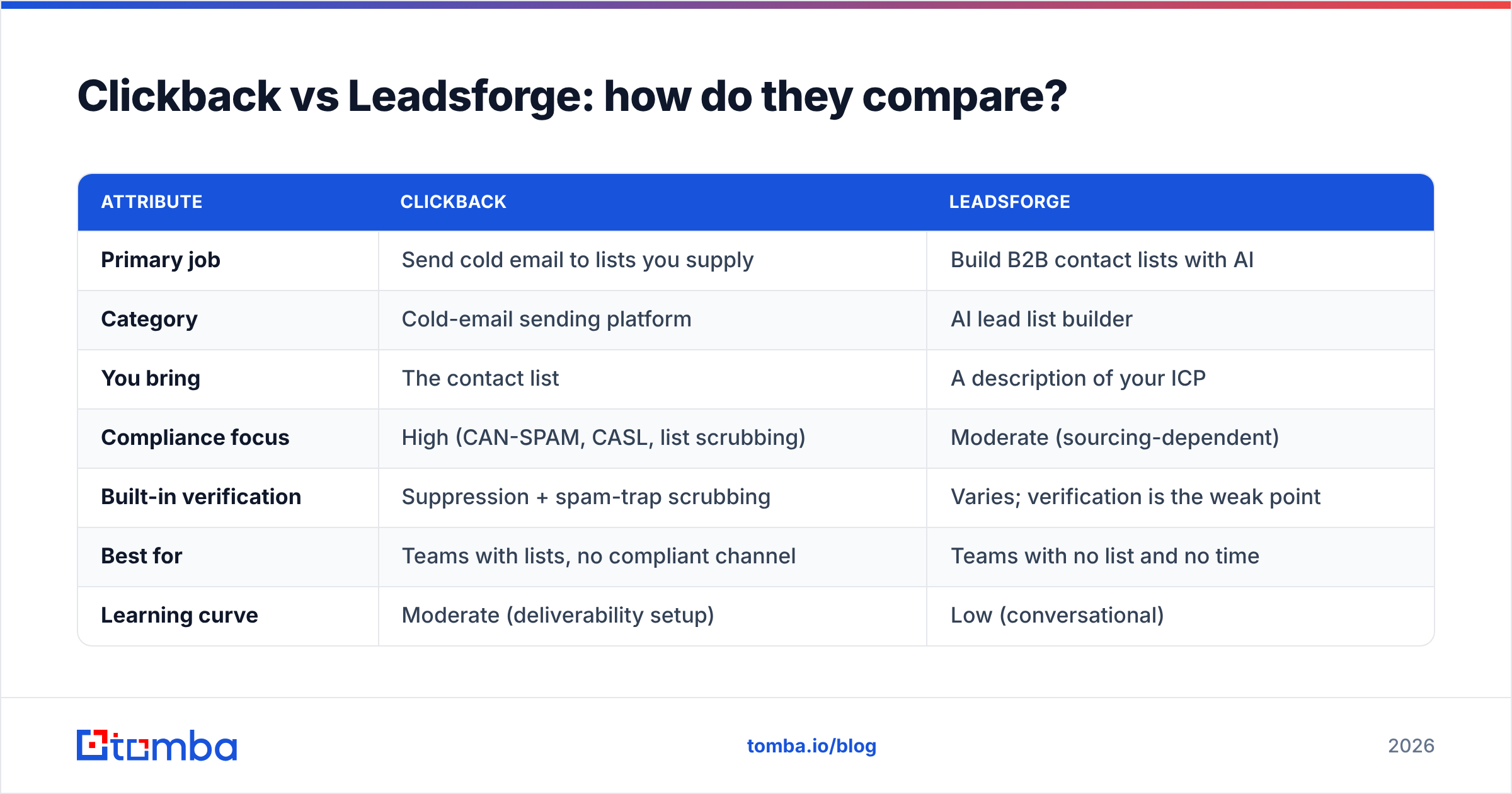
Here's the core distinction in one table. Treat the pricing as indicative — both vendors quote ranges and custom tiers, so confirm current numbers on their own sites before you commit.
| Attribute | Clickback | Leadsforge |
|---|---|---|
| Primary job | Send cold email to lists you supply | Build B2B contact lists with AI |
| Category | Cold-email sending platform | AI lead list builder |
| You bring | The contact list | A description of your ICP |
| Compliance focus | High (CAN-SPAM, CASL, list scrubbing) | Moderate (sourcing-dependent) |
| Built-in verification | Suppression + spam-trap scrubbing | Varies; verification is the weak point |
| Best for | Teams with lists, no compliant channel | Teams with no list and no time |
| Learning curve | Moderate (deliverability setup) | Low (conversational) |
| What it does NOT do | Generate net-new contacts | Run high-volume sending sequences |
The takeaway: they sit on opposite ends of the same funnel. Leadsforge fills the top (who to contact); Clickback works the middle (how to reach them). If you frame "clickback vs leadsforge" as a winner-take-all fight, you'll misjudge both.

Which one should you choose?#
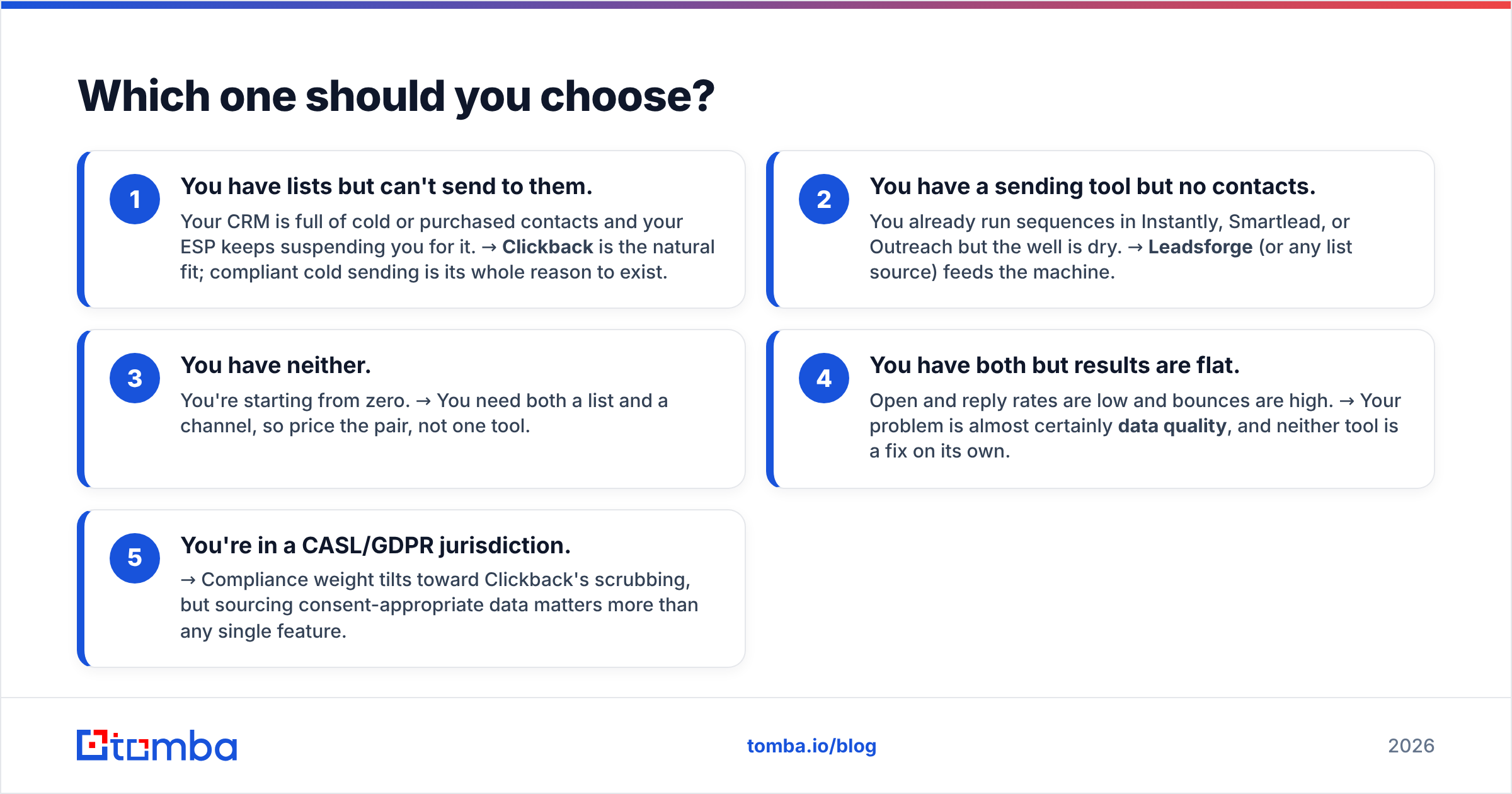
Choose based on the gap in your current stack. Use this checklist:
- You have lists but can't send to them. Your CRM is full of cold or purchased contacts and your ESP keeps suspending you for it. → Clickback is the natural fit; compliant cold sending is its whole reason to exist.
- You have a sending tool but no contacts. You already run sequences in Instantly, Smartlead, or Outreach but the well is dry. → Leadsforge (or any list source) feeds the machine.
- You have neither. You're starting from zero. → You need both a list and a channel, so price the pair, not one tool.
- You have both but results are flat. Open and reply rates are low and bounces are high. → Your problem is almost certainly data quality, and neither tool is a fix on its own.
- You're in a CASL/GDPR jurisdiction. → Compliance weight tilts toward Clickback's scrubbing, but sourcing consent-appropriate data matters more than any single feature.
The fourth case is the most common — and the most expensive to ignore. Both tools can show impressive demos and still underperform if the emails bouncing back are eroding your sender reputation.
Why data quality decides the winner#
Here's the uncomfortable truth: the deliverability ceiling on both platforms is set by data you can control independently. Clickback's scrubbing removes known bad addresses, but it doesn't validate that an unknown one is real. Leadsforge's AI finds plausible contacts, but plausible isn't verified.
A bounce rate above 3-5% drags your domain reputation down fast, and once mailbox providers throttle you, even your good emails land in spam. That's why the smartest teams treat sourcing and verification as a separate, non-negotiable layer rather than trusting whatever a single platform bundles in.
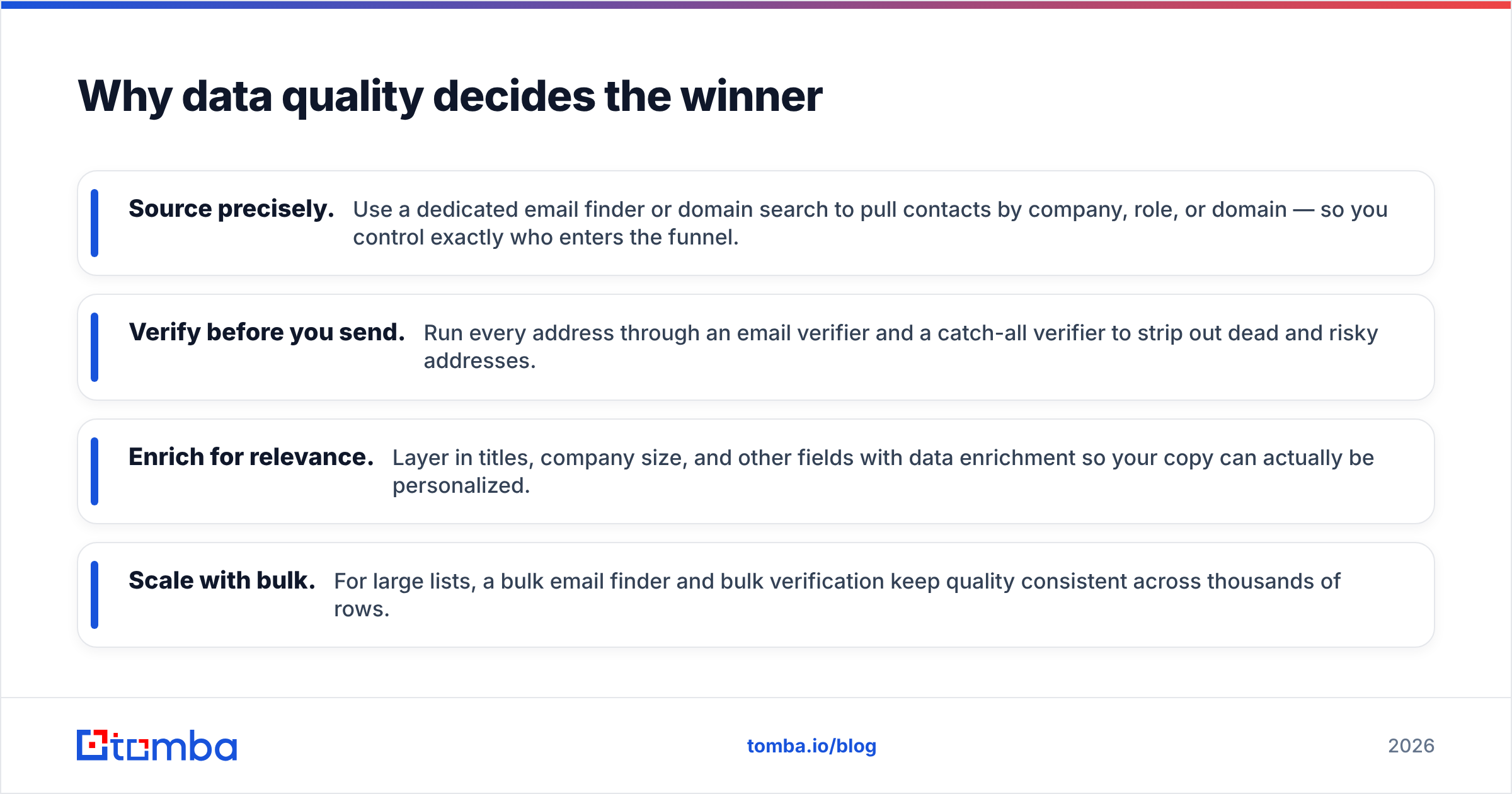
A practical, tool-agnostic workflow looks like this:
- Source precisely. Use a dedicated email finder or domain search to pull contacts by company, role, or domain — so you control exactly who enters the funnel.
- Verify before you send. Run every address through an email verifier and a catch-all verifier to strip out dead and risky addresses.
- Enrich for relevance. Layer in titles, company size, and other fields with data enrichment so your copy can actually be personalized.
- Scale with bulk. For large lists, a bulk email finder and bulk verification keep quality consistent across thousands of rows.
Do this and it almost doesn't matter which sending or list tool you pick — your inputs are clean, so your outputs improve everywhere downstream.

How do Clickback and Leadsforge handle pricing?#
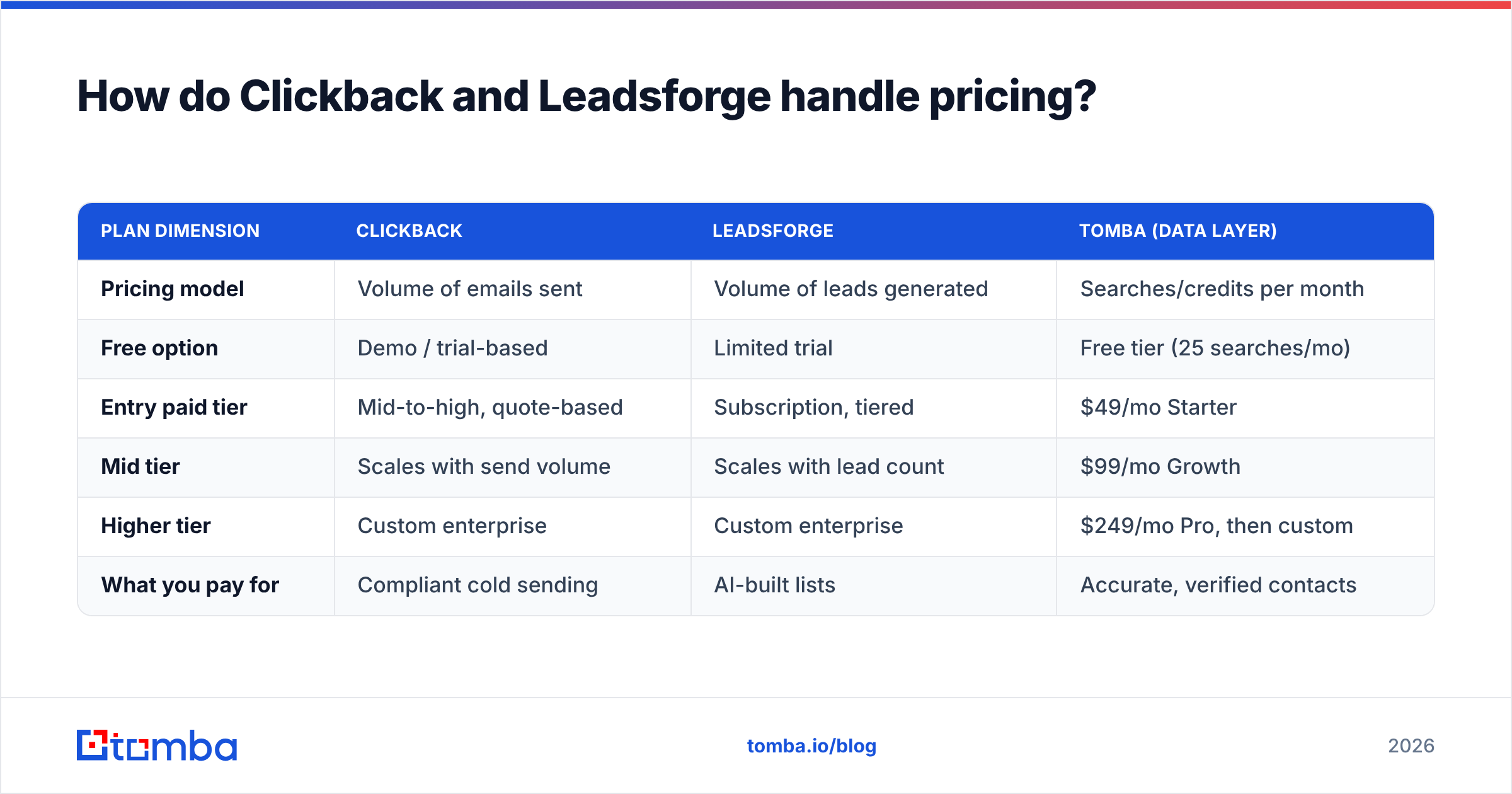
Pricing is where the two diverge sharply, because you're buying different things — send volume versus list volume.
| Plan dimension | Clickback | Leadsforge | Tomba (data layer) |
|---|---|---|---|
| Pricing model | Volume of emails sent | Volume of leads generated | Searches/credits per month |
| Free option | Demo / trial-based | Limited trial | Free tier (25 searches/mo) |
| Entry paid tier | Mid-to-high, quote-based | Subscription, tiered | $49/mo Starter |
| Mid tier | Scales with send volume | Scales with lead count | $99/mo Growth |
| Higher tier | Custom enterprise | Custom enterprise | $249/mo Pro, then custom |
| What you pay for | Compliant cold sending | AI-built lists | Accurate, verified contacts |
Two things stand out. First, Clickback and Leadsforge both push you toward quote-based or volume-scaled pricing, which makes apples-to-apples comparison hard — get written quotes for your real volumes. Second, a dedicated data layer is comparatively cheap: you can review full Tomba pricing and see the Starter plan sits at $49/mo, well below the cost of feeding either platform dirty data and burning your domain.
If you're weighing total cost, remember the hidden line item: a damaged sending domain can take weeks to recover and can stall an entire outbound program. Clean data is the cheapest insurance you'll buy.
What are the main pros and cons?#
A quick honest scorecard for each:
Clickback — pros
- Purpose-built for the legally tricky job of emailing cold/purchased lists
- Strong compliance and list-scrubbing posture (CAN-SPAM, CASL)
- Mature reporting and suppression management
Clickback — cons
- Generates zero net-new contacts; you must supply the list
- Quote-based pricing can climb quickly with volume
- Cold-list sending carries inherent reputation risk no tool fully removes
Leadsforge — pros
- Extremely low learning curve; conversational list building
- Fast time-to-list for teams without prospecting resources
- Good for quickly testing new ICP segments
Leadsforge — cons
- List accuracy depends entirely on underlying data and verification
- Not a high-volume sending engine; you still need a channel
- AI "plausible" contacts still need independent verification before scale
Notice the symmetry: each tool's biggest weakness is the other tool's job — and the verification gap is shared by both. That's the strongest argument for treating contact data as its own discipline.
Is there a better combined approach?#
Yes — stop forcing a binary. The highest-performing outbound stacks in 2026 separate three concerns and pick the best tool for each:
- Sourcing & verification — own this layer with dedicated, accuracy-first tooling so every contact entering your funnel is real and current.
- List intelligence — use AI builders like Leadsforge for fast ICP exploration when you genuinely lack a starting list.
- Compliant sending — use a channel tool like Clickback when your use case is cold or purchased lists in regulated markets.
When you decouple these, you stop overpaying for bundled features you don't trust and you stop blaming the wrong tool when results dip. A flat reply rate is usually a data problem, not a sending problem — and you can only diagnose that when your data layer is independent and measurable.
For deeper background on why deliverability hinges on inputs, the fundamentals of email deliverability are worth a read, and third-party reviews on G2 and Capterra give you unfiltered user sentiment on both platforms. You can also confirm current feature sets directly on the Clickback site before any purchase.
The bottom line#
Clickback and Leadsforge aren't really rivals — they're two pieces of one funnel. Clickback is the compliant channel for cold lists; Leadsforge is the AI shortcut to building one. Pick by the gap in your stack, not by which has the flashier demo.
But whichever you choose, the variable that actually moves your numbers is data accuracy, and that's a layer worth owning yourself. Start by sourcing and verifying contacts with the Tomba Email Finder — find professional emails by domain, name, or company, verify them before they ever hit a send queue, and feed clean, deliverable data into Clickback, Leadsforge, or any tool you run next. Spin up the free tier, run your next list through it, and watch your bounce rate fall before you spend another dollar on volume.
Ready to find emails that actually work?
Join 150,000+ professionals who stopped guessing and started sending. Free credits on signup — no credit card required.
Get the Tomba newsletter
Practical outbound tactics and product updates — once every two weeks.
About the author