Clickback vs SalesQL 2026: Which B2B Email Tool Wins?
Clickback sends cold email at scale; SalesQL finds emails on LinkedIn. They solve different problems. Here's which one your pipeline actually needs in 2026.
Choosing between Clickback and SalesQL is the wrong question — and most buyers don't realize it until they've wasted a month and a credit card. The two tools sit at opposite ends of the outbound workflow. One sends cold email to cold contacts at scale. The other scrapes emails off LinkedIn profiles one connection at a time. Knowing which gap you're actually trying to fill is the whole game.
This breakdown walks through what each platform does, where they overlap, what they cost in 2026, and which one belongs in your stack — plus where a dedicated data provider beats both.
TL;DR — Clickback vs SalesQL at a glance#
- Clickback is a B2B cold-email sending platform built to legally email purchased or cold lists (CAN-SPAM oriented), with built-in list cleaning and sending infrastructure. It is not a prospecting tool.
- SalesQL is a Chrome extension that extracts personal and work emails plus phone numbers from LinkedIn and Sales Navigator profiles. It is not a sending tool.
- They don't compete head-to-head — they're often used together: SalesQL builds the list, Clickback sends to it.
- Accuracy and data freshness are the weak spots for both: SalesQL depends on LinkedIn coverage, and Clickback's value drops if your source data is stale.
- If your real bottleneck is finding and verifying accurate emails at scale, a dedicated finder like the Tomba Email Finder outperforms a LinkedIn-only scraper and feeds cleaner lists into any sender.
What is Clickback?#
Clickback is a Canadian B2B email marketing platform designed around a niche most tools avoid: emailing cold, purchased, or third-party lists in a compliant way. Where Mailchimp and HubSpot require opt-in contacts, Clickback positions itself as software you can point at a cold list and still stay inside CAN-SPAM rules.
Its core features:
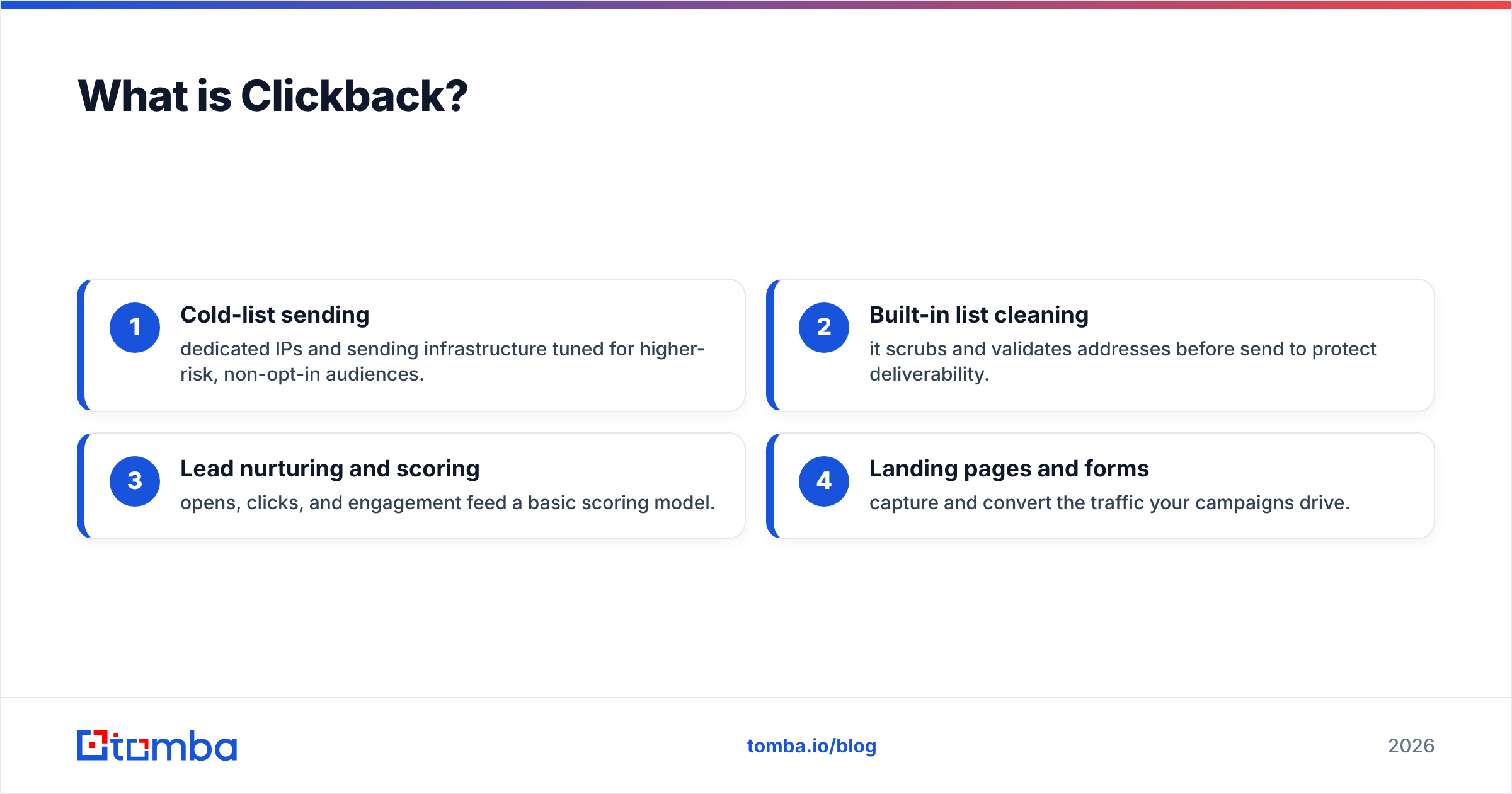
- Cold-list sending — dedicated IPs and sending infrastructure tuned for higher-risk, non-opt-in audiences.
- Built-in list cleaning — it scrubs and validates addresses before send to protect deliverability.
- Lead nurturing and scoring — opens, clicks, and engagement feed a basic scoring model.
- Landing pages and forms — capture and convert the traffic your campaigns drive.
The catch: Clickback does not find anyone. You bring the list. If that list is garbage, Clickback's cleaning step trims the worst of it, but it can't conjure a correct address that was never in the file. Garbage in, slightly-less-garbage out.
What is SalesQL?#
SalesQL is a lightweight LinkedIn email-finder that lives as a Chrome extension. Open a profile, click the icon, and it surfaces the person's likely work email, personal email, and sometimes a phone number. SalesQL is popular with recruiters and SDRs who already prospect inside LinkedIn and want contact details without leaving the tab.
Its strengths:
- Tight LinkedIn integration — works on profiles, search results, and Sales Navigator lists.
- Bulk extraction — pull contacts from a whole search page or saved list, not just one profile.
- Personal + work emails — useful when the corporate address bounces or is gated.
- Cheap entry point — a free tier and low monthly plans make it easy to test.
The limits are structural. SalesQL only knows what LinkedIn exposes. If a prospect isn't on LinkedIn, has a locked-down profile, or you've hit LinkedIn's own usage ceilings, the tool goes quiet. There's no domain-wide search, no company-pattern intelligence, and verification is thinner than a dedicated email verifier.
Is Clickback better than SalesQL?#
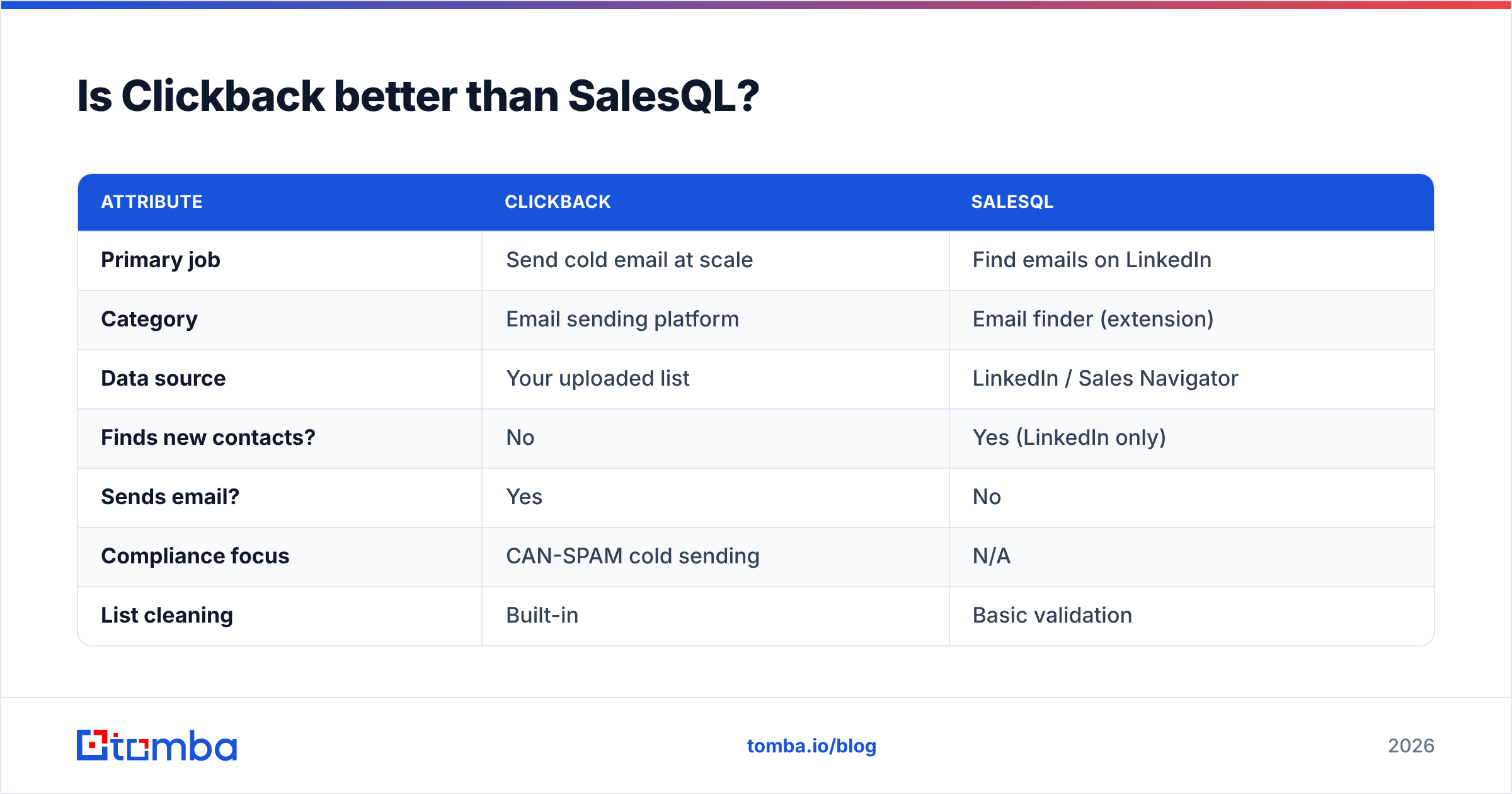
Neither is "better" — they answer different questions. Asking whether Clickback beats SalesQL is like asking whether a delivery truck beats a warehouse. You need both, in order, to ship anything.
| Attribute | Clickback | SalesQL |
|---|---|---|
| Primary job | Send cold email at scale | Find emails on LinkedIn |
| Category | Email sending platform | Email finder (extension) |
| Data source | Your uploaded list | LinkedIn / Sales Navigator |
| Finds new contacts? | No | Yes (LinkedIn only) |
| Sends email? | Yes | No |
| Compliance focus | CAN-SPAM cold sending | N/A |
| List cleaning | Built-in | Basic validation |
| Best user | B2B marketers with lists | Recruiters, SDRs in LinkedIn |
| Entry pricing | Mid-to-high, quote-based | Free tier, low monthly |
The decision tree is simple. If you already have a list and need to send to it compliantly, look at Clickback. If you have target accounts and need to find the people, look at SalesQL — or a stronger finder. If you need both finding and sending, you'll be buying two tools no matter what, so optimize each stage separately.
How much do Clickback and SalesQL cost in 2026?#
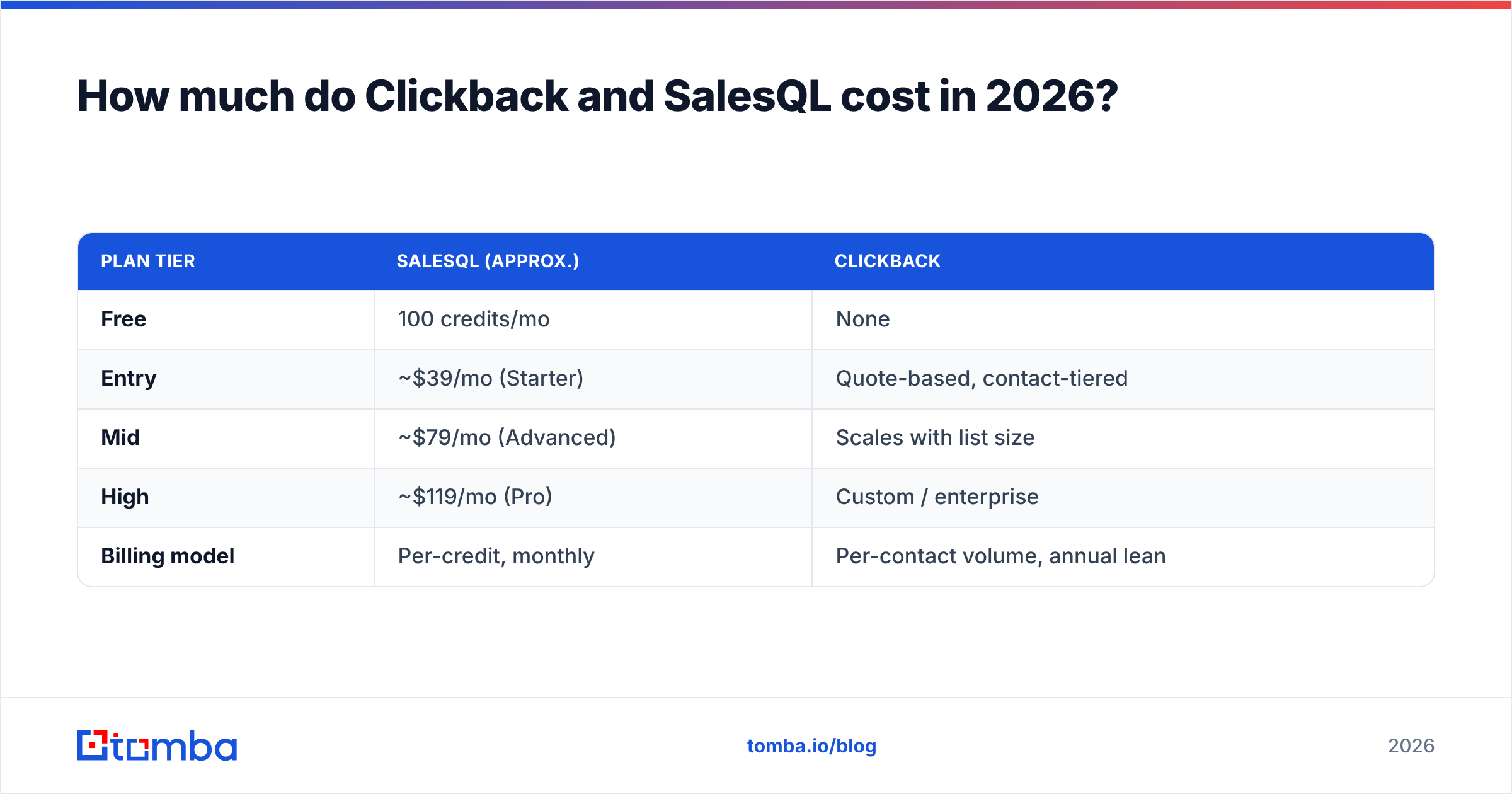
Pricing models differ as much as the products. SalesQL sells credits on a self-serve ladder. Clickback sells contact-volume packages, usually through a sales conversation, which makes apples-to-apples comparison hard.
| Plan tier | SalesQL (approx.) | Clickback |
|---|---|---|
| Free | 100 credits/mo | None |
| Entry | ~$39/mo (Starter) | Quote-based, contact-tiered |
| Mid | ~$79/mo (Advanced) | Scales with list size |
| High | ~$119/mo (Pro) | Custom / enterprise |
| Billing model | Per-credit, monthly | Per-contact volume, annual lean |
Two things to flag. First, SalesQL credits are consumed whether or not the email turns out valid, so effective cost per usable contact is higher than the sticker. Second, Clickback's pricing rewards volume but locks you into its sending ecosystem — you're paying for infrastructure, not data. If your data quality is the problem, neither price tag solves it.
For teams that want predictable, data-first pricing without a sales call, Tomba's pricing runs Free (25 searches/mo), Starter at $49/mo, Growth at $99/mo, and Pro at $249/mo — credits that cover finding and verification in one place.
Where do both tools fall short?#
The shared weakness is data accuracy, and it shows up at different stages.
SalesQL's blind spot is coverage. It's only as good as LinkedIn. Prospects without profiles, in regions with low LinkedIn adoption, or behind privacy settings simply don't surface. And a scraped email is a guessed email until something verifies it against the mail server. A meaningful slice of LinkedIn-sourced addresses are personal Gmail accounts that nobody checks for work, which tanks reply rates.
Clickback's blind spot is input quality. Its compliance and sending tech are genuinely useful, but the platform assumes you've solved sourcing. Feed it a list with 30% invalid addresses and you'll burn sender reputation faster than its cleaning can protect it. High bounce rates trigger spam filters, and once your domain reputation drops, even your good emails stop landing.
This is why the smartest outbound stacks separate three jobs that Clickback and SalesQL each only partly cover:
- Find — locate the right contact across the whole web, not just LinkedIn.
- Verify — confirm the address is live before it ever hits a sender.
- Send — deliver compliantly with good infrastructure.
SalesQL handles a slice of "find." Clickback handles "send" and a little "verify." Neither owns the full chain, and the verify step in the middle is where most campaigns quietly die.
How does a dedicated finder change the math?#
A purpose-built data platform attacks the find-and-verify gap directly, which is exactly where the Clickback-plus-SalesQL combo leaks. Instead of scraping one profile at a time, a tool like Tomba runs domain search across an entire company, applies known email-pattern intelligence, and verifies addresses against mail servers before you ever export.
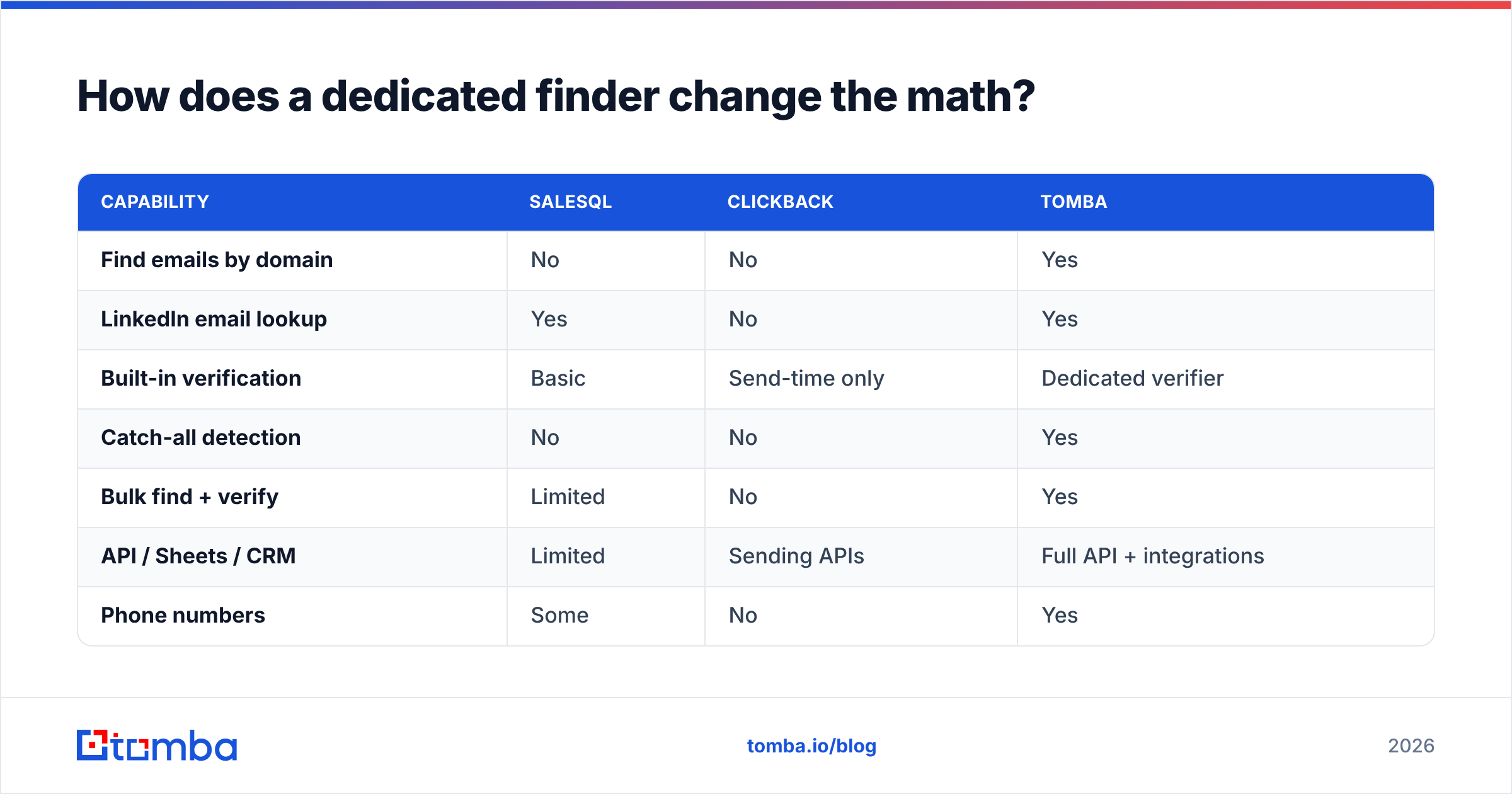
Here's how the three approaches stack up on the part that matters most — getting accurate, send-ready contacts:
| Capability | SalesQL | Clickback | Tomba |
|---|---|---|---|
| Find emails by domain | No | No | Yes |
| LinkedIn email lookup | Yes | No | Yes |
| Built-in verification | Basic | Send-time only | Dedicated verifier |
| Catch-all detection | No | No | Yes |
| Bulk find + verify | Limited | No | Yes |
| API / Sheets / CRM | Limited | Sending APIs | Full API + integrations |
| Phone numbers | Some | No | Yes |
The practical upshot: you can use Tomba to build a clean, verified list, then hand that list to Clickback (or any sender) and actually benefit from Clickback's compliance and infrastructure. You stop paying SalesQL for guessed addresses, and you stop feeding Clickback the bounces that wreck deliverability. For LinkedIn-heavy workflows specifically, the LinkedIn finder covers SalesQL's core use case while adding verification SalesQL lacks.
Which tool should you choose?#
Match the tool to the bottleneck — not to the hype.
- Choose SalesQL if your entire prospecting motion lives inside LinkedIn, your volumes are modest, and you want the cheapest way to pull a few hundred contacts a month. It's a fine point solution for solo recruiters and early-stage SDRs.
- Choose Clickback if you already own a large cold list, your bottleneck is compliant sending rather than sourcing, and you have the budget for a managed sending platform. It earns its keep when the data is already clean.
- Choose a dedicated finder (Tomba) if your real problem is accurate, verified contact data at scale — across domains, not just LinkedIn — and you want one source feeding clean lists into whatever sender you prefer. It also replaces SalesQL's finding job outright while fixing its verification gap.
Most growing teams end up with two tools, not one: a data layer that finds and verifies, and a sending layer that delivers compliantly. The mistake is buying SalesQL or Clickback and expecting it to cover the whole funnel. It won't, and you'll feel the gap in your bounce rate within the first send.
A quick gut check before you buy: log your last campaign's bounce rate. If it's above 3–4%, your problem is data, and no sending platform will save you — you need better find-and-verify upstream. If your deliverability is fine but you're hand-pulling contacts from LinkedIn all day, your problem is sourcing scale, and a bulk finder beats a one-profile-at-a-time extension every time. You can sanity-check any vendor's reputation on independent review sites like G2 before committing.
The bottom line#
Clickback and SalesQL aren't rivals — they're two parts of a chain that's missing its strongest link. SalesQL finds a narrow slice of contacts on LinkedIn. Clickback sends to lists you've already built. The verification and full-web sourcing that determine whether your campaign lands or bounces sit in the gap between them.
Close that gap before you scale your spend. Start with the Tomba Email Finder to build accurate, verified, send-ready lists from any domain or LinkedIn profile — then let your sender do the one job it's good at. Spin up the free tier (25 searches a month, no card), test it against your real target accounts, and compare the bounce rate yourself. Clean data is the cheapest deliverability upgrade you'll ever buy.
// get started
Find, verify and enrich your first contacts today
Start on the free plan with 25 searches a month, then scale when your team is ready.
Free plan · No credit card required · GDPR & CCPA
// about the author