Clickback vs UpLead 2026: Which B2B Lead Tool Wins?
Clickback and UpLead solve different halves of outbound: one sends cold email to purchased lists at scale, the other builds the prospect list. Here's how they actually compare in 2026.
Clickback vs UpLead: Which B2B Lead Tool Actually Fits Your 2026 Stack?
Most "Clickback vs UpLead" comparisons get one thing wrong: they treat these two as rivals. They aren't. They sit at opposite ends of the same outbound pipeline. Pick the wrong one and you'll either have a list with no way to email it, or an email engine with no one to email.
TL;DR — Clickback vs UpLead in one screen#
- Clickback is a cold-email engine for purchased/owned B2B lists. Its standout feature is the ability to email contacts you didn't opt-in, with built-in compliance guardrails for CAN-SPAM and CASL.
- UpLead is a B2B prospecting database. You search 160M+ contacts, verify emails in real time, and export or push them to your CRM. It does not send campaigns.
- They're complementary, not competitive. UpLead builds the list; Clickback (or any sender) works it. Many teams that buy one eventually buy both.
- Neither is the cheapest way to get accurate emails. A dedicated email finder plus a sender often beats both on cost-per-verified-contact.
- Verdict: Choose UpLead for data, Clickback for compliant cold sending — but verify everything before it hits an inbox.

What is Clickback and who is it for?#
Clickback is B2B lead generation software built around one controversial-but-legal premise: you can email cold, purchased B2B contacts in North America if you do it compliantly. Its flagship product, Clickback MAIL, is essentially an email service provider engineered for cold lists — the kind that would get you suspended on Mailchimp or HubSpot in an afternoon.
The platform pairs sending with a list-cleaning layer (Clickback validates and removes risky addresses before send) and engagement tracking that pushes opens and clicks into your funnel as "warm" leads. The pitch is volume: take a list of 50,000 cold contacts, scrub it, send compliant campaigns, and convert the openers into MQLs.
Clickback fits you if:
- You operate in North America and your legal team is comfortable with CASL/CAN-SPAM cold-email rules.
- You already own large B2B lists — from events, data purchases, or partnerships — and need a way to legally activate them.
- You measure success in raw reach, not hyper-personalized 1:1 outreach.
It's a poor fit if you sell into the EU/UK (GDPR makes cold B2B email far riskier), or if your motion is low-volume, high-touch, account-based selling.
What is UpLead and who is it for?#
UpLead is a sales intelligence and prospecting database. You filter a contact universe of roughly 160M profiles by title, industry, technology used, location, revenue, and dozens of other attributes, then export verified contacts. Its differentiator is real-time email verification at the moment of export — UpLead pings the mail server before it spends a credit, so you only pay for addresses that resolve.
UpLead also offers data enrichment, intent data, and technographics, positioning it against tools like ZoomInfo and Apollo but at a smaller-business price point. According to UpLead's own site, it advertises a 95% data-accuracy guarantee — a claim worth testing on your specific ICP before committing, since accuracy varies wildly by geography and seniority.
UpLead fits you if:
- You need to build lists from scratch rather than work an existing one.
- You want CRM-ready, verified contacts without running your own verification pass.
- You value a predictable per-credit cost over an all-you-can-eat database.
It does nothing for you if you already have your contacts — you'd be paying for data you own.
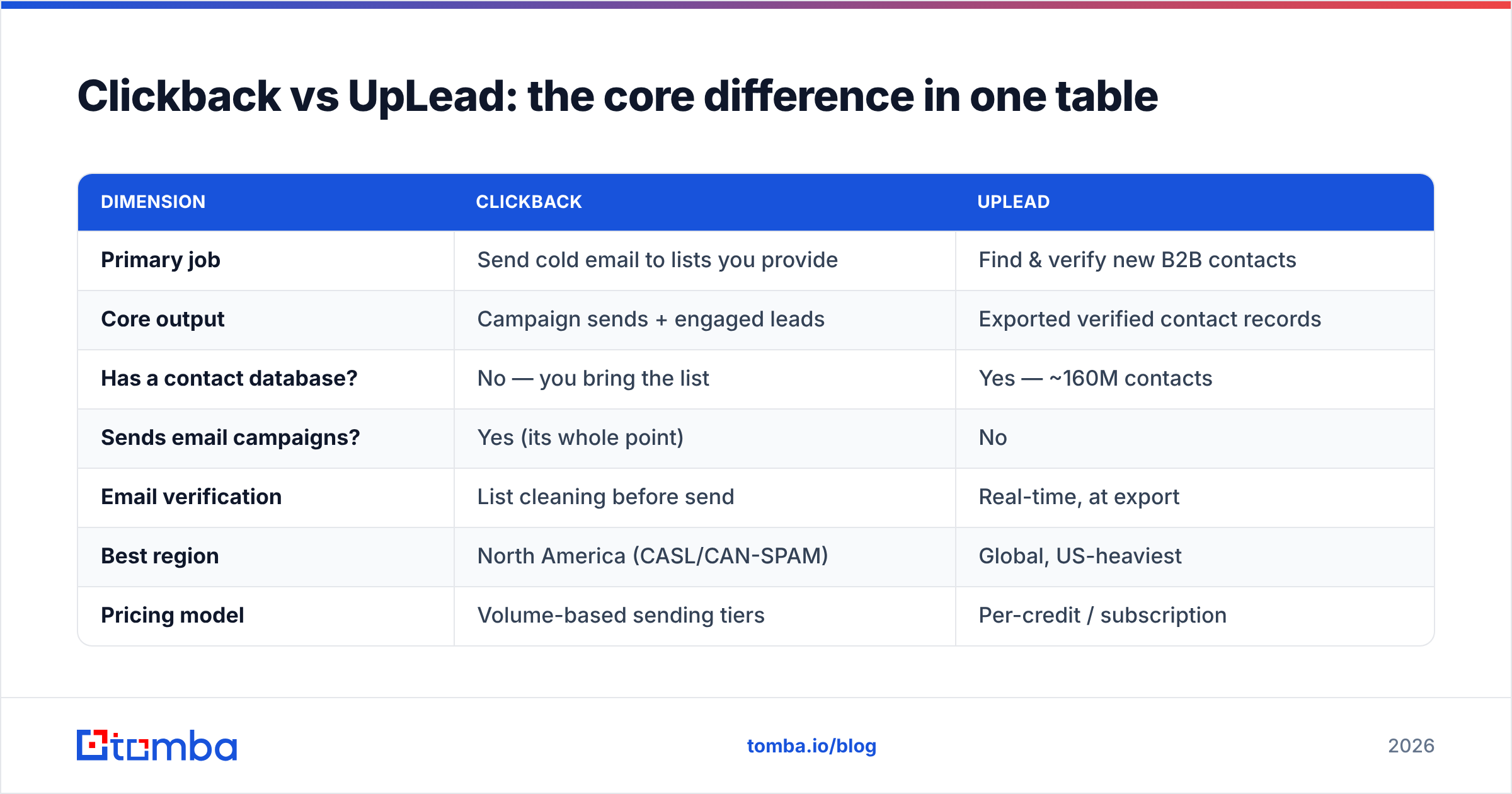
Clickback vs UpLead: the core difference in one table#
This is the comparison that actually matters. They overlap only at the edges.
| Dimension | Clickback | UpLead |
|---|---|---|
| Primary job | Send cold email to lists you provide | Find & verify new B2B contacts |
| Core output | Campaign sends + engaged leads | Exported verified contact records |
| Has a contact database? | No — you bring the list | Yes — ~160M contacts |
| Sends email campaigns? | Yes (its whole point) | No |
| Email verification | List cleaning before send | Real-time, at export |
| Best region | North America (CASL/CAN-SPAM) | Global, US-heaviest |
| Pricing model | Volume-based sending tiers | Per-credit / subscription |
| Typical buyer | Demand-gen / volume outbound | SDRs, founders, list builders |
| Compliance focus | Cold-email legal guardrails | Data sourcing / GDPR notes |
The takeaway: asking "Clickback or UpLead?" is like asking "hose or sprinkler?" One moves water, one distributes it. If you only buy one, you've solved half the problem.
Is Clickback better than UpLead for cold outreach?#
For the sending half of cold outreach, yes — that's literally what Clickback is built to do, and UpLead doesn't send at all. But "better at sending" hides a real risk: sending speed multiplies the cost of bad data.
Here's the trap. Clickback will happily blast a list with stale or guessed addresses. Every hard bounce chips away at your domain reputation, and once you're flagged, even your good contacts stop landing in the inbox. Clickback's list cleaning helps, but pre-send cleaning is not the same as deep verification. If your source list came from a scraper or a three-year-old trade show, you want a real verification pass first.
That's where a standalone email verifier earns its keep. Run the list, drop the catch-alls and traps, then hand Clickback only deliverable addresses. Your bounce rate falls, your sender reputation holds, and Clickback's reporting actually reflects interest instead of infrastructure failures.
For more on why deliverability is the silent killer of cold campaigns, the fundamentals of email deliverability are worth a refresher before you scale send volume.
Is UpLead better than Clickback for building a pipeline?#
For sourcing, UpLead wins by default — Clickback has no database. The real question is whether UpLead is the best sourcing tool for your budget and ICP.
UpLead's strengths are genuine: real-time verification, clean CRM exports, and transparent per-credit billing that's easy to forecast. Its weaknesses show up at the margins. International coverage thins out fast outside the US. Niche industries and non-VP titles can return sparse or aging records. And the credit model means a sloppy search — pulling 2,000 contacts you'll never email — burns budget you can't recover.
If your ICP is concentrated and US-based, UpLead is a clean choice. If you need broad coverage, specific email patterns at target companies, or you're filling gaps a database can't reach, a domain-driven approach often beats a static database.

Where does a dedicated email finder fit in?#
Both tools leave a gap, and it's the same gap: finding the specific person you already know you want to reach. Databases are great for discovery ("give me 200 marketing directors in fintech") but weak for targeting ("I need the email for this VP at this company I saw on LinkedIn").
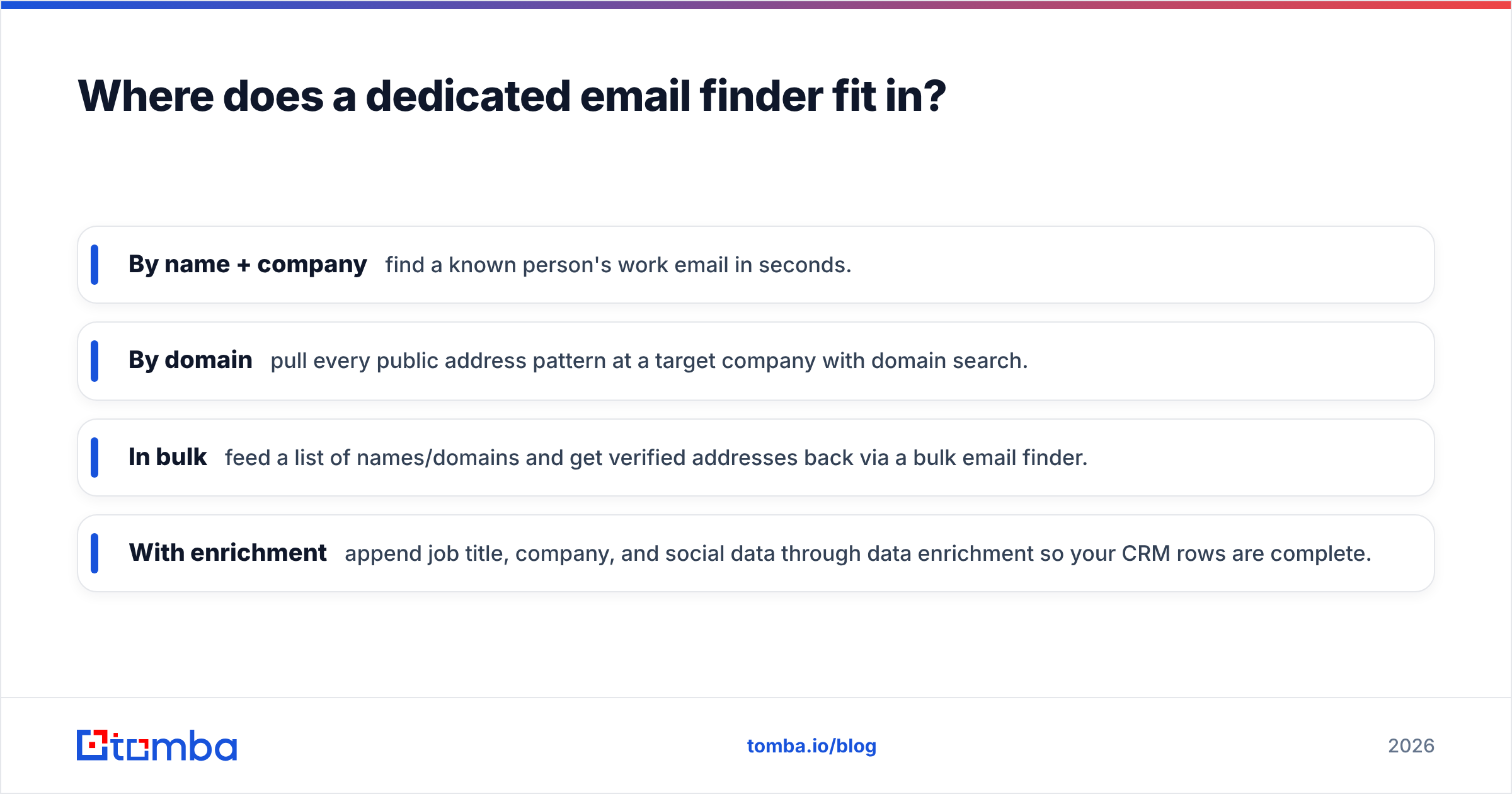
That's the job of a focused email finder. Instead of paying for a whole database subscription or a high-volume sender, you look up exactly the contacts on your account list:
- By name + company — find a known person's work email in seconds.
- By domain — pull every public address pattern at a target company with domain search.
- In bulk — feed a list of names/domains and get verified addresses back via a bulk email finder.
- With enrichment — append job title, company, and social data through data enrichment so your CRM rows are complete.
This is where Tomba sits relative to Clickback and UpLead. It isn't a campaign sender like Clickback, and it isn't a sprawling database play like UpLead. It's the precision layer — accurate, verified emails for the exact people you're targeting, priced so you're not buying a 160M-record subscription to reach 800 of them.
How do the three approaches compare on cost and accuracy?#
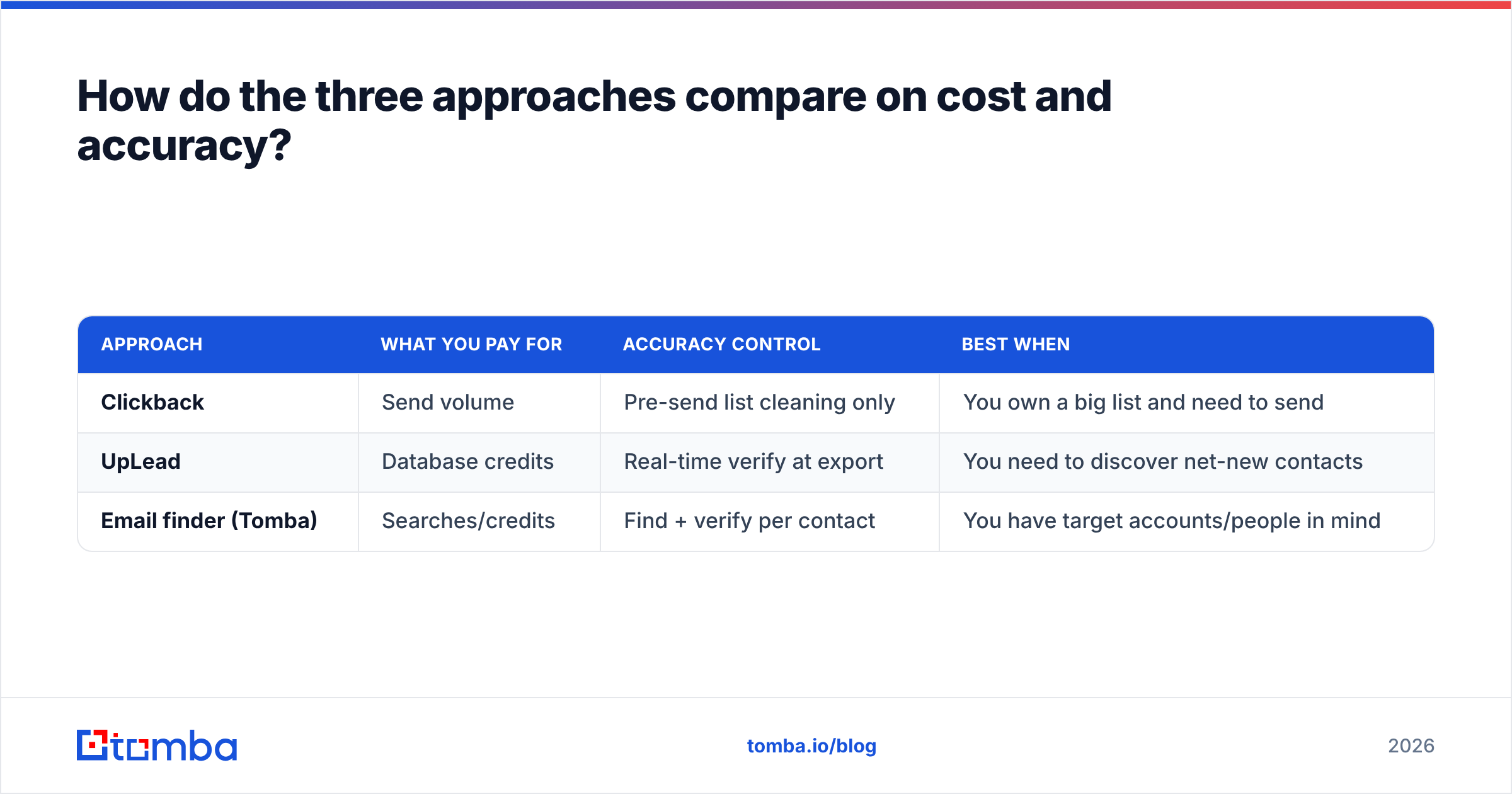
Cost-per-verified-contact is the metric that cuts through the marketing. Here's how the three models stack up conceptually.
| Approach | What you pay for | Accuracy control | Best when |
|---|---|---|---|
| Clickback | Send volume | Pre-send list cleaning only | You own a big list and need to send |
| UpLead | Database credits | Real-time verify at export | You need to discover net-new contacts |
| Email finder (Tomba) | Searches/credits | Find + verify per contact | You have target accounts/people in mind |
A realistic stack for most B2B teams in 2026 looks like this: use an email finder to build and verify a tight, ICP-matched list; optionally supplement with a database like UpLead for broad discovery; then push verified addresses into a compliant sender — Clickback if you're emailing cold North American lists, or your existing ESP for opted-in nurture.
Tomba's pricing makes the precision layer affordable to test: a Free tier with 25 searches a month, Starter at $49/mo, Growth at $99/mo, and Pro at $249/mo. You can see the full breakdown on the Tomba pricing page and compare it against UpLead's per-credit plans on G2 before you commit budget.
What about compliance and data sourcing?#
This is the part teams skip and regret. Clickback's entire model leans on the legality of cold B2B email in North America — and it builds compliance tooling to support that. But "legal to send" doesn't mean "safe for your domain." Hammering cold lists still damages sender reputation if the data is dirty, regardless of CAN-SPAM compliance.
UpLead, on the vendor's documentation, positions its data as ethically sourced and verified, which matters for GDPR exposure if any of your contacts are in the EU/UK. Whoever you buy from, you remain the data controller — the vendor's sourcing doesn't transfer your legal obligations.
Practical guardrails:
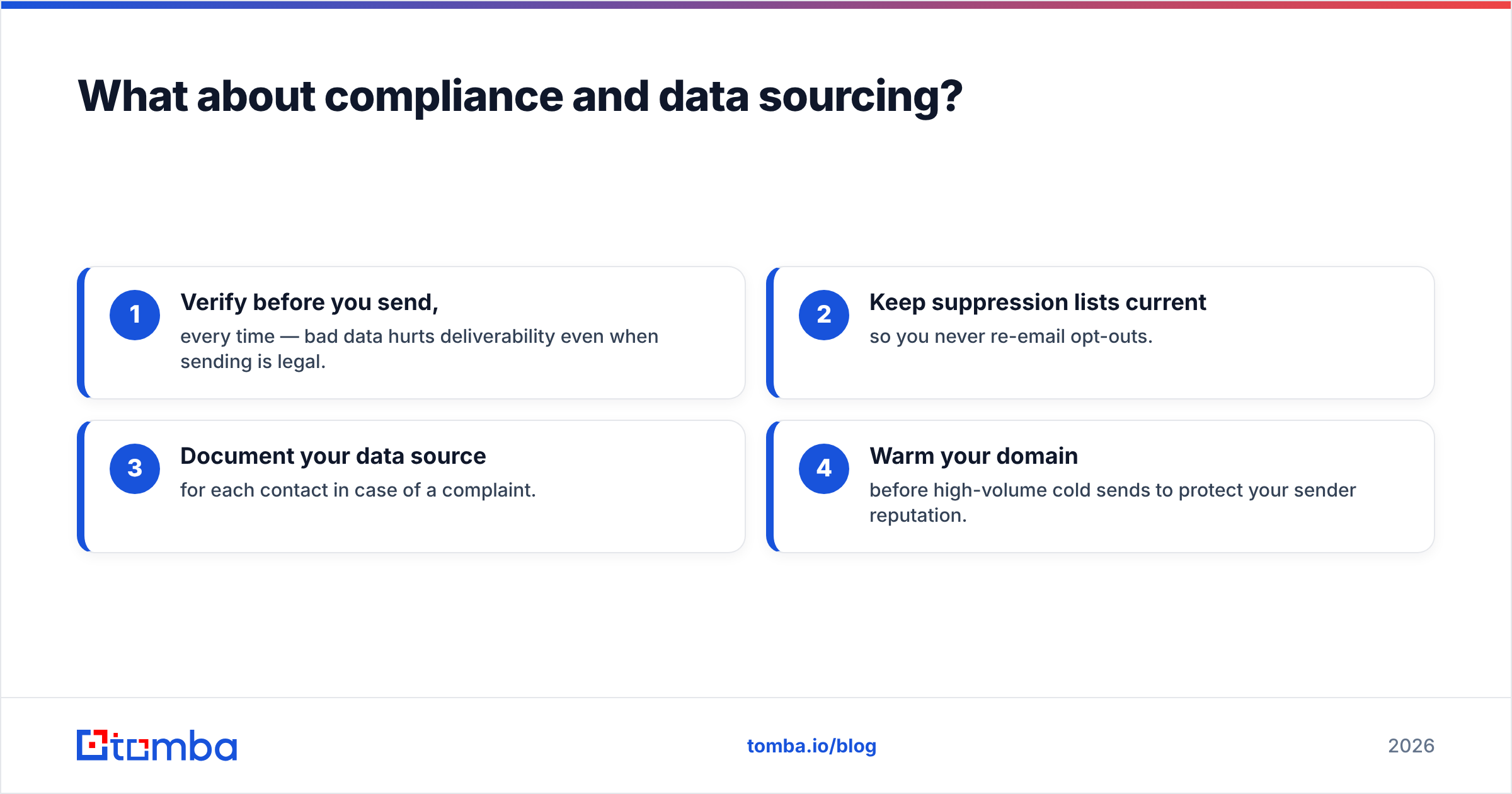
- Verify before you send, every time — bad data hurts deliverability even when sending is legal.
- Keep suppression lists current so you never re-email opt-outs.
- Document your data source for each contact in case of a complaint.
- Warm your domain before high-volume cold sends to protect your sender reputation.
So which should you choose — Clickback or UpLead?#
Conclusion first: most teams shouldn't choose — they should sequence.
- Need to send cold to a list you already own? Clickback, after a hard verification pass.
- Need to discover net-new contacts at scale? UpLead, watching your credit burn.
- Need the exact emails for specific target accounts, cheaply? A dedicated email finder, which feeds both of the above.
Choose Clickback over UpLead only when your bottleneck is sending, not sourcing. Choose UpLead over Clickback only when you have no list and no targeting hypothesis. In every other case, the limiting factor is email accuracy — and that's solved upstream of both products.
If you're standing up outbound from scratch, start where the leverage is highest: getting verified, real emails for the people you actually want to reach. Try the Tomba Email Finder free — 25 searches a month, no card, name-and-domain to verified inbox in seconds. Build the clean list first, then let Clickback or your sender do what it does best. Bad data is the most expensive line item in outbound, and it's the one you can fix before you spend a cent on volume.
// get started
Find, verify and enrich your first contacts today
Start on the free plan with 25 searches a month, then scale when your team is ready.
Free plan · No credit card required · GDPR & CCPA
// about the author