Clickback vs Wiza 2026: Which B2B Lead Gen Tool Wins?
Clickback vs Wiza compared for 2026: pricing, data accuracy, compliance, and use cases. See which B2B lead gen tool fits your outbound motion — and where a dedicated email finder beats both.
TL;DR
- Clickback and Wiza solve different problems. Clickback is a B2B email marketing and lead-conversion platform built to send cold email to purchased or owned lists; Wiza is a LinkedIn-first prospecting tool that pulls contact data out of Sales Navigator searches.
- Pick Clickback if your bottleneck is sending compliant cold email at volume to North American B2B audiences.
- Pick Wiza if your bottleneck is sourcing contacts from LinkedIn lists and exporting them with verified emails.
- Neither is a pure email-finder. If accuracy-per-credit on domain and name-based lookups is your real need, a dedicated tool like the Tomba Email Finder usually beats both on cost and coverage.
- Many teams run two tools, not one: a data layer for contacts plus a separate sending or enrichment layer.
What are Clickback and Wiza?#
Clickback and Wiza both live under the "B2B lead generation" umbrella, but they sit at opposite ends of the funnel. Think of it like a restaurant: Wiza is the supplier that delivers fresh ingredients to your door, and Clickback is the kitchen line that actually cooks and serves the meal. Confusing them leads to buying the wrong tool.
Clickback is an email lead-generation and email-marketing platform aimed at sending cold outreach to cold contacts — including bought or third-party lists — which most mainstream ESPs forbid. Its pitch is deliverability infrastructure plus list hygiene so those campaigns actually land. You can read its positioning on the Clickback homepage.
Wiza is a prospecting and contact-data tool tightly coupled to LinkedIn Sales Navigator. You run a search, Wiza scrapes the matching profiles, finds and verifies work emails and phone numbers, and exports a clean CSV or pushes to your CRM. See it on the Wiza homepage.
So the honest framing of Clickback vs Wiza is not "which is better" but "which job are you hiring a tool to do." One finds people; the other emails them.
How do Clickback and Wiza compare at a glance?#
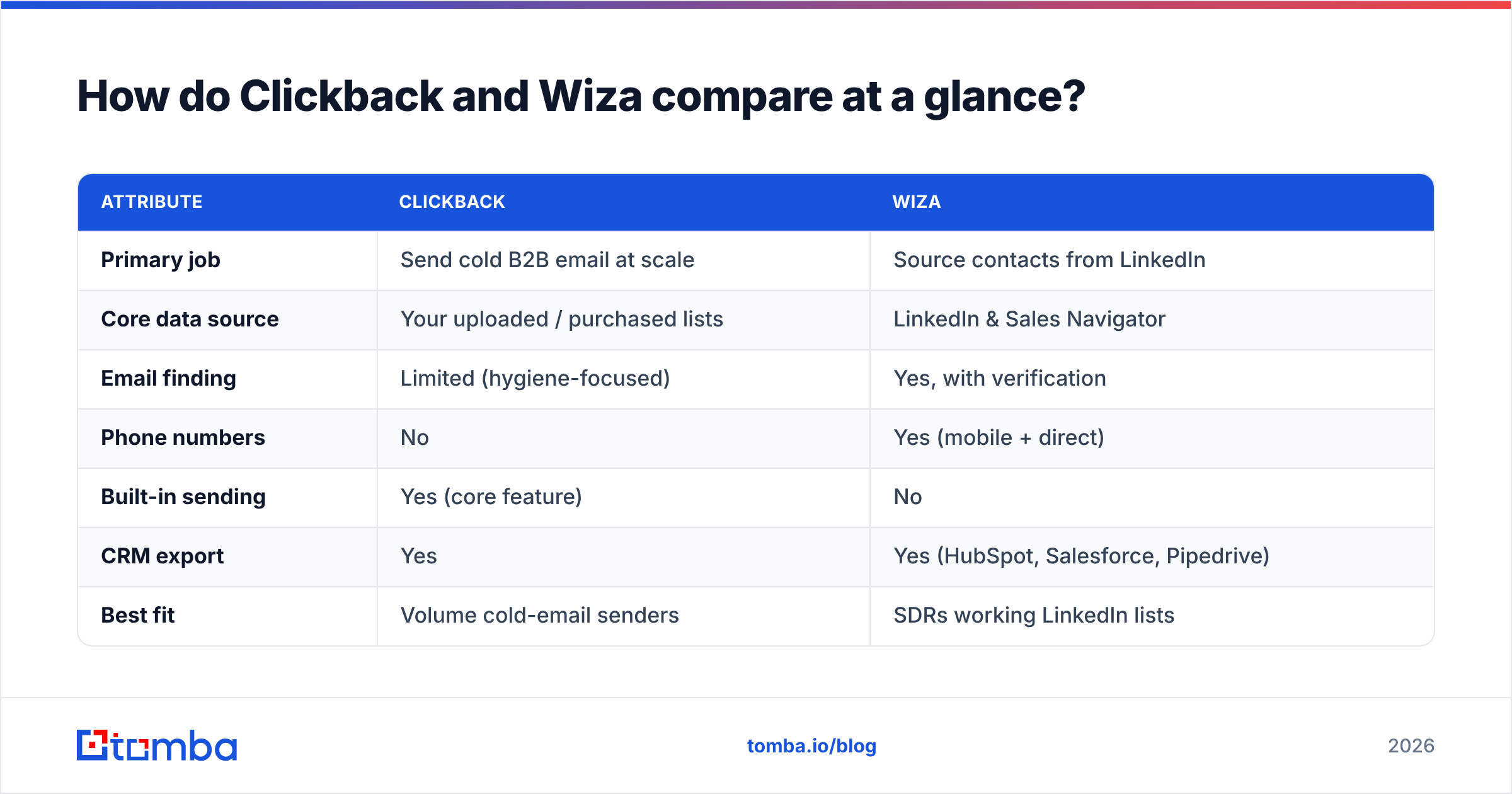
Here is the side-by-side most buyers actually want before a demo call. Treat published pricing as directional — both vendors quote custom and tiered plans that change.
| Attribute | Clickback | Wiza |
|---|---|---|
| Primary job | Send cold B2B email at scale | Source contacts from LinkedIn |
| Core data source | Your uploaded / purchased lists | LinkedIn & Sales Navigator |
| Email finding | Limited (hygiene-focused) | Yes, with verification |
| Phone numbers | No | Yes (mobile + direct) |
| Built-in sending | Yes (core feature) | No |
| CRM export | Yes | Yes (HubSpot, Salesforce, Pipedrive) |
| Best fit | Volume cold-email senders | SDRs working LinkedIn lists |
| Pricing model | Quote-based, volume tiers | Per-credit + monthly tiers |
| Free option | Demo only | Free credits to start |
The takeaway: there is almost no feature overlap. If you already have a list and need to send, Clickback wins by default. If you have a LinkedIn search and need contacts, Wiza wins by default.
/blog/generated/memes/2026-06-25/clickback-vs-wiza-meme-1.png
Which tool has better data accuracy?#
Wiza wins on raw contact discovery; Clickback isn't really competing on that axis. Wiza verifies emails at export time and reports a deliverability status per contact, which is the standard you want before loading a sequence. Its accuracy is strongest for profiles with an active LinkedIn presence and weaker for roles that barely use the platform.
Clickback's data story is different. It focuses on cleaning and validating lists you bring — removing role accounts, spam traps, and risky domains — so your sending reputation survives. That is hygiene, not discovery. If you hand Clickback an empty database, it has nothing to find.
This is exactly where a focused data tool changes the math. A dedicated email verifier plus a domain search can out-resolve a LinkedIn-only pipeline because they aren't constrained to people who keep their profiles current. For catch-all domains — the bane of every outbound team — a purpose-built catch-all verifier gives you a confidence signal neither Clickback nor Wiza fully matches. Accuracy depends heavily on where the data comes from, so always test on your own ICP before committing budget.
Is Clickback or Wiza better for cold email compliance?#
This is Clickback's home turf — and the single biggest reason it exists. Sending unsolicited B2B email to purchased lists is a legal minefield: CAN-SPAM in the US, CASL in Canada, and GDPR in the EU all impose different rules. Clickback is explicitly engineered around sending to cold contacts within those frameworks, with suppression handling and consent tooling baked in. If "we bought a list and need to email it" describes your plan, Clickback is the safer mechanical choice.
Wiza sits upstream of that question. It gives you contact data; what you do with it — and whether your sending complies — is on you and your sending platform. Wiza's own compliance burden is mostly about how it sources data from LinkedIn, which has its own terms of service considerations.
A few realities to keep in mind, whichever you choose:
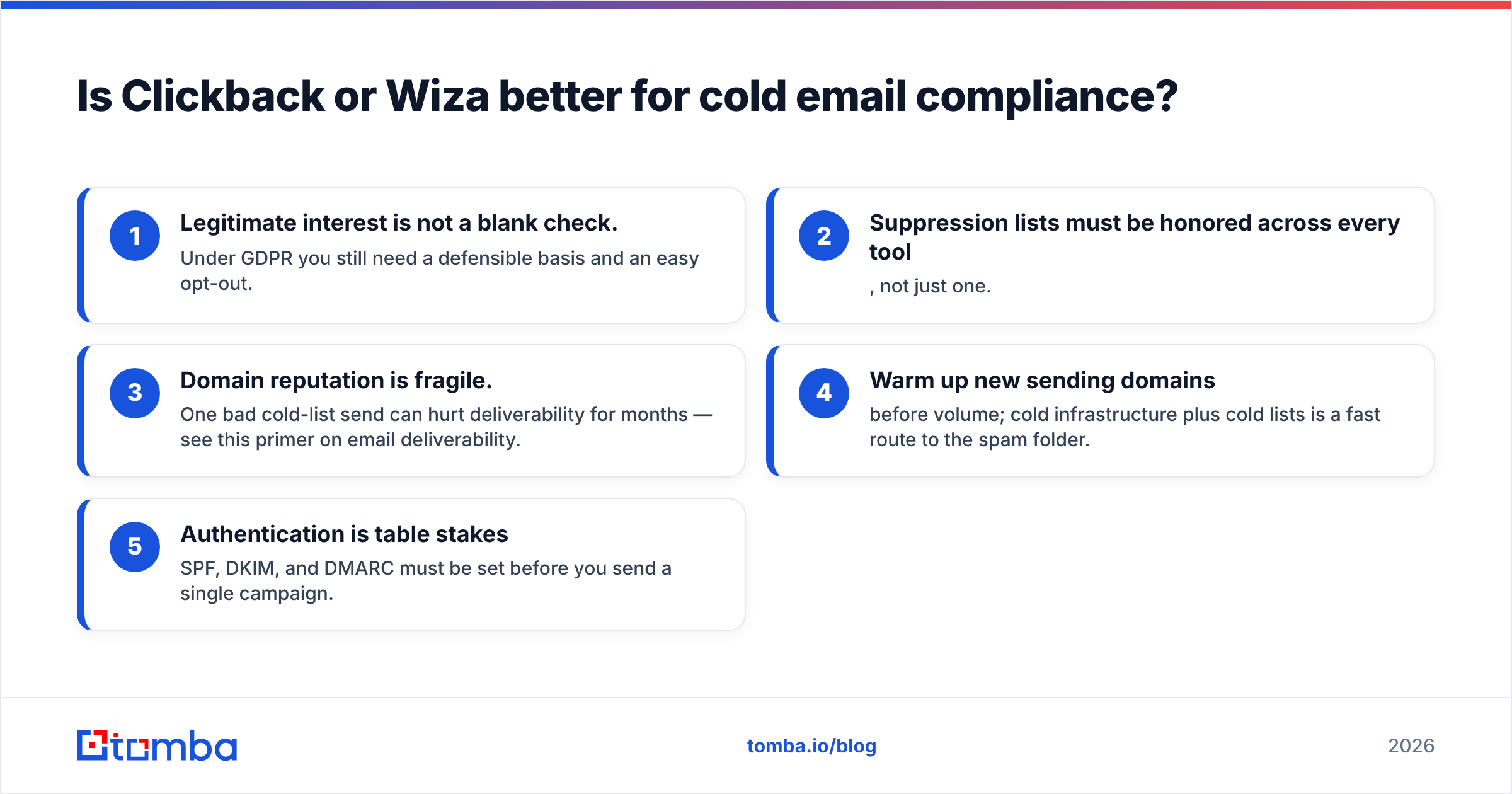
- Legitimate interest is not a blank check. Under GDPR you still need a defensible basis and an easy opt-out.
- Suppression lists must be honored across every tool, not just one.
- Domain reputation is fragile. One bad cold-list send can hurt deliverability for months — see this primer on email deliverability.
- Warm up new sending domains before volume; cold infrastructure plus cold lists is a fast route to the spam folder.
- Authentication is table stakes — SPF, DKIM, and DMARC must be set before you send a single campaign.
For a deeper read on the regulatory side, the GDPR overview on Wikipedia is a solid neutral starting point.
How much do Clickback and Wiza cost?#
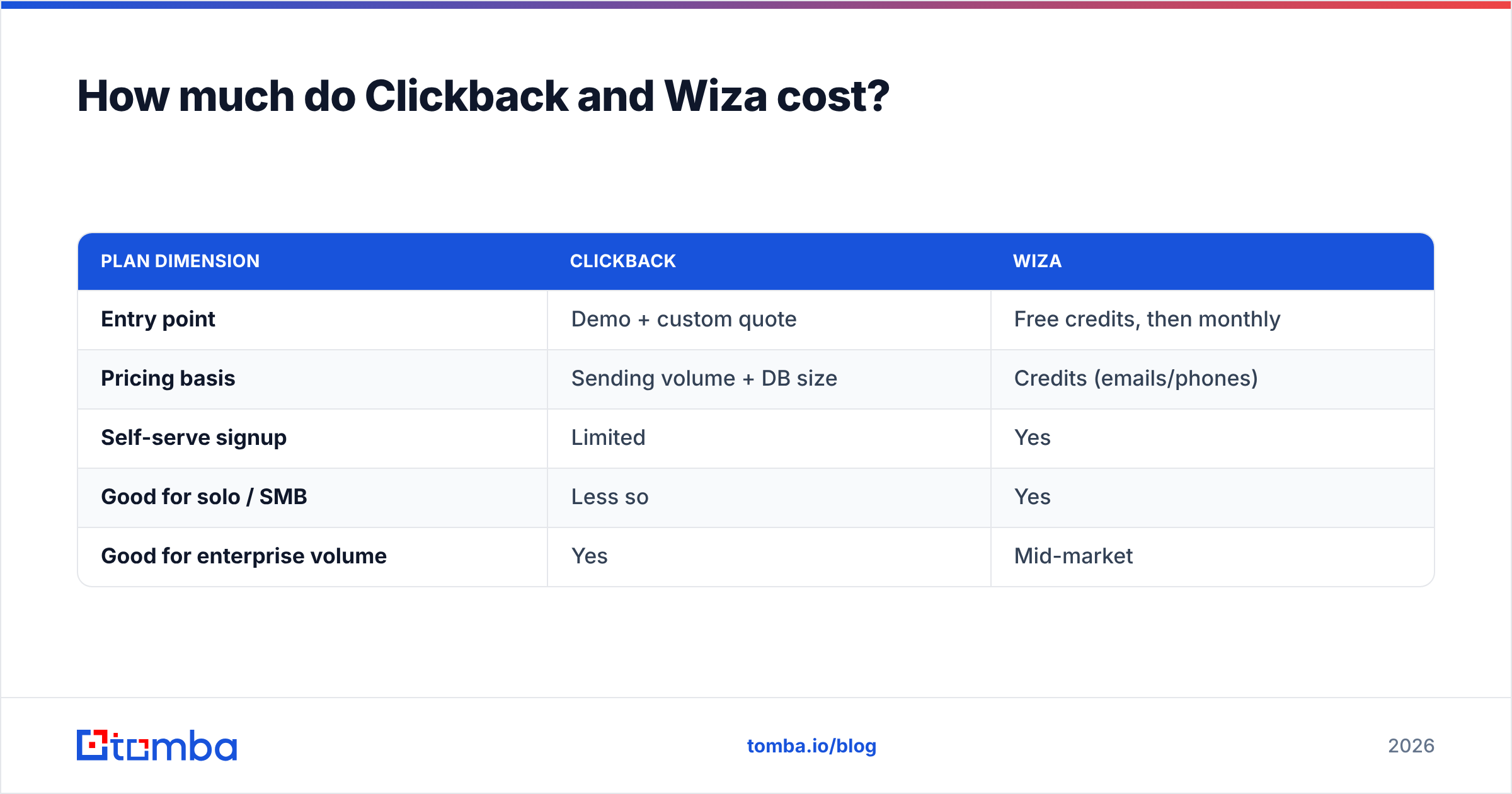
Wiza is easier to start cheaply; Clickback is a bigger, quote-based commitment. Wiza offers free credits and self-serve monthly tiers priced largely on how many emails and phone numbers you reveal. That makes it friendly for individual SDRs and small teams who want to test before scaling.
Clickback is sold as a platform engagement — pricing scales with sending volume and contact database size, and you'll typically go through a sales conversation rather than a checkout page. That fits its enterprise-leaning, high-volume sending audience but raises the entry cost for a solo founder.
| Plan dimension | Clickback | Wiza |
|---|---|---|
| Entry point | Demo + custom quote | Free credits, then monthly |
| Pricing basis | Sending volume + DB size | Credits (emails/phones) |
| Self-serve signup | Limited | Yes |
| Good for solo / SMB | Less so | Yes |
| Good for enterprise volume | Yes | Mid-market |
Cost-per-result matters more than sticker price. If you are paying for a sending platform and a separate data tool, your true outbound cost stacks up fast. This is where comparing against transparent, credit-based Tomba pricing — Free (25 searches/mo), Starter at $49/mo, Growth at $99/mo, and Pro at $249/mo — helps you benchmark whether you're overpaying for the data half of the equation.
/blog/generated/memes/2026-06-25/clickback-vs-wiza-meme-2.png
When should you choose Clickback over Wiza?#
Choose Clickback when these are true:
- Your primary constraint is sending, not sourcing. You already own or buy lists.
- You operate in North American B2B and need cold-email-specific deliverability and compliance scaffolding.
- You send at volume and want managed reputation rather than DIY inbox rotation.
- You're comfortable with a sales-led purchase and a platform-level commitment.
Choose Wiza when these are true instead:
- LinkedIn Sales Navigator is already central to how your team finds accounts.
- You need contact-level data — verified emails and mobile numbers — exported fast.
- You're a self-serve SDR or small team that wants to start on free credits.
- You'll send through your own sequencer (Instantly, Smartlead, Outreach, etc.) and just need the data.
If you scored "yes" on both columns, you likely need both — Wiza to fill the top of the funnel and Clickback (or a sequencer) to work it. That's common, and it's also where teams quietly overspend.
Where does a dedicated email finder fit?#
Between these two tools sits a gap: high-accuracy, low-cost contact discovery that isn't locked to LinkedIn. Wiza is excellent when your prospect is an active LinkedIn user inside a Sales Navigator list. But plenty of your ICP isn't: operations leads, technical buyers, founders of smaller firms, and entire industries that simply don't live on LinkedIn.
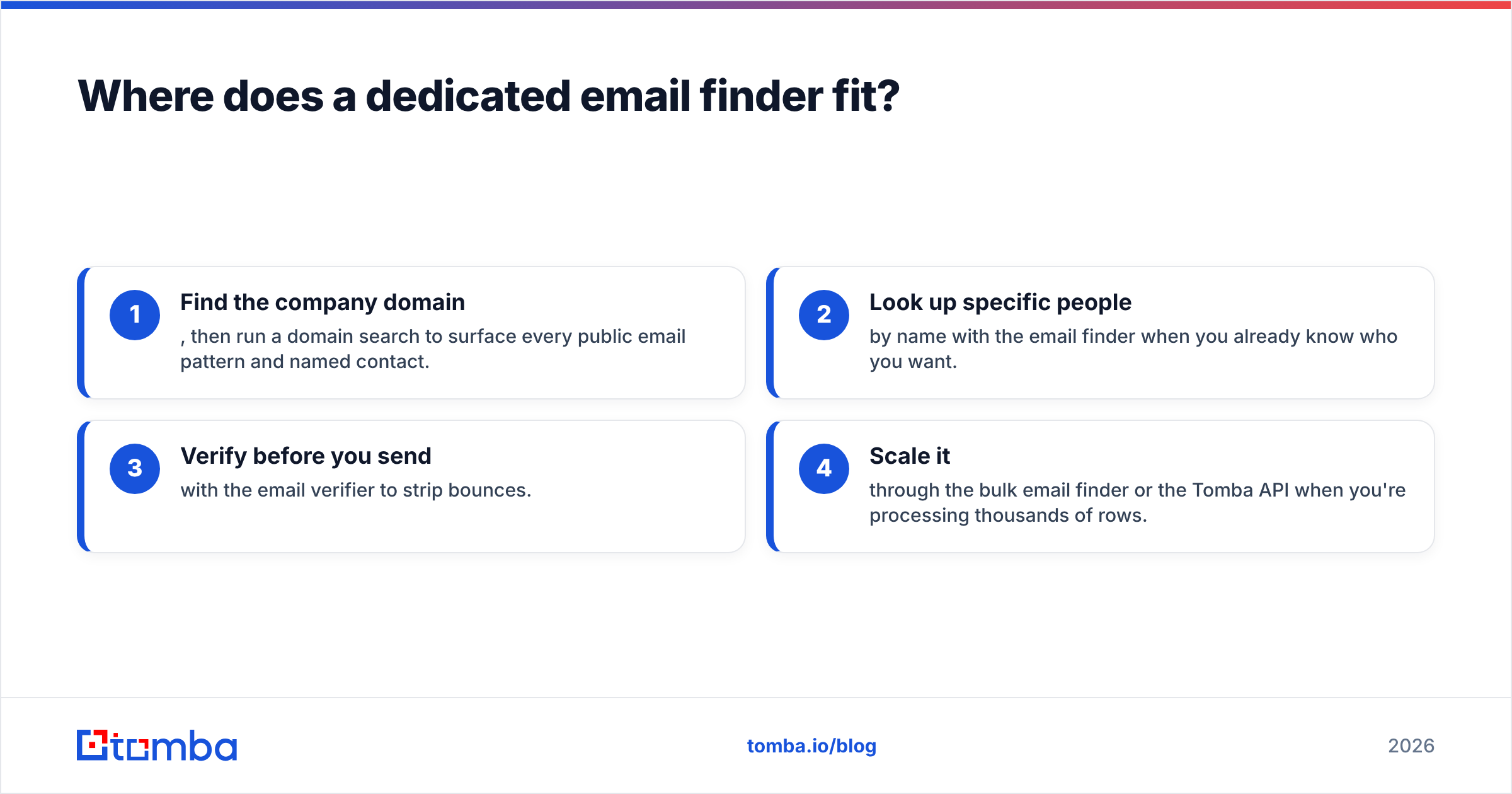
A dedicated finder works from a name and a company domain rather than a social profile, so it resolves contacts the LinkedIn-only path misses. The practical workflow looks like this:
- Find the company domain, then run a domain search to surface every public email pattern and named contact.
- Look up specific people by name with the email finder when you already know who you want.
- Verify before you send with the email verifier to strip bounces.
- Scale it through the bulk email finder or the Tomba API when you're processing thousands of rows.
This data layer slots in front of whatever you use to send — including Clickback. You're not replacing your sending platform; you're feeding it cleaner, broader, cheaper contacts than a single-source tool can. If you're weighing Wiza specifically, it's worth reading the dedicated Wiza alternative breakdown to see the accuracy-per-credit difference on real lookups.
Clickback vs Wiza: which should you pick in 2026?#
Pick by the job, not the brand. If you need to send cold email to lists at volume under tight compliance rules, Clickback is the specialist and the safer bet. If you need to source verified contacts off LinkedIn quickly and self-serve, Wiza is the more direct fit. They are complements far more often than competitors.
The mistake to avoid is treating either one as your entire data strategy. Clickback assumes you already have a list; Wiza assumes your buyers live on LinkedIn. Both assumptions leave coverage — and money — on the table. A transparent, credit-based email finder fixes the data half without forcing you to abandon the sending or prospecting tool you already like.
Run a small bake-off on your own ICP before you commit. Pull 100 target accounts, push them through each tool, and measure valid-email rate, bounce rate, and cost per usable contact. The winner on your list is the only ranking that matters.
Ready to test the data layer that feeds both motions? Start free with the Tomba Email Finder — 25 searches a month on the free tier, then $49/mo when you scale — and compare its accuracy-per-credit against whatever you're using today. Find more contacts, verify before you send, and stop paying twice for the same lead.
Ready to find emails that actually work?
Join 150,000+ professionals who stopped guessing and started sending. Free credits on signup — no credit card required.
Get the Tomba newsletter
Practical outbound tactics and product updates — once every two weeks.
About the author