ClickPoint Software Pricing, Reviews, Pros and Cons (2026)
A neutral 2026 breakdown of ClickPoint Software pricing, real user reviews, and the honest pros and cons before you commit to a lead management contract.
TL;DR
- ClickPoint Software is a lead management and sales engagement platform built around fast lead distribution, a native dialer, and rules that route inbound leads to the right rep in seconds.
- Pricing is quote-based and per-user. Review sites historically report figures around $65/user/month for the core product, but ClickPoint does not publish a fixed price list, so expect a sales call and an annual commitment.
- Reviewers praise the speed-to-lead automation and support but flag a learning curve, dated UI in places, and reporting that some teams find limiting.
- It fits high-volume inbound and call-center sales teams, not solo founders or pure cold-outbound shops.
- ClickPoint manages leads — it doesn't find them. You still need a clean source of verified contact data feeding the top of the funnel.
What is ClickPoint Software?#
ClickPoint Software is a lead management platform aimed at teams that buy or generate a lot of inbound leads and need to act on them fast. Think of it like a switchboard operator for your sales floor: the moment a lead lands, ClickPoint decides who picks it up, in what order, and through which channel — phone, text, or email — so no lead sits cold while a rep is busy.
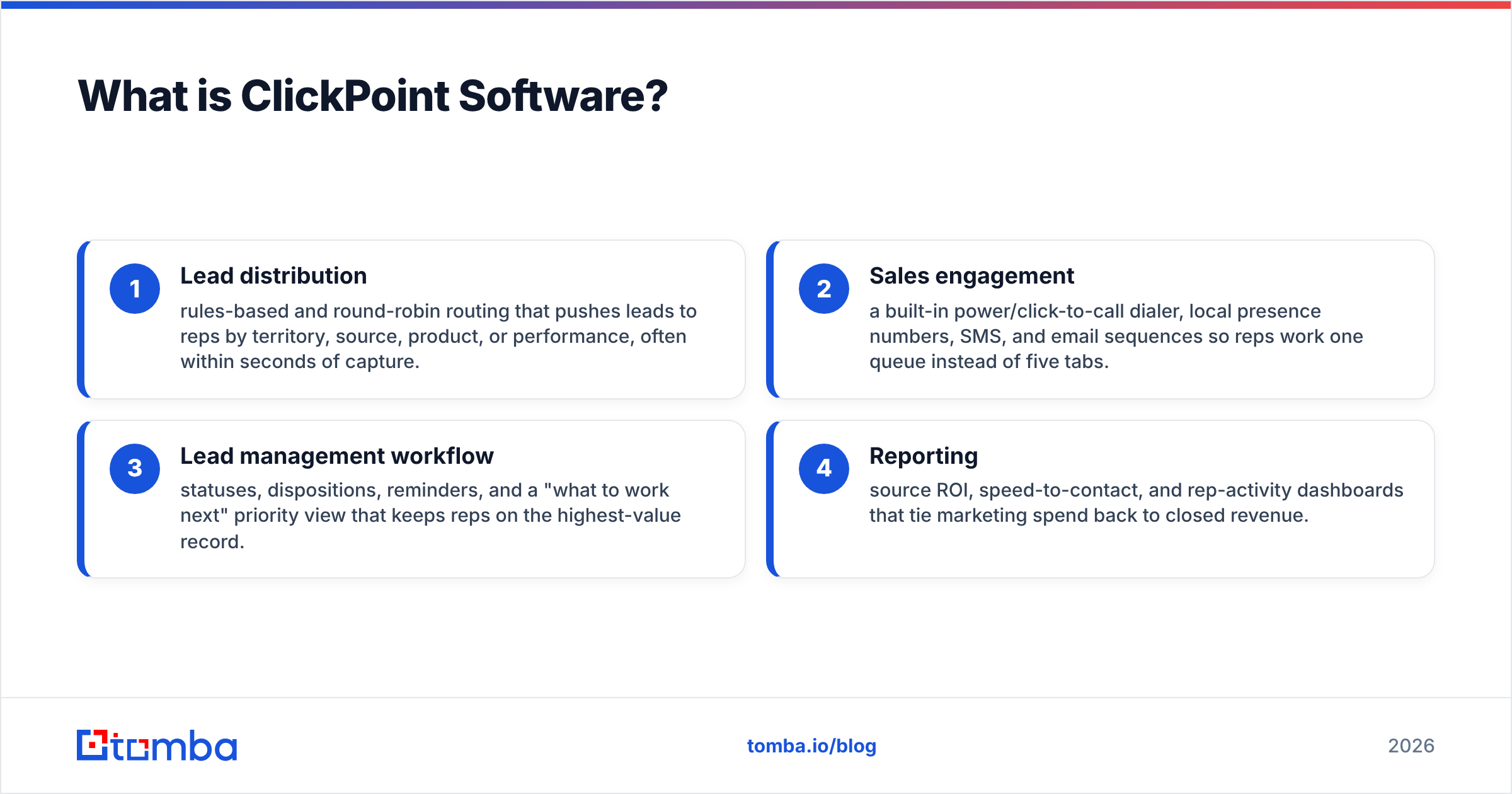
The core capabilities reported across G2 and Capterra and the vendor's own site at clickpointsoftware.com cluster around four areas:
- Lead distribution — rules-based and round-robin routing that pushes leads to reps by territory, source, product, or performance, often within seconds of capture.
- Sales engagement — a built-in power/click-to-call dialer, local presence numbers, SMS, and email sequences so reps work one queue instead of five tabs.
- Lead management workflow — statuses, dispositions, reminders, and a "what to work next" priority view that keeps reps on the highest-value record.
- Reporting — source ROI, speed-to-contact, and rep-activity dashboards that tie marketing spend back to closed revenue.
The product has roots in the call-center and high-velocity inbound world (mortgage, insurance, home services, education), which is why so much of it revolves around connecting on the phone before a competitor does. If your motion is "100 web leads a day, call them in under a minute," ClickPoint is squarely built for you.
How much does ClickPoint Software cost?#
The short answer: ClickPoint does not publish a public price list — pricing is custom, per-user, and almost always annual. That is the single most common complaint and the single most important thing to know before you book a demo.
Here's what is publicly known versus what requires a quote, so you can walk into that sales call with realistic expectations:
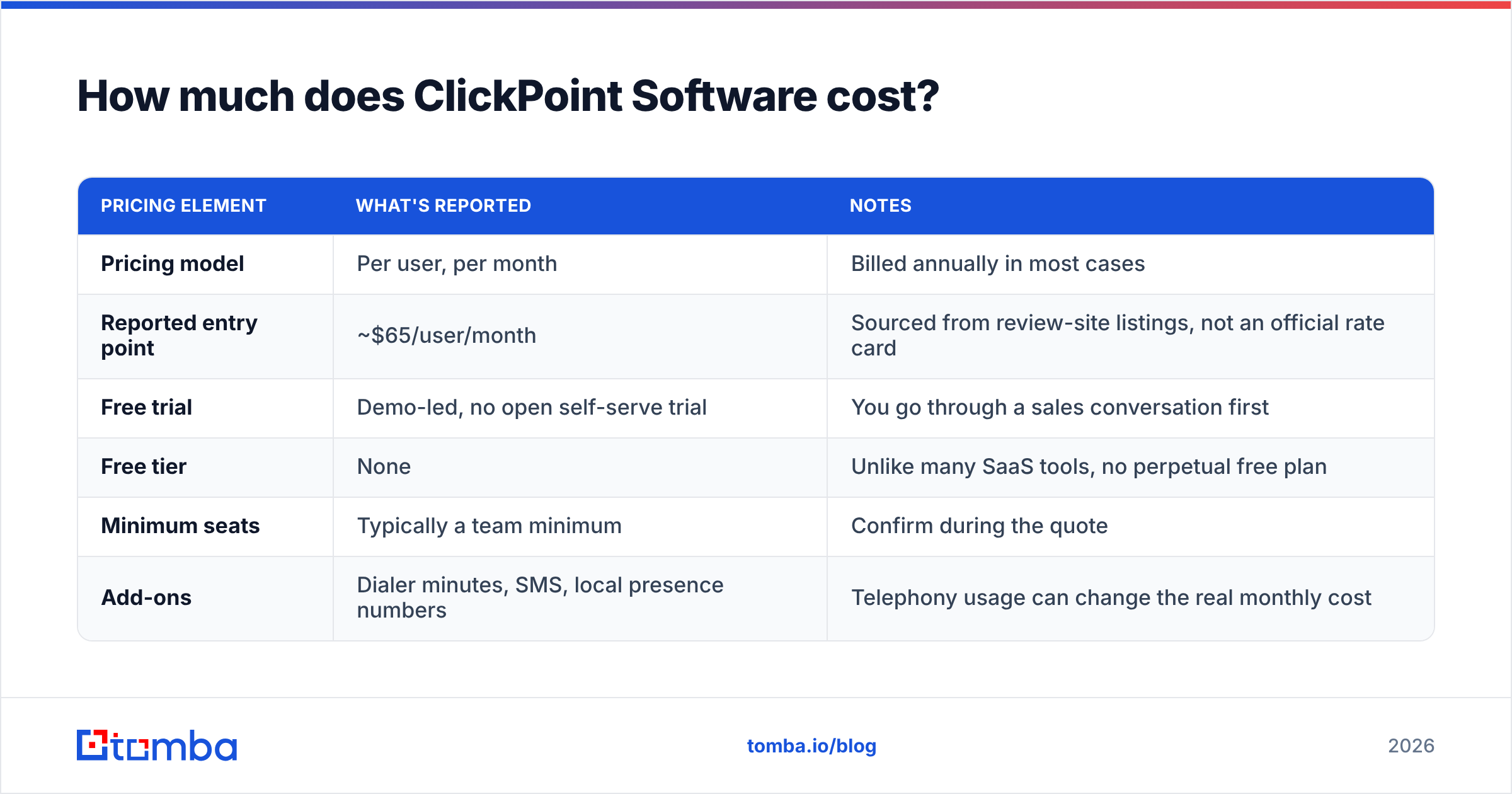
| Pricing element | What's reported | Notes |
|---|---|---|
| Pricing model | Per user, per month | Billed annually in most cases |
| Reported entry point | ~$65/user/month | Sourced from review-site listings, not an official rate card |
| Free trial | Demo-led, no open self-serve trial | You go through a sales conversation first |
| Free tier | None | Unlike many SaaS tools, no perpetual free plan |
| Minimum seats | Typically a team minimum | Confirm during the quote |
| Add-ons | Dialer minutes, SMS, local presence numbers | Telephony usage can change the real monthly cost |
Two honest caveats. First, the $65/user figure is what third-party directories have listed, not a number ClickPoint guarantees — treat it as a ballpark, not a contract. Second, telephony usage matters. A heavy-dialing team can see real per-seat costs climb once minutes, SMS, and local-presence numbers are added. When you compare ClickPoint to anything else, normalize on "fully loaded cost per rep per month," not the headline number.
If transparent pricing is a hard requirement for your procurement process, this is the friction point. Plenty of competing tools — and Tomba's own transparent plans for the data layer — publish exact numbers; ClickPoint asks you to talk to sales first.
What do ClickPoint Software reviews say?#
Across public review platforms, ClickPoint lands in respectable territory — generally in the low-to-mid 4-star range — with a fairly consistent split between what people love and what frustrates them.
What reviewers consistently praise:
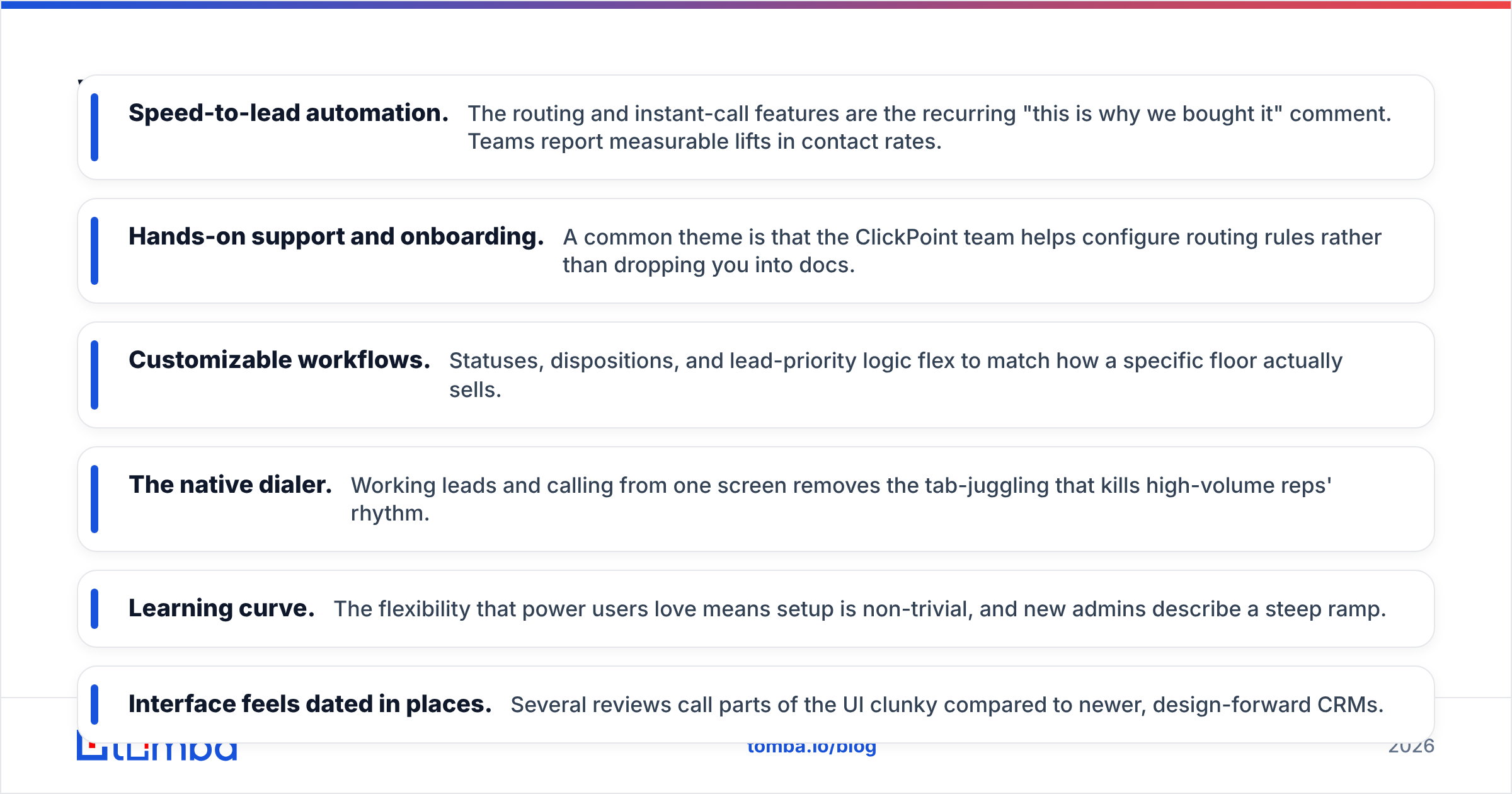
- Speed-to-lead automation. The routing and instant-call features are the recurring "this is why we bought it" comment. Teams report measurable lifts in contact rates.
- Hands-on support and onboarding. A common theme is that the ClickPoint team helps configure routing rules rather than dropping you into docs.
- Customizable workflows. Statuses, dispositions, and lead-priority logic flex to match how a specific floor actually sells.
- The native dialer. Working leads and calling from one screen removes the tab-juggling that kills high-volume reps' rhythm.
What reviewers consistently criticize:
- Learning curve. The flexibility that power users love means setup is non-trivial, and new admins describe a steep ramp.
- Interface feels dated in places. Several reviews call parts of the UI clunky compared to newer, design-forward CRMs.
- Reporting limits. Teams that want deep, custom analytics sometimes export to BI tools instead.
- Opaque pricing and annual lock-in. The demo-first, quote-based model and yearly commitment come up repeatedly as a buying-process annoyance.
The pattern is typical for a mature, vertical-focused tool: deep where it counts for its core buyer, less polished on the edges that broader-market SaaS has prioritized.
What are the pros and cons of ClickPoint?#
| Pros | Cons |
|---|---|
| Best-in-class lead distribution and speed-to-lead | No public pricing; demo required |
| Native dialer, SMS, and local presence built in | Annual billing and seat minimums |
| Strong, hands-on customer support | Learning curve for admins |
| Highly customizable routing and workflows | Some UI screens feel dated |
| Solid source-ROI reporting | Custom/advanced reporting can require exports |
| Purpose-built for high-volume inbound teams | Overkill for solo or low-volume sellers |
The takeaway: ClickPoint is a specialist, not a generalist. If your pain is "leads are slipping through the cracks and reps call them too late," its strengths map directly to your problem. If you want a cheap, self-serve, do-everything CRM, the cons will outweigh the fit.
How does ClickPoint compare to alternatives?#
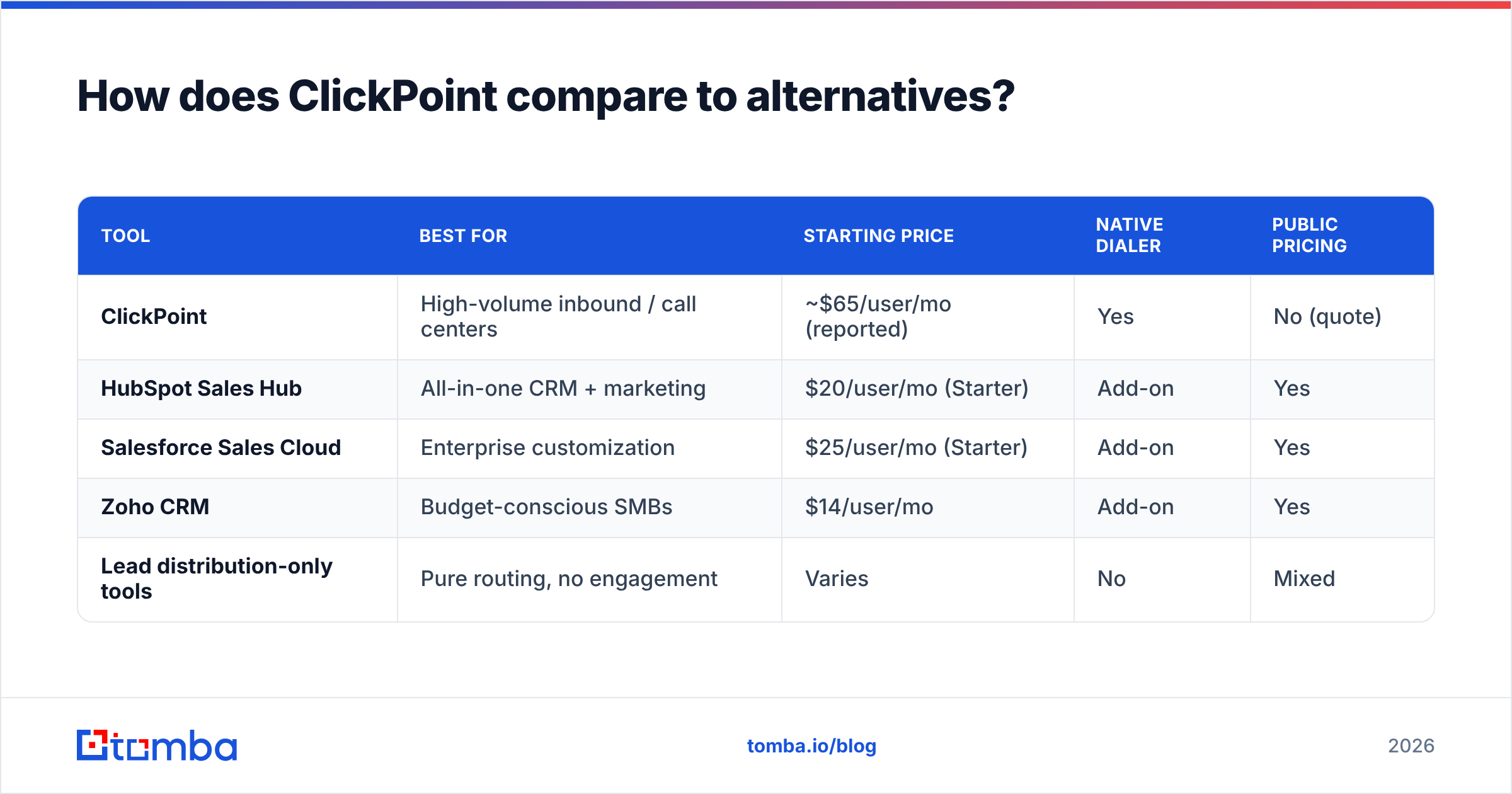
No tool wins for every team. Here's how ClickPoint stacks up against common alternatives people evaluate alongside it. Pricing reflects publicly available starting points and is approximate — always confirm a current quote.
| Tool | Best for | Starting price | Native dialer | Public pricing |
|---|---|---|---|---|
| ClickPoint | High-volume inbound / call centers | ~$65/user/mo (reported) | Yes | No (quote) |
| HubSpot Sales Hub | All-in-one CRM + marketing | $20/user/mo (Starter) | Add-on | Yes |
| Salesforce Sales Cloud | Enterprise customization | $25/user/mo (Starter) | Add-on | Yes |
| Zoho CRM | Budget-conscious SMBs | $14/user/mo | Add-on | Yes |
| Lead distribution-only tools | Pure routing, no engagement | Varies | No | Mixed |
If you live inside an existing ecosystem, the integration story matters as much as the feature list. ClickPoint connects to the usual suspects, and Tomba similarly plugs into the platforms you already run — see the Salesforce integration and HubSpot integration for how a data layer sits on top of your CRM rather than replacing it.
A useful mental model: a CRM and a lead-management tool like ClickPoint decide what happens after a lead exists. They assume the lead is real, reachable, and accurately attributed. That assumption is exactly where a lot of pipelines quietly leak.
Who should use ClickPoint Software?#
Use ClickPoint if you are a high-volume, phone-first inbound team. The clearest fits:
- Call centers and inside-sales floors dialing dozens to hundreds of leads daily.
- Lead-buyer businesses (insurance, mortgage, home services, education) where speed-to-lead directly determines close rates.
- Multi-rep teams that need fair, rules-based distribution and tight activity reporting.
Look elsewhere if you are:
- A solo founder or tiny team — the cost and setup overhead won't pay back.
- A pure cold-outbound shop — you'd lean more on prospecting and sequencing tools than inbound routing.
- A team that requires transparent, self-serve pricing before committing.
How do you keep ClickPoint full of leads worth working?#
Here's the part the software-comparison posts skip: ClickPoint's job starts the moment a good lead exists. It does nothing to create that lead, verify the contact, or keep the record clean. Route a bad number to a rep instantly and all you've done is help them waste a call faster.
That top-of-funnel data quality is a separate problem with a separate toolset. Whatever lead-management platform you choose, the inputs determine the output:
- Find the right contact in the first place. A B2B email finder turns a company domain or a name into a verified professional email, so reps reach decision-makers instead of generic inboxes.
- Verify before you route. An email verifier catches dead and risky addresses before they pollute your CRM and tank your sender reputation.
- Enrich thin records. Data enrichment fills in titles, company size, and firmographics so your routing rules and lead scoring actually have something to work with.
- Keep the database clean over time. A maintained B2B database and regular hygiene stop the slow rot that makes any lead-management tool look worse than it is.
Pair a routing engine like ClickPoint with a clean, verified data source and the whole system gets sharper: better contact rates, more accurate source ROI, and fewer "wrong number" dispositions clogging the queue.
Frequently asked questions#
Is ClickPoint Software worth it in 2026? For high-volume inbound and call-center teams, yes — the speed-to-lead and distribution features tend to pay for themselves through higher contact rates. For low-volume or self-serve-minded buyers, the quote-based pricing and learning curve make lighter, cheaper CRMs a better starting point.
How much does ClickPoint Software really cost? There's no public rate card. Review sites have listed figures around $65/user/month, but real cost depends on seat count, telephony usage, and your negotiated annual contract. Get a written quote that includes dialer minutes and SMS before comparing.
Does ClickPoint have a free trial? Not in the open, self-serve sense. Access is demo-led — you go through a sales conversation, and there is no perpetual free tier.
Can ClickPoint find or verify email addresses? No. ClickPoint manages and routes leads you already have. To source and verify contact data, you pair it with a dedicated tool — that's where Tomba fits.
The bottom line#
ClickPoint Software is a strong, specialized lead-management platform: excellent at routing and speed-to-lead for phone-first inbound teams, weaker on pricing transparency, polish, and fit for small or outbound-only shops. Match it to your motion before you sign an annual deal.
But remember what it can't do. ClickPoint optimizes how fast you work a lead — it never tells you whether the contact is real. Start your pipeline with accurate, verified data using the Tomba Email Finder to turn names and domains into reachable decision-makers, verify them before they hit your queue, and feed your routing engine leads that are actually worth a rep's time. Try Tomba free with 25 searches a month, then scale up as your funnel proves out.
// get started
Find, verify and enrich your first contacts today
Start on the free plan with 25 searches a month, then scale when your team is ready.
Free plan · No credit card required · GDPR & CCPA
// about the author