Client Database: How to Build and Maintain One in 2026
A client database is only as valuable as it is accurate. Here's how to build, structure, clean, and scale one that actually drives revenue in 2026.
A client database sounds like plumbing — boring, invisible, and somebody else's job. Then a rep emails a contact who left the company eight months ago, finance can't reconcile two records for the same account, and a campaign bounces at 22%. Suddenly the plumbing is the whole house.
This guide is the practical version: what a client database actually is, the fields that matter, how to keep it clean, and how to choose tooling without overpaying. No theory you can't act on by Friday.
TL;DR#
- A client database is a structured, single source of truth for everyone you sell to or serve — not a contact list, not a static spreadsheet.
- The value is in accuracy and freshness, not volume. A 5,000-record clean database beats a 50,000-record stale one every time.
- Structure around accounts, contacts, and interactions with stable unique IDs so records never collide or duplicate.
- B2B data decays ~30% per year — budget for continuous enrichment and verification, not a one-time import.
- Tools range from a $0 spreadsheet to a full CRM; match the tier to your team size and motion, and feed it with a reliable email finder and verification layer.
What is a client database?#
A client database is a centralized, structured store of every person and company you do business with, designed so any team — sales, marketing, support, finance — can read from and write to the same records without stepping on each other.
Think of it like a shared address book for a large family where everyone keeps the same copy updated, instead of each cousin scribbling phone numbers on their own napkin. The napkins are spreadsheets. The shared book is a database.
Technically, the difference comes down to three properties:
- Unique identifiers — every record has a stable ID, so "Acme Corp" and "Acme Corporation" don't become two customers.
- Relational structure — contacts link to accounts, accounts link to deals, deals link to interactions. You can ask "show me every open opportunity at accounts in fintech" and get an answer.
- Controlled writes — fields have types and rules (an email field rejects "n/a"), so the data stays queryable.
A spreadsheet can fake the first two for a while. It breaks the moment two people edit it at once or the row count passes a few thousand.
)
Client database vs CRM vs spreadsheet: what's the difference?#
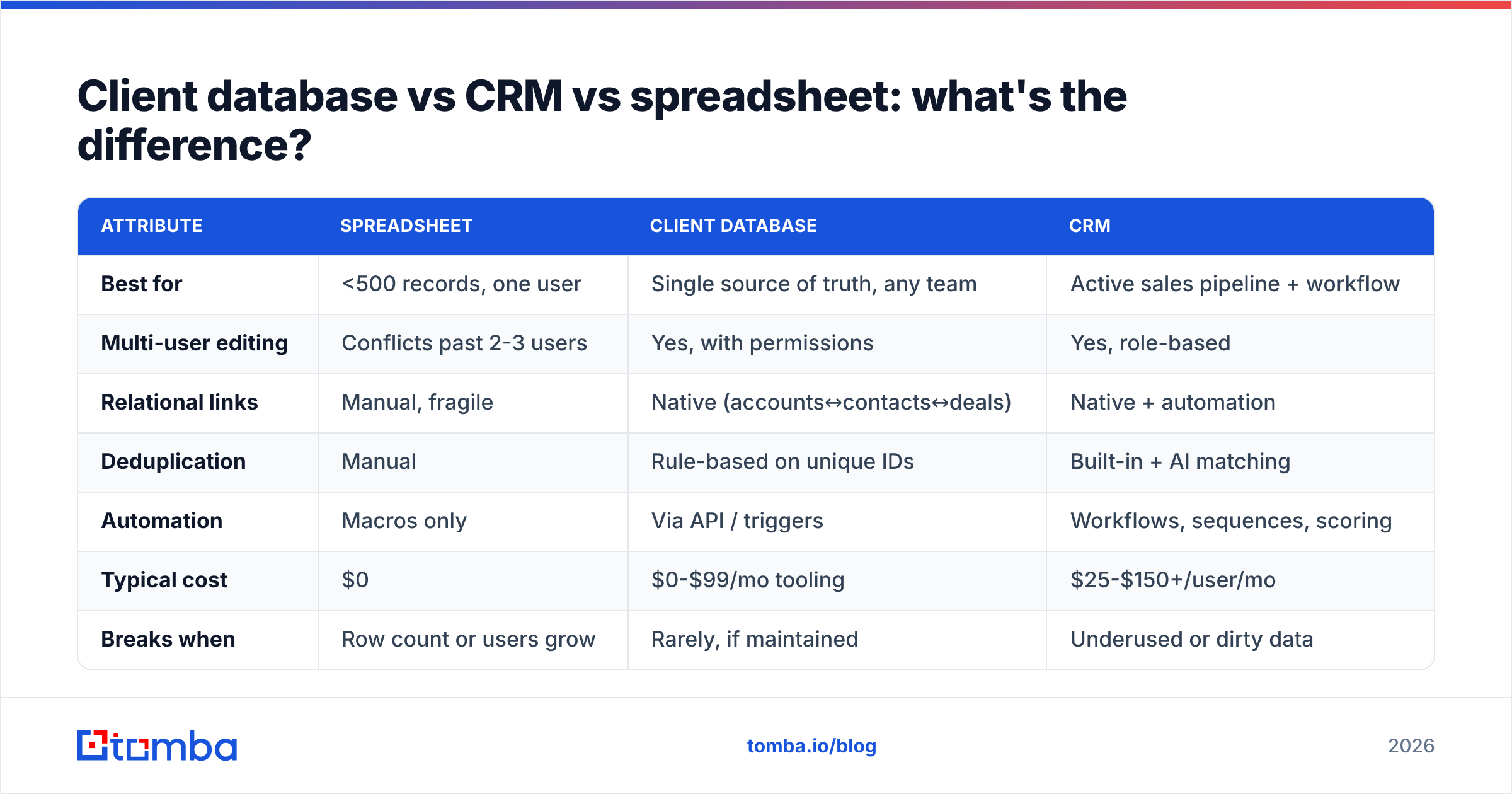
People use these terms interchangeably, which is how teams end up with three half-built systems and one source of truth that is nobody's. Here is the honest breakdown.
| Attribute | Spreadsheet | Client database | CRM |
|---|---|---|---|
| Best for | <500 records, one user | Single source of truth, any team | Active sales pipeline + workflow |
| Multi-user editing | Conflicts past 2-3 users | Yes, with permissions | Yes, role-based |
| Relational links | Manual, fragile | Native (accounts↔contacts↔deals) | Native + automation |
| Deduplication | Manual | Rule-based on unique IDs | Built-in + AI matching |
| Automation | Macros only | Via API / triggers | Workflows, sequences, scoring |
| Typical cost | $0 | $0-$99/mo tooling | $25-$150+/user/mo |
| Breaks when | Row count or users grow | Rarely, if maintained | Underused or dirty data |
The short version: a CRM is a client database with a sales workflow bolted on top. If you have an active pipeline, the CRM is your client database. If you mostly need a clean, queryable record of who your clients are — for support, billing, or analytics — a leaner database plus a spreadsheet front-end can be enough until you grow into a CRM. Don't pay for workflow you won't use.
What fields should a client database include?#
Start lean. Every field you add is a field someone has to maintain, and empty or stale fields are worse than missing ones because they look authoritative.
Group your schema into three layers:
- Account-level (the company): legal name, domain, industry, employee count, revenue band, region, account owner, lifecycle stage.
- Contact-level (the person): first/last name, role/title, verified email, direct phone, LinkedIn URL, account ID (foreign key), opt-in status, source.
- Interaction-level (the history): last contacted, last reply, deal stage, support tickets, renewal date, notes timestamped by author.
The fields that quietly drive the most revenue are the boring ones: verified email, role/title, and last contacted. Email decides whether you can reach anyone at all. Title decides whether you're talking to a buyer. Recency decides whether your outreach reads as relevant or robotic.
A note on email specifically: store the verified status, not just the address. A field that says email: jane@acme.com | status: verified | checked: 2026-05-01 is worth ten times a bare address, because it tells you whether to trust it. Run new and aging records through an email verifier before they enter active campaigns.
Why does data quality matter more than size?#
Because B2B contact data decays roughly 30% per year, and a single bad record costs you more than a missing one ever could.
Here's the chain reaction from one stale email: it bounces, your bounce rate climbs, mailbox providers throttle your domain, your good emails start landing in spam, and now a clean record you spent money to acquire never gets seen. One rotten record poisons the batch. That's why email deliverability is downstream of database hygiene, not a separate problem.
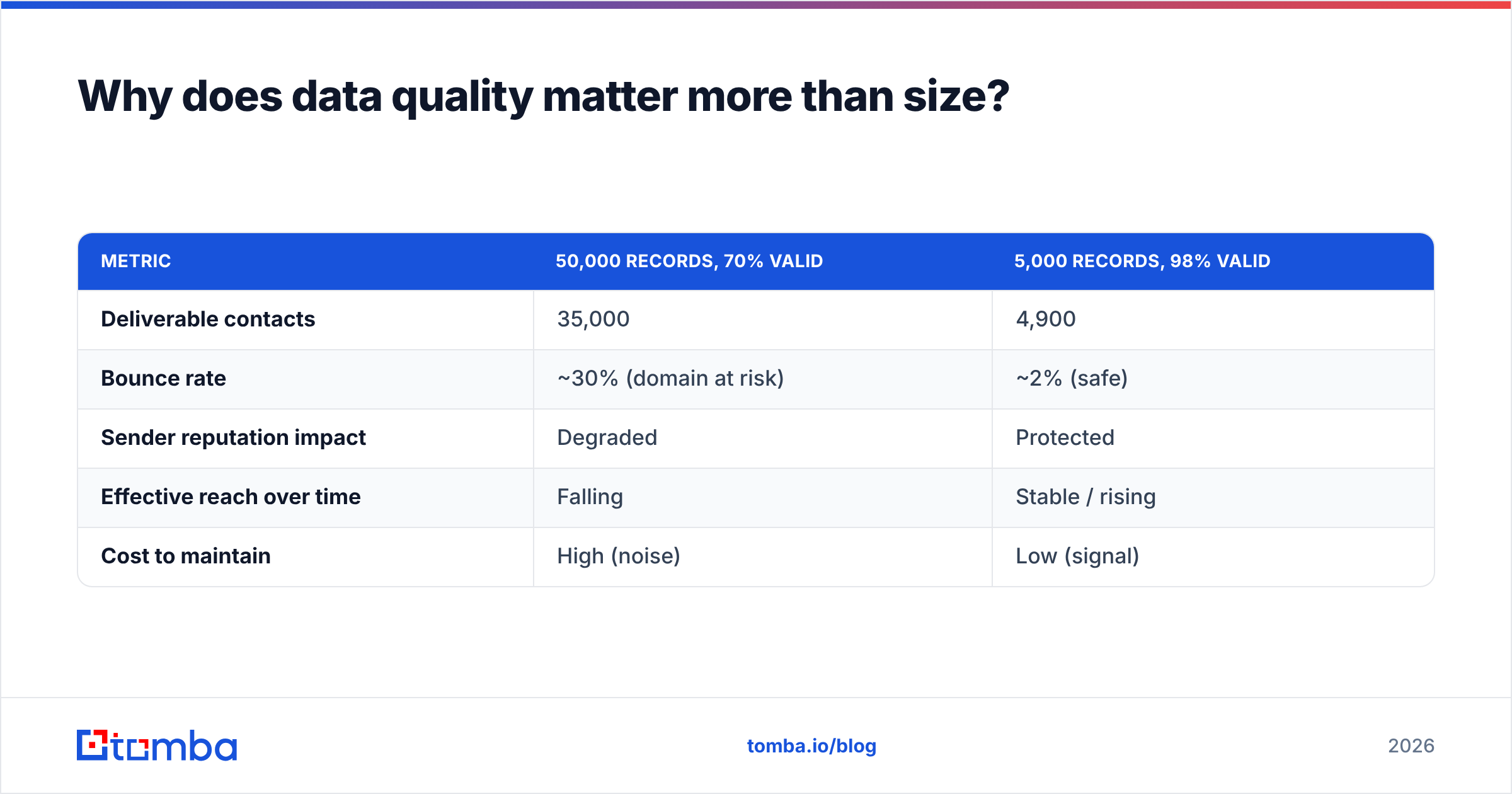
The math is unkind to "more is better." Compare two databases sending the same campaign:
| Metric | 50,000 records, 70% valid | 5,000 records, 98% valid |
|---|---|---|
| Deliverable contacts | 35,000 | 4,900 |
| Bounce rate | ~30% (domain at risk) | ~2% (safe) |
| Sender reputation impact | Degraded | Protected |
| Effective reach over time | Falling | Stable / rising |
| Cost to maintain | High (noise) | Low (signal) |
The smaller, cleaner list reaches nearly as many real humans, protects your sender reputation, and costs far less to keep current. Volume feels productive. Accuracy is productive.
According to Gartner, poor data quality costs organizations millions annually in wasted effort and bad decisions — and in a client database, every error compounds across every team that touches the record.
How do you keep a client database clean?#
Treat hygiene as a recurring process with owners and dates, not a heroic cleanup you do once a year in a panic.
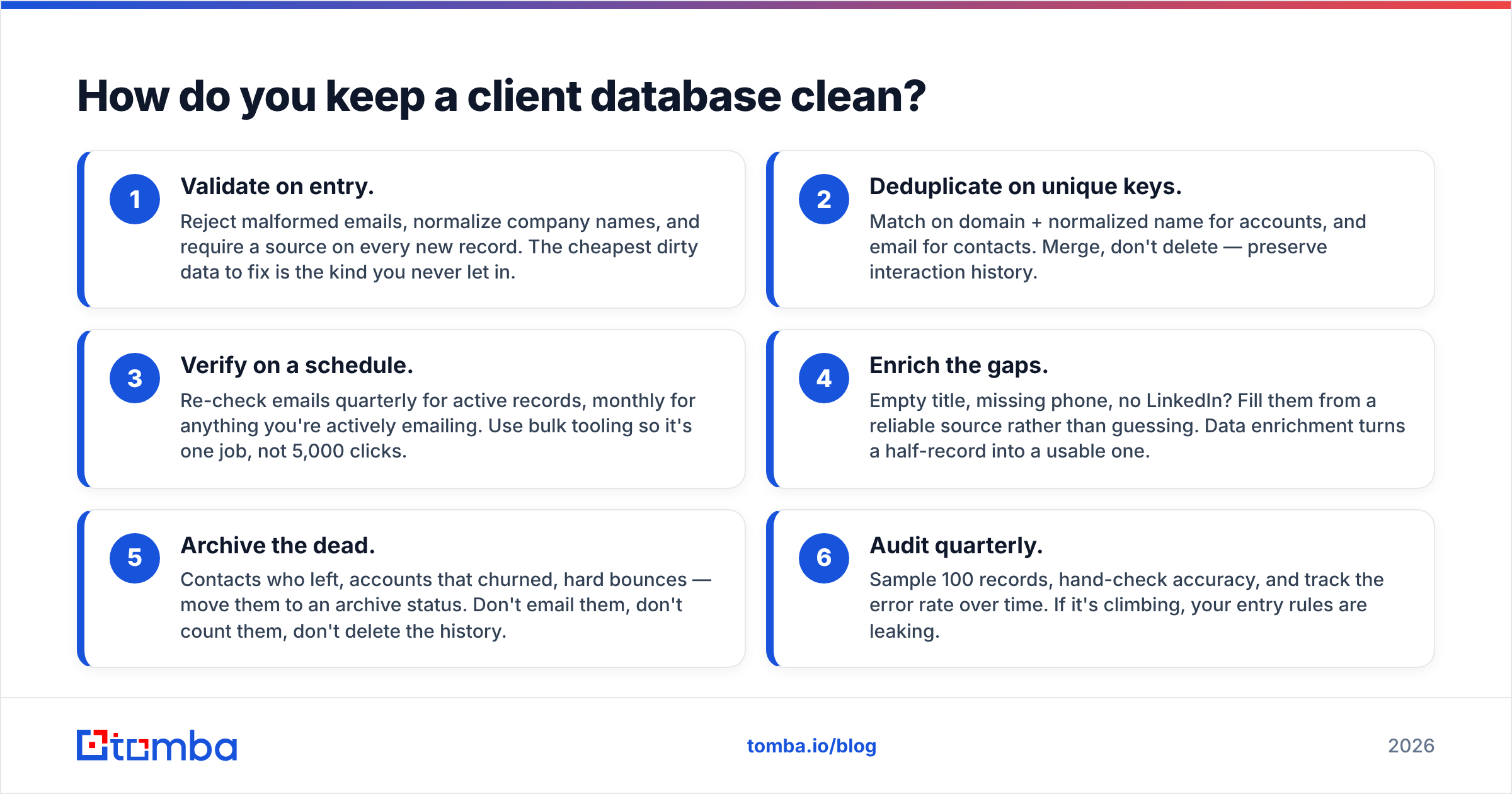
A maintenance workflow that actually holds up:
- Validate on entry. Reject malformed emails, normalize company names, and require a source on every new record. The cheapest dirty data to fix is the kind you never let in.
- Deduplicate on unique keys. Match on domain + normalized name for accounts, and email for contacts. Merge, don't delete — preserve interaction history.
- Verify on a schedule. Re-check emails quarterly for active records, monthly for anything you're actively emailing. Use bulk tooling so it's one job, not 5,000 clicks.
- Enrich the gaps. Empty title, missing phone, no LinkedIn? Fill them from a reliable source rather than guessing. Data enrichment turns a half-record into a usable one.
- Archive the dead. Contacts who left, accounts that churned, hard bounces — move them to an archive status. Don't email them, don't count them, don't delete the history.
- Audit quarterly. Sample 100 records, hand-check accuracy, and track the error rate over time. If it's climbing, your entry rules are leaking.
The discipline that separates a database that lasts from one that rots: every record has an owner and a last-checked date. Unowned data is unmaintained data.
)
What tools do you need to build and maintain one?#
You need three capabilities, and they don't have to come from one vendor: a store (where records live), an acquisition layer (how new accurate records get in), and a hygiene layer (how they stay accurate).
For the store, your options scale with the team:
- Spreadsheet + add-ons — fine under ~1,000 records and one or two users. Push it further with an Excel email finder or Sheets add-on so acquisition and storage live in one place.
- Lightweight database (Airtable, Notion) — relational structure without CRM overhead. Connect acquisition via the Airtable integration.
- CRM (HubSpot, Salesforce, Pipedrive) — when you have an active pipeline and need workflow. See HubSpot's CRM overview for what the workflow layer adds on top of the database.
For acquisition and hygiene, the question is where accurate contact data comes from. You can find verified professional emails by company or person with an email finder, pull every contact at a target company with domain search, and keep a list deliverable with bulk verification. The point is that your store is only as good as the pipe feeding it.
How does Tomba fit into a client database stack?#
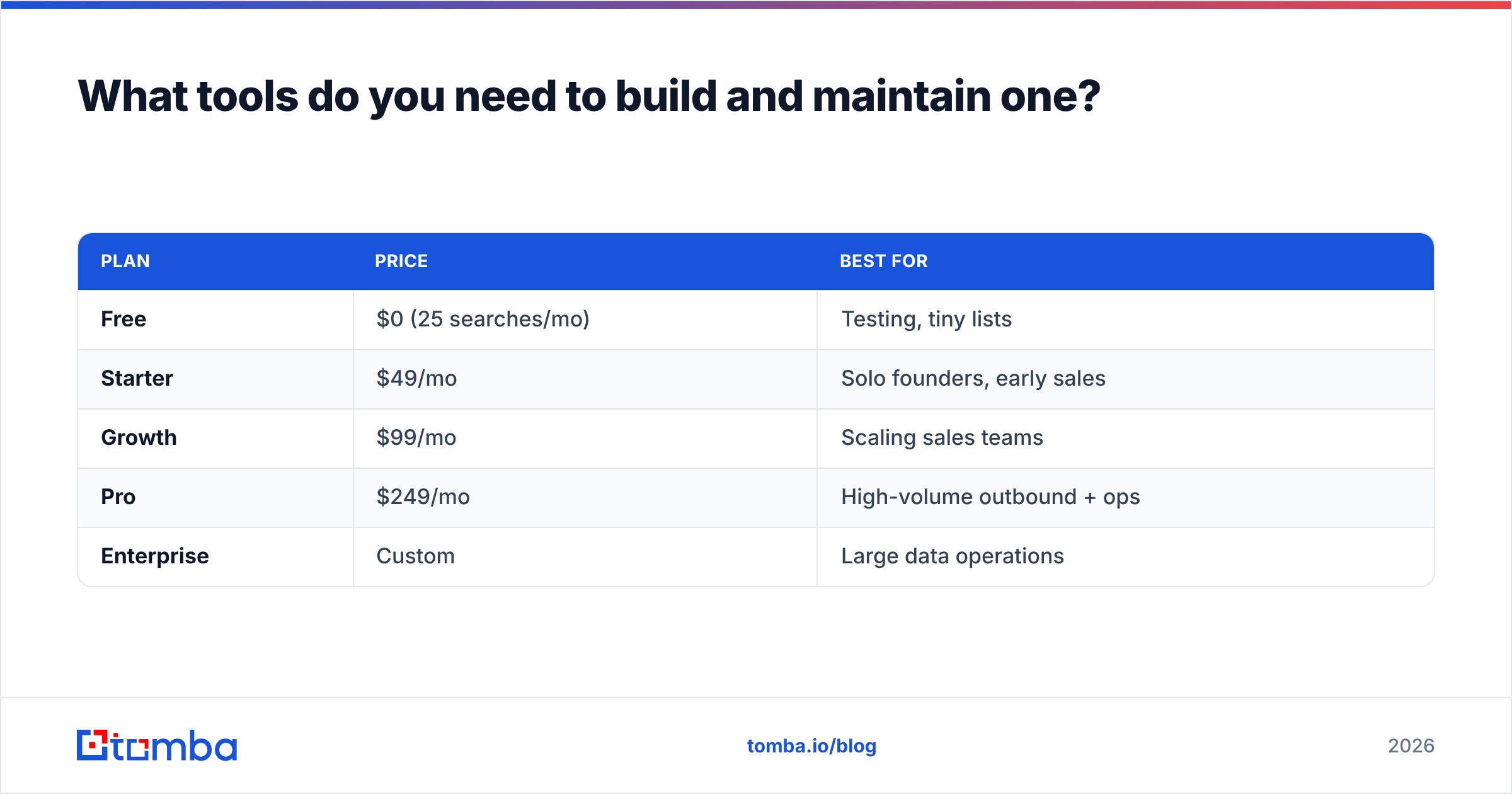
Tomba sits in the acquisition and hygiene layers — it's not trying to be your CRM. It finds and verifies the contact data, then hands clean records to wherever you store them. Pricing maps to how much data you move:
| Plan | Price | Best for |
|---|---|---|
| Free | $0 (25 searches/mo) | Testing, tiny lists |
| Starter | $49/mo | Solo founders, early sales |
| Growth | $99/mo | Scaling sales teams |
| Pro | $249/mo | High-volume outbound + ops |
| Enterprise | Custom | Large data operations |
See full Tomba pricing for credit limits per tier. Because it connects through the Tomba API, native HubSpot integration, and Salesforce integration, the verified data flows straight into your existing store instead of living in yet another silo. For periodic cleanups, run your existing records through the bulk email finder to fill gaps and re-verify in one pass.
How do you structure a client database for growth?#
Design it so it survives 10x growth without a rebuild. Three rules carry most of the weight.
Use stable IDs, never names, as the join key. Companies rebrand, people change their last name, "Inc." becomes "LLC." If your records link by name, every rename creates an orphan. Link by an immutable ID and the relationships hold.
Separate the person from the role. Jane is a contact. "VP of Marketing at Acme" is a role she currently holds. When she moves to a new company, you want her history to follow her and the Acme role to open up for a successor. Modeling these as two linked things instead of one flat row saves you from rewriting history every time someone gets promoted.
Keep interactions append-only. Don't overwrite "last contacted" — append a new interaction row. The current state is a query over the history, not a field you keep stomping on. This is what lets you answer "how many touches before this account converted?" a year later.
Get those three right and the database grows by accretion. Get them wrong and you'll be migrating at 20,000 records, which is exactly when you can least afford the downtime.
Common client database mistakes to avoid#
- Optimizing for record count. A bigger number isn't a better database. Reach and reputation are the metrics that pay.
- Treating import as the finish line. The day you import is the day decay starts. Without ongoing verification, you're just watching a clean list rot in slow motion.
- No ownership model. "Everyone maintains it" means no one does. Assign owners.
- Storing emails without verification status. A bare address is a gamble. Store whether it's verified and when it was checked.
- One giant flat table. Flat works at 500 rows and collapses at 50,000. Build the account/contact/interaction structure before you need it.
- Skipping deduplication rules. Duplicates don't announce themselves — they quietly split your view of a customer in two until billing or a rep notices.
Build a client database that earns its keep#
A client database is a revenue asset, and like any asset it depreciates without maintenance. The teams that win aren't the ones with the most records — they're the ones whose records are accurate, structured, and current enough to act on without second-guessing.
Start with clean structure, then keep the data fresh. For the acquisition and hygiene layers that decide whether your database is trustworthy, the Tomba Email Finder finds verified professional emails by name, company, or domain and pushes them straight into your store via API or native integrations. Begin on the free tier, prove the data quality on your own list, and scale the plan as your database grows. Clean in, clean out — that's the whole game.
Ready to find emails that actually work?
Join 150,000+ professionals who stopped guessing and started sending. Free credits on signup — no credit card required.
Get the Tomba newsletter
Practical outbound tactics and product updates — once every two weeks.
About the author