Client Management in 2026: A Practical Playbook & Tools
Client management decides whether your hard-won accounts renew or churn. Here's a 2026 playbook covering process, metrics, and the tools that keep relationships profitable.
Client management is the discipline of keeping the customers you already won — organized, informed, and renewing — instead of quietly letting them slip to a competitor. Do it well and your existing book of business becomes your cheapest, most predictable growth channel. Do it badly and you spend every quarter refilling a leaky bucket.
This guide breaks down what client management actually involves in 2026, the process that makes it repeatable, the metrics that tell you it's working, and the stack that supports it without drowning your team in busywork.
TL;DR#
- Client management is retention engineering, not just "being nice" — it's a repeatable process for onboarding, regular check-ins, value reviews, and renewals.
- Centralize everything in one system. Scattered notes across inboxes, spreadsheets, and someone's memory is the single biggest cause of churn surprises.
- Track leading indicators (product usage, response rate, NPS) — not just lagging ones (renewal rate) — so you can intervene before a client is already gone.
- Clean contact data is the foundation. You can't manage a relationship you can't reach; enrichment and verification keep your records reachable.
- The right tools depend on your size — a startup needs a lightweight CRM, an enterprise needs dedicated customer-success software. We compare both below.
What is client management?#
Client management is the everyday practice of nurturing post-sale relationships so accounts stay, expand, and refer. Think of it like tending a garden you already planted: the seeds (deals) are in the ground, but without watering (check-ins), weeding (issue resolution), and feeding (value delivery), nothing grows — and some plants die.
Technically, it spans several overlapping responsibilities:
- Onboarding — getting a new client to first value as fast as possible.
- Relationship maintenance — scheduled touchpoints, business reviews, and proactive support.
- Account health monitoring — watching usage and sentiment for early churn signals.
- Renewal and expansion — securing the next contract and finding upsell room.
- Advocacy — turning happy clients into references, case studies, and referrals.
The distinction worth nailing down: sales wins the client, client management keeps and grows them. In most B2B orgs the cost of acquiring a customer dwarfs the cost of retaining one, which is exactly why a structured approach to the second half pays off.
)
Why does client management matter so much in 2026?#
The short answer: acquisition got more expensive and buyers got more skeptical, so your installed base is where the margin lives.
A few forces converged:
- Rising acquisition costs. Paid channels are saturated and outbound reply rates keep sliding. Keeping an existing client is routinely cited as several times cheaper than winning a new one — HubSpot's research on customer retention and broader industry data both point the same direction.
- Subscription and usage-based pricing. When revenue is recurring, a churned client doesn't just cost one sale — it erases all future renewals. Net revenue retention has become a board-level metric.
- Buyer expectations. Clients now expect proactive, data-informed account management. A vendor who only calls 30 days before renewal looks asleep at the wheel.
Put simply: in a market where it's hard and costly to win new logos, the teams that win are the ones who don't lose the logos they already have.
What does a good client management process look like?#
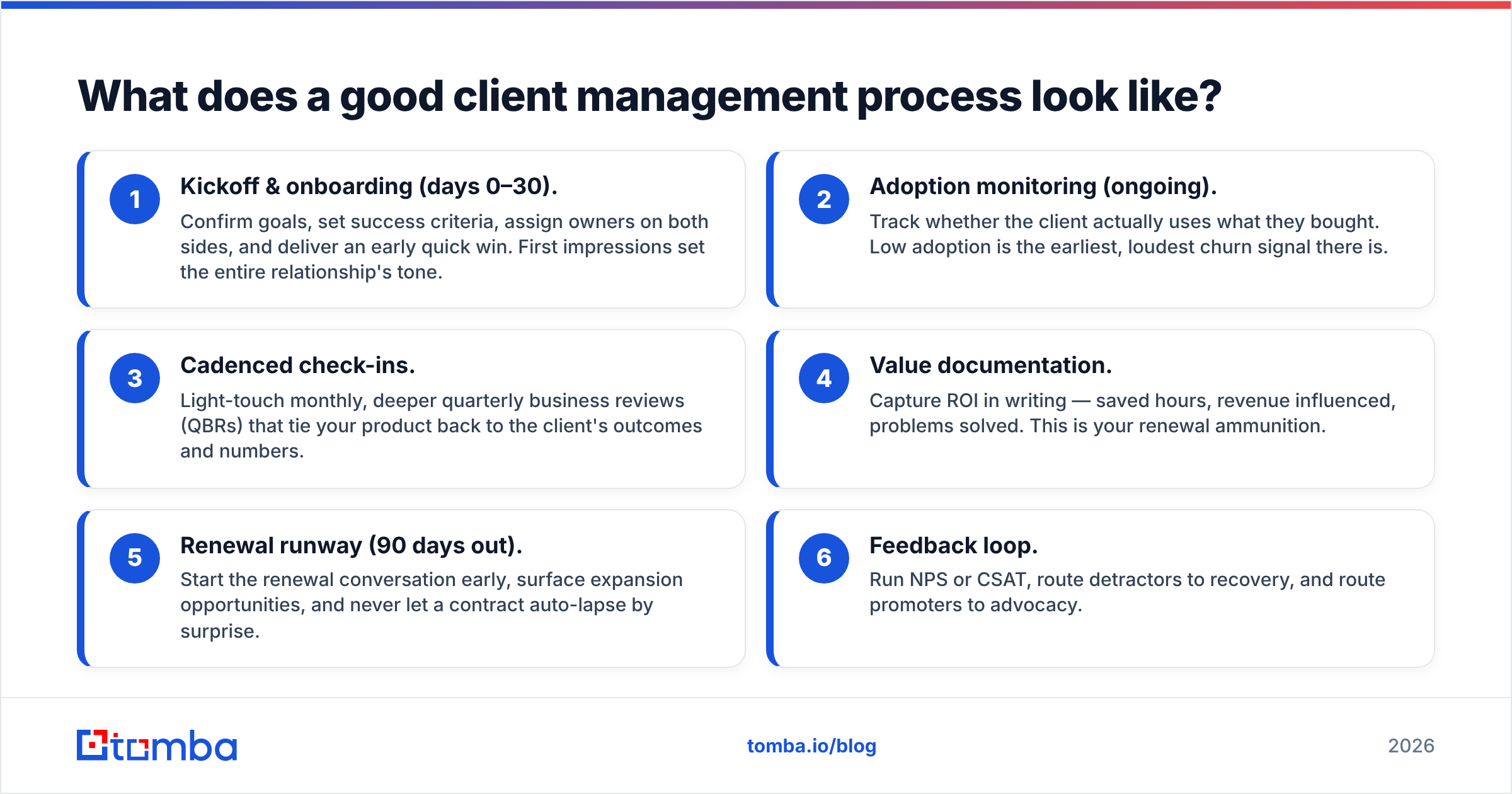
A good process is boringly repeatable. Every client moves through the same defined stages, and nothing depends on a single rep remembering to follow up. Here's the backbone most high-retention teams use:
- Kickoff & onboarding (days 0–30). Confirm goals, set success criteria, assign owners on both sides, and deliver an early quick win. First impressions set the entire relationship's tone.
- Adoption monitoring (ongoing). Track whether the client actually uses what they bought. Low adoption is the earliest, loudest churn signal there is.
- Cadenced check-ins. Light-touch monthly, deeper quarterly business reviews (QBRs) that tie your product back to the client's outcomes and numbers.
- Value documentation. Capture ROI in writing — saved hours, revenue influenced, problems solved. This is your renewal ammunition.
- Renewal runway (90 days out). Start the renewal conversation early, surface expansion opportunities, and never let a contract auto-lapse by surprise.
- Feedback loop. Run NPS or CSAT, route detractors to recovery, and route promoters to advocacy.
The throughline is documentation. A relationship that lives only in one person's head is a liability — when that person leaves, the relationship leaves with them. This is also where the foundation of clean, reachable contact data matters: if you can't quickly find the right stakeholder's email when a champion changes roles, the process breaks. Tools like a reverse email lookup and ongoing data enrichment keep your account records current as people move.
How do you measure client management success?#
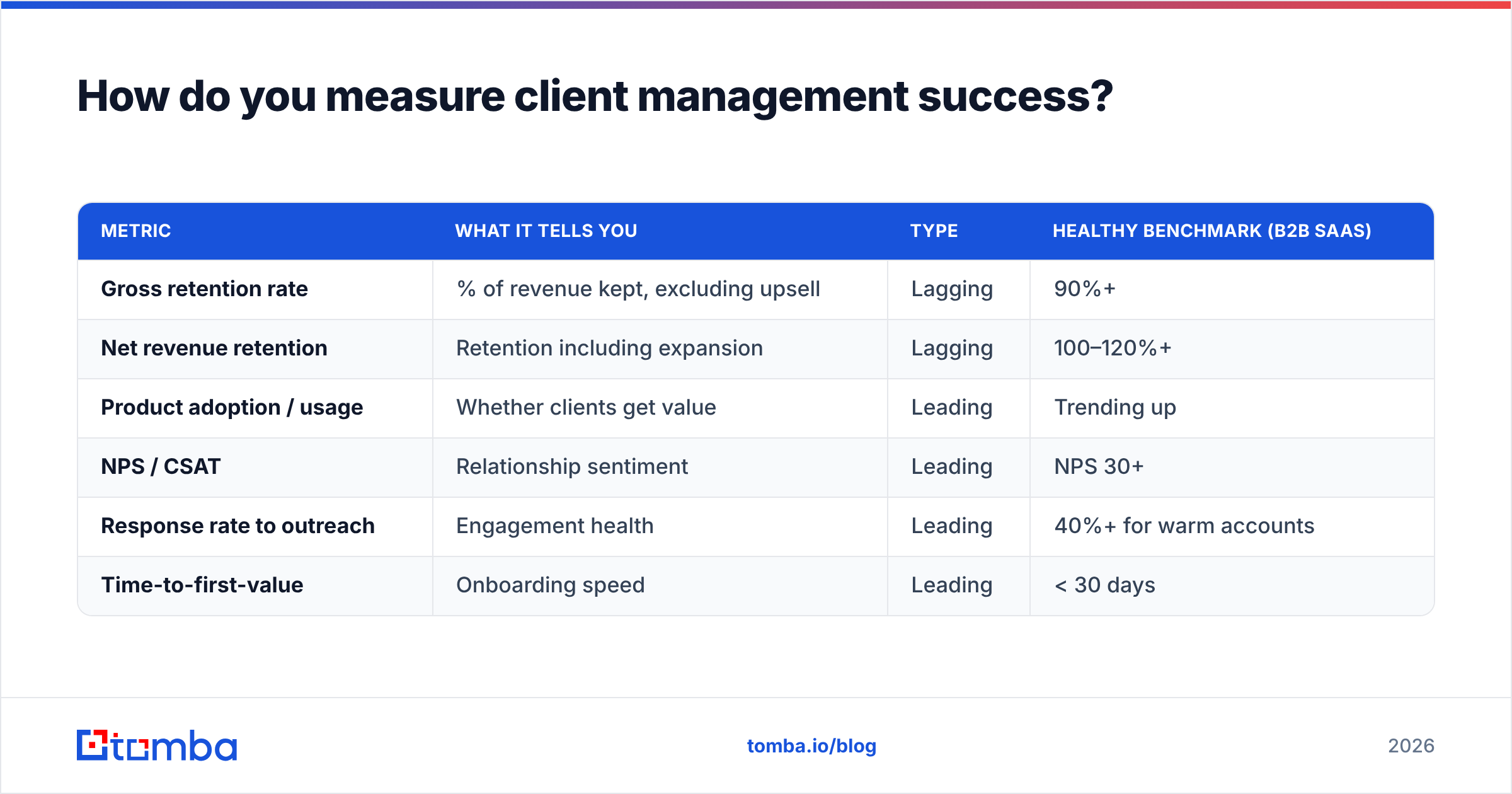
Measure both leading and lagging indicators — lagging tells you what happened, leading tells you what's about to. Watching only renewal rate is like checking your bank balance once a year; by the time it's bad, it's too late to act.
| Metric | What it tells you | Type | Healthy benchmark (B2B SaaS) |
|---|---|---|---|
| Gross retention rate | % of revenue kept, excluding upsell | Lagging | 90%+ |
| Net revenue retention | Retention including expansion | Lagging | 100–120%+ |
| Product adoption / usage | Whether clients get value | Leading | Trending up |
| NPS / CSAT | Relationship sentiment | Leading | NPS 30+ |
| Response rate to outreach | Engagement health | Leading | 40%+ for warm accounts |
| Time-to-first-value | Onboarding speed | Leading | < 30 days |
The practical move: build a simple account-health score that blends usage, sentiment, and engagement into a single red/amber/green flag. When an account goes amber, you intervene with a human before it goes red. You can read more on the underlying definitions of response rate and win rate in the Tomba glossary if you're standardizing terms across your team.
Which tools do you need for client management?#
The right stack depends on company size and account complexity, but every client management operation needs three layers: a system of record (CRM), a data layer (enrichment and verification), and an engagement layer (communication and scheduling).
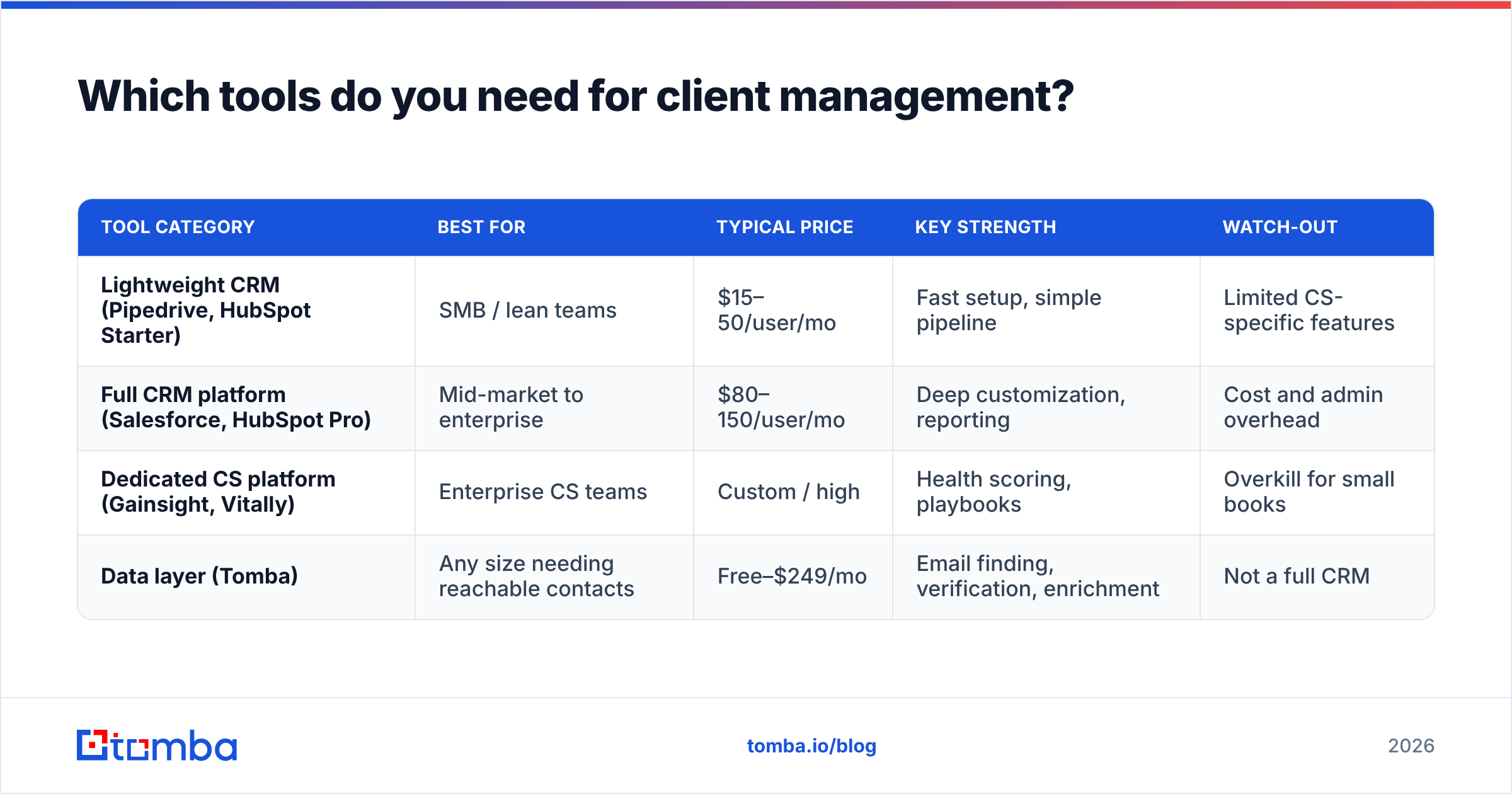
Here's how the common options compare for a mid-market B2B team:
| Tool category | Best for | Typical price | Key strength | Watch-out |
|---|---|---|---|---|
| Lightweight CRM (Pipedrive, HubSpot Starter) | SMB / lean teams | $15–50/user/mo | Fast setup, simple pipeline | Limited CS-specific features |
| Full CRM platform (Salesforce, HubSpot Pro) | Mid-market to enterprise | $80–150/user/mo | Deep customization, reporting | Cost and admin overhead |
| Dedicated CS platform (Gainsight, Vitally) | Enterprise CS teams | Custom / high | Health scoring, playbooks | Overkill for small books |
| Data layer (Tomba) | Any size needing reachable contacts | Free–$249/mo | Email finding, verification, enrichment | Not a full CRM |
A trap worth naming: buying a heavyweight customer-success platform before you have a documented process. Software amplifies a process; it doesn't create one. Get the workflow working in a simple CRM first, then scale the tooling.
)
Where data tools fit#
Your CRM is only as useful as the contacts inside it. Stakeholders change jobs, emails bounce, and decision-makers get reorganized — and stale records quietly sabotage your renewal outreach. This is the layer where Tomba slots in alongside your CRM rather than replacing it:
- Find the new champion when your contact leaves, using domain search to map who's now in the relevant role.
- Keep records reachable by running addresses through an email verifier before a renewal push, so your message actually lands.
- Enrich thin accounts with firmographic and contact data so QBR prep isn't a manual research slog.
You can connect this layer directly to your system of record — Tomba's HubSpot integration and Salesforce integration push verified data where your account managers already work. For teams standardizing on automation, Tomba pricing starts free at 25 searches a month and scales to a $49/mo Starter and $99/mo Growth plan as your book grows.
Is client management different from account management or customer success?#
Mostly no — they overlap heavily, and the labels vary by company. Here's the practical distinction:
- Account management usually emphasizes the commercial relationship: renewals, upsells, contract negotiation. It's revenue-focused.
- Customer success emphasizes outcomes: making sure the client achieves the goal they bought your product for. It's value-focused.
- Client management is the umbrella term that spans both, common in agencies, professional services, and consultancies where one person owns the whole relationship.
In a small company, the same person does all three. In a large one, they're separate teams that should share a single account record and a single source of truth for health scoring. The failure mode is when account management and customer success operate from different systems and the client gets contradictory messages — a problem that traces straight back to fragmented data.
What are the most common client management mistakes?#
Most retention problems come from a handful of avoidable habits:
- Reactive instead of proactive. Only contacting clients when something breaks or renewal looms. By then, sentiment is already set.
- No single source of truth. Notes in inboxes, spreadsheets, and Slack threads mean nobody has the full picture, and handoffs lose context.
- Measuring only lagging metrics. If renewal rate is your only signal, you find out about churn after it's irreversible.
- Ignoring the multi-threaded relationship. Relying on one champion is fragile — when they leave, the account is exposed. Map and maintain multiple contacts per account.
- Letting contact data rot. Bounced emails and outdated titles silently degrade every outreach effort. Periodic verification and enrichment fix this cheaply.
- Treating QBRs as status updates. A business review should tie your product to the client's numbers and goals, not just recap activity.
Fixing these is less about effort and more about systems: a defined cadence, one shared record, leading metrics, multi-threaded contacts, and clean data. None of it requires heroics — just discipline.
How do you build a client management system from scratch?#
Start lean and add structure as you grow. A workable first version takes a week, not a quarter:
- Pick one CRM and put every client in it — no exceptions, no side spreadsheets.
- Define your stages (onboarding → active → at-risk → renewal) and a simple health flag.
- Set a cadence per tier: high-value accounts get monthly touchpoints, smaller ones quarterly.
- Standardize your contact data by verifying every email and enriching missing fields, so outreach never silently fails.
- Document value after every meaningful interaction — wins, ROI, risks.
- Review weekly. Scan amber/red accounts and assign owners to act before renewal.
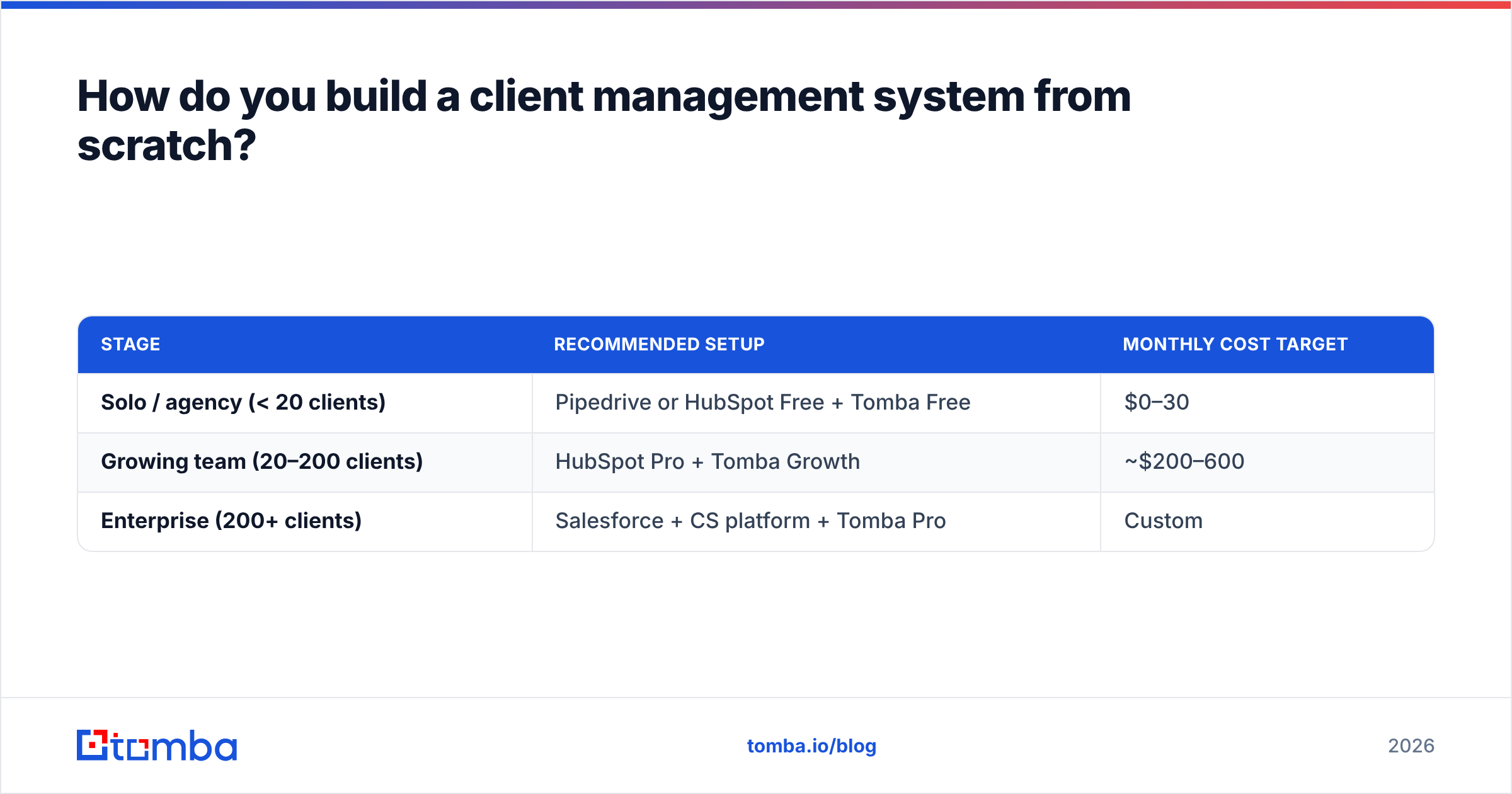
Compare two starting points depending on your stage:
| Stage | Recommended setup | Monthly cost target |
|---|---|---|
| Solo / agency (< 20 clients) | Pipedrive or HubSpot Free + Tomba Free | $0–30 |
| Growing team (20–200 clients) | HubSpot Pro + Tomba Growth | ~$200–600 |
| Enterprise (200+ clients) | Salesforce + CS platform + Tomba Pro | Custom |
The key insight: the system matters more than the software. A disciplined team with a cheap CRM beats a chaotic team with an expensive one every time. For deeper definitions of the surrounding concepts — what a CRM actually is, or how revenue operations ties retention to the rest of go-to-market — the Tomba glossary is a useful reference. You can also benchmark vendors independently on G2 before committing.
Final takeaway and where to start#
Client management is retention engineering: a repeatable process, the right leading metrics, multi-threaded relationships, and clean, reachable data — supported by tools sized to your stage. The teams that win in 2026 aren't the ones with the flashiest software; they're the ones who treat their installed base like the asset it is and refuse to let accounts churn by surprise.
The foundation under all of it is data you can actually reach. If your account records are full of stale emails and missing stakeholders, every other layer of the process leaks. Start there: use the Tomba Email Finder to find and verify the right contact for every account, keep your CRM records current as people move, and never lose a renewal because you couldn't reach the new decision-maker. Spin up the free tier, connect it to your CRM, and make "we can always reach our clients" the baseline your client management process is built on.
// get started
Find, verify and enrich your first contacts today
Start on the free plan with 25 searches a month, then scale when your team is ready.
Free plan · No credit card required · GDPR & CCPA
// about the author