Client Profiling Software: Best Tools & Guide for 2026
Client profiling software turns scattered contact records into sharp, sellable customer profiles. Here's how it works, what to look for, and the best tools to evaluate in 2026.
TL;DR
- Client profiling software collects, enriches, and structures data about your customers so you can segment, score, and target the accounts most likely to buy.
- The best tools combine firmographic, technographic, and contact-level data with enrichment APIs that fill the gaps in your CRM automatically.
- Pricing ranges from free tiers to enterprise contracts — what you pay for is data accuracy, coverage, and how cleanly it pipes into your existing stack.
- For most B2B teams, the practical starting point is a reliable enrichment and email-finding layer rather than a six-figure intelligence platform.
- Below: a working definition, a feature checklist, a side-by-side comparison table, and how to build profiles without overspending.
What is client profiling software?#
Client profiling software is a tool that builds a structured, data-rich picture of who your customers are — and who your ideal customers should be. Think of it like a detective's case file: instead of a name and a phone number scribbled on a sticky note, you get a full dossier — company size, industry, tech stack, decision-makers, verified contact details, and buying signals — all in one place.
Technically, it ingests raw inputs (a domain, a company name, a list of emails) and returns enriched records you can segment and act on. The goal is to replace guesswork with evidence so reps spend time on accounts that actually fit, not on whoever happened to fill out a form.
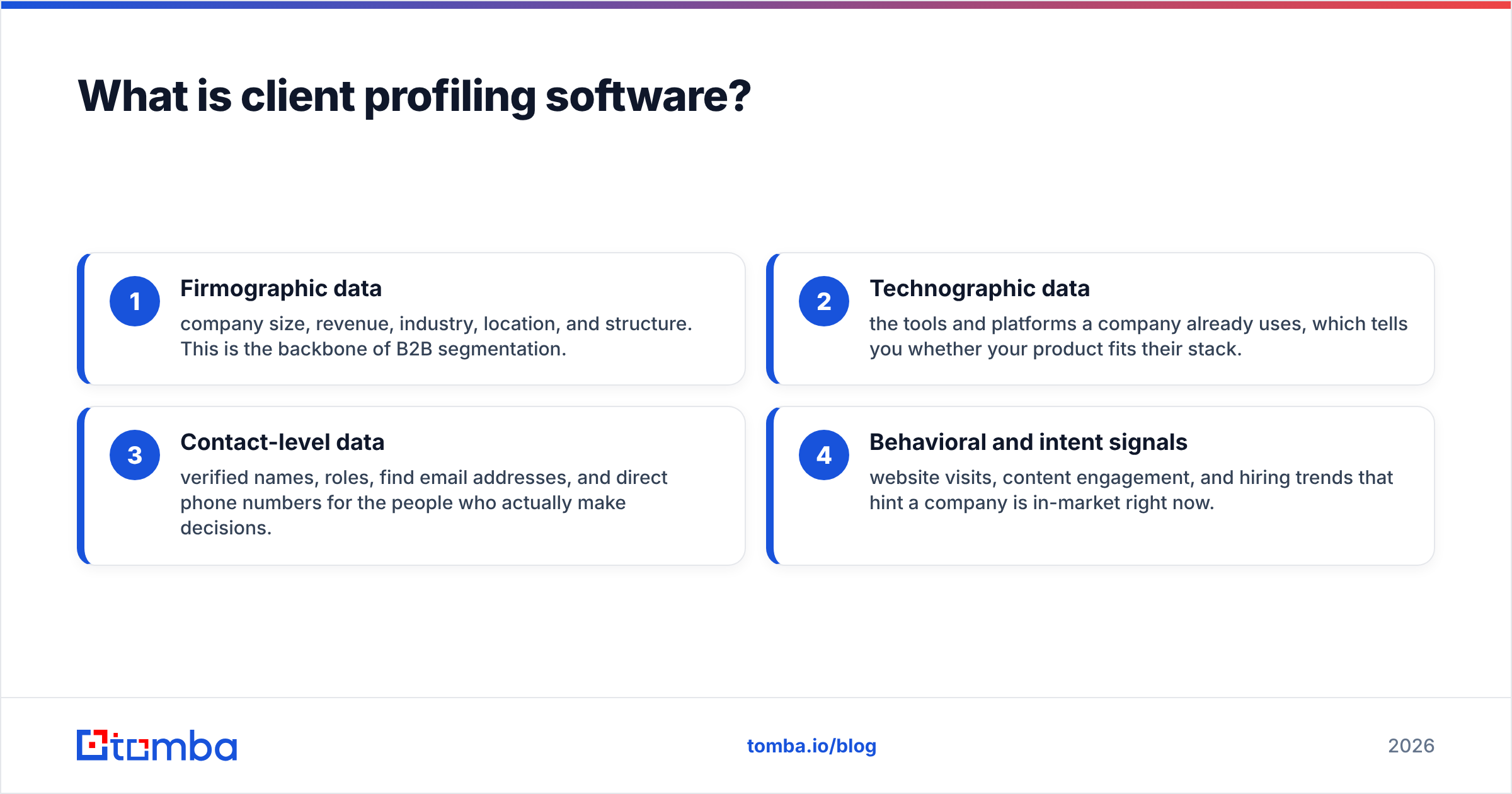
A complete client profile usually pulls from four data layers:
- Firmographic data — company size, revenue, industry, location, and structure. This is the backbone of B2B segmentation.
- Technographic data — the tools and platforms a company already uses, which tells you whether your product fits their stack.
- Contact-level data — verified names, roles, find email addresses, and direct phone numbers for the people who actually make decisions.
- Behavioral and intent signals — website visits, content engagement, and hiring trends that hint a company is in-market right now.
When those four layers sit on one record, you stop selling to "a company" and start selling to a specific buyer with a specific problem.
Why does client profiling matter in 2026?#
Because spray-and-pray outbound is dead, and the math proves it. Mailbox providers now filter aggressively on sender reputation, buyers ignore generic pitches, and a single bad data source can torch your domain. Profiling fixes the input problem: better targeting upstream means higher reply rates and cleaner email deliverability downstream.
There's also a cost argument. According to Gartner research on sales productivity, reps spend a large share of their week on non-selling tasks — much of it manual research and data cleanup. Client profiling software automates that research, so a rep opens their CRM to a finished profile instead of a blank field and a browser full of LinkedIn tabs.
The third reason is alignment. When marketing, sales, and RevOps share one definition of a good-fit account — backed by the same enriched data — you stop arguing about lead quality and start measuring it. That shared definition is the foundation of any serious revenue operations motion.
What features should client profiling software have?#
Not every tool labeled "profiling" does the same job. Some are pure databases, some are enrichment APIs, and some are full intent platforms. Use this checklist to separate the must-haves from the marketing copy:
- Data enrichment — the ability to take a thin record (just an email or domain) and return a full profile. This is the core function; without it you're just buying a static list.
- Verified contact discovery — accurate email and phone data with a validation step, so you're not building profiles on bounced addresses.
- Coverage and freshness — how many companies and contacts the provider covers, and how recently the data was refreshed. Stale data is worse than no data because it looks trustworthy.
- Segmentation and scoring — built-in filters to slice your profiles by firmographics and rank them by fit.
- Integrations — native connections to your CRM, spreadsheets, and outreach tools so profiles flow where reps work.
- Bulk processing and API — the ability to enrich thousands of records at once or wire profiling into your own product.
- Transparent, fair pricing — credit systems you can predict, not opaque "contact sales" walls for basic features.
If a tool nails enrichment, verification, and integrations, you can build everything else around it. If it's weak on data accuracy, no amount of dashboards will save you.
How does client profiling software actually work?#
The workflow is more like an assembly line than a magic box. Here's the typical path a record takes from raw input to sellable profile:
Step 1 — Input. You feed the system a seed: a company domain, a name, a list of emails, or a CRM export. Many teams start with a domain search to pull every known contact at a target company.
Step 2 — Match and enrich. The software matches your seed against its database and external sources, then appends firmographic, technographic, and contact fields. A thin row becomes a full record.
Step 3 — Verify. Contact data gets validated — emails checked against mail servers, catch-all domains flagged, phone numbers confirmed. This is where you verify emails before they ever reach a sequence.
Step 4 — Segment and score. Enriched profiles are filtered into segments (by industry, size, region) and scored against your ideal customer profile.
Step 5 — Sync and act. Finished profiles push into your CRM and outreach tools, where reps work them.
The quality of the whole chain depends on Step 2 and Step 3. Garbage data enriched and verified is still targeted garbage — which is why provider accuracy is the single most important thing you evaluate.
What are the best client profiling tools to compare in 2026?#
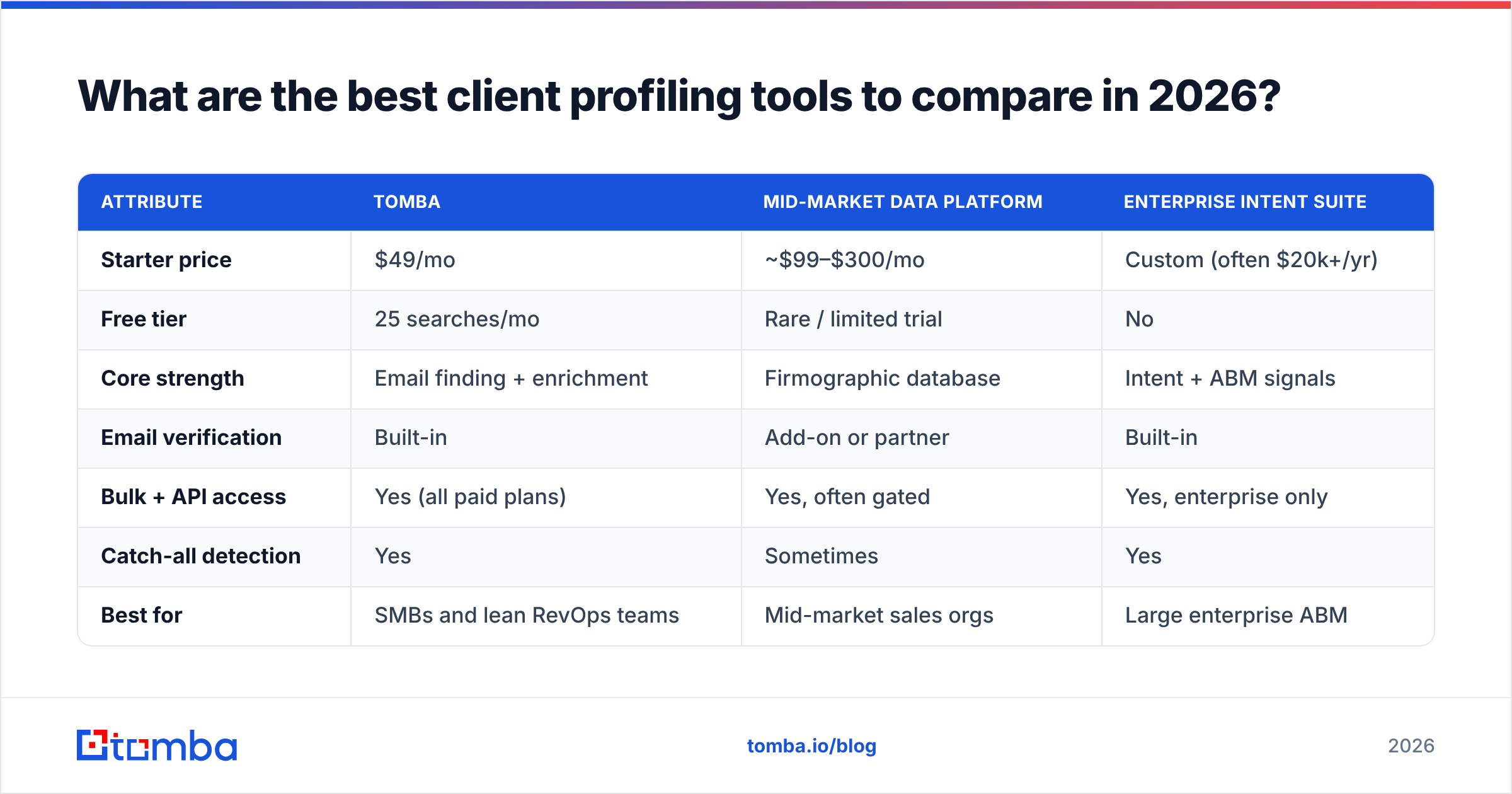
The market splits into three rough tiers: lightweight enrichment-and-contact tools, mid-market data platforms, and enterprise intent suites. Most teams over-buy here, paying enterprise prices for data they could source from a focused enrichment layer. The table below compares representative options across the attributes that actually drive ROI.
| Attribute | Tomba | Mid-market data platform | Enterprise intent suite |
|---|---|---|---|
| Starter price | $49/mo | ~$99–$300/mo | Custom (often $20k+/yr) |
| Free tier | 25 searches/mo | Rare / limited trial | No |
| Core strength | Email finding + enrichment | Firmographic database | Intent + ABM signals |
| Email verification | Built-in | Add-on or partner | Built-in |
| Bulk + API access | Yes (all paid plans) | Yes, often gated | Yes, enterprise only |
| Catch-all detection | Yes | Sometimes | Yes |
| Best for | SMBs and lean RevOps teams | Mid-market sales orgs | Large enterprise ABM |
| Contract lock-in | Monthly, cancel anytime | Often annual | Annual minimum |
The honest takeaway: if you need verified contacts and clean enrichment to build accurate profiles, a focused tool covers 80% of the job at a fraction of enterprise cost. You graduate to an intent suite when you have the headcount to action thousands of in-market signals a month — and most teams don't, yet.

For a deeper data-coverage breakdown, vendor-neutral review sites like G2 are useful for reading verified user feedback before you commit to a contract. Cross-reference claimed coverage against real reviews — vendors quote their best-case database size, not what you'll match against your specific market.
How do you build client profiles without overspending?#
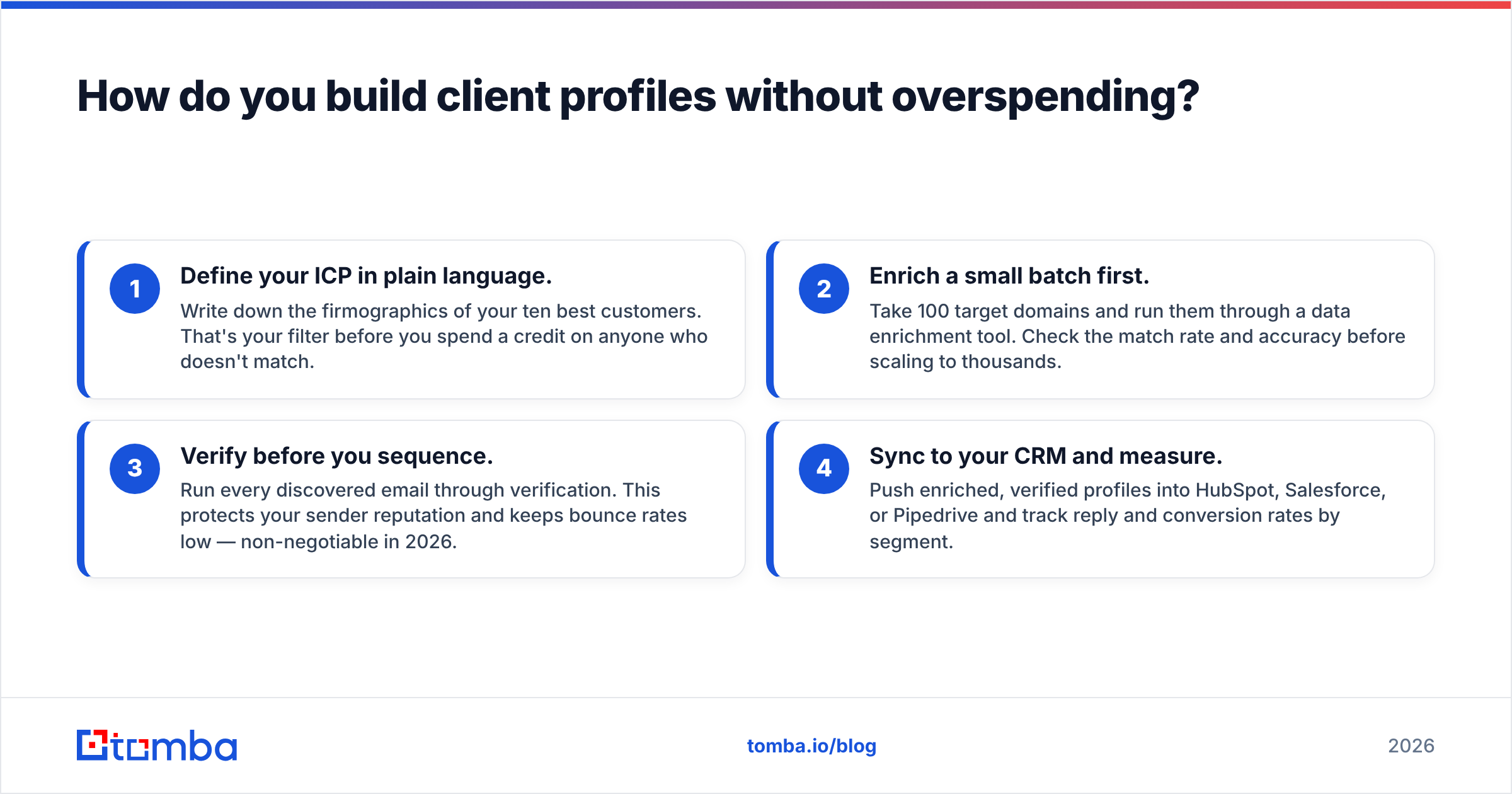
Conclusion first: start with enrichment, prove ROI, then expand. You don't need a $20k platform to begin profiling — you need accurate data and a repeatable process.
Here's a lean, four-step build that scales:
- Define your ICP in plain language. Write down the firmographics of your ten best customers. That's your filter before you spend a credit on anyone who doesn't match.
- Enrich a small batch first. Take 100 target domains and run them through a data enrichment tool. Check the match rate and accuracy before scaling to thousands.
- Verify before you sequence. Run every discovered email through verification. This protects your sender reputation and keeps bounce rates low — non-negotiable in 2026.
- Sync to your CRM and measure. Push enriched, verified profiles into HubSpot, Salesforce, or Pipedrive and track reply and conversion rates by segment.
Tools like a bulk email finder let you process whole lists at once, and a maintained B2B database gives you a head start on coverage. The discipline that matters most is the small-batch test — never buy coverage you haven't validated against your own market first.
If your stack already runs on HubSpot or Salesforce, push profiles through native connectors rather than CSV exports; both HubSpot and Salesforce treat enriched, deduplicated records far better than manually pasted rows, and you keep one source of truth.
Client profiling software vs a CRM: what's the difference?#
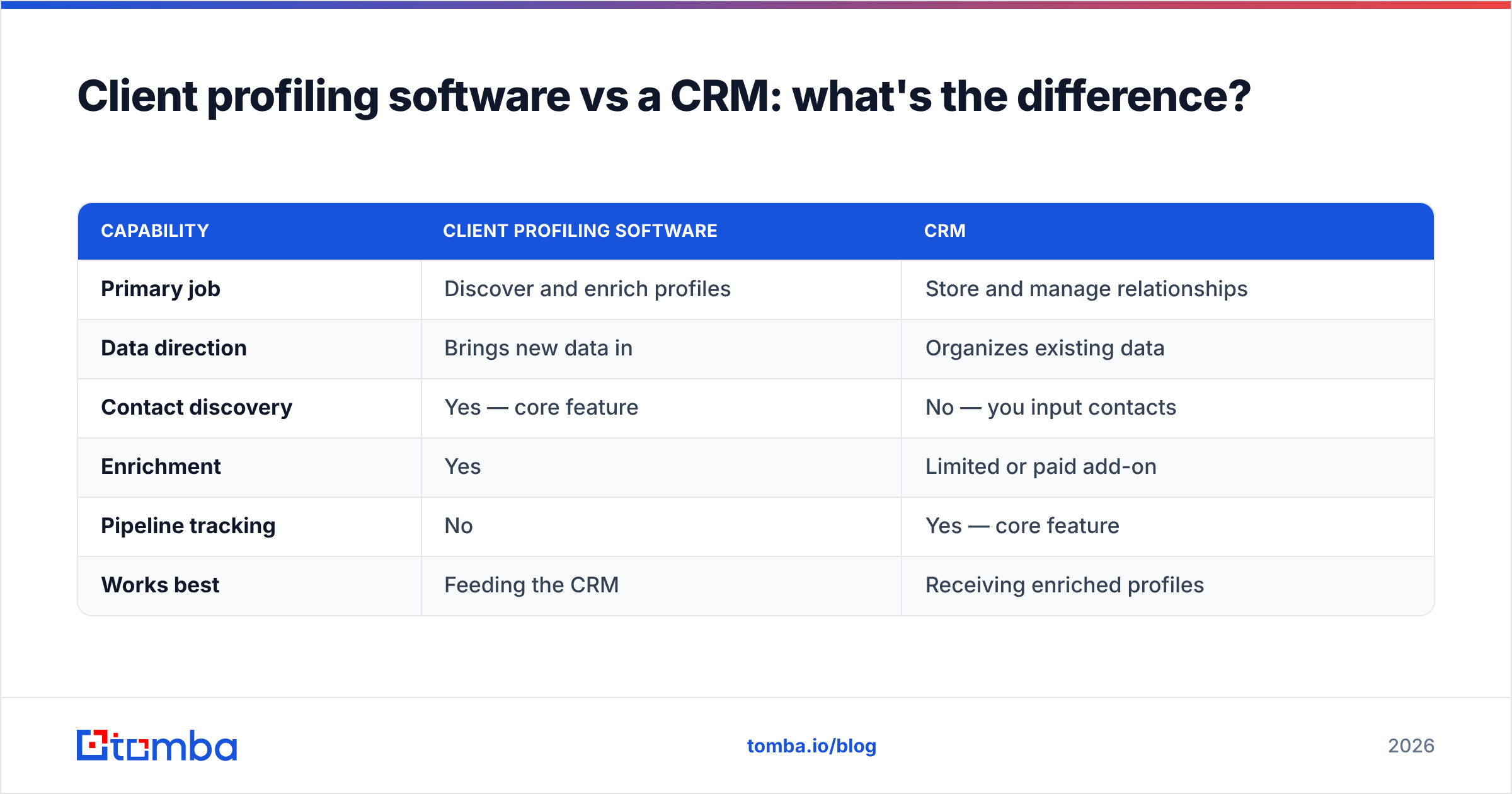
They're partners, not competitors. A CRM is the filing cabinet — it stores and tracks relationships you already have. Client profiling software is the researcher that fills the cabinet with accurate, enriched files in the first place.
| Capability | Client profiling software | CRM |
|---|---|---|
| Primary job | Discover and enrich profiles | Store and manage relationships |
| Data direction | Brings new data in | Organizes existing data |
| Contact discovery | Yes — core feature | No — you input contacts |
| Enrichment | Yes | Limited or paid add-on |
| Pipeline tracking | No | Yes — core feature |
| Works best | Feeding the CRM | Receiving enriched profiles |
A CRM with empty or stale fields is just an expensive address book. Profiling software keeps it fed with current, verified data — which is why the two belong in the same workflow, not in an either/or decision.
What mistakes should you avoid with client profiling?#
A few traps sink otherwise good profiling programs:
- Buying coverage before proving accuracy. Vendors quote total database size; what matters is match rate for your market. Always test a sample.
- Skipping verification. Enriching bad emails just gives you confident-looking bounces. Verify every contact before outreach.
- Profiling everyone. Enrichment credits are finite. Filter to your ICP first, then enrich — not the other way around.
- Treating profiles as static. Companies hire, churn tools, and reorganize. A profile built in January is partly wrong by June. Refresh on a schedule.
- Letting data sit in a silo. A profile that never reaches the rep working the account is wasted spend. Sync it into the CRM and outreach tools where decisions happen.
Avoid those five and your profiling program will outperform tools that cost ten times more, because the bottleneck in B2B is rarely data volume — it's data accuracy and follow-through.
The bottom line on client profiling software in 2026#
Client profiling software earns its keep when it turns thin, scattered records into accurate, sellable profiles your team can act on today. The winners aren't the platforms with the biggest dashboards — they're the tools with the cleanest data, the fairest pricing, and the integrations that put profiles in front of reps.
Start lean. Prove that better data lifts your reply and conversion rates on a small batch, then scale the spend to match the return. That sequence keeps you out of the over-buying trap that catches so many teams.
Ready to build profiles on data you can trust? The Tomba Email Finder gives you verified contacts and built-in enrichment to turn any domain or name into a complete client profile — with a free tier of 25 searches a month and paid plans starting at $49/mo. See full Tomba pricing, run a batch against your own ICP, and measure the match rate yourself before you commit a dollar to an enterprise contract you may not need.
// get started
Find, verify and enrich your first contacts today
Start on the free plan with 25 searches a month, then scale when your team is ready.
Free plan · No credit card required · GDPR & CCPA
// about the author