Clodura.AI vs ContactOut 2026: Which Data Tool Wins?
Clodura.AI bundles a sales database with sequencing; ContactOut lives inside LinkedIn for email lookups. Here's the honest 2026 breakdown of accuracy, pricing, and which one fits your prospecting motion.
Clodura.AI vs ContactOut: The 2026 B2B Data Showdown
Picking a contact-data tool is like choosing between a fully stocked warehouse and a sharp pocketknife. One hands you a giant database plus sequencing; the other lives quietly in your browser and pulls a personal email the moment you open a LinkedIn profile. Both have real fans. Both have real gaps.
This is a neutral, hands-on comparison of Clodura.AI vs ContactOut for 2026 — accuracy, pricing, coverage, and the workflows each one actually fits. We'll also show where a verification-first tool like Tomba slots in, because the data you pull is only as useful as the bounces it avoids.
TL;DR#
- Clodura.AI is an all-in-one sales intelligence platform: a ~600M+ contact database, buyer intent signals, org charts, and built-in email sequencing. Best if you want prospecting and outreach under one roof.
- ContactOut is a LinkedIn-first contact finder with a Chrome extension known for strong personal/work email coverage. Best if your entire motion runs through LinkedIn.
- Accuracy is the real battleground — both claim high match rates, but neither replaces a dedicated email verifier before you hit send.
- Pricing differs in shape: Clodura sells platform tiers with credits; ContactOut sells per-seat plans that get steep at scale.
- If you mainly need clean, verified B2B emails by domain or name, a focused finder like Tomba Email Finder is cheaper per result and pairs with either tool.
What is Clodura.AI?#
Clodura.AI is a sales intelligence and engagement platform. Think of it as a CRM-adjacent command center: you search a large company and contact database, layer on technographic and buyer-intent filters, build a list, and then run email sequences without leaving the tool.
Its standout features are the org-chart mapping (so you can see reporting lines inside a target account), direct-dial discovery, and intent data that flags accounts showing buying signals. For a mid-market SDR team that wants one subscription instead of five, that bundling is the pitch.
The trade-off is depth-per-feature. A platform that does database + intent + sequencing + analytics rarely wins every category outright. The database is broad but its email accuracy varies by region and seniority, and the sequencing engine is serviceable rather than best-in-class. You can read more about how buyer-intent and account data feed a modern pipeline in our overview of revenue operations.
What is ContactOut?#
ContactOut is a contact-finding tool built around LinkedIn. Its reputation rests on a Chrome extension that surfaces a prospect's work and personal email plus phone number right on their profile. Recruiters love it because personal emails reach candidates who ignore work inboxes.
ContactOut also offers a search portal and a data-export workflow, but the browser extension is the heart of the product. If your reps live in LinkedIn Sales Navigator all day, ContactOut feels native — you never break flow.
The limitation is the flip side of that strength: ContactOut is profile-by-profile by design. Bulk, domain-wide discovery ("give me every email at acme.com") isn't its sweet spot, and per-seat pricing means costs scale with headcount, not value. For domain-level sweeps, a dedicated domain search tool is a better shape.

Clodura.AI vs ContactOut: Feature comparison#
Here's the head-to-head on the attributes that actually change your quota.
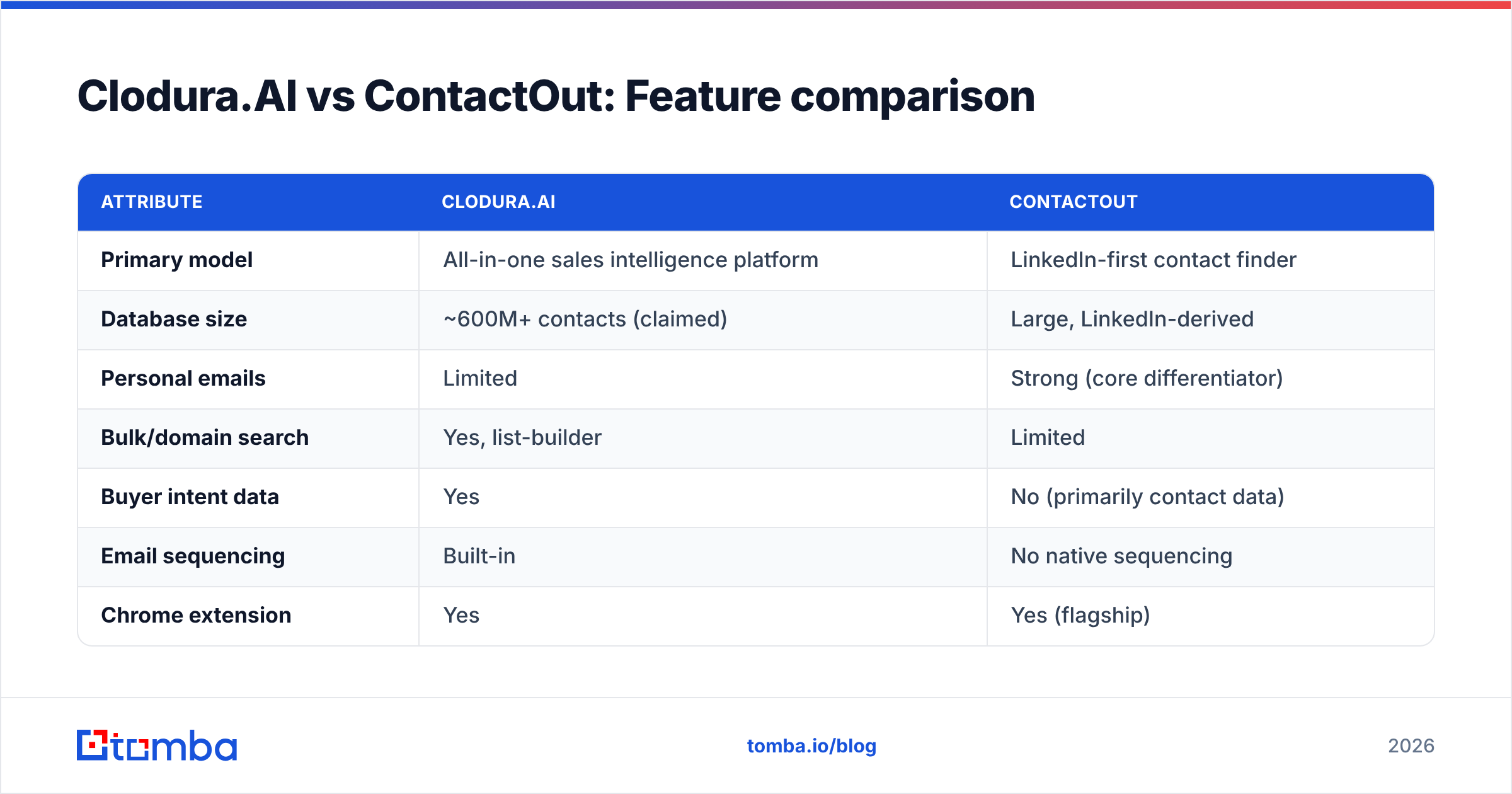
| Attribute | Clodura.AI | ContactOut |
|---|---|---|
| Primary model | All-in-one sales intelligence platform | LinkedIn-first contact finder |
| Database size | ~600M+ contacts (claimed) | Large, LinkedIn-derived |
| Personal emails | Limited | Strong (core differentiator) |
| Bulk/domain search | Yes, list-builder | Limited |
| Buyer intent data | Yes | No (primarily contact data) |
| Email sequencing | Built-in | No native sequencing |
| Chrome extension | Yes | Yes (flagship) |
| Pricing model | Platform tiers + credits | Per-seat plans |
| Best for | Mid-market teams wanting one stack | LinkedIn-heavy reps & recruiters |
| Verification depth | Basic | Basic |
The pattern is clear: Clodura wins on breadth (database + intent + sequencing), ContactOut wins on LinkedIn depth and personal-email reach. Neither is a true verification engine, which is the gap we'll come back to.
Which one is more accurate?#
Accuracy depends on what you're matching. ContactOut tends to win on LinkedIn-sourced personal emails — that's its trained specialty. Clodura tends to be more even across work emails and firmographic data because it blends multiple sources.
But "accuracy" claims from any vendor deserve skepticism. A 95% match-rate headline often measures coverage (we returned an email) rather than deliverability (the email actually exists and accepts mail). Those are different numbers. A catch-all domain will happily accept a verification ping for an address that bounces in production.
That's why serious teams run a separate verification pass regardless of source. Pipe either tool's output through an email verifier, and for the trickiest domains use a catch-all verifier so you stop guessing on addresses that "pass" superficial checks. According to peer-review aggregators like G2, real-world bounce rates move far more on verification hygiene than on which finder you started with.
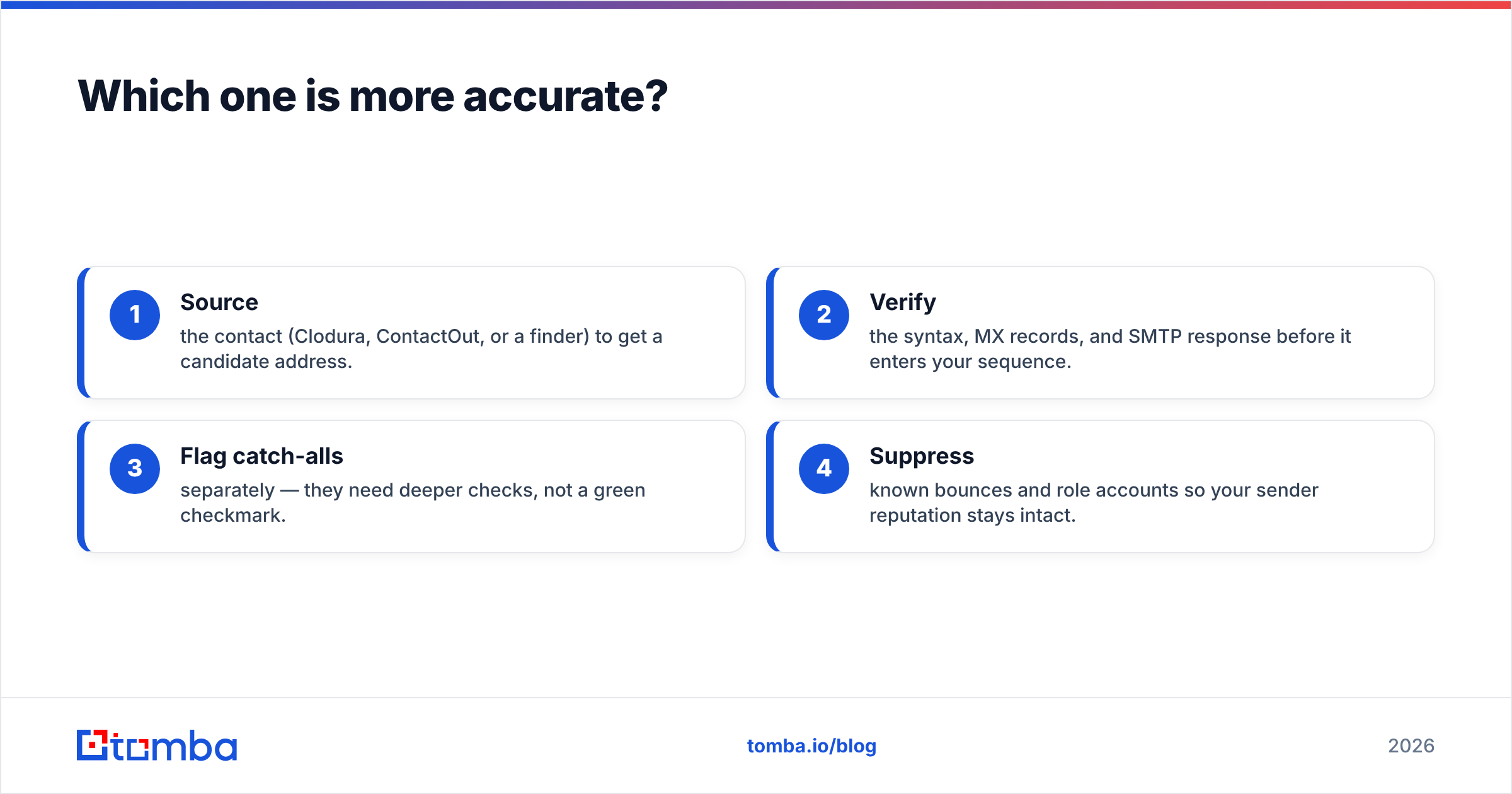
A clean four-step hygiene loop looks like this:
- Source the contact (Clodura, ContactOut, or a finder) to get a candidate address.
- Verify the syntax, MX records, and SMTP response before it enters your sequence.
- Flag catch-alls separately — they need deeper checks, not a green checkmark.
- Suppress known bounces and role accounts so your sender reputation stays intact.
Skip step two and your sender reputation erodes one bounce at a time.
How do they price in 2026?#
Pricing shape matters more than the sticker number, because the two tools charge for different things.
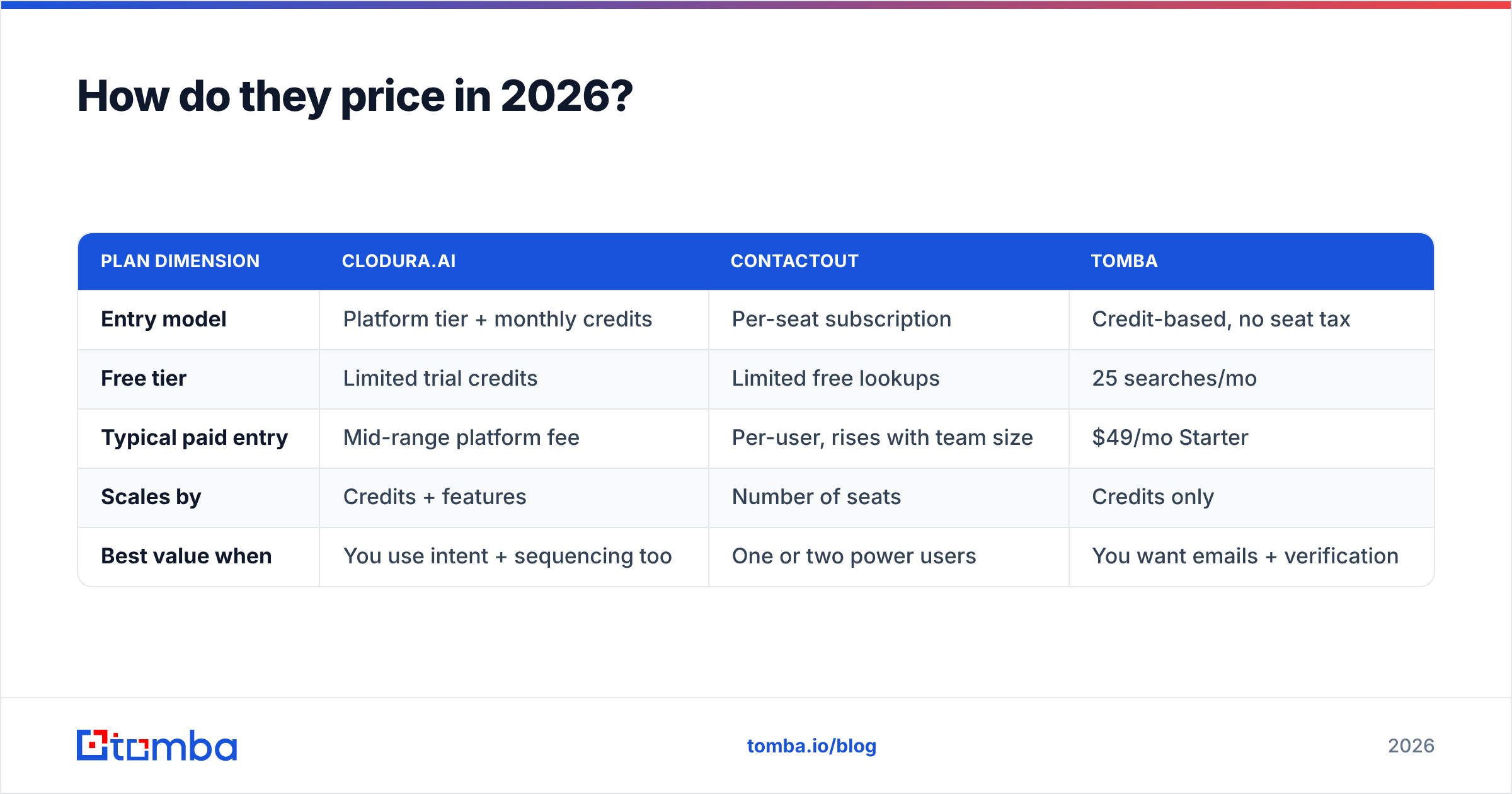
| Plan dimension | Clodura.AI | ContactOut | Tomba |
|---|---|---|---|
| Entry model | Platform tier + monthly credits | Per-seat subscription | Credit-based, no seat tax |
| Free tier | Limited trial credits | Limited free lookups | 25 searches/mo |
| Typical paid entry | Mid-range platform fee | Per-user, rises with team size | $49/mo Starter |
| Scales by | Credits + features | Number of seats | Credits only |
| Best value when | You use intent + sequencing too | One or two power users | You want emails + verification |
Clodura makes sense when you'll genuinely use the intent and sequencing modules — otherwise you're paying for a platform to use one feature. ContactOut is efficient for a small number of heavy LinkedIn users but gets expensive as you add reps. If your core need is "find and verify B2B emails reliably without a per-seat tax," compare both against transparent Tomba pricing: Free (25/mo), Starter $49/mo, Growth $99/mo, Pro $249/mo, and Enterprise.

Which workflow fits your team?#
Match the tool to your motion, not the marketing.
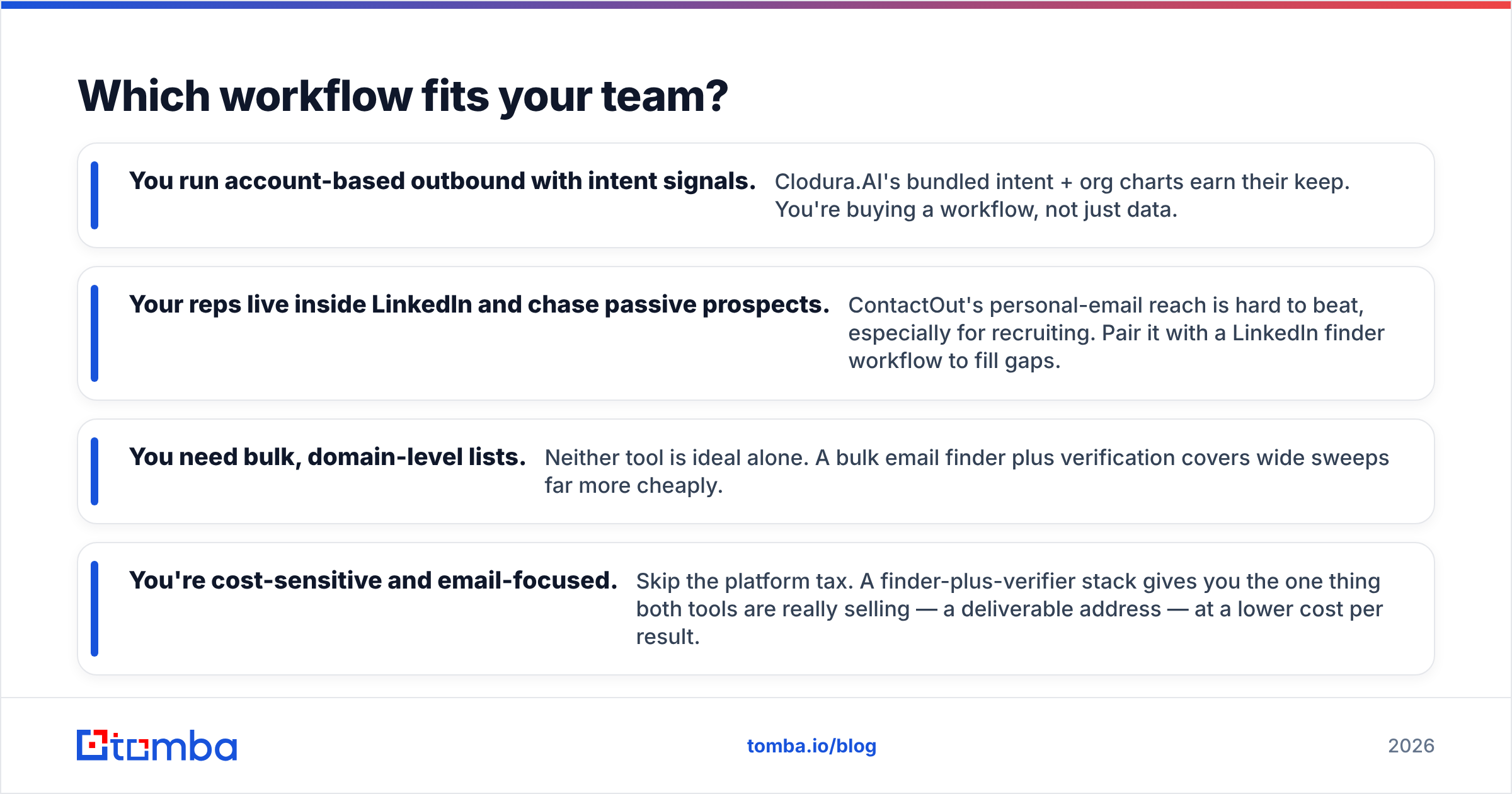
- You run account-based outbound with intent signals. Clodura.AI's bundled intent + org charts earn their keep. You're buying a workflow, not just data.
- Your reps live inside LinkedIn and chase passive prospects. ContactOut's personal-email reach is hard to beat, especially for recruiting. Pair it with a LinkedIn finder workflow to fill gaps.
- You need bulk, domain-level lists. Neither tool is ideal alone. A bulk email finder plus verification covers wide sweeps far more cheaply.
- You're cost-sensitive and email-focused. Skip the platform tax. A finder-plus-verifier stack gives you the one thing both tools are really selling — a deliverable address — at a lower cost per result.
There's no shame in a hybrid stack. Plenty of teams use ContactOut for LinkedIn one-offs, Clodura for intent-driven account research, and a dedicated finder/verifier for everything in bulk. The tools aren't mutually exclusive; your budget just has opinions.
Where does Tomba fit in this comparison?#
Tomba isn't trying to be a 600M-row platform or a LinkedIn sidebar. It's a focused, verification-first email finder — and that focus is the point. Where Clodura and ContactOut hand you a candidate address and move on, Tomba's job is to make sure that address is real before it costs you a bounce.
| Capability | Why it matters here |
|---|---|
| Email Finder | Find addresses by name, domain, or company — not just LinkedIn profiles |
| Email Verifier | Catches the bounces "accuracy" headlines hide |
| Domain Search | Pull every public address at a company in one query |
| Tomba API | Drop finding + verification into your existing pipeline |
| Integrations | Connect to HubSpot, Sheets, Zapier, and more |
Crucially, Tomba is complementary, not just a replacement. Use ContactOut for a hot LinkedIn lead, then verify it in Tomba. Build a target list in Clodura, then run it through Tomba's bulk verify before launch. The result is fewer bounces, a healthier domain, and outreach that lands in primary instead of spam. If deliverability is the goal — and it always is — the verification layer is non-negotiable. Tomba's data sourcing and methodology are documented openly at our data so you can audit the claims yourself.
Frequently asked questions#
Is Clodura.AI better than ContactOut? Neither is universally better. Clodura.AI wins if you want an all-in-one platform with intent data and sequencing. ContactOut wins for LinkedIn-centric prospecting and personal-email reach. Pick by motion, not by feature count.
Does ContactOut find personal emails? Yes — that's its core differentiator. ContactOut is well known for surfacing personal (not just work) emails from LinkedIn profiles, which is why recruiters favor it. Always verify those addresses before bulk sending.
Can I use these tools together? Absolutely. Many teams source with ContactOut or Clodura and verify with a dedicated tool. A finder-plus-email verifier combo keeps bounce rates low regardless of where the contact came from.
What's the cheapest way to get verified B2B emails? A credit-based finder with built-in verification — and no per-seat fees — is usually the lowest cost per deliverable result. Compare Tomba pricing against the per-seat math of ContactOut and the platform fees of Clodura.
Do high accuracy claims mean low bounce rates? Not necessarily. Many "accuracy" figures measure coverage, not deliverability. Catch-all domains and stale data still bounce. A verification step is what actually protects your email deliverability.
The bottom line#
Clodura.AI and ContactOut solve different problems. Clodura is the warehouse — broad data, intent, and sequencing for teams that want one stack. ContactOut is the pocketknife — fast, LinkedIn-native, strong on personal emails for reps who never leave the feed. Choose based on where your prospecting actually happens and how your pricing scales.
But whichever you pick, the address you pull still has to be real. That's the layer both tools treat as an afterthought and the layer that decides whether your campaign reaches inboxes or spam folders.
Start free with Tomba Email Finder — 25 searches a month on the free tier, built-in verification, and a transparent credit model with no per-seat tax. Find the email, verify it before you send, and let Clodura or ContactOut handle the rest of your motion. Your bounce rate will thank you.
// get started
Find, verify and enrich your first contacts today
Start on the free plan with 25 searches a month, then scale when your team is ready.
Free plan · No credit card required · GDPR & CCPA
// about the author