Clodura.ai vs Finder.io: Best Email Finder in 2026?
Clodura.ai bundles prospecting and sequencing; Finder.io is a lean email lookup. We compare accuracy, pricing, and data depth — and where Tomba beats both.
TL;DR
- Clodura.ai is an all-in-one sales intelligence platform — database, email finder, sequences, and a dialer bundled together. You pay for the suite even if you only need emails.
- Finder.io (by 500apps) is a lean, low-cost email finder and verifier. Cheap, but the database is thin and accuracy drops on smaller domains.
- Neither wins on verified accuracy. If your only goal is finding and confirming the right email, a focused tool with SMTP-level verification beats both.
- For pure email discovery with a free tier and transparent pricing, Tomba Email Finder is the cleaner pick — and it slots into the same workflow with a Chrome extension and API.
- Read on for a side-by-side table, accuracy notes, and which tool fits which team.
What are Clodura.ai and Finder.io?#
Think of these two as a Swiss Army knife versus a single sharp blade.
Clodura.ai is the Swiss Army knife. It markets itself as a sales prospecting platform: a B2B contact database of roughly 18M companies and several hundred million contacts, plus email finding, an email verifier, buyer-intent signals, and a built-in sequencer and dialer. The pitch is "replace five tools with one." That breadth is the selling point — and the catch, because you carry the whole bundle whether you use it or not.
Finder.io is the single blade. Built by 500apps, it does two things: find an email from a name and domain, and verify whether an email is deliverable. It ships a bulk uploader and an API. The appeal is price — it's one of the cheaper email finders on the market — but a low price usually signals a smaller, less frequently refreshed dataset.
The honest framing: these tools solve overlapping but different problems. Clodura wants to own your entire top-of-funnel. Finder.io just wants to hand you an address. Picking between them starts with knowing which job you actually need done.
)
How do Clodura.ai and Finder.io compare on features?#
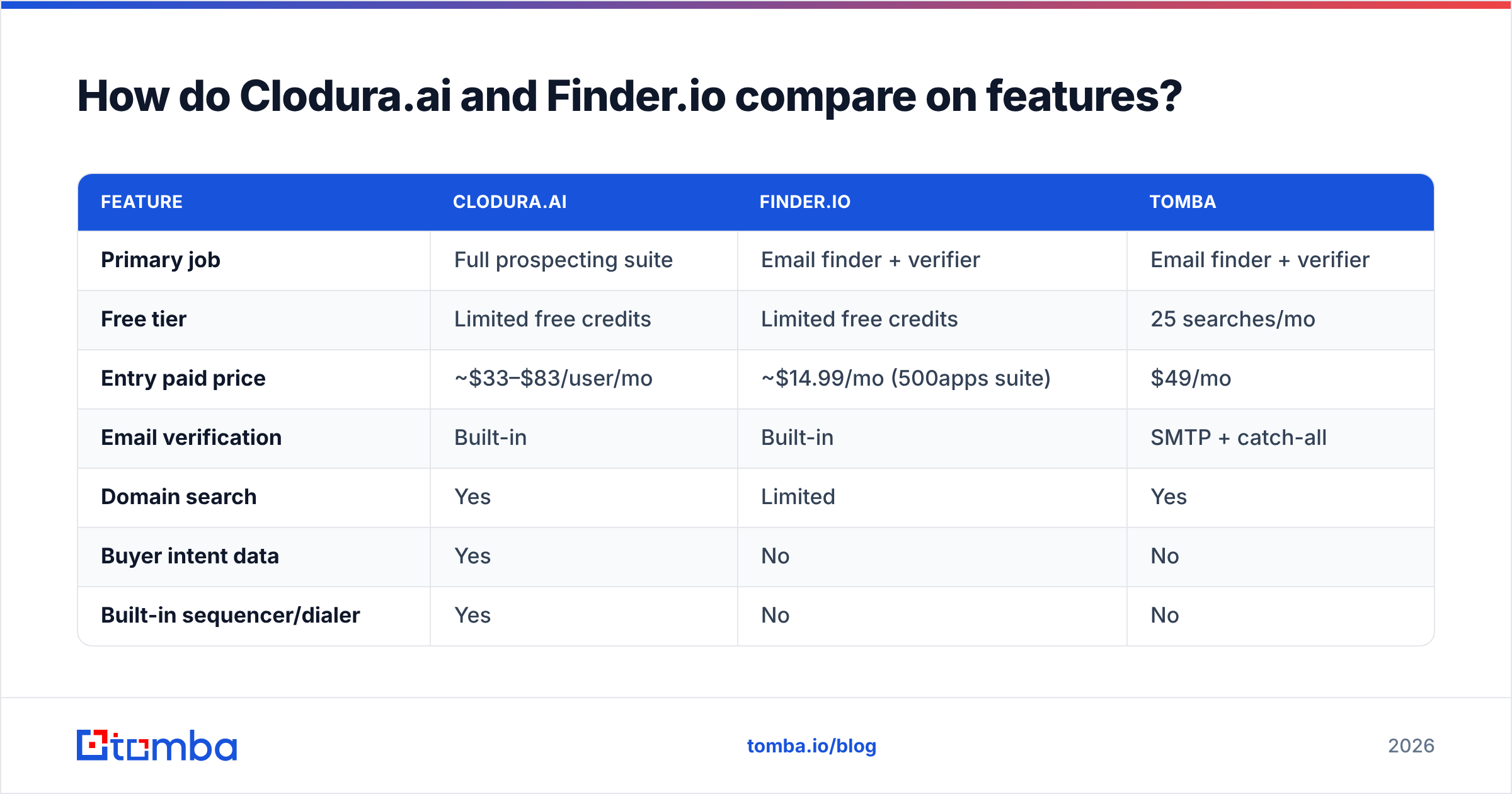
Here's the side-by-side. Numbers reflect each vendor's public positioning as of 2026; always confirm current limits on their own pricing pages before you buy.
| Feature | Clodura.ai | Finder.io | Tomba |
|---|---|---|---|
| Primary job | Full prospecting suite | Email finder + verifier | Email finder + verifier |
| Free tier | Limited free credits | Limited free credits | 25 searches/mo |
| Entry paid price | ~$33–$83/user/mo | ~$14.99/mo (500apps suite) | $49/mo |
| Email verification | Built-in | Built-in | SMTP + catch-all |
| Domain search | Yes | Limited | Yes |
| Buyer intent data | Yes | No | No |
| Built-in sequencer/dialer | Yes | No | No |
| Bulk processing | Yes | Yes | Yes (bulk) |
| Native API | Yes | Yes | Yes |
| Chrome extension | Yes | Yes | Yes |
The table makes the trade-off obvious. Clodura packs the most boxes — intent, sequencing, dialing — which matters if you want one login for everything. Finder.io is the budget option with the fewest moving parts. Tomba sits in the middle on scope but leans hardest into the one thing both of the others treat as a feature rather than the product: finding a correct, verified email.
A few things the checkmarks hide:
- A "yes" on verification is not a quality guarantee. All three verify, but verification depth varies. Catch-all domains, role accounts, and greylisting trip up shallow checkers. Confirm whether the tool does real email verification at the SMTP layer or just regex and MX lookups.
- Bundled features age unevenly. Clodura's database may be strong while its dialer lags a dedicated dialer — and you pay for both. Bundles average out; specialists don't.
- Credits are not equal. One vendor's "credit" might be a single email reveal; another's might cover a full contact record with phone and social. Read the credit definition, not just the headline number.
- Free tiers are sales funnels. A 25-search free tier you can actually test on real prospects tells you more than a higher number gated behind a sales call.
Which tool is more accurate?#
Accuracy is the only metric that matters, and it's the one marketing pages bury. A cheaper tool that hands you bounces costs you more than an expensive one that doesn't — because every bounce chips at your sender reputation and pushes your next campaign toward spam.

Three factors separate accurate finders from guess-machines:
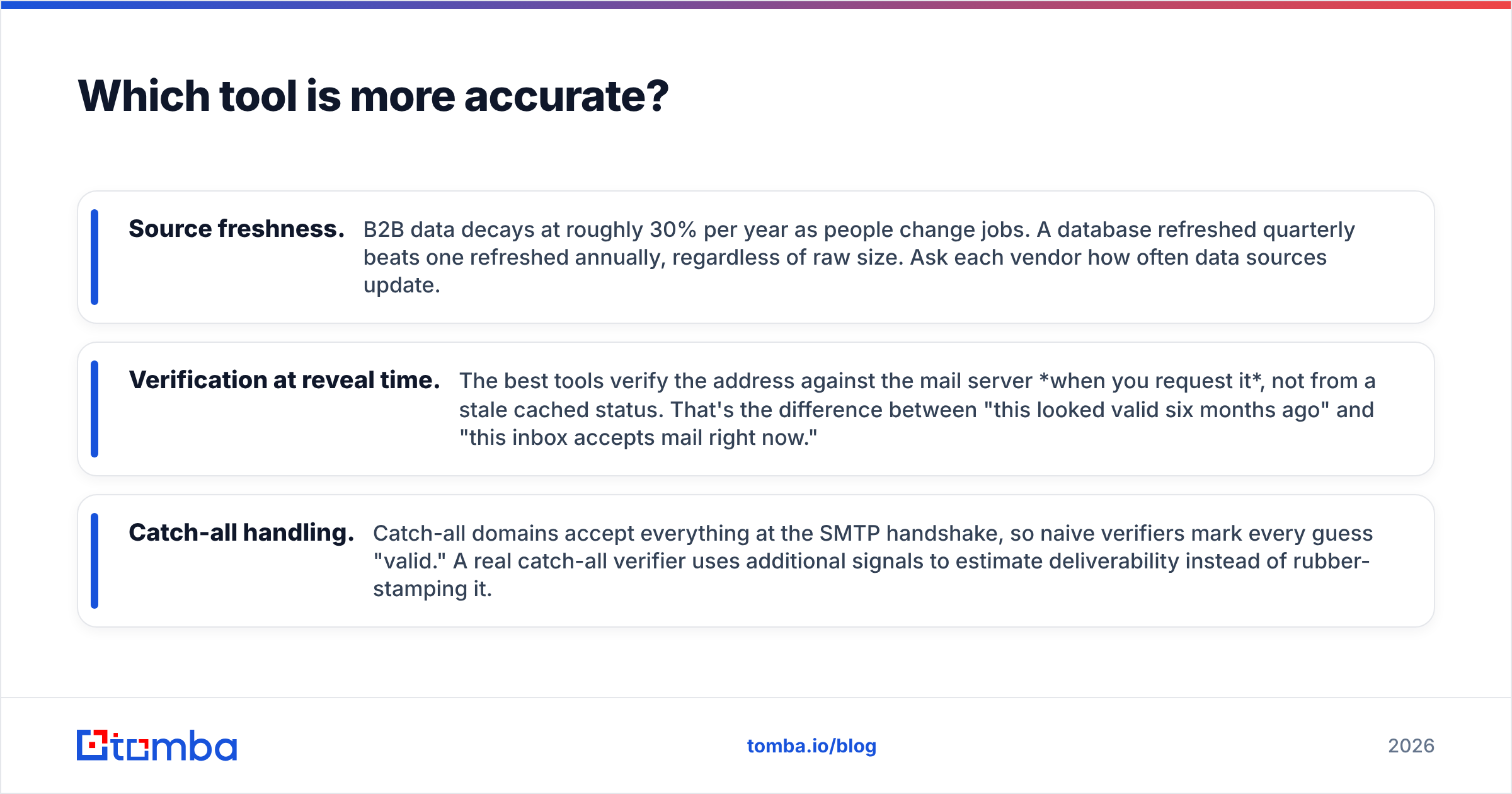
- Source freshness. B2B data decays at roughly 30% per year as people change jobs. A database refreshed quarterly beats one refreshed annually, regardless of raw size. Ask each vendor how often data sources update.
- Verification at reveal time. The best tools verify the address against the mail server when you request it, not from a stale cached status. That's the difference between "this looked valid six months ago" and "this inbox accepts mail right now."
- Catch-all handling. Catch-all domains accept everything at the SMTP handshake, so naive verifiers mark every guess "valid." A real catch-all verifier uses additional signals to estimate deliverability instead of rubber-stamping it.
Where do these two land? Clodura's large database gives it decent coverage on mid-market and enterprise domains, but coverage is not accuracy — a found address still needs verifying, and reviews on G2 flag stale records on smaller companies. Finder.io's lower price tracks a thinner dataset; it does fine on common patterns at large domains and struggles on niche or international ones.
The takeaway: don't trust any single tool blindly. Whichever you pick, run found emails through dedicated verification before you send. If you find yourself doing that anyway, a finder with strong native verification removes the extra step.
How does pricing compare?#
Pricing is where the two tools diverge hardest, and where "cheapest" and "best value" part ways.
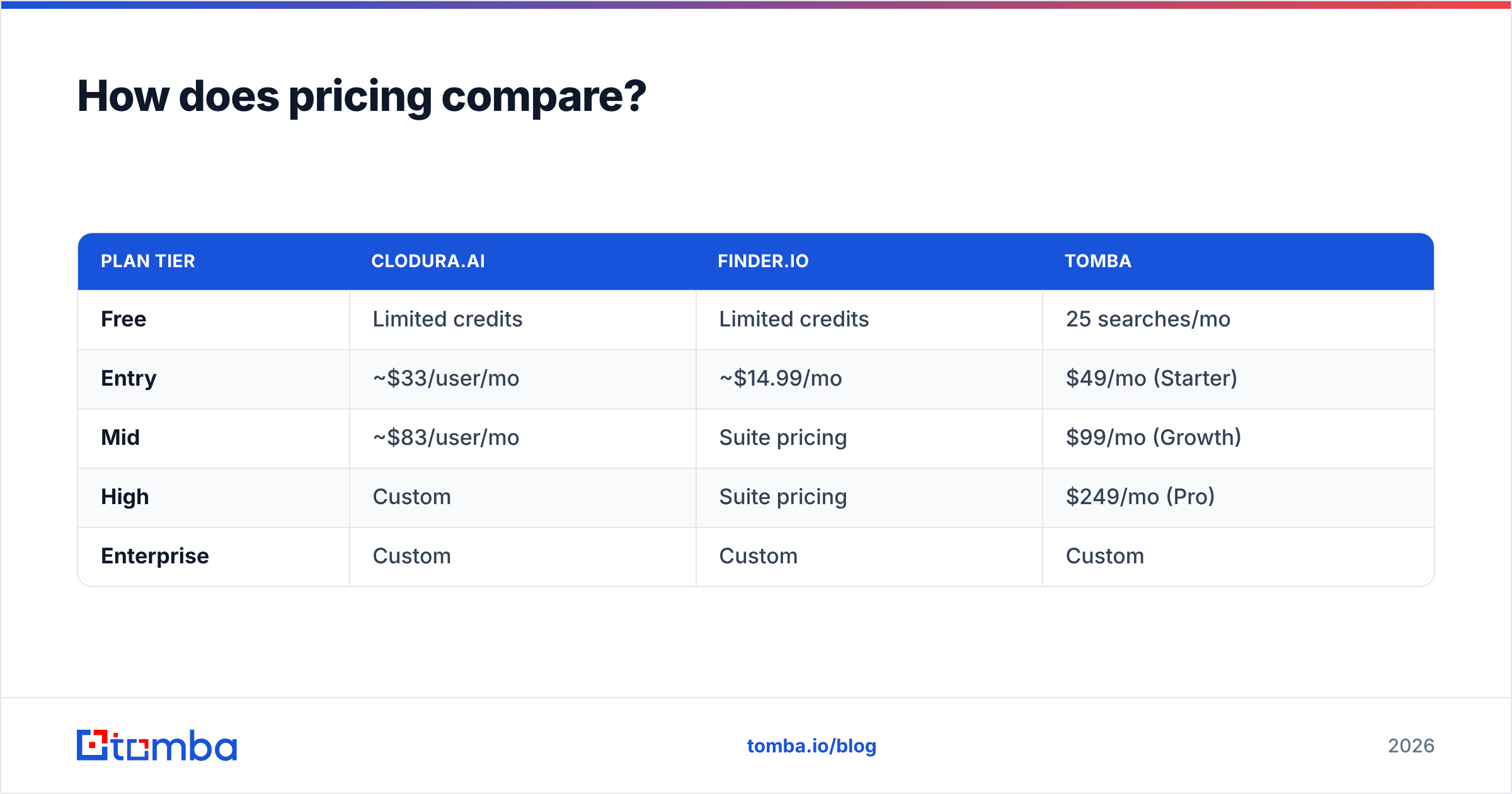
| Plan tier | Clodura.ai | Finder.io | Tomba |
|---|---|---|---|
| Free | Limited credits | Limited credits | 25 searches/mo |
| Entry | ~$33/user/mo | ~$14.99/mo | $49/mo (Starter) |
| Mid | ~$83/user/mo | Suite pricing | $99/mo (Growth) |
| High | Custom | Suite pricing | $249/mo (Pro) |
| Enterprise | Custom | Custom | Custom |
Read the structure, not just the numbers:
- Clodura is per-seat. A five-person SDR team multiplies that monthly figure by five. The bundled intent and sequencing can justify it if you replace separately-paid tools — otherwise you're paying suite prices for an email finder.
- Finder.io is part of the 500apps bundle. The low headline often assumes you're buying into the broader 500apps ecosystem. Standalone, the value depends entirely on whether the data quality holds up for your target accounts.
- Tomba is usage-based, not per-seat. A flat monthly credit pool shared across your team, starting at $49/mo with a genuinely usable free tier. See full Tomba pricing for credit definitions.
The smart move is to map cost to verified emails delivered, not credits purchased. A $15 tool that gives you 60% deliverable addresses is more expensive per usable lead than a $49 tool at 90%. Run a sample of 100 known contacts through each free tier and measure the hit rate yourself — it's the only benchmark that reflects your actual market.
)
Is there a better alternative to both?#
Yes — if your core need is finding and verifying email addresses rather than running an entire prospecting suite from one console.
Clodura makes sense when you genuinely want intent data, sequencing, and dialing under one roof and will use all of it. Finder.io makes sense when budget is the hard constraint and your targets are large, common-pattern domains. But both ask you to compromise: Clodura on price and bloat, Finder.io on data depth.
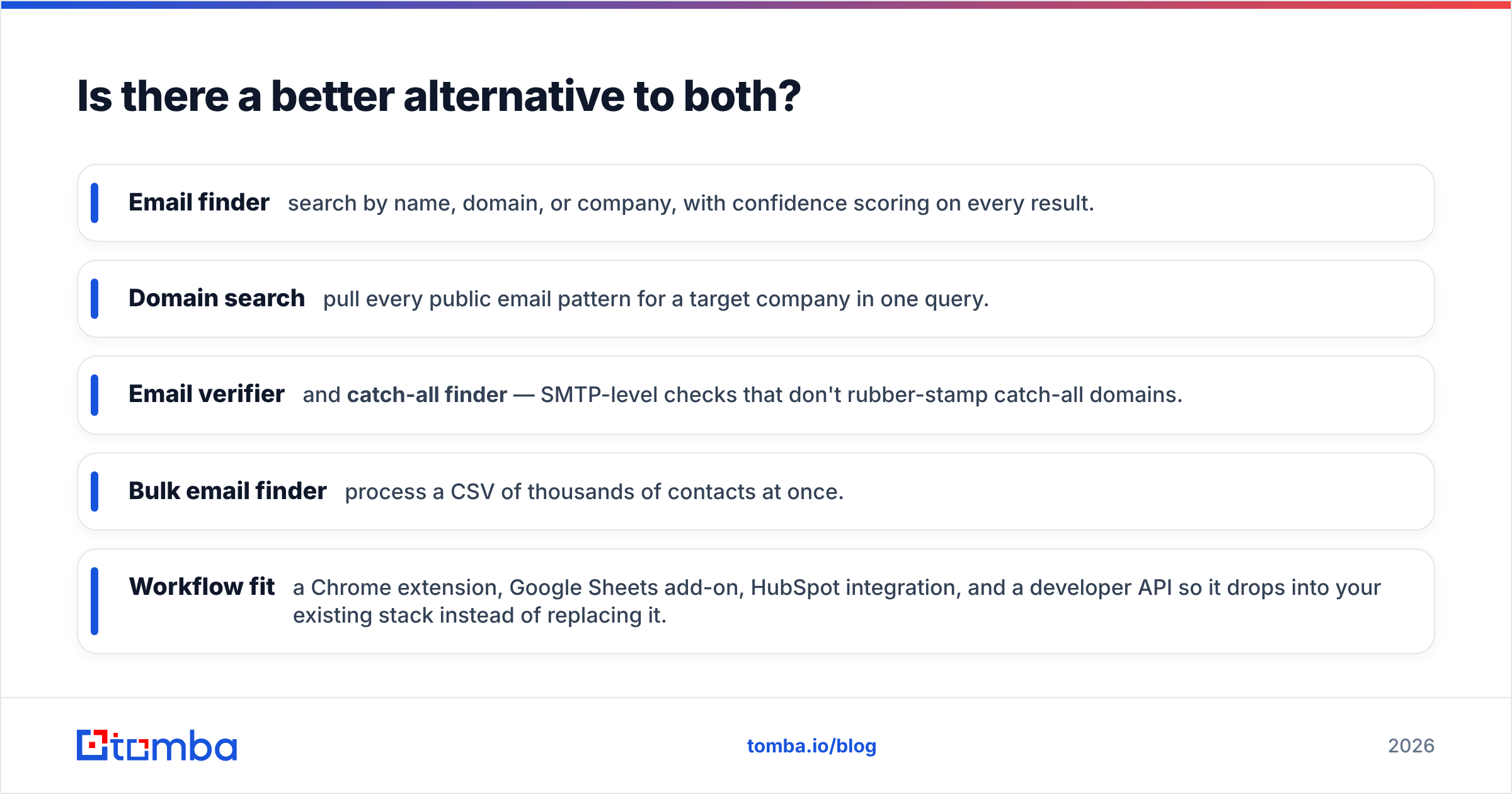
Tomba was built around the finding-and-verifying job specifically. The relevant pieces:
- Email finder — search by name, domain, or company, with confidence scoring on every result.
- Domain search — pull every public email pattern for a target company in one query.
- Email verifier and catch-all finder — SMTP-level checks that don't rubber-stamp catch-all domains.
- Bulk email finder — process a CSV of thousands of contacts at once.
- Workflow fit — a Chrome extension, Google Sheets add-on, HubSpot integration, and a developer API so it drops into your existing stack instead of replacing it.
The 25-search free tier lets you test on real prospects before paying anything — the same head-to-head benchmark we recommend running against the other two.

How do you choose the right tool for your team?#
Match the tool to the job, not the feature list. Use this decision guide:
- You want one platform for intent, sequencing, and dialing and will use all of it → Clodura.ai. Just budget for per-seat pricing and verify found emails before sending.
- Budget is the hard ceiling and your targets are large, common domains → Finder.io. Sample its accuracy on your specific market first.
- Your bottleneck is correct, verified emails — and you'd rather not pay for a suite to get them → Tomba. Strongest on the find-and-verify job with transparent, usage-based pricing.
- You already own a sequencer and CRM and just need clean data feeding in → a focused finder beats a suite every time. Plug Tomba's API into what you have.
One rule applies no matter what you choose: always verify before you send. Bounces don't just waste a credit — they degrade email deliverability for every campaign after, including the ones to inboxes you found correctly. Treat verification as non-negotiable, and the "which tool" question gets a lot smaller.
The bottom line#
Clodura.ai and Finder.io sit at opposite ends of the spectrum — one a heavy all-in-one suite, the other a bare-bones budget finder. Both can work, but both ask you to trade something: price and bloat on one side, data depth on the other. Neither was built primarily to do the one thing most outbound teams actually need: hand you a correct, deliverable email and prove it's deliverable.
If that's your core job, start with the tool built for it. Tomba Email Finder gives you accurate discovery, real SMTP and catch-all verification, bulk processing, and a free tier you can test today — no sales call, no per-seat math. Run your own 100-contact benchmark against all three and let the hit rate decide. Try Tomba free and see the difference verified data makes.
// get started
Find, verify and enrich your first contacts today
Start on the free plan with 25 searches a month, then scale when your team is ready.
Free plan · No credit card required · GDPR & CCPA
// about the author