Cloduraai vs Lead Kahuna: Which B2B Tool Wins in 2026?
A neutral, hands-on breakdown of Cloduraai vs Lead Kahuna in 2026 — pricing, data accuracy, features, and where a leaner email finder beats both.
Choosing between Clodura.AI and Lead Kahuna comes down to one question: do you need an all-in-one sales intelligence platform, or a focused lead-scraping tool that won't drain your budget? This guide puts both side by side, then shows where a leaner email finder beats them on the metric that actually matters — accurate contact data.
TL;DR#
- Cloduraai is a full sales-intelligence suite: a 600M+ contact database, org charts, intent signals, and a built-in sequencer. Strong for teams that want everything in one tab.
- Lead Kahuna is a desktop scraper and email finder aimed at agencies and solo prospectors who want raw lists fast and cheap.
- Pricing diverges hard: Clodura.AI sells annual SaaS seats; Lead Kahuna leans on one-time or low monthly desktop licenses.
- Data accuracy — not feature count — is where both win or lose. Verify every email before you send, regardless of source.
- If you only need clean, verified B2B emails, a focused tool like the Tomba Email Finder at $49/mo often beats paying for a bloated suite.
What is Cloduraai?#
Clodura.AI (often typed "cloduraai") is a sales-intelligence and prospecting platform. Think of it as a research analyst, a database, and an email sequencer bundled into one dashboard. You search its contact database by title, industry, geography, and technographics, then push those contacts straight into automated email cadences without leaving the tool.
Its headline assets are a large B2B contact database, organizational charts that map reporting lines, buyer-intent signals, and direct-dial phone numbers. The pitch is consolidation: instead of stitching together a data provider, a verifier, and an outreach tool, you run the whole top of funnel inside Clodura.AI. You can read more about its positioning on the official Clodura.AI site.
That breadth is the selling point and the catch. You pay for every module whether you use it or not, and onboarding a team onto a full suite takes longer than dropping one Chrome extension into a workflow.
What is Lead Kahuna?#
Lead Kahuna is a desktop lead-generation and email-finding application. It is built for speed and volume: feed it domains, company names, or search criteria, and it scrapes contact details, guesses email patterns, and exports lists you can drop into any CRM or cold-email tool.
The audience skews toward agencies, freelancers, and lean outbound teams who want lists now and don't want a recurring SaaS bill. Because it runs on your machine rather than in the cloud, it behaves more like classic scraping software than a modern data platform — powerful in the right hands, but more manual, and more dependent on your own verification step before anything ships.

How do Cloduraai and Lead Kahuna compare on features?#
Here is the honest side-by-side. Neither tool is strictly "better" — they target different buyers.
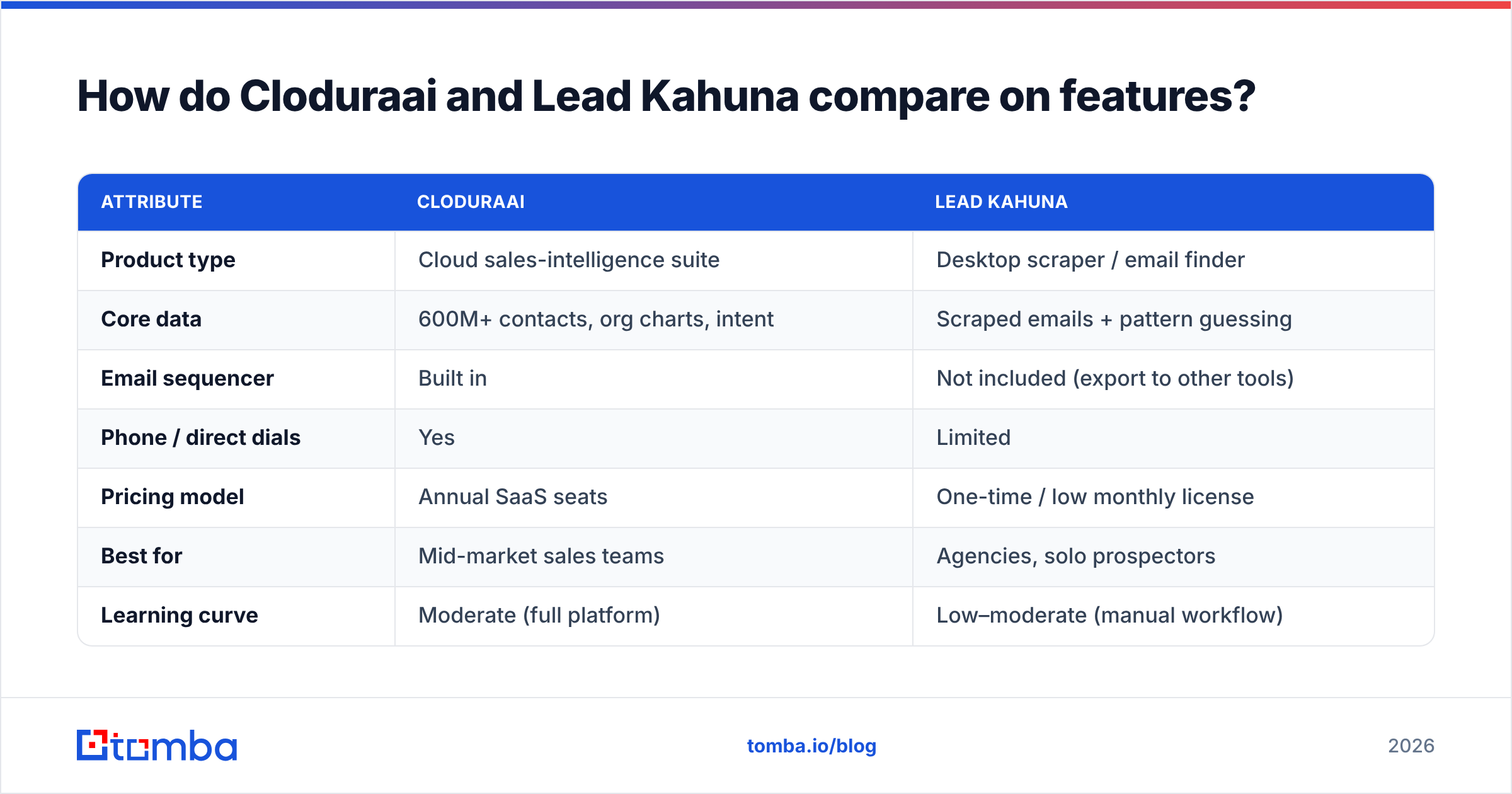
| Attribute | Cloduraai | Lead Kahuna |
|---|---|---|
| Product type | Cloud sales-intelligence suite | Desktop scraper / email finder |
| Core data | 600M+ contacts, org charts, intent | Scraped emails + pattern guessing |
| Email sequencer | Built in | Not included (export to other tools) |
| Phone / direct dials | Yes | Limited |
| Pricing model | Annual SaaS seats | One-time / low monthly license |
| Best for | Mid-market sales teams | Agencies, solo prospectors |
| Learning curve | Moderate (full platform) | Low–moderate (manual workflow) |
| Verification | Built-in checks | Mostly DIY |
The pattern is clear. Clodura.AI is the platform play — more data types, more automation, more cost. Lead Kahuna is the utility play — cheaper, faster to start, but you supply the surrounding workflow yourself.
Is Cloduraai better than Lead Kahuna?#
It depends entirely on what you are optimizing for. Use this decision shortcut:
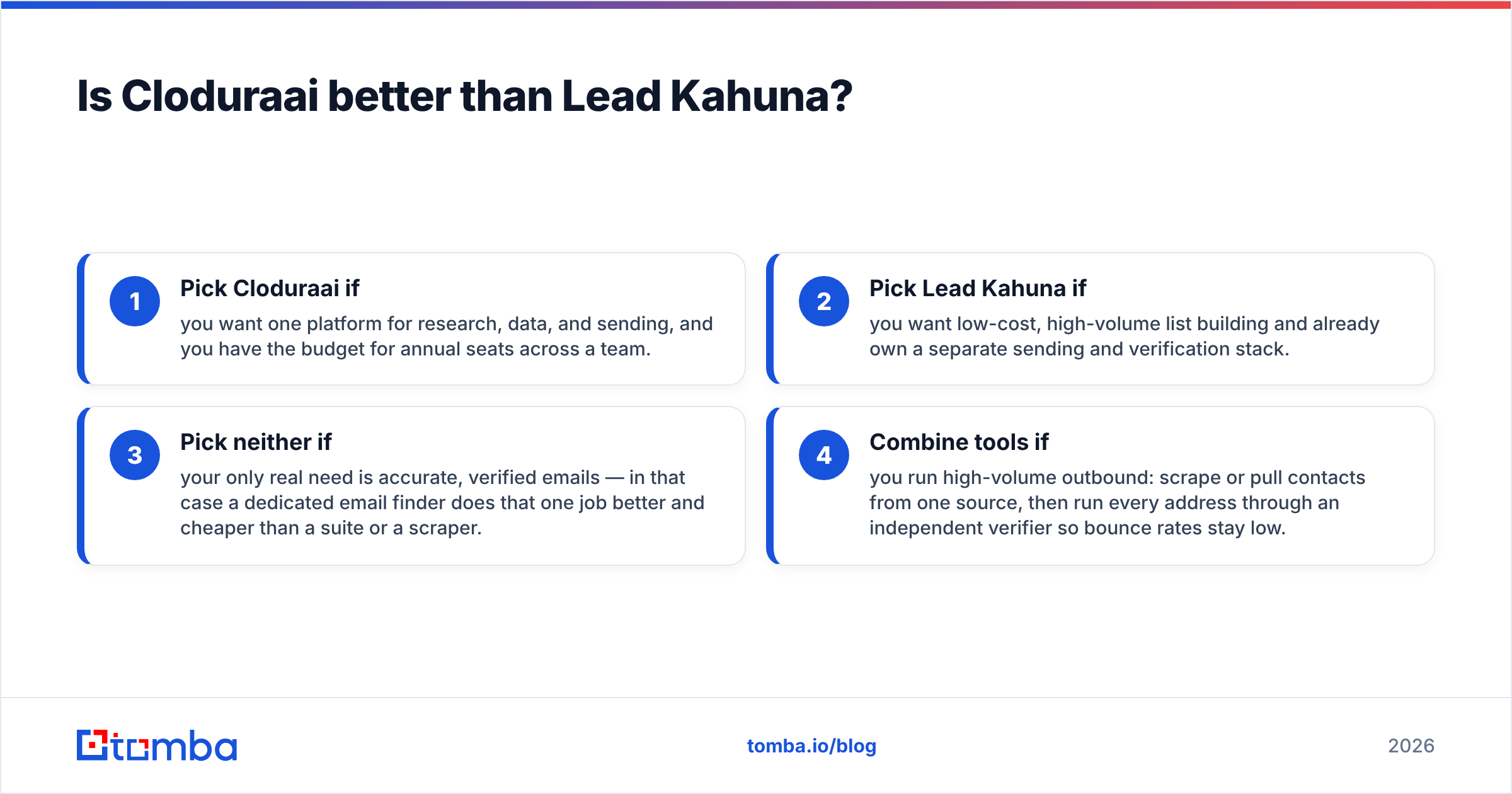
- Pick Cloduraai if you want one platform for research, data, and sending, and you have the budget for annual seats across a team.
- Pick Lead Kahuna if you want low-cost, high-volume list building and already own a separate sending and verification stack.
- Pick neither if your only real need is accurate, verified emails — in that case a dedicated email finder does that one job better and cheaper than a suite or a scraper.
- Combine tools if you run high-volume outbound: scrape or pull contacts from one source, then run every address through an independent verifier so bounce rates stay low.
The trap teams fall into is buying the biggest platform "to be safe." A 600M-record database is meaningless if 30% of the emails bounce. What matters at the moment of truth is whether the address you send to actually exists.
How accurate is the data from each tool?#
Data accuracy is the single metric that decides outbound success — and it is where most comparisons stop short. A large database is not the same as a fresh database. Contacts change jobs roughly every two to three years, so any provider's records decay constantly. Clodura.AI invests in continuous refresh and built-in verification; Lead Kahuna's pattern-guessing approach is fast but can produce a higher share of unverified guesses that you must clean yourself.

Whichever you choose, treat verification as non-negotiable. Independent benchmarks from review platforms like G2 consistently show that real-world accuracy varies far more between verified and unverified exports than between vendors. Run your list through an email verifier before the first send. A clean list protects your sender reputation; a dirty one quietly tanks deliverability for every campaign that follows.

What about pricing — Cloduraai vs Lead Kahuna vs a focused alternative?#
Pricing is where the two tools split most sharply, and where a third option becomes hard to ignore.
Clodura.AI uses tiered annual SaaS pricing, typically billed per seat with credit limits on exports and email sends — reasonable for a full team, expensive for a single rep who just needs emails. Lead Kahuna's desktop model means lower upfront cost but more manual effort and a separate spend on verification and sending tools. Always confirm current numbers on each vendor's own page or a directory like Capterra, since plans change.
Now compare that to a purpose-built finder. Tomba keeps it simple:
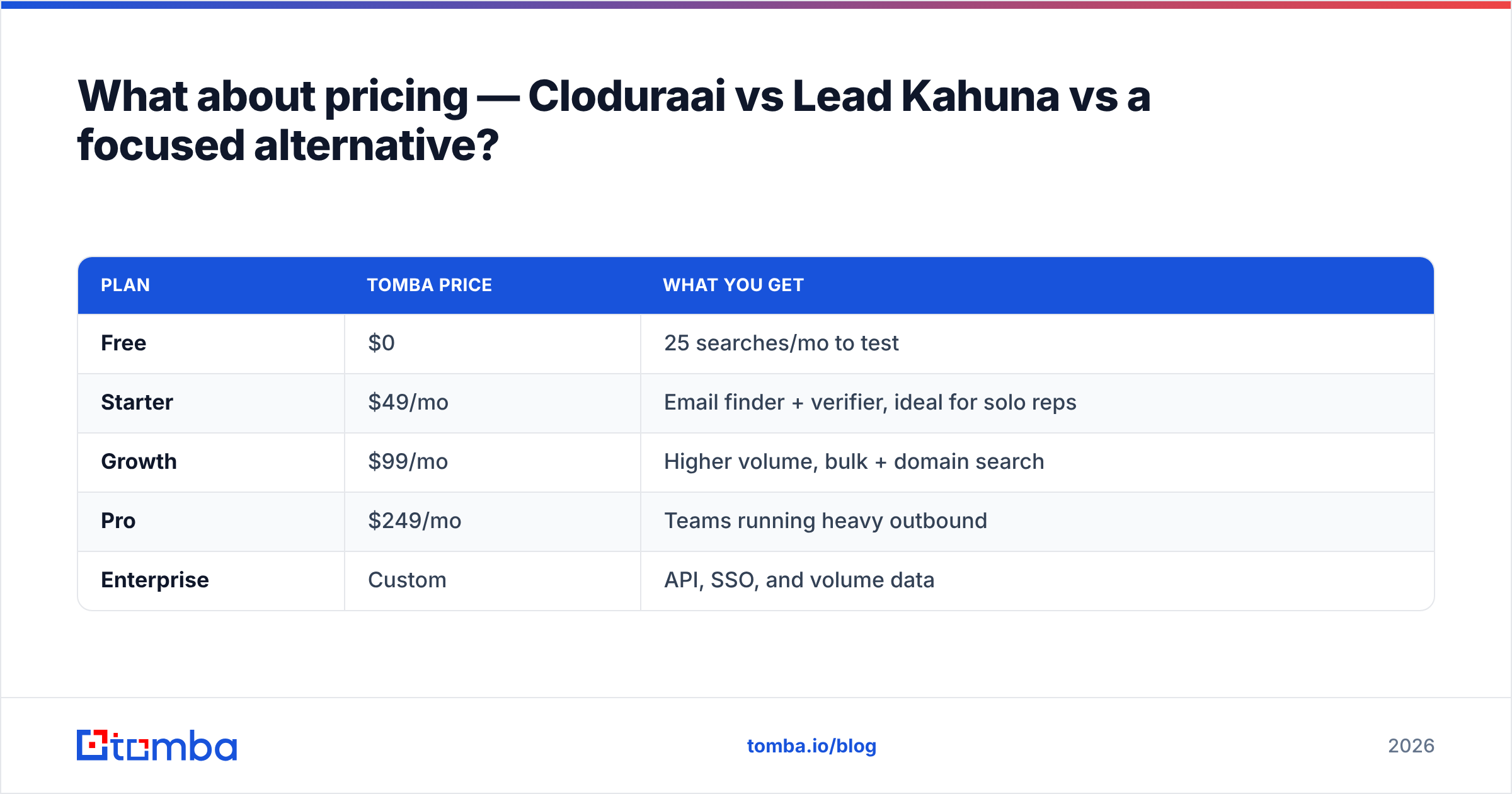
| Plan | Tomba price | What you get |
|---|---|---|
| Free | $0 | 25 searches/mo to test |
| Starter | $49/mo | Email finder + verifier, ideal for solo reps |
| Growth | $99/mo | Higher volume, bulk + domain search |
| Pro | $249/mo | Teams running heavy outbound |
| Enterprise | Custom | API, SSO, and volume data |
You can see the full breakdown on the Tomba pricing page. The point is not that Tomba does everything Clodura.AI does — it deliberately doesn't. It does the data-accuracy job that both a suite and a scraper depend on, without charging suite prices for modules you may never open.
Who should use which tool?#
Match the tool to the team, not the marketing:
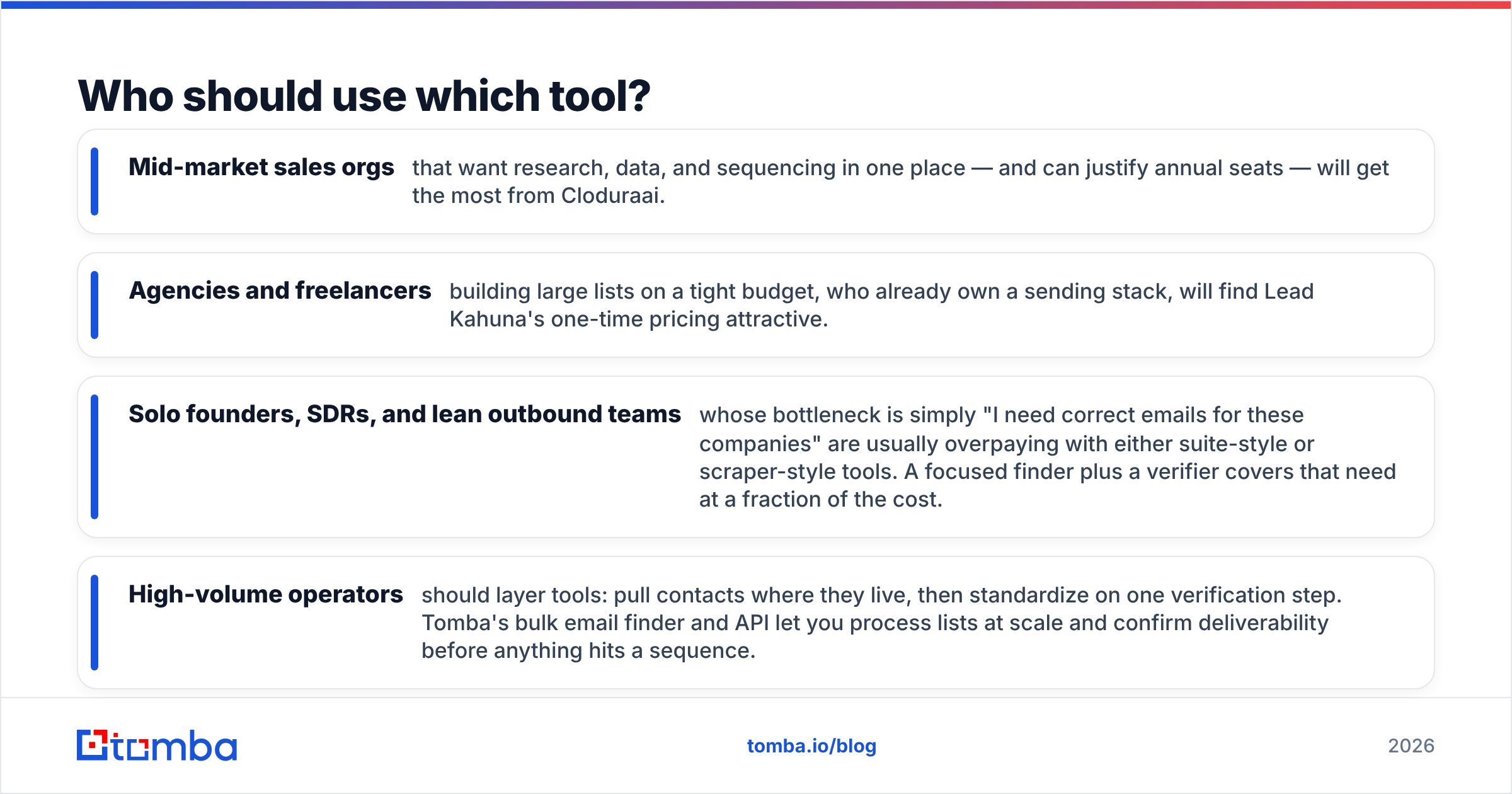
- Mid-market sales orgs that want research, data, and sequencing in one place — and can justify annual seats — will get the most from Cloduraai.
- Agencies and freelancers building large lists on a tight budget, who already own a sending stack, will find Lead Kahuna's one-time pricing attractive.
- Solo founders, SDRs, and lean outbound teams whose bottleneck is simply "I need correct emails for these companies" are usually overpaying with either suite-style or scraper-style tools. A focused finder plus a verifier covers that need at a fraction of the cost.
- High-volume operators should layer tools: pull contacts where they live, then standardize on one verification step. Tomba's bulk email finder and API let you process lists at scale and confirm deliverability before anything hits a sequence.
How do these tools fit your existing stack?#
Neither tool lives in a vacuum. Clodura.AI wants to be your stack, which is great until you already love your CRM and sequencer. Lead Kahuna assumes you'll bolt it onto whatever you already run, which means more integration glue on your side.
A focused finder sits comfortably between those extremes. Tomba connects to the tools you already use — HubSpot, Salesforce, Google Sheets, Zapier — so you enrich and verify inside your current workflow instead of migrating to a new home base. If your goal is to improve data quality without ripping out your existing process, that low-friction model usually wins. You can browse the Tomba integrations to see whether it slots into your pipeline before you commit.
This is the quiet advantage of doing one thing well: it plays nicely with everything else. A platform that wants to own your whole funnel forces an all-or-nothing decision; a single-purpose tool just makes the funnel you already have more accurate.
Cloduraai vs Lead Kahuna: the verdict#
For 2026, here is the straight answer. Choose Cloduraai if you want an all-in-one sales-intelligence platform and have the budget to use most of it. Choose Lead Kahuna if you want cheap, high-volume list building and already own your sending and verification layer. But recognize what both have in common: their value collapses if the emails aren't accurate.
That is why the smartest outbound teams don't frame this as a two-horse race at all. They pick the data source that fits their workflow, then standardize on independent verification so every send lands. Whether you go with a suite, a scraper, or a focused finder, accuracy is the metric that pays the bills.
Get verified B2B emails without the suite tax#
If your real bottleneck is finding correct, deliverable email addresses — not learning a new platform — start with the Tomba Email Finder. Search by name, company, or domain, get results scored for confidence, and verify them in the same workflow. The free tier gives you 25 searches a month to test accuracy against your own list, and the Starter plan at $49/mo covers most solo reps and small teams. Find the right person, confirm the address is real, and send with confidence — that's the part Cloduraai and Lead Kahuna both depend on, and the part Tomba is built to nail.
// get started
Find, verify and enrich your first contacts today
Start on the free plan with 25 searches a month, then scale when your team is ready.
Free plan · No credit card required · GDPR & CCPA
// about the author