Clodura.ai vs LeadGibbon 2026: Which B2B Lead Tool Wins?
Clodura.ai vs LeadGibbon compared on data accuracy, pricing, and workflow fit for 2026 — plus where a focused email finder like Tomba beats both.
Clodura.ai vs LeadGibbon is a common B2B lead tool matchup. The two platforms look alike on the surface. Underneath, they solve different problems. Clodura.ai is an all-in-one sales-intelligence and engagement suite. LeadGibbon is a lighter list-building and email-lookup tool that lives close to LinkedIn. This guide shows where each one earns its price. It also shows where a focused email finder beats both.
TL;DR — Clodura.ai vs LeadGibbon at a glance#
- Clodura.ai is the heavier platform. It bundles a B2B database, an email and sequence engine, and intent signals. Good if you want one tool to find and email prospects.
- LeadGibbon is the lighter pick. It builds LinkedIn lists fast and looks up emails straight to a spreadsheet. Good if you live in LinkedIn and just need contacts.
- Accuracy is the real battleground. Both rely on database matching. So verification quality decides your bounce rate more than feature count does.
- Neither is the cheapest path to clean emails. If you mainly need verified addresses by domain or name, a dedicated email finder like Tomba gives higher accuracy per dollar.
- Pick by job: full engagement suite → Clodura; quick LinkedIn lists → LeadGibbon; surgical, verified email discovery at scale → Tomba.
What is Clodura.ai?#
Clodura.ai is a sales-intelligence platform. It is built around a self-claimed database of hundreds of millions of B2B contacts. Beyond raw data, it adds direct-dial numbers, email sequencing, and buyer-intent signals. An org-chart view lets reps map an account before they reach out. The pitch is consolidation. Instead of stitching a database, a sequencer, and a verifier together, you work inside one login.
That breadth is also the trade-off. All-in-one suites spread effort across many modules. So no single module is always best. Clodura's coverage is broad. But coverage and accuracy are not the same. A record can exist and still be stale.

What is LeadGibbon?#
LeadGibbon is a lead-list builder focused on speed and simplicity. Its center of gravity is LinkedIn. You find people there, and LeadGibbon surfaces their business email and company details. Then you push the result to a downloadable list or Google Sheet. It drops the sequencing and intent layers Clodura piles on. The bet is simple: many sellers just want a clean export for their own CRM or cold-email tool.
For a solo seller or a founder doing manual outbound, that focus is a feature. You do not pay for a sequencer you will not use. The risk is the reverse of Clodura's. When your needs grow past list-building, LeadGibbon hands you off to other tools fast. Think multichannel cadences, team analytics, or territory management.
How do Clodura.ai and LeadGibbon compare on features?#
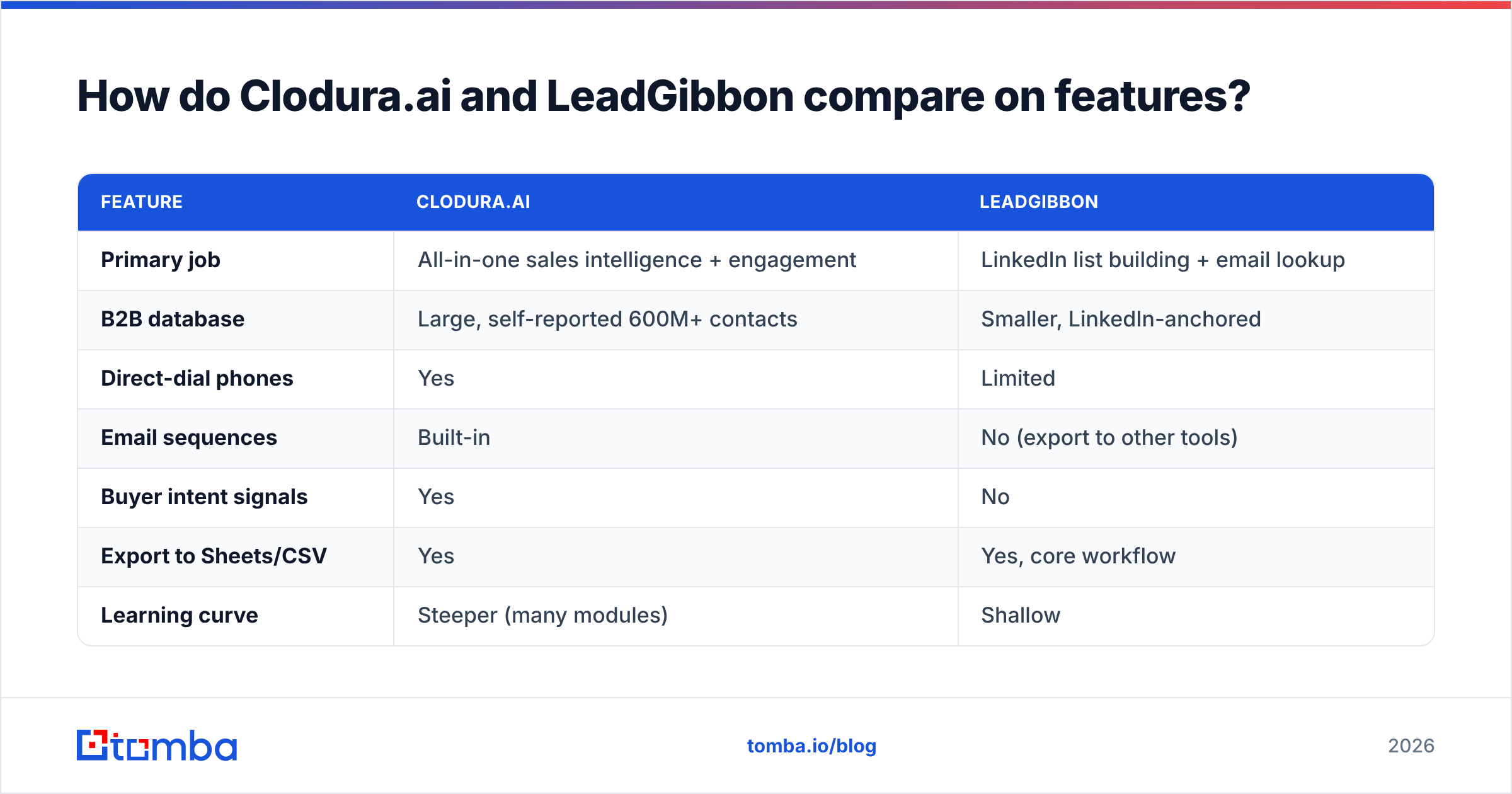
Here is the core split. Read it as "what is this tool actually for," not just a checkbox race.
| Feature | Clodura.ai | LeadGibbon |
|---|---|---|
| Primary job | All-in-one sales intelligence + engagement | LinkedIn list building + email lookup |
| B2B database | Large, self-reported 600M+ contacts | Smaller, LinkedIn-anchored |
| Direct-dial phones | Yes | Limited |
| Email sequences | Built-in | No (export to other tools) |
| Buyer intent signals | Yes | No |
| Export to Sheets/CSV | Yes | Yes, core workflow |
| Learning curve | Steeper (many modules) | Shallow |
| Best for | Teams wanting one platform | Solo reps and founders |
The pattern is clear. Clodura wins on breadth. LeadGibbon wins on simplicity. But neither claim settles the question that decides your reply rate. How many of those emails actually land?
Which has better data accuracy?#
Accuracy decides your sender reputation. And database-first tools share one weakness: records age. A contact captured 18 months ago may have changed jobs. A platform that does not re-verify at request time will hand you a dead address. High bounce rates then drag down your email deliverability. They can also get your domain throttled.
Both Clodura.ai and LeadGibbon match against stored records. That makes real-time verification the feature that matters most. It is also the one buyers most often overlook. They compare contact-count headlines instead. Before you trust any list, run it through an email verifier and check the catch-all rate. A "valid" result on a catch-all domain is really an "unknown."

This is also where independent benchmarks beat vendor marketing. Don't take a 95%-accuracy banner at face value. Test each tool on a sample of your target accounts. Then measure the live bounce rate.

How do Clodura.ai and LeadGibbon pricing compare?#
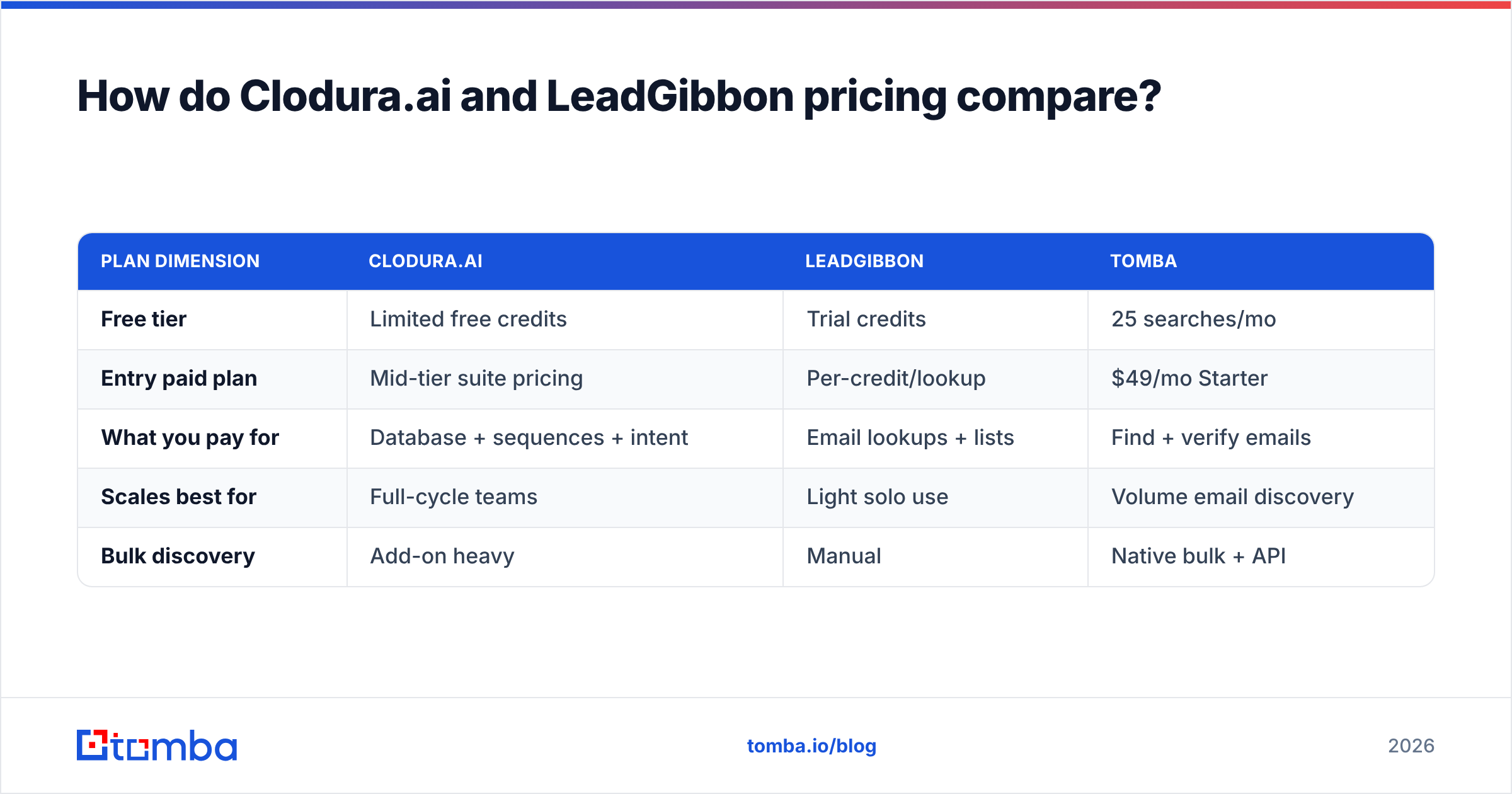
Pricing models differ enough that a flat "X is cheaper" misses the point. Clodura sells tiered plans that bundle credits with the engagement suite. So you pay for sequencing and intent whether or not you use them. LeadGibbon prices closer to a credit-per-lookup model. That rewards light, occasional use. It punishes high-volume list pulls.
| Plan dimension | Clodura.ai | LeadGibbon | Tomba |
|---|---|---|---|
| Free tier | Limited free credits | Trial credits | 25 searches/mo |
| Entry paid plan | Mid-tier suite pricing | Per-credit/lookup | $49/mo Starter |
| What you pay for | Database + sequences + intent | Email lookups + lists | Find + verify emails |
| Scales best for | Full-cycle teams | Light solo use | Volume email discovery |
| Bulk discovery | Add-on heavy | Manual | Native bulk + API |
Two honest takeaways. First, if you only need verified emails, Clodura makes you overpay for modules you will not touch. Second, LeadGibbon's per-lookup model gets expensive fast. That happens once you scale past a few hundred contacts a month. Compare both against transparent Tomba pricing before you commit annually.
When should you pick a dedicated email finder instead?#
Pick a focused tool when finding and verifying emails is the actual job, not a side feature. Suites like Clodura justify their price only if you use the sequencer, the dialer, and the intent data. Say you already have a CRM and a cold-email platform you like. Then a second engagement suite is just wasted spend.
A specialist email finder gives you three things bundled tools rarely match at the same price:
- Higher verification depth — real-time SMTP checks plus a dedicated catch-all verifier so catch-all domains don't quietly inflate your "valid" count.
- Workflow coverage — find by name, by company, or sweep a whole domain with domain search, then enrich the row.
- Scale without lock-in — a bulk email finder and an email finder API push results into whatever stack you already run.
That is the gap. Clodura wants to be your whole motion. LeadGibbon wants to be your LinkedIn sidecar. A specialist just wants to hand you clean, verified contacts you can route anywhere.
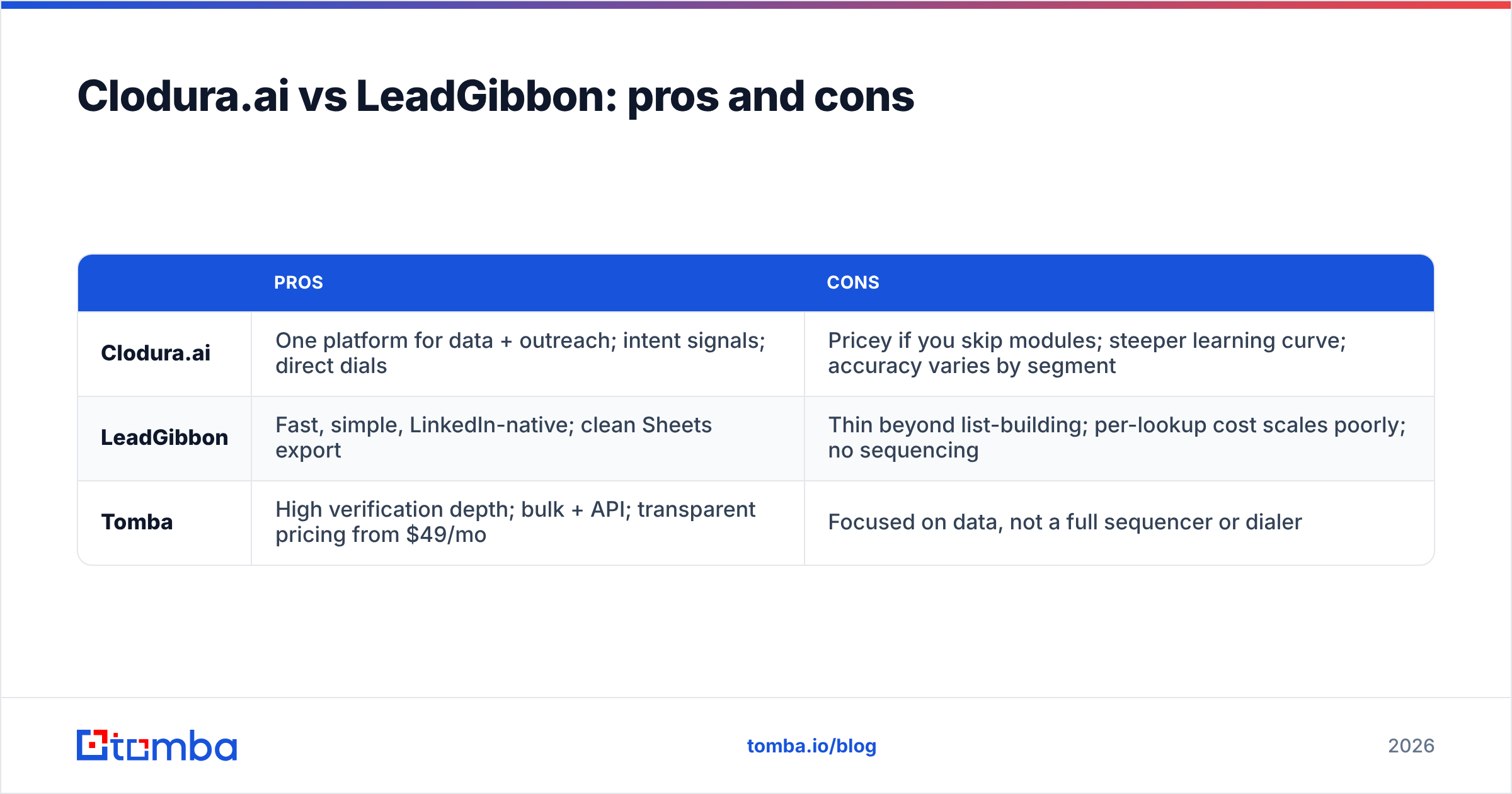
Clodura.ai vs LeadGibbon: pros and cons#
| Pros | Cons | |
|---|---|---|
| Clodura.ai | One platform for data + outreach; intent signals; direct dials | Pricey if you skip modules; steeper learning curve; accuracy varies by segment |
| LeadGibbon | Fast, simple, LinkedIn-native; clean Sheets export | Thin beyond list-building; per-lookup cost scales poorly; no sequencing |
| Tomba | High verification depth; bulk + API; transparent pricing from $49/mo | Focused on data, not a full sequencer or dialer |
Want the unfiltered crowd view? Cross-check current ratings on G2 and Capterra. Both let you filter reviews by company size. That exposes where a tool quietly struggles for your segment.
How should you actually decide?#
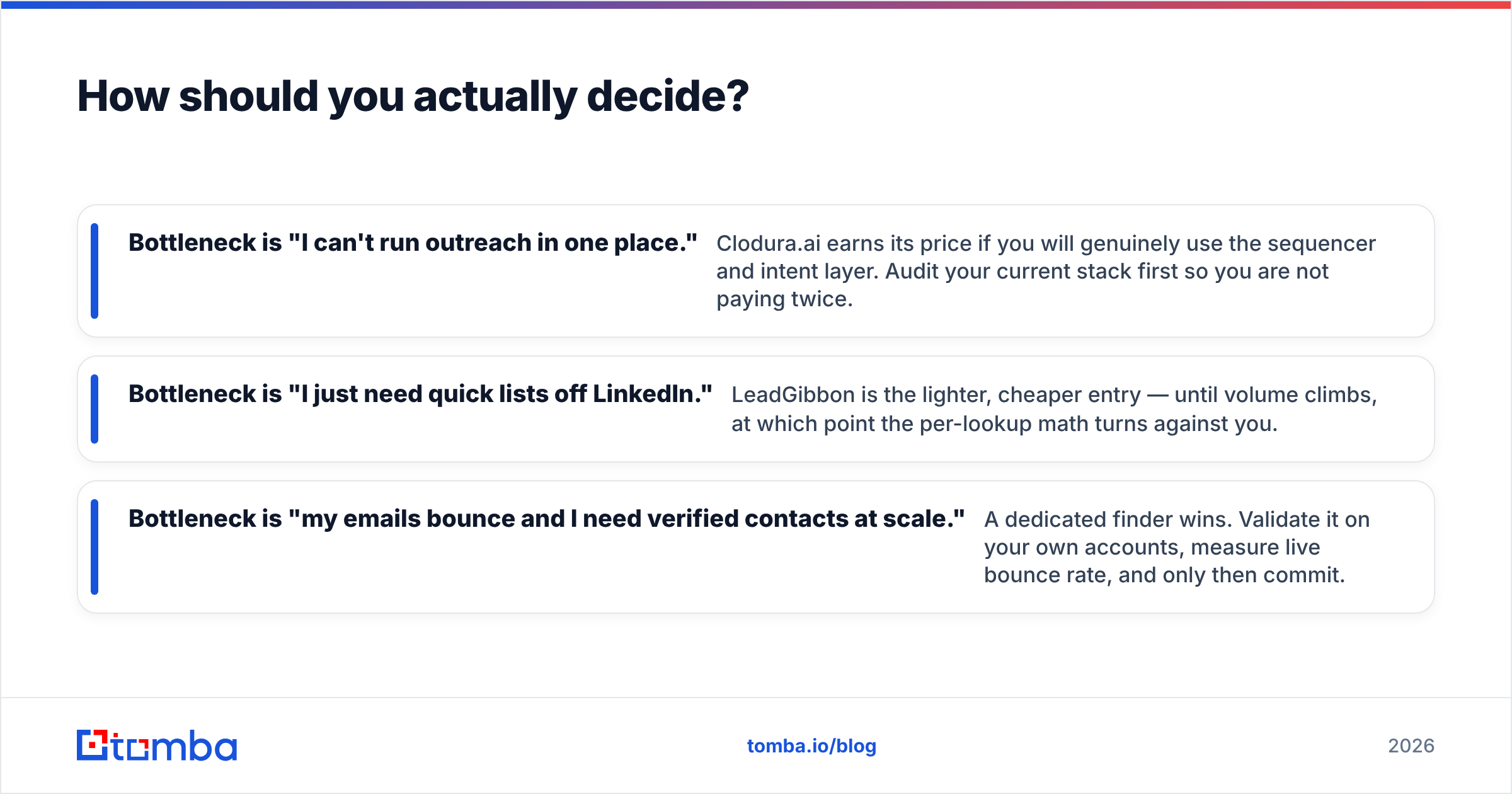
Work backward from your bottleneck, not from feature lists.
- Bottleneck is "I can't run outreach in one place." Clodura.ai earns its price if you will truly use the sequencer and intent layer. Audit your current stack first. That way you are not paying twice.
- Bottleneck is "I just need quick lists off LinkedIn." LeadGibbon is the lighter, cheaper entry. But once volume climbs, the per-lookup math turns against you.
- Bottleneck is "my emails bounce and I need verified contacts at scale." A dedicated finder wins. Validate it on your own accounts. Measure the live bounce rate. Only then commit.
The big point: contact count is the loudest number in this category. It is also the least predictive of results. Verification rate and bounce rate are what move pipeline. For more on how matching and verification interact, HubSpot's research library on sales and prospecting is a solid neutral reference.
The bottom line on Clodura.ai vs LeadGibbon#
Clodura.ai and LeadGibbon are not really rivals. They are two answers to different questions. Clodura is the consolidation play: one suite to find, dial, and sequence. It pays off only when you use the whole thing. LeadGibbon is the minimalist play: fast LinkedIn lists with a clean export. It shines for solo work before volume scales up.
But what if you measured the wrong metric? If your real problem is bounce rate, both leave money on the table. The accuracy gap, not the feature gap, is what costs you replies.
Is clean, verified email discovery your core need? Start with the Tomba Email Finder. Find addresses by domain, name, or company, and verify them in the same flow. Push the results into your CRM through the API. You skip paying for a sequencer or dialer you may never open. The free tier gives you 25 searches a month. Test accuracy on your own target accounts before you spend a dollar.
// get started
Find, verify and enrich your first contacts today
Start on the free plan with 25 searches a month, then scale when your team is ready.
Free plan · No credit card required · GDPR & CCPA
// about the author