Clodura.ai vs LeadLeaper 2026: Which Lead Tool Wins?
Clodura.ai bundles a B2B database, sequences, and intent data; LeadLeaper is a lean LinkedIn email-finder extension. Here's which one fits your pipeline in 2026 — and where a focused finder beats both.
Picking between Clodura.ai and LeadLeaper is really a choice between two philosophies: an all-in-one sales intelligence platform versus a single-purpose browser extension that pulls emails off LinkedIn. They overlap just enough to confuse a buyer, and differ enough that picking the wrong one wastes a quarter of budget.
This guide breaks down Clodura.ai vs LeadLeaper on data accuracy, pricing, workflow fit, and the use cases each one actually wins — plus where a dedicated email finder quietly outperforms both.
TL;DR — Clodura.ai vs LeadLeaper at a glance#
- Clodura.ai is a full prospecting suite: a 600M+ contact B2B database, email sequences, intent signals, and org charts. Best for teams that want one tool to run outbound end to end.
- LeadLeaper is a Chrome extension that captures emails from LinkedIn and LinkedIn Sales Navigator, one profile or one page at a time. Best for solo reps who live inside LinkedIn.
- Accuracy is the tiebreaker. Bundled databases age fast; verification at the moment of export matters more than raw record count.
- Pricing favors LeadLeaper for light use (a free monthly credit allotment), Clodura.ai for teams who'll use the full platform.
- If your real need is "find and verify a correct email," a focused tool like Tomba's email finder gives you better deliverability per dollar than paying for features you'll never open.
What is Clodura.ai?#
Clodura.ai is a sales-intelligence and prospecting platform built around a large B2B contact database. The pitch is "everything in one login": search for accounts and contacts, pull direct-dial numbers and verified emails, see buyer-intent topics, map org charts, and run multi-step email sequences without leaving the app.
It targets SMB and mid-market sales teams that don't want to stitch together a database tool, a verifier, and a sequencer. You get a credit-based model for revealing contact details, plus seats for the sequencing and CRM-sync features. The strength is breadth — the weakness is that breadth means you pay for modules you may not use, and a bundled database is only as fresh as its last refresh cycle.
What is LeadLeaper?#
LeadLeaper is a lightweight email-finding tool that lives as a browser extension. You browse LinkedIn or Sales Navigator, click the LeadLeaper button, and it captures the prospect's name, title, company, and a best-guess business email. You can grab a single profile or sweep a search-results page, then export the leads to CSV or push them into an email campaign.
Its appeal is simplicity and a generous free tier. There's no database to search, no sequencer to learn — it's a capture-and-export utility. The trade-off is scope: LeadLeaper is only as useful as the LinkedIn pages you're already viewing, and like any pattern-guessing finder, its raw emails need verification before you send.

How do Clodura.ai and LeadLeaper compare on features?#
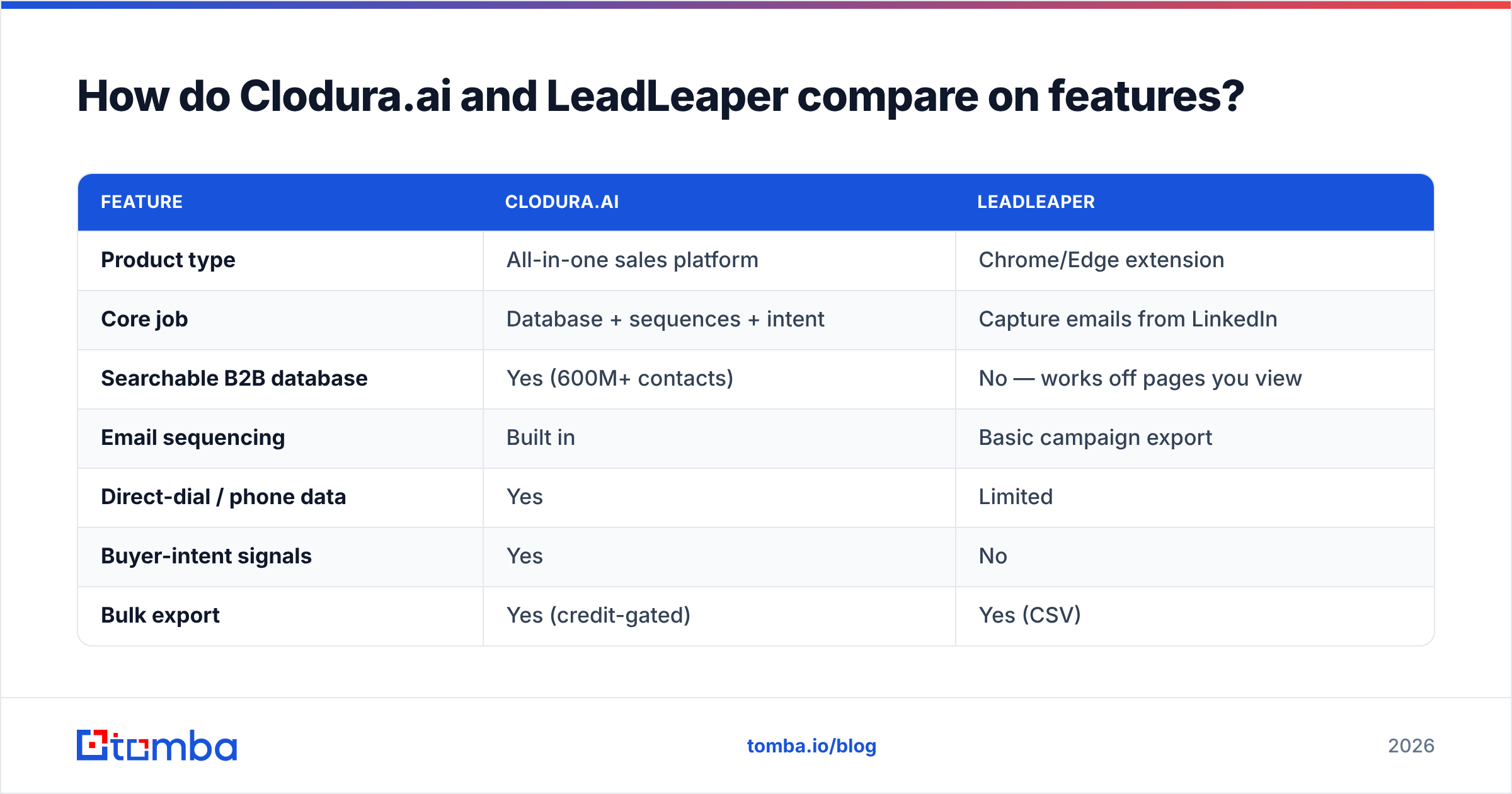
The two tools barely live in the same weight class. One is a platform; the other is a focused extension. Here's the side-by-side.
| Feature | Clodura.ai | LeadLeaper |
|---|---|---|
| Product type | All-in-one sales platform | Chrome/Edge extension |
| Core job | Database + sequences + intent | Capture emails from LinkedIn |
| Searchable B2B database | Yes (600M+ contacts) | No — works off pages you view |
| Email sequencing | Built in | Basic campaign export |
| Direct-dial / phone data | Yes | Limited |
| Buyer-intent signals | Yes | No |
| Bulk export | Yes (credit-gated) | Yes (CSV) |
| Best for | Teams running full outbound | Solo reps inside LinkedIn |
| Learning curve | Moderate to steep | Minimal |
The takeaway: if you need intent data and a searchable database, LeadLeaper simply can't do it. If you only want emails for the people already on your screen, Clodura.ai is overkill. Match the tool to the job, not the marketing.
Which has more accurate data?#
Accuracy beats volume, and this is where both tools deserve scrutiny. A 600M-record database sounds decisive until you remember that B2B data decays roughly 30% per year as people change jobs. A finder that guesses an email pattern from a name and domain is fast, but a guess is not a verified address.

The practical rule: never trust an exported email without a verification pass. Clodura.ai verifies inside its platform, and LeadLeaper returns best-guess addresses you should re-check. If you're routing leads into cold outreach, run every address through an email verifier before your first send — bounces above 3% put your whole sending domain at risk, no matter which tool sourced the address. For LinkedIn-sourced leads specifically, a dedicated LinkedIn finder that verifies on extraction removes the guesswork LeadLeaper leaves on the table.
How do Clodura.ai and LeadLeaper pricing compare?#
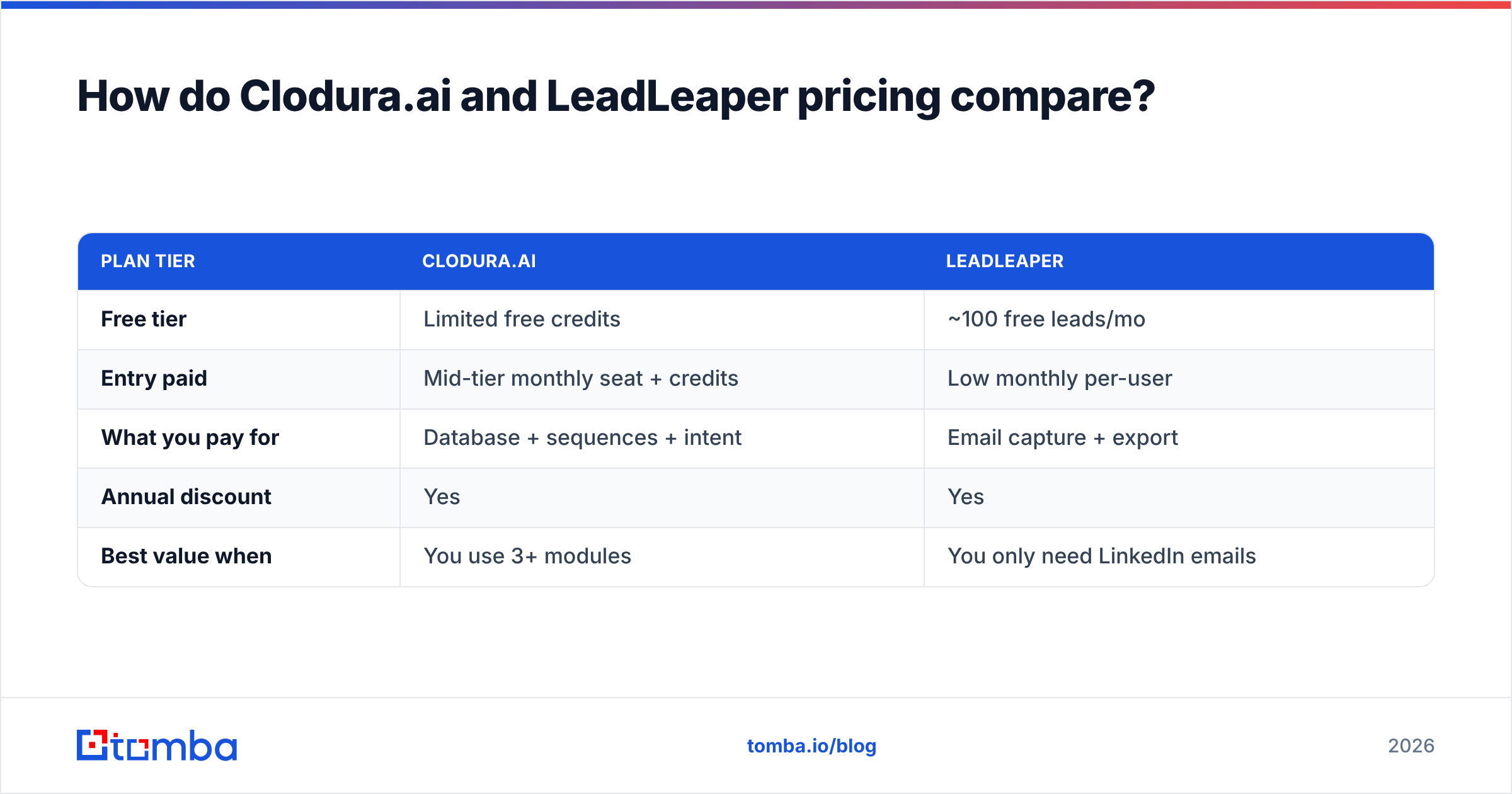
LeadLeaper wins on entry cost; Clodura.ai wins when you'll actually use the platform. Both use credits, so model your real monthly contact volume before committing.
| Plan tier | Clodura.ai | LeadLeaper |
|---|---|---|
| Free tier | Limited free credits | ~100 free leads/mo |
| Entry paid | Mid-tier monthly seat + credits | Low monthly per-user |
| What you pay for | Database + sequences + intent | Email capture + export |
| Annual discount | Yes | Yes |
| Best value when | You use 3+ modules | You only need LinkedIn emails |
Pricing for both shifts with promotions and seat counts, so check each vendor's live page — Clodura.ai's pricing and LeadLeaper's plans — before you buy. The cost question that matters isn't sticker price; it's cost per usable, deliverable contact. A cheap tool that feeds you 40% bounces is more expensive than it looks once you factor in domain reputation damage.
When should you choose Clodura.ai?#
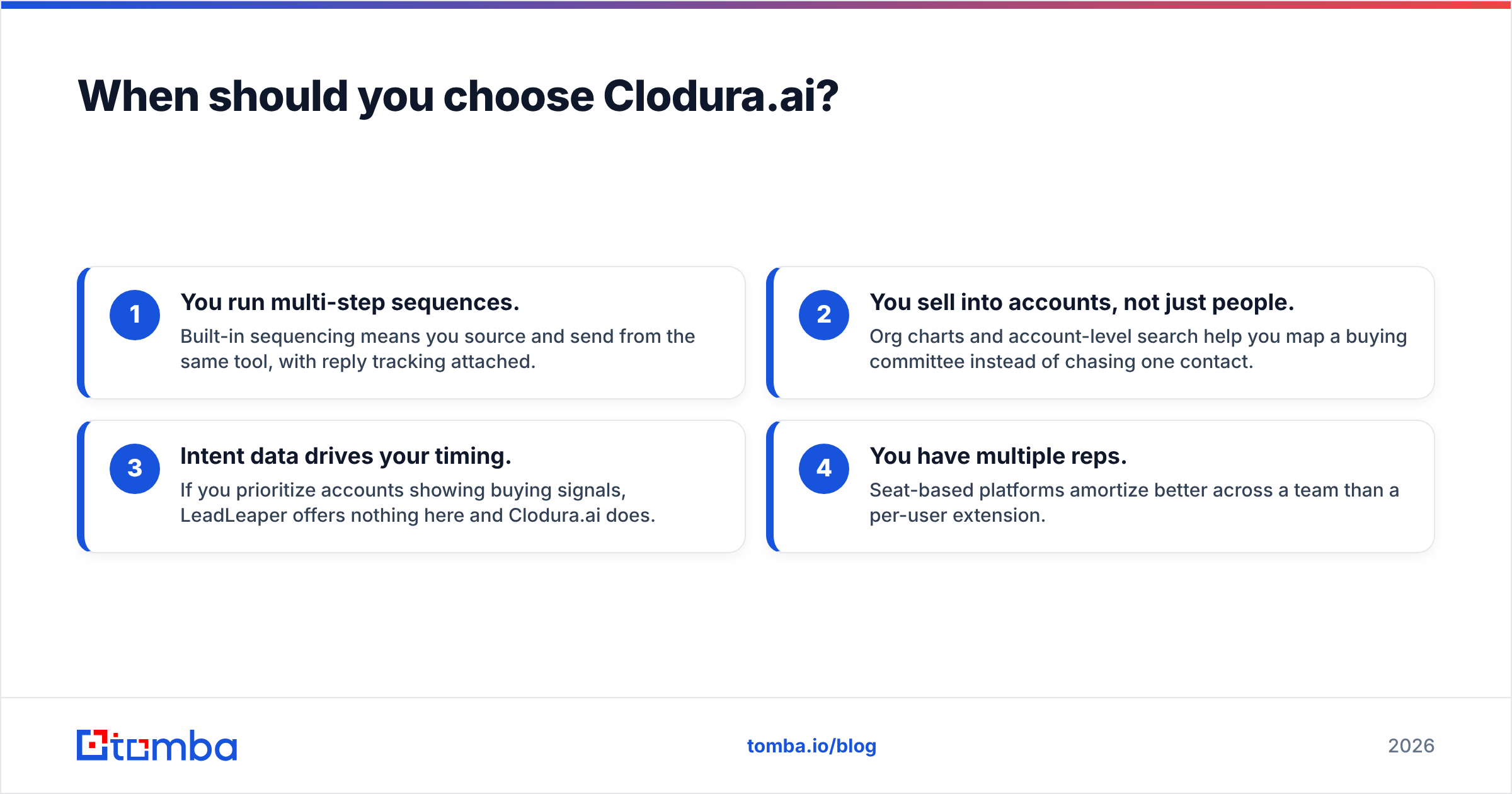
Pick Clodura.ai when prospecting is a team sport and you want one system of record. Specific signals it's the right call:
- You run multi-step sequences. Built-in sequencing means you source and send from the same tool, with reply tracking attached.
- You sell into accounts, not just people. Org charts and account-level search help you map a buying committee instead of chasing one contact.
- Intent data drives your timing. If you prioritize accounts showing buying signals, LeadLeaper offers nothing here and Clodura.ai does.
- You have multiple reps. Seat-based platforms amortize better across a team than a per-user extension.
If three or more of those apply, the bundle pays for itself. If only one does, you're renting a mansion to use one room.
When should you choose LeadLeaper?#
Pick LeadLeaper when your workflow is "I'm already on LinkedIn, just give me the email." It's the right tool when:
- You're a solo founder or single rep doing low-volume, high-touch outreach.
- LinkedIn is your only sourcing channel and you don't need a searchable database.
- Budget is tight and the free monthly leads cover your volume.
- You want zero onboarding — install, click, export, done.
LeadLeaper's honesty is its scope. It does one thing, and for a narrow user it does it cheaply. Just pair it with verification so the emails you export actually land.
Is there a better Clodura.ai or LeadLeaper alternative?#
Often, yes — because most buyers in this comparison don't actually need a full platform or a LinkedIn-only extension. They need correct, verified emails at a fair price, delivered through whatever workflow they already use.
That's the gap a focused email finder fills. Instead of paying platform prices for modules you ignore, or accepting unverified guesses from an extension, you get find-plus-verify in one step across a browser extension, bulk uploads, and an email finder API you can wire into your stack.

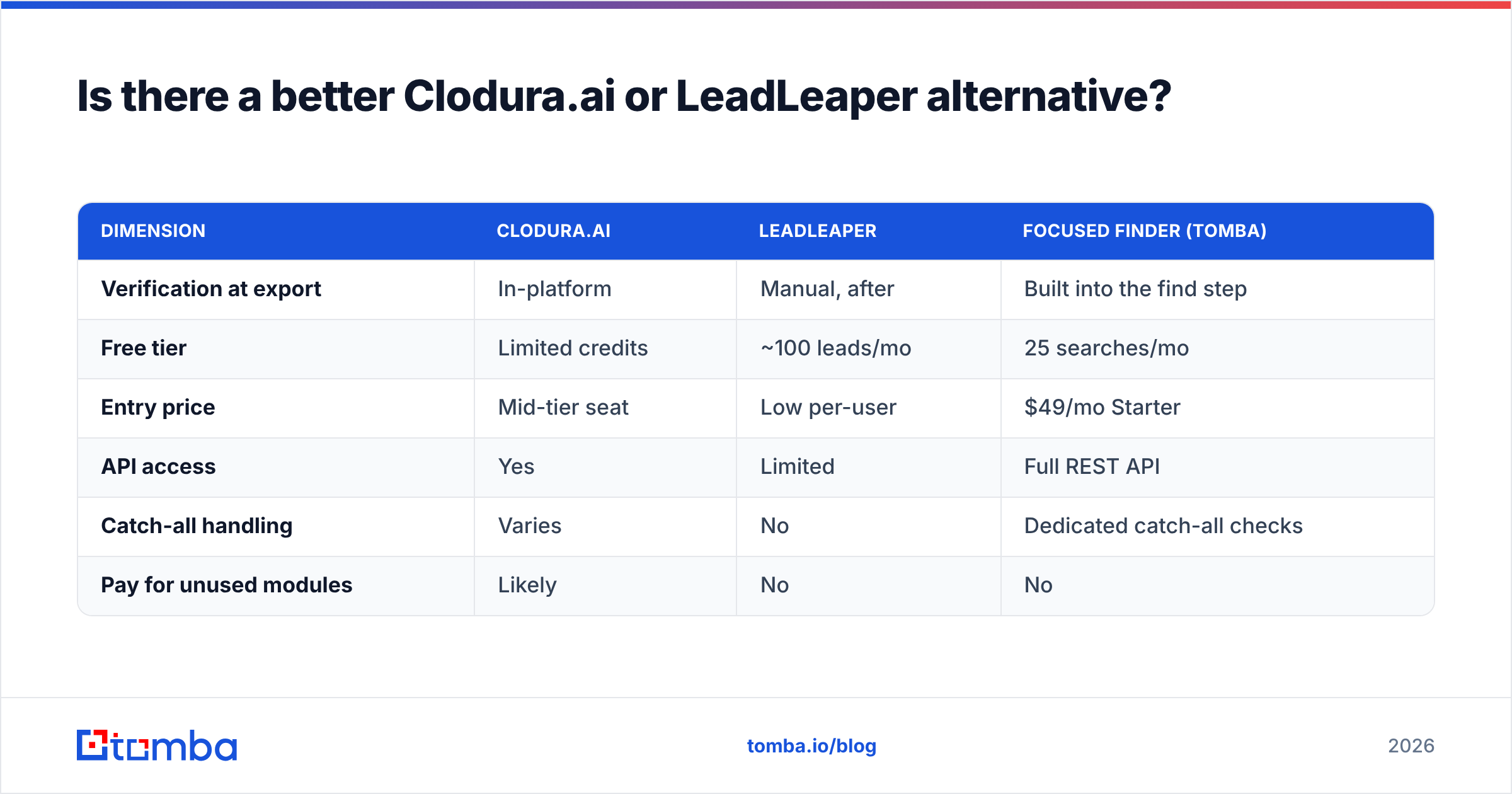
Here's how a dedicated finder stacks up against the two platforms on the dimensions that drive deliverability.
| Dimension | Clodura.ai | LeadLeaper | Focused finder (Tomba) |
|---|---|---|---|
| Verification at export | In-platform | Manual, after | Built into the find step |
| Free tier | Limited credits | ~100 leads/mo | 25 searches/mo |
| Entry price | Mid-tier seat | Low per-user | $49/mo Starter |
| API access | Yes | Limited | Full REST API |
| Catch-all handling | Varies | No | Dedicated catch-all checks |
| Pay for unused modules | Likely | No | No |
The point isn't that platforms are bad — it's that you should pay for what you'll use. If your bottleneck is "I keep sending to addresses that bounce," a verification-first finder fixes that directly. Compare full Tomba pricing against a platform seat plus a separate verifier and the math usually favors the focused tool for sourcing.
How do you decide between them?#
Run your decision through three questions, in order:
- What's my sourcing channel? LinkedIn-only and low volume points to LeadLeaper. Multi-channel with account research points to Clodura.ai. "I just need verified emails from names and domains" points to a dedicated email finder.
- Will I use the extra modules? If you won't touch intent data, sequences, and org charts, you're overpaying for Clodura.ai. If you need them, it's a bargain versus buying four tools.
- What's my real cost per usable contact? Add verification, bounce risk, and seat fees — not just the headline price. The cheapest sticker rarely wins this column.
Answer honestly and the choice usually makes itself. Most small teams overestimate how much platform they need and underestimate how much verification they're skipping.
The bottom line#
Clodura.ai and LeadLeaper solve different problems. Clodura.ai is the better buy for teams that want a single platform to search, sequence, and prioritize accounts with intent data. LeadLeaper is the better buy for solo reps who live in LinkedIn and want cheap, fast email capture. Neither is wrong — they're just built for different buyers.
But if you strip the decision down to its core — getting verified emails that actually reach the inbox — paying for a full platform or accepting unverified guesses both leave value on the table. A find-and-verify tool gives you accuracy per dollar without the bloat.
Want emails that land instead of bounce? Start free with the Tomba Email Finder — 25 searches a month at no cost, built-in verification on every result, and a full API when you're ready to scale. Source on a G2-reviewed finder, verify before you send, and keep your sending domain clean. That's the workflow that beats both platforms where it counts.
// get started
Find, verify and enrich your first contacts today
Start on the free plan with 25 searches a month, then scale when your team is ready.
Free plan · No credit card required · GDPR & CCPA
// about the author