Clodura.AI vs LFBBD Lead For Business: 2026 Comparison
Clodura.AI vs LFBBD Lead For Business, compared on data accuracy, pricing, automation, and fit. See which lead-gen platform wins for your team in 2026.
Choosing between Clodura.AI and LFBBD Lead For Business comes down to one question most comparison posts dodge: do you need a full sales-intelligence engine, a lightweight list builder, or just clean, verified contact data feeding the tools you already own? This guide answers that directly, with concrete attributes instead of feature-list noise.
TL;DR — Which one should you pick?#
- Clodura.AI is a broader sales-intelligence platform: a B2B database, intent signals, sequences, and an email/phone finder bundled together. It fits teams that want one suite.
- LFBBD Lead For Business is a lighter, list-building-first offering aimed at quick prospecting and exports. It fits solo founders and small teams on a budget.
- Neither is primarily an accuracy-first email tool. If bounce rates and verified data are your bottleneck, a dedicated email finder plus an email verifier often beats both on the metric that actually moves reply rates.
- Pricing favors LFBBD for entry, Clodura for depth. Your real cost is wasted sends on stale data, not the monthly sticker price.
- Best practical setup: use a platform for workflow, and layer verified data on top so your sequences don't burn sender reputation.
What is Clodura.AI?#
Clodura.AI is an all-in-one sales prospecting and intelligence platform. It pairs a self-reported B2B contact database (tens of millions of direct dials and email addresses) with buyer-intent signals, technographic filters, sales-cadence automation, and built-in email verification. The pitch is consolidation: instead of stitching a database, a sequencer, and a verifier together, you run prospecting end to end in one login.
In practice, teams use Clodura.AI to build target-account lists, pull contacts at those accounts, surface intent triggers (companies showing buying behavior), and push those contacts into automated email sequences. It leans toward mid-market sales orgs that want structure and reporting, not just raw exports.
The trade-off is the one every suite makes. You pay for breadth you may not use, and the data layer — the part that decides whether your emails land — is one feature among many rather than the entire focus of the company.
What is LFBBD Lead For Business?#
LFBBD Lead For Business is a lead-generation and list-building tool positioned for speed and affordability. The emphasis is on quickly assembling prospect lists — by industry, role, or geography — and exporting them for outreach. It targets freelancers, agencies, and small teams who need volume without a heavyweight platform commitment or a steep learning curve.
Where Clodura.AI sells a system, LFBBD sells a shortcut: search, filter, export, send. That simplicity is genuinely useful when your workflow is already built elsewhere (your CRM, your sending tool) and you just need names and addresses to feed it.
The flip side is that lightweight list builders typically lean on broader, less frequently refreshed data sources, and verification is often a bolt-on rather than a guarantee. The lead "exists" — but whether the inbox is live and the person still works there is a separate question.

Cloduraai vs Lfbbd Lead For Business: the core comparison#
Here is the head-to-head on the attributes that actually change outcomes. Treat the data-volume figures as vendor-reported ranges — every provider counts differently, and coverage in your niche matters more than a global headline number.
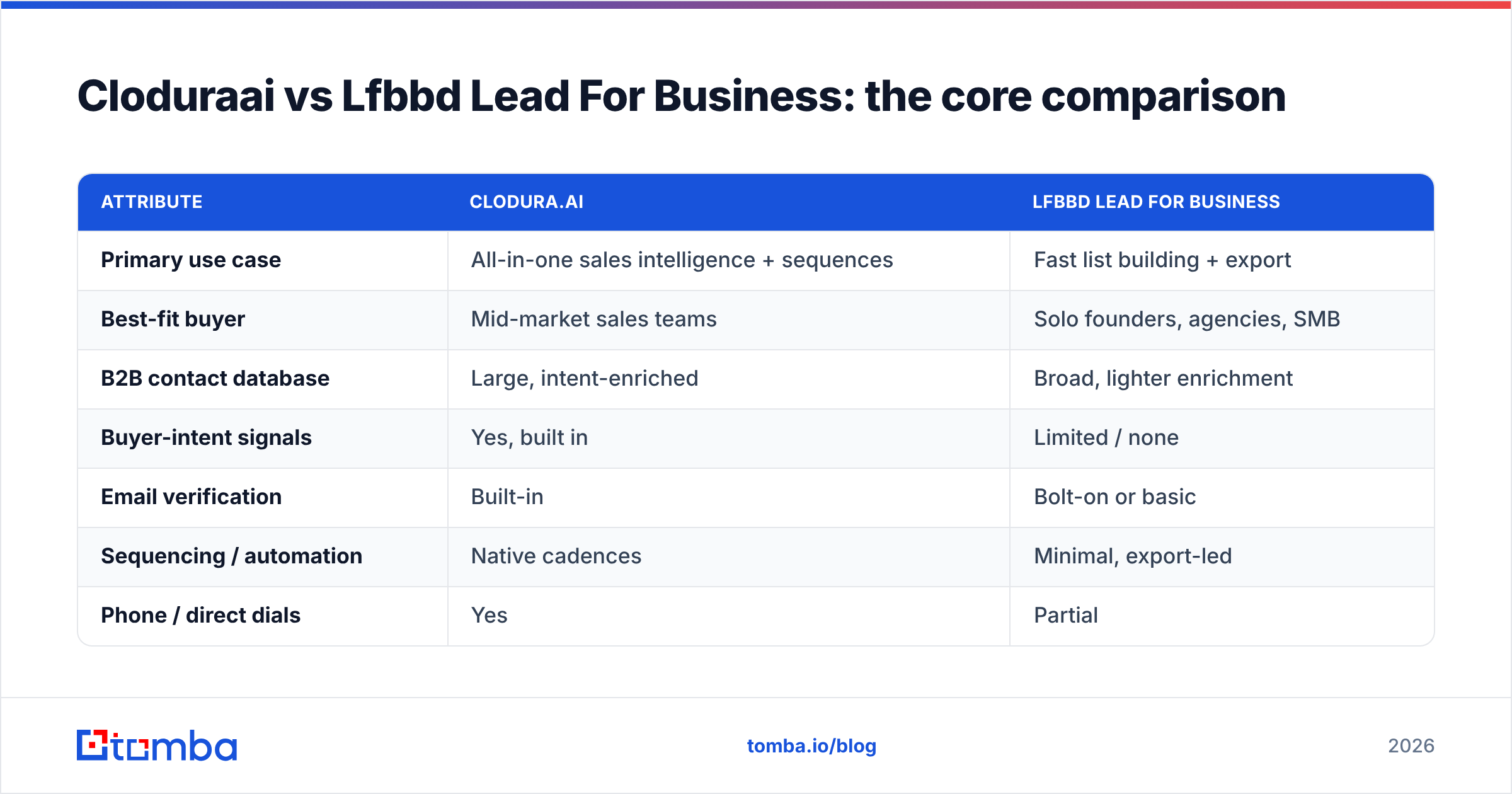
| Attribute | Clodura.AI | LFBBD Lead For Business |
|---|---|---|
| Primary use case | All-in-one sales intelligence + sequences | Fast list building + export |
| Best-fit buyer | Mid-market sales teams | Solo founders, agencies, SMB |
| B2B contact database | Large, intent-enriched | Broad, lighter enrichment |
| Buyer-intent signals | Yes, built in | Limited / none |
| Email verification | Built-in | Bolt-on or basic |
| Sequencing / automation | Native cadences | Minimal, export-led |
| Phone / direct dials | Yes | Partial |
| Learning curve | Moderate (full suite) | Low |
| Entry pricing | Higher, tiered | Lower, budget-friendly |
| Where it struggles | Cost + data-freshness in niches | Verification depth + accuracy |
A few honest takeaways from the table:
- Pick Clodura.AI if consolidation is the goal. One platform for finding, signaling, and sending reduces tool sprawl and gives managers cleaner reporting.
- Pick LFBBD if speed and price win. When you already own your sending stack, paying for sequences and intent you won't touch is waste.
- Both live or die on data quality. A bundled verifier or a cheap list both still produce bounces when the underlying records are stale.
- Coverage is regional and vertical. Run a free trial against 50 real target accounts in your niche before trusting any global "100M+ contacts" claim.
Is Clodura.AI better than LFBBD Lead For Business?#
It depends on what's breaking in your funnel — not on which feature list is longer.
Choose Clodura.AI when you have a sales team that needs shared workflows, intent data to prioritize accounts, and native sequencing so reps don't bounce between five tabs. The value is the system, and the reporting that comes with it. If you're running structured outbound at scale, that structure pays for itself.
Choose LFBBD when you're cost-sensitive, your team is small, and your bottleneck is simply "I need more qualified names to contact this week." You don't need intent scoring to email 200 founders; you need 200 good addresses and a sending tool. LFBBD gets you there faster and cheaper.
But there's a third answer the framing hides: for many teams the real problem is neither workflow nor list volume — it's deliverability. You can have the best sequences and the biggest list and still see 25% bounce rates because the data is months old. That's where a dedicated data layer changes the math.
Where does a dedicated email finder beat both?#
When accuracy is the constraint, specialization wins. A platform that does ten things spreads its data investment across all ten. A tool whose entire business is finding and verifying contacts concentrates everything on the number that matters: does this email reach a real, current inbox?
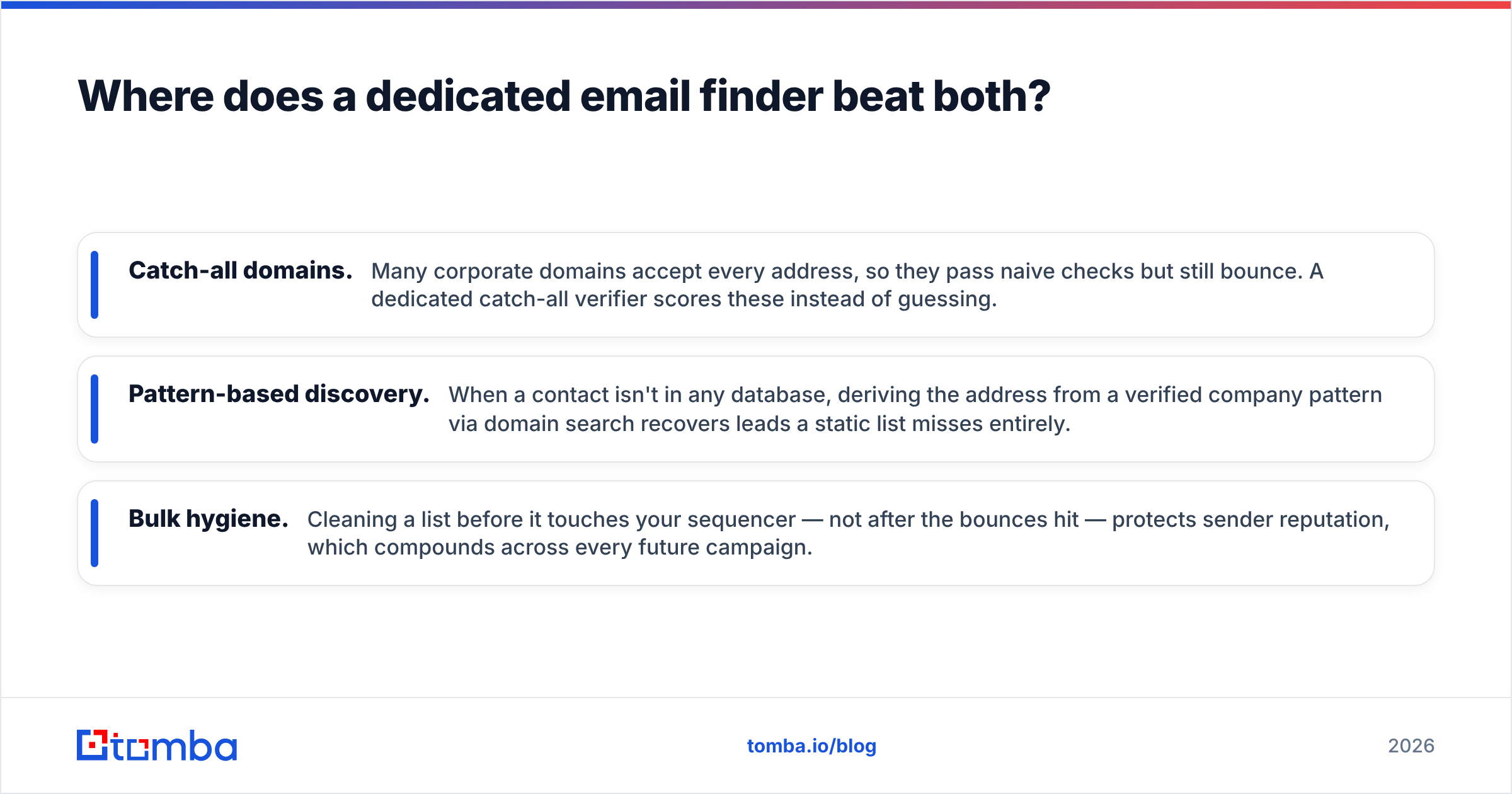
Concretely, a verification-first stack helps in three places both suites tend to leave thin:
- Catch-all domains. Many corporate domains accept every address, so they pass naive checks but still bounce. A dedicated catch-all verifier scores these instead of guessing.
- Pattern-based discovery. When a contact isn't in any database, deriving the address from a verified company pattern via domain search recovers leads a static list misses entirely.
- Bulk hygiene. Cleaning a list before it touches your sequencer — not after the bounces hit — protects sender reputation, which compounds across every future campaign.
This is also where Tomba sits relative to both products. It isn't trying to be your sequencer or your intent engine. It's the data layer you point at whatever workflow you've chosen — Clodura, LFBBD, your CRM, or a plain spreadsheet — so the contacts going in are verified before you spend a send on them.

How do the three approaches compare on real cost?#
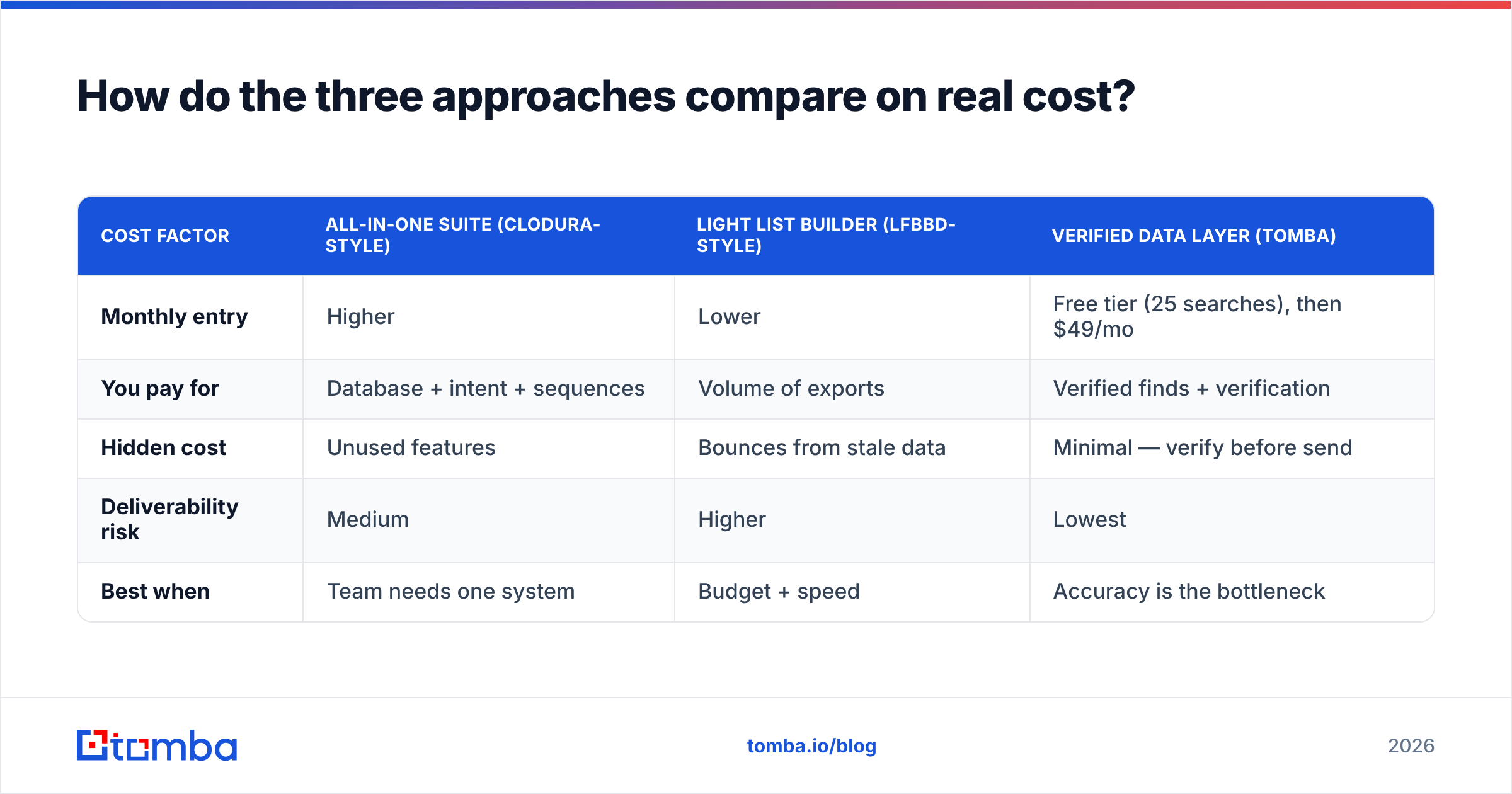
Sticker price is the wrong number. The real cost is price per usable, deliverable contact — and that flips the ranking. For context, third-party reviews on G2 and Capterra consistently show that "data accuracy" and "outdated contacts" are the top complaints for nearly every all-in-one prospecting suite, regardless of brand.
| Cost factor | All-in-one suite (Clodura-style) | Light list builder (LFBBD-style) | Verified data layer (Tomba) |
|---|---|---|---|
| Monthly entry | Higher | Lower | Free tier (25 searches), then $49/mo |
| You pay for | Database + intent + sequences | Volume of exports | Verified finds + verification |
| Hidden cost | Unused features | Bounces from stale data | Minimal — verify before send |
| Deliverability risk | Medium | Higher | Lowest |
| Best when | Team needs one system | Budget + speed | Accuracy is the bottleneck |
For reference, Tomba pricing runs Free (25 searches/mo), Starter at $49/mo, Growth at $99/mo, and Pro at $249/mo, with Enterprise custom. The point isn't that it's cheaper than every plan on every tier — it's that paying a focused tool to keep bounce rates low protects the much larger money you're already spending on outreach time and domain reputation.
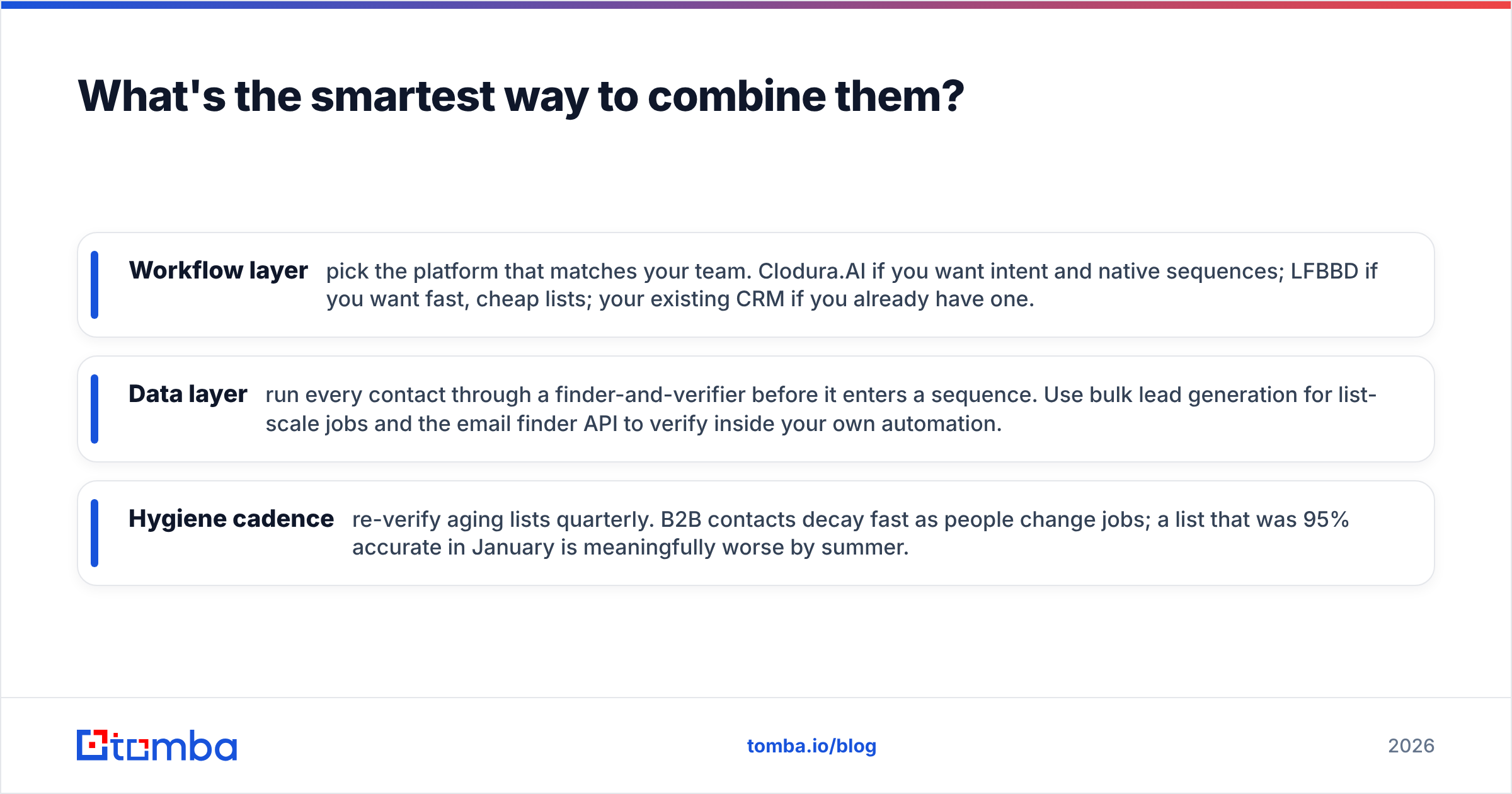
What's the smartest way to combine them?#
Stop treating this as either/or. The strongest 2026 outbound stacks separate workflow from data.
- Workflow layer — pick the platform that matches your team. Clodura.AI if you want intent and native sequences; LFBBD if you want fast, cheap lists; your existing CRM if you already have one.
- Data layer — run every contact through a finder-and-verifier before it enters a sequence. Use bulk lead generation for list-scale jobs and the email finder API to verify inside your own automation.
- Hygiene cadence — re-verify aging lists quarterly. B2B contacts decay fast as people change jobs; a list that was 95% accurate in January is meaningfully worse by summer.
This is also why "which tool is best" is the wrong question. The platform organizes your work. The data layer determines whether that work lands. Teams that win outbound treat the second as non-negotiable, no matter which of the first they chose.
Frequently asked questions#
Is LFBBD Lead For Business accurate enough for cold email? For low-volume, hand-checked outreach, often yes. For scaled sending, verify exports through a dedicated email verification step first — light list builders rarely guarantee live-inbox accuracy, and a 20%+ bounce rate will throttle your domain quickly.
Does Clodura.AI replace the need for an email verifier? Its built-in verification helps, but bundled verification is a feature, not a focus. For high-stakes campaigns or catch-all-heavy domains, a specialized verifier still catches addresses a suite passes through.
Which is cheaper, Clodura.AI or LFBBD? LFBBD is generally the lower-entry option; Clodura.AI costs more because you're buying intent data and sequencing too. Compare on price-per-deliverable-contact, not monthly sticker price.
Can I use these alongside Tomba? Yes — that's the recommended setup. Keep your chosen platform for workflow and route contacts through Tomba's finder and verifier so what enters your sequences is already clean.
Do I need buyer-intent data? Only if you have the volume and team to act on it. Solo founders emailing 100 prospects a week rarely need intent scoring; they need accurate addresses and a clear message.
The bottom line#
Clodura.AI wins on breadth and is the better pick for structured sales teams that want intent signals and native sequences in one place. LFBBD Lead For Business wins on simplicity and price for small teams that just need lists fast. But the metric that quietly decides your reply rate — deliverable, verified data — is exactly the layer both treat as a side feature.
If bounces, stale contacts, or catch-all domains are what's actually capping your outbound, fix the data first. Start free with the Tomba Email Finder — 25 searches a month at no cost — and verify your next list before it touches a single sequence. Pair it with whichever platform fits your workflow, and you get the best of both: the structure of a suite and the accuracy of a tool that does one thing extremely well.
// get started
Find, verify and enrich your first contacts today
Start on the free plan with 25 searches a month, then scale when your team is ready.
Free plan · No credit card required · GDPR & CCPA
// about the author