Clodura.ai vs Lusha 2026: B2B Data, Accuracy & Pricing
Clodura.ai vs Lusha compared on data accuracy, coverage, pricing, and credits for 2026 — plus where a pay-per-result email finder beats both on cost.
Clodura.ai vs Lusha: Which B2B Data Tool Wins in 2026?
You are choosing between two very different bets. Clodura.ai sells you a sales-intelligence suite — a database, sequencing, and buyer-intent signals stitched together. Lusha sells you fast, clean contact data with a browser extension your reps will actually open every day. Picking the wrong one means either paying for modules you never touch or hitting credit walls mid-quarter.
This guide breaks down where each tool genuinely wins, where the marketing oversells, and where a leaner pay-for-results approach beats both.
TL;DR#
- Clodura.ai is the better fit if you want an all-in-one prospecting platform: B2B database, intent data, email sequencing, and an org-chart view in one login.
- Lusha is the better fit if you mainly want accurate phone numbers and direct emails surfaced fast from LinkedIn, with minimal setup.
- Accuracy is close on emails; Lusha tends to edge ahead on mobile/direct dials, while Clodura wins on breadth of company and technographic data.
- Pricing punishes scale on both — Lusha's per-seat credits and Clodura's tiered bundles get expensive once a team grows.
- If you only need verified emails on demand, a usage-based tool like the Tomba Email Finder often costs a fraction of either suite.
What are Clodura.ai and Lusha?#
Clodura.ai is a sales-intelligence platform aimed at outbound teams that want one system instead of five. Beyond contact data, it bundles email sequencing, a meeting scheduler, buyer-intent signals, and organizational charts. The pitch is consolidation: stop paying for a database, a sequencer, and an enrichment tool separately. You can read more on the vendor's own site at clodura.ai.
Lusha is a contact-data provider built around speed and a slick Chrome extension. Reps live inside LinkedIn and company sites; Lusha surfaces direct dials and verified work emails in one click, then pushes them to a CRM. It is less of a "platform" and more of a precision tool, and it is one of the highest-rated data vendors on G2. See the official product at lusha.com.
The short version: Clodura wants to be your prospecting cockpit. Lusha wants to be the fastest way to grab a number. Those are different jobs, and the right answer depends on which one is actually slowing your team down.

How do Clodura.ai and Lusha compare head-to-head?#
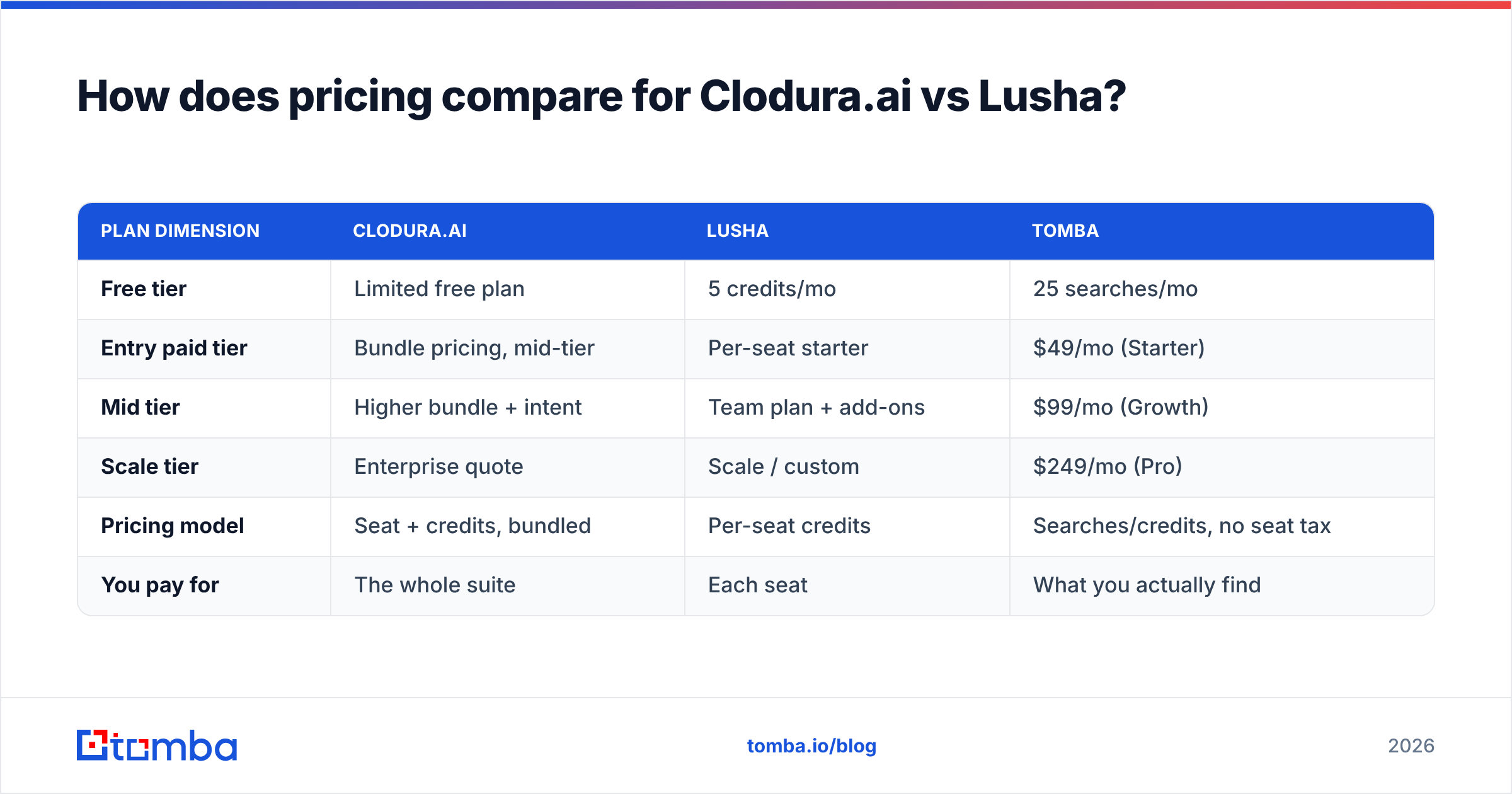
Here is the core comparison across the attributes that actually change a buying decision. Treat the data points as directional — every vendor's coverage shifts by region and refresh cycle.
| Attribute | Clodura.ai | Lusha |
|---|---|---|
| Primary use case | All-in-one sales intelligence + sequencing | Fast contact data via extension |
| Database size (claimed) | ~600M+ B2B contacts | ~150M+ business profiles |
| Direct dials / mobile | Good, US-weighted | Strong, a core selling point |
| Email verification | Built-in, bulk-friendly | Verified emails, click-to-reveal |
| Buyer intent data | Yes, included on higher tiers | Add-on / higher tiers |
| Email sequencing | Native | Not native (relies on CRM/tools) |
| Org charts / hierarchy | Yes | Limited |
| Chrome extension | Yes | Yes — best-in-class |
| Free tier | Limited free plan | 5 credits/mo free |
| Pricing model | Tiered bundles (seat + credits) | Per-seat credits |
| Best for | Teams consolidating tools | Reps who prospect on LinkedIn |
If you read only one row, read "primary use case." Clodura is buying a workflow; Lusha is buying a data feed. A team that already runs a sequencer and a CRM rarely needs Clodura's full stack — and a team without one may resent stitching Lusha into three other subscriptions.
Which tool has more accurate data?#
Neither tool is dramatically more accurate on email; the gap shows up by data type. Lusha has built its reputation on direct dials and mobile numbers, and reps consistently rate its phone data highly. Clodura's strength is breadth — more companies, more technographic and firmographic fields, and intent signals layered on top.
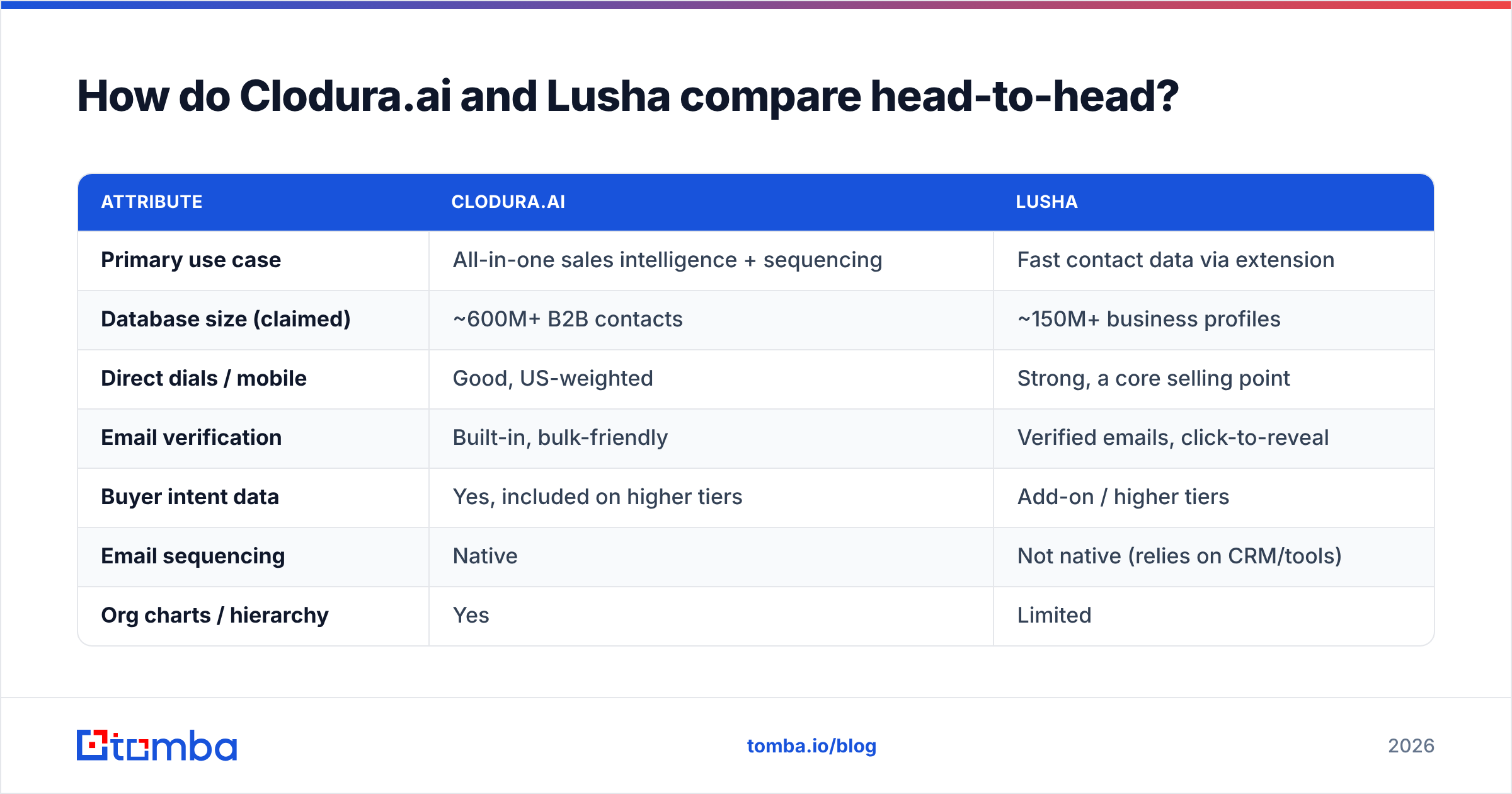
Accuracy is also a moving target. B2B contact data decays at roughly 22–30% per year as people change jobs, so a database that was 95% accurate at capture can drift well below that within months. That is why verification at the moment of use matters more than any headline accuracy claim on a pricing page. A number that was correct in January is a wrong number in June.
This is where a dedicated verification step earns its keep. Whether you pull contacts from Clodura, Lusha, or a static list you bought two years ago, running them through an email verifier before you send protects your sender reputation and keeps bounce rates under the 2–3% threshold mailbox providers watch. Tools that bundle verification — and re-check against catch-all domains with a catch-all verifier — save you from learning the hard way that "verified" meant "verified last year."
A practical accuracy checklist before you trust any vendor:
- Test your own ICP, not their demo. Pull 50 contacts in your target industry and region, then manually check a sample.
- Separate email accuracy from phone accuracy. They are different pipelines with different decay rates.
- Check the catch-all rate. A high share of "accept-all" domains inflates apparent coverage while hiding unverifiable addresses.
- Re-verify at send time. Treat every record as stale until proven fresh.

How does pricing compare for Clodura.ai vs Lusha?#
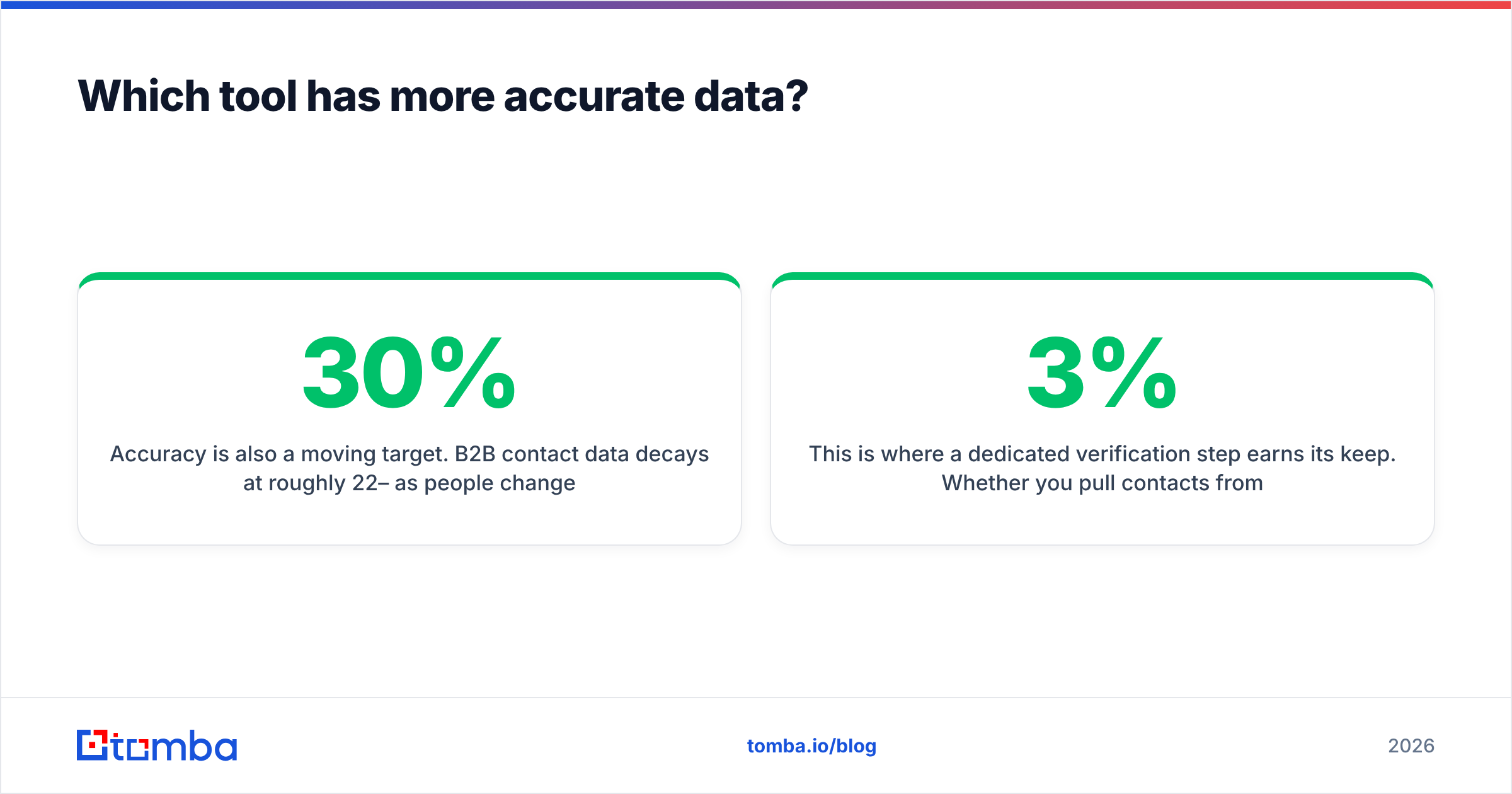
Both tools use credit-and-seat models, and both get expensive as you add reps. That is the structural trade-off of suite pricing: you pay for capacity you may not fully use, and the per-contact cost rises with team size rather than falling.
Lusha's plans scale per seat with monthly credit allotments, and the jump from a starter plan to team and scale tiers is significant once you add intent data or bulk enrichment. Clodura bundles more into each tier — sequencing, intent, org charts — so the sticker price reflects the full stack whether or not you use every module. For current numbers, always check the live pricing pages at lusha.com and clodura.ai, since both revise tiers frequently.
Here is how the cost philosophy stacks up against a usage-based alternative:
| Plan dimension | Clodura.ai | Lusha | Tomba |
|---|---|---|---|
| Free tier | Limited free plan | 5 credits/mo | 25 searches/mo |
| Entry paid tier | Bundle pricing, mid-tier | Per-seat starter | $49/mo (Starter) |
| Mid tier | Higher bundle + intent | Team plan + add-ons | $99/mo (Growth) |
| Scale tier | Enterprise quote | Scale / custom | $249/mo (Pro) |
| Pricing model | Seat + credits, bundled | Per-seat credits | Searches/credits, no seat tax |
| You pay for | The whole suite | Each seat | What you actually find |
The pattern is clear: suites charge for breadth and seats, while a focused finder charges for output. If your team's real need is "verified emails and the occasional phone number," paying suite prices for sequencing and intent modules you already cover elsewhere is dead weight. You can compare the full breakdown on the Tomba pricing page.

When should you pick Clodura.ai?#
Choose Clodura.ai when consolidation is the actual problem you are solving. It makes sense if:
- You are running outbound from scattered tools — a database here, a sequencer there, intent data nowhere — and want one login.
- Buyer intent matters to your motion. If timing outreach to in-market accounts changes your win rate, having intent in the same place as contact data is genuinely useful.
- You sell into complex orgs where seeing the hierarchy and finding the real decision-maker beats spraying generic contacts.
- You are a smaller team without a CRM-native sequencer and the bundled workflow replaces several subscriptions at once.
Where Clodura frustrates buyers: teams that already own a strong sequencer or CRM-native cadence tool end up paying for overlapping features, and the breadth can feel like complexity you did not ask for.
When should you pick Lusha?#
Choose Lusha when speed and phone accuracy are the bottleneck. It shines if:
- Your reps prospect inside LinkedIn and company sites all day. The extension is the product, and it is excellent.
- Direct dials drive your pipeline. If cold calling or multi-threading by phone is core, Lusha's mobile data is a real advantage.
- You want minimal onboarding. Install, log in, start revealing contacts — there is almost no learning curve.
- You already have a sequencer and CRM and only need a reliable data feed plugged into them.
Where Lusha frustrates buyers: it is not a platform, so you still need other tools for sequencing and broader enrichment, and per-seat credits make large teams expensive. Heavy users burn credits faster than they expect.
Is there a better-value alternative to both?#
Yes — if your real need is "find and verify business emails," not "buy a suite." Both Clodura and Lusha bundle features many teams never fully use, and you pay for that bundle through seats and tiers. A usage-based email finder flips the model: you pay for results.
Tomba focuses on the data layer that every outbound motion depends on. Its core email finder locates professional addresses by name, domain, or company, and you can run a whole prospect list through the bulk email finder in one pass. Need every contact at a target account? The domain search returns the verified addresses on a company's domain along with the patterns behind them. When you need numbers, the phone finder covers the B2B dial side without forcing you into a full sales-intelligence subscription.
Here is how the alternative angle compares on the dimensions that drive cost:
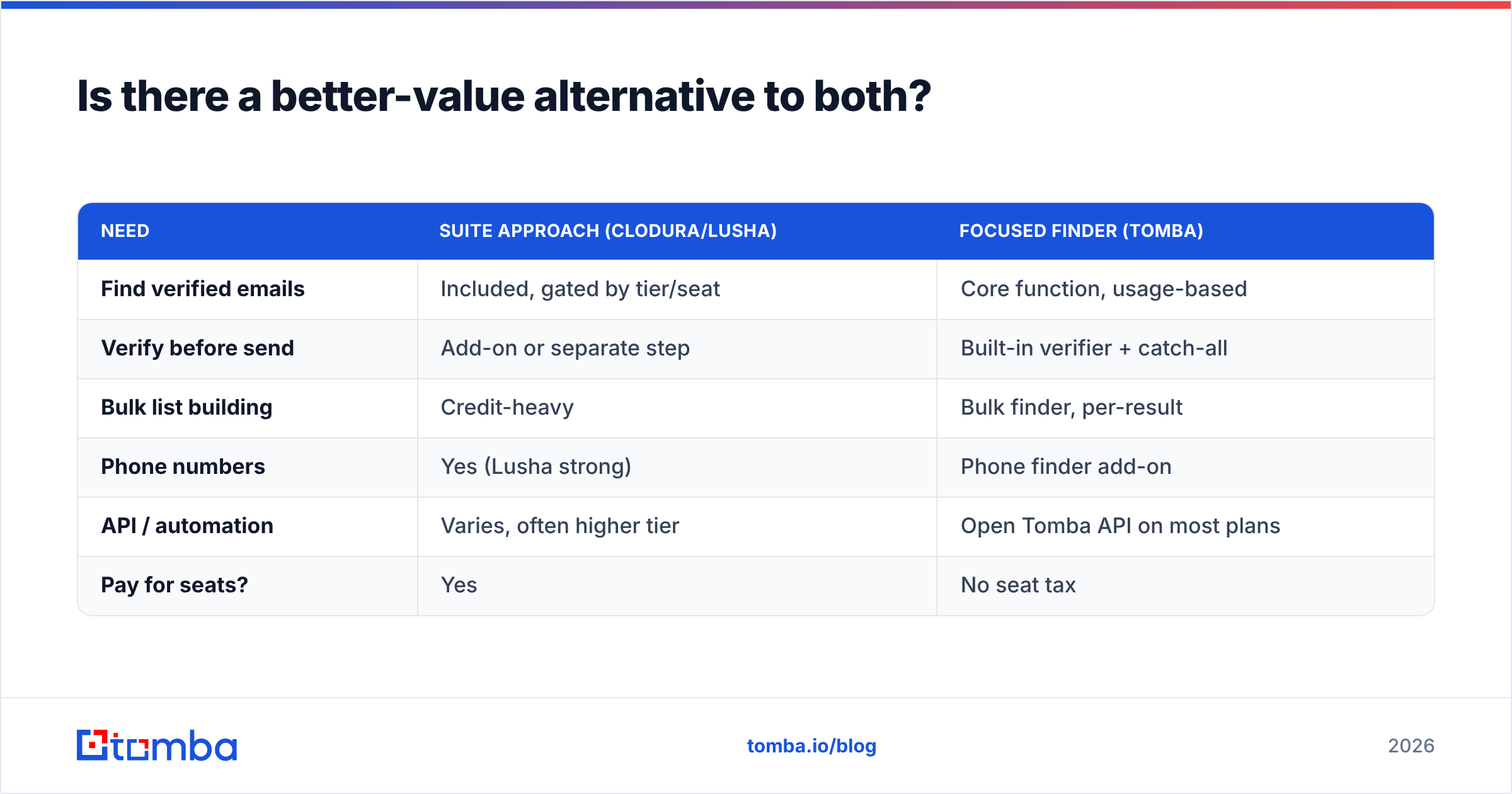
| Need | Suite approach (Clodura/Lusha) | Focused finder (Tomba) |
|---|---|---|
| Find verified emails | Included, gated by tier/seat | Core function, usage-based |
| Verify before send | Add-on or separate step | Built-in verifier + catch-all |
| Bulk list building | Credit-heavy | Bulk finder, per-result |
| Phone numbers | Yes (Lusha strong) | Phone finder add-on |
| API / automation | Varies, often higher tier | Open Tomba API on most plans |
| Pay for seats? | Yes | No seat tax |
The honest framing: Clodura and Lusha are the right call if you genuinely want the full sales-intelligence workflow in one place. But a large share of buyers sign up for that workflow and use 20% of it — the data. For those teams, a focused finder plus their existing CRM and sequencer delivers the same outbound results for far less.
How do you decide between Clodura.ai, Lusha, and the alternative?#
Run this quick decision filter:
- You need one platform to replace several tools → Clodura.ai. Consolidation is its whole value proposition.
- You need fast, accurate phone numbers from LinkedIn → Lusha. The extension and dial data are best-in-class.
- You mainly need verified emails (and maybe phones) feeding tools you already own → a usage-based finder. Skip the seat tax and the modules you won't touch.
Whatever you pick, build verification into your process rather than trusting any database to stay clean. Contact data rots, and a "verified" stamp from acquisition time means little six months later. Pulling clean addresses, re-checking them before send, and enriching gaps with data enrichment does more for your reply rates than chasing the vendor with the biggest claimed database.
The bottom line#
Clodura.ai and Lusha solve different problems. Clodura is the consolidation play — a full sales-intelligence cockpit for teams that want everything under one login and value buyer intent. Lusha is the precision play — the fastest, most accurate way to grab a direct dial or verified email while your reps work LinkedIn. Both are good at their job, and both charge suite-style prices that climb with your headcount.
If you have read this far and realized you mostly just need accurate, verified business emails without paying for sequencing, intent dashboards, and per-seat credits you'll barely use, start with the Tomba Email Finder. The free tier gives you 25 searches a month to test it against your own ICP, the Starter plan is $49/mo, and you pay for the contacts you find — not the seats you fill. Plug it into your existing CRM and sequencer, keep the verification step on, and put the savings toward more pipeline.
// get started
Find, verify and enrich your first contacts today
Start on the free plan with 25 searches a month, then scale when your team is ready.
Free plan · No credit card required · GDPR & CCPA
// about the author