Clodura.AI vs Mailstand 2026: Which Sales Tool Wins?
Clodura.AI is a B2B database and sequencing engine; Mailstand is a multi-inbox sending layer. Here's which one fits your outbound stack in 2026 — and where a dedicated email finder beats both.
You typed "Clodura.AI vs Mailstand" into a search bar expecting a head-to-head, and the first surprise is this: these two tools barely compete. One builds your prospect list and writes sequences. The other makes sure those sequences land from a wall of inboxes. Picking "the winner" without understanding that split is how teams end up paying for two platforms that do half a job each.
This post breaks down what each tool actually does, where they overlap, where they don't, and how to assemble an outbound stack that doesn't leak money — including where a focused data provider like Tomba quietly outperforms both on the part that matters most: contact accuracy.
TL;DR#
- Clodura.AI is a sales intelligence platform — a B2B contact database, email finder, and sequencer rolled into one. It's the "find and reach" layer.
- Mailstand is an inbox aggregation and warmup layer — it connects many sending accounts into one workspace so agencies and high-volume senders can scale cold email without burning domains.
- They solve different problems. Comparing them directly is like comparing a CRM to an SMTP relay. Most serious outbound teams use a database tool and a sending tool.
- Data accuracy is the weak point of all-in-ones. Bundled databases trade freshness for breadth, which is why teams pair them with a dedicated email finder for verification.
- Best 2026 setup: dedicated email data (Tomba) → enrichment → sequencer → inbox layer (Mailstand if you're sending at agency scale).
What is Clodura.AI?#
Clodura.AI is a B2B sales intelligence and engagement platform. Think of it as a Swiss Army knife for the top of the funnel: a prospect database of company and contact records, an email and direct-dial finder, buyer-intent signals, and a built-in email sequencer so you can prospect and send from the same dashboard.
Its pitch is consolidation. Instead of stitching together a data vendor, an enrichment tool, and a cadence tool, you log into one platform. For a small team that wants a single subscription and a single login, that's genuinely appealing.
The trade-off is the one every all-in-one makes. A platform spread across database, intent, and sequencing rarely leads any single category. The database is broad but uneven by region and seniority; intent data is directional, not surgical; and the sequencer covers the basics without the deliverability tuning that purpose-built senders offer.
What is Mailstand?#
Mailstand sits at the opposite end of the pipeline. It's an inbox management and email-aggregation tool built for one painful reality: if you send cold email at volume, you cannot do it from one inbox without torching your sender reputation.
Mailstand connects dozens — sometimes hundreds — of sending accounts (Google Workspace, Microsoft 365, custom SMTP) into a single unified workspace. You manage replies from one place, rotate sends across accounts, and keep each domain's volume under the thresholds that trigger spam filters. For agencies running outbound for multiple clients, that consolidation of inboxes is the entire value proposition.
What Mailstand is not is a data source. It doesn't find you prospects, build lists, or verify emails. You bring the contacts; Mailstand helps you deliver to them at scale without flaming out. If you confuse it for a prospecting tool, you'll be disappointed — and if you confuse Clodura.AI for an inbox-rotation tool, same result.
Clodura.AI vs Mailstand: how do they actually compare?#
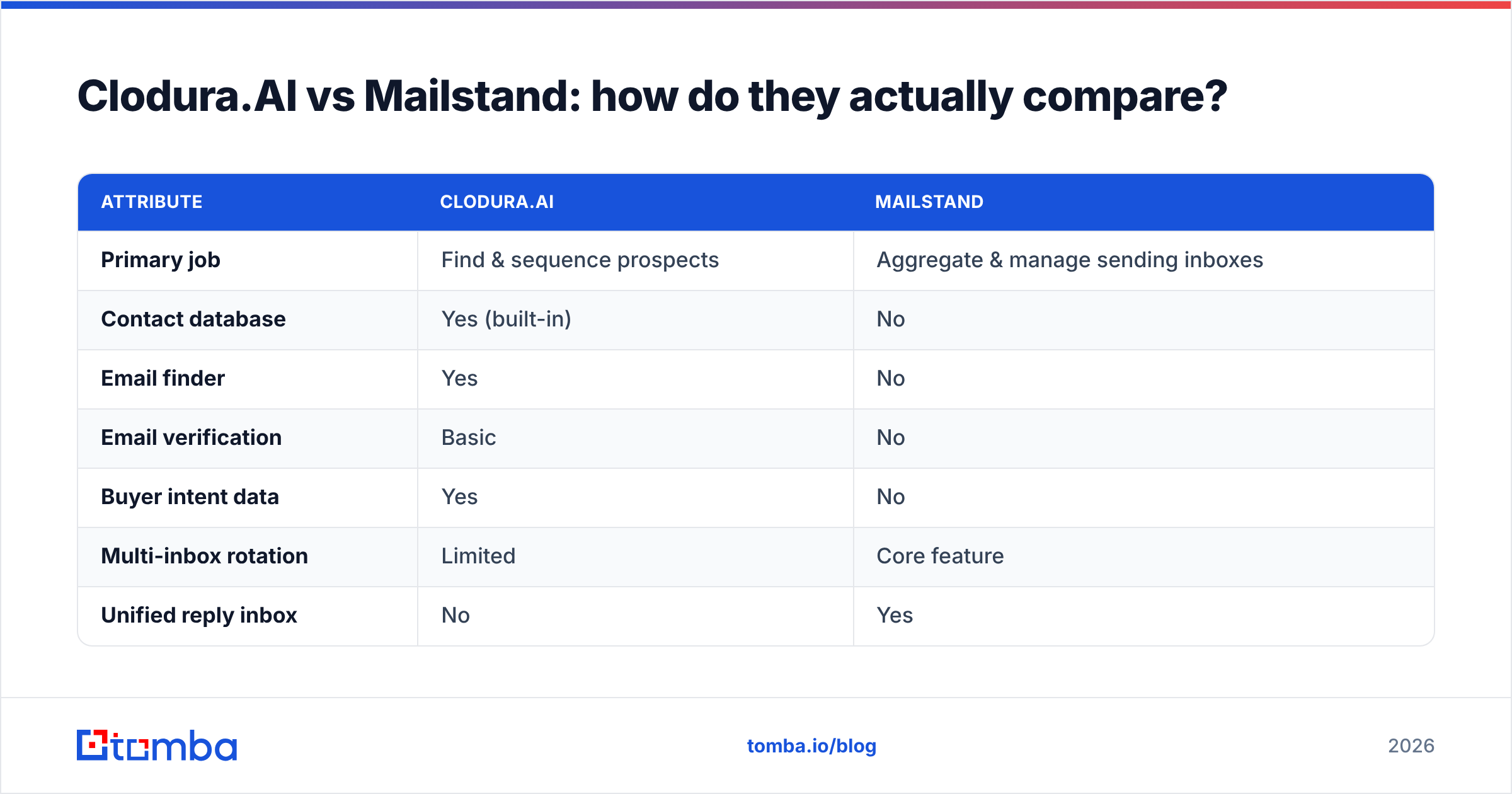
Here's the honest side-by-side. Note how few rows are true overlaps — that's the whole point.
| Attribute | Clodura.AI | Mailstand |
|---|---|---|
| Primary job | Find & sequence prospects | Aggregate & manage sending inboxes |
| Contact database | Yes (built-in) | No |
| Email finder | Yes | No |
| Email verification | Basic | No |
| Buyer intent data | Yes | No |
| Multi-inbox rotation | Limited | Core feature |
| Unified reply inbox | No | Yes |
| Best for | SDR teams needing data + cadence | Agencies sending at high volume |
| Entry pricing | Free tier, paid from ~$33/user/mo | Usage/seat-based, agency-focused |
| Biggest weakness | Data freshness & accuracy | No prospecting or data at all |
The takeaway: these tools are complements far more than competitors. A realistic stack might run Clodura.AI (or a dedicated data provider) to build and enrich the list, then push verified contacts into a sequencer that Mailstand feeds with rotating inboxes.
Which one is better for finding accurate emails?#
Neither, if accuracy is your top priority — and this is the part most comparison posts skip.
Mailstand doesn't find emails at all, so it's out of this race by design. Clodura.AI does include an email finder, but it inherits the classic all-in-one problem: the database is a secondary feature competing for engineering attention with intent, sequencing, and reporting. When a record goes stale — someone changes jobs, a company rebrands its domain — bundled databases are slow to catch it. You don't notice until your bounce rate spikes and your sending domain takes the hit Mailstand was supposed to protect.
This is why high-performing teams decouple data from everything else. A focused provider exists to do one thing — return a correct, deliverable address — and is measured on exactly that.
Consider how a dedicated workflow differs:
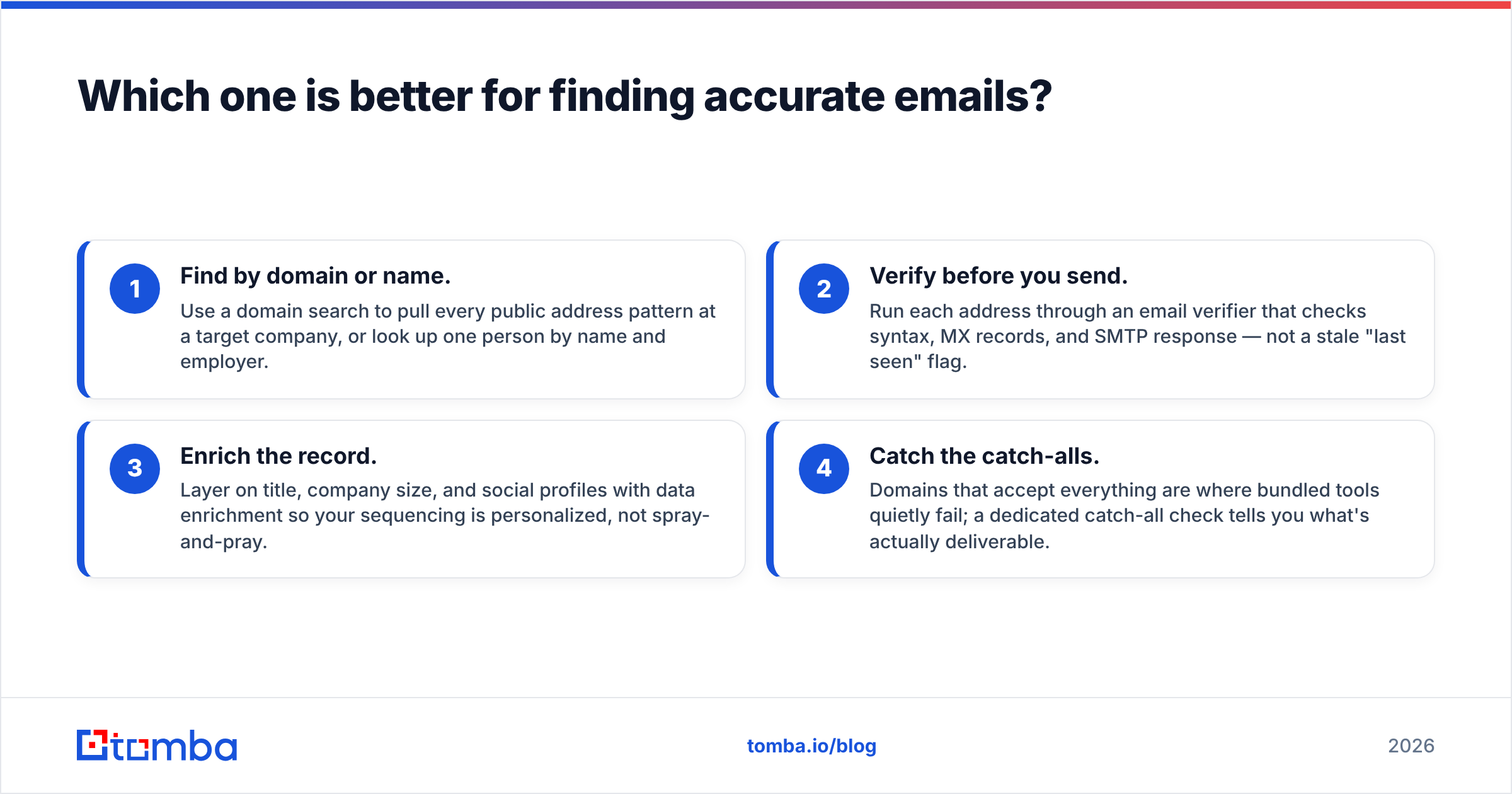
- Find by domain or name. Use a domain search to pull every public address pattern at a target company, or look up one person by name and employer.
- Verify before you send. Run each address through an email verifier that checks syntax, MX records, and SMTP response — not a stale "last seen" flag.
- Enrich the record. Layer on title, company size, and social profiles with data enrichment so your sequencing is personalized, not spray-and-pray.
- Catch the catch-alls. Domains that accept everything are where bundled tools quietly fail; a dedicated catch-all check tells you what's actually deliverable.
That separation of concerns is the difference between a 2% bounce rate and a 12% one. And bounce rate is the input that determines whether all of Mailstand's inbox-rotation work even matters.
How does pricing compare in 2026?#
Pricing is where the "different tools" reality bites hardest, because you're not really choosing between two line items — you may be budgeting for both, plus a data layer.
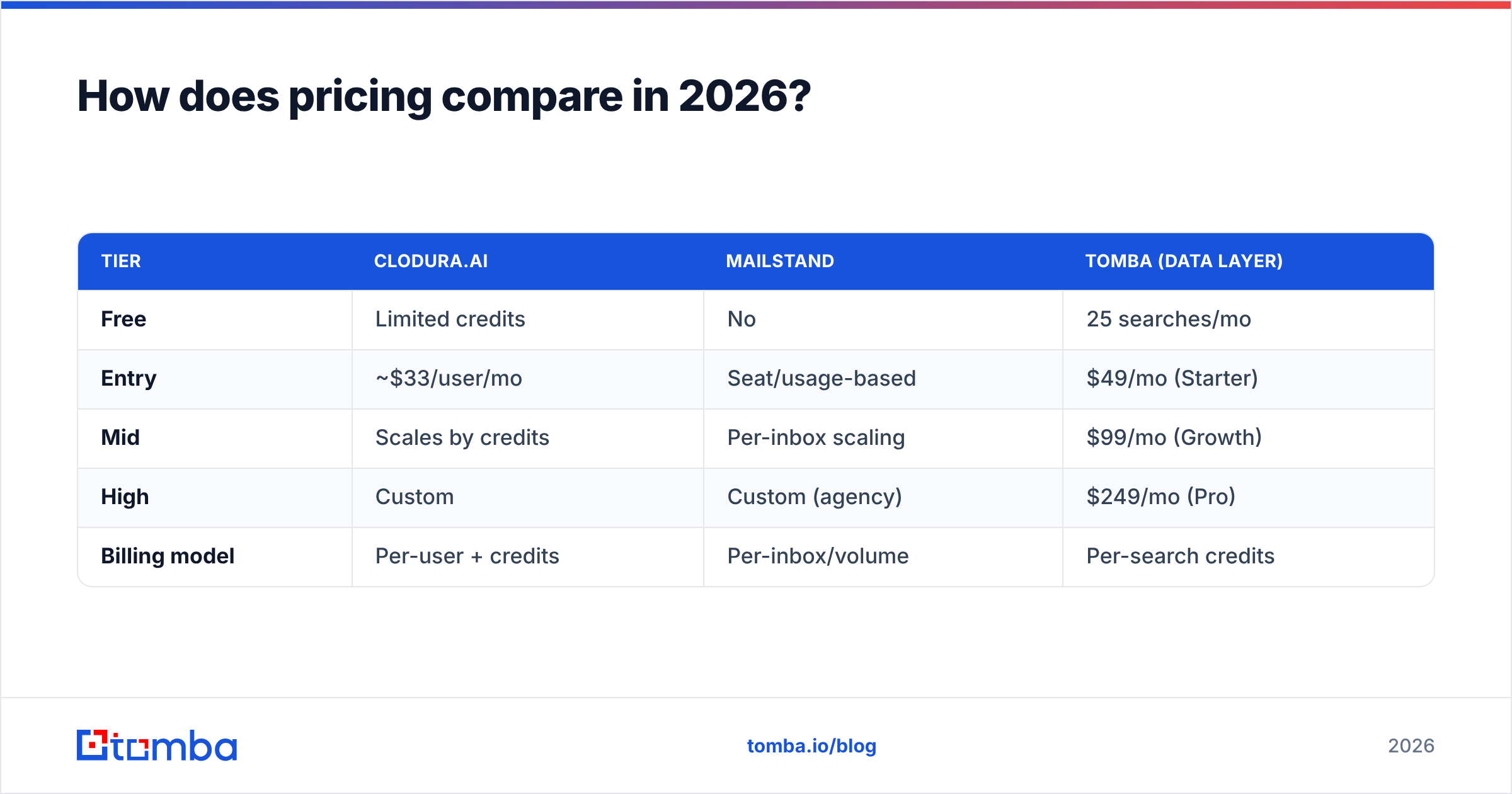
| Tier | Clodura.AI | Mailstand | Tomba (data layer) |
|---|---|---|---|
| Free | Limited credits | No | 25 searches/mo |
| Entry | ~$33/user/mo | Seat/usage-based | $49/mo (Starter) |
| Mid | Scales by credits | Per-inbox scaling | $99/mo (Growth) |
| High | Custom | Custom (agency) | $249/mo (Pro) |
| Billing model | Per-user + credits | Per-inbox/volume | Per-search credits |
A few honest notes. Clodura.AI's per-user-plus-credits model means costs climb as both your team and your search volume grow — two multipliers at once. Mailstand's pricing tracks the number of inboxes you connect, which is exactly what you want it to track if you're an agency, but it's pure overhead if you send from one or two domains. And a dedicated data layer like Tomba's pricing is credit-based, so you pay for lookups, not seats — which keeps cost tied to output rather than headcount.
The common mistake is assuming an all-in-one is cheaper because it's one invoice. Add up the credits you'll actually burn on mediocre data, then add the cost of the deliverability damage from bad sends, and the "bundled discount" often evaporates.
Which tool fits your team?#
Match the tool to the motion, not the marketing.
- You're a 2–10 person SDR team that needs lists and cadences fast. Clodura.AI's consolidation is reasonable as a starting point — but pair it with verification so your bounce rate stays sane. Don't trust any single bundled database blindly.
- You're an agency or high-volume sender managing many domains. Mailstand is close to non-negotiable. Inbox rotation and a unified reply view are what keep you out of spam folders at scale. Bring your own data.
- Accuracy and deliverability are your bottleneck. Lead with a dedicated email finder and verifier, then choose a sequencer and (if volume demands it) Mailstand on top. The data layer is the foundation; everything else is plumbing.
- You want the leanest possible stack. A focused finder + a single good sequencer beats an all-in-one whose data you don't fully trust. Fewer tools, but the right ones.
If you're cross-shopping platforms in this category, vendor-neutral review sites like G2 and Capterra are worth checking for current user-reported deliverability and data-quality scores — those move faster than any vendor's own page. And always pull the latest details straight from the source: Clodura.AI and Mailstand both publish current feature and pricing breakdowns.
What's the smartest 2026 outbound stack?#
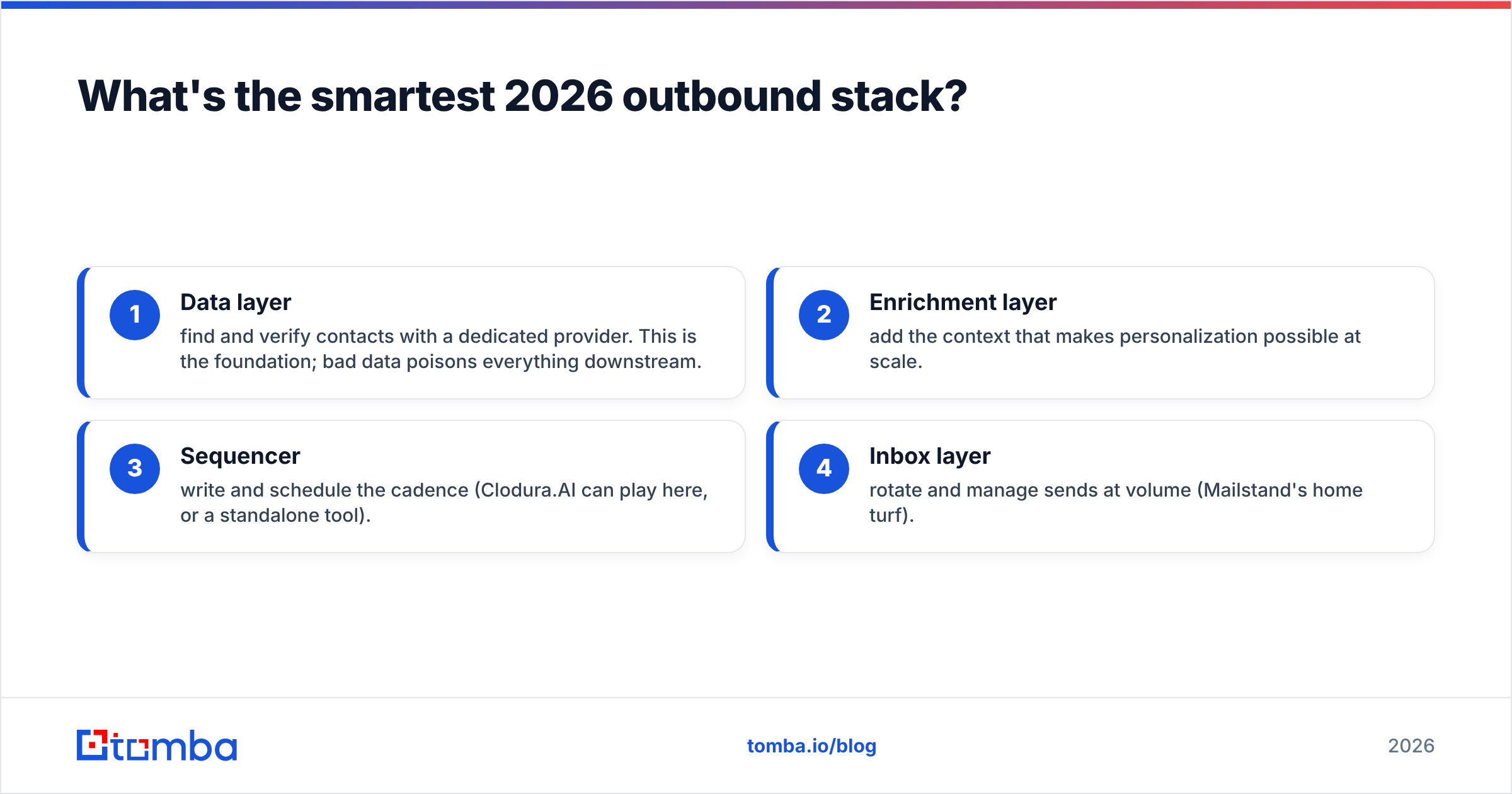
The winning pattern this year isn't "one platform to rule them all." It's a thin, accountable stack where each layer has one job and is measured on it:
- Data layer — find and verify contacts with a dedicated provider. This is the foundation; bad data poisons everything downstream.
- Enrichment layer — add the context that makes personalization possible at scale.
- Sequencer — write and schedule the cadence (Clodura.AI can play here, or a standalone tool).
- Inbox layer — rotate and manage sends at volume (Mailstand's home turf).
Notice that Clodura.AI and Mailstand occupy different slots in that stack. That's the clearest sign they were never really competitors — they're potential teammates, with a data provider sitting underneath both, keeping the whole thing accurate.
The bottom line#
Clodura.AI vs Mailstand is the wrong fight. Clodura.AI helps you find and sequence; Mailstand helps you deliver at scale. Choose Clodura.AI when you need an all-in-one starting point, choose Mailstand when inbox management is your scaling pain, and recognize that many teams need both — plus a data layer neither one nails.
That data layer is where your campaigns live or die. If your bounce rate is high, no amount of inbox rotation or clever sequencing will save you. Start with contacts you can actually reach.
Build the foundation right. Try the Tomba Email Finder to source and verify professional emails by name, company, or domain — with a free tier (25 searches/month) to test accuracy before you commit, and credit-based plans from $49/mo that scale with output, not seats. Get the data right first, and every layer above it works harder.
// get started
Find, verify and enrich your first contacts today
Start on the free plan with 25 searches a month, then scale when your team is ready.
Free plan · No credit card required · GDPR & CCPA
// about the author