How to Find a Personal Email Address: 9 Proven Methods
Personal Gmail and Outlook addresses are the hardest contacts to source. Here are nine methods that actually work in 2026, ranked by hit rate, cost, and legal risk.
TL;DR
- How to find a personal email address, in one line: resolve a known identifier, don't guess a name. Personal inboxes (gmail.com, outlook.com, proton.me) are not indexed the way work addresses are. Guessing patterns lands 5-15% of the time. On company domains it lands 60-80%.
- The best methods are reverse lookups on an identifier you already hold (phone, work email, social handle). Next come public sources the person published themselves (GitHub commits, WHOIS, newsletter footers). Then enrichment APIs that hold consumer records.
- Never send to an unverified personal address. Free-mail providers punish unknown senders harder than work mail servers do. A 15% bounce rate on a Gmail-heavy list can throttle your domain in days.
- In most B2B work you want the work address, not the personal one. GDPR treats a personal inbox as personal data, and the legitimate-interest defense is far weaker there.
- A realistic stack: identity first, waterfall enrichment second, verification always. Write down your lawful basis before you press send.
Finding someone's work email is close to a solved problem. Company domains publish patterns. Employees leak their addresses in press releases and conference bios. Any decent email finder can rebuild first.last@company.com with high confidence.
Personal email addresses are a different animal. There is no domain pattern to reverse-engineer. jsmith88@gmail.com, johnnysmith@gmail.com, and smith.j.1984@outlook.com are all equally likely, and none of them follow from the person's name. This guide shows how to find a personal email address, what the real hit rates look like, and where the legal line sits in 2026.
What counts as a "personal email address"?#
A personal email address sits on a consumer free-mail provider, or on a private domain the person owns. It is used outside an employer relationship. In practice that means:
- Free-mail addresses — gmail.com, outlook.com, hotmail.com, yahoo.com, icloud.com, proton.me, gmx.de. Roughly 70% of all personal addresses you'll meet.
- Vanity domains —
hello@johnsmith.com. Usually owned by freelancers, creators, consultants, and founders between companies. - Aliased addresses — Gmail plus-addressing (
john+signup@gmail.com), Apple Hide My Email relays, SimpleLogin or Firefox Relay forwards. These deliver, but many are abandoned. - Legacy ISP addresses — comcast.net, bt.com, orange.fr. Still common in some regions and age brackets, and far more likely to be dead.
- Role-free private addresses — no
info@,sales@, orsupport@here. If it's a role account, it isn't personal.
The type matters because each one has its own discovery path. You can find a vanity domain through domain search and WHOIS. You cannot find a Gmail address that way. Either you locate a place the person published it, or you query a database that already recorded it.
Why is finding a personal email address so much harder?#
Three structural reasons.
No pattern to infer. Company domains have a format. Gmail has 1.8 billion arbitrary local parts. A permutation tool builds 40 candidates for a corporate domain. Point it at gmail.com and you get 40 useless guesses, because there is no format rule to narrow them down.
No SMTP feedback. This one catches people out. Google, Microsoft, and Yahoo accept mail for local parts that don't exist. They bounce it later, or drop it. So the standard trick — ask the MX server whether the mailbox exists — returns "unknown" on most consumer providers. You cannot test your guesses cheaply.
Deliberate separation. People keep a personal inbox clean on purpose. Apple's Hide My Email, hard filtering, and a decade of spam have trained users well. They hand out a burner address and save the real one for people they know.

That last point has a cost. Guess and send, and you will bounce. Blasting 500 permuted Gmail addresses is the fastest way to burn your sender reputation, because free-mail providers weigh unknown-user bounces heavily against new senders.
How do the main methods compare?#
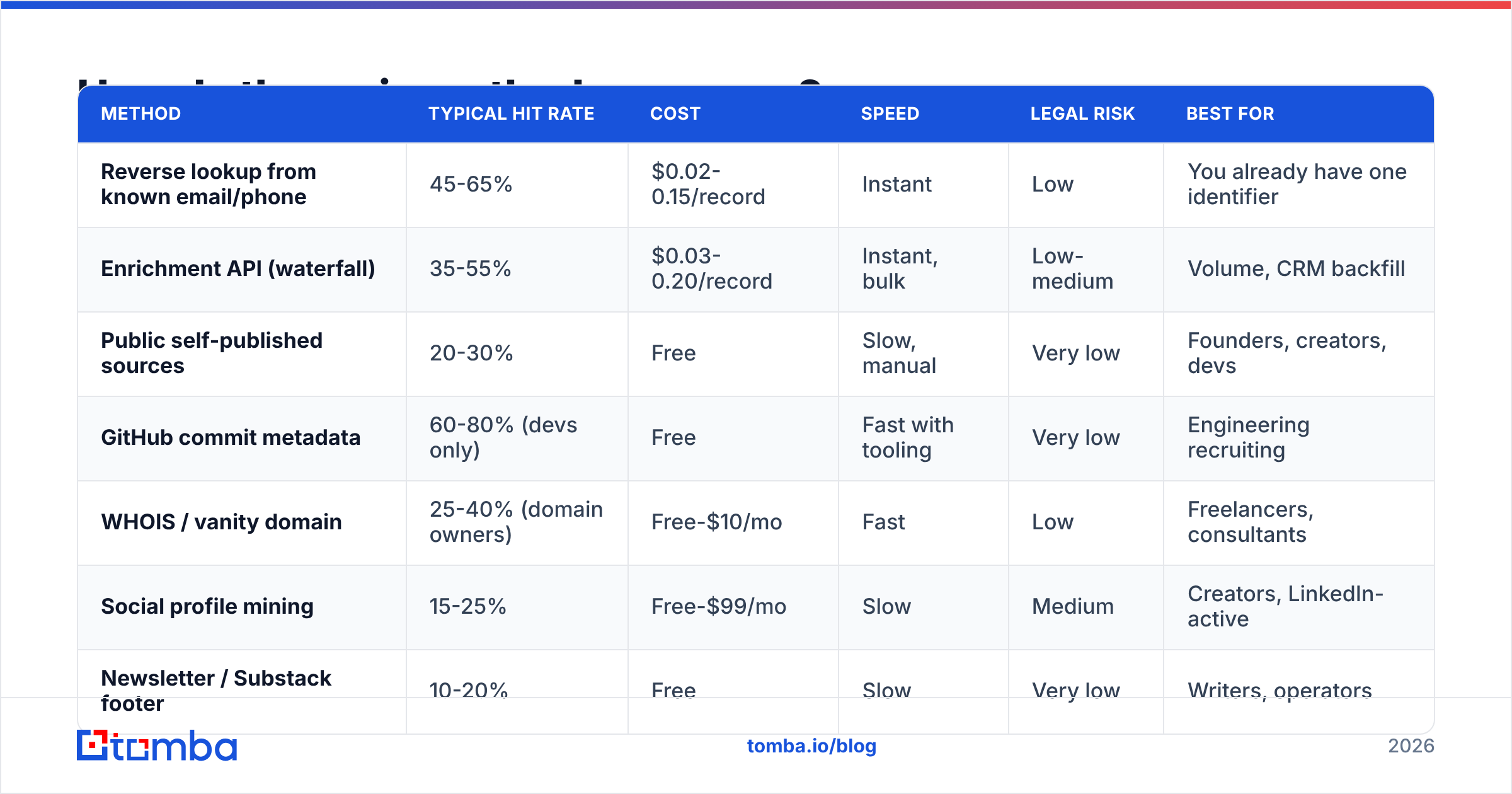
Here's the honest scoreboard. Hit rates assume a B2B-adjacent target with some public footprint, not a random consumer.
| Method | Typical hit rate | Cost | Speed | Legal risk | Best for |
|---|---|---|---|---|---|
| Reverse lookup from known email/phone | 45-65% | $0.02-0.15/record | Instant | Low | You already have one identifier |
| Enrichment API (waterfall) | 35-55% | $0.03-0.20/record | Instant, bulk | Low-medium | Volume, CRM backfill |
| Public self-published sources | 20-30% | Free | Slow, manual | Very low | Founders, creators, devs |
| GitHub commit metadata | 60-80% (devs only) | Free | Fast with tooling | Very low | Engineering recruiting |
| WHOIS / vanity domain | 25-40% (domain owners) | Free-$10/mo | Fast | Low | Freelancers, consultants |
| Social profile mining | 15-25% | Free-$99/mo | Slow | Medium | Creators, LinkedIn-active |
| Newsletter / Substack footer | 10-20% | Free | Slow | Very low | Writers, operators |
| Direct ask (form, DM, referral) | 60-90% when it lands | Free | Slowest | None | High-value targets |
| Name permutation + guessing | 5-15% | Free | Fast | High (bounces) | Almost nothing |
Two things stand out. First, the free methods are not cheap. They are slow, and slow costs real money past a handful of contacts. Second, permutation guessing is the default advice in most listicles, and it is the worst option on this table. It works on corporate domains. It does not carry over.
How to find a personal email address: the nine methods, ranked by yield#
1. Reverse lookup from an identifier you already hold#
Do you have the work email, the phone number, or a social profile URL? Then you have a key into an identity graph. A reverse email lookup takes a known address and returns the person record. That record often includes a second, personal address. This path yields the most, because you are resolving a known identity instead of searching a namespace.
The same logic runs from a phone number. A phone finder result and an email record usually point to the same person entity in a well-built graph.
2. Enrichment APIs and waterfall providers#
Enrichment vendors hold consumer records from opt-in signups, public filings, and partner data. You submit a name plus a company or a LinkedIn URL. You get back whatever the graph has. Coverage swings hard by region. US coverage runs much deeper than EU coverage, largely because GDPR has pruned European consumer datasets.
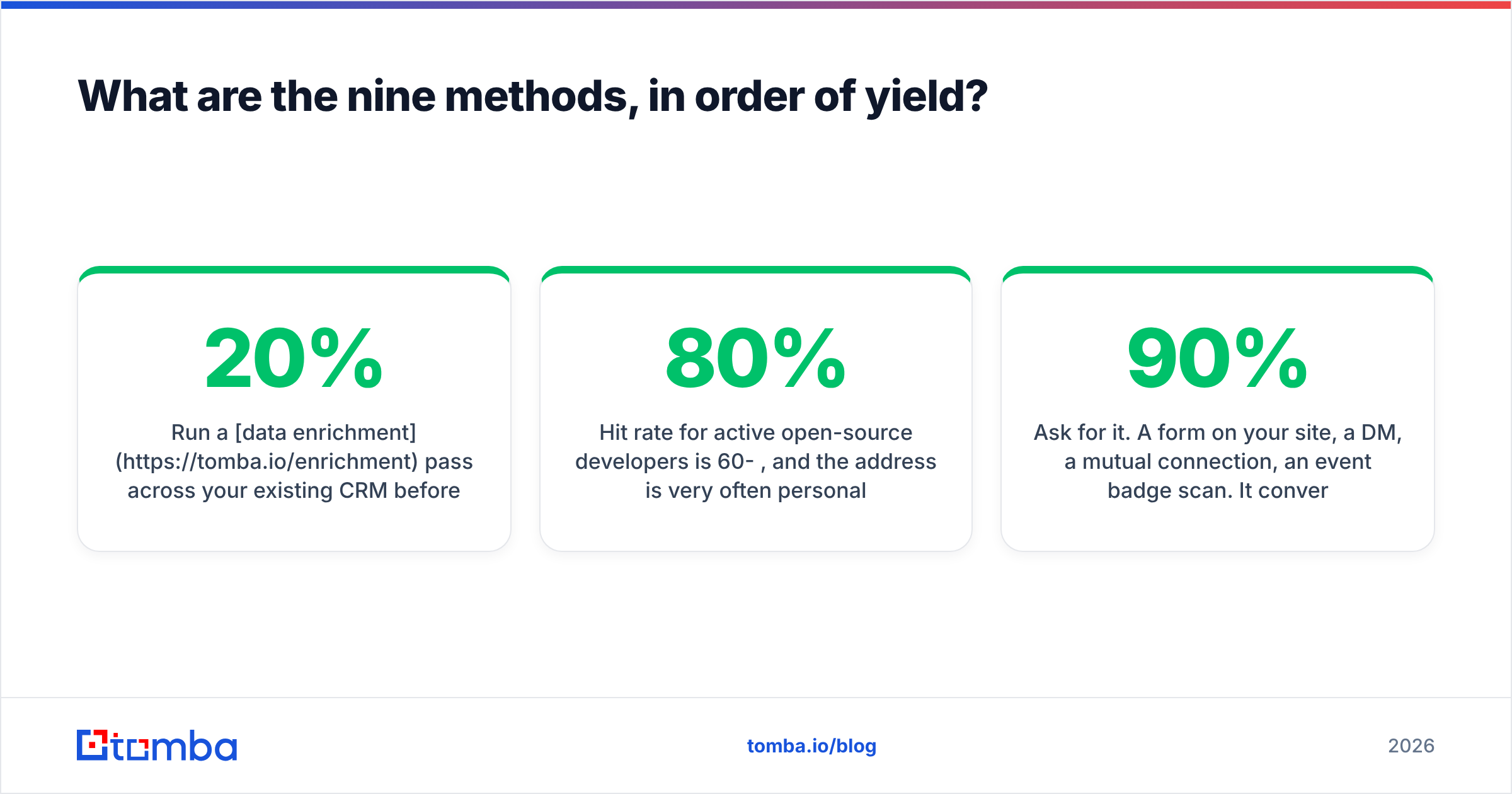
Run a data enrichment pass over your own CRM before you buy anything new. In most databases, 10-20% of contacts already carry a second address in a form-fill field nobody ever mapped.
3. GitHub and open-source commit metadata#
Every Git commit carries an author email. Developers who never turned on GitHub's email privacy setting have published their address in every push they've made. Check https://api.github.com/users/<username>/events/public and read the commit author fields. Or clone a repo and run git log --format='%ae' | sort -u.
For active open-source developers the hit rate runs 60-80%, and the address is often personal rather than work. This is the best method for technical recruiting, and almost nobody uses it.
4. WHOIS and vanity domain records#
If your target owns a domain, WHOIS may show the registrant contact. Privacy proxies like WhoisGuard and Domains By Proxy have made this weaker than it was ten years ago. Still, plenty of older registrations carry real data, and historical WHOIS archives keep pre-privacy records. If the domain resolves, a company email search will map the addresses actually in use on it.
5. Self-published public sources#
People publish their personal address more often than they think:
- Conference speaker bios and slide decks (check the last slide)
- Academic papers — the corresponding-author field is almost always a real, watched address
- Newsletter and Substack footers — the reply-to on a personal newsletter is usually personal
- Podcast show notes and guest one-sheets
- Job boards and portfolio sites — designers and freelancers list contact details directly
- Court filings, patent applications, and business registrations — public record in most places
Google search operators still work here: "john smith" (gmail.com OR outlook.com) site:*.edu or "@gmail.com" "john smith" filetype:pdf.
6. Social profile mining#
Instagram business accounts show a contact email on the profile. X/Twitter bios sometimes carry one. LinkedIn's contact-info panel shows an address when the person shares it with connections. The LinkedIn finder approach pulls that data where it is visible. Note that LinkedIn's user agreement bans unauthorized scraping, so pick tooling that respects the platform's terms.
7. Newsletter double-opt-in reply#
Subscribe to the person's newsletter, then reply to the welcome email. If they run it from a personal address, you now have it. Better still, you have a warm, permissioned thread instead of a cold one. It's slow, but the reply rate afterward is in another league.
8. The direct ask#
Ask for it. Use a form on your site, a DM, a mutual connection, or an event badge scan. It converts at 60-90% when it lands. It produces a truly opted-in contact. And it is the only method with zero compliance exposure. For a high-value target, a week spent on a warm intro beats a database lookup that returns an address the person ignores.
9. Permutation and pattern guessing#
Last, and only for vanity domains where a format really exists. An email permutator building candidates for johnsmith.com is fair game. The same tool pointed at gmail.com is a bounce generator. If you use it, verify every candidate first. Never guess and blast at the same time.

How do you verify a personal email once you find it?#
Verification is where personal addresses split hardest from corporate ones. It is also where most guides go quiet.
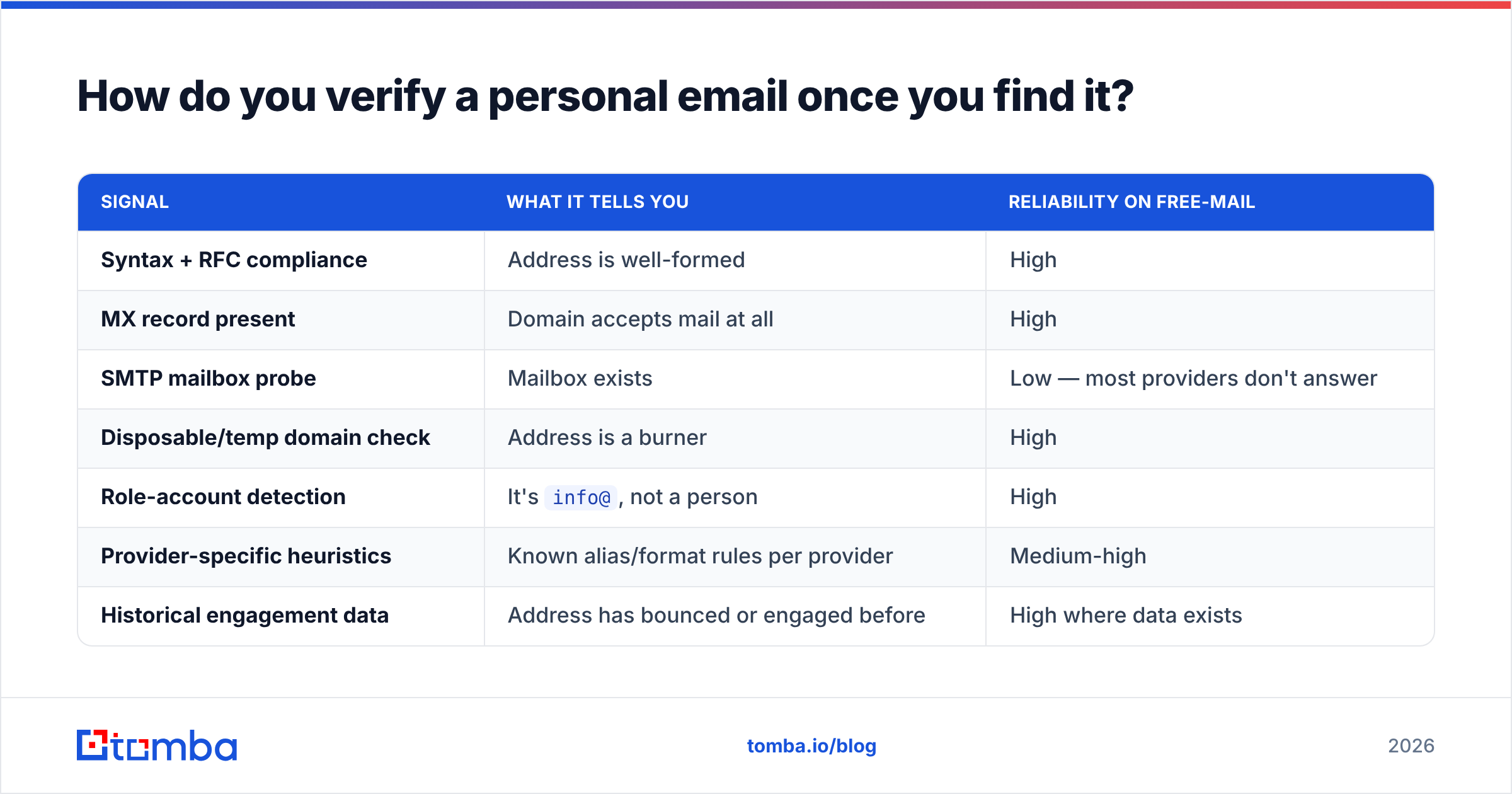
Standard SMTP checks ask the receiving server whether a mailbox exists. Corporate Exchange and Google Workspace domains usually answer honestly. Consumer Gmail, Outlook.com, and Yahoo mostly do not. They accept and discard, rate-limit probes, or send back a generic reply. So a raw "valid" verdict on a free-mail address tells you much less than the same verdict on a company domain.
A good email verifier stacks signals instead:
| Signal | What it tells you | Reliability on free-mail |
|---|---|---|
| Syntax + RFC compliance | Address is well-formed | High |
| MX record present | Domain accepts mail at all | High |
| SMTP mailbox probe | Mailbox exists | Low — most providers don't answer |
| Disposable/temp domain check | Address is a burner | High |
| Role-account detection | It's info@, not a person |
High |
| Provider-specific heuristics | Known alias/format rules per provider | Medium-high |
| Historical engagement data | Address has bounced or engaged before | High where data exists |
The practical rule on free-mail: read "valid" as "probably deliverable" and stage your sending. Send a small batch. Watch the bounce rate. Scale the segment only if it comes in under 2%. The same staged approach applies to catch-all verification on vanity domains, since catch-alls accept everything and tell you nothing.
For one address, a free email checker is enough. For a list, run it through bulk verify and drop anything below your confidence threshold. Don't gamble on it.
Is it legal to find someone's personal email address?#
Short answer: finding it is usually legal. Using it for marketing often is not. People mix up the two questions all the time.
Under GDPR, a personal email address is personal data. To process it, you need a lawful basis. Legitimate interest can cover B2B outreach to a work address, where the person's role makes your message relevant to their job. That argument is much weaker for a personal inbox, because you are contacting the individual, not the employee. Several EU regulators have said exactly this. Read the EDPB guidance on legitimate interests before you build a program on it. Add the ePrivacy Directive on top, and most EU member states require consent first for unsolicited marketing email to individuals.
Under CAN-SPAM (US), unsolicited commercial email is allowed with conditions. Don't use deceptive headers or subject lines. Label the message as an ad where required. Include a valid physical postal address. Honor opt-outs within 10 business days. The FTC's CAN-SPAM compliance guide is short and worth reading in full.
Under CASL (Canada) and similar rules, you usually need express or implied consent before the first message. Implied consent from "conspicuous publication" is narrower than people assume. The address must be published without a note declining unsolicited messages, and your message must be relevant to that person's role.
Three practical guardrails, whatever the jurisdiction:
- Prefer the work address for work outreach. It's easier to find, easier to justify, and it performs better anyway.
- Document your source. Log where each address came from. If a complaint or a data request arrives, "our vendor had it" is not an answer.
- Honor deletion instantly. Keep one suppression list across every sending domain and tool you run.
None of this is legal advice. But if your program leans on cold-emailing personal inboxes at scale, talk to counsel before you scale it, not after.
What does a working stack look like?#
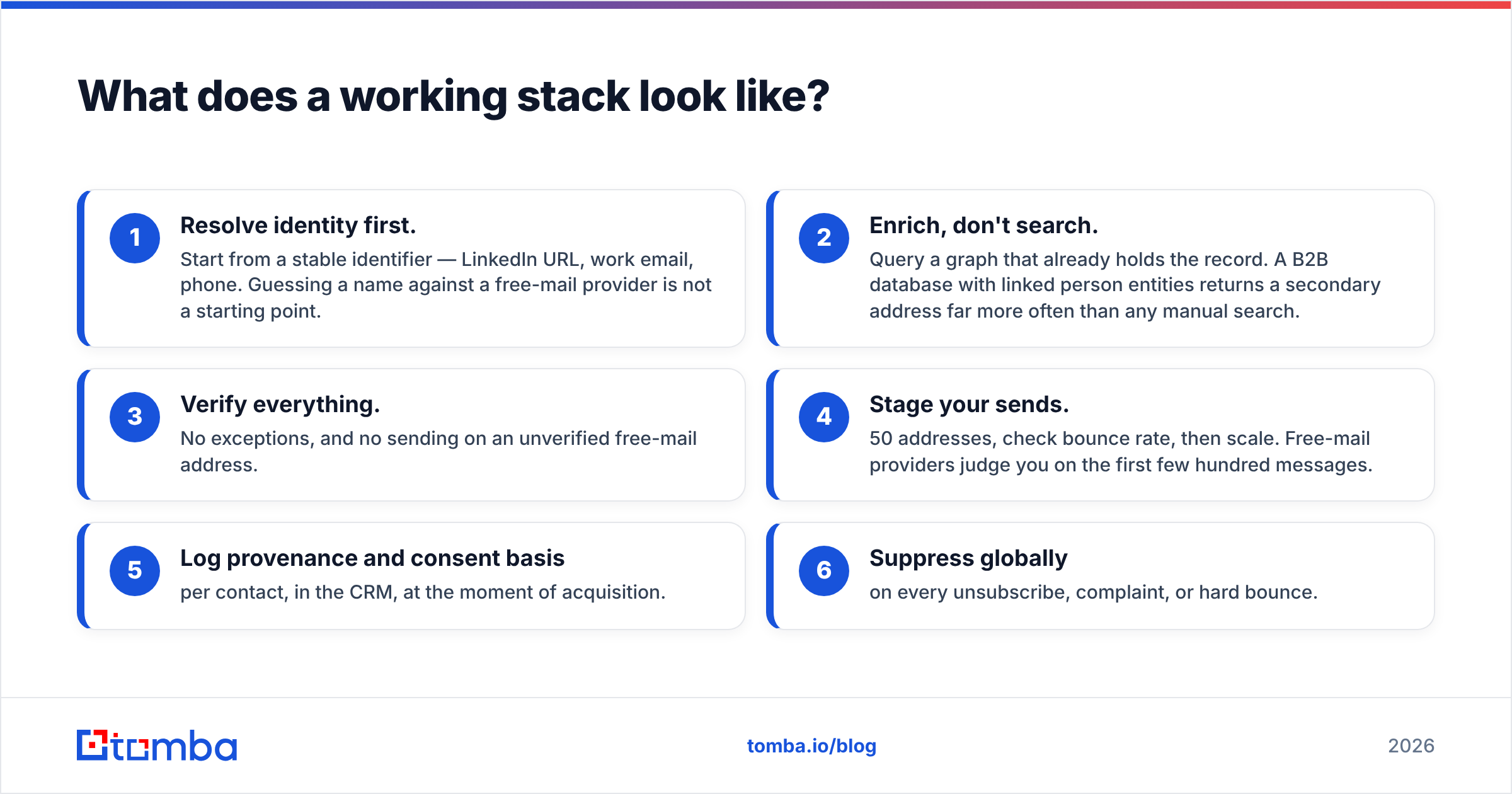
For a team doing this at volume, this sequence holds up:
- Resolve identity first. Start from a stable identifier: a LinkedIn URL, a work email, a phone number. Guessing a name against a free-mail provider is not a starting point.
- Enrich, don't search. Query a graph that already holds the record. A B2B database with linked person entities returns a second address far more often than any manual search.
- Verify everything. No exceptions. Never send to an unverified free-mail address.
- Stage your sends. Try 50 addresses, check the bounce rate, then scale. Free-mail providers judge you on the first few hundred messages.
- Log provenance and consent basis per contact, in the CRM, at the moment you acquire it.
- Suppress globally on every unsubscribe, complaint, or hard bounce.
Teams that make personal-email outreach work treat it as an identity problem with a compliance layer. Teams that fail treat it as a permutation exercise, then wonder why their domain got throttled in week two.
One note on cost: verify before you commit budget. Run a small sample through a free tier. That gives you the coverage rate for your region and your segment, which is the only number that matters. Published coverage percentages are averages across everyone else's use case. Check Tomba pricing against your own sample-tested hit rate before you move to a paid plan. The Free tier gives you 25 searches a month, which is enough to run that test properly, and Starter at $49/mo covers most solo and small-team volumes.
Where should you start?#
If you hold any identifier at all — a work email, a company domain, a LinkedIn profile — start there and resolve outward. That one decision moves you from a 10% hit rate to a 50% one, and it is the shortest answer to how to find a personal email address without burning your domain.
The Tomba Email Finder handles the resolution step. Feed it a name and domain, a LinkedIn URL, or an existing address. It returns a scored, verified contact record with sources attached, so you know where each address came from before you use it. Pair it with the email verifier before you send anything, and stage the first batch.
// get started
Find, verify and enrich your first contacts today
Start on the free plan with 25 searches a month, then scale when your team is ready.
Free plan · No credit card required · GDPR & CCPA
// about the author