Email Bounce Rate in 2026: Cut Hard and Soft Bounces
Hard bounces, soft bounces, and a creeping bounce rate quietly wreck your sender reputation. Here's how to diagnose, fix, and keep email bounces under 2% in 2026.

Your open rates look fine, your copy is tight, and yet replies have gone quiet. Before you blame the message, check the bounce report. A rising email bounce rate is the single fastest way to torch a sending domain — and most teams don't notice until the inbox provider has already throttled them.
This guide breaks down what counts as a bounce, what a healthy rate looks like in 2026, and a repeatable framework to keep bounces low without slowing your outbound down.
TL;DR#
- A hard bounce is permanent (the mailbox doesn't exist); a soft bounce is temporary (full inbox, server down). Hard bounces are the ones that hurt your reputation.
- Keep your overall email bounce rate under 2%. Above 5% and mailbox providers start filtering or blocking you.
- Most bounces come from stale, mistyped, or never-verified addresses — not from bad luck. Verification at the point of collection fixes ~80% of the problem.
- Mailbox providers (Gmail, Outlook) read your bounce rate as a spam signal. High bounces drag down deliverability for every email you send, not just the bad ones.
- Fix the input (clean lists), monitor the output (Postmaster Tools), and you rarely have to think about bounces again.
What is an email bounce rate?#
Your email bounce rate is the percentage of messages that get rejected by the recipient's mail server instead of being delivered. The formula is simple:
Bounce rate = (bounced emails ÷ total emails sent) × 100
Send 1,000 emails, have 30 come back undelivered, and your bounce rate is 3%. That number matters far more than it looks, because mailbox providers treat it as a proxy for how carefully you manage your list. A sender who blasts thousands of dead addresses looks exactly like a spammer — so the filters respond the same way.
Think of it like a returned-mail pile at the post office. One or two wrong addresses a month is normal. A bin overflowing with "no such person" slips tells the postal service you bought a junk mailing list, and they start treating everything from you as suspect.
What's the difference between a hard bounce and a soft bounce?#
Not all bounces are equal. The distinction decides how you should react.
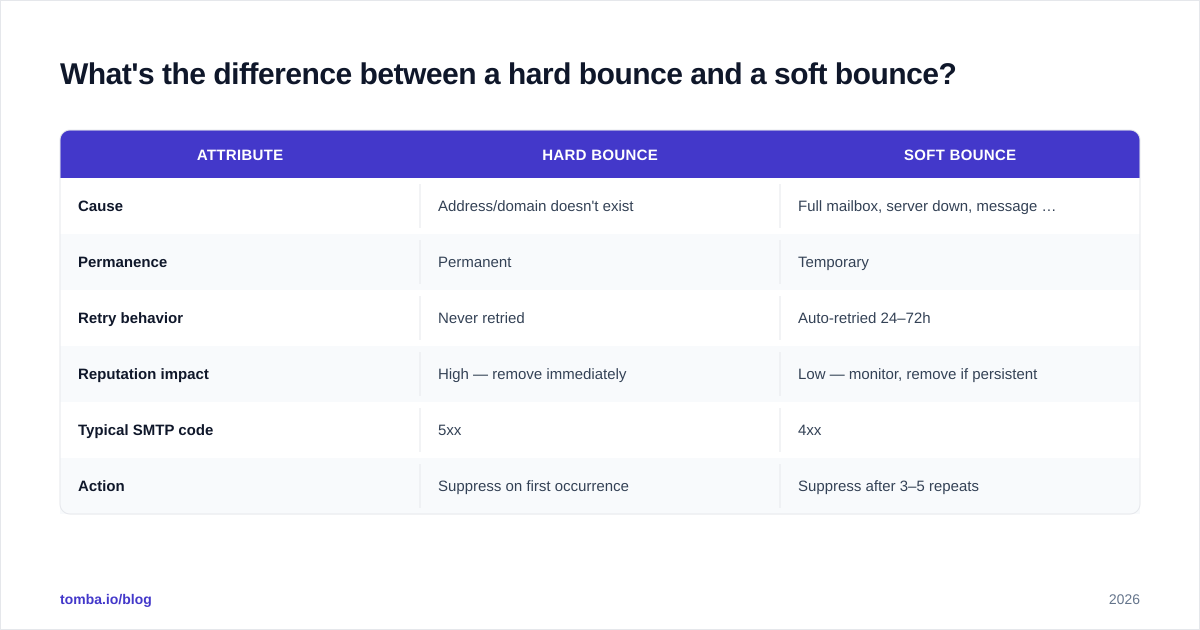
A hard bounce is a permanent failure. The address doesn't exist, the domain is invalid, or the server has flatly refused you. These never succeed on retry, and each one is a black mark against your sender reputation.
A soft bounce is temporary. The mailbox is full, the server is briefly down, or the message is too large. Mail servers retry soft bounces automatically for 24–72 hours before giving up. A few soft bounces are routine; a pattern of them to the same address means it's effectively dead and should be treated like a hard bounce.
| Attribute | Hard bounce | Soft bounce |
|---|---|---|
| Cause | Address/domain doesn't exist | Full mailbox, server down, message too big |
| Permanence | Permanent | Temporary |
| Retry behavior | Never retried | Auto-retried 24–72h |
| Reputation impact | High — remove immediately | Low — monitor, remove if persistent |
| Typical SMTP code | 5xx | 4xx |
| Action | Suppress on first occurrence | Suppress after 3–5 repeats |
The practical rule: suppress hard bounces on the first hit, and suppress soft bounces once they repeat across several sends. Keeping a hard-bounced address "just in case" is how reputation damage compounds.
What is a good email bounce rate in 2026?#
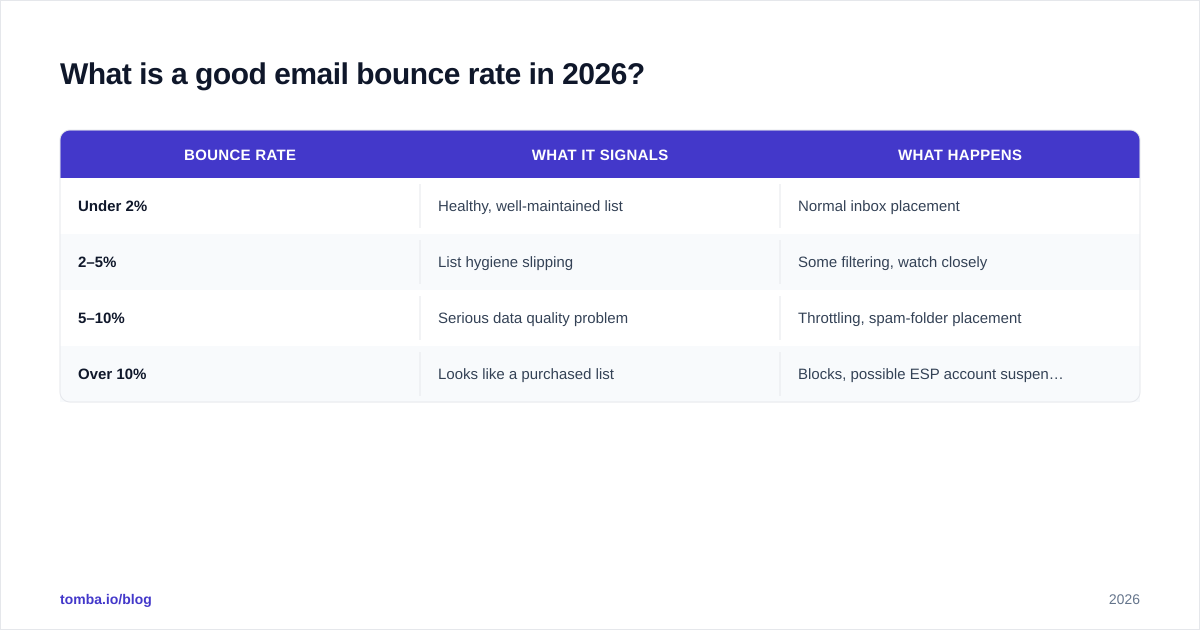
Aim for under 2%. Most reputable email service providers flag anything above that, and the major mailbox providers tighten the screws as you climb.
Here's how the bands break down in practice:
| Bounce rate | What it signals | What happens |
|---|---|---|
| Under 2% | Healthy, well-maintained list | Normal inbox placement |
| 2–5% | List hygiene slipping | Some filtering, watch closely |
| 5–10% | Serious data quality problem | Throttling, spam-folder placement |
| Over 10% | Looks like a purchased list | Blocks, possible ESP account suspension |
In 2026 the tolerance is tighter than it used to be. After Google and Yahoo rolled out stricter bulk-sender requirements, a sustained high bounce rate is one of the quickest ways to get your domain reputation downgraded — and once it's down, email deliverability suffers across your whole program, including the addresses that are valid.
If you send cold outbound, hold yourself to an even stricter bar. Cold lists carry more risk, so a 1% ceiling is a healthier target there.
Why do emails bounce in the first place?#
Bounces feel random, but the causes are predictable and mostly preventable:
- Invalid or mistyped addresses —
john@gmial.com, typos from web forms, fake addresses entered to grab a lead magnet. - Stale data — B2B email decays roughly 22–30% per year as people change jobs. A list that was clean 18 months ago is now full of dead mailboxes.
- Role and catch-all addresses —
info@,sales@, and catch-all domains accept or reject unpredictably and inflate bounces. - Authentication gaps — missing or broken SPF records, DKIM, or DMARC make servers reject you outright.
- Aggressive spam filters — some receiving servers block first and ask questions never, especially if your reputation is already shaky.
- Full or inactive mailboxes — the soft-bounce category that turns permanent over time.
Notice the theme: most of these are data problems, not infrastructure problems. You can buy the best sending platform on the market and still bounce 8% if the underlying addresses are bad.
How do you reduce your email bounce rate?#
The fix is a loop, not a one-time cleanup: verify on the way in, monitor on the way out, and suppress aggressively in between.
1. Verify addresses before you send#
This is the highest-leverage move by a wide margin. Running addresses through an email verifier before they ever hit your sequence catches the invalids, the typos, and the dead mailboxes before they can bounce. For lists you've collected over months, a bulk verify pass clears out the decay in one shot.
Verification checks syntax, confirms the domain has live mail servers, and pings the mailbox at the SMTP level without sending anything. A good verifier will return a clear deliverable / risky / undeliverable verdict so you can cut the undeliverables and decide what to do with the risky ones.
2. Handle catch-all domains deliberately#
Catch-all domains accept every address, so a standard check can't confirm whether a specific mailbox is real. These are the single biggest source of "unknown" results. Run them through a dedicated catch-all verifier so you're segmenting risk instead of guessing — send to the confirmed ones first, treat the rest as lower priority.
3. Fix authentication#
Set up SPF, DKIM, and DMARC correctly for your sending domain. This won't fix bad addresses, but missing authentication causes bounces and spam-foldering that have nothing to do with list quality. It's table stakes after the 2024–2025 sender rule changes, and HubSpot's deliverability documentation covers the setup well if you're starting from scratch.
4. Monitor with Postmaster Tools#
You can't manage what you can't see. Google Postmaster Tools shows your domain reputation, spam rate, and delivery errors straight from Gmail's side. Watch it weekly. A bounce rate creeping up usually shows up here before it becomes a deliverability crisis.
5. Suppress and never re-send#
Every ESP keeps a suppression list. Use it. Once an address hard bounces, it should never receive another message from you — re-sending to known-dead addresses is exactly the behavior that gets domains blocklisted. Automate this so it doesn't depend on someone remembering.

Does a high bounce rate really hurt deliverability that much?#
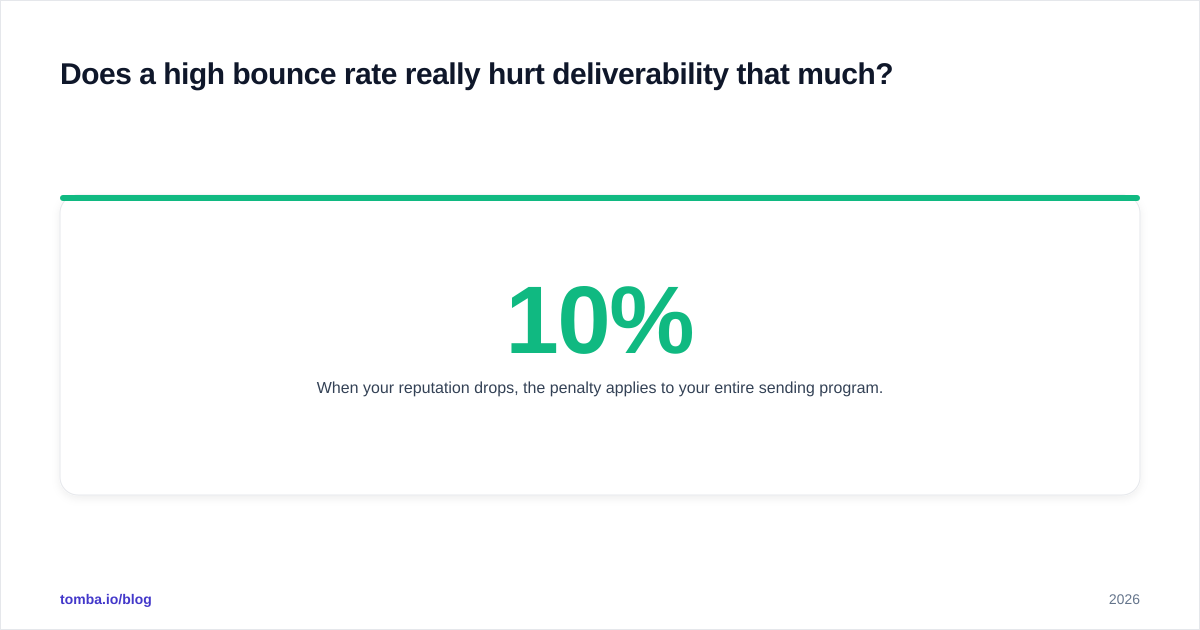
Yes — and this is the part teams underestimate. Mailbox providers don't evaluate each email in isolation. They score your domain and IP reputation, and bounce rate is one of the loudest inputs to that score.
When your reputation drops, the penalty applies to your entire sending program. The clean, engaged, perfectly valid contacts on your list start landing in spam alongside the junk. So a 10% bounce rate doesn't just waste 10% of your sends — it quietly suppresses the other 90% too. According to the bounce message standards baked into SMTP, every rejection is logged and counted by the receiving server, and providers aggregate that history over weeks.
That's why bounce management is a deliverability issue first and a data-hygiene issue second. The two are the same problem wearing different hats.
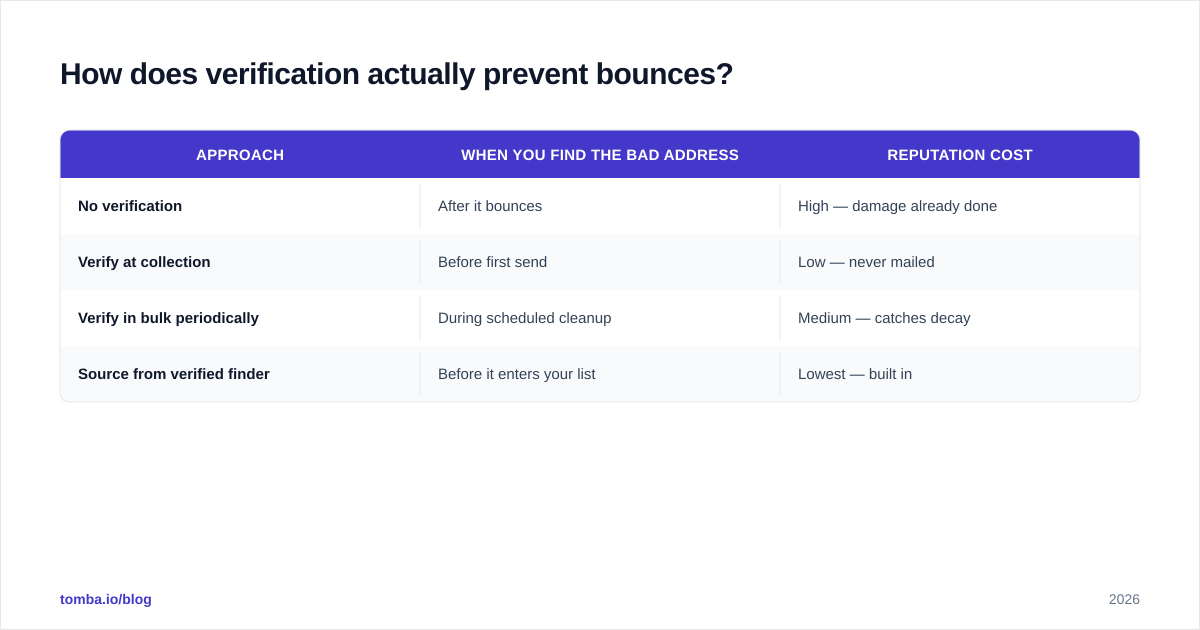
How does verification actually prevent bounces?#
Prevention beats cleanup because the damage from a bounce is already done by the time you see the report — the rejection has been recorded against your reputation.
Verification moves the check before the send. When you collect an address — from a form, a domain search, an import, or an enrichment job — you validate it on the spot. Bad addresses get caught at the door instead of being mailed and bounced.
This is also why sourcing addresses from a verified provider matters more than scraping them yourself. When you find email addresses through a tool that verifies at the source, the bounce risk is handled before the data ever reaches your sequence. You're not cleaning up a mess; you're never making one.
| Approach | When you find the bad address | Reputation cost |
|---|---|---|
| No verification | After it bounces | High — damage already done |
| Verify at collection | Before first send | Low — never mailed |
| Verify in bulk periodically | During scheduled cleanup | Medium — catches decay |
| Source from verified finder | Before it enters your list | Lowest — built in |
The strongest setup combines all three: source clean, verify at collection, and run periodic bulk passes to catch natural decay.
What's a simple monthly bounce-control routine?#
You don't need a full-time deliverability engineer. A short monthly checklist keeps the problem solved:
- Bulk-verify any list older than 90 days before its next send.
- Review Postmaster Tools for reputation and bounce trends.
- Audit your suppression list — confirm hard bounces are actually being blocked.
- Re-check catch-all segments that may have changed status.
- Confirm SPF/DKIM/DMARC still pass (they break during DNS changes more often than you'd think).
Fifteen minutes a month here saves you from the weeks-long reputation-recovery slog that follows a deliverability collapse.
The bottom line#
A healthy email bounce rate isn't luck — it's the output of a clean list and basic monitoring. Keep hard bounces out at the source, suppress them ruthlessly when they slip through, watch your reputation in Postmaster Tools, and your bounce rate stays boringly low. Boring is exactly what you want from a bounce report.
Most of the work happens before you ever hit send. If your bounce rate is climbing, the fastest fix is to stop adding bad addresses in the first place. Tomba Email Finder finds professional email addresses by domain, name, or company and verifies them at the source, so the contacts entering your sequences are deliverable before you mail them. Pair it with the built-in email verifier for periodic list cleaning, start free with 25 searches a month, and scale up on the Starter plan at $49/mo when you're ready. Clean inputs, low bounces, inbox placement that holds.
// get started
Find, verify and enrich your first contacts today
Start on the free plan with 25 searches a month, then scale when your team is ready.
Free plan · No credit card required · GDPR & CCPA
// about the author