Email Finding and Verification: The 2026 Sales Hub Guide
A practical 2026 playbook for email finding and verification — how the two stages work together, what accuracy really means, and how to build a clean B2B list that lands in the inbox.
TL;DR
- Email finding and verification are two different jobs: finding gets you a candidate address, verification confirms it can actually receive mail. You need both.
- Skipping verification is the fastest way to wreck a sending domain — anything over a ~2% bounce rate starts dragging your sender reputation down.
- Accuracy claims ("99% accurate") only mean something when they're tied to a verification method (SMTP check, catch-all handling, deliverability score), not a marketing slide.
- A clean workflow is: discover by domain or name → verify each address → segment catch-alls separately → enrich → send.
- Tomba covers both stages — finder plus verifier plus catch-all handling — on one free-to-start plan, which is why it shows up well in head-to-head accuracy tests.
What is email finding and verification?#
Email finding and verification is the two-step process of (1) discovering a prospect's professional email address and (2) confirming that the address is real and deliverable before you send anything to it. Think of it like getting a phone number and then checking the line isn't disconnected — having the digits is useless if nobody picks up.
The two stages solve different problems. Finding answers "what is this person's email?" using public signals: the company's domain, known email patterns (first.last@, flast@, first@), web sources, and historical data. Verification answers "will mail to this address actually land?" by checking the format, the domain's MX records, and — where possible — pinging the mail server over SMTP to see if the mailbox exists.
Sales teams conflate the two constantly, and it costs them. You can have a perfectly found address that is months out of date because the person left the company. You can also have a syntactically valid address sitting on a catch-all domain that accepts everything and confirms nothing. Treating finding and verification as one button is how lists rot.
Why does verification matter so much in 2026?#
Because mailbox providers got stricter, and the penalty for a dirty list is now immediate. Google and Yahoo's bulk-sender rules pushed required complaint and authentication thresholds onto everyone, and a high bounce rate is one of the loudest negative signals you can send. When too many of your messages hit dead addresses, providers read it as "this sender doesn't know who they're emailing" and quietly route you to spam.
The math is unforgiving. If you send 1,000 cold emails to an unverified list with a 15% invalid rate, that's 150 hard bounces in one campaign — enough to damage email deliverability for every legitimate prospect on the same domain. Verification is the cheapest insurance you can buy against that.

Accuracy is the headline metric, but read it carefully. A vendor that says "99% accurate" without telling you how it measured that number is selling a slide, not a result. Real accuracy is the share of addresses that (a) exist and (b) accept mail, validated against a live SMTP response — not a guess based on pattern matching alone. Tools that surface a confidence score per address, and flag catch-alls honestly, are the ones worth trusting.
How does the email finding stage work?#
Finding works from one of two directions: you either know the company, or you know the person.
Domain-first (you know the company). You have stripe.com and want everyone in their marketing team. A domain search crawls public sources and known records for that domain and returns the addresses it can attribute, along with the email pattern the company uses. This is how you build a target account list from scratch.
Name-first (you know the person). You have "Jane Okafor, VP Marketing at Stripe" and need her address. An email finder takes the name plus the domain, applies the company's detected pattern, and validates the most likely candidate. This is the workhorse for ABM and one-to-one outreach.
Both approaches lean on the same underlying asset: data sources. The breadth and freshness of where a tool pulls from — public web, crawled pages, contributed data, historical patterns — sets the ceiling on what it can find. It's worth knowing where the data comes from before you trust a result, because a finder is only as current as its last crawl.
How does the verification stage work?#
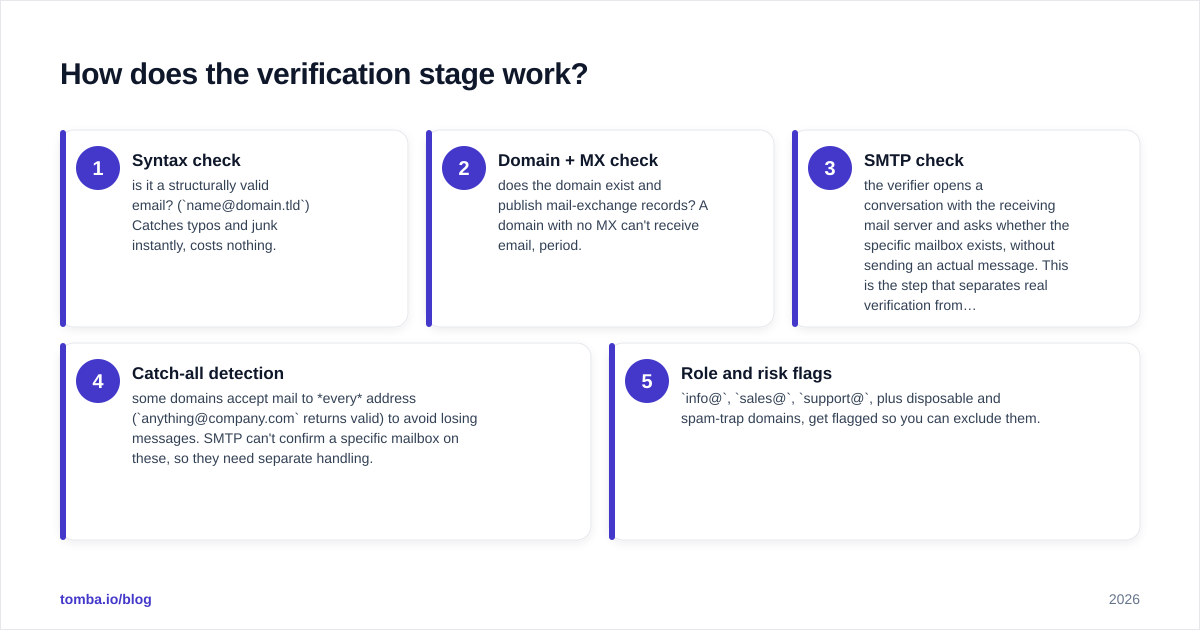
Verification runs a layered set of checks, cheapest first, and stops escalating once an address fails:
- Syntax check — is it a structurally valid email? (
name@domain.tld) Catches typos and junk instantly, costs nothing. - Domain + MX check — does the domain exist and publish mail-exchange records? A domain with no MX can't receive email, period.
- SMTP check — the verifier opens a conversation with the receiving mail server and asks whether the specific mailbox exists, without sending an actual message. This is the step that separates real verification from format-checking.
- Catch-all detection — some domains accept mail to every address (
anything@company.comreturns valid) to avoid losing messages. SMTP can't confirm a specific mailbox on these, so they need separate handling. - Role and risk flags —
info@,sales@,support@, plus disposable and spam-trap domains, get flagged so you can exclude them.
A good email verifier returns not just pass/fail but a status (deliverable, risky, undeliverable, unknown) so you can decide your own risk tolerance per segment.
What about catch-all domains?#
Catch-alls are the single biggest source of "I verified it and it still bounced" complaints. Because the server accepts everything, a standard SMTP check returns "valid" even when the mailbox doesn't exist. You have three real options: exclude catch-alls entirely (safest, smallest list), send to them in a separate low-volume segment (accept some risk), or run them through a dedicated catch-all verifier that uses additional signals to estimate deliverability. Whatever you choose, never blend catch-alls into your main "verified" segment — that's what quietly inflates your bounce rate.

How do the leading tools compare?#
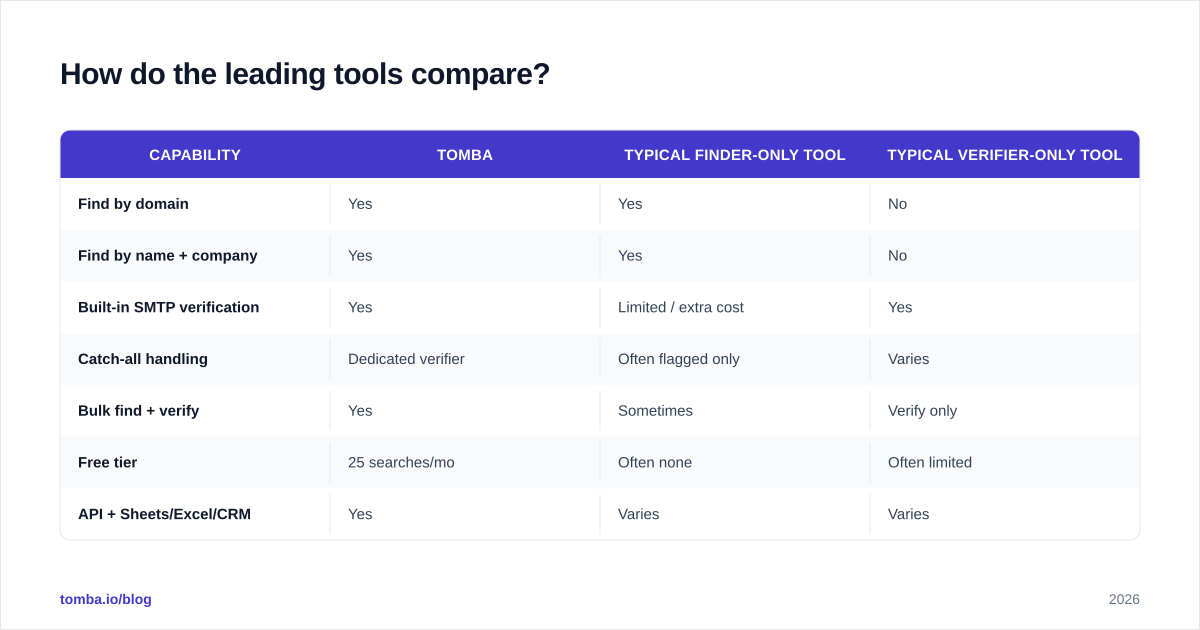
Here's the practical comparison that matters when you're choosing a stack. The question isn't "who finds emails" — almost everyone does — it's whether one tool handles both finding and verification well, how it treats catch-alls, and whether the free tier lets you test before paying.

| Capability | Tomba | Typical finder-only tool | Typical verifier-only tool |
|---|---|---|---|
| Find by domain | Yes | Yes | No |
| Find by name + company | Yes | Yes | No |
| Built-in SMTP verification | Yes | Limited / extra cost | Yes |
| Catch-all handling | Dedicated verifier | Often flagged only | Varies |
| Bulk find + verify | Yes | Sometimes | Verify only |
| Free tier | 25 searches/mo | Often none | Often limited |
| API + Sheets/Excel/CRM | Yes | Varies | Varies |
| Starter price | $49/mo | $39–$99/mo | $20–$79/mo |
The pattern most teams fall into is stitching a finder to a separate verifier and paying twice, exporting CSVs between them, and losing data on every hop. Consolidating both stages removes that seam. If you want to see the full tier breakdown, the Tomba pricing page lays out exactly what each plan includes; the free tier is enough to verify the workflow on a real account list before you commit.
For an objective second opinion on any tool in this space, G2 and Capterra both carry verified-buyer reviews that are harder to game than a vendor's own case studies.
Is one combined tool better than separate best-of-breed tools?#
For most B2B teams, yes — one combined tool wins on total cost and data integrity. The "best-of-breed" argument (a specialist finder plus a specialist verifier) made sense when combined tools were weak at one stage. That gap has mostly closed. A unified pipeline means an address is found and verified in the same call, with no CSV export step where records get mangled, deduped wrong, or silently dropped.
There are two cases where you might still split them. First, if you already pay for a high-volume verifier with a contract you can't escape, bolt a finder onto it. Second, if your finding need is exotic — say you only need author emails from published articles or emails tied to LinkedIn profiles — a specialist may dig deeper in that one niche. For the everyday "build a clean account list and send" job, combined is faster and cheaper.
What does a clean end-to-end workflow look like?#
Here's the sequence that keeps bounce rates under control and protects your sender reputation:
- Define the account list. Pick target domains and the roles you want inside them.
- Discover. Run a domain search per account, or a bulk find by name + company, to generate candidate addresses. Use the bulk email finder when you're working hundreds of accounts at once.
- Verify every address. Push the full candidate list through verification. Keep only deliverable statuses in your primary segment.
- Quarantine catch-alls and risky addresses. Move them to a separate segment with lower send volume, or drop them.
- Enrich. Add firmographic and role context with data enrichment so your messaging is relevant, not generic.
- Sync to your stack. Send the clean list straight to your CRM or sheet — Tomba connects to HubSpot, Salesforce, Google Sheets, and Excel, or hits your app directly through the Tomba API.
- Send, then monitor bounces. Watch your hard-bounce rate per campaign. If it creeps above 2%, your verification step needs tightening — not your copy.
The discipline that separates teams with 1% bounce rates from teams in the spam folder isn't a secret tool. It's never letting an unverified address reach the send step.
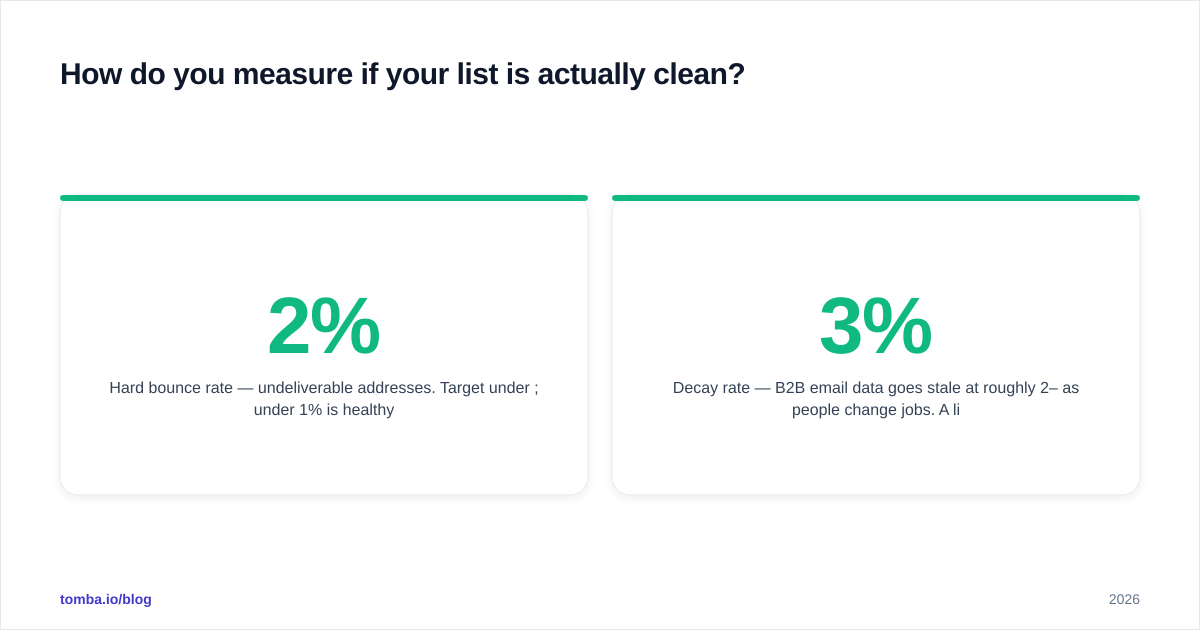
How do you measure if your list is actually clean?#
Track four numbers, not one:
- Hard bounce rate — undeliverable addresses. Target under 2%; under 1% is healthy.
- Catch-all share — what percentage of your "valid" list is actually catch-all. If it's high, your real deliverability is lower than your dashboard claims.
- Acceptance vs. open — a verified address that never opens may be a real mailbox nobody reads (role accounts, shared inboxes). Verification proves existence, not engagement.
- Decay rate — B2B email data goes stale at roughly 2–3% per month as people change jobs. A list verified six months ago is meaningfully dirtier today. Re-verify before any major send.
That last point is the one teams forget. Verification is not a one-time event; it's a freshness check with a short shelf life. Build re-verification into your cadence the same way you'd refresh any decaying dataset.
Frequently asked questions#
Does email verification guarantee delivery? No. It confirms the mailbox exists and can receive mail. It can't guarantee the receiving server won't filter your message for content, authentication, or reputation reasons — that's a separate deliverability problem.
Can I verify catch-all addresses reliably? Not with a standard SMTP check alone. You need a dedicated catch-all verifier that layers additional signals, and even then you should treat the result as a probability, not a certainty.
How often should I re-verify a list? Before every significant campaign, and at minimum quarterly for any list you reuse. B2B data decays fast.
Is a free email finder accurate enough for real outreach? A free tier is enough to test accuracy on your own accounts and run small campaigns. For volume, you'll want a paid plan — but verify the free results first so you know what you're paying for.
Start finding and verifying in one place#
If you're stitching together a finder and a separate verifier, you're paying twice and losing data on every export. The Tomba Email Finder discovers professional addresses by domain, name, or company and verifies them in the same workflow, with dedicated catch-all handling so your "verified" segment is genuinely clean. Start on the free tier — 25 searches a month, no card — point it at a few of your real target accounts, and check the bounce rate yourself before you scale. Clean lists aren't a luxury in 2026; they're the price of reaching the inbox at all.
// get started
Find, verify and enrich your first contacts today
Start on the free plan with 25 searches a month, then scale when your team is ready.
Free plan · No credit card required · GDPR & CCPA
// about the author