Email Finding and Verification: The Core Discovery Guide 2026
Email finding and verification is the foundation of every outbound motion. Here's how the core discovery workflow actually works, where accuracy comes from, and how to pick the right tools in 2026.
TL;DR
- Email finding and verification is a two-stage discovery process: first you find a likely address, then you verify it can actually receive mail without bouncing.
- Accuracy is not a single number. It depends on data sources, pattern logic, SMTP checks, and how the tool handles catch-all domains.
- A clean list beats a big list. Sub-2% bounce rates protect sender reputation and keep you out of spam folders.
- The best workflow combines domain-level discovery, name-based lookup, and a verification pass before any email leaves your sequencer.
- Tools differ most on catch-all handling and bulk throughput — that's where you should focus your evaluation.
What is email finding and verification?#
Email finding and verification is the discovery layer that sits under every outbound campaign. Think of it like a postal service before the post office existed: finding is figuring out the right street address for a person, and verification is knocking on the door to confirm someone actually lives there before you mail anything important.
In practice, "finding" means turning a name and a company domain into a working email address — for example, turning Jane Doe + acme.com into jane.doe@acme.com. "Verification" is the second, non-negotiable step: confirming that the mailbox exists and will accept mail, so your message doesn't bounce.
Skipping the second step is the single most common reason cold campaigns fail. A high bounce rate tells inbox providers you're sending to stale or fabricated lists, and your sender reputation takes the hit. Once that happens, even your verified, legitimate emails start landing in spam.
How does the core discovery process actually work?#
The discovery process runs in distinct stages. Each one narrows uncertainty until you're left with an address you can trust.
1. Domain identification. Everything starts with the company domain. Once you have acme.com, you can use domain search to pull every known email pattern and public address tied to that company. This is the fastest way to map an entire organization at once.
2. Pattern detection. Most companies use a consistent format — first.last@, flast@, or first@. Discovery tools detect the dominant pattern from known addresses, then apply it to new names. This is inference, not fact, which is exactly why verification has to follow.
3. Name-based lookup. When you have a specific person, the email finder combines the detected pattern with public data sources to propose the most probable address and attach a confidence score.
4. SMTP verification. The tool opens a conversation with the receiving mail server and asks, in effect, "does this mailbox exist?" without sending a real message. A clean response means deliverable; a rejection means you drop it.
5. Catch-all handling. Some domains accept every address, real or not. These "catch-all" servers can't be verified by a simple SMTP check, so a catch-all verifier uses additional signals to estimate risk instead of returning a false "valid."
Where does accuracy actually come from?#
Accuracy is the whole game, and it's worth understanding why two tools fed the same name can return different results. According to industry reviews aggregated on G2, email tools vary widely on exactly these dimensions.

Accuracy comes from four stacked layers:
- Data freshness. Emails decay. People change jobs at roughly 20–30% per year, so a database that isn't continuously refreshed quietly rots. Where a tool sources and how often it refreshes its data matters more than raw record count.
- Pattern confidence. A tool that has seen many verified addresses on a domain can infer the pattern with high confidence. A tool guessing from a single data point cannot.
- Real-time SMTP checks. Cached verification results go stale. The strongest tools re-check at query time rather than trusting a result from months ago.
- Honest catch-all reporting. A tool that labels every catch-all address "valid" is inflating its accuracy number. One that flags the uncertainty is being honest with you — and saving your reputation.
The lesson: treat a vendor's headline "98% accuracy" claim as a starting question, not an answer. Ask how it's measured and whether catch-all domains are included.
Email finding vs. email verification: what's the difference?#
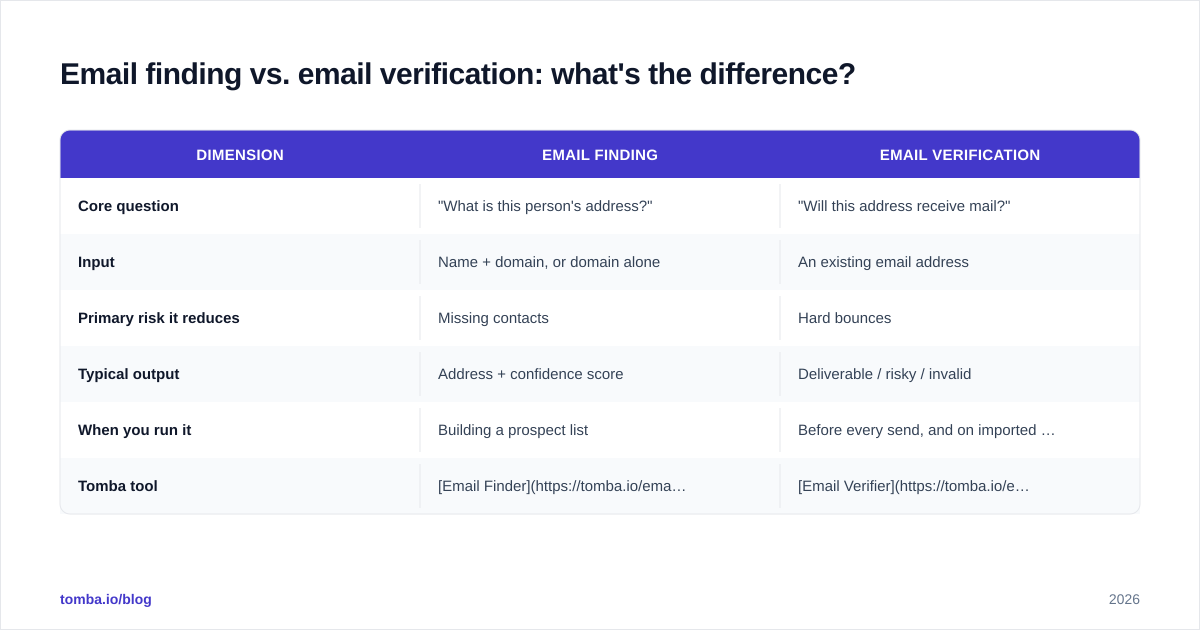
These two terms get used interchangeably, but they solve different problems and you usually need both.
| Dimension | Email finding | Email verification |
|---|---|---|
| Core question | "What is this person's address?" | "Will this address receive mail?" |
| Input | Name + domain, or domain alone | An existing email address |
| Primary risk it reduces | Missing contacts | Hard bounces |
| Typical output | Address + confidence score | Deliverable / risky / invalid |
| When you run it | Building a prospect list | Before every send, and on imported lists |
| Tomba tool | Email Finder | Email Verifier |
The honest answer is that you don't choose between them. Finding without verification gives you a list full of guesses. Verification without finding gives you a clean check on a list you don't have yet. The core discovery workflow chains them: find, then verify, then send.
What does a complete discovery workflow look like in 2026?#
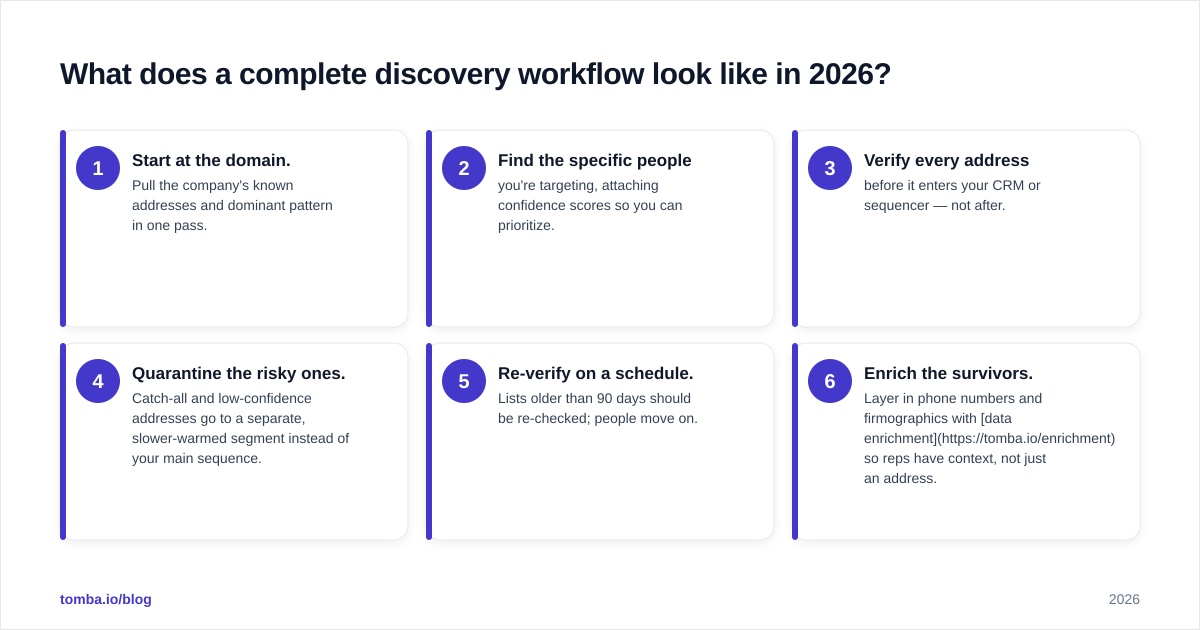
Here's the workflow most high-performing outbound teams converge on. It's deliberately boring — reliability beats cleverness when your domain reputation is on the line.
- Start at the domain. Pull the company's known addresses and dominant pattern in one pass.
- Find the specific people you're targeting, attaching confidence scores so you can prioritize.
- Verify every address before it enters your CRM or sequencer — not after.
- Quarantine the risky ones. Catch-all and low-confidence addresses go to a separate, slower-warmed segment instead of your main sequence.
- Re-verify on a schedule. Lists older than 90 days should be re-checked; people move on.
- Enrich the survivors. Layer in phone numbers and firmographics with data enrichment so reps have context, not just an address.
For teams working at scale, steps 1–3 collapse into a single bulk email finder run, and the whole thing can be wired into your stack through the Tomba API. You can read more about where the data comes from if source transparency matters for your compliance review — and it should.

How do the leading tools compare on core discovery?#
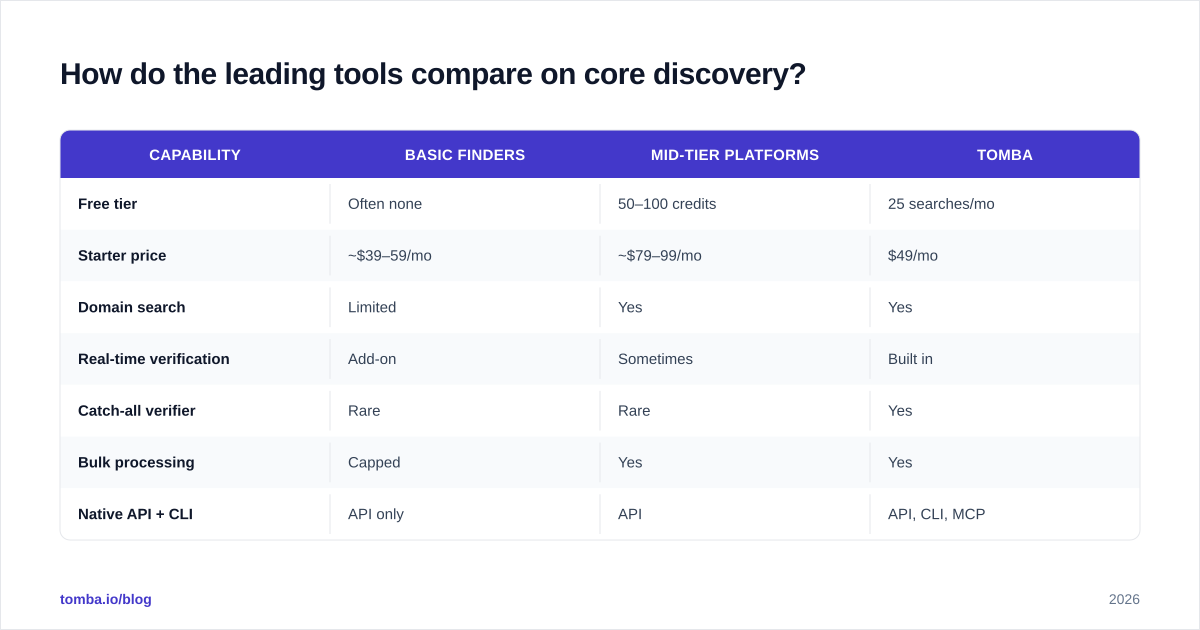
Most platforms can return an address. They diverge on the parts that actually protect your campaigns: catch-all handling, bulk throughput, verification depth, and pricing transparency. Reviews on Capterra and G2 echo the same split.

Here's how the core discovery capabilities stack up across typical tiers. Use it as a checklist, not gospel — verify current specs against each vendor's own pricing page.
| Capability | Basic finders | Mid-tier platforms | Tomba |
|---|---|---|---|
| Free tier | Often none | 50–100 credits | 25 searches/mo |
| Starter price | ~$39–59/mo | ~$79–99/mo | $49/mo |
| Domain search | Limited | Yes | Yes |
| Real-time verification | Add-on | Sometimes | Built in |
| Catch-all verifier | Rare | Rare | Yes |
| Bulk processing | Capped | Yes | Yes |
| Native API + CLI | API only | API | API, CLI, MCP |
A few things to notice. First, the cheapest "starter" prices often exclude verification, so the real cost is higher than the sticker. Second, catch-all handling is the rarest feature and the one that separates a list you can trust from one that quietly burns your domain. You can compare the full breakdown on the Tomba pricing page.
How do you avoid bounces and protect deliverability?#
Bounces are the symptom; an unverified list is the disease. Every hard bounce is a signal to mailbox providers that you don't maintain your data, and that signal compounds. Keeping bounce rates under 2% is the practical threshold most deliverability teams aim for.
Three habits do most of the work:
- Verify at the boundary. Validate every address the moment it enters your system, the way you'd check an ID at the door rather than after the guest is already inside. This is the validate at the boundary principle applied to data.
- Segment by confidence. Send your highest-confidence, fully-verified addresses first. Let risky and catch-all addresses go to a warmed, low-volume segment so a bad guess can't poison your primary domain.
- Re-verify regularly. A verified address is a snapshot, not a permanent fact. Quarterly re-verification on active lists catches the job-changers before they bounce.
If you want to understand the mechanics deeper, the email deliverability glossary entry covers how reputation, authentication, and list hygiene interact. The short version: verification is the cheapest deliverability insurance you can buy.
What about catch-all domains — the hardest case?#
Catch-all domains are the reason "100% verified" claims should make you skeptical. A catch-all server accepts mail addressed to anything at the domain, which means a standard SMTP check always comes back positive — even for an address that doesn't belong to a real person.
It's like a building where the front desk accepts every package regardless of whether the recipient works there. The package gets in; whether it reaches a human is a separate question.
Handling these correctly requires extra signals beyond the SMTP handshake: historical engagement data, pattern consistency, and probabilistic scoring. A dedicated catch-all verifier returns a risk estimate instead of a false green light, so you can decide whether to send, hold, or route to a low-volume segment. Tools that ignore this nuance are the ones that quietly tank your bounce rate two weeks into a campaign.
What should you optimize for when choosing a tool?#
Conclusion first: optimize for verification depth and catch-all honesty, not headline accuracy percentages or database size.
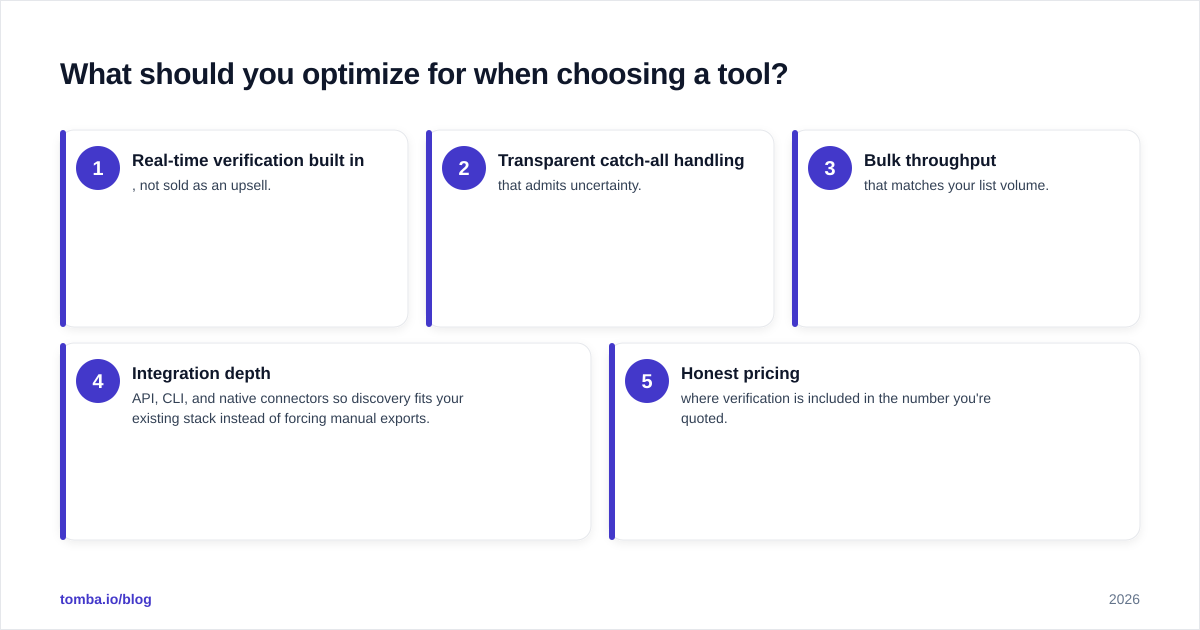
A 200-million-record database means nothing if a third of it is stale and the tool can't tell you which third. Prioritize, in order:
- Real-time verification built in, not sold as an upsell.
- Transparent catch-all handling that admits uncertainty.
- Bulk throughput that matches your list volume.
- Integration depth — API, CLI, and native connectors so discovery fits your existing stack instead of forcing manual exports.
- Honest pricing where verification is included in the number you're quoted.
For broader context on the category and how buyers evaluate these tools, Wikipedia's overview of email verification and vendor documentation like HubSpot's deliverability guidance are useful neutral references.
Putting it together#
Email finding and verification isn't a feature you bolt on at the end — it's the core discovery layer that determines whether your entire outbound motion works. Find the address, verify it can receive mail, segment by confidence, and re-verify on a schedule. Do that consistently and your bounce rates stay low, your domain reputation stays clean, and your reps spend time selling instead of cleaning lists.
If you're ready to put a reliable discovery workflow in place, start with the Tomba Email Finder. It pairs domain-level discovery with built-in verification and honest catch-all handling, so the addresses you find are addresses you can actually send to. The free tier gives you 25 searches a month to test it against your own list — verify the accuracy before you commit, which is exactly the standard you should hold every tool to.
// get started
Find, verify and enrich your first contacts today
Start on the free plan with 25 searches a month, then scale when your team is ready.
Free plan · No credit card required · GDPR & CCPA
// about the author