Find Email by Entity: Entity-Based Email Search in 2026
Stop guessing email formats. Learn how to find email by entity — name, domain, company, or LinkedIn — and which method gives you the highest match rate in 2026.
TL;DR
- "Find email by entity" means starting from a known data point — a person's name, a company domain, a LinkedIn profile, or an email you already have — and resolving it to a verified business email instead of guessing the format.
- The entity you start from decides your match rate. A full name plus a verified domain beats a bare company name every time.
- Permutation guessing ("first.last@domain") is the weakest method; entity-based lookup backed by a real B2B dataset and SMTP verification is the strongest.
- For volume, the workflow that wins is upload a list of entities, resolve in bulk, verify, then enrich — not one-off manual searches.
- Tomba exposes a dedicated finder per entity type (name+domain, domain search, LinkedIn, reverse email) so you pick the route that matches the data you already hold.
What does "find email by entity" mean?#
To find email by entity is to treat the thing you already know — a name, a domain, a company, a profile URL, or even an existing email — as the input, and let a finder resolve it to a deliverable address. The "entity" is your starting anchor. You are not inventing the email; you are looking it up from the strongest signal you have.
Think of it like a library. If you walk in knowing the exact ISBN (a verified domain plus a full name), the librarian hands you the book in seconds. If all you have is "a blue book about sales" (just a company name), they have to search, narrow, and guess. Same library, very different hit rate — and the difference is entirely the quality of the entity you started with.
This matters because most failed prospecting isn't a deliverability problem. It's a resolution problem: reps start from a weak entity, guess a format, and send to an address that never existed. Entity-based finding flips the order — resolve first, verify second, send third.
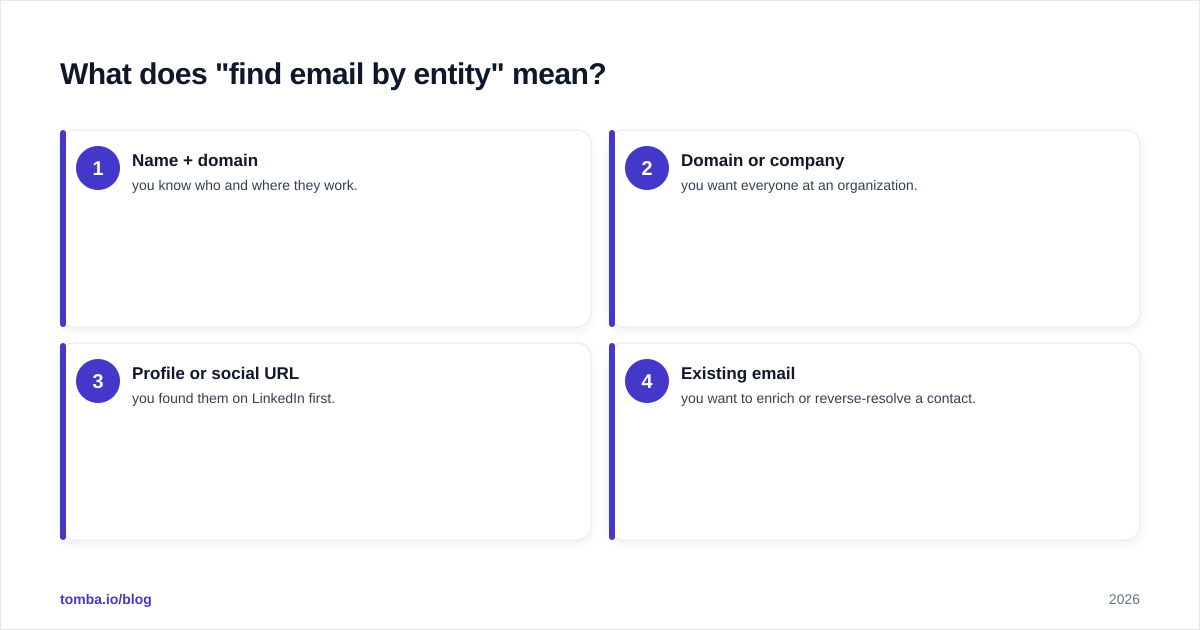
The four practical entry points you'll use day to day are:
- Name + domain — you know who and where they work.
- Domain or company — you want everyone at an organization.
- Profile or social URL — you found them on LinkedIn first.
- Existing email — you want to enrich or reverse-resolve a contact.
Each route uses a different finder under the hood, and each has a different realistic accuracy ceiling.
)
What entity types can you search by?#
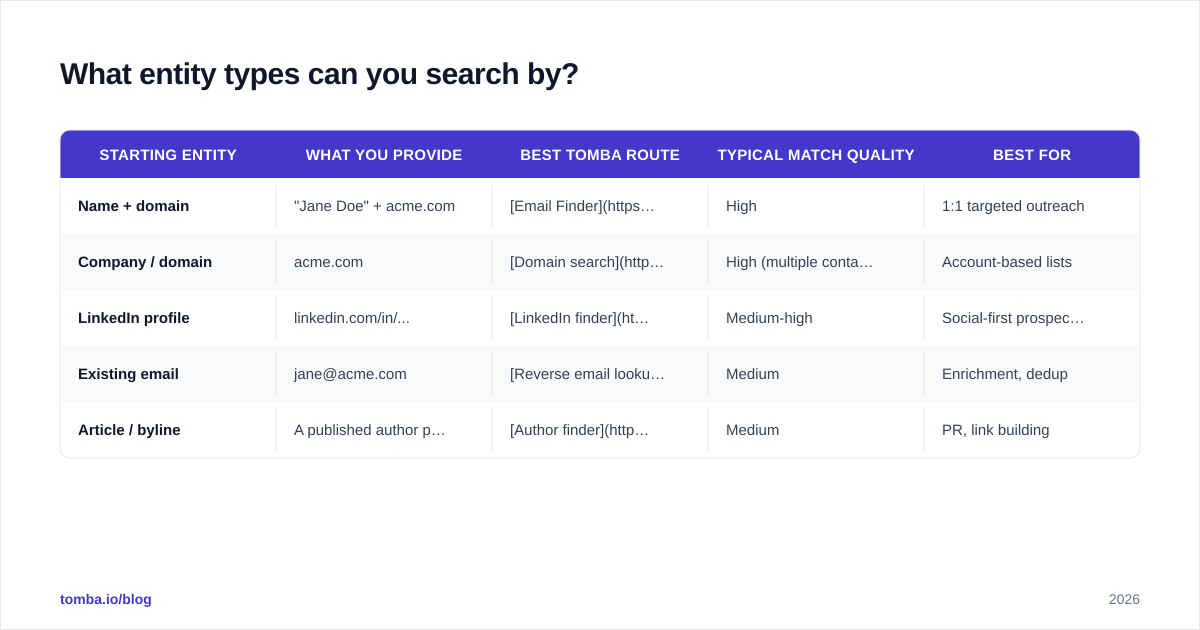
Different starting entities map to different tools and different expected outcomes. Here's how the common entry points compare.
| Starting entity | What you provide | Best Tomba route | Typical match quality | Best for |
|---|---|---|---|---|
| Name + domain | "Jane Doe" + acme.com | Email Finder | High | 1:1 targeted outreach |
| Company / domain | acme.com | Domain search | High (multiple contacts) | Account-based lists |
| LinkedIn profile | linkedin.com/in/... | LinkedIn finder | Medium-high | Social-first prospecting |
| Existing email | jane@acme.com | Reverse email lookup | Medium | Enrichment, dedup |
| Article / byline | A published author page | Author finder | Medium | PR, link building |
The pattern is consistent: the more precise and verifiable your input entity, the cleaner the output. A name paired with a confirmed corporate domain is the gold standard because it constrains the search to a single mailbox pattern at a single, real mail server.
If you only have a company name and no domain, resolve the domain first (company → website → domain) and then run the lookup. Skipping that step is the single most common reason match rates collapse.
How accurate is entity-based email finding?#
Accuracy depends on two things you control and one you don't: the strength of the input entity, whether the result is SMTP-verified, and how fresh the underlying dataset is.
A realistic way to think about it: entity-based finding gives you a candidate address, and verification turns that candidate into a deliverable one. Skipping verification is where teams quietly torch their sender reputation — bounces from unverified guesses are the fastest way to land in spam.
The verification step checks the address against the live mail server without sending anything, separating real mailboxes from typos, dead accounts, and traps. For domains that accept everything, you need a catch-all verifier rather than a simple yes/no check, because a standard SMTP probe returns "valid" for every address on a catch-all domain.
A grounded accuracy hierarchy, strongest to weakest:
- Verified name + domain lookup — highest confidence; you resolved a real person at a real mail server and confirmed the mailbox.
- Domain search with verification — high; you pull confirmed addresses already associated with the domain.
- LinkedIn-sourced resolution — solid when the profile maps cleanly to a current employer and domain.
- Reverse lookup / enrichment — useful for filling gaps, but treat as supplementary.
- Pure permutation guessing — lowest; no dataset, no verification, just format math.
Vendors that publish methodology and let you verify before you spend a credit are the ones worth trusting. Independent review sites like G2 are a sane place to sanity-check claims against real user feedback rather than marketing numbers.
Is entity-based lookup better than guessing the format?#
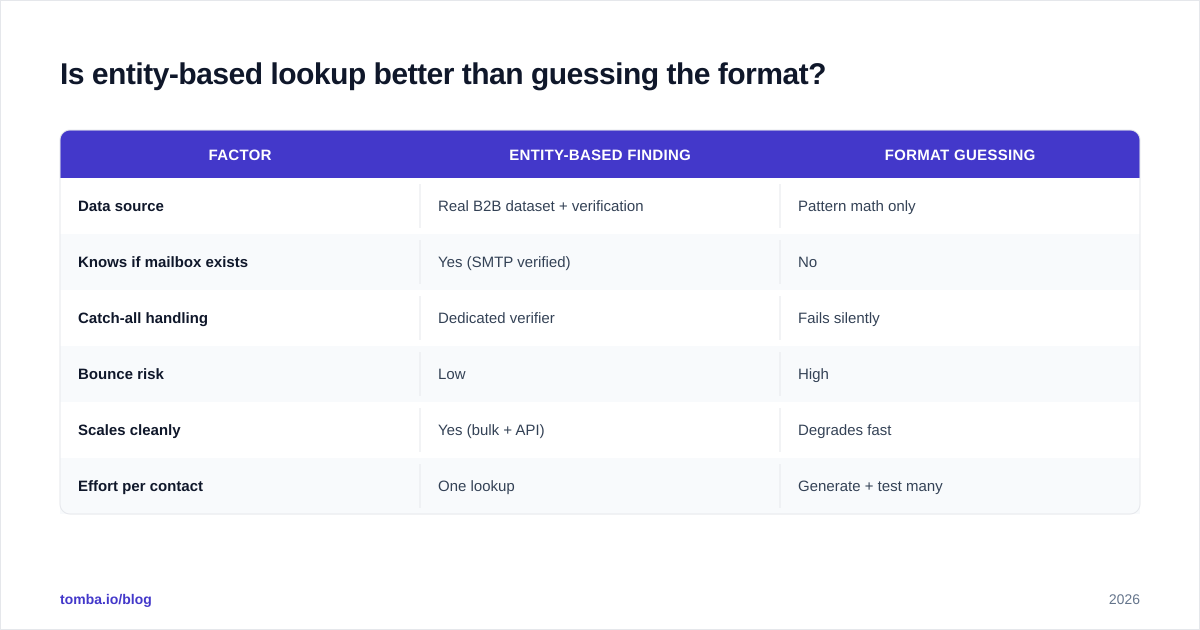
Yes — and it isn't close. Format guessing (the "email permutator" approach) generates every plausible combination and hopes one lands. It works occasionally for tiny companies with obvious patterns, but it has no idea whether the mailbox actually exists.
| Factor | Entity-based finding | Format guessing |
|---|---|---|
| Data source | Real B2B dataset + verification | Pattern math only |
| Knows if mailbox exists | Yes (SMTP verified) | No |
| Catch-all handling | Dedicated verifier | Fails silently |
| Bounce risk | Low | High |
| Scales cleanly | Yes (bulk + API) | Degrades fast |
| Effort per contact | One lookup | Generate + test many |
Guessing has a place as a fallback — if every other route comes up empty, an email permutator plus verification can salvage a contact. But leading with it inverts the funnel: you spend more effort to get a worse, riskier result.
)
How do you find emails by entity at scale?#
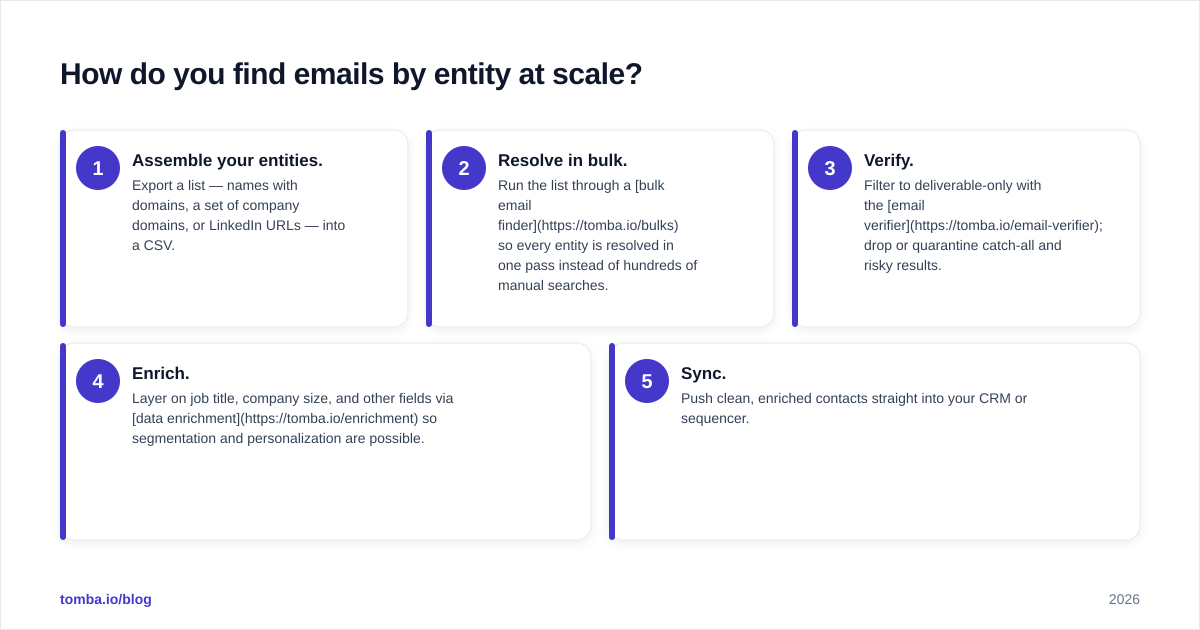
Manual one-at-a-time lookups are fine for a handful of priority accounts. Past that, you want a repeatable pipeline. The volume workflow looks like this:
- Assemble your entities. Export a list — names with domains, a set of company domains, or LinkedIn URLs — into a CSV.
- Resolve in bulk. Run the list through a bulk email finder so every entity is resolved in one pass instead of hundreds of manual searches.
- Verify. Filter to deliverable-only with the email verifier; drop or quarantine catch-all and risky results.
- Enrich. Layer on job title, company size, and other fields via data enrichment so segmentation and personalization are possible.
- Sync. Push clean, enriched contacts straight into your CRM or sequencer.
For engineering-led teams, the same steps run programmatically through the Tomba API: post an entity, get back a resolved, scored, verified address. That's how you wire entity-based finding into a product, an enrichment job, or an internal RevOps tool without anyone touching a spreadsheet. If your stack is no-code, the HubSpot integration and
Zapier-style connectors let you trigger lookups on new records automatically — HubSpot's own contact management docs explain where enriched fields land once they sync back.
Which entity-based route should you choose?#
Pick the route that matches the data you already hold — don't force a weak entity through a strong tool.
- You have a name and you know the company → name + domain lookup with the email finder. Highest precision, lowest effort.
- You want the whole account mapped → domain search to pull every public address at the organization, then verify.
- You're prospecting on LinkedIn first → resolve from the profile URL, then verify the result against the employer's domain.
- You already have an email and need context → reverse lookup and enrichment to fill in the rest of the record.
- You only have a company name → resolve the domain first, then proceed. Never run a lookup on a bare brand string.
A quick mental rule: the closer your input is to a specific person at a specific verified domain, the better your output will be. Everything else is about getting your starting entity closer to that ideal before you spend a credit.
How fresh does the underlying data need to be?#
Fresher than you'd think. People change jobs constantly, and a contact that was perfect last quarter may now point to a mailbox that's been deprovisioned. Entity-based finding is only as good as the dataset behind it plus the verification at the moment of lookup.
This is why "verify at send time" beats "verify at list-build time" for anything more than a few weeks old. The entity (the name, the LinkedIn profile) stays stable; the email attached to it does not. A good pipeline re-verifies before each campaign rather than trusting a stale export. You can read more about how a provider sources and refreshes contacts on a vendor's data sources page — transparency there is a strong signal of reliability.
Frequently asked questions#
What is the most accurate entity to search by? A full name paired with a verified company domain. It constrains the search to one person at one real mail server, which is the cleanest possible signal for a finder to resolve and verify.
Can I find an email from just a LinkedIn URL? Often, yes. A LinkedIn finder maps the profile to a current employer and domain, then resolves and verifies the likely address. Accuracy is strongest when the profile lists a current, identifiable employer.
Is finding email by entity GDPR-compliant? Finding business contact data for legitimate B2B outreach is generally permissible, but compliance depends on your jurisdiction, your basis for processing, and how you handle opt-outs. Treat sourced data responsibly and honor unsubscribe requests. Consult the relevant regulation (see GDPR overview) for your specifics.
How do I avoid bounces when finding emails by entity? Always verify before you send, handle catch-all domains with a dedicated verifier, and re-verify lists older than a few weeks. The resolution step finds the candidate; verification is what protects your deliverability.
Do I need to know the domain to find an email? It helps enormously. If you only have a company name, resolve the domain first, then run the lookup — searching on a bare brand name produces far weaker results than searching on a confirmed domain.
Start finding emails by entity the right way#
If you've been guessing formats and praying nothing bounces, switch the order: resolve from the strongest entity you have, verify, then send. Start with the Tomba Email Finder — feed it a name and a domain, a company, or a profile, and get back a verified, deliverable address instead of a hopeful guess. The free tier gives you 25 searches a month to test match quality on your own list before committing; paid plans start at $49/mo, and you can see full Tomba pricing when you're ready to scale from a handful of accounts to a whole pipeline. Resolve by entity, verify every result, and let your reps spend their time on conversations — not on inventing email addresses.
// get started
Find, verify and enrich your first contacts today
Start on the free plan with 25 searches a month, then scale when your team is ready.
Free plan · No credit card required · GDPR & CCPA
// about the author