Email Finder Vendor Reviews: A 2026 Buyer's Framework
Most email finder vendor reviews are recycled affiliate copy. Use this 2026 scoring framework to test accuracy, pricing, coverage, and compliance before you pay a cent.
TL;DR
- Most published email finder vendor reviews are affiliate content that never ran a single test — treat star ratings as marketing, not data.
- Score every vendor on five axes: verified accuracy, true cost per valid email, data coverage, deliverability impact, and compliance posture.
- Always run your own 100-contact bench test with a known control list before you trust any vendor's "98% accuracy" claim.
- Headline price is the least useful number. Cost per valid, deliverable email is what actually hits your budget.
- A tool that wins on accuracy and verification (like Tomba) usually beats a cheaper tool that floods your list with catch-all guesses.
If you have ever bought a lead-data tool based on a glowing review and then watched your bounce rate climb past 12%, this guide is the fix. Below is the exact framework to evaluate email finder vendor reviews — and to run your own — so the next tool you buy actually performs.
Why can't you trust most email finder vendor reviews?#
Because the incentives are broken. The conclusion first: a large share of "best email finder" roundups are ranked by affiliate commission, not by accuracy testing. The vendor paying the highest payout lands at position one, and the "review" is a paraphrase of that vendor's own landing page.
Think of it like a restaurant guide written by the restaurants. The food might be fine, but you would never know from a guide where every kitchen graded its own dishes. The same dynamic runs through most sales-tool content.
That does not mean reviews are worthless. It means you need a filter. A credible review answers four questions that affiliate copy almost never touches:
- What was the test set? A real review states how many contacts were tested and where the control emails came from.
- How was "accuracy" defined? Found-rate, valid-rate, and deliverable-rate are three different numbers, and vendors love to blur them.
- What did it cost per valid result? Not per search — per email that actually inboxes.
- When was it tested? Data decays roughly 2–3% per month. A 2023 benchmark is folklore by 2026.
When a review skips all four, you are reading an ad. Cross-reference it against structured marketplaces like G2 and Capterra, where reviews are tied to verified user accounts, and weight hands-on tests over vibes.
What does a real email finder accuracy test look like?#
Run a controlled bench test. The single most reliable signal in any vendor evaluation is a head-to-head on a list where you already know the right answers.
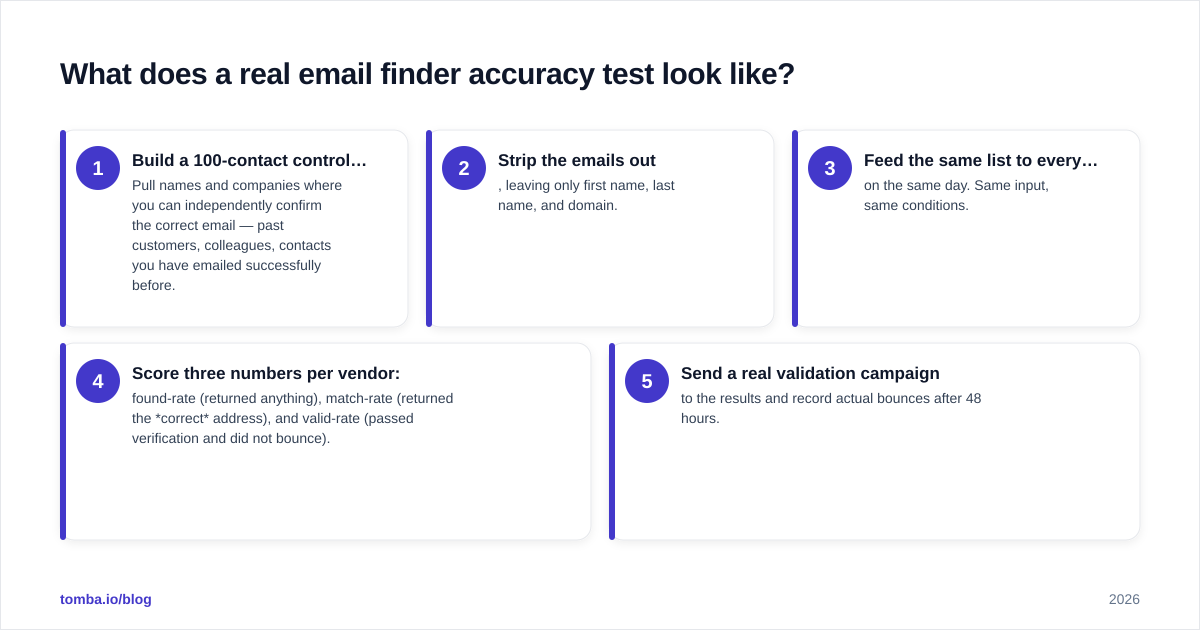
Here is the method that takes about an hour:
- Build a 100-contact control list. Pull names and companies where you can independently confirm the correct email — past customers, colleagues, contacts you have emailed successfully before.
- Strip the emails out, leaving only first name, last name, and domain.
- Feed the same list to every vendor on the same day. Same input, same conditions.
- Score three numbers per vendor: found-rate (returned anything), match-rate (returned the correct address), and valid-rate (passed verification and did not bounce).
- Send a real validation campaign to the results and record actual bounces after 48 hours.
The match-rate is where marketing claims go to die. A vendor can advertise a 99% "find rate" while half of those finds are pattern guesses on catch-all domains that will never reach a human. That is why pairing a finder with a real email verifier matters more than the headline find number.

Catch-all domains deserve special attention. On a catch-all server, the mail system accepts every address at the SMTP layer, so naive verifiers mark guesses as "valid" when they are anything but. A serious vendor exposes a dedicated catch-all check — see how a catch-all verifier separates a real mailbox from an accept-all illusion. If a tool cannot tell you whether a domain is catch-all, its accuracy claims are unfalsifiable.
What are the five scoring axes for any vendor?#
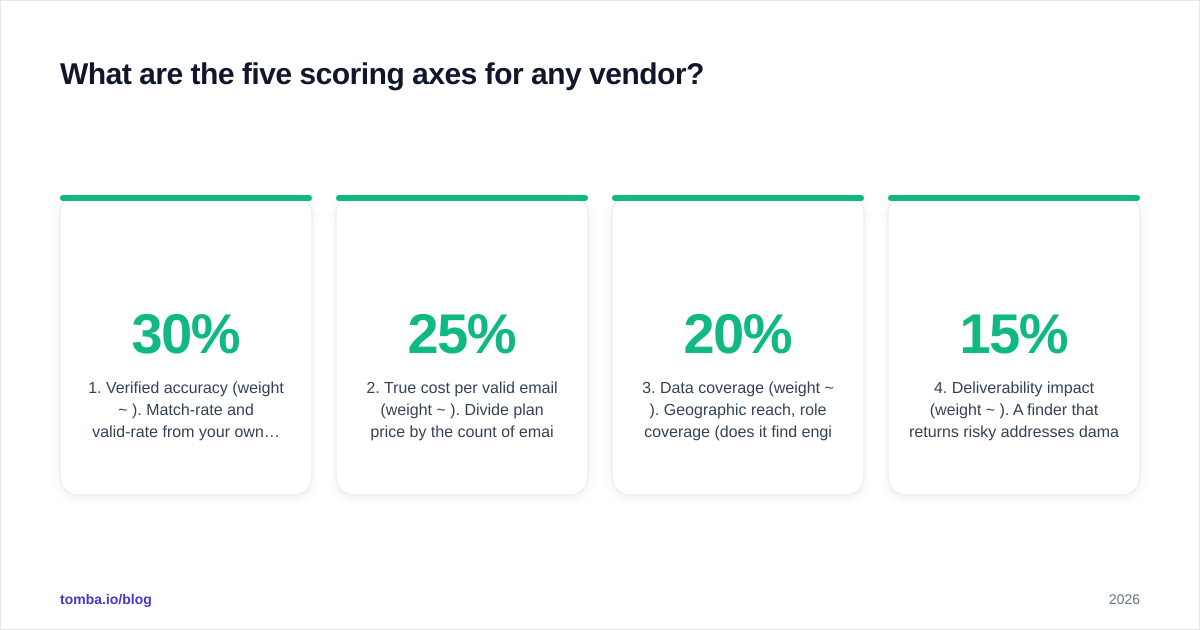
Score every vendor 1–10 on these five, then weight by what your motion actually needs. Drop the framework diagram below into your buying doc and fill a column per vendor.
- Verified accuracy (weight ~30%). Match-rate and valid-rate from your own bench test. Vendor-reported numbers get a zero until you reproduce them.
- True cost per valid email (weight ~25%). Divide plan price by the count of emails that actually inboxed in your test — not by credits purchased.
- Data coverage (weight ~20%). Geographic reach, role coverage (does it find engineers as well as VPs?), and freshness. Ask where the data sources come from.
- Deliverability impact (weight ~15%). A finder that returns risky addresses damages your sender reputation. Bounce rate from your test list is the proxy.
- Compliance posture (weight ~10%). GDPR/CCPA handling, opt-out mechanics, and a real data-processing agreement. This is a hard gate for EU outreach, not a nice-to-have.
The weighting is the point. A founder doing 50 hyper-targeted sends per week should weight accuracy and coverage. A team blasting thousands of contacts should weight deliverability and cost per valid email, because a 5% bounce difference compounds into blocked domains fast.
How do the main vendor categories compare?#
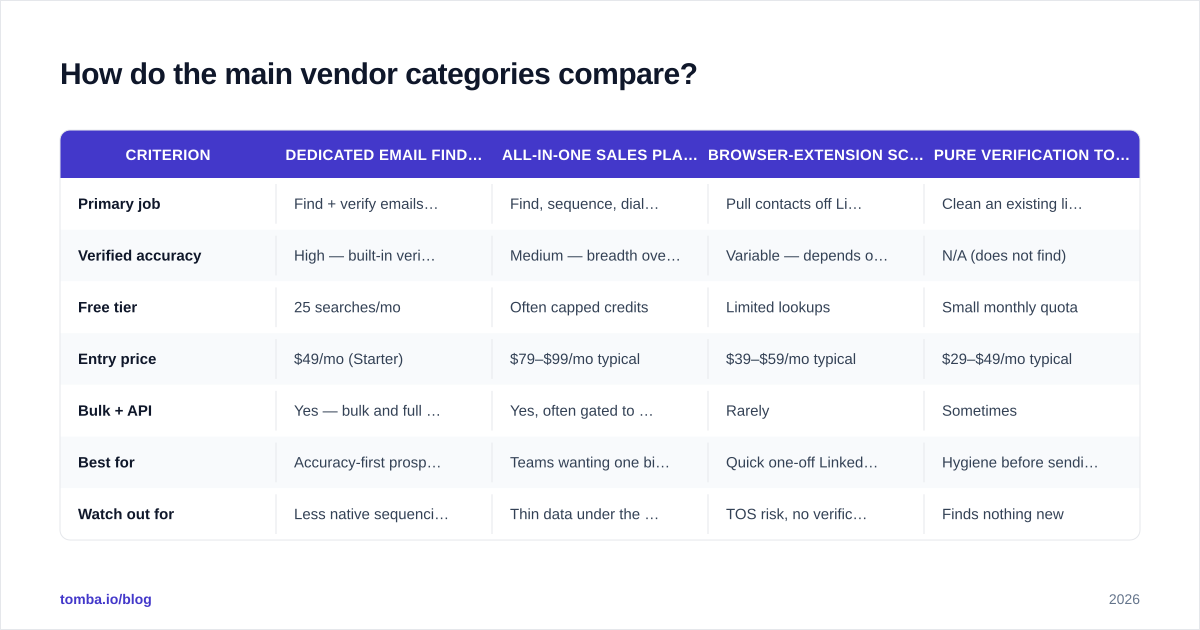
Different tools optimize for different jobs. The table below compares the archetypes you will meet in any roundup, scored on the framework above. Match the archetype to your motion before you compare individual brand names.

| Criterion | Dedicated email finder (e.g. Tomba) | All-in-one sales platform | Browser-extension scraper | Pure verification tool |
|---|---|---|---|---|
| Primary job | Find + verify emails by domain/name | Find, sequence, dial, CRM | Pull contacts off LinkedIn pages | Clean an existing list |
| Verified accuracy | High — built-in verifier + catch-all check | Medium — breadth over depth | Variable — depends on profile | N/A (does not find) |
| Free tier | 25 searches/mo | Often capped credits | Limited lookups | Small monthly quota |
| Entry price | $49/mo (Starter) | $79–$99/mo typical | $39–$59/mo typical | $29–$49/mo typical |
| Bulk + API | Yes — bulk and full API | Yes, often gated to top tier | Rarely | Sometimes |
| Best for | Accuracy-first prospecting | Teams wanting one bill | Quick one-off LinkedIn pulls | Hygiene before sending |
| Watch out for | Less native sequencing | Thin data under the wrapper | TOS risk, no verification | Finds nothing new |
Two honest caveats. First, all-in-one platforms feel efficient because of the single invoice, but the email data underneath is frequently licensed from the same providers a dedicated finder uses — you sometimes pay a premium for a thinner dataset wrapped in more UI. Second, extension scrapers are fast and cheap but skip verification entirely, so they push the deliverability risk onto you. If you go that route, budget for a separate verifier.
For accuracy-first work, a focused email finder with verification baked in tends to win the cost-per-valid-email math even when its sticker price is not the lowest. You can confirm that with your own bench test rather than taking my word for it.
How should you weight price against accuracy?#
Stop comparing monthly prices. Compare cost per valid, deliverable email — the only number that touches pipeline.
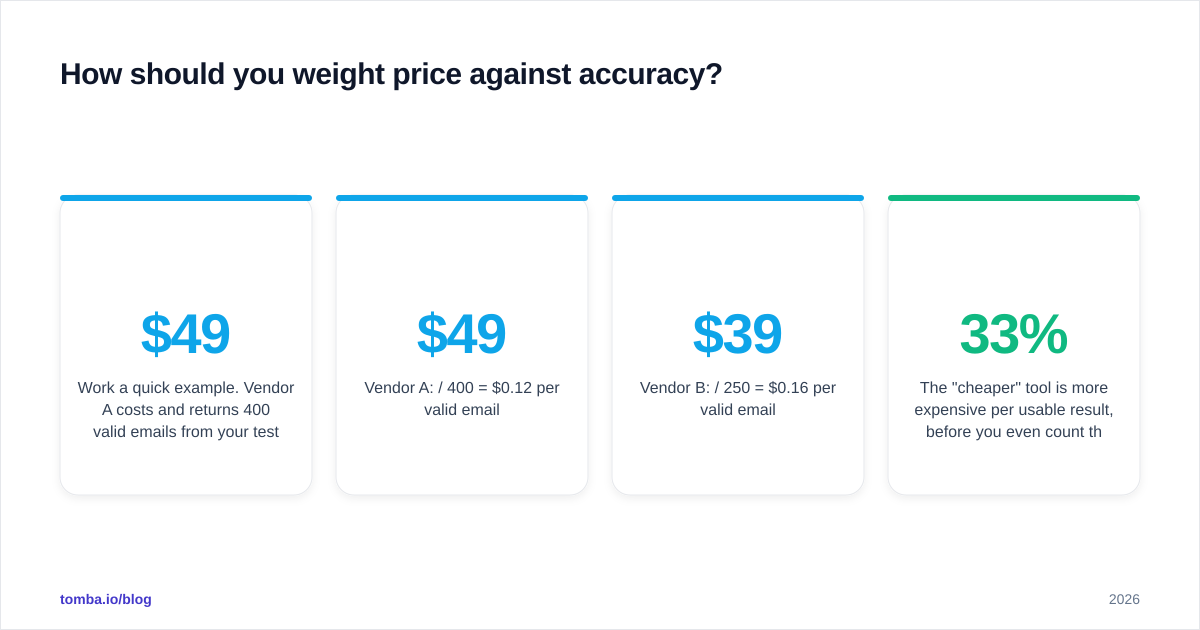
Work a quick example. Vendor A costs $49/mo and returns 400 valid emails from your test ratio. Vendor B costs $39/mo but returns 250 valid emails because more of its finds are catch-all guesses that bounce.
- Vendor A: $49 / 400 = $0.12 per valid email
- Vendor B: $39 / 250 = $0.16 per valid email
The "cheaper" tool is 33% more expensive per usable result, before you even count the deliverability damage from the extra bounces. This is why transparent, tiered pricing matters more than a low headline. Review the full Tomba pricing the same way you would any vendor: map each tier to your monthly valid-email need, not to the credit count.
For high-volume teams, also test the bulk path. Single-lookup pricing and bulk email finder economics diverge sharply at scale, and a tool that is fine for 50 sends a week can get punishing at 5,000. Run the cost-per-valid math at your volume, not the demo volume.
A note on free tiers: they are for testing match-rate, not for running a business. A 25-search free tier is plenty to validate accuracy on a sample before you commit budget — which is exactly how you should use it.
What red flags should disqualify a vendor immediately?#
Some signals are bad enough to end the evaluation. Treat these as hard stops:
- No verification step. If the finder cannot tell a real mailbox from a catch-all guess, every accuracy claim is unverifiable. Hard pass for cold outreach.
- "Unlimited" emails with no rate transparency. Unlimited usually means unlimited guesses. The valid-rate is the constraint, and hiding it is a choice.
- No data-source disclosure. Reputable vendors explain where data comes from and how it refreshes. Silence here is a compliance liability you inherit.
- Bounce-rate guarantees with no methodology. "Under 2% bounce" means nothing without a stated test set and verification method.
- Reviews that all sound identical. If every roundup uses the same three adjectives in the same order, you are reading syndicated affiliate copy, not independent testing.
- No API or export. A tool you cannot integrate becomes a manual copy-paste tax. Confirm there is a real Tomba API-style interface before committing a workflow to it.
Run any shortlist through the official vendor docs and a neutral source — even HubSpot's research library on outreach benchmarks — before signing. If a claim only appears on the vendor's own blog, it is a claim, not a finding.
How do you turn this into a one-hour decision?#
Here is the compressed workflow. Block 60 minutes and you will out-research 90% of buyers who rely on star ratings.
- Shortlist three vendors — ideally one dedicated finder, one all-in-one, one budget option — so you are comparing archetypes, not clones.
- Build your 100-contact control list with known-correct emails.
- Run the same list through all three free tiers or trials on the same day.
- Score match-rate and valid-rate, then send a validation campaign and log 48-hour bounces.
- Compute cost per valid email at your real monthly volume.
- Fill the five-axis framework, weight for your motion, and pick the highest weighted score — not the lowest price.
The vendor that survives this process is the one worth a contract. Everything else is someone else's affiliate commission.
The bottom line#
Email finder vendor reviews are a starting point, never a verdict. The only review that matters is the one you run on your own control list, scored on verified accuracy, true cost per valid email, coverage, deliverability, and compliance. Do that once and you will never again buy a lead tool on the strength of a five-star badge.
When you are ready to run that bench test, start with a tool built accuracy-first: the Tomba Email Finder pairs domain and name search with built-in verification and a catch-all check, plus a free tier of 25 searches so you can validate match-rate before you spend a dollar. Find your control list, run the test, and let the numbers — not the marketing — choose your vendor.
// get started
Find, verify and enrich your first contacts today
Start on the free plan with 25 searches a month, then scale when your team is ready.
Free plan · No credit card required · GDPR & CCPA
// about the author