Email Verification vs Validation: The 2026 Expert Guide
Validation checks if an address is formatted right. Verification checks if it actually exists and accepts mail. Here's why the difference quietly decides your deliverability in 2026.
TL;DR
- Validation answers a cheap question: is this string shaped like an email? Verification answers the expensive one: does this mailbox exist and accept mail right now?
- Validation runs offline in microseconds (regex + DNS). Verification needs a live SMTP conversation with the receiving server.
- Skipping verification is the single most common reason cold campaigns hit 8–15% bounce rates and torch their sender reputation.
- Catch-all domains break naive verification — you need a dedicated strategy, not a green/red flag.
- A healthy 2026 workflow: validate on input, verify before send, re-verify lists older than 90 days.
What is the difference between email verification and validation?#
Validation is the bouncer checking your ID matches the format on the door. Verification is the bouncer calling upstairs to confirm you're actually on the guest list. Both stop bad entries, but they catch completely different problems.
Validation is a set of offline, deterministic checks. It confirms the address follows the rules: there's exactly one @, the local part has no illegal characters, the domain has a valid TLD, and DNS shows the domain exists with MX records. It never touches the mailbox. It's fast, free, and runs client-side or in a single API call.
Verification goes further and talks to the receiving mail server over SMTP. It opens a connection, issues MAIL FROM and RCPT TO commands, and reads how the server responds. A 250 means the mailbox is willing to accept mail; a 550 means it doesn't exist. This is the only way to know an address is genuinely deliverable — and it's the step most people skip because it's slower and harder to get right.
The confusion is understandable: many tools market "validation" when they actually mean the full verification pipeline, and vice versa. What matters is what the check does, not what the landing page calls it.
Why does the distinction actually matter?#
Because mailbox providers grade you on bounces, and only verification catches the bounces that matter.
A perfectly valid address — john.doe@acme.com, flawless syntax, real domain, live MX — can still be dead. John left the company. The mailbox was deleted. The address was a typo of a real format that nobody ever owned. Validation waves all of those through. Verification catches them before you send.
Here's the chain reaction when you send to unverified lists:
- You blast 5,000 syntactically valid addresses.
- 600 of them don't exist. Gmail, Outlook, and Yahoo bounce them.
- Your bounce rate spikes past 10%. Sender reputation drops.
- Mailbox providers start routing your good mail to spam.
- Your reply rate craters across the entire campaign — not just the dead addresses.
Email deliverability is reputation-weighted. One dirty send poisons the well for the clean addresses too. Industry guidance from senders like HubSpot consistently puts the safe bounce ceiling around 2%. You cannot hit that with validation alone.
What does email validation actually check?#
Validation is a layered filter. Each layer is cheaper than the next and discards obvious garbage before you spend money on the expensive checks.
- Syntax check — Does the string conform to RFC 5322? Catches missing
@, double dots, spaces, illegal characters. Pure regex, microseconds. - Domain / DNS check — Does the domain resolve? Are there MX records telling the world where to deliver mail? No MX, no mailbox.
- Disposable detection — Is the domain a known throwaway provider (Mailinator, 10MinuteMail)? These are valid but worthless for B2B.
- Role-account detection — Is it
info@,sales@,support@? Valid, but usually a shared inbox you don't want in a personalized sequence. - Typo / suggestion —
gmial.com→gmail.com. Fixable at the point of capture.
Validation is the right tool at input time — web forms, signup flows, CRM imports. It gives instant feedback and blocks 20–30% of bad data before it ever enters your system. But notice what's missing: at no point does validation confirm the mailbox exists. That's the gap verification fills.
What does email verification actually check?#
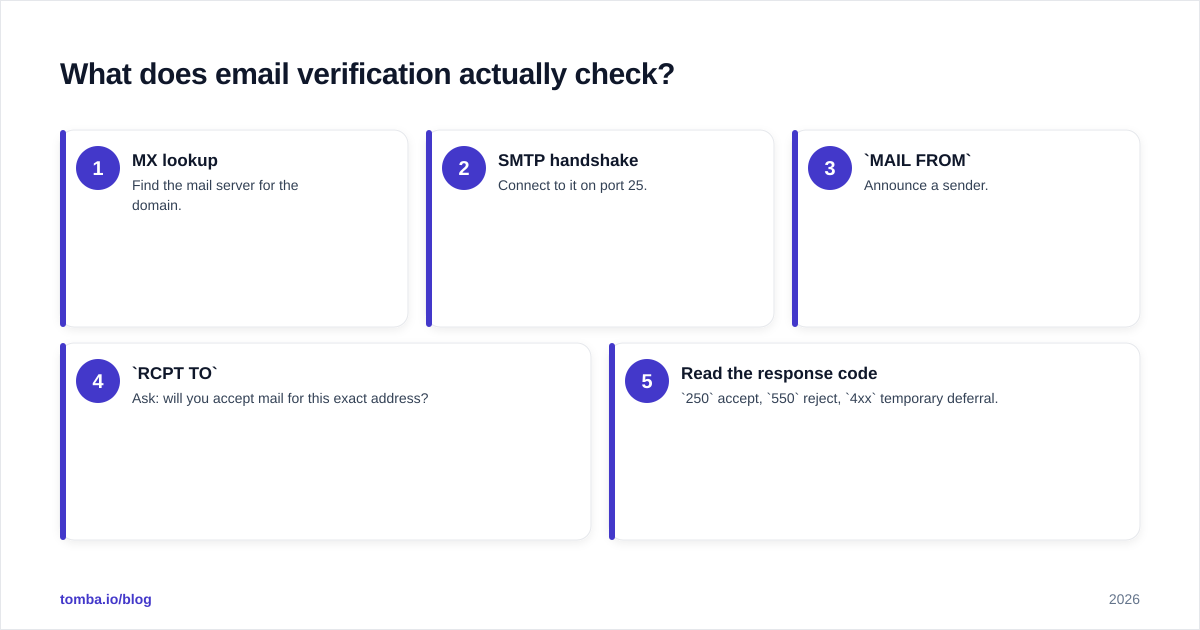
Verification is a real conversation with the destination server. The core sequence:
- MX lookup — Find the mail server for the domain.
- SMTP handshake — Connect to it on port 25.
MAIL FROM— Announce a sender.RCPT TO— Ask: will you accept mail for this exact address?- Read the response code —
250accept,550reject,4xxtemporary deferral.
The mechanics rest on SMTP, the same protocol that actually delivers your mail. That's why verification is predictive in a way validation never can be — it asks the receiving server the literal question your campaign will ask later.
But three things make production-grade verification hard, and they're why you should use a service instead of rolling your own:
- Greylisting — Servers return a temporary
4xxto unknown senders to deter spam. A naive checker reads that as "unknown" and discards a real address. A good verifier retries. - IP reputation — Probe too aggressively from one IP and you get blocked. Services rotate IPs and throttle.
- Catch-all domains — The big one. Covered next.
How do catch-all domains break verification?#
A catch-all (or "accept-all") domain says 250 OK to every address you probe — real or not. ceo@company.com, asdfgh@company.com, both come back accepted. The server has decided to receive everything and sort it out internally.
This destroys the clean binary of verification. You can't tell a real mailbox from a fabricated one through SMTP alone, because the server refuses to tell you. Roughly 15–20% of B2B domains are catch-alls, so this isn't an edge case — it's a fifth of your list.
Serious tools handle catch-alls as a distinct status (often "risky" or "unknown") rather than forcing a green/red. The better ones layer additional signals — historical send data, pattern matching, engagement records — to estimate deliverability. If your verifier marks every catch-all as "valid," it's lying to you; if it marks them all "invalid," it's throwing away good leads. You want a tool with a dedicated catch-all verifier that returns a confidence signal instead of a coin flip.
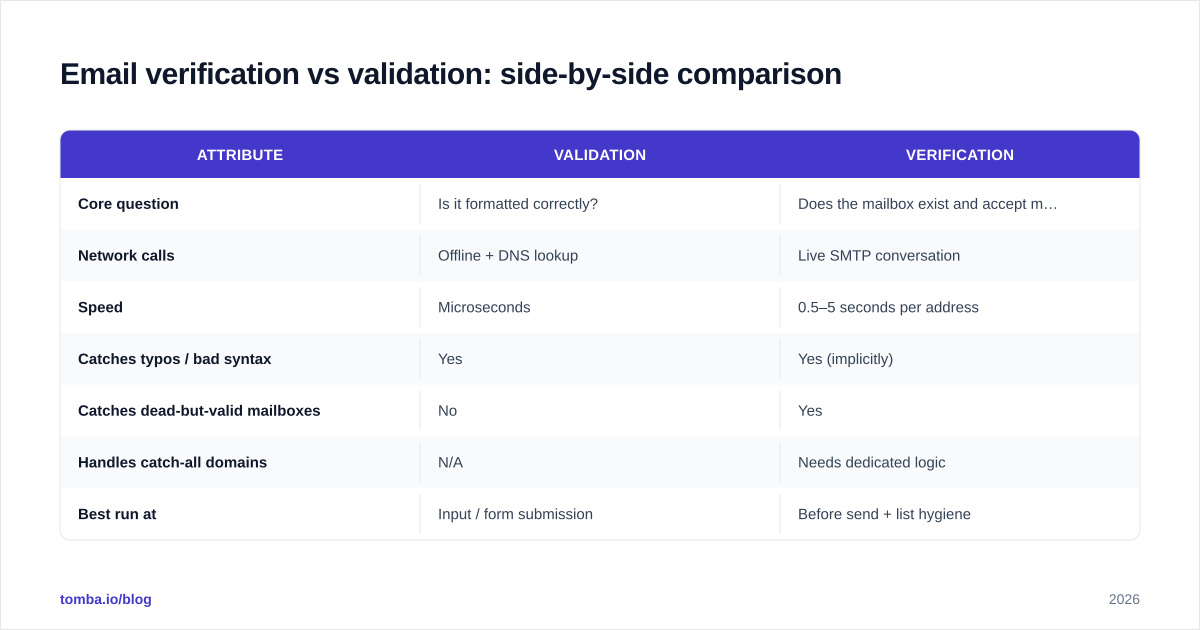
Email verification vs validation: side-by-side comparison#
| Attribute | Validation | Verification |
|---|---|---|
| Core question | Is it formatted correctly? | Does the mailbox exist and accept mail? |
| Network calls | Offline + DNS lookup | Live SMTP conversation |
| Speed | Microseconds | 0.5–5 seconds per address |
| Catches typos / bad syntax | Yes | Yes (implicitly) |
| Catches dead-but-valid mailboxes | No | Yes |
| Handles catch-all domains | N/A | Needs dedicated logic |
| Best run at | Input / form submission | Before send + list hygiene |
| Cost per check | Free / negligible | Credit-metered |
| Reduces bounce rate | Marginally | Dramatically |
The takeaway: these aren't competitors. Validation is the front door, verification is the final gate. A mature stack runs both at different moments in the data lifecycle.

When should you run each check?#
Match the check to the moment. Running verification on every keystroke is wasteful; running only validation before a 10,000-person send is reckless.
- At data capture (forms, signups, chat): Validation. Instant, free, blocks typos and disposables before they pollute your CRM. Pair it with a typo suggester to recover near-misses.
- At list import (CSV, scraped data, purchased lists): Validation first to strip obvious junk, then batch verification on what survives. Never trust an imported list's "cleanliness."
- Before any send: Verification. Non-negotiable for cold outreach. This is where a bulk email finder and verifier earn their keep — you re-verify the whole segment in one job.
- On a recurring cadence: Re-verification. B2B email decays at roughly 22–30% per year as people change jobs. Anything older than 90 days should be re-checked before reuse.
If you only adopt one new habit from this guide, make it the pre-send verification gate. It's the highest-leverage 10 minutes in your entire outreach process.
How accurate is email verification, really?#
No verifier is 100% accurate, and any vendor claiming otherwise is selling. Catch-alls, aggressive firewalls, and greylisting all introduce genuine uncertainty that SMTP simply cannot resolve. The honest framing is a confidence spectrum, not a guarantee.
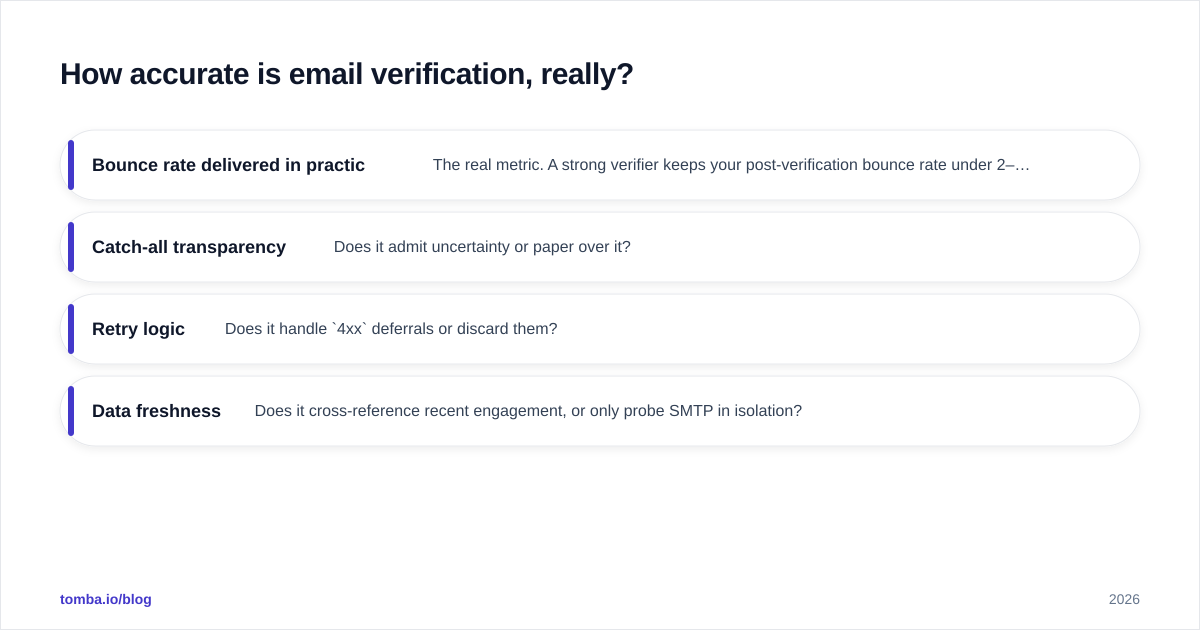
What separates a good verifier from a mediocre one:
- Bounce rate delivered in practice — The real metric. A strong verifier keeps your post-verification bounce rate under 2–3%.
- Catch-all transparency — Does it admit uncertainty or paper over it?
- Retry logic — Does it handle
4xxdeferrals or discard them? - Data freshness — Does it cross-reference recent engagement, or only probe SMTP in isolation?
You can sanity-check any vendor's claims against third-party reviews on G2 rather than trusting marketing numbers. When you verify with a tool that combines SMTP probing with a real B2B database and historical signals, accuracy on catch-alls climbs well above what pure SMTP can deliver. For one-off checks, a free email verifier is enough; for production volume, you want metered bulk verification with proper catch-all handling.
How do you build a clean-list workflow in 2026?#
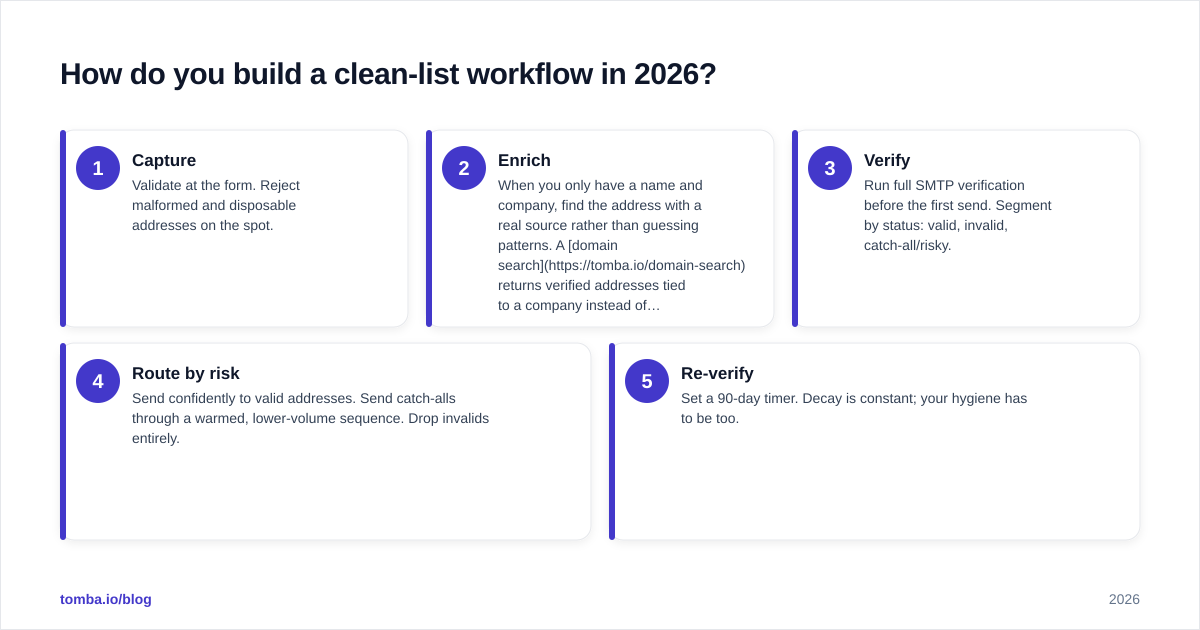
Treat list hygiene as a pipeline, not a one-time scrub. Here's a sequence that holds up under daily sending volume:
- Capture — Validate at the form. Reject malformed and disposable addresses on the spot.
- Enrich — When you only have a name and company, find the address with a real source rather than guessing patterns. A domain search returns verified addresses tied to a company instead of permutations you'd have to test blindly.
- Verify — Run full SMTP verification before the first send. Segment by status: valid, invalid, catch-all/risky.
- Route by risk — Send confidently to valid addresses. Send catch-alls through a warmed, lower-volume sequence. Drop invalids entirely.
- Re-verify — Set a 90-day timer. Decay is constant; your hygiene has to be too.
This is also where finding and verifying in one platform pays off. Bouncing data between a finder, a separate verifier, and a CRM introduces sync gaps where stale addresses slip through. A combined email finder and verifier keeps the find → verify → export loop inside one credit pool and one status model, which matters once you're processing thousands of contacts a week. Check the Tomba pricing tiers against your monthly volume — the Free tier (25 searches/mo) is enough to test the workflow before you commit.
Common mistakes that quietly wreck deliverability#
- Treating "valid syntax" as "safe to send." The most expensive mistake in this whole guide. Valid ≠ deliverable.
- Marking every catch-all as good. You'll bounce a chunk of them and never know which.
- Verifying once and never again. A list verified in January is meaningfully dirty by April.
- Rolling your own SMTP checker. Without IP rotation and retry logic you'll get blocked, misread greylisting, and trust garbage results.
- Skipping verification on "warm" lists. Even opt-in subscribers churn jobs. Re-verify before reactivation campaigns.
The bottom line#
Validation tells you an address could work. Verification tells you it will. You need both, at the right moments — validation as the cheap front-door filter, verification as the gate that protects your sender reputation before every send. Get this two-step rhythm right and you keep bounce rates under 2%, your domain reputation intact, and your good mail in the inbox where it belongs.
Ready to stop guessing whether an address is real? Tomba's Email Finder finds professional email addresses by name, domain, or company and verifies them against live mail servers and a real B2B database in the same step — so the addresses you export are already checked. Start free with 25 searches a month, then scale into bulk verification when your volume demands it. Clean lists aren't a luxury in 2026; they're the price of reaching the inbox at all.
// get started
Find, verify and enrich your first contacts today
Start on the free plan with 25 searches a month, then scale when your team is ready.
Free plan · No credit card required · GDPR & CCPA
// about the author