Customer Onboarding Emails: 9 Templates & Sequence (2026)
A practical 2026 playbook for customer onboarding emails: the 9-email sequence, timing, copy templates, and the metrics that separate activation from churn.
Most SaaS revenue leaks happen in the first two weeks, not at renewal. The product is fine. The pricing is fine. The new user just never reached the moment where your tool became useful — and your onboarding emails were the only lever you had to get them there.
This guide gives you the full system: the sequence, the timing, the copy, and the numbers to judge it by.
TL;DR#
- Onboarding emails are activation tools, not announcements. Each one should push the user toward a single next action, not list features.
- Nine emails over 30 days is the workhorse structure: welcome, setup, first-value, feature depth, social proof, check-in, expansion, and a re-engagement save.
- Timing beats volume. Trigger emails on behavior (signed up, completed setup, went quiet) rather than a fixed blast calendar.
- Personalization needs clean data. A verified name, role, and company turns a generic blast into a relevant message — that starts with accurate contact data, not a merge tag.
- Measure activation rate and time-to-value, not just open rate. Opens flatter you; activation pays you.
What are customer onboarding emails?#
Customer onboarding emails are the automated sequence a new user receives after signing up, designed to move them from "created an account" to "got real value." Think of them as a flight attendant's safety briefing crossed with a concierge: the first part makes sure nobody is lost, the second part quietly steers people toward the thing they came for.
They differ from marketing emails in one critical way. A marketing email tries to win attention. An onboarding email assumes you already have attention — the user just raised their hand — and spends it carefully on a single behavior: confirm your email, connect your data, invite a teammate, run your first search. Every message has one job.
The stakes are concrete. According to HubSpot's research on customer retention, acquiring a new customer costs far more than keeping one, and the earliest days of the relationship set the trajectory. If a user doesn't hit their first "aha" moment fast, no discount or feature email later will rescue them.
Why do onboarding emails matter more than the welcome page?#
Because the welcome page is seen once, in a tab the user closes in ninety seconds. Email follows them.
A new signup is rarely ready to commit on day one. They were curious, they poked around, and then real life — a meeting, a Slack ping, lunch — pulled them away. The sequence is your only way back into their head over the next month.
There's also a compounding effect. Users who complete onboarding don't just stick around; they invite colleagues, upgrade sooner, and generate the response rate you'll quote in your next board deck. The first sequence is where lifetime value is decided.
What does a high-performing onboarding sequence look like?#
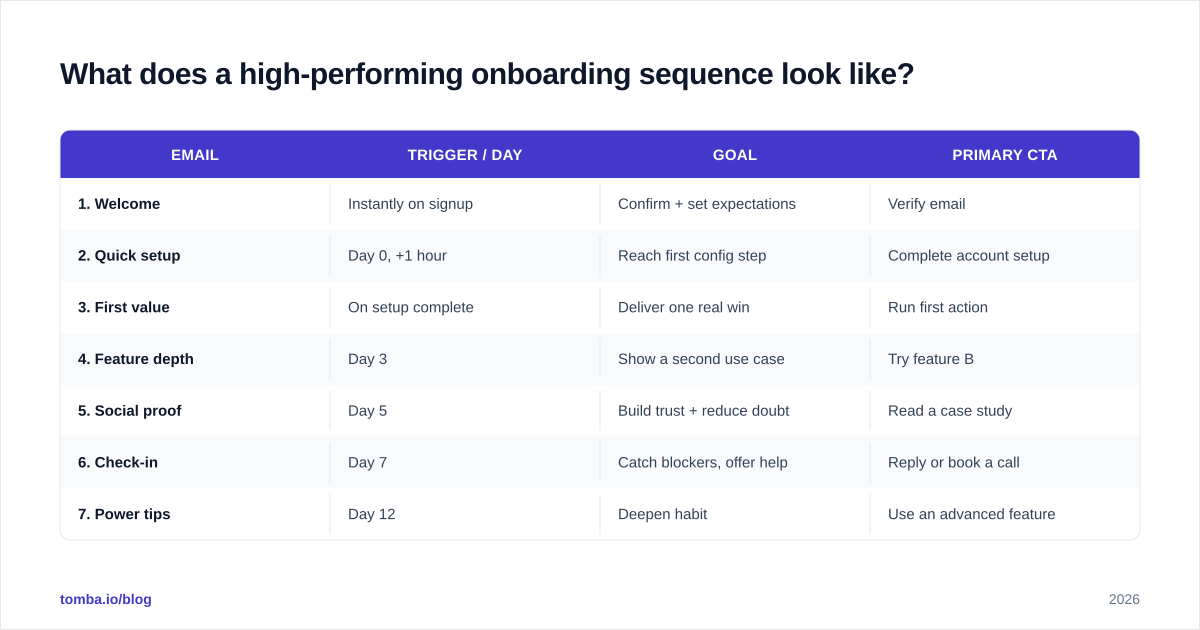
Below is the nine-email structure that works across most B2B SaaS products. Adjust the days to your own activation window — a complex platform may stretch this to 45 days, a simple tool may compress it to 14.
| Trigger / Day | Goal | Primary CTA | |
|---|---|---|---|
| 1. Welcome | Instantly on signup | Confirm + set expectations | Verify email |
| 2. Quick setup | Day 0, +1 hour | Reach first config step | Complete account setup |
| 3. First value | On setup complete | Deliver one real win | Run first action |
| 4. Feature depth | Day 3 | Show a second use case | Try feature B |
| 5. Social proof | Day 5 | Build trust + reduce doubt | Read a case study |
| 6. Check-in | Day 7 | Catch blockers, offer help | Reply or book a call |
| 7. Power tips | Day 12 | Deepen habit | Use an advanced feature |
| 8. Expansion | Day 20 | Surface upgrade value | View plans |
| 9. Re-engagement | Triggered on inactivity | Win back quiet users | Come back / give feedback |
Notice that only emails 1, 2, 4, 5, 7, and 8 are time-based. The rest fire on behavior. That blend is the difference between a sequence that feels like a robot and one that feels like a helpful human watching your progress.
Behavior triggers beat the calendar#
A user who finishes setup on day one shouldn't get a "still need help setting up?" email on day three. Segment your sends by what the user has actually done. The cleanest way to model this:
- Did the action → advance to the next value milestone.
- Opened but didn't act → resend with a lighter, more specific CTA.
- Went silent for 5+ days → drop into the re-engagement branch.
How do you write onboarding emails that get opened and acted on?#
Five rules carry most of the weight.
1. One CTA per email. Two buttons halve your click-through. Pick the single most valuable next step and cut everything else. Link to a help doc in plain text if you must, but only one primary button.
2. Write the subject line for the inbox, not the brand. "Your account is ready — here's step 1" beats "Welcome to Acme!" because it tells the reader what's inside and what to do. If you're stuck, a subject line generator can surface angles you'd miss, but always rewrite the output in your own voice.
3. Lead with the user's outcome, not your feature. Don't say "We have a bulk import tool." Say "Upload your whole list once and never copy-paste again." The feature is the how; the outcome is the why-they-care.
4. Keep it short enough to read on a phone in a hallway. Three short paragraphs and a button. If your onboarding email needs a scroll, it's a help-center article wearing an email costume.
5. Personalize with real data, not just {{first_name}}. Referencing the user's role, company, or industry lifts relevance dramatically — but only if that data is accurate. A merge field firing "Hi {{first_name}}" on a blank record is worse than no name at all. This is why teams that take onboarding seriously enrich and verify contact records before the sequence runs, often pulling clean fields through data enrichment so every send has a real name, title, and company behind it.
For ready-made starting points across the whole funnel, a library of email templates saves you from drafting every message from scratch.
What should each core email actually say?#
Here are condensed templates you can adapt. Keep your real versions tight and brand-specific.
Email 1 — Welcome (send instantly):
Subject: You're in. Here's your first step.
Hi {{first_name}}, your {{product}} account is live. The fastest way to see value is to {{first_action}} — it takes about two minutes.
[Do {{first_action}}]
Reply to this email if anything's unclear. A real person reads it.
Email 3 — First value (on setup complete):
Subject: Nice — now try this
You've got {{product}} connected. Most teams see their first win by {{specific_outcome}}. Want to try it now?
[Run {{first_action}}]
Email 6 — Check-in (day 7):
Subject: How's it going with {{product}}?
You signed up a week ago — I wanted to check whether you hit any snags. What were you hoping {{product}} would help you do?
Just hit reply. I'll point you to the fastest path.
The check-in email is deliberately plain text and reply-driven. It often outperforms every polished HTML email in the sequence because it feels like a person, not a campaign.
How is onboarding email different from a cold email sequence?#
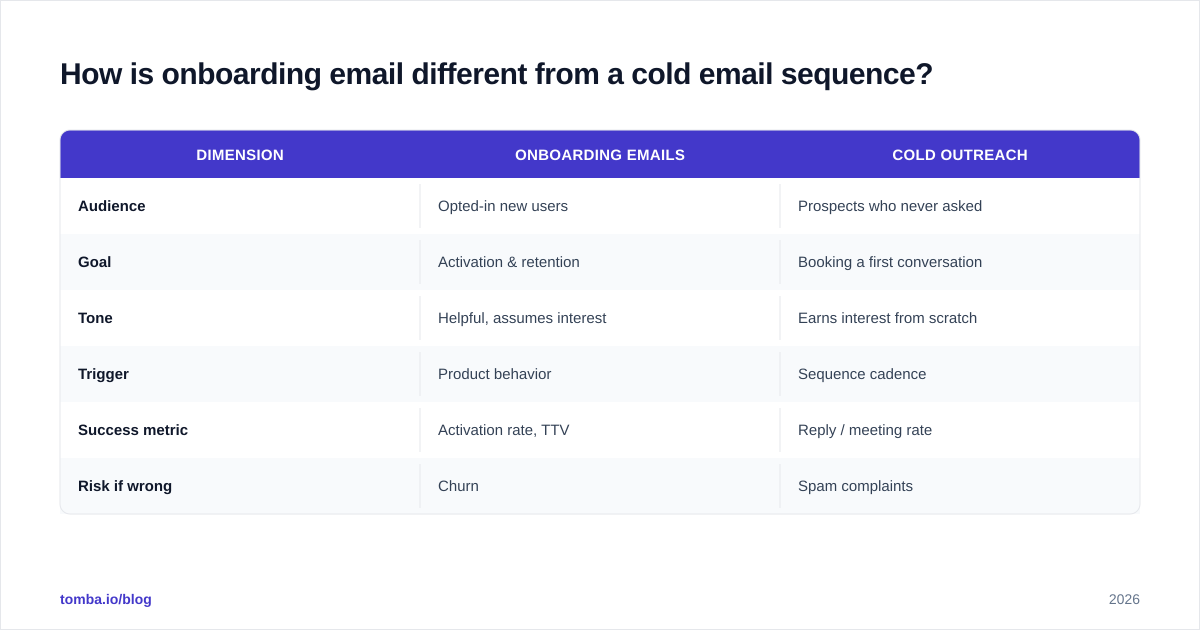
They share mechanics but invert the relationship, and confusing them is a common mistake.
| Dimension | Onboarding emails | Cold outreach |
|---|---|---|
| Audience | Opted-in new users | Prospects who never asked |
| Goal | Activation & retention | Booking a first conversation |
| Tone | Helpful, assumes interest | Earns interest from scratch |
| Trigger | Product behavior | Sequence cadence |
| Success metric | Activation rate, TTV | Reply / meeting rate |
| Risk if wrong | Churn | Spam complaints |
The implication: copy that works cold ("I noticed you're hiring SDRs…") feels strange to someone who just paid you. Match the message to where the relationship actually is.
That said, both depend on the same foundation — reaching a real, deliverable inbox. A polished onboarding sequence is wasted if your transactional and lifecycle emails land in spam. Protect that by keeping lists clean and bounces low; running addresses through an email verifier before they enter any automated flow is the simplest insurance against deliverability damage.
How do you measure whether your onboarding emails work?#
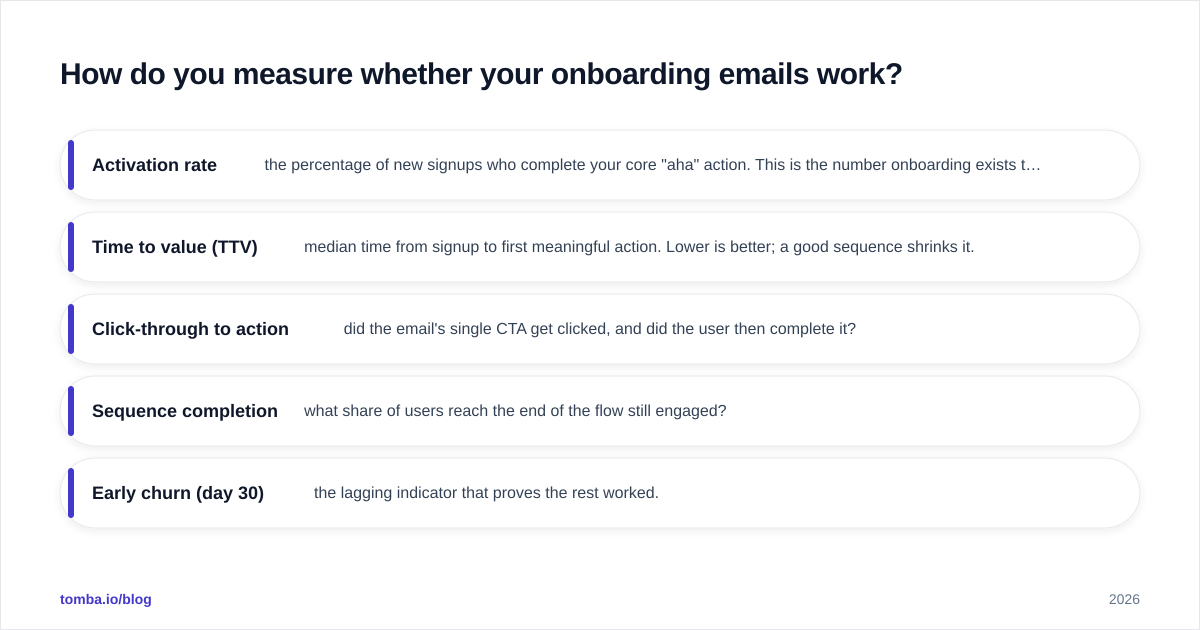
Stop celebrating open rates. With privacy changes inflating open data, opens are now closer to noise than signal. Track these instead:
- Activation rate — the percentage of new signups who complete your core "aha" action. This is the number onboarding exists to move.
- Time to value (TTV) — median time from signup to first meaningful action. Lower is better; a good sequence shrinks it.
- Click-through to action — did the email's single CTA get clicked, and did the user then complete it?
- Sequence completion — what share of users reach the end of the flow still engaged?
- Early churn (day 30) — the lagging indicator that proves the rest worked.
Benchmark against your own past cohorts, not vanity averages from a blog. According to product analytics guidance compiled by firms like Salesforce and reviewed across G2, the teams that win onboarding instrument it like a funnel and fix the leakiest step first.
A simple weekly habit: pull last week's signups, find the single email or step where the largest drop-off happens, and rewrite only that one. Onboarding improvement is iterative, not a one-time launch.
What are the most common onboarding email mistakes?#
- Front-loading every feature. New users can't absorb ten capabilities. Teach one, confirm it landed, then teach the next.
- Ignoring behavior. Sending "complete your setup" to someone who finished setup destroys trust instantly.
- No reply path. Onboarding emails that come from
noreply@throw away your best qualitative feedback channel. - Dirty data. Personalization tokens firing on incomplete records make you look careless at the exact moment you're earning trust.
- Stopping too early. The expansion and re-engagement emails (8 and 9) are where retained revenue hides. Most teams quit at email 5.
Putting it together#
The winning pattern is boring on purpose: one clear action per email, timing driven by behavior, copy that leads with the user's outcome, and personalization built on data you've actually verified. Do those four things and your activation curve bends before your competitors even notice.
The piece teams most often skip is the data layer. Personalization, segmentation, and deliverability all assume you know who the user is and that their address is real. If you're enriching signups, routing leads from a form, or building lookalike outreach off your best-activated accounts, you need accurate contact data feeding the whole machine. Tomba's Email Finder gives you verified professional emails and the company and role context that makes onboarding personalization land — start free with 25 searches a month, and see full Tomba pricing when you're ready to scale the sequence across every new account.
// get started
Find, verify and enrich your first contacts today
Start on the free plan with 25 searches a month, then scale when your team is ready.
Free plan · No credit card required · GDPR & CCPA
// about the author