Lead Routing and SLAs in 2026: Speed-to-Lead Playbook
Slow routing kills deals. Learn how to design lead routing SLAs, set realistic response windows, and enforce them so no qualified lead goes cold in 2026.
TL;DR
- Lead routing SLAs are written agreements on how fast a qualified lead gets assigned and contacted — and who owns the clock.
- Speed-to-lead is the highest-leverage variable in inbound conversion: contacting a lead in the first five minutes can lift qualification odds dramatically versus waiting an hour.
- The four routing models you'll actually use are round-robin, weighted, account-based, and territory — each fits a different motion.
- SLAs only work when they're instrumented: timestamps on assignment, first-touch, and first-meaningful-conversation, with escalation when a clock breaches.
- Routing speed is only as good as your data; a misrouted or unenriched lead burns the SLA before a rep ever touches it.
What is a lead routing SLA?#
A lead routing SLA is a documented promise about two things. First, how quickly an inbound lead gets assigned to the right owner. Second, how fast that owner makes first contact. Think of it like a kitchen ticket rail in a busy restaurant — the moment an order lands, there's an agreed clock for plating it. No clock, and tickets pile up while diners walk out.
In practice the SLA defines three timestamps you measure against:
- Time-to-assignment — lead enters the system to lead has an owner.
- Time-to-first-touch — owner assigned to first outbound attempt (call, email, or LinkedIn).
- Time-to-qualification — first touch to a logged qualifying conversation.
Most teams obsess over the third number and ignore the first two. That's backwards. Assignment and first-touch are the cheapest minutes to win. They're entirely within your control. Qualification depends on the prospect picking up.
The reason this matters in 2026 is volume plus expectation. Buyers research across more channels and expect near-instant follow-up when they raise a hand. A marketing qualified lead that sits in an unassigned queue overnight isn't a warm lead anymore — it's a cold one wearing a warm label.
Why does speed-to-lead matter so much?#
Because attention decays fast, and your competitors are routing the same lead. The classic finding — repeated across vendor and analyst studies — is that contacting a web lead within the first few minutes massively outperforms waiting even an hour. HubSpot's research on response time and similar Salesforce sales benchmarks both point the same direction: the curve is steep and early.
Here's the uncomfortable math. Say your SLA allows a 24-hour first-touch window and your competitor's allows five minutes. You are not competing on product on that deal. You already lost the first conversation, the framing, and often the meeting.

Speed-to-lead also compounds with response rate. A fast first touch isn't just about being first. It's about catching the prospect while the trigger that made them act — a pricing page visit, a demo request, a content download — is still fresh in their mind. Wait, and you're asking them to reconstruct intent they've already forgotten.
What are the main lead routing models?#
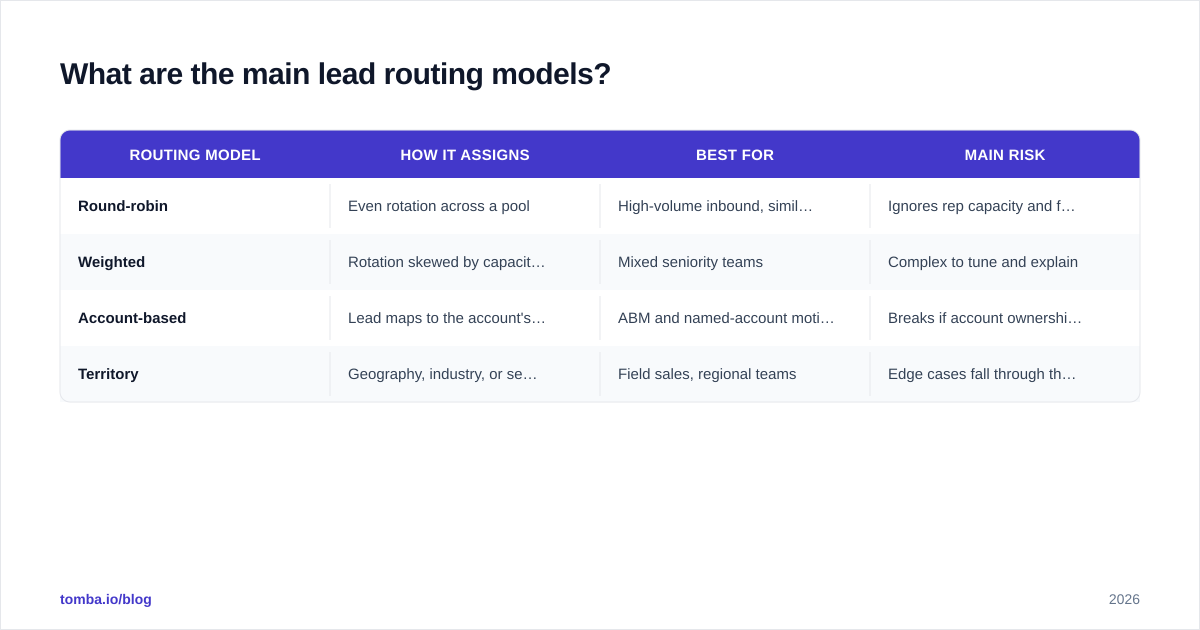
There's no single correct model — the right one depends on how your team is structured and how you sell. Most orgs end up running two or three in parallel for different lead types.
| Routing model | How it assigns | Best for | Main risk |
|---|---|---|---|
| Round-robin | Even rotation across a pool | High-volume inbound, similar reps | Ignores rep capacity and fit |
| Weighted | Rotation skewed by capacity or skill | Mixed seniority teams | Complex to tune and explain |
| Account-based | Lead maps to the account's existing owner | ABM and named-account motions | Breaks if account ownership data is stale |
| Territory | Geography, industry, or segment rules | Field sales, regional teams | Edge cases fall through the cracks |
A few practical notes. Round-robin is the default for a reason — it's fair and simple — but pure round-robin punishes you when one rep is buried and another is idle. Weighted round-robin fixes that by assigning more leads to reps with open capacity. Account-based routing is non-negotiable if you run ABM: a new lead from an account a rep is already working must land with that rep, not a stranger. Territory routing is clean on paper and messy in reality, because real leads constantly fall between segments.
Whatever you choose, the routing rule is only as trustworthy as the data feeding it. Account-based routing depends on accurate firmographics; territory routing depends on knowing the lead's true location and industry. If those fields are blank or wrong, the lead gets misrouted and your SLA clock runs out while it bounces between inboxes. This is why data enrichment sits upstream of routing — you enrich first, then route on clean fields.
How do you set realistic SLA targets?#
Start from your actual capacity, not from an aspirational number you'll never hit. An SLA you breach 40% of the time is worse than no SLA, because it trains reps to ignore the clock.
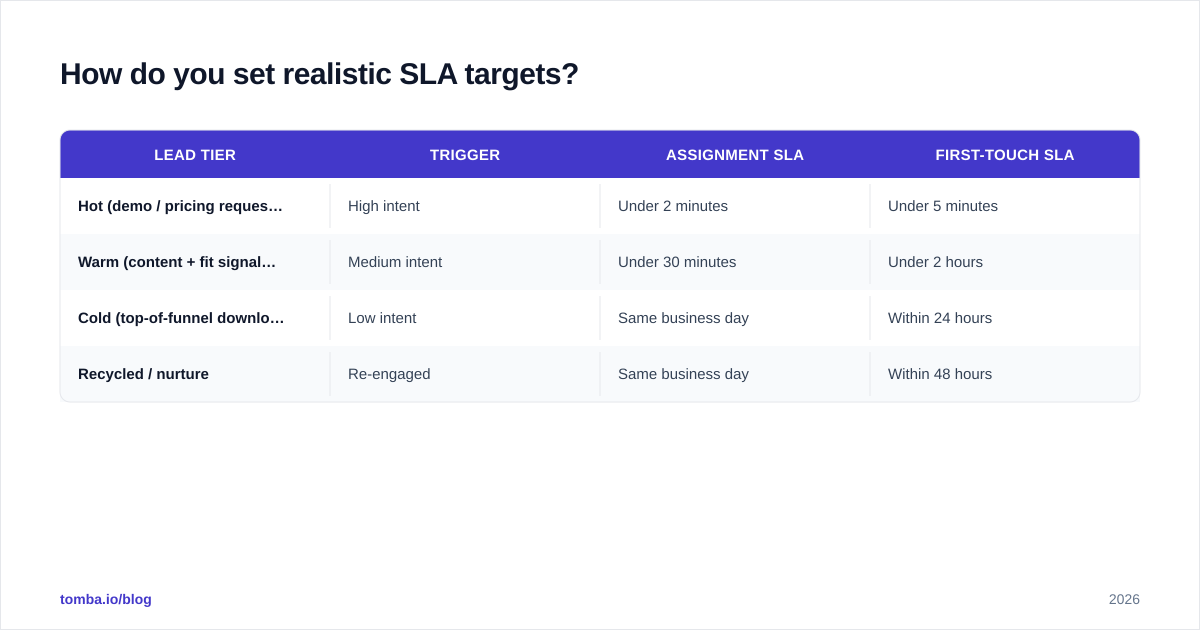
A workable tiered model looks like this:
| Lead tier | Trigger | Assignment SLA | First-touch SLA |
|---|---|---|---|
| Hot (demo / pricing request) | High intent | Under 2 minutes | Under 5 minutes |
| Warm (content + fit signals) | Medium intent | Under 30 minutes | Under 2 hours |
| Cold (top-of-funnel download) | Low intent | Same business day | Within 24 hours |
| Recycled / nurture | Re-engaged | Same business day | Within 48 hours |
Notice that not every lead deserves a five-minute scramble. Treating a whitepaper download like a demo request burns rep energy and dulls the team to genuine urgency. The art is scoring leads well enough that the hot tier really is hot.
Three rules for setting the numbers:
- Measure your baseline before you commit. Pull current time-to-first-touch from your CRM. Set the first SLA at roughly your 70th percentile, then ratchet down.
- Define business hours explicitly. A five-minute SLA at 2 a.m. on a Sunday is a fiction unless you staff it. State the coverage window.
- Separate assignment from first-touch. Marketing can own assignment speed (it's system-driven); sales owns first-touch. Blur them, and nobody owns the breach.
How do you enforce a routing SLA?#
Enforcement is where most SLA programs quietly die. A target nobody monitors is just a suggestion. The fix is instrumentation plus escalation.
Instrument every clock. Stamp the lead on creation, on assignment, on first-touch, and on first qualifying conversation. If your CRM can't show you those four timestamps per lead, fix that before you write the SLA. You can't enforce what you don't measure.
Escalate automatically. When a clock breaches, the lead should reassign or alert a manager without a human noticing. The pattern: hot lead unassigned after two minutes → ping the on-call rep; unactioned after five → reassign to the next available rep and notify the manager. Build this in your routing tool or workflow automation — a HubSpot integration or Salesforce flow can fire these alerts off the timestamp fields.
Review breaches weekly, not quarterly. A standing 15-minute review of every breached SLA surfaces the real causes fast: a rep on PTO with leads still routing to them, a territory rule with a gap, a scoring model marking junk as hot.

Make the data clean before it routes. A surprising share of breaches aren't laziness. They're a rep staring at a lead with no phone number, no company, and a generic Gmail address, with no idea who to call. Enriching the lead at capture with a verified work email, company, and role removes that friction. Tools like the Tomba Email Finder and contact data enrichment fill those gaps so the rep opens a complete record and acts immediately instead of researching first.
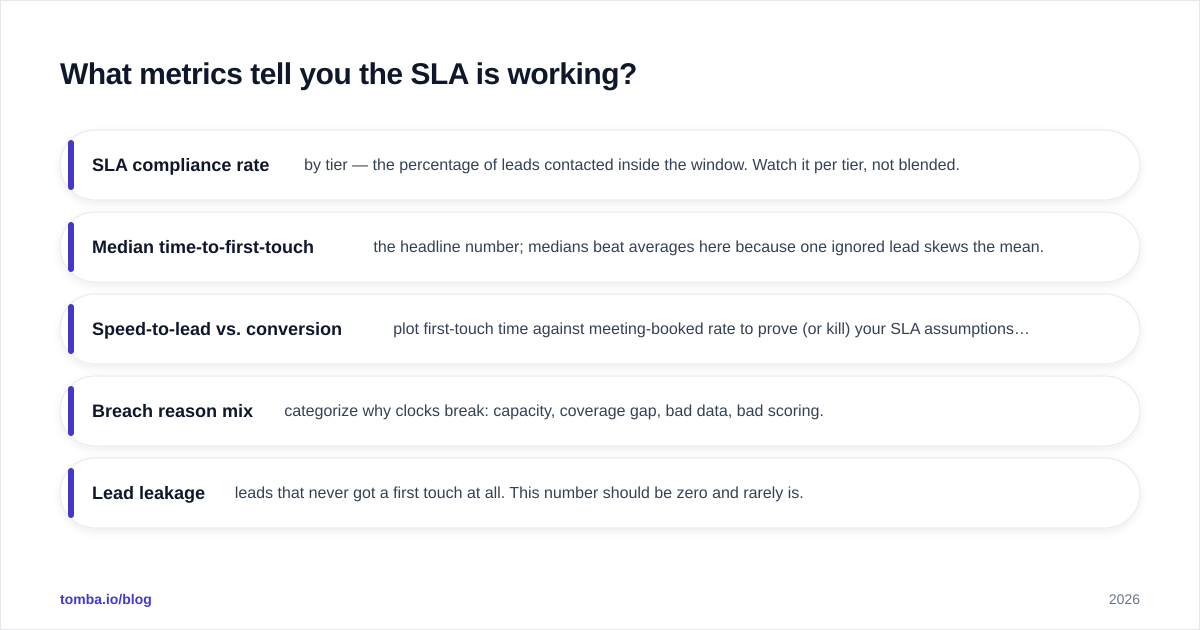
What metrics tell you the SLA is working?#
Track outcomes, not just compliance. A 100% SLA-compliance rate that doesn't move conversion means you optimized the wrong clock.
- SLA compliance rate by tier — the percentage of leads contacted inside the window. Watch it per tier, not blended.
- Median time-to-first-touch — the headline number; medians beat averages here because one ignored lead skews the mean.
- Speed-to-lead vs. conversion — plot first-touch time against meeting-booked rate to prove (or kill) your SLA assumptions with your own data.
- Breach reason mix — categorize why clocks break: capacity, coverage gap, bad data, bad scoring.
- Lead leakage — leads that never got a first touch at all. This number should be zero and rarely is.
If you sell on calls, fold phone coverage into the picture too — a fast email touch is hollow if the B2B phone numbers are missing and the rep can't dial. The SLA is a system, and the data layer is part of it.
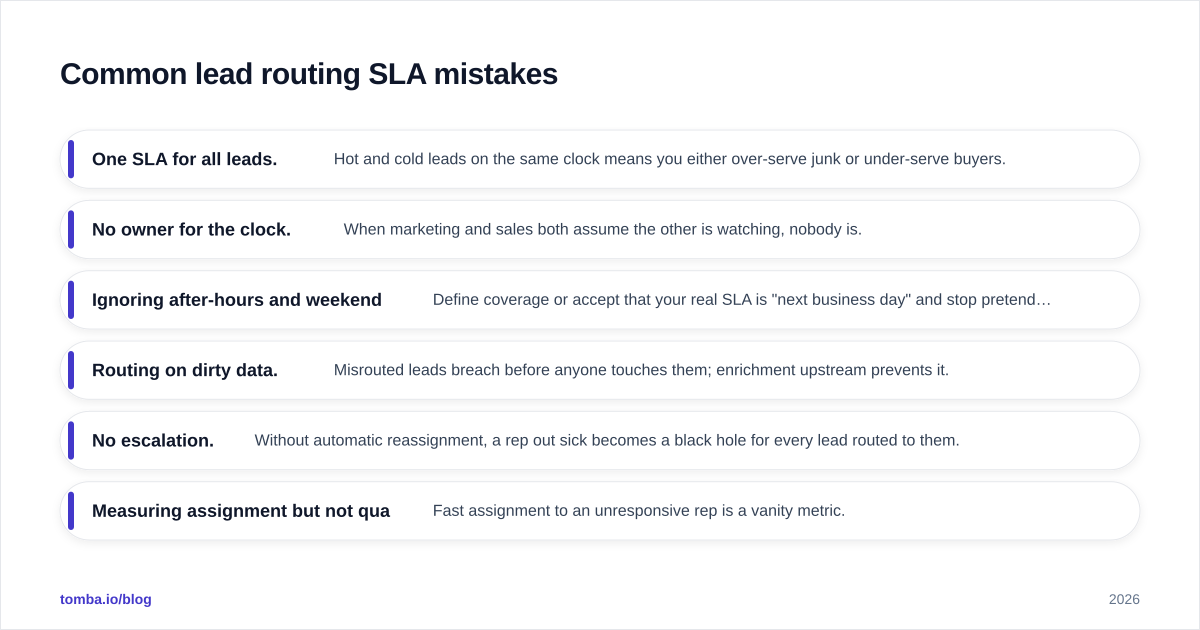
Common lead routing SLA mistakes#
A short list of the failures that show up again and again:
- One SLA for all leads. Hot and cold leads on the same clock means you either over-serve junk or under-serve buyers.
- No owner for the clock. When marketing and sales both assume the other is watching, nobody is.
- Ignoring after-hours and weekends. Define coverage or accept that your real SLA is "next business day" and stop pretending.
- Routing on dirty data. Misrouted leads breach before anyone touches them; enrichment upstream prevents it.
- No escalation. Without automatic reassignment, a rep out sick becomes a black hole for every lead routed to them.
- Measuring assignment but not qualification. Fast assignment to an unresponsive rep is a vanity metric.
How does data quality affect lead routing SLAs?#
It's the hidden dependency under everything above. Your routing rules, your enrichment, your escalation — all of it assumes the lead record is accurate. A lead with the wrong company gets routed to the wrong territory. A lead with no email or phone can't be touched inside any window. A duplicate creates two clocks and two reps stepping on each other.
The teams that hit their lead routing SLAs consistently treat capture-time data quality as part of the routing system, not a separate cleanup project. They verify and enrich at the moment of capture. So when the routing engine fires, it's working with a complete, correct record. That means a verified work email, a real company match, a role, and ideally a direct dial — present before the clock starts, not researched after it's already running.
When you combine clean inbound data with a tiered SLA, instrumented clocks, and automatic escalation, routing stops being a source of leakage and becomes a competitive edge. You're not just first to the lead — you're first with context.
Where Tomba fits#
If your lead routing SLAs keep breaking because reps open half-empty lead records, fix the data layer first. The Tomba Email Finder returns verified professional emails by name, company, or domain. Tomba's data enrichment backfills company, role, and contact details at the moment a lead is captured — so the record that hits your routing engine is complete and ready to action. Start on the free tier (25 searches a month) to test it against your own inbound, then scale up via Tomba pricing (Starter at $49/mo) once it's wired into your CRM. Clean data in, faster first touch out, fewer cold leads wearing warm labels.
// get started
Find, verify and enrich your first contacts today
Start on the free plan with 25 searches a month, then scale when your team is ready.
Free plan · No credit card required · GDPR & CCPA
// about the author