Sales Hub Sales Process: Pipeline, Expansion & Upsell 2026
Net-new logos get the glory, but expansion and upsell revenue is cheaper, faster, and more predictable. Here's how to build a sales process and pipeline in your sales hub that treats existing accounts as a real growth engine.
Sales Hub Sales Process: Pipeline, Expansion & Upsell
Most revenue teams build a beautiful pipeline for net-new logos and then leave expansion to chance — a renewal email here, an accidental upsell there. That gap is where the cheapest, fastest revenue in your business is quietly leaking out.
This guide shows how to design a sales process and pipeline inside your sales hub (HubSpot, Salesforce, or whatever you run) that treats pipeline expansion and upsell as a first-class motion, not an afterthought.
TL;DR#
- Expansion revenue costs 3–5x less to win than net-new and closes faster because trust already exists.
- A dedicated expansion pipeline needs its own stages, signals, and owner — bolting it onto your new-logo pipeline hides the numbers.
- The four expansion plays that matter: seat growth, tier upgrades, cross-sell, and usage-based true-ups.
- Track Net Revenue Retention (NRR), expansion win rate, and time-to-expand separately from new-business metrics.
- Clean contact and account data is the fuel — stale records kill expansion outreach before it starts.
Why does expansion and upsell beat net-new revenue?#
Conclusion first: expanding an existing account is the highest-margin pipeline you own, and most teams under-invest in it.
Think of your customer base like a fruit orchard you already planted. Net-new logos are seeds — they take a full season of watering before they yield anything. Expansion is picking the fruit that's already ripe on trees you tended last year. Same orchard, far less labor, much faster harvest.
The economics back this up. Acquiring a new customer typically costs five times more than retaining and growing an existing one, and existing customers convert at dramatically higher rates than cold prospects. When a customer already trusts your product, the friction of a second purchase — a new seat, a higher tier, an add-on module — is a fraction of the friction of a first.
There's also a strategic reason. In a tight 2026 budget environment, your buyers are consolidating vendors. The account you already serve is being courted by competitors who want to absorb your footprint. If you're not running a deliberate expansion motion, you're not just leaving money on the table — you're leaving the door open.
What is an expansion pipeline, and how is it different?#
An expansion pipeline is a separate, tracked set of deal stages for revenue that comes from current customers — upgrades, seat additions, cross-sells, and renewals with an uplift. It runs parallel to your new-business pipeline, with its own stages and its own owner.
The mistake almost everyone makes is dumping expansion deals into the same pipeline as new logos. When you do that, a $4,000 seat upsell sits next to a $60,000 net-new deal in the same forecast, gets the same stage definitions, and gets worked with the same playbook — none of which fit. The numbers blur, and leadership can't see whether expansion is actually growing.
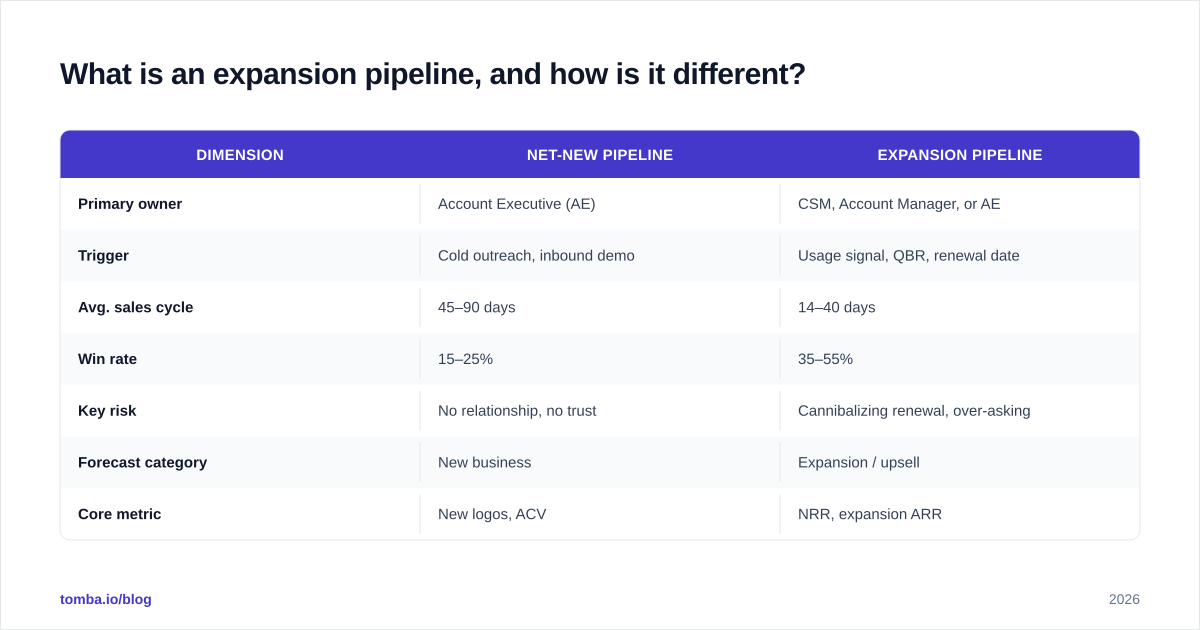
Here's how the two motions differ:
| Dimension | Net-New Pipeline | Expansion Pipeline |
|---|---|---|
| Primary owner | Account Executive (AE) | CSM, Account Manager, or AE |
| Trigger | Cold outreach, inbound demo | Usage signal, QBR, renewal date |
| Avg. sales cycle | 45–90 days | 14–40 days |
| Win rate | 15–25% | 35–55% |
| Key risk | No relationship, no trust | Cannibalizing renewal, over-asking |
| Forecast category | New business | Expansion / upsell |
| Core metric | New logos, ACV | NRR, expansion ARR |
Notice the win rate gap. Expansion deals close at roughly double the rate because the hard part — proving you're worth paying for — is already done. Your job shifts from persuasion to timing and packaging.
What stages belong in an expansion pipeline?#
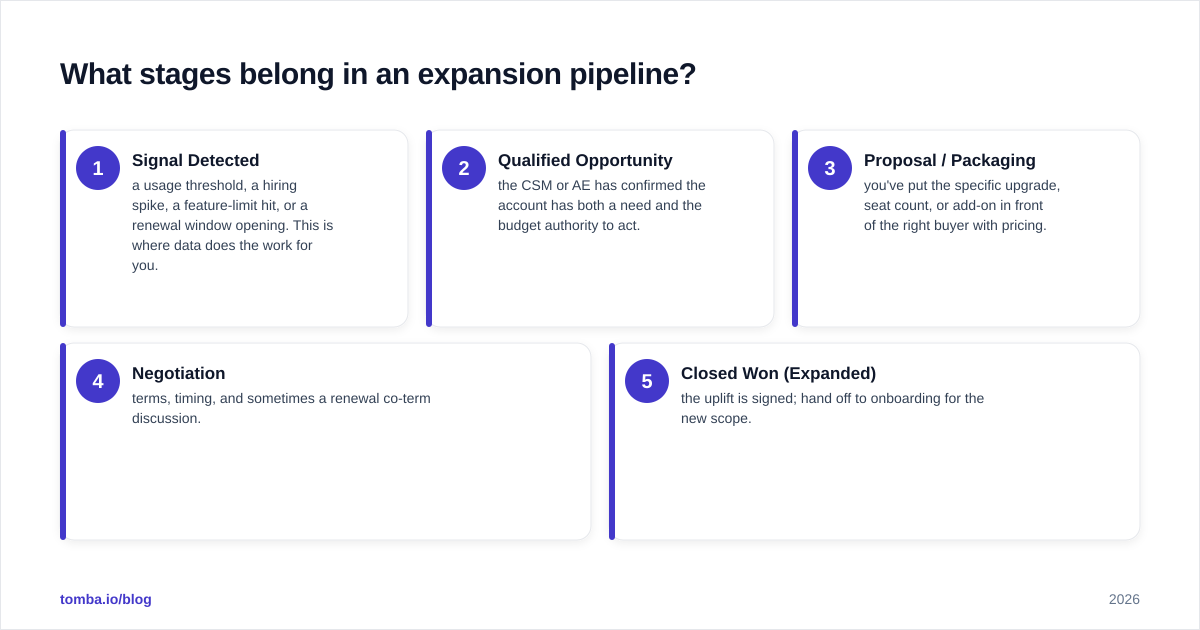
Keep it lean. Expansion deals move fast, so a heavy nine-stage pipeline just creates admin drag. Five stages cover almost every B2B expansion motion:
- Signal Detected — a usage threshold, a hiring spike, a feature-limit hit, or a renewal window opening. This is where data does the work for you.
- Qualified Opportunity — the CSM or AE has confirmed the account has both a need and the budget authority to act.
- Proposal / Packaging — you've put the specific upgrade, seat count, or add-on in front of the right buyer with pricing.
- Negotiation — terms, timing, and sometimes a renewal co-term discussion.
- Closed Won (Expanded) — the uplift is signed; hand off to onboarding for the new scope.
The discipline that separates good expansion teams from accidental ones is stage 1. Most upsells are reactive — a customer asks, and you react. Mature teams instrument their product and CRM so signals surface automatically: a team that's used 90% of its seats, an account whose web traffic doubled, a champion who just got promoted. Each is an entry into the pipeline before the customer even raises a hand.
Which expansion plays should you run?#
Conclusion first: there are four repeatable plays, and most teams should run all four with different owners and triggers.
Seat / volume growth. The simplest. Your customer's team grew, or their usage climbed. Watch active-user ratios and consumption against plan limits. This is the play you can most easily automate with a usage alert.
Tier upgrades. Moving a customer from Starter to a higher plan when they bump into feature ceilings. The trigger is behavioral — they tried to use a gated feature, or they're manually working around a limit your next tier removes.
Cross-sell. Selling an adjacent product or module. This needs the most discovery because you're introducing something new, but the trust discount still applies. A clean B2B database of account contacts helps you find the right buyer for the adjacent product, who often isn't your original champion.
Usage-based true-ups. For consumption-priced products, this is semi-automatic, but a human touch at the true-up moment turns a billing event into a relationship conversation — and a chance to right-size for the year ahead.
Who should own expansion in the sales process?#
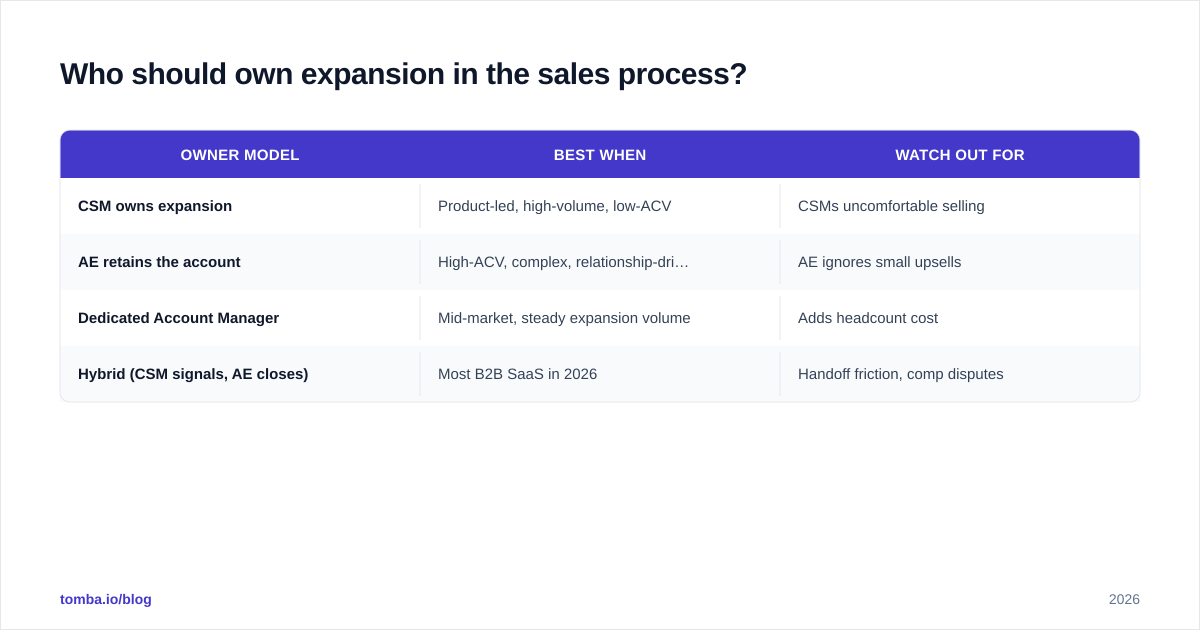
This is the question that derails most expansion programs, so decide it deliberately. There's no universally correct answer — there's a correct answer for your motion.
| Owner model | Best when | Watch out for |
|---|---|---|
| CSM owns expansion | Product-led, high-volume, low-ACV | CSMs uncomfortable selling |
| AE retains the account | High-ACV, complex, relationship-driven | AE ignores small upsells |
| Dedicated Account Manager | Mid-market, steady expansion volume | Adds headcount cost |
| Hybrid (CSM signals, AE closes) | Most B2B SaaS in 2026 | Handoff friction, comp disputes |
The hybrid model wins most often because it puts signal detection with the people closest to the customer (CSMs) and deal-closing with the people trained to negotiate (AEs). The catch is compensation. If your CSM surfaces a $30k upsell and the AE closes it, both need to win in the comp plan — otherwise the signal stops flowing. Sort out the comp split before you launch, not after the first disputed deal.
For a deeper look at how these handoffs fit the broader revenue engine, the discipline of revenue operations is what keeps the model honest across teams.
How do you find the right contact to expand into?#
Here's the under-discussed problem: the person who bought your product 18 months ago is often gone. B2B contact data decays at roughly 25–30% per year — people change jobs, get promoted, or leave. Your champion who signed the original deal may have moved on, and the new decision-maker isn't in your CRM.
This is where expansion outreach quietly dies. You send the upsell proposal to a dead inbox, or to someone who has no budget authority, and conclude "the account isn't interested." It's not the account — it's your data.
Two moves fix this:
Re-verify your account contacts before every expansion cycle. Bounced emails to existing customers don't just waste effort — they hurt your sender reputation and can land legitimate renewal emails in spam. Run your customer contact list through an email verifier on a schedule.
Map the full buying committee, not just your champion. Expansion deals — especially cross-sells — often need a new economic buyer. Use data enrichment to fill in the org chart around your existing contact: who runs the adjacent team, who controls the larger budget, who got promoted into the seat that matters now.
Clean, current data is the difference between an expansion pipeline that compounds and one that stalls at "Signal Detected."
What metrics prove the expansion motion is working?#
Track these separately from new business — that's the whole point of a dedicated pipeline.
- Net Revenue Retention (NRR). The headline number. Above 100% means your existing base grows even if you sign zero new logos. Best-in-class B2B SaaS runs 110–130%.
- Gross Revenue Retention (GRR). Strips out expansion to show pure churn. Tells you whether expansion is masking a retention leak.
- Expansion ARR / MRR. Raw new revenue from existing accounts per period.
- Expansion win rate. Should run meaningfully higher than net-new. If it doesn't, your signals are weak or your packaging is wrong.
- Time-to-expand. Days from signal to closed-won. The faster, the more cycles you fit per account per year.
- Coverage. What share of eligible accounts have an active expansion opportunity? Low coverage means signals aren't reaching the pipeline.
A note on tooling: both HubSpot's Sales Hub and Salesforce let you build a second pipeline with custom stages and forecast categories. Use that capability. Gartner's research on revenue technology consistently points to the same failure mode — teams buy the platform but never configure the expansion motion, so the data stays invisible. The tool isn't the strategy; the configured process is.
How do you avoid over-asking and damaging the relationship?#
The fastest way to wreck an expansion program is to treat every customer as a perpetual upsell target. Three guardrails:
Lead with value, not the ask. The signal should map to a real customer outcome. "You're at 95% of your seats and three people are sharing a login" is a value conversation. "It's been 90 days, want to buy more?" is noise.
Co-time with renewals carefully. Bundling an upsell into a renewal can streamline the deal — or it can blow up an otherwise safe renewal by introducing price friction. Read the relationship. If the renewal is at risk, secure it first, expand later.
Respect the no. A logged "not now" with a follow-up date is a future pipeline entry, not a dead end. Re-qualify it on the next signal.
This restraint is what keeps your win rate on expansion high. Pushing hard on cold accounts just trains your team to ignore the pipeline because it stops converting.
A 30-day plan to launch your expansion pipeline#
If you're starting from zero, here's a realistic sequence:
- Week 1 — Build the pipeline. Create a second pipeline in your sales hub with the five stages above and a distinct "Expansion" forecast category.
- Week 2 — Define signals. List the 3–5 usage or account events that should auto-create an opportunity. Wire up at least the easy ones (seat limits, renewal dates).
- Week 3 — Clean the data. Verify and enrich contacts on your top 50 accounts so outreach actually lands. This is the step teams skip and regret.
- Week 4 — Assign ownership and comp. Lock the owner model, settle the comp split, and run your first 10 expansion plays as a pilot.
Measure NRR and expansion win rate from day one so you have a baseline to improve against.
Where Tomba fits#
Expansion is a data problem before it's a sales problem. You can have flawless stages and a motivated team, but if your customer contacts are stale, the pipeline stalls at the first email.
Tomba's Email Finder helps you find and confirm the right contacts inside your existing accounts — the newly promoted champion, the economic buyer for a cross-sell, the head of the team that just doubled in size — so your expansion outreach reaches a real, verified inbox instead of a bounce. Pair it with verification and enrichment, and your expansion pipeline runs on data that's actually current. Start on the free tier (25 searches/month) and scale into a paid plan when the motion proves out; see Tomba pricing for the Starter ($49/mo), Growth ($99/mo), and Pro ($249/mo) tiers.
Build the pipeline, instrument the signals, and feed it clean data. Expansion is the cheapest revenue you'll ever close — but only if you treat it like a real motion.
// get started
Find, verify and enrich your first contacts today
Start on the free plan with 25 searches a month, then scale when your team is ready.
Free plan · No credit card required · GDPR & CCPA
// about the author