Sales Hub Prospecting: Reaching Decision Makers in 2026
A practical 2026 playbook for using HubSpot Sales Hub to find, qualify, and book real decision makers — plus the data layer most teams forget.
TL;DR
- Sales Hub is a strong system of action for prospecting, but it is only as good as the contact data you feed it — decision-maker accuracy is where most pipelines leak.
- Decision makers in 2026 are harder to reach: buying committees average 6–10 people, gatekeepers screen aggressively, and generic blasts get filtered.
- The winning sequence is ICP → enriched, verified contacts → multi-channel Sales Hub sequence → human-qualified handoff.
- Sales Hub does not find or verify emails for you; pair it with a dedicated finder and verifier so reps work real inboxes, not bounces.
- This guide gives you the framework, a tool comparison, and the exact workflow to book meetings with people who can actually sign.
What does "Sales Hub sales prospecting decision makers" actually mean?#
It means using HubSpot Sales Hub as the engine that turns a list of titled buyers into booked meetings — and doing it against the people who control budget, not the analysts who forward your email to the recycle bin.
Three things are bundled in that phrase, and teams that conflate them stall:
- Sales Hub — the CRM and engagement layer where you store contacts, run sequences, log activity, and forecast.
- Sales prospecting — the motion of identifying and reaching out to net-new accounts and contacts.
- Decision makers — the specific humans on the buying committee who can say yes (or kill your deal).
Sales Hub is excellent at #2's execution and #1's record-keeping. What it does not do natively is reliably produce #3 — accurate, verified contact details for the right person at the right account. That gap is where this post lives.
Why is reaching decision makers harder in 2026?#
Because the buyer changed faster than most playbooks did.
According to Gartner research on B2B buying, a typical purchase now involves a buying group of six to ten stakeholders, each arriving with their own information. That means a single "champion" email rarely moves a deal — you have to map and reach a committee. Add three more pressures:
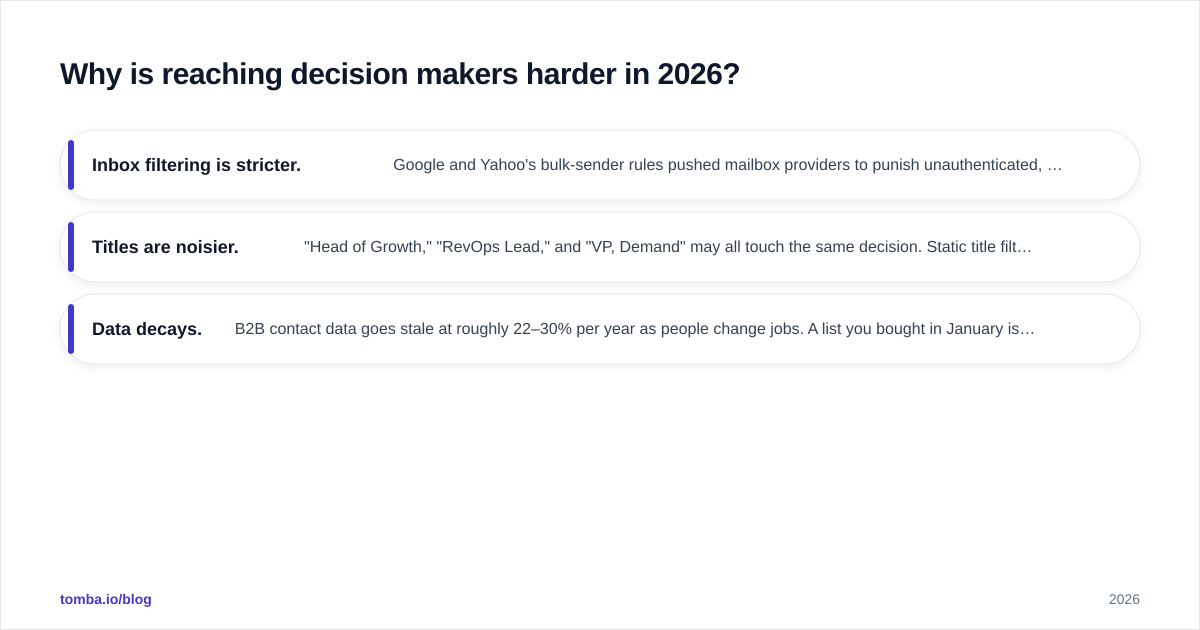
- Inbox filtering is stricter. Google and Yahoo's bulk-sender rules pushed mailbox providers to punish unauthenticated, high-bounce senders. One bad list can tank your domain. (More on protecting your sender reputation below.)
- Titles are noisier. "Head of Growth," "RevOps Lead," and "VP, Demand" may all touch the same decision. Static title filters miss real buyers and waste reps on the wrong ones.
- Data decays. B2B contact data goes stale at roughly 22–30% per year as people change jobs. A list you bought in January is materially wrong by Q4.
The takeaway: prospecting to decision makers is now a data quality problem as much as a messaging problem. Sales Hub handles the messaging beautifully. The data quality is on you.

How do you build the decision-maker prospecting workflow in Sales Hub?#
Run it as five stages. Each stage has an owner and an exit criterion, so nothing rots in a queue.
Stage 1 — Define the ICP and committee map. Before you touch a tool, write down the account profile (industry, size, tech, trigger) and the roles on the committee: economic buyer, champion, technical evaluator, blocker. You are prospecting roles, not just names.
Stage 2 — Source and enrich contacts. Pull target accounts, then find the actual humans in each committee role and enrich them with verified email, phone, and LinkedIn. This is the step Sales Hub can't do alone — feed it from a dedicated finder.
Stage 3 — Verify before import. Run every email through verification so bounces never reach Sales Hub. A 2% bounce ceiling protects your sending domain.
Stage 4 — Sequence in Sales Hub. Build a multi-channel sequence: email, LinkedIn task, call task. Personalize the first line by committee role, not by company name.
Stage 5 — Human qualify and hand off. A reply is not a meeting. A rep confirms authority and need, then the deal moves to a Sales Hub pipeline stage with a real next step.
Which tools do what? A Sales Hub prospecting stack comparison#
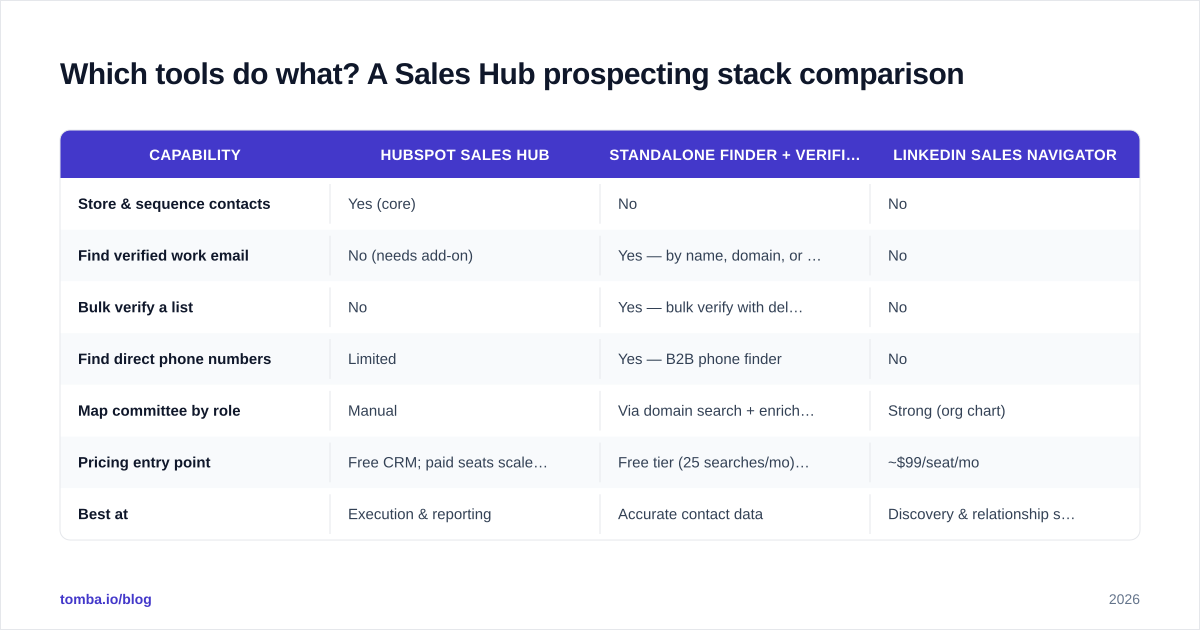
Sales Hub is the hub. The spokes — data sourcing, verification, phone — decide whether your reps spend the day selling or scrubbing lists. Here is how the layers compare on the jobs that matter for decision-maker prospecting.
| Capability | HubSpot Sales Hub | Standalone finder + verifier (e.g. Tomba) | LinkedIn Sales Navigator |
|---|---|---|---|
| Store & sequence contacts | Yes (core) | No | No |
| Find verified work email | No (needs add-on) | Yes — by name, domain, or company | No |
| Bulk verify a list | No | Yes — bulk verify with deliverability score | No |
| Find direct phone numbers | Limited | Yes — B2B phone finder | No |
| Map committee by role | Manual | Via domain search + enrichment | Strong (org chart) |
| Pricing entry point | Free CRM; paid seats scale fast | Free tier (25 searches/mo), Starter $49/mo | ~$99/seat/mo |
| Best at | Execution & reporting | Accurate contact data | Discovery & relationship signals |
The honest read: no single product wins. Sales Navigator is the best place to discover a committee. Sales Hub is the best place to act on it. A finder/verifier is the bridge that turns a name on LinkedIn into a verified, importable contact. Teams that skip the bridge import garbage and blame the CRM.
You can pressure-test the data layer further with Tomba's published data sources and compare entry pricing on the Tomba pricing page against your current per-seat cost.
How do you find the right decision maker's contact details?#
Start from the account, not a purchased list. Two reliable paths:
Path A — Domain-first. You know the company but not the people. Use a domain search to pull every public email pattern and role at the company, then filter to your committee roles. This surfaces the VP of Operations you didn't know existed.
Path B — Name-first. You have a name from Sales Navigator or a webinar list. Use an email finder to resolve their verified work email by name + company, then add a direct line with a phone finder for multi-channel follow-up.
Either way, verify before you import. Run the result through an email verifier and drop anything that isn't deliverable. If a target uses a catch-all domain (common at enterprises), a standard verify returns "unknown" — that's where a catch-all check earns its keep instead of guessing.
Then enrich. A name and email is a contact; a name, email, title, seniority, and company size is a prioritized contact. Push enriched fields into Sales Hub so your sequence logic and lead scoring have something to work with. Tomba's data enrichment and the HubSpot integration let you do this without CSV gymnastics.

How do you protect deliverability while prospecting decision makers?#
Treat your sending domain like a credit score: easy to wreck, slow to rebuild.
Decision-maker prospecting tempts teams to crank volume, which is exactly how reputations die. Three guardrails:
- Cap bounces under 2%. Mailbox providers read high bounce rates as spam behavior. Verification before import is the single highest-leverage control — it's cheaper to verify a list than to recover a burned domain.
- Authenticate properly. SPF, DKIM, and DMARC are non-negotiable in 2026. If you can't read your own SPF record, start with a free SPF checker and fix alignment before you scale.
- Warm up and pace. New domains and inboxes need a ramp. Don't send 500 cold emails from a domain that sent 5 last week.
This matters specifically for decision makers because senior inboxes sit behind the most aggressive filters and the most attentive assistants. One spammy send to a CFO and you've burned the account, not just the email. For a deeper primer, HubSpot's own blog and peer reviews on G2 are useful neutral references on engagement hygiene.
What does a good Sales Hub sequence to decision makers look like?#
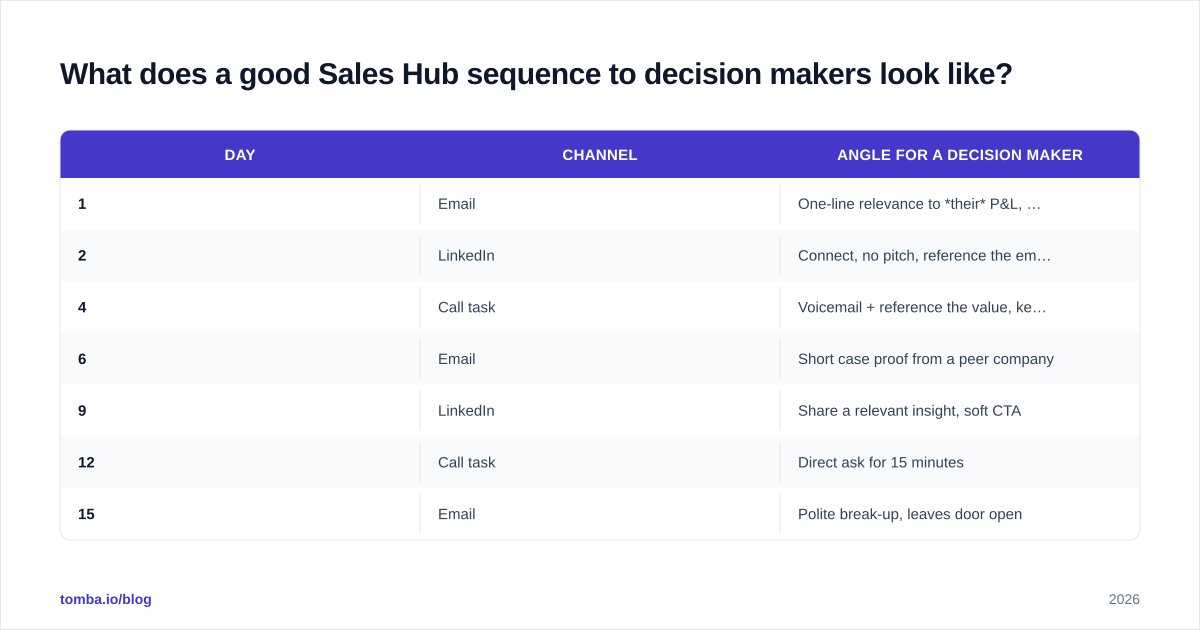
Personalized by role, multi-channel, and patient. Here's a proven seven-touch shape you can build directly in Sales Hub:
| Day | Channel | Angle for a decision maker |
|---|---|---|
| 1 | One-line relevance to their P&L, not your features | |
| 2 | Connect, no pitch, reference the email | |
| 4 | Call task | Voicemail + reference the value, keep under 20s |
| 6 | Short case proof from a peer company | |
| 9 | Share a relevant insight, soft CTA | |
| 12 | Call task | Direct ask for 15 minutes |
| 15 | Polite break-up, leaves door open |
Two rules that separate winners from spammers:
- Lead with their problem, in their words. A VP of RevOps cares about pipeline coverage and forecast accuracy — not your "AI-powered platform."
- Reference the committee. "I'm also speaking with your demand-gen and ops teams about this" signals you understand how the decision gets made and earns a faster reply.
Because Sales Hub logs every touch, you can A/B the first email by role and let the data — not opinion — pick the winner.
How do you measure decision-maker prospecting in Sales Hub?#
Track the funnel, not vanity opens. The metrics that predict booked revenue:
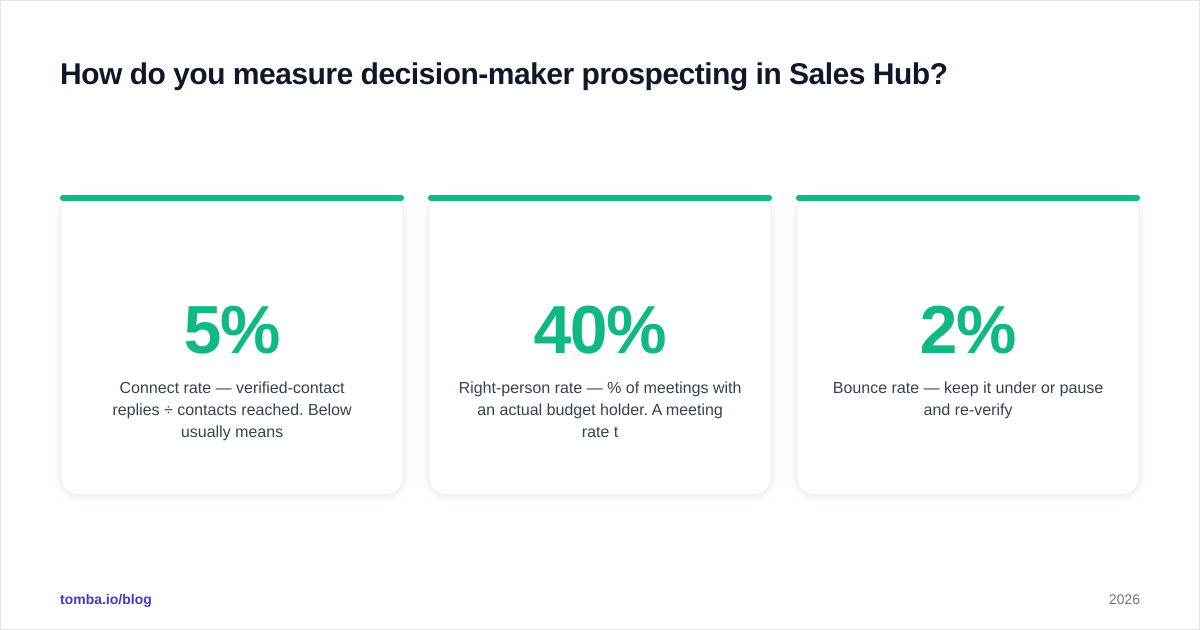
- Connect rate — verified-contact replies ÷ contacts reached. Below 5% usually means bad data or bad targeting, not bad copy.
- Meeting rate — meetings booked ÷ committee members reached. This is your north star.
- Right-person rate — % of meetings with an actual budget holder. A 40% meeting rate that's all analysts is worse than a 15% rate of real buyers.
- Bounce rate — keep it under 2% or pause and re-verify.
Sales Hub's reporting dashboards make the first three trivial once your data is clean. The fourth is upstream — it's a data-quality metric, which loops you right back to verification.
Common mistakes that kill decision-maker prospecting#
- Buying a static list and trusting it. It's decaying as you read this. Source and verify fresh.
- Title-only targeting. "Director" at a 50-person startup ≠ "Director" at a 50,000-person enterprise. Layer seniority and company size.
- Skipping verification to "save time." You'll spend that time later cleaning a damaged domain.
- One-channel sequences. Decision makers ignore email-only outreach. Pair it with LinkedIn and phone.
- Treating a reply as a win. Qualify for authority before you celebrate.
Putting it together: the operating loop#
Run this monthly and your Sales Hub pipeline compounds:
- Refresh the ICP and committee map from closed-won patterns.
- Source accounts → find committee contacts → enrich.
- Verify the entire list; discard undeliverables.
- Import to Sales Hub, sequence by role, run multi-channel.
- Measure right-person meeting rate; feed learnings back to step 1.
Sales Hub owns steps 4 and 5. Steps 2 and 3 — the data that decides whether the whole loop works — are where a dedicated finder and verifier pay for themselves many times over.
Start with the data layer#
If your reps are working a CRM full of guesses, no sequence will save them. Fix the input first.
Use the Tomba Email Finder to resolve verified work emails for the decision makers on each account, run them through verification, and push clean, enriched contacts straight into Sales Hub. The free tier gives you 25 searches a month to test it against your own target accounts before you commit a dollar — and the Starter plan at $49/mo covers most single-rep prospecting motions. Find the real buyer, verify the inbox, and let Sales Hub do what it does best: turn that verified contact into a booked meeting.
// get started
Find, verify and enrich your first contacts today
Start on the free plan with 25 searches a month, then scale when your team is ready.
Free plan · No credit card required · GDPR & CCPA
// about the author