Sales Hub Sales Prospecting & Research List Building (2026)
A practical 2026 playbook for using HubSpot Sales Hub to run prospecting research and build targeted lists that actually convert — plus how to fill the data gaps Sales Hub leaves open.

TL;DR
- HubSpot Sales Hub is strong at organizing prospecting work — sequences, tasks, and saved views — but its built-in research and list-building depend heavily on the data you feed it.
- A repeatable list-building motion has three stages: define the ICP, research and segment accounts, then enrich contacts with verified emails before you ever hit "Enroll."
- Static lists are for one-off campaigns; active (smart) lists keep themselves current as records change. Use both deliberately.
- Sales Hub's own contact data is thin for net-new prospecting. Pair it with a dedicated email finder and verifier so your sequences don't bounce.
- The teams that win in 2026 treat list building as an engineering problem: documented filters, enrichment at the point of import, and verification before send.
If you bought HubSpot Sales Hub expecting it to find prospects for you, you already know the gap. Sales Hub is excellent at running the play once you have a list — sequences, task queues, deal stages, reporting. The hard part is the part nobody automates for you: researching the right accounts and building a clean, current list of contacts to load in. This guide walks through how to do exactly that inside Sales Hub in 2026, and where to plug the holes the platform leaves open.
What does "sales prospecting research and list building" actually mean in Sales Hub?#
The short version: it's the work of turning a vague target market into a finite, enrich-ready list of people you can sequence.
Think of Sales Hub like a professional kitchen. It has the stations, the timers, and the tickets (sequences, tasks, workflows) — but it doesn't grow the ingredients. Prospecting research is sourcing the ingredients; list building is your mise en place, getting everything chopped and arranged so service runs without scrambling.
Concretely, the motion breaks into three jobs:
- Define who you're targeting (the ICP and buying-committee roles).
- Research which specific companies and people match, and segment them.
- Build the list — import or create records, enrich them, verify the emails, and assign them to the right list type.
Most teams collapse all three into "scrape a CSV and import it." That's why their bounce rates are ugly and their reps distrust the CRM. Separate the stages and each becomes fixable.
How do you set up your ICP filters before building anything?#
Decide your filters before you open a list builder — otherwise the tool's options will quietly define your strategy for you.
Write down, in plain language, the firmographic and persona criteria that make a good-fit account. A typical 2026 B2B SaaS ICP looks like:
- Industry: B2B software, fintech, or e-commerce enablement
- Headcount: 50–500 employees
- Region: North America + UK/EU
- Trigger: recently raised funding, hiring for the relevant function, or using a competitor's technology
- Buying committee: VP/Director of the owning function (economic buyer) + a manager (champion) + an ops/enablement role (gatekeeper)
In Sales Hub, these become the properties you'll filter on: Industry, Number of employees, Country/Region, and custom properties you create for triggers. If a property doesn't exist yet, create it now — you cannot segment on data you never captured. This is also the moment to confirm your data sources are reliable, because every downstream list inherits whatever quality you start with.

Static lists vs. active lists: which one for prospecting?#
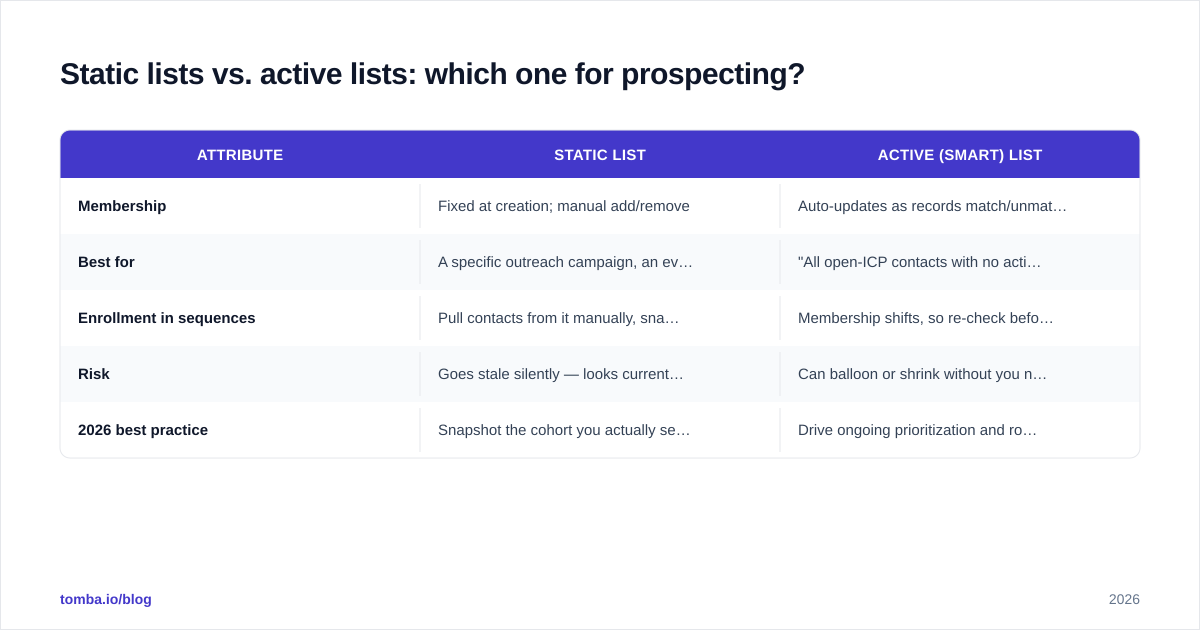
Use active (smart) lists for ongoing segmentation and static lists for a frozen campaign cohort. They are not interchangeable.
| Attribute | Static list | Active (smart) list |
|---|---|---|
| Membership | Fixed at creation; manual add/remove | Auto-updates as records match/unmatch criteria |
| Best for | A specific outreach campaign, an event invite, a frozen test cohort | "All open-ICP contacts with no activity in 30 days" type segments |
| Enrollment in sequences | Pull contacts from it manually, snapshot stays put | Membership shifts, so re-check before bulk actions |
| Risk | Goes stale silently — looks current, isn't | Can balloon or shrink without you noticing |
| 2026 best practice | Snapshot the cohort you actually sequenced | Drive ongoing prioritization and routing |
A practical pattern: keep one active list as your living "prospecting pool" (everyone who matches the ICP and is not yet engaged), and spin off static lists each week for the specific batch you're loading into a sequence. The active list keeps the pipeline topped up; the static list gives you a clean record of exactly who got which campaign. HubSpot's own documentation on lists is worth reading once so your whole team uses the same definitions.
How do you research accounts without leaving the workflow?#
Batch your research instead of toggling tabs per record — context-switching is where prospecting hours quietly die.
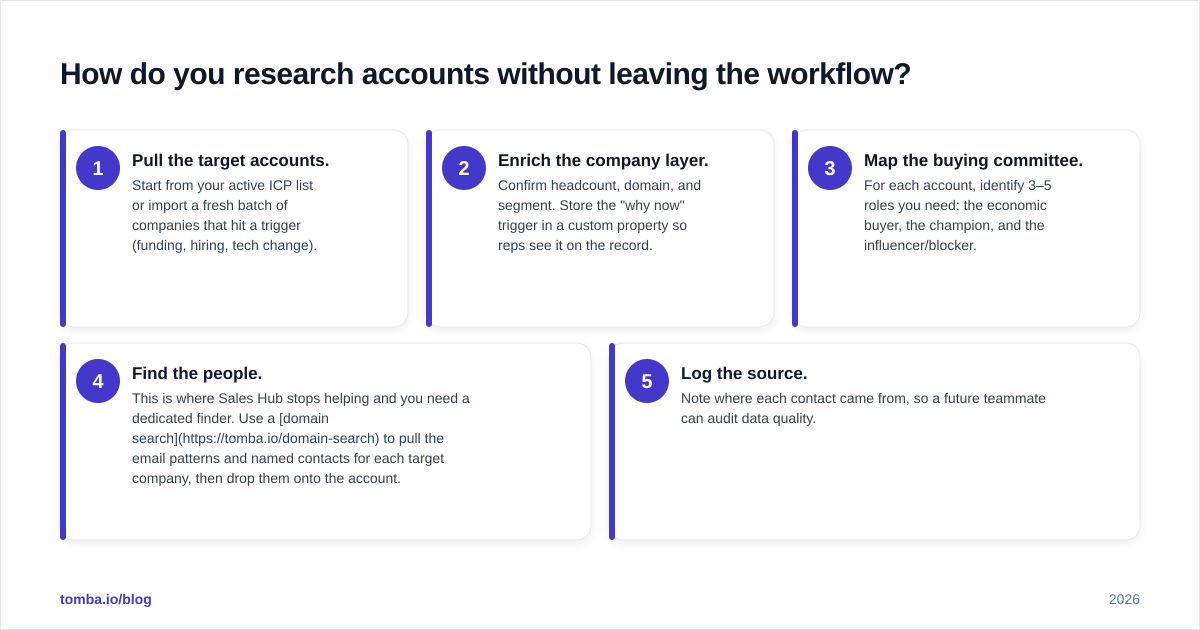
A workable weekly loop inside and around Sales Hub:
- Pull the target accounts. Start from your active ICP list or import a fresh batch of companies that hit a trigger (funding, hiring, tech change).
- Enrich the company layer. Confirm headcount, domain, and segment. Store the "why now" trigger in a custom property so reps see it on the record.
- Map the buying committee. For each account, identify 3–5 roles you need: the economic buyer, the champion, and the influencer/blocker.
- Find the people. This is where Sales Hub stops helping and you need a dedicated finder. Use a domain search to pull the email patterns and named contacts for each target company, then drop them onto the account.
- Log the source. Note where each contact came from, so a future teammate can audit data quality.
The discipline that separates good list builders from spreadsheet-wranglers: research the account first, then the people. Reps who start at the contact level end up with a pile of disconnected names and no account narrative to anchor the outreach.
Where does Sales Hub fall short, and how do you fill the gap?#
Sales Hub's blind spot is net-new contact data — it organizes what you import but won't reliably source verified emails for cold accounts.
HubSpot does sell add-on intelligence and a contact database, but for serious outbound you'll still want a specialist layer for three things it doesn't do well out of the box:
- Finding emails for people not already in your CRM. Use a dedicated email finder to resolve a name + company into a deliverable address.
- Verifying before you send. A list that imports cleanly can still bounce. Run every address through an email verifier so your sender reputation survives the campaign.
- Catch-all handling. Many corporate domains accept everything at the SMTP layer, which masks bad addresses. A catch-all verifier tells you which "valid-looking" emails are actually risky.
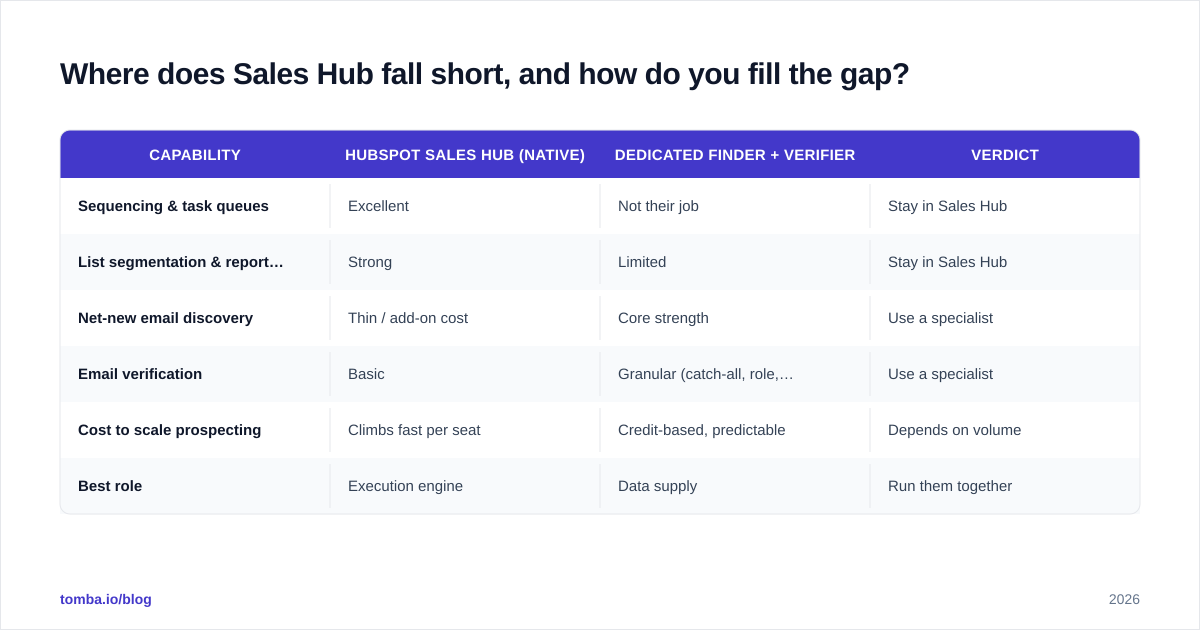
Here's the comparison that matters when you're deciding how much to lean on native tooling versus a dedicated data layer:
| Capability | HubSpot Sales Hub (native) | Dedicated finder + verifier | Verdict |
|---|---|---|---|
| Sequencing & task queues | Excellent | Not their job | Stay in Sales Hub |
| List segmentation & reporting | Strong | Limited | Stay in Sales Hub |
| Net-new email discovery | Thin / add-on cost | Core strength | Use a specialist |
| Email verification | Basic | Granular (catch-all, role, disposable) | Use a specialist |
| Cost to scale prospecting | Climbs fast per seat | Credit-based, predictable | Depends on volume |
| Best role | Execution engine | Data supply | Run them together |
The point isn't that Sales Hub is weak — it's that it's an execution platform, and you shouldn't ask it to also be your data vendor. Pair it with the right supply layer and each does what it's good at.

What's the step-by-step list-building workflow?#
Build the list in a fixed order so verification always happens before enrollment, never after.
- Create the active ICP list in Sales Hub from your documented filters. This is your living pool.
- Export the company batch you want to work this week (or pull it from a trigger source).
- Run domain search on each company to surface contacts and the email pattern. For bulk work, a bulk email finder processes the whole batch at once instead of one company at a time.
- Verify every address before it touches a record. Discard invalids; flag catch-alls for a softer first touch.
- Import to HubSpot with a clear source property and the "why now" trigger filled in.
- Snapshot into a static list — this exact cohort is what you'll sequence.
- Enroll the static list into the appropriate sequence, then leave the active list to keep refilling.
The non-negotiable is step 4 before step 5. Verifying after import means you've already polluted the CRM and possibly already sent. Verifying first keeps your sender reputation intact and your reps trusting the data.
How do you keep the list clean over time?#
Treat list hygiene as a recurring job, not a one-time cleanup — data decays at roughly 2–3% per month as people change roles.
- Re-verify quarterly. Run your active prospecting pool back through verification every 90 days. Roles churn, companies get acquired, domains change.
- Suppress and document. When someone bounces or unsubscribes, move them to a suppression list immediately and keep it. A suppression list is an asset, not a graveyard.
- Audit sources. If one import source consistently produces high bounce rates, stop using it. The source property you logged earlier makes this a two-minute report instead of a guess.
- Watch active-list drift. Smart lists silently change membership. Review the criteria monthly so a sloppy filter edit doesn't accidentally enroll 4,000 wrong-fit contacts.
For a deeper read on the deliverability side of this, HubSpot's own marketing blog and review aggregators like G2 are useful for seeing how other teams handle the data-quality trade-offs at scale, and HubSpot's product pages lay out exactly what's native versus add-on.
Common mistakes that wreck a Sales Hub prospecting list#
Avoid these five and you'll outperform most teams using the same tooling.
- Importing unverified CSVs. The single biggest cause of bounce-driven reputation damage. Verify first, always.
- Confusing list types. Sequencing off an active list whose membership shifts mid-campaign produces inconsistent, un-auditable sends.
- No "why now." A list without a trigger is just a directory. Reps ignore directories.
- Over-relying on native enrichment. It's convenient and incomplete. Treat it as a starting point, not the source of truth.
- Building once, never refreshing. A list you built six months ago is now ~15% wrong. Re-verify on a schedule.
Conclusion: where Tomba fits#
Sales Hub runs the play; you still have to supply the players. The fastest, most reliable way to keep that supply clean is to find and verify contacts before they ever enter your CRM — so your sequences enroll real people at deliverable addresses.
That's exactly the gap the Tomba Email Finder fills. Resolve names and domains into verified, deliverable emails, run them through verification and catch-all checks, then import a clean static list straight into your Sales Hub sequences. Start on the free tier (25 searches/month), and when your volume grows, the Tomba pricing scales with credits rather than per-seat — Starter is $49/mo, Growth $99/mo, and Pro $249/mo. Build the list right once, and Sales Hub will do the rest.
// get started
Find, verify and enrich your first contacts today
Start on the free plan with 25 searches a month, then scale when your team is ready.
Free plan · No credit card required · GDPR & CCPA
// about the author