Sales Hub Video Prospecting: 2026 Sales Prospecting Guide
Video prospecting inside HubSpot Sales Hub can lift reply rates fast—but only if your data, sequences, and targeting are right. Here's the 2026 playbook.
Video prospecting gets talked about like a gimmick. It isn't. When you pair a short, personalized video with the sequencing and tracking already built into HubSpot Sales Hub, you get a prospecting motion that stands out in a crowded inbox and tells you exactly who's paying attention. This guide shows you how to run that motion in 2026 without wasting reps' time or torching your sender reputation.
TL;DR#
- Sales Hub video prospecting = recording short, personalized videos (via the native HubSpot Video tool powered by Vidyard or a connected app) and embedding them inside sequences, tasks, and one-to-one emails.
- It works because video lifts reply and meeting-booked rates—but only on a clean, well-targeted list. Garbage contacts kill any channel.
- Use video on the highest-value tier of your list (named accounts, warm inbound, re-engagement), not the whole database.
- Track views as buying signals: a 100% watch is a stronger intent signal than an open.
- Your bottleneck is usually data, not creativity. Verified contacts and accurate firmographics decide whether your videos reach a real human.
What is Sales Hub video prospecting?#
Sales Hub video prospecting is the practice of using HubSpot Sales Hub's built-in tooling to record, host, send, and track personalized video messages as part of your outbound prospecting—instead of (or alongside) plain-text emails and calls.
Think of it like the difference between a form letter and someone knocking on your door to say hello. The form letter is easy to ignore. A 45-second video where a rep says your name, references your company, and points at your specific problem is much harder to scroll past. HubSpot bakes this into the same place reps already work: the Sales Hub sequences, the contact timeline, and the deal record.
Technically, you have three common paths:
- Native HubSpot Video — Sales Hub integrates video recording (historically powered by Vidyard) so reps can record a webcam + screen-share clip and drop it straight into an email with an animated thumbnail.
- Connected video apps — Loom, Vidyard, and Bonjoro all have HubSpot integrations that log video sends and views back to the contact timeline.
- Manual embed — record anywhere, host anywhere, paste a thumbnail GIF linking to the video landing page. Less tracking, more flexibility.
The magic isn't the recording. It's that every play, every watch-percentage, and every click flows back into HubSpot as a trackable event you can build automation and scoring around.
Why does video prospecting work in 2026?#
Because attention is the scarce resource, and video earns more of it per send than text.
Buyers are drowning in templated cold email. AI has made it trivial to spin up thousands of "personalized" plain-text messages, so the bar to stand out in text has risen sharply. A human face, a real voice, and a screen that shows you understand the prospect's world cut through that noise. The asymmetry is the point: video is still relatively rare in the inbox, so it still surprises people.
There's also a measurement advantage. An email open in 2026 is a weak signal—Apple Mail Privacy Protection and bulk pre-fetching have made opens noisy for years. A video watch is different. Nobody accidentally watches 80% of your 60-second clip. When Sales Hub tells you a contact watched twice and forwarded the link, that's intent you can act on the same day.
A few honest caveats so you don't over-rotate:
- Video does not fix a bad list. If the address bounces or the person left the company, the most charming clip on earth dies in a spam folder.
- Video is slower to produce per touch. That's why targeting matters—you cannot afford to record 5,000 clips.
- It can feel intrusive if mistimed. Cold-cold video to someone who's never heard of you converts worse than warm or re-engagement video.
How do you set up a video prospecting workflow in Sales Hub?#
Build it as a tiered system, not a blanket campaign. Here's the process most high-performing teams converge on.
1. Segment your list into tiers. Reserve recorded 1:1 video for Tier 1 (named target accounts, high-fit inbound, ghosted late-stage deals). Tier 2 gets semi-personalized video (same intro, swapped first line). Tier 3 stays on efficient text + call sequences.
2. Verify the contacts before you ever hit record. This is the step teams skip and regret. Run your list through an email verifier and confirm you have the right person at the right company. Five minutes of personalized video aimed at a dead inbox is five minutes gone.
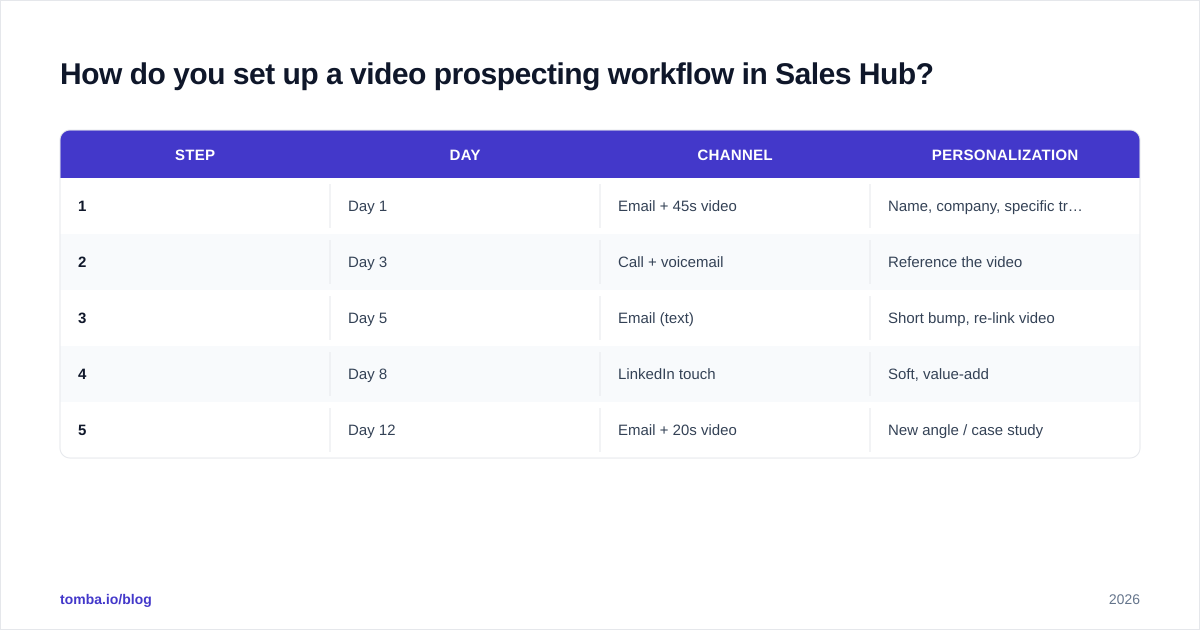
3. Build the sequence in Sales Hub. A typical Tier 1 video sequence:
| Step | Day | Channel | Personalization |
|---|---|---|---|
| 1 | Day 1 | Email + 45s video | Name, company, specific trigger |
| 2 | Day 3 | Call + voicemail | Reference the video |
| 3 | Day 5 | Email (text) | Short bump, re-link video |
| 4 | Day 8 | LinkedIn touch | Soft, value-add |
| 5 | Day 12 | Email + 20s video | New angle / case study |
4. Record with a repeatable structure. Hook (use their name + a visible trigger in the first 3 seconds), problem, one specific insight, soft CTA. Keep Tier 1 clips under 60 seconds and Tier 2 under 30.
5. Wire view events into scoring. In Sales Hub, set workflows so a video watched past ~75% raises a lead score or fires a Slack alert to the rep. Treat a deep watch like a hand-raise.
6. Measure and prune. Watch reply rate, meeting-booked rate, and watch-through rate by tier. Kill what underperforms.
Which video tools work best with HubSpot Sales Hub?#
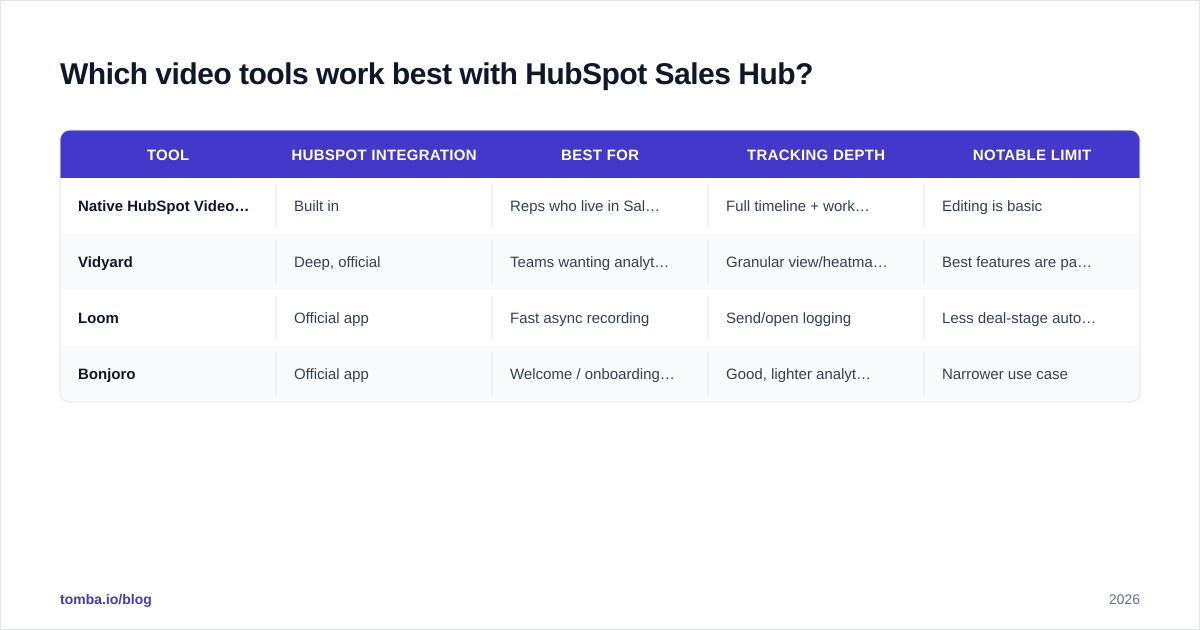
It depends on whether you want fully native tracking or richer editing. Here's an honest comparison of the common options, plus where pricing roughly sits in 2026 (always check the vendor for current numbers).
| Tool | HubSpot integration | Best for | Tracking depth | Notable limit |
|---|---|---|---|---|
| Native HubSpot Video (Vidyard-powered) | Built in | Reps who live in Sales Hub | Full timeline + workflow events | Editing is basic |
| Vidyard | Deep, official | Teams wanting analytics + CTAs | Granular view/heatmap data | Best features are paid |
| Loom | Official app | Fast async recording | Send/open logging | Less deal-stage automation |
| Bonjoro | Official app | Welcome / onboarding video | Good, lighter analytics | Narrower use case |
A few rules of thumb:
- If you want the least friction and the most native tracking, start with the built-in HubSpot Video tool. Everything logs automatically.
- If your marketing team also wants gated video and detailed heatmaps, Vidyard's paid tiers earn their keep.
- If reps just want to bang out quick clips and async updates, Loom is the lowest-friction recorder—just accept slightly shallower automation.
Whatever you pick, the integration only matters if the contact behind the play is real. Tool choice is downstream of data quality.
How do you keep video prospecting from hurting deliverability?#
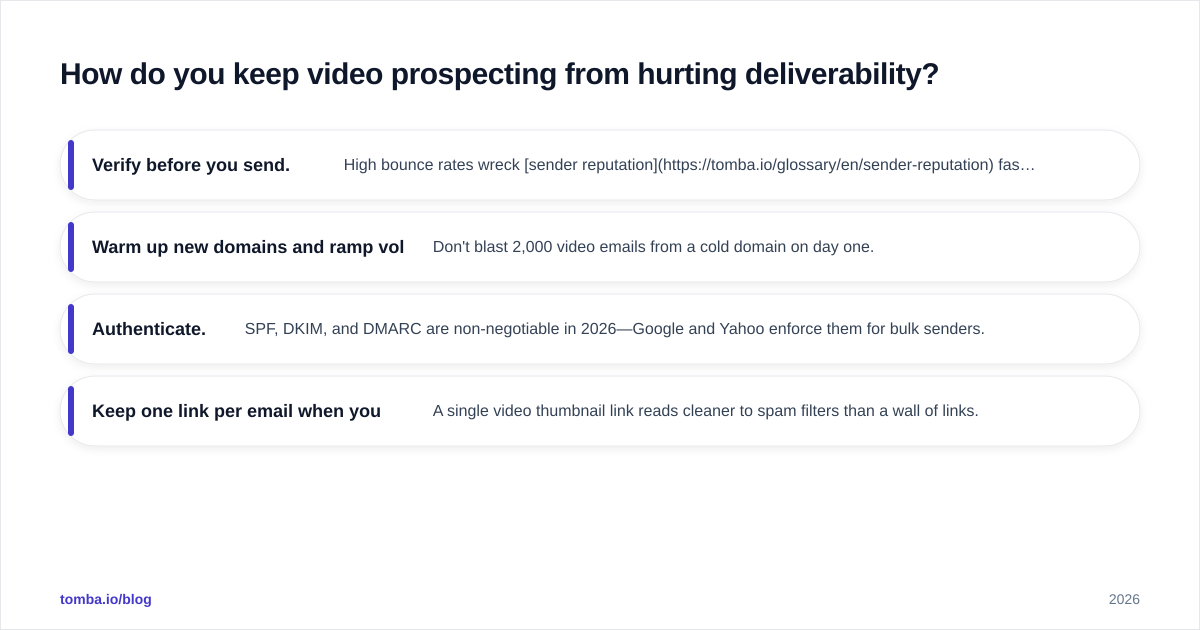
Protect the inbox first, because a clever video that lands in spam never plays.
Video itself doesn't damage deliverability—the way you send it can. The classic mistake is embedding a heavy autoplay file or a raw video attachment. Don't. Send an animated thumbnail (GIF) that links to a hosted landing page. That keeps your email lightweight and your links clean.
The bigger deliverability lever is list hygiene and sending discipline, the same fundamentals that govern any cold outreach:
- Verify before you send. High bounce rates wreck sender reputation fast. Clean the list with a verifier and remove risky catch-all and role addresses.
- Warm up new domains and ramp volume slowly. Don't blast 2,000 video emails from a cold domain on day one.
- Authenticate. SPF, DKIM, and DMARC are non-negotiable in 2026—Google and Yahoo enforce them for bulk senders.
- Keep one link per email when you can. A single video thumbnail link reads cleaner to spam filters than a wall of links.
If you want the deeper mechanics, HubSpot's own resources and general guides on email deliverability cover authentication and reputation in detail. The summary: video is a payload, not a poison—your list and your domain setup decide whether it arrives.
What does good video prospecting personalization look like?#
Specific beats clever. The goal is for the prospect to think "this could only have been sent to me."
- Show, don't just say. Screen-share their website, their pricing page, or a LinkedIn post they wrote, and react to it on camera.
- Name the trigger. New funding round, a job opening that implies a pain, a tech-stack change, a competitor they just mentioned. Triggers come from research and enrichment, not guesswork.
- One CTA. "Worth a 15-minute look next week?" is enough. Don't stack three asks.
- Keep the whiteboard in frame. A physical or digital note with their name on it in the thumbnail is a tested attention hook.
This is where data enrichment pays off. If you know a contact's role, seniority, company size, and recent activity before you record, your "hook" writes itself. Reps who personalize from enriched data book meetings; reps who improvise burn clips on bad angles. Public review sites like G2 are also useful for vetting which video tools your peers actually keep using past month one.
How do you measure video prospecting ROI?#
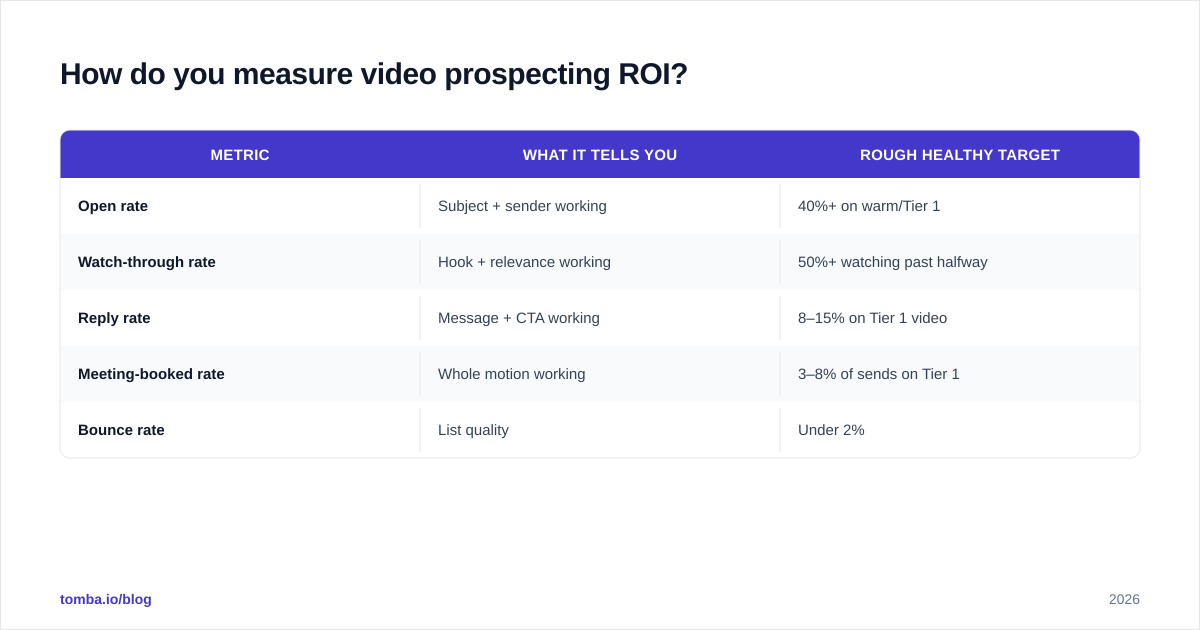
Track the funnel, not the vanity metric. View count feels good but doesn't pay rent. Watch the conversion from each step to the next.
| Metric | What it tells you | Rough healthy target |
|---|---|---|
| Open rate | Subject + sender working | 40%+ on warm/Tier 1 |
| Watch-through rate | Hook + relevance working | 50%+ watching past halfway |
| Reply rate | Message + CTA working | 8–15% on Tier 1 video |
| Meeting-booked rate | Whole motion working | 3–8% of sends on Tier 1 |
| Bounce rate | List quality | Under 2% |
If watch-through is high but replies are low, your CTA or timing is off. If opens are low, fix the subject line and sender reputation before blaming the video. If bounces are high, stop everything and clean the list—no channel survives a dirty database.
The point of putting this in Sales Hub is that all of it lives on the contact and deal records automatically, so you can build reports that compare video sequences against text-only sequences head-to-head and let the numbers decide.
Common video prospecting mistakes to avoid#
- Recording before verifying. The cardinal sin. Confirm the contact exists and is reachable first.
- Treating every contact as Tier 1. Recorded video doesn't scale infinitely. Reserve it for value.
- Making it about you. A 90-second monologue about your product loses. Lead with their world.
- Ignoring mobile. Most plays happen on phones. Keep text overlays legible and clips short.
- No follow-up. A single video send isn't a campaign. The sequence is where most replies come from—steps 3–5 do real work.
- Skipping authentication. No SPF/DKIM/DMARC means your beautiful clip lands in spam.
Where does the data come from?#
Right here is the honest bottleneck. Sales Hub gives you the sequencing, recording, and tracking. It does not hand you accurate prospect contact data on a plate—you have to bring that.
That's the gap Tomba fills. Before you build a single video sequence, you need verified email addresses, the correct decision-makers per account, and enrichment so your personalization is grounded in real firmographics. Use the Tomba Email Finder to find the right professional contacts by name or domain, run them through verification to protect deliverability, and push clean records into HubSpot. Plans start with a free tier (25 searches/month) and scale to Starter at $49/mo and Growth at $99/mo—see Tomba pricing for the full breakdown. Feed Sales Hub good data, and your video prospecting stops being a coin flip and starts being a repeatable motion that books meetings.
// get started
Find, verify and enrich your first contacts today
Start on the free plan with 25 searches a month, then scale when your team is ready.
Free plan · No credit card required · GDPR & CCPA
// about the author