80legs vs Mozenda 2026: Web Scraping Tools Compared
80legs and Mozenda both promise turnkey web scraping, but they target very different buyers. Here's how pricing, scale, and data quality really stack up in 2026.
80legs vs Mozenda: Which Web Scraping Tool Actually Earns Its Price in 2026?
TL;DR
- 80legs is a distributed crawler built for engineers who need to hit millions of URLs cheaply, not a point-and-click data tool.
- Mozenda is a hosted, no-code scraping platform aimed at analysts and ops teams who want clean structured rows in a spreadsheet.
- 80legs wins on raw crawl volume and price-per-URL; Mozenda wins on data structuring, scheduling, and exports your CRM can actually ingest.
- Neither tool gives you verified contact data — pair scraped output with a dedicated email verifier before pushing into outbound.
- If your goal is B2B contact discovery rather than full-site crawling, a purpose-built email finder will beat both on cost and accuracy.
What are 80legs and Mozenda, and who actually buys them?#
80legs and Mozenda get lumped together in "web scraping tool" lists, but they solve different problems. Treating them as interchangeable is how teams end up paying twice and getting neither what they need.
80legs (80legs.com) is a distributed crawler-as-a-service. You write or upload a small JavaScript "app" describing what to extract, point it at a URL seed list, and 80legs spreads the crawl across its grid. The model is closer to a hosted Scrapy cluster than a no-code product. Buyers are usually engineers, data scientists, or SEO teams doing large-scale link discovery, price monitoring, or research.
Mozenda is a hosted scraping platform owned by Dexi. You build "agents" with a point-and-click recorder, run them on Mozenda's cloud, and pipe results to CSV, JSON, an API, or directly to Amazon S3, Dropbox, or a SQL Server endpoint. Buyers are analysts, ecommerce ops teams, and competitive-intelligence groups inside larger companies — people who want a vendor relationship, not a codebase.
That difference shapes every other comparison. If you mix them up at the buying stage, you'll either pay enterprise prices for raw HTML you can't use, or pay for a developer toolkit that needs a developer you don't have.
How does 80legs vs Mozenda pricing compare?#
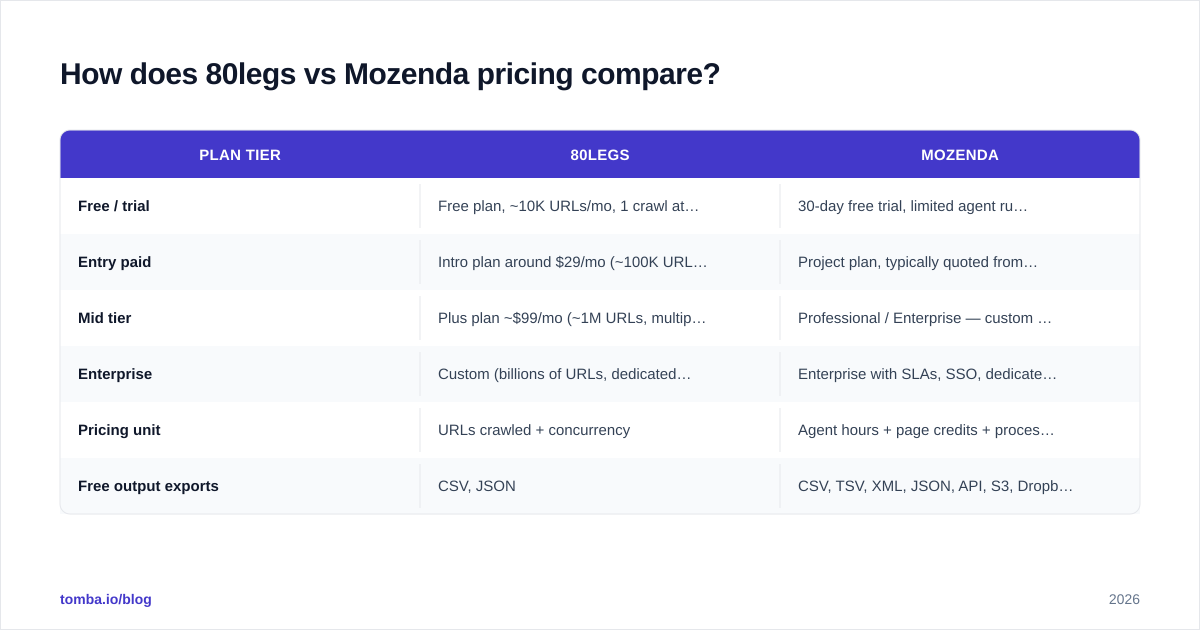
Pricing is where the two tools diverge most clearly. 80legs publishes a low entry price tied to URL volume. Mozenda's published pricing starts higher and bundles concurrent agents, cloud storage, and support.
| Plan tier | 80legs | Mozenda |
|---|---|---|
| Free / trial | Free plan, ~10K URLs/mo, 1 crawl at a time | 30-day free trial, limited agent runs |
| Entry paid | Intro plan around $29/mo (~100K URLs) | Project plan, typically quoted from $250–$450/mo |
| Mid tier | Plus plan ~$99/mo (~1M URLs, multiple concurrent crawls) | Professional / Enterprise — custom quote |
| Enterprise | Custom (billions of URLs, dedicated capacity) | Enterprise with SLAs, SSO, dedicated CSM |
| Pricing unit | URLs crawled + concurrency | Agent hours + page credits + processing |
| Free output exports | CSV, JSON | CSV, TSV, XML, JSON, API, S3, Dropbox |
The takeaway: 80legs costs cents per thousand URLs if you only need raw fetched pages. Mozenda costs more because you're also paying for the agent builder, scheduler, post-processing, and support contract. Quote one against the other only after you've decided whether you're buying compute or buying a finished dataset.
For context on how lead-gen tooling prices itself in the same space, compare with Tomba pricing — a credit-based model that targets contact records rather than page fetches.
Which one handles scale better?#
80legs was built around scale. The original sales pitch — back when it launched as a grid-computing crawler — was that it could hit a billion URLs without you owning the hardware. That bias still shows. Concurrent crawls, URL queues in the millions, and per-URL pricing are first-class concepts.
Mozenda scales differently. You can run many agents concurrently on Professional and Enterprise plans, and the platform handles IP rotation and retries, but the unit of work is an "agent" doing a structured extraction — not a flat list of URLs. Trying to crawl a million-page site with Mozenda usually means designing the agent carefully so it follows pagination and detail links efficiently, then watching agent hours instead of URL counts.
Practical guidance:
- Need to crawl > 1 million URLs/month with light extraction? 80legs is almost always cheaper.
- Need 5,000 well-structured product rows per day with images, variants, and clean field names? Mozenda is easier even if the dollar cost looks higher.
- Need both? Some teams use 80legs to discover URLs and Mozenda (or a custom parser) to extract from a curated subset.
How do data quality and output formats compare?#
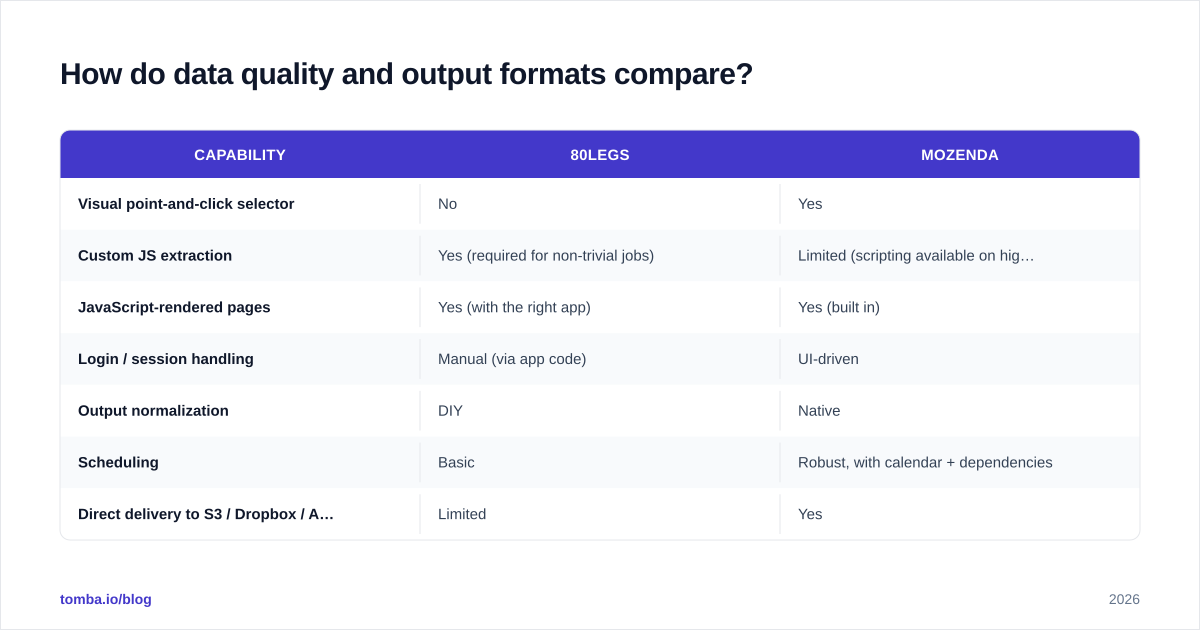
This is the gap most buyers underestimate.
80legs hands you what your custom "app" returns. If your script grabs raw HTML and you didn't write a parser, you get raw HTML. The platform won't second-guess your schema or normalize fields for you. That's powerful when you know exactly what you want and painful when you don't.
Mozenda is the opposite. Its agent recorder is built around picking fields, naming them, and shaping rows. Outputs land as structured CSV/JSON, ready for BI tools or a database load. Mozenda also handles common annoyances — paginated lists, infinite scroll, login-gated pages, basic JS rendering — through the UI rather than code.
| Capability | 80legs | Mozenda |
|---|---|---|
| Visual point-and-click selector | No | Yes |
| Custom JS extraction | Yes (required for non-trivial jobs) | Limited (scripting available on higher tiers) |
| JavaScript-rendered pages | Yes (with the right app) | Yes (built in) |
| Login / session handling | Manual (via app code) | UI-driven |
| Output normalization | DIY | Native |
| Scheduling | Basic | Robust, with calendar + dependencies |
| Direct delivery to S3 / Dropbox / API | Limited | Yes |
If you're going to feed a CRM or a dashboard, "structured output" stops being a nice-to-have. A 90% accurate scrape with messy columns is worse than an 80% accurate scrape with clean columns, because cleanup will eat any time you saved on the run.

Is 80legs or Mozenda better for B2B lead data?#
Honest answer: neither is a great primary tool for B2B contact data. Both can scrape company pages, "About" sections, and team directories. Both will struggle once you need verified, deliverable emails attached to a named person at a specific company.
Three reasons:
- Email obfuscation is now standard. Public team pages rarely list raw
name@company.comanymore. Even when they do, you don't know if it bounces. - Title and seniority data is messy on the open web. LinkedIn-style structure isn't there, so role normalization is a project on its own.
- You'll still need verification. Scraped emails without an email verifier pass step in front of them will burn your sender reputation fast — see this short primer on email deliverability for what's at stake.
A more cost-effective stack for B2B contact discovery in 2026:
- Identify target companies (scrape with Mozenda or 80legs if the source isn't on a vendor list).
- Use a dedicated domain search to pull contacts per company.
- Run results through an email verifier before any send.
- Enrich with firmographics via a data enrichment API.
You replace the "scrape the whole web for emails" leg — which is exactly the leg where 80legs and Mozenda both struggle — with a tool built for that single job.
What about compliance and ToS risk?#
Both 80legs and Mozenda put the legal burden on you. Their terms make you responsible for respecting robots.txt, target-site ToS, copyright, and data-protection law (GDPR, CCPA, etc.).
Operational differences that matter:
- 80legs is more permissive about what you ask the grid to do, because you're writing the app. That also means it's easier to misconfigure a crawl and hammer a site you shouldn't.
- Mozenda ships UI defaults that reduce request rates, retries, and concurrency. It's harder to accidentally DDoS a target — but easier to assume the platform is "handling compliance" for you. It isn't; you are.
If your use case touches EU personal data, treat any scraped contact data as personal data and apply a lawful basis before you process it. Public availability is not, on its own, a lawful basis under GDPR. Vendor docs from HubSpot and Salesforce on lawful processing are decent non-lawyer starting points.
Which has the better support and ecosystem?#
Mozenda wins on support, hands down. You get account managers, training, and documentation aimed at non-engineers. The cost of that support is baked into pricing — it's why the entry tier looks expensive next to 80legs.
80legs runs lean. Documentation exists, the API works, and the community is small but technical. Expect to debug your own crawl when something breaks. If you're an engineer, that's not a problem. If you're a marketing analyst whose Python skills end at copy-pasting from Stack Overflow, it will hurt.
Ecosystem-wise, both pre-date the current ETL stack era, so neither integrates as smoothly into modern tooling as something like a HubSpot integration, a Salesforce integration, or a Zapier integration does. For scraped data, plan to land the output in S3 or a database and integrate from there.
How do real-world use cases break down?#
A cleaner way to choose: match the tool to the job, not the brand.
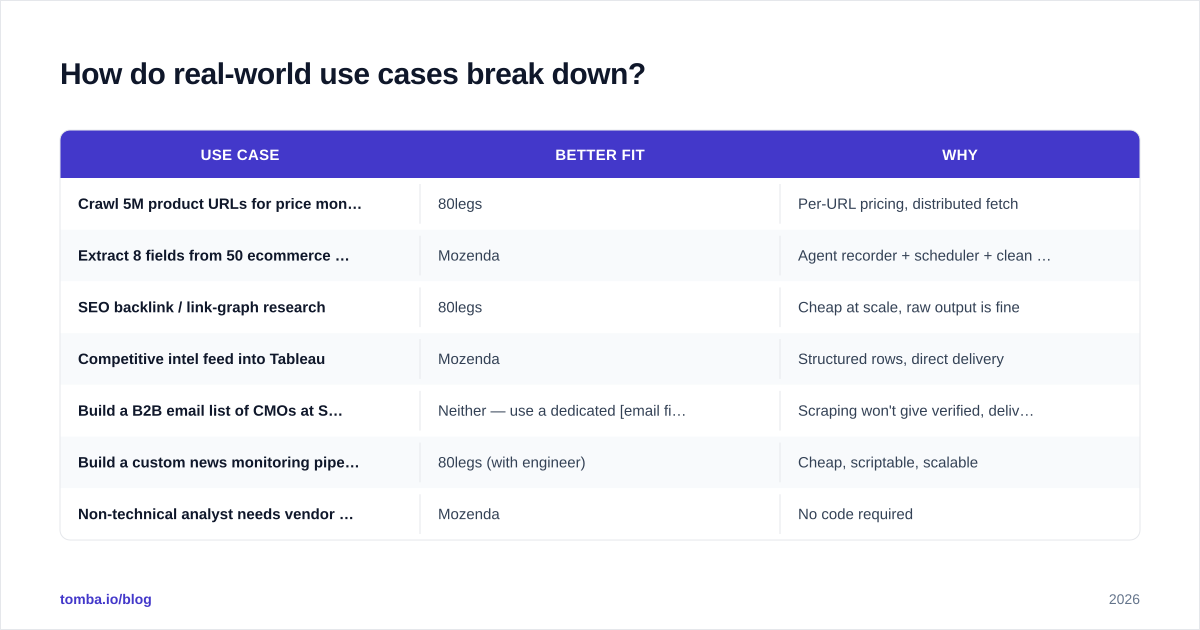
| Use case | Better fit | Why |
|---|---|---|
| Crawl 5M product URLs for price monitoring | 80legs | Per-URL pricing, distributed fetch |
| Extract 8 fields from 50 ecommerce sites, daily | Mozenda | Agent recorder + scheduler + clean CSV |
| SEO backlink / link-graph research | 80legs | Cheap at scale, raw output is fine |
| Competitive intel feed into Tableau | Mozenda | Structured rows, direct delivery |
| Build a B2B email list of CMOs at SaaS companies | Neither — use a dedicated email finder | Scraping won't give verified, deliverable contacts |
| Build a custom news monitoring pipeline | 80legs (with engineer) | Cheap, scriptable, scalable |
| Non-technical analyst needs vendor pricing data | Mozenda | No code required |
A second sanity check: read public reviews on G2 and Capterra for both tools before committing. Pay more attention to recent reviews (last 12 months) than to lifetime averages, because both platforms have evolved feature-wise.
What are the main pros and cons in 2026?#
80legs — pros
- Genuinely cheap at high URL volumes
- Distributed grid you don't have to operate
- Scriptable for arbitrary extraction logic
- Useful for SEO and research workloads where structure is a "later" problem
80legs — cons
- Requires engineering effort
- No visual builder; documentation is dated in places
- Output is whatever your app emits — no normalization safety net
- Smaller community than open-source alternatives like Scrapy
Mozenda — pros
- True no-code agent builder
- Handles login, pagination, and JS rendering through the UI
- Clean, scheduled, structured exports
- Account managers and training for non-engineers
Mozenda — cons
- Significantly more expensive at the entry tier
- Pricing not transparent — expect a sales call
- Concurrent agent / page credit limits add complexity
- Overkill if all you want is raw crawled HTML
How should you choose between 80legs vs Mozenda?#
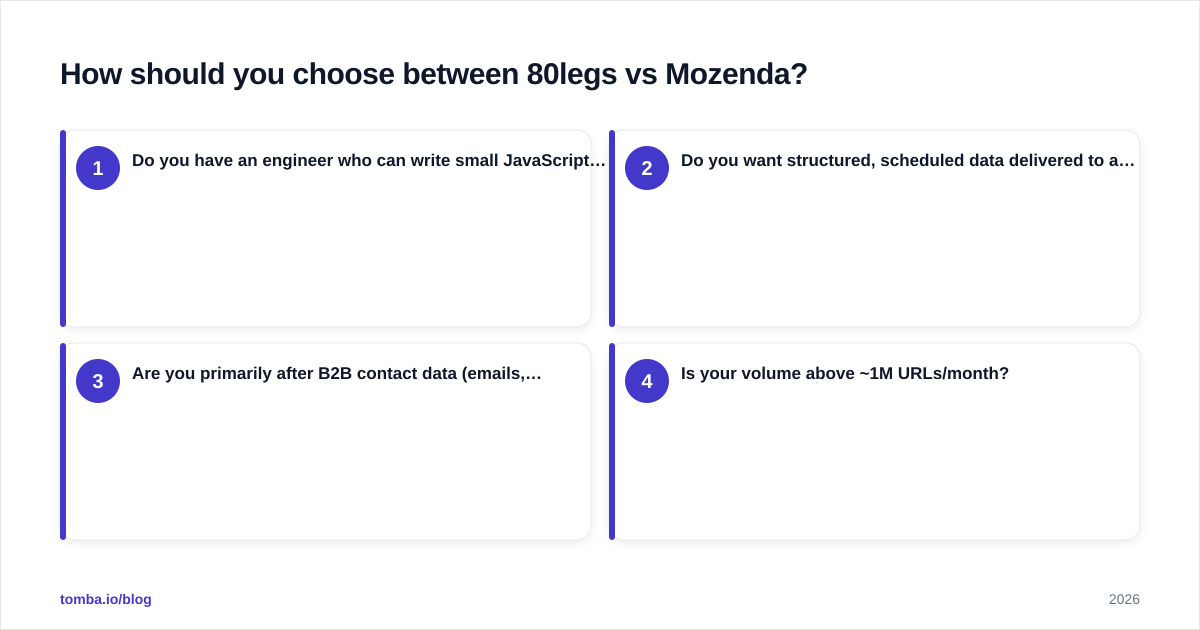
A 30-second decision tree:
- Do you have an engineer who can write small JavaScript extractors?
- Yes → 80legs is on the table.
- No → 80legs is mostly off the table.
- Do you want structured, scheduled data delivered to a destination (S3, BI, CRM) with minimal cleanup?
- Yes → Mozenda.
- No, you'll do your own ETL → 80legs is fine.
- Are you primarily after B2B contact data (emails, phones, titles)?
- Yes → Skip both. Use a dedicated tool — see the next section.
- Is your volume above ~1M URLs/month?
- Yes → 80legs wins on unit economics.
- No → Either tool works; pick on usability, not price.
If you're somewhere in the middle — say, ~200K pages/month with mixed structure — try both free trials on the same target site and compare the cleaned output, not the marketing copy.
Where does Tomba fit if your real goal is contact data?#
Most teams searching "80legs vs Mozenda" end up at one of two places: building a scraping pipeline they didn't really need, or quietly switching to a contact-data tool after a quarter of wrestling with raw HTML.
If your end product is "verified email + name + title at a target company," scraping is the long road. A dedicated stack is shorter:
- Domain search to list contacts per company
- Email verifier to drop bounces before sending
- Bulk email finder for list-based workflows
- Tomba API or Tomba MCP to wire it into your own scripts and CRMs
- Tomba pricing starts at $49/mo on Starter, with a free tier (25 searches/mo) to test before paying anything
Try the Tomba Email Finder before you spin up a scraping project. If the data you actually need is "the right person's working email at a target company," you'll close that gap in minutes rather than sprints — and you can still keep 80legs or Mozenda around for the genuine crawling jobs they're each good at.
Ready to find emails that actually work?
Join 150,000+ professionals who stopped guessing and started sending. Free credits on signup — no credit card required.
Get the Tomba newsletter
Practical outbound tactics and product updates — once every two weeks.
About the author