Abstract API vs Wiza: Which B2B Data Tool Wins in 2026?
Abstract API and Wiza solve different problems but get pitched against each other. Here's the honest 2026 breakdown of accuracy, pricing, use cases, and where each one breaks down.
TL;DR#
- Abstract API is a developer-first validation and enrichment API suite. It validates emails, phones, IPs, and company domains in real time via HTTP calls. It does not prospect.
- Wiza is a LinkedIn Sales Navigator scraper. You build a Sales Nav search, hit "Find Emails," and Wiza exports a CSV of names, emails, and phones.
- They overlap on one thing only: turning a prospect into a verified email. Everything else is different.
- Pick Abstract API if you are a developer wiring validation into a signup flow, CRM webhook, or lead form. Pick Wiza if you are an SDR pulling lists out of LinkedIn.
- If you want both — a real-time API plus a bulk finder that runs on domains, names, or LinkedIn URLs without manual scraping — look at the Tomba Email Finder instead.
What is Abstract API?#
Abstract API is a collection of small, single-purpose REST APIs sold under one billing account. The relevant endpoints for B2B teams are:
- Email Validation API — syntax, MX, SMTP, disposable, free-mail, role check
- Phone Validation API — format and carrier lookup
- Company Enrichment API — domain to firmographics (name, size, industry, location)
- IP Geolocation API — useful for lead routing and fraud scoring
You call them with a key, get JSON back, ship it. The pricing is per-endpoint and tiered by request volume. There is a free tier on every product, capped at a few hundred to a few thousand requests per month depending on the API.
What Abstract API does not do: it does not generate prospect lists, it does not scrape LinkedIn, it does not do pattern-based email finding from a first name + last name + domain combo. You bring the email; Abstract tells you if it is valid.
What is Wiza?#
Wiza is a LinkedIn-native prospecting tool. The core workflow:
- You log into LinkedIn Sales Navigator (Wiza requires it for serious lists).
- You build a search — title, industry, headcount, geography, intent filters.
- You install the Wiza Chrome extension and click "Export."
- Wiza pulls each profile, finds the work email, verifies it, often grabs a mobile number, and drops a CSV into your dashboard or directly into Salesforce / HubSpot / Outreach.
Wiza charges per "credit" — roughly one credit per verified email, with phone numbers costing extra. They publish a 99% deliverability guarantee on verified emails, and they refund credits spent on bounces.
So Wiza is closer to a RocketReach alternative or a ZoomInfo-lite than it is to Abstract. The fact that people compare it to Abstract API at all is mostly because both end up writing an email address into a spreadsheet — but they get there from completely different directions.
Abstract API vs Wiza: how do they actually compare?#
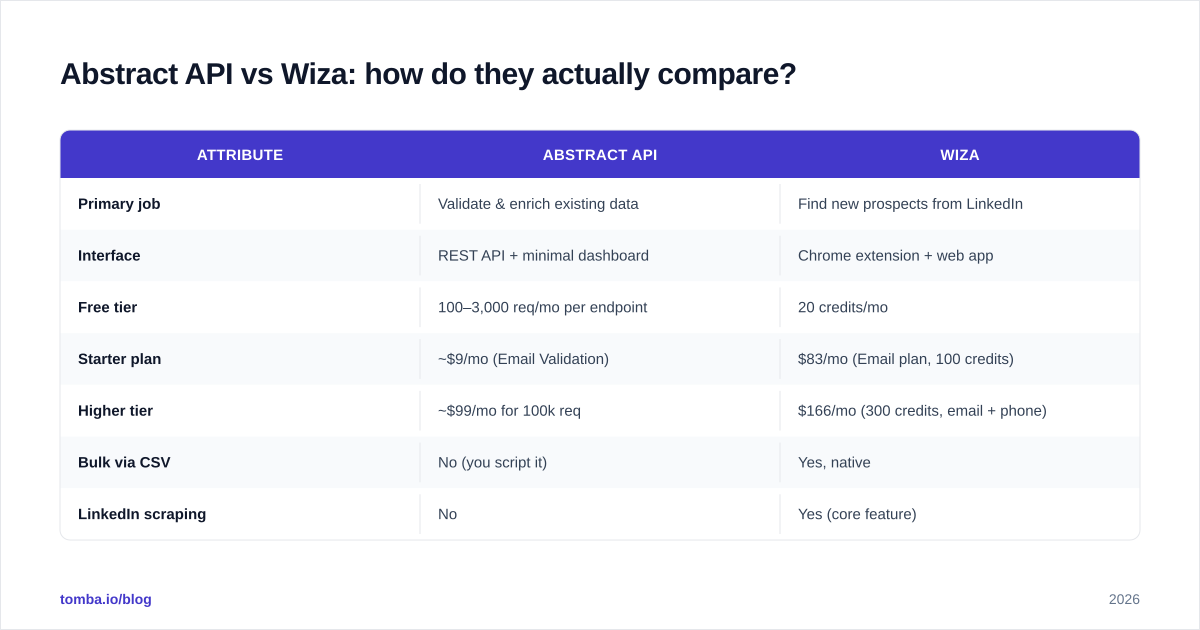
Here is the side-by-side. I have priced the entry tiers as of Q1 2026 and rounded to the nearest dollar where vendors offer annual discounts.
| Attribute | Abstract API | Wiza |
|---|---|---|
| Primary job | Validate & enrich existing data | Find new prospects from LinkedIn |
| Interface | REST API + minimal dashboard | Chrome extension + web app |
| Free tier | 100–3,000 req/mo per endpoint | 20 credits/mo |
| Starter plan | ~$9/mo (Email Validation) | $83/mo (Email plan, 100 credits) |
| Higher tier | ~$99/mo for 100k req | $166/mo (300 credits, email + phone) |
| Bulk via CSV | No (you script it) | Yes, native |
| LinkedIn scraping | No | Yes (core feature) |
| Phone numbers | Validation only | Sourcing + validation |
| CRM push | DIY via API | Native Salesforce, HubSpot, Outreach, Salesloft |
| Email accuracy claim | ~98% deliverability | 99% deliverability, credit refund on bounce |
| Best for | Developers, SaaS signup flows, ops engineers | SDRs, recruiters, agency lead gen |
| Worst for | Non-technical SDR teams | Engineers wiring real-time lead forms |
The price gap looks dramatic, but you are paying for two different things. Abstract's $9 buys you the right to call an endpoint 5,000 times. Wiza's $83 buys you 100 hand-picked, name-and-email-attached B2B records, sourced and verified for you. The cost per usable lead, not per API call, is the only honest comparison — and we will get to that.

Which one has better email accuracy?#
Both publish big numbers. Here is what they actually mean.
Abstract API's email validator does what every validator does: syntax, MX record lookup, SMTP handshake (without sending), disposable domain check, free-email flag, role check (info@, sales@), catch-all detection. It is competent. It is not differentiated. The catch is that the input has to be an actual email. Garbage in, garbage out.
Wiza's accuracy is end-to-end: they find the email and verify it. So their 99% claim covers a harder problem — they have to guess the right pattern, hit the right person, and land in the inbox. Their credit refund policy is the real signal here: a vendor that refunds bounces has skin in the game.
If you already have a list of emails and you want to scrub it before pushing into your sending tool, Abstract is fine. If you have no list, Abstract cannot help you at all. For end-to-end finding plus verification in one shot, look at a dedicated email verifier chained with a finder, or a single tool that does both.
One caveat: SMTP-based verification — which both vendors lean on — has gotten worse since 2024. Microsoft 365 tenants increasingly accept all SMTP probes and return 250 OK regardless, which makes catch-all detection the real differentiator. Wiza handles this by cross-checking patterns against their internal contact graph; Abstract just flags the domain as catch-all and leaves the decision to you.
How does Wiza handle LinkedIn vs Abstract API's data sources?#
This is where the two products live on different planets.
Wiza's data flow:
- SDR builds a Sales Navigator search.
- Wiza's worker visits each profile (or processes the URL list you uploaded).
- It extracts name, title, company, LinkedIn URL.
- It runs that against its email-finder graph to produce
firstname.lastname@company.com-style candidates and verifies each. - It returns the verified contact.
So Wiza's "data source" is, effectively, LinkedIn plus a contact graph built from years of customer searches and third-party feeds. That is a Sales Navigator alternative workflow whether they call it that or not.
Abstract API's data flow:
- You send a request with an email or domain.
- Abstract looks it up against its enrichment database for company info, or runs SMTP probes for email validation.
- It returns JSON.
There is no scraping, no LinkedIn integration, no list-building. If you want LinkedIn-sourced contacts and you are evaluating Abstract API, you are comparing the wrong tools. You actually want Wiza, ContactOut alternative, or Tomba's LinkedIn finder.
Is Abstract API or Wiza better for developers?#
Abstract, by a mile — but only because Wiza is not trying to win the developer market.
Abstract publishes REST endpoints with predictable JSON shapes, rate limits documented per tier, and free tiers on every product. Wiring it into a Zapier-style flow or a backend signup handler is a 15-minute job. Their docs are passable; their support is async email.
Wiza has an API too, and it is fine — but the product is designed around the Chrome extension and the bulk CSV runner. Their API exists mainly so RevOps teams can push results into a CRM without manual CSV juggling. If you treat Wiza like an enrichment API, you will fight the product.
The cleaner developer story, if you want one tool that does both find and validate over a real API with a Chrome extension on the side, is the Tomba API — it covers domain search, email finder, verifier, and enrichment under one key, with SDKs in Node, Python, PHP, and Go.
Which one is cheaper at scale?#
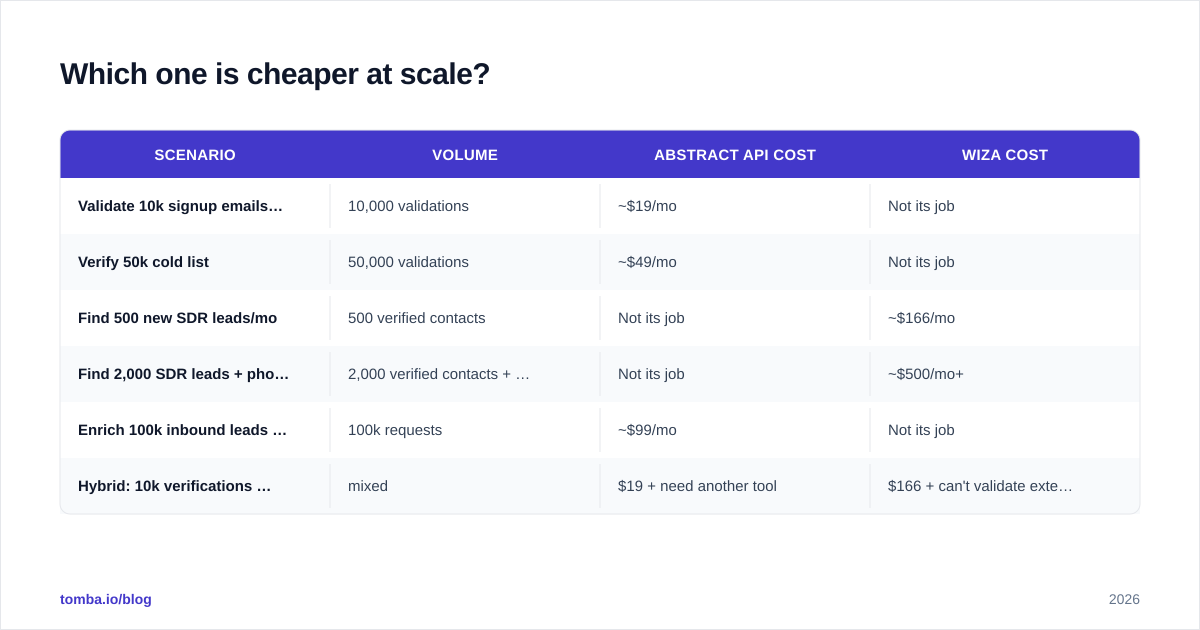
Depends entirely on what you are measuring.
| Scenario | Volume | Abstract API cost | Wiza cost |
|---|---|---|---|
| Validate 10k signup emails/mo | 10,000 validations | ~$19/mo | Not its job |
| Verify 50k cold list | 50,000 validations | ~$49/mo | Not its job |
| Find 500 new SDR leads/mo | 500 verified contacts | Not its job | ~$166/mo |
| Find 2,000 SDR leads + phones | 2,000 verified contacts + phones | Not its job | ~$500/mo+ |
| Enrich 100k inbound leads with firmographics | 100k requests | ~$99/mo | Not its job |
| Hybrid: 10k verifications + 1k sourced | mixed | $19 + need another tool | $166 + can't validate external lists efficiently |
The hybrid row is the punchline. Most B2B teams need both jobs done — verify your existing pipeline AND find new prospects — and neither Abstract nor Wiza does both. You either run two contracts or you find a tool that handles both surfaces. See Tomba pricing for a comparison; the $49/mo Starter plan covers 1,000 search credits and 1,000 verification credits in one account.

What about integrations and CRM workflows?#
Wiza wins this category for sales teams. Native push to Salesforce, HubSpot, Pipedrive, Outreach, and Salesloft. You go from Sales Nav search to a sequence in under a minute, no CSV download required. For an SDR running 30 prospecting hours a week, that integration depth is the product.
Abstract API wins for engineering teams because it integrates with whatever you write code for. It plugs into Zapier, Make, n8n, your custom Node server, your Postgres trigger — anywhere you can make an HTTP call. There is no "Salesforce app" because there does not need to be one; you call the API from Apex or Flow.
A third option worth flagging: tools like HubSpot integration and Salesforce integration plug a finder + verifier combo straight into the CRM you already use, which removes the need for either standalone product for many teams.
When should you actually pick Abstract API?#
Pick Abstract if every one of these is true:
- You are a developer or operate a SaaS product with a signup flow
- You already have email addresses coming in (forms, imports, partners)
- You need real-time, per-request validation — not bulk list processing
- You want à la carte APIs (email, phone, IP, company) you can mix and match
- You do not need to prospect or build lists from LinkedIn
Classic Abstract use cases: validating signup emails to block disposable addresses, scrubbing newsletter subscribers before send, geo-routing inbound leads by IP, enriching form submissions with company firmographics before the lead hits the CRM.
It is not a sales tool. It is a backend utility belt. If you treat it as a prospecting platform you will hate it.
When should you actually pick Wiza?#
Pick Wiza if every one of these is true:
- You have an active Sales Navigator seat (mandatory for serious volume)
- Your motion is outbound — SDRs prospecting from LinkedIn lists
- You need verified work emails plus optional mobile phones
- You want a Chrome extension that exports straight into your CRM or sequencer
- A few hundred to a few thousand contacts a month is your volume
Wiza's sweet spot is the 5–20 person sales team that lives in Sales Nav, runs short-list-based campaigns, and needs a finisher tool that turns the LinkedIn list into a sendable file. Recruiters with LinkedIn Recruiter seats use it the same way.
It is not a developer tool. If your stakeholder says "wire this into our product," Wiza is the wrong choice.
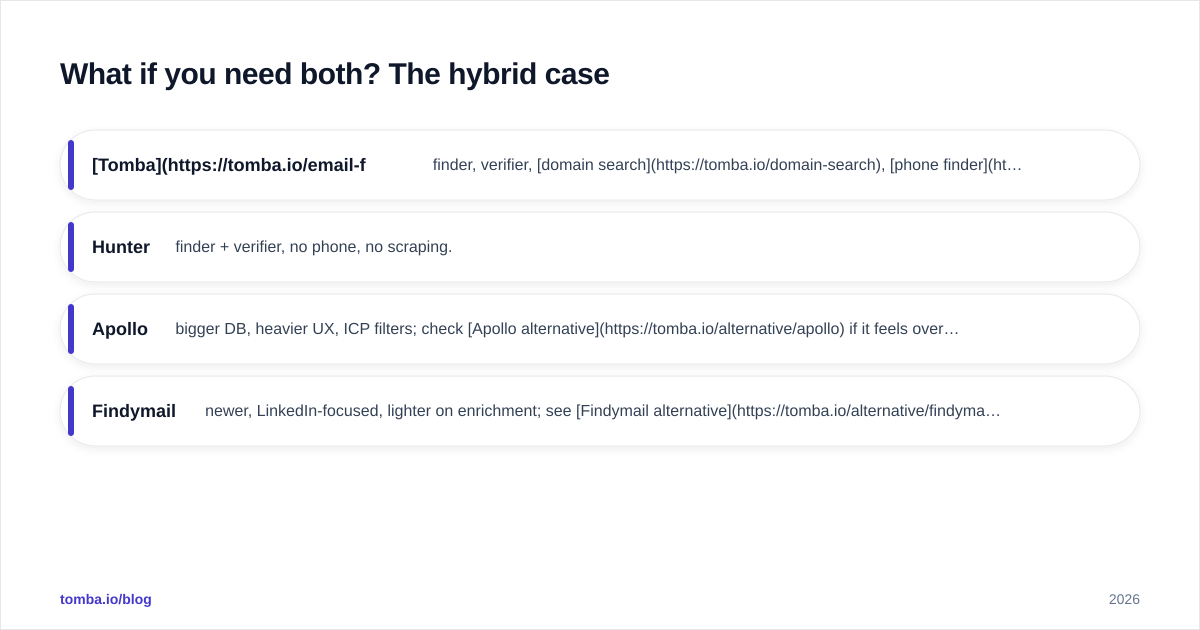
What if you need both? The hybrid case#
A lot of teams arrive at this comparison because they are doing both jobs and want one bill instead of two.
Here is the honest read: Abstract API and Wiza were not built to overlap. If you pick one, you will eventually buy the other or stitch in a third tool. The category that does sit between them — find emails from names/domains/LinkedIn URLs and validate them and expose a real API — is the email-finder-plus-verifier category.
Options worth shortlisting in that category:
- Tomba — finder, verifier, domain search, phone finder, and data enrichment on one API. Starts at $49/mo, free tier of 25 searches/mo.
- Hunter — finder + verifier, no phone, no scraping.
- Apollo — bigger DB, heavier UX, ICP filters; check Apollo alternative if it feels overkill.
- Findymail — newer, LinkedIn-focused, lighter on enrichment; see Findymail alternative.
If you skim the G2 grid for sales intelligence, the leaders are not Abstract API or Wiza — they are tools that span both jobs. That is the signal.
Frequently asked questions#
Does Abstract API do email finding?
No. Abstract validates emails you already have. It does not generate firstname.lastname@company.com candidates or look up emails from a LinkedIn URL.
Does Wiza work without Sales Navigator? Technically yes — you can paste lists of LinkedIn URLs or names+companies. Practically, almost every Wiza customer uses Sales Nav because that is where the filter power lives.
Which is more accurate for cold email deliverability? Wiza's 99% deliverability guarantee covers the full find-plus-verify cycle and includes a credit refund. Abstract's accuracy applies to validation of emails you already have. They are not comparable claims.
Can I replace both with one tool? Often, yes. A combined finder + verifier with an API and a Chrome extension covers the same surface for most teams. Look at bulk email finder tools that do both.
Is there a free way to test either? Both have free tiers. Abstract's free tier is per-endpoint (100–3,000 req/mo). Wiza gives 20 credits/mo. Tomba's free tier is 25 searches/mo for comparison.
The bottom line#
Abstract API and Wiza are not really competitors. They are two different jobs that happen to both involve an email address.
- Abstract API is the right answer for validating and enriching data you already have, exposed as a clean REST API for engineers.
- Wiza is the right answer for building B2B prospect lists out of LinkedIn Sales Navigator, optimised for SDRs.
The mistake is buying one expecting it to do the other's job. The second mistake is buying both when a single combined tool would cover 90% of the surface for less.
If you want one finder + verifier + enrichment stack with a real API, a Chrome extension, native CRM pushes, and a $49 starting price, try the Tomba Email Finder. The free tier gives you 25 searches to test against your own domain before you commit — no credit card, no Sales Nav requirement.
Ready to find emails that actually work?
Join 150,000+ professionals who stopped guessing and started sending. Free credits on signup — no credit card required.
Get the Tomba newsletter
Practical outbound tactics and product updates — once every two weeks.
About the author