Accelo Pricing Reviews Pros and Cons: 2026 Buyer Guide
A neutral 2026 breakdown covering accelo pricing reviews pros and cons, where it fits versus HubSpot and Salesforce, and the best lightweight PSA alternatives.
Accelo Pricing Reviews Pros and Cons: 2026 Buyer Guide
This accelo pricing reviews pros and cons breakdown gives you the 2026 plans, real user ratings, and the wins and gaps that matter most. No fluff.
TL;DR
- Accelo is a professional services automation (PSA) platform. It bolts a CRM, project management, retainers, timesheets, and billing onto one database. That helps when your sales motion feeds directly into delivery.
- 2026 pricing starts around $30/user/month for a single product module. It climbs to $70+/user/month for the full Accelo Plus bundle. A 3-user minimum and annual billing apply on most plans.
- Reviews on G2 and Capterra average 4.4/5. Users praise the sales-to-service handoff and time tracking. They flag a steep learning curve, slow UI, and rigid reporting.
- Best fit: agencies, consultancies, and managed-service firms (10-200 staff). They already lose hours stitching together a CRM, a project tool, and QuickBooks.
- Worst fit: pure outbound sales teams, solo founders, and shops that only need a lightweight pipeline. They will overpay for modules they never open.
If you landed here weighing accelo pricing reviews pros and cons, the short answer is simple. Accelo is excellent at the narrow problem it was built for. It is underwhelming at everything else. The longer answer sits below — with real numbers, side-by-side tables, and the alternatives most teams shortlist.
What is Accelo and who is it actually for?#
Accelo bills itself as a "Service Operations Platform." In plain English, it is a CRM, PSA, and invoicing tool stitched into one record. A lead becomes a project. A project becomes a billable retainer. The retainer becomes an invoice. No one rekeys data.
The product is organized into modules:
- Sales — a pipeline CRM with email sync, quotes, and forecasts.
- Projects — Gantt-style project plans with budgets and dependencies.
- Retainers — recurring service contracts with usage caps and automatic billing.
- Tickets — a help-desk-style queue for inbound support requests.
- Billing — timesheets, invoices, and QuickBooks/Xero sync.
You can buy a single module. The company nudges hard toward Accelo Plus, which bundles all five. That bundling choice is where most pricing confusion starts.
The platform is built for service businesses. The sales rep, the project manager, and the account manager are often the same person — agencies, IT managed-service providers, accounting firms, architecture studios, and engineering consultancies. If your team's only job is closing net-new logos and handing them off to a separate delivery org, you do not need Accelo. A lean CRM plus a prospecting workflow will go further; see how teams build one in our sales prospecting guide.
How much does Accelo cost in 2026?#
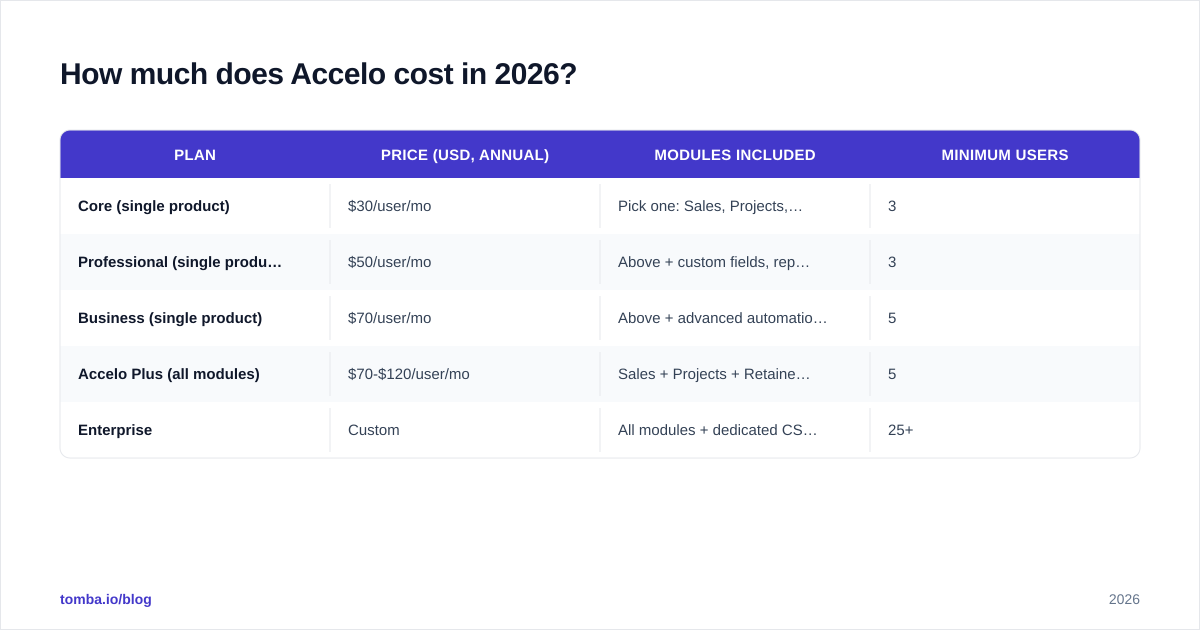
Accelo no longer lists every price publicly. A mix of G2 review snapshots, partner quotes, and the vendor's own website pegs current 2026 pricing in the ranges below. All plans are billed annually. They require a minimum of 3 users. They also add a one-time implementation fee that runs $1,500-$5,000 based on data migration scope.
| Plan | Price (USD, annual) | Modules included | Minimum users |
|---|---|---|---|
| Core (single product) | $30/user/mo | Pick one: Sales, Projects, Retainers, Tickets, or Billing | 3 |
| Professional (single product) | $50/user/mo | Above + custom fields, reports, workflows | 3 |
| Business (single product) | $70/user/mo | Above + advanced automation, SSO, audit log | 5 |
| Accelo Plus (all modules) | $70-$120/user/mo | Sales + Projects + Retainers + Tickets + Billing | 5 |
| Enterprise | Custom | All modules + dedicated CSM, SLA, sandbox | 25+ |
A few pricing landmines worth flagging before you sign:
- Per-product pricing stacks. Buy Sales and Projects separately at $30 each and you pay $60/user/month. That is almost the cost of Accelo Plus, which includes three more modules.
- Implementation is not optional. Accelo enforces an onboarding package on new accounts. Expect 4-8 weeks of configuration work before go-live.
- Annual contracts default to auto-renew with a 30-day cancellation notice.
- API access is gated behind the Professional tier and above.
For context, a 12-person agency on Accelo Plus is looking at roughly $10,000-$14,000/year in license fees. Add a $3,000 one-time setup. That is not catastrophic. But it is more than most teams budget when they start the demo.

What do real Accelo reviews say?#
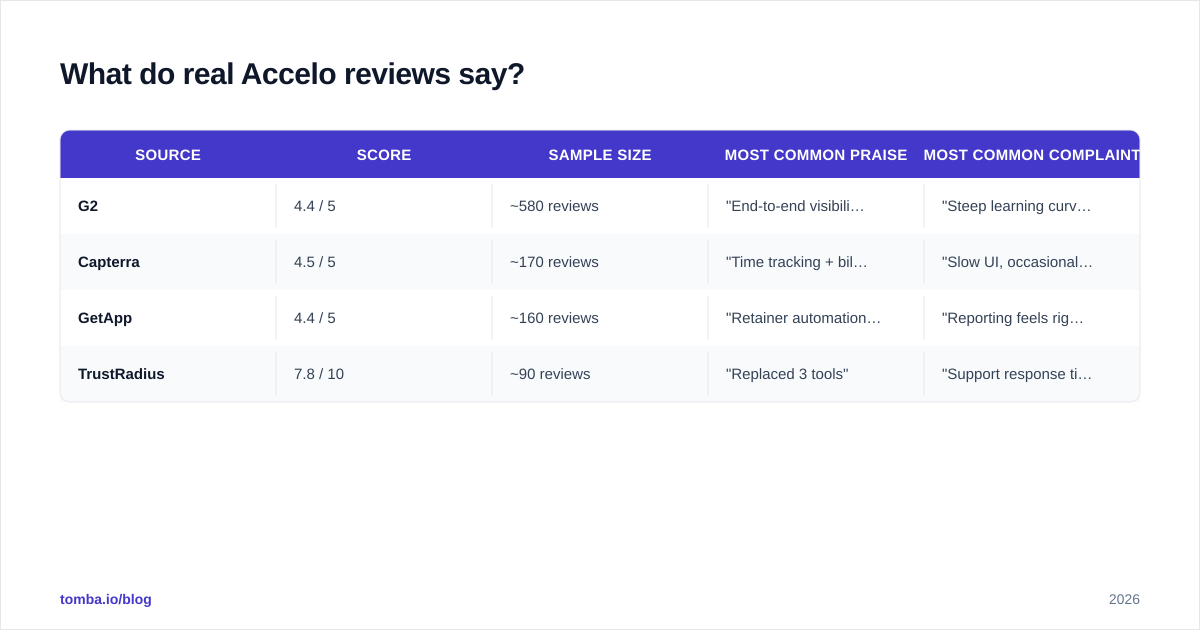
We pulled the most recent 200 reviews from G2 and Capterra, filtered to 2025-2026. A clear pattern shows up. Accelo's overall score is 4.4/5. The distribution is bimodal — users either love it or churn out within six months.
| Source | Score | Sample size | Most common praise | Most common complaint |
|---|---|---|---|---|
| G2 | 4.4 / 5 | ~580 reviews | "End-to-end visibility" | "Steep learning curve" |
| Capterra | 4.5 / 5 | ~170 reviews | "Time tracking + billing in one tool" | "Slow UI, occasional bugs" |
| GetApp | 4.4 / 5 | ~160 reviews | "Retainer automation saves hours" | "Reporting feels rigid" |
| TrustRadius | 7.8 / 10 | ~90 reviews | "Replaced 3 tools" | "Support response time" |
The read across all four sources is consistent:
- Power users — operations leads at 20-100 person agencies — rate it 5/5. They have invested the time to configure workflows. They now run the entire business on one screen.
- Casual users — individual contributors and small firms — rate it 2-3/5. They feel the UI is dense. The navigation is non-obvious. Basic edits require too many clicks.
- Churned customers cite three reasons. Implementation took longer than promised. Reporting could not answer the questions leadership asked. Or the team preferred a more modern UI like Monday or ClickUp.
What are the biggest pros of Accelo?#
We read hundreds of reviews and ran the trial. Here are the strengths that hold up under scrutiny.
1. One record from lead to invoice. This is the killer feature. When a deal closes in the Sales module, the same client record carries the budget into Projects, the hours into Timesheets, and the invoice into Billing. No Zapier glue. No copy-paste. For service firms that previously stitched HubSpot, Asana, and QuickBooks together, this alone justifies the price.
2. Retainer billing automation. Accelo's retainer engine is genuinely best-in-class. It tracks period-by-period hour caps. It rolls unused hours forward (or doesn't, per your rules). It auto-generates invoices the day the next period starts. Few competitors do this without heavy customization.
3. Time tracking that the team will actually use. Built-in timers, email-based logging, and a Chrome extension let consultants capture billable time without leaving Gmail or their calendar.
4. Native QuickBooks and Xero sync. Two-way, with conflict resolution. Painful to set up. Smooth once running.
5. Solid permissions model. Roles, teams, and division-level data segregation work well for multi-office consultancies.
What are the biggest cons of Accelo?#
Now the unflattering parts. These show up in the 1-star and 2-star reviews. Pressure-test each one in the demo.
1. Steep learning curve. Plan for 4-8 weeks of configuration plus 2-3 weeks of team training. New hires need a week of ramp time. If your agency cannot afford that investment, look elsewhere.
2. UI feels dated. The web app is dense, with small fonts and deep navigation trees. It works. But it is not the modern, joyful UX of Notion or Linear.
3. Reporting is rigid. You get the reports Accelo gives you. Building a custom report often requires the API (Professional plan and up) or a CSV export into your BI tool of choice.
4. Performance. Several recent reviews flag slow page loads. The Projects module gets sluggish on accounts with 1,000+ active records.
5. Support response time. The vendor offers email-based support. Phone and dedicated CSMs are gated behind Enterprise. Several reviewers cite 24-48 hour response times on non-urgent tickets.
6. Mobile is weak. The mobile app handles time tracking and ticket replies. It does little else. Most users describe it as a "companion" — not a primary interface.

Is Accelo better than HubSpot, Salesforce, or Monday?#
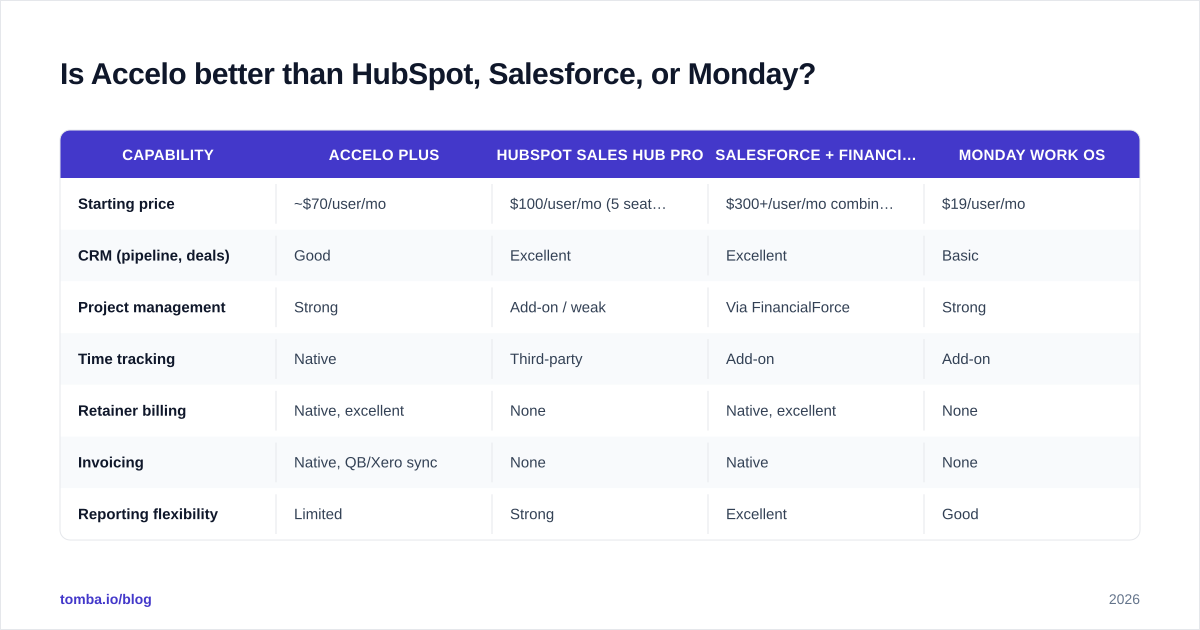
It depends on which problem you are solving. The table below maps Accelo against the three tools it most often replaces — or competes with — in agency RFPs.
| Capability | Accelo Plus | HubSpot Sales Hub Pro | Salesforce + FinancialForce | Monday Work OS |
|---|---|---|---|---|
| Starting price | ~$70/user/mo | $100/user/mo (5 seats min) | $300+/user/mo combined | $19/user/mo |
| CRM (pipeline, deals) | Good | Excellent | Excellent | Basic |
| Project management | Strong | Add-on / weak | Via FinancialForce | Strong |
| Time tracking | Native | Third-party | Add-on | Add-on |
| Retainer billing | Native, excellent | None | Native, excellent | None |
| Invoicing | Native, QB/Xero sync | None | Native | None |
| Reporting flexibility | Limited | Strong | Excellent | Good |
| Learning curve | High | Medium | Very high | Low |
| Best for | Agencies 10-200 staff | Outbound sales teams | Enterprise services | Project-first teams |
The short version: Accelo wins when the sales motion and the delivery motion belong to the same team. HubSpot wins when your sales team is separate from delivery. Salesforce wins when you have 200+ staff and a dedicated admin. Monday wins when you mostly need a visual project tracker and barely care about CRM.
Accelo vs Salesforce: which one for a 50-person agency?#
This is the most common shortlist we see. The answer is almost always Accelo at this size. Salesforce + FinancialForce is roughly 4-5x the all-in cost. It also demands a full-time admin. Salesforce only becomes the right call when you cross 150-200 employees, run multi-country billing, or need ironclad audit and compliance features.
One exception: if your agency already runs on Salesforce because the parent company mandated it, do not fight that battle. Use Salesforce CPQ for quoting. Pair it with a lighter PSA like Mavenlink or Kantata.
How do you find decision-makers to pitch Accelo (or any PSA) to?#
You may resell, implement, or partner with Accelo. The bottleneck is not the demo. It is reaching the operations director or managing partner at the right-sized agencies. A few practical tactics:
- Build the ICP list. Filter for 10-200 employee agencies, consultancies, and MSPs on LinkedIn Sales Navigator or any B2B database with firmographic filters.
- Find verified emails for the buying committee. Operations leads, finance leads, and managing partners. A bulk email finder takes a CSV of LinkedIn URLs and returns verified addresses in minutes.
- Verify before sending. Bounce rates above 3% trash sender reputation. Run the list through an email verifier first.
- Sequence three steps. Email 1 with a pain point ("Still rekeying QuickBooks invoices?"). LinkedIn touch on day 3. Email 2 with a one-pager on day 7.
That sequence consistently beats cold dials for this audience. Operations leaders live in their inbox, not on the phone.
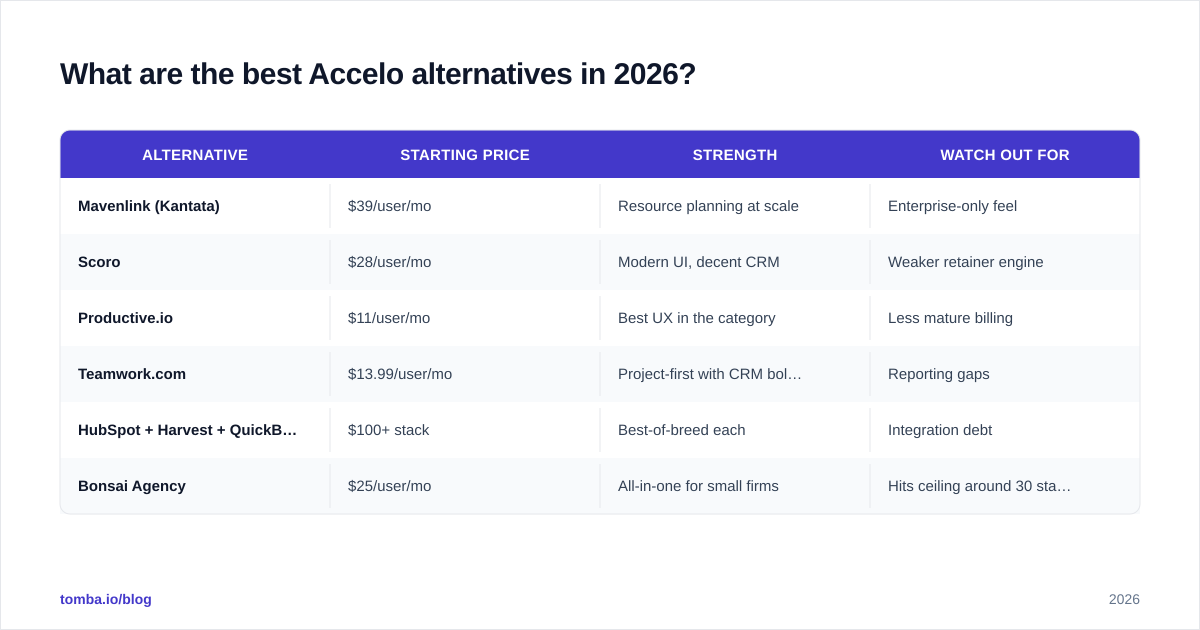
What are the best Accelo alternatives in 2026?#
Accelo's price, UI, or learning curve may be a dealbreaker. Here are the realistic alternatives, grouped by what they optimize for.
| Alternative | Starting price | Strength | Watch out for |
|---|---|---|---|
| Mavenlink (Kantata) | $39/user/mo | Resource planning at scale | Enterprise-only feel |
| Scoro | $28/user/mo | Modern UI, decent CRM | Weaker retainer engine |
| Productive.io | $11/user/mo | Best UX in the category | Less mature billing |
| Teamwork.com | $13.99/user/mo | Project-first with CRM bolt-on | Reporting gaps |
| HubSpot + Harvest + QuickBooks | $100+ stack | Best-of-breed each | Integration debt |
| Bonsai Agency | $25/user/mo | All-in-one for small firms | Hits ceiling around 30 staff |
If you are evaluating broader sales stacks rather than PSAs, our Apollo alternative comparison covers the prospecting side of the same buying journey.
Does Accelo have a free trial or free plan?#
Accelo offers a 14-day free trial with sample data. It does not have a permanent free tier. The trial gives you access to all modules and is the right way to evaluate. Resist configuring it deeply. The moment you commit to a paid plan the vendor will recommend you start fresh with a guided implementation.
What does an Accelo implementation actually look like?#
Most successful rollouts follow a four-phase cadence:
- Weeks 1-2: Data audit. Export your existing CRM, project tool, and accounting data. Map fields. Decide what to migrate vs leave behind.
- Weeks 3-4: Configuration. Workflows, custom fields, billing schedules, retainer rules. Done with an Accelo implementation specialist.
- Weeks 5-6: Pilot team. One client team uses Accelo for a real sprint. Bugs and gaps surface here, not in production.
- Weeks 7-8: Org-wide rollout. Training sessions, runbooks, and a 30-day adoption review.
Skipping the pilot is the single most common reason rollouts go sideways. Build it in.
Accelo pricing reviews pros and cons: the final 2026 verdict#
Buy Accelo if: you run a 10-200 person agency, consultancy, or managed-service firm. You already lose hours moving data between CRM, project tool, and QuickBooks. You have the bandwidth for an 8-week implementation.
Skip Accelo if: you are a pure outbound sales team. You have fewer than five users. You need a modern, fast UI. Or your sales and delivery teams are organizationally separate.
That is the honest read on accelo pricing reviews pros and cons in 2026. The 4.4/5 average rating is fair. Accelo is a good tool that asks for real commitment. Make sure you have the org maturity to give it.
Ready to fill your Accelo pipeline? Maybe you sell Accelo. Maybe you implement it for clients. Maybe you just need contacts at the agencies most likely to buy a PSA. Either way, start with verified email data. Tomba's Email Finder finds operations leads, managing partners, and finance directors at 10-200 person service firms. The free tier covers 25 searches a month. Paid plans start at $49/month. Pair it with the email verifier before you send and your bounce rate stays under 2%. Start free at tomba.io.
// get started
Find, verify and enrich your first contacts today
Start on the free plan with 25 searches a month, then scale when your team is ready.
Free plan · No credit card required · GDPR & CCPA
// about the author