Adaptio vs D7 Lead Finder: 2026 Lead Gen Tool Comparison
Choosing between Adaptio and D7 Lead Finder? Here's an honest 2026 breakdown of data quality, pricing, and the workflows each tool actually fits.
TL;DR
- Adaptio leans toward curated, intent-aware B2B contact data with built-in enrichment, while D7 Lead Finder is a high-volume local-business scraper that pulls listings (emails, phones, social profiles) by keyword and location.
- If you sell to local businesses and need raw volume fast, D7 Lead Finder is cheaper per list. If you sell to defined B2B accounts and care about deliverability, Adaptio's data quality wins.
- Neither tool is a true verification engine — both produce lists you'll want to clean before any cold campaign, or you'll torch your sender reputation.
- Pricing models differ sharply: D7 sells subscription tiers tied to daily lead caps; Adaptio prices on contacts/credits and enrichment depth.
- The smartest 2026 stack often isn't "either/or" — it's a lead source plus a dedicated finder/verifier like Tomba Email Finder to confirm every address before you send.
What are Adaptio and D7 Lead Finder?#
Quick conclusion first: these two tools solve different halves of the prospecting problem, and most "vs" debates go wrong by treating them as direct clones.
D7 Lead Finder is a lead-scraping tool. You type a keyword ("dentists," "plumbers," "marketing agencies") and a location, and it returns a list of matching businesses with whatever public contact data it can find — website, email, phone, social links, and basic SEO signals. Think of it like a phone book that rebuilds itself on demand: broad, fast, and tuned for local-business and SMB outreach at volume. You can see its positioning on the official D7 Lead Finder site.
Adaptio sits closer to the B2B sales-intelligence category. Rather than scraping local listings, it focuses on company and people data — job titles, firmographics, and enrichment fields — aimed at teams running account-based outbound to defined ICPs. The analogy: D7 is a wide net dragged across a harbor; Adaptio is a spear aimed at specific fish.
That distinction drives everything below. Volume tools optimize for coverage. Intelligence tools optimize for precision. Your choice depends on which mistake hurts you more: missing a prospect, or emailing a dead address.
How do Adaptio and D7 Lead Finder compare at a glance?#
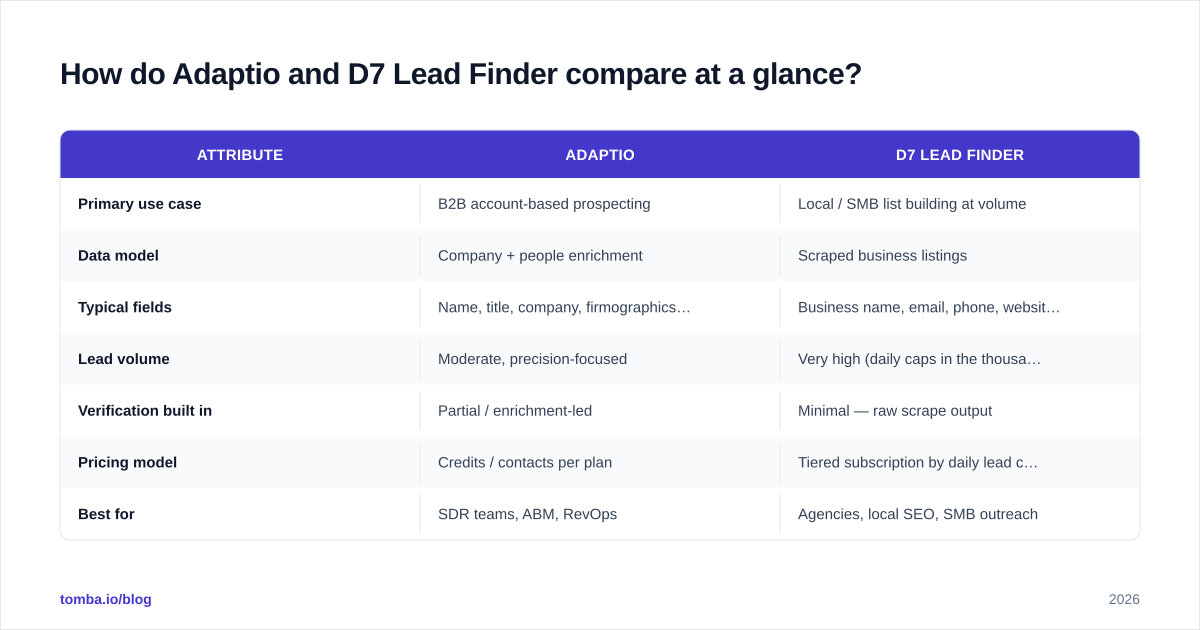
Here's the side-by-side. Treat published pricing as directional — both vendors adjust tiers, and you should confirm current numbers before buying.
| Attribute | Adaptio | D7 Lead Finder |
|---|---|---|
| Primary use case | B2B account-based prospecting | Local / SMB list building at volume |
| Data model | Company + people enrichment | Scraped business listings |
| Typical fields | Name, title, company, firmographics, email | Business name, email, phone, website, social, SEO data |
| Lead volume | Moderate, precision-focused | Very high (daily caps in the thousands) |
| Verification built in | Partial / enrichment-led | Minimal — raw scrape output |
| Pricing model | Credits / contacts per plan | Tiered subscription by daily lead cap |
| Best for | SDR teams, ABM, RevOps | Agencies, local SEO, SMB outreach |
| Weakness | Smaller raw volume | Variable accuracy, needs cleaning |
The pattern is consistent: D7 gives you more rows; Adaptio gives you better rows. Neither replaces a dedicated email verifier step, which is where most "why are my bounces so high" problems actually get solved.

Which tool has better data accuracy?#
Conclusion: Adaptio is generally more accurate per record, but D7 wins on sheer reach — and both degrade without a verification layer.
D7 Lead Finder pulls from public sources, which means accuracy tracks the freshness of those listings. For local businesses, a meaningful share of scraped emails are role-based (info@, contact@) or outdated. That's fine for some campaigns and fatal for others. Role addresses inflate your list size while quietly dragging down reply rates, and catch-all domains hide invalid mailboxes behind a server that accepts everything. If you've never run a catch-all verifier against a scraped list, you're flying blind on a chunk of it.
Adaptio's enrichment-led model tends to produce cleaner person-level data — real names mapped to real titles — because it's built for B2B targeting rather than directory coverage. But "cleaner" is not "clean." Email data decays roughly 22–30% per year as people change jobs, so even a premium source needs re-verification before each send.
The honest takeaway: accuracy is a process, not a product feature. Whatever source you pick, route the output through verification. Independent reviews on G2 and Capterra for both categories repeat the same complaint — users who skip verification blame the data vendor for bounces that a 5-cent verify step would have caught.
How does pricing compare between Adaptio and D7 Lead Finder?#
D7 Lead Finder uses subscription tiers gated by how many leads you can pull per day, which makes cost predictable for high-volume agency work. The more daily searches and exports you need, the higher the tier. Because it's volume-priced, your effective cost-per-lead drops as you scale — attractive if you genuinely use the volume.
Adaptio prices around credits/contacts and enrichment depth, which suits teams that pull fewer, higher-value records and want firmographic fields attached. You pay more per contact but get more per contact.
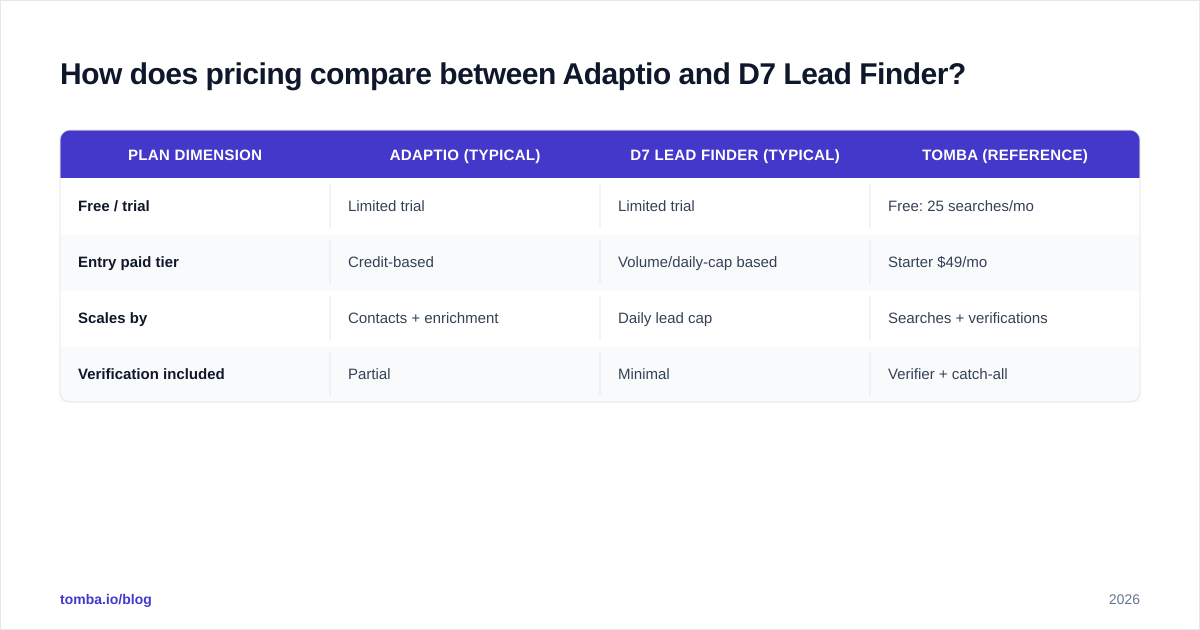
The trap in both models is the same: you're paying for raw records, not usable ones. If 25% of a list bounces, your real cost-per-usable-lead is 33% higher than the sticker price. That's why teams increasingly separate "sourcing spend" from "verification spend" and measure cost-per-deliverable-contact instead. For reference, transparent per-credit options like Tomba pricing start with a free tier (25 searches/month) and a Starter plan at $49/month, so you can verify and finish-find emails without committing to a heavy sourcing contract.
| Plan dimension | Adaptio (typical) | D7 Lead Finder (typical) | Tomba (reference) |
|---|---|---|---|
| Free / trial | Limited trial | Limited trial | Free: 25 searches/mo |
| Entry paid tier | Credit-based | Volume/daily-cap based | Starter $49/mo |
| Scales by | Contacts + enrichment | Daily lead cap | Searches + verifications |
| Verification included | Partial | Minimal | Verifier + catch-all |
Is Adaptio better than D7 Lead Finder for B2B outbound?#
For defined B2B account targeting, yes — Adaptio is the better fit. For local and SMB volume plays, D7 Lead Finder is hard to beat on price-per-list.
Map it to your motion:
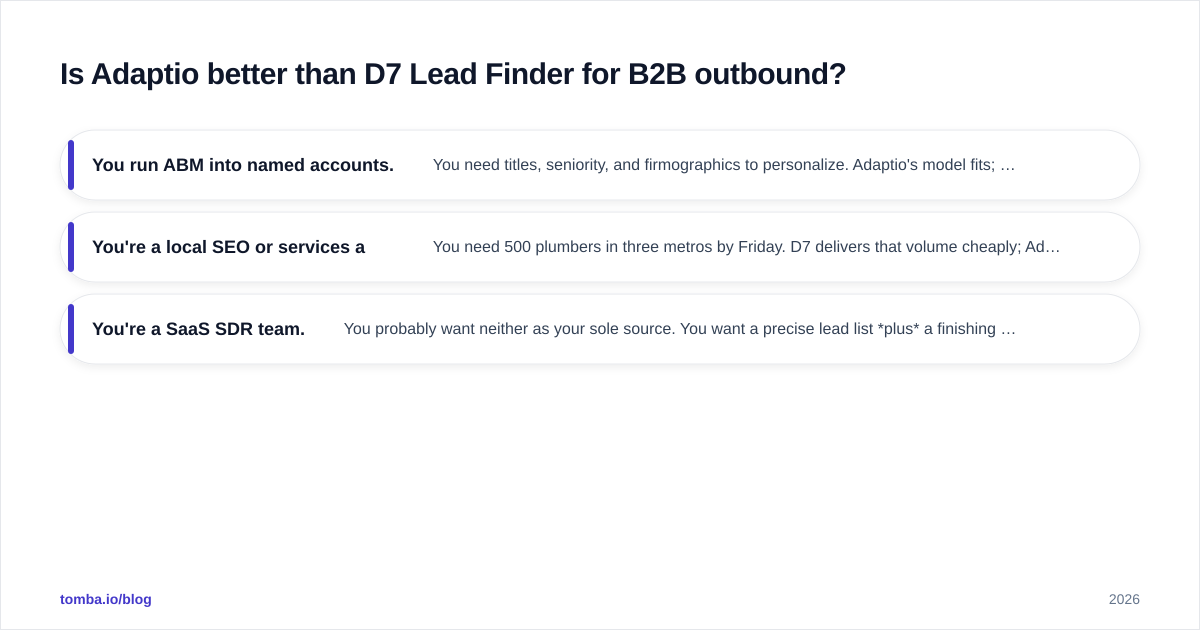
- You run ABM into named accounts. You need titles, seniority, and firmographics to personalize. Adaptio's model fits; D7's local-listing output doesn't carry that depth.
- You're a local SEO or services agency. You need 500 plumbers in three metros by Friday. D7 delivers that volume cheaply; Adaptio is overkill and over-priced for it.
- You're a SaaS SDR team. You probably want neither as your sole source. You want a precise lead list plus a finishing layer that locates and verifies the decision-maker's email — which is exactly the gap a domain search and finder workflow fills.
A useful frame: your marketing qualified lead definition should dictate the tool, not the other way around. If an MQL for you is "any business in category X," volume sourcing works. If it's "VP of Ops at a 200+ employee SaaS company," you need intelligence-grade data.
What are the biggest weaknesses of each tool?#
No tool review is honest without the failure modes.
D7 Lead Finder weaknesses:
- Accuracy varies by industry and region — dense local categories scrape well; niche B2B segments return thin or stale data.
- Heavy on role-based and catch-all emails that need filtering before send.
- Minimal native verification, so the cleaning burden falls on you.
- Output quality is only as fresh as the public listings it pulls from.
Adaptio weaknesses:
- Lower raw volume — you won't bulk-export tens of thousands of local businesses.
- Higher cost per contact, which stings if your campaigns are low-converting and volume-dependent.
- Still needs re-verification despite cleaner sourcing, because B2B data decays fast.
- Less suited to hyper-local outreach where firmographic depth is irrelevant.
The shared weakness — and the reason this comparison keeps circling back to one point — is that both are sources, not senders. Neither protects your email deliverability. That's on you, and it starts with verifying every address before it touches your sending domain.
How should you actually build your 2026 lead stack?#
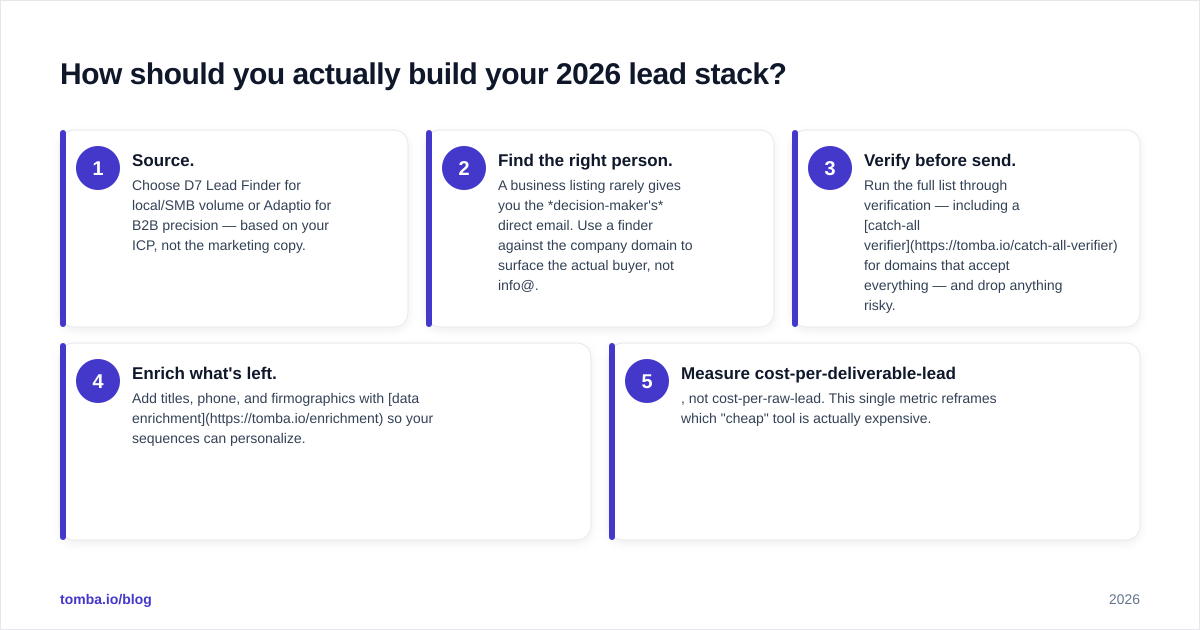
Conclusion first: pick one source based on your motion, then bolt on a dedicated finder + verifier layer. Don't ask a sourcing tool to also be your quality gate.
A practical, vendor-neutral workflow:
- Source. Choose D7 Lead Finder for local/SMB volume or Adaptio for B2B precision — based on your ICP, not the marketing copy.
- Find the right person. A business listing rarely gives you the decision-maker's direct email. Use a finder against the company domain to surface the actual buyer, not info@.
- Verify before send. Run the full list through verification — including a catch-all verifier for domains that accept everything — and drop anything risky.
- Enrich what's left. Add titles, phone, and firmographics with data enrichment so your sequences can personalize.
- Measure cost-per-deliverable-lead, not cost-per-raw-lead. This single metric reframes which "cheap" tool is actually expensive.
This is where a focused tool earns its place alongside either platform. Tomba's bulk email finder and verification stack are built to take a messy sourced list and return addresses you can safely send to — the step that turns a scrape or an enrichment export into pipeline.
Adaptio vs D7 Lead Finder: which should you choose?#
Final verdict, stated plainly:
- Choose D7 Lead Finder if you're an agency or local-services business that needs large volumes of SMB contacts cheaply and you're prepared to clean the output.
- Choose Adaptio if you run B2B or ABM outbound into defined accounts and you'll pay more per contact for cleaner, enriched, person-level data.
- Choose neither as your only tool. Whichever source you pick, the bounce-rate math is the same: unverified lists wreck deliverability, and deliverability is the whole game in 2026.
The teams that win aren't the ones with the biggest lists. They're the ones whose lists actually land in the inbox — because they treated sourcing and verification as two separate, deliberate steps.
Where Tomba fits#
If your bottleneck is finding and confirming the right email for a decision-maker — not just collecting business listings — start with Tomba Email Finder. Drop in a name and company domain and get the verified professional address, then run your whole sourced list through verification before a single send. Pair it with either Adaptio or D7 Lead Finder as your raw source, and you get the best of both: volume or precision at the front, deliverability you can trust at the back. The free tier (25 searches/month) is enough to test it against your current bounce rate this week — and that one comparison usually settles the debate faster than any feature chart.
// get started
Find, verify and enrich your first contacts today
Start on the free plan with 25 searches a month, then scale when your team is ready.
Free plan · No credit card required · GDPR & CCPA
// about the author