Adaptio vs Leadleaper: Which Email Finder Wins in 2026?
A neutral, hands-on breakdown of Adaptio vs Leadleaper for B2B email finding in 2026 — accuracy, pricing, LinkedIn coverage, and where each tool actually fits.
Picking between two lesser-known email finders usually comes down to one question: which one hands you addresses that actually land, without burning your budget or your sender reputation. Adaptio vs Leadleaper is exactly that kind of decision — two LinkedIn-leaning prospecting tools that look similar on a feature grid but behave very differently once real campaigns hit them.
This guide breaks both down with no marketing gloss. We cover what each tool is, how their accuracy and pricing compare, where each one wins, and what to do when neither quite fits.
TL;DR#
- Leadleaper is a long-running Chrome extension built around pulling emails from LinkedIn search and profiles, with a small monthly free allotment and credit-based paid tiers.
- Adaptio positions itself as a newer, AI-flavored prospecting layer — lead capture plus enrichment — but has thinner public track record and less independent verification data.
- Neither tool ships a strong, separate email verifier, which is the single biggest driver of bounce rate and deliverability problems in cold outreach.
- If accuracy and verification matter more than the LinkedIn-scrape workflow, a dedicated finder-plus-verifier stack (like Tomba's email finder paired with its email verifier) usually beats either single tool.
- Read the comparison table below before you commit — pricing transparency and verification depth are where the gap shows up.
What is Leadleaper?#
Leadleaper is a browser-based lead capture tool that most people meet as a Chrome extension. You run a LinkedIn search, click into profiles or list views, and the extension attempts to resolve a work email for each person, then drops the contact into a saved list you can export or push to outreach tools.
Its appeal is workflow speed for people who already live inside LinkedIn Sales Navigator or basic LinkedIn search. You stay in the browser, you click, you collect. The free tier historically offered a small number of leads per month, with paid plans unlocking larger monthly credit pools.
The tradeoffs are the ones common to extension-first finders: coverage depends heavily on what LinkedIn exposes, results can vary by region and seniority, and verification is light. You often get an address with a confidence label rather than a hard SMTP-checked result, which means some percentage of what you export will bounce.
What is Adaptio?#
Adaptio is the newer and less-documented of the two. It markets itself as an AI-assisted prospecting and enrichment tool — the kind of product that bundles lead discovery, contact data, and some automation under one dashboard rather than a single-purpose extension.
The honest assessment: Adaptio has a much thinner public footprint than Leadleaper. There are fewer independent reviews on platforms like G2 and Capterra, less published accuracy benchmarking, and less clarity on data sourcing. That isn't automatically a knock — every tool starts somewhere — but it does mean you should treat its accuracy and coverage claims as unverified until you run your own test batch.
If you're evaluating Adaptio, demand a free trial and test it against a known list of contacts whose real emails you can confirm. Self-reported "high accuracy" is not evidence.

Adaptio vs Leadleaper: how do they compare?#
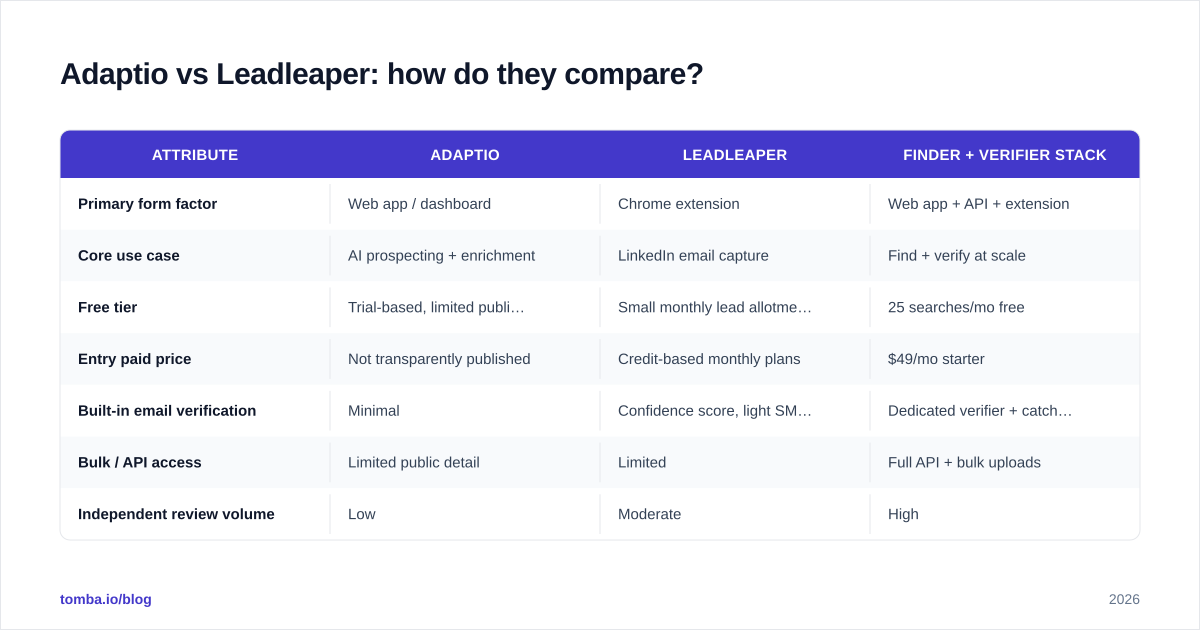
Here's the side-by-side. Where a tool's public data is thin or inconsistent, we mark it rather than guess — and we add a dedicated finder-plus-verifier reference column so you can see what a verification-first stack looks like.
| Attribute | Adaptio | Leadleaper | Finder + Verifier stack |
|---|---|---|---|
| Primary form factor | Web app / dashboard | Chrome extension | Web app + API + extension |
| Core use case | AI prospecting + enrichment | LinkedIn email capture | Find + verify at scale |
| Free tier | Trial-based, limited public detail | Small monthly lead allotment | 25 searches/mo free |
| Entry paid price | Not transparently published | Credit-based monthly plans | $49/mo starter |
| Built-in email verification | Minimal | Confidence score, light SMTP | Dedicated verifier + catch-all check |
| Bulk / API access | Limited public detail | Limited | Full API + bulk uploads |
| Independent review volume | Low | Moderate | High |
| Best for | Teams testing a new all-in-one | LinkedIn-first solo prospectors | Deliverability-focused teams |
The pattern is clear. Leadleaper is the more proven of the two for the specific job of grabbing emails off LinkedIn. Adaptio is the higher-risk, higher-curiosity pick. And both leave a verification gap that you'll feel in your bounce rate.
Which one is more accurate?#
Accuracy is the whole game, and it splits into two separate questions that tools often blur together: match rate (did it find an email at all?) and validity (is that email real and deliverable?).
Leadleaper tends to post a reasonable match rate for common, well-indexed B2B profiles, but its validity is only as good as its light verification step. Adaptio's accuracy is genuinely hard to assess from public data — there isn't enough independent benchmarking to make a confident claim, so test before you trust.
The deeper problem with both is the verification gap. An email finder that returns jane@company.com with a "likely" label has done half the job. If you don't run that address through a real verifier — one that checks MX records, performs an SMTP handshake, and flags catch-all domains — you're shipping guesses into your sequence. Catch-all domains accept every address at the SMTP layer, so a "valid" result there can still bounce or land in a black hole.
This is why accuracy comparisons that look only at finder output are misleading. The honest metric is deliverable emails per 100 contacts after verification, and on that metric a finder without a strong verifier always underperforms.

How does pricing compare?#
Leadleaper uses a credit/lead model: a free monthly allotment, then paid tiers that raise your monthly cap. The economics are fine for low-to-moderate volume, but credits get expensive per usable contact once you account for the addresses that bounce because they were never verified.
Adaptio's pricing is not transparently published in a way that's easy to compare, which is itself a data point. When a vendor hides pricing behind a demo wall, factor the sales-call friction and the uncertainty into your decision.
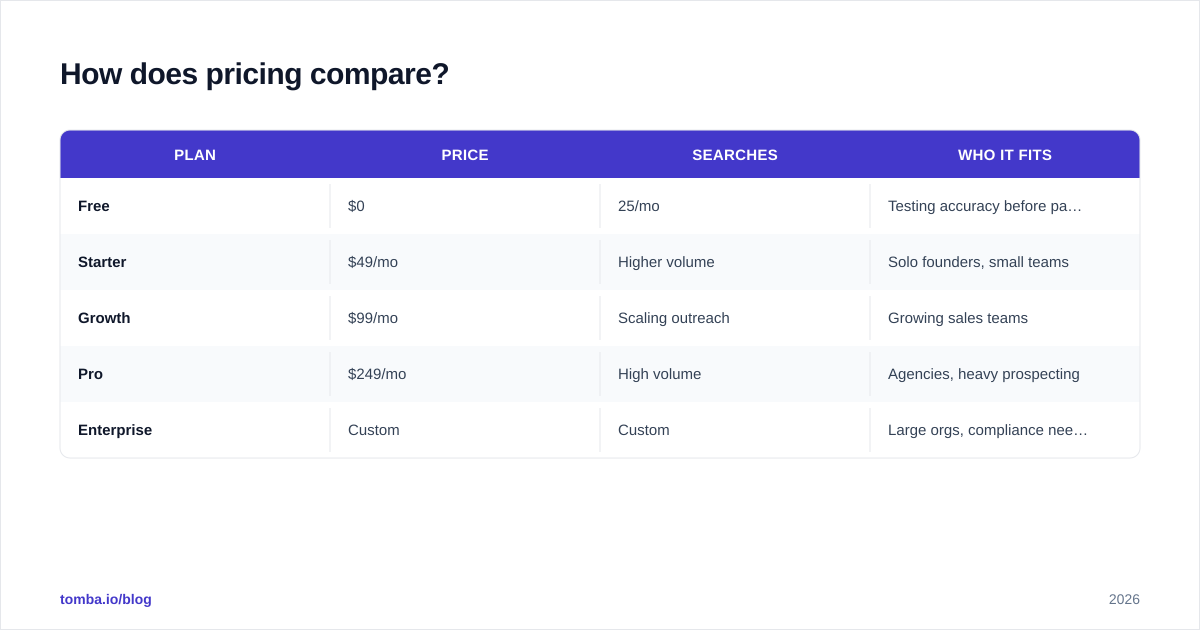
For reference, a transparent finder-plus-verifier stack looks like this — Tomba's pricing is public and tiered:
| Plan | Price | Searches | Who it fits |
|---|---|---|---|
| Free | $0 | 25/mo | Testing accuracy before paying |
| Starter | $49/mo | Higher volume | Solo founders, small teams |
| Growth | $99/mo | Scaling outreach | Growing sales teams |
| Pro | $249/mo | High volume | Agencies, heavy prospecting |
| Enterprise | Custom | Custom | Large orgs, compliance needs |
The point isn't that one number beats another — it's that you can only do real cost-per-deliverable-lead math when pricing and verification are both transparent. With Adaptio, you're missing pricing clarity; with Leadleaper, you're missing verification depth.
When should you pick Adaptio?#
Pick Adaptio if you're specifically shopping for a newer all-in-one prospecting dashboard, you have time to run a controlled trial, and you're comfortable being an early adopter. Its bundled-enrichment angle can be attractive if you want discovery, contact data, and light automation under one login rather than stitching tools together.
Conditions worth meeting first:
- You can get a real trial and test it against contacts you can independently verify.
- You confirm data sourcing and compliance (GDPR/CCPA) directly with their team.
- You're not betting a high-volume, deliverability-sensitive campaign on it day one.
If those boxes go unchecked, treat Adaptio as a pilot, not a primary.
When should you pick Leadleaper?#
Pick Leadleaper if your workflow is LinkedIn-first and individual, you value clicking through profiles in-browser over running bulk jobs, and your volume is modest enough that the free or low tiers cover you. It's a proven, narrow tool that does its one thing acceptably.
Just plan around its weak spot: pipe every export through a real verifier before you send. Treating Leadleaper as a finder and adding a separate verification step is the difference between a 12% bounce rate and a 2% one. For that, a standalone email verifier or a bulk email finder with verification built in does the heavy lifting Leadleaper skips.
What's the verification-first alternative?#
If your real goal is deliverable leads — not just captured ones — the strongest setup isn't either of these tools alone. It's a finder with serious verification underneath it.
That's the framework below: find, verify, segment, then send. Skipping the verify step is the most common reason cold campaigns underperform, and it's the step both Adaptio and Leadleaper treat as optional.
A verification-first stack typically gives you:
- A high match-rate finder that works from name, domain, or company — and a domain search for mapping an entire company's contacts at once.
- A dedicated verifier with SMTP checks and catch-all detection, so "found" actually means "deliverable."
- Bulk and API access for scale, plus transparent per-tier pricing you can model.
This is where a tool like Tomba fits the conversation honestly: it's built finder-first with verification as a core feature rather than an afterthought, and its data approach is published openly. You can read more about LinkedIn-specific workflows on the LinkedIn finder page if that's your primary channel.
How should you actually choose?#
Decide on three axes, in order:
- Deliverability tolerance. Sending volume and a sensitive domain reputation? Verification depth outranks everything — and that pushes you toward a finder-plus-verifier stack over either tool alone.
- Workflow. Live entirely inside LinkedIn and prospect one profile at a time? Leadleaper's extension fits. Want a dashboard with enrichment baked in and you're willing to pilot? Adaptio is worth a controlled test.
- Budget transparency. You can't optimize cost-per-deliverable-lead without public pricing and a verification step. Leadleaper gives you pricing clarity; Adaptio doesn't; a transparent stack gives you both.
Run a 50-contact bench test on whatever you shortlist. Find the emails, verify them through an independent verifier, then count how many were actually deliverable. That number — not the marketing page — is your answer.
Final verdict and recommendation#
Between the two, Leadleaper is the safer pick today simply because it's proven at the one job it does, while Adaptio remains a curiosity worth piloting rather than betting on. But the more useful conclusion is that the Adaptio vs Leadleaper framing is too narrow: both leave the verification gap that quietly wrecks cold-email performance, and neither offers the bulk-plus-API scale that serious teams need.
If you want emails that land, build the workflow around accuracy and verification first. Start free with the Tomba Email Finder — find addresses by name, domain, or company, verify them in the same place, and only pay once you've confirmed the accuracy on your own list. Twenty-five free searches a month is enough to run the bench test above and decide with evidence instead of marketing claims.
// get started
Find, verify and enrich your first contacts today
Start on the free plan with 25 searches a month, then scale when your team is ready.
Free plan · No credit card required · GDPR & CCPA
// about the author