Adaptio vs LetsExtract 2026: Email Extraction Compared
Adaptio and LetsExtract both pull emails at scale, but they solve different problems. Here's an honest, side-by-side breakdown for 2026 — accuracy, pricing, compliance, and the cloud alternative most teams actually need.
Choosing between Adaptio and LetsExtract usually means you've outgrown copy-pasting addresses by hand and want a tool that pulls contact data in bulk. Both promise that. They go about it very differently, and the wrong pick can leave you with a bounce-heavy list, a compliance headache, or a desktop app that chews your IP reputation. This breakdown is the neutral version your sales team needs before committing budget.
TL;DR#
- Adaptio leans toward automated, browser-driven extraction and enrichment workflows — good for hands-off scraping, weaker on built-in verification.
- LetsExtract is a long-running desktop suite (Email Studio) that scrapes emails from web pages, search engines, and files — flexible, but raw output needs heavy cleaning.
- Neither tool is a true B2B email finder: both extract whatever is on a page, so accuracy depends entirely on the source and your post-processing.
- For deliverability, you'll still need a separate email verifier regardless of which one you choose.
- If your real goal is verified, role-mapped business emails by domain, a cloud finder like Tomba is a cleaner fit than either scraper.
What is Adaptio?#
Adaptio positions itself as an automation-first extraction and enrichment layer. The pitch is that you point it at sources — pages, profiles, lists — and it pulls structured contact data with minimal manual steps. It targets users who want a "set it and forget it" pipeline rather than a manual scraping session.
The trade-off with automation-heavy tools is transparency. When extraction happens behind the scenes, you have less visibility into where each address came from, which matters when you're trying to defend list quality or stay inside data-scraping norms. Automated enrichment is convenient until a chunk of your list bounces and you can't trace the source.
What is LetsExtract?#
LetsExtract (often sold as Email Studio) is a veteran Windows desktop application. It bundles several modules: an email extractor that crawls websites and search engines, an extractor that pulls addresses out of local files, a verifier, and a basic sender. You install it, feed it keywords or URLs, and it harvests every email-shaped string it finds.
That breadth is the appeal. One license, several jobs. But desktop scraping has well-known downsides: it runs on your machine and your IP, search engines throttle or block aggressive crawling, and the raw output is noisy — you'll catch info@, noreply@, image filenames that look like emails, and plenty of dead addresses. The built-in verifier helps, but desktop SMTP checks from a residential IP are unreliable and can get your IP flagged.
You can see the current module list on the official LetsExtract site, and real user notes on G2 if you want unfiltered reviews.

Adaptio vs LetsExtract: how do they compare?#
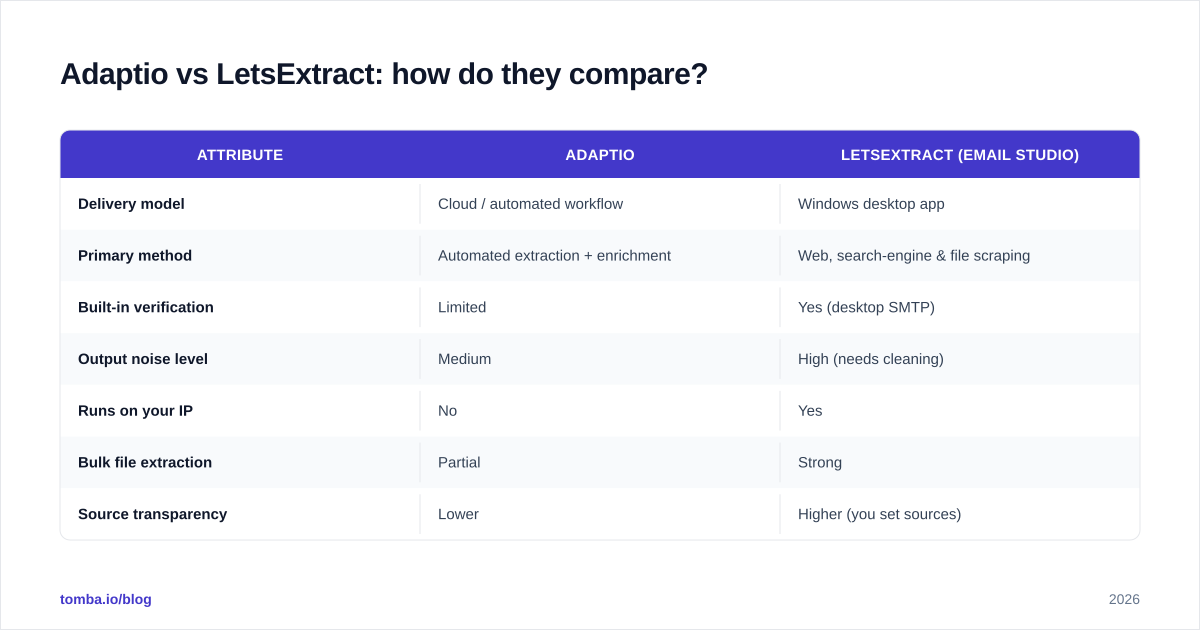
Here's the side-by-side. Treat pricing as directional — both vendors change tiers and LetsExtract sells perpetual licenses plus subscription add-ons.
| Attribute | Adaptio | LetsExtract (Email Studio) |
|---|---|---|
| Delivery model | Cloud / automated workflow | Windows desktop app |
| Primary method | Automated extraction + enrichment | Web, search-engine & file scraping |
| Built-in verification | Limited | Yes (desktop SMTP) |
| Output noise level | Medium | High (needs cleaning) |
| Runs on your IP | No | Yes |
| Bulk file extraction | Partial | Strong |
| Source transparency | Lower | Higher (you set sources) |
| Best for | Hands-off pipelines | Power users who clean data |
| Learning curve | Low | Medium-high |
The honest summary: Adaptio trades control for convenience; LetsExtract trades convenience for control. Neither one removes the core problem — scraped emails are unverified by default, and B2B deliverability lives or dies on verification.
Which one is more accurate?#
Accuracy is the wrong question for scrapers, and that's not a knock. Both tools return what exists on the page or file you point them at. If the source lists a stale 2019 contact, you get a stale 2019 contact. There's no validation layer confirming the person still works there or that the mailbox accepts mail.

This is the fork in the road. A scraper answers "what addresses are written on this surface?" An email finder answers "what is the current, deliverable address for this person at this company?" Those are different jobs. If you're running cold outbound, the second question is the one that protects your domain reputation. That's why most teams that start with a scraper eventually bolt on a verification step — or switch to a finder that bundles it.
For a deeper look at where contact data actually comes from and how confidence scoring works, Tomba documents its data sources openly, which is the kind of provenance a desktop scrape can't give you.
What about pricing?#
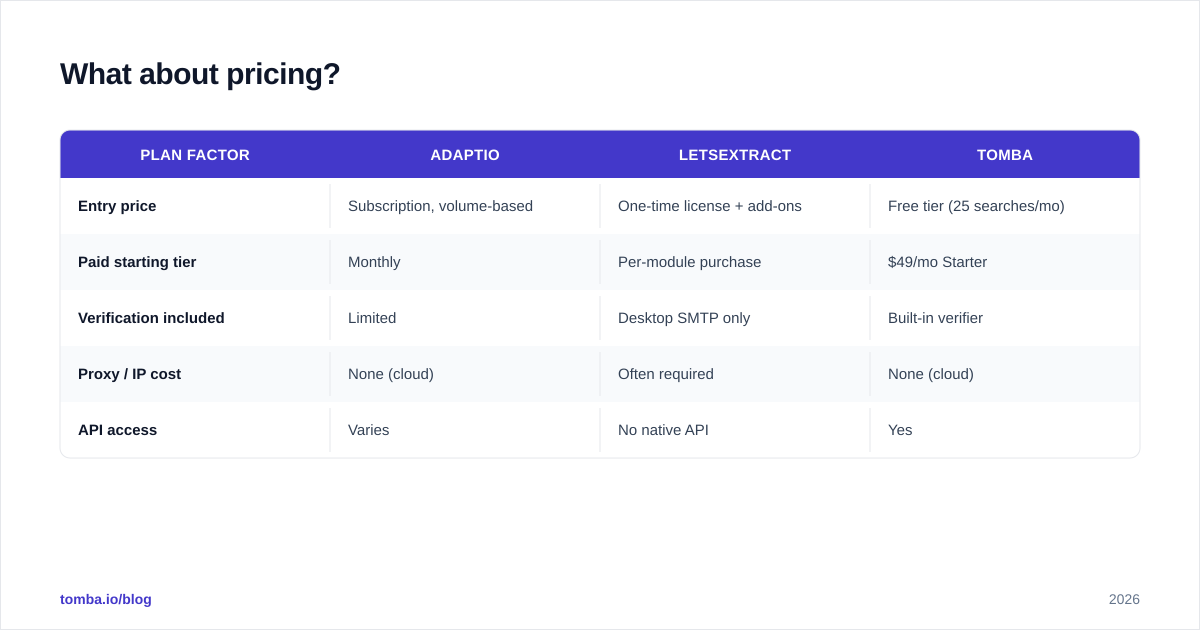
LetsExtract typically sells a perpetual desktop license (one-time fee per module, with paid upgrades) plus optional verification credits. Adaptio, being cloud-first, tends toward monthly subscription pricing scaled by volume. A perpetual license looks cheaper on a spreadsheet, but factor in the hidden costs: your time cleaning lists, the proxies you'll buy to avoid blocks, and the deliverability damage from sending to unverified scraped addresses.
Here's a realistic three-way cost frame including the cloud-finder alternative:
| Plan factor | Adaptio | LetsExtract | Tomba |
|---|---|---|---|
| Entry price | Subscription, volume-based | One-time license + add-ons | Free tier (25 searches/mo) |
| Paid starting tier | Monthly | Per-module purchase | $49/mo Starter |
| Verification included | Limited | Desktop SMTP only | Built-in verifier |
| Proxy / IP cost | None (cloud) | Often required | None (cloud) |
| API access | Varies | No native API | Yes |
You can compare the full Tomba pricing tiers directly; the free tier alone lets you benchmark scraped lists against verified results before you spend anything.
Where does each tool fit in a real workflow?#
Map the tool to the job, not the hype.
Pick LetsExtract if you're a power user comfortable with desktop software, you control your own proxies, and you need to pull emails out of mixed local files (PDFs, spreadsheets, exported docs) where a cloud API has no access. The file-extraction module is genuinely useful for one-off cleanup jobs.
Pick Adaptio if you want a low-touch automated pipeline and you're okay trading source transparency for convenience — and you plan to verify downstream anyway.
Pick a cloud finder if your goal is outbound at scale to verified business inboxes. This is where extraction tools hit a wall: they don't map company domains to people, they don't dedupe across sources, and they don't return a deliverability score per address.
For that last workflow, the relevant pieces are an email finder to get the address by name and company, a domain search to pull every public email pattern for a company at once, and a bulk email finder when you're processing thousands of rows. If you only need to grab visible addresses from a block of text, even a free email extractor covers that without installing anything.
What's the catch with desktop scrapers in 2026?#
Three things have gotten harder for tools like LetsExtract, and they apply to any IP-based scraper:
- Search engines fight automated crawling. Aggressive query-based extraction gets rate-limited or CAPTCHA-walled fast. You'll need rotating proxies, which adds cost and complexity the marketing page rarely mentions.
- Deliverability is stricter. Mailbox providers in 2026 punish senders who blast unverified lists. Bounce rates above ~3% drag your domain reputation down quickly. Scraped-and-unverified is the fastest route to the spam folder.
- Compliance scrutiny is real. Indiscriminate scraping of personal data sits uncomfortably with privacy regulations. Tools that document sources and offer opt-out handling reduce your exposure; a desktop crawler that grabs everything does not.
None of this makes scrapers useless. It means the raw output is the start of the job, not the end. The cleaning, verifying, and deduping that follows is where most teams underestimate the effort.
Adaptio vs LetsExtract: which should you choose?#
Short answer: if you must choose between only these two, pick LetsExtract for hands-on file and source control, or Adaptio for hands-off automation — then budget for a separate verification pass either way.
Better answer: for B2B prospecting, the extraction-tool category is solving yesterday's problem. The bottleneck isn't "grab visible emails"; it's "get current, verified, deliverable addresses tied to real decision-makers." A cloud platform that combines finding, verification, enrichment, and an API does in one pass what these tools do in three or four — without proxies, without desktop installs, and without a post-scrape cleanup marathon.
| Decision driver | Winner |
|---|---|
| Hands-off automation | Adaptio |
| File-based extraction | LetsExtract |
| Verified outbound at scale | Cloud finder |
| Lowest deliverability risk | Cloud finder |
| API + integrations | Cloud finder |
| One-time license preference | LetsExtract |
The bottom line#
Adaptio and LetsExtract are real tools that do real work, but both leave you holding unverified data and the cleanup that comes with it. If your downstream goal is cold outbound that actually lands, the smart move is to start from verified data instead of scraping toward it.
That's exactly what the Tomba Email Finder is built for: enter a name and company or search an entire domain, and get back professional email addresses with a confidence score and built-in verification — no desktop install, no proxies, no guesswork. Start on the free tier (25 searches a month), test it against whatever list a scraper hands you, and keep the data you can actually trust. When the verified results out-deliver the scraped ones, you'll have your answer.
// get started
Find, verify and enrich your first contacts today
Start on the free plan with 25 searches a month, then scale when your team is ready.
Free plan · No credit card required · GDPR & CCPA
// about the author